

Met software voor digitale menuborden kun je je menu's op elk scherm binnen je bedrijf vanaf één plek beheren en bijwerken. Voor retail- en restaurantketens die tientallen of honderden locaties beheren, lost de juiste tool de chaos van last-minute promoties, prijswijzigingen en nalevingsupdates op—zonder weken handmatig werk.
In deze gids vind je mijn keuzes voor 2026 voor software voor digitale menuborden die het beste aansluit bij teams met meerdere locaties die behoefte hebben aan centraal toezicht, POS-integratie, merkconsistentie en inzicht in de bedrijfsvoering. Ontdek hoe deze oplossingen je helpen je menu's actueel, flexibel en altijd gesynchroniseerd te houden.
Waarom u onze softwareaanbevelingen kunt vertrouwen
6,700+
Reviews
20
Industry experts
16+
Evaluation factors
14
Years
Ons team test en beoordeelt software sinds 2012. Als retailleiders weten we zelf hoe moeilijk — en belangrijk — het is om de juiste software te kiezen.
Voor deze gids hebben we tools geëvalueerd met behulp van praktijktests en onafhankelijk onderzoek, waarbij we tools beoordeelden aan de hand van onze selectiecriteria.
Onze reviews weerspiegelen ons onafhankelijke oordeel — geen verkooppraatje.
Vergelijkingstabel voor software voor digitale menuborden
Deze vergelijkingstabel bevat een samenvatting van de prijsinformatie voor mijn belangrijkste keuzes op het gebied van software voor digitale menuborden:
| Tool | Best For | Trial Info | Price | ||
|---|---|---|---|---|---|
| 1 | Het beste voor AI-gestuurd toezicht op menubordnetwerken | 14 dagen gratis proefversie + gratis demo beschikbaar | Prijs op aanvraag | Website | |
| 2 | Ideaal voor menubeheer en advertentieplanning op meerdere locaties | Gratis demo beschikbaar | Prijs op aanvraag | Website | |
| 3 | Het beste voor hardware-onafhankelijke implementaties van menuborden | 14 dagen gratis proefperiode + gratis demo beschikbaar | Vanaf $20/scherm/maand (jaarlijks gefactureerd) | Website | |
| 4 | Het beste voor volledig begeleide uitrol van menuborden | Gratis proefversie + gratis demo beschikbaar | Vanaf $15/maand (jaarlijks gefactureerd) | Website | |
| 5 | Het meest geschikt voor digitale signage voor ondernemingen met meerdere locaties | Gratis demo beschikbaar | Prijzen op aanvraag | Website | |
| 6 | Het beste voor planning per dagdeel voor QSR-locaties | 30 dagen gratis proefperiode + gratis demo beschikbaar | Vanaf $14/scherm/maand (jaarlijks gefactureerd) | Website | |
| 7 | Het beste voor menubordbeheer met SOC 2-certificering | 14 dagen gratis proberen + gratis demo beschikbaar | Vanaf $3.5/apparaat/maand (jaarlijks gefactureerd) | Website | |
| 8 | Het beste voor menuborden op Apple TV | 14 dagen gratis uitproberen + gratis demo beschikbaar | Vanaf $7/scherm/maand (jaarlijks gefactureerd) | Website | |
| 9 | Het beste voor beheer van menuborden met een eeuwigdurende licentie | Gratis demo beschikbaar | Vanaf $450 eenmalig | Website | |
| 10 | Het beste voor het beheer van zakelijke menubordparken | Gratis demo beschikbaar | Vanaf $14/maand/speler | Website |


Beoordelingen van software voor digitale menuborden
Hieronder vind je mijn gedetailleerde samenvattingen van de beste software voor digitale menuborden die mijn selectie hebben gehaald. In mijn beoordelingen bekijk ik de functies, mogelijkheden en integraties van elke software uitgebreid, zodat je de beste optie voor jouw situatie kunt vinden.
 Het beste voor AI-gestuurd toezicht op menubordnetwerken
- 14 dagen gratis proefversie + gratis demo beschikbaar
- Prijs op aanvraag
Visit WebsiteCustomer Rating:4.5/5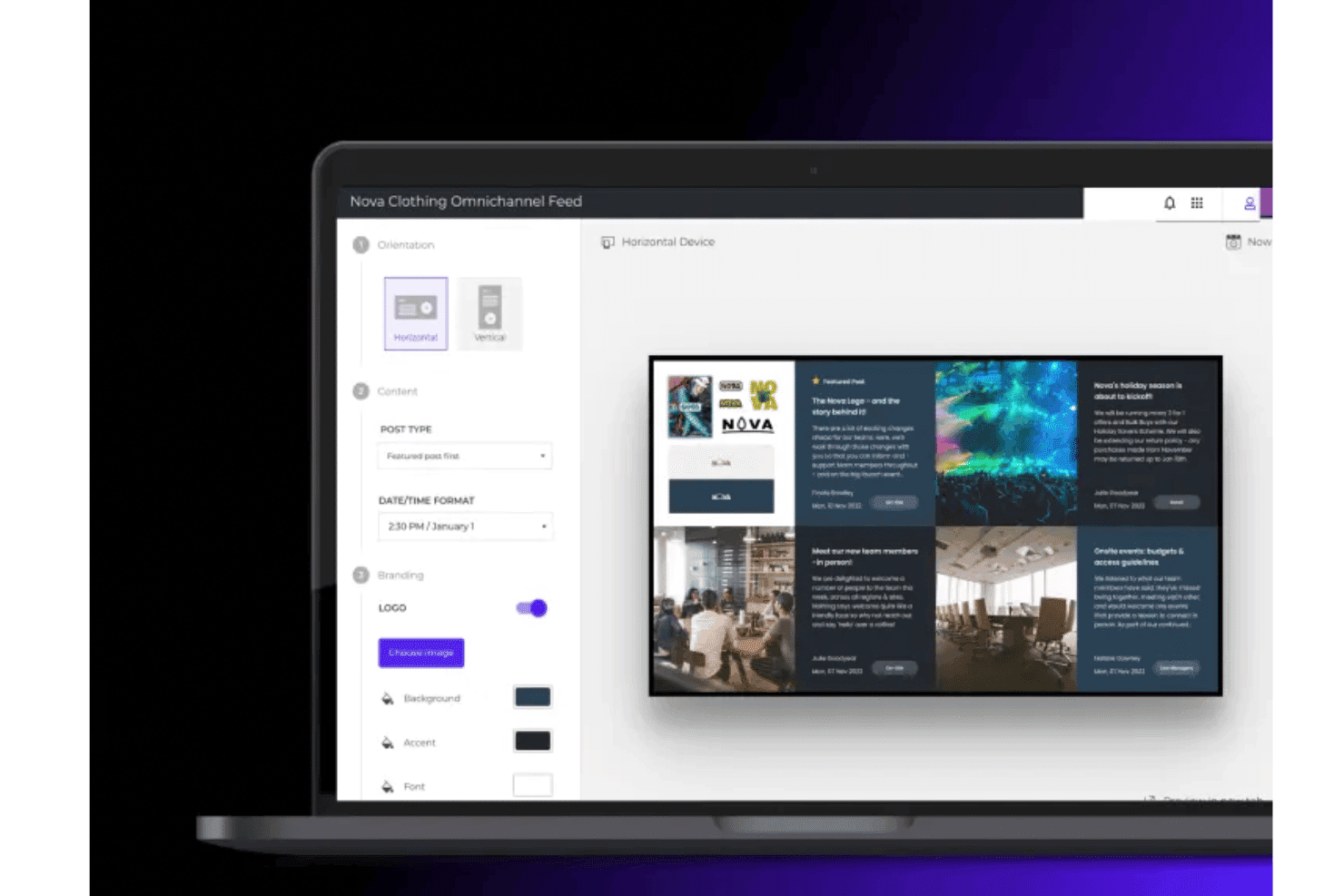
Met Poppulo kunnen teams digitale menubordindelingen maken en aanpassen met merkcontent, afbeeldingen en dynamische feeds. Poppulo is een digitaal signageplatform voor ondernemingen dat cloudgebaseerd contentbeheer, planning voor meerdere schermen, bewaking van externe apparatuur en integratie van realtimegegevensfeeds combineert om grootschalige implementaties van digitale menuborden op verspreide locaties te beheren.
Voor wie is Poppulo het meest geschikt?
Poppulo is zeer geschikt voor winkelketens en franchise-exploitanten die gecentraliseerde controle nodig hebben over grote, verspreide schermnetwerken op honderden of duizenden locaties.
Waarom ik voor Poppulo heb gekozen
Ik heb Poppulo gekozen als een van de beste opties omdat de AI-agent de manier waarop grootschalige menubordnetwerken worden beheerd echt verandert. De agent controleert afspeel- en apparaatgegevens op duizenden schermen, signaleert afwijkingen en brengt trends in contentprestaties automatisch onder de aandacht. In combinatie met realtime controle van de apparaatstatus en de Device Status Tracker kan je IT-team een offline scherm op een specifieke locatie opsporen voordat iemand in die winkel het merkt.
Belangrijkste functies van Poppulo
- Planning op basis van dagdelen: Wissel content automatisch op basis van het tijdstip van de dag op alle locaties, zonder handmatige tussenkomst, voor ontbijt, lunch, diner en andere gedefinieerde tijdssegmenten.
- Publicatierechten op basis van rollen: Stel gedetailleerde toegangsbeheerregels in, zodat bedrijfsteams de merknormen bewaken terwijl lokale teams content binnen vastgestelde grenzen publiceren.
- Rapportage van afgespeelde content: Houd precies bij welke content op welk scherm en op welk tijdstip is afgespeeld—handig om gezamenlijke marketinguitgaven en naleving door franchisenemers te verifiëren.
- Livegegevenswidgets: Haal realtimefeeds uit weerberichten, sociale media, belangrijke bedrijfsindicatoren en RSS-bronnen rechtstreeks naar displays, zonder dat gebruikers hoeven in te loggen.
Poppulo-integraties
Poppulo biedt native integraties die relevant zijn voor implementaties van menuborden, waaronder Oracle Hospitality Integration Platform (OHIP), Salesforce, Microsoft Power BI, Tableau en meer.
Pros and Cons
Pros:
- AI bewaakt apparaatstatus en afspelen in realtime
- Planning op basis van dagdelen automatiseert het wisselen van menubordcontent
- Afspeelbewijs bevestigt campagne- en nalevingsvereisten
Cons:
- Professionele onboarding en hulp bij de installatie zijn vereist
- Te complex voor bedrijven met één locatie
Learn more about Poppulo: Ideaal voor menubeheer en advertentieplanning op meerdere locaties
- Gratis demo beschikbaar
- Prijs op aanvraag
Visit WebsiteCustomer Rating:4.6/5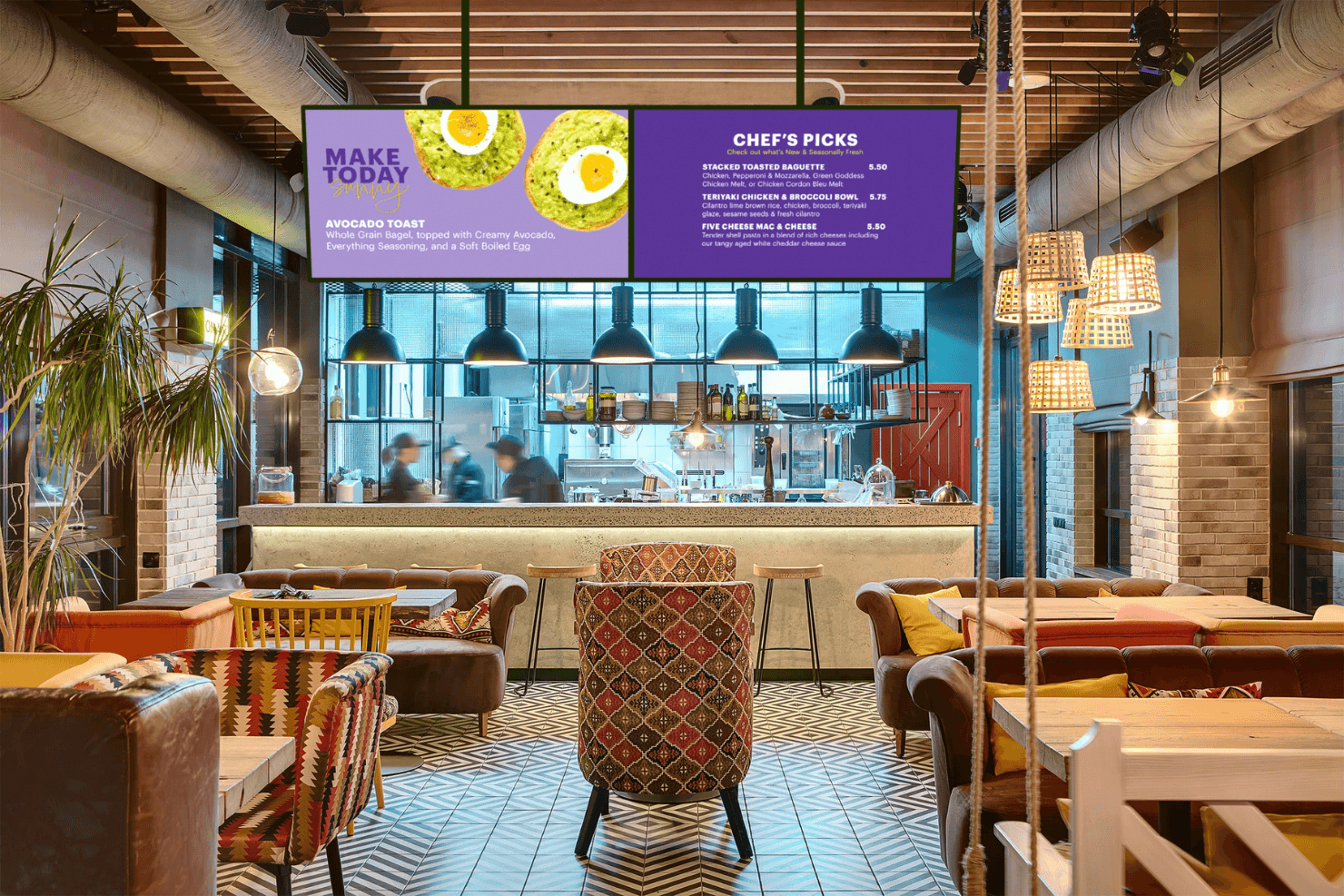
Spectrio ondersteunt digitale menuborden voor restaurants met dynamische content. Spectrio is een cloudgebaseerd platform voor digitale menuborden en bewegwijzering dat contentbeheer voor meerdere schermen, planning op basis van tijdssegmenten, publieksmeting en een advertentieplanner combineert voor campagnegestuurde menu- en promotieweergave op grote schermnetwerken.
Voor wie is Spectrio het meest geschikt?
Spectrio is zeer geschikt voor franchise- en ketenbeheerders die schermcontent op tientallen of honderden locaties beheren.
Waarom ik voor Spectrio heb gekozen
Spectrio staat op mijn shortlist omdat het echt is ontwikkeld voor beheerders die schermen op tientallen of honderden locaties aansturen. Ik vind het geweldig hoe de advertentieplanner en de tools voor tijdssegmentering samenwerken, zodat je tijdgebaseerde menuwisselingen kunt automatiseren en locatiegerichte promotiecampagnes vanuit één cloudinterface kunt verspreiden. De laag voor franchisebeheer onderscheidt het platform echt van de rest: bedrijfsteams kunnen merkkritische content vergrendelen en individuele locaties toch de ruimte geven om aanpassingen te doen.
Belangrijkste functies van Spectrio
- Spectrio Measure: Gebruikt radar- en computervisiesensoren om demografische gegevens van het publiek, verblijfsduur en bezettingsgraad in realtime te volgen, met ondersteuning voor A/B-contenttests.
- Retailmedianetwerk: Maakt het mogelijk om tot 30% van je scherminventaris te gelde te maken door programmatische merkadvertenties naast je eigen winkelcommunicatie weer te geven.
- Override voor noodberichten: Stuurt noodmeldingen en veiligheidscontent direct vanuit het CMS naar elk verbonden scherm.
- Interactieve touchscreenkiosken: Ondersteunt kioskconstructies voor toonbanken en vrijstaande kiosken voor zelfbedieningsnavigatie, productverkenning en merkbetrokkenheid.
Integraties van Spectrio
Spectrio biedt native integraties met Google Sheets, Slack en Google Calendar, plus ondersteuning voor hardwarepartners met BrightSign-, Samsung Tizen- en LG WebOS-spelers.
Pros and Cons
Pros:
- AI-gestuurde publieksmeting en contentactivering
- Ondersteunt complexe promotieplanning voor meerdere locaties
- Retailmedianetwerk voor advertentie-inkomsten in de winkel
Cons:
- POS-integratie is nog niet volledig beschikbaar
- Er zijn problemen met de betrouwbaarheid van hardware-spelers gemeld
Learn more about Spectrio: 3Het beste voor hardware-onafhankelijke implementaties van menuborden
Fugo
- 14 dagen gratis proefperiode + gratis demo beschikbaar
- Vanaf $20/scherm/maand (jaarlijks gefactureerd)
Visit WebsiteCustomer Rating:4.5/5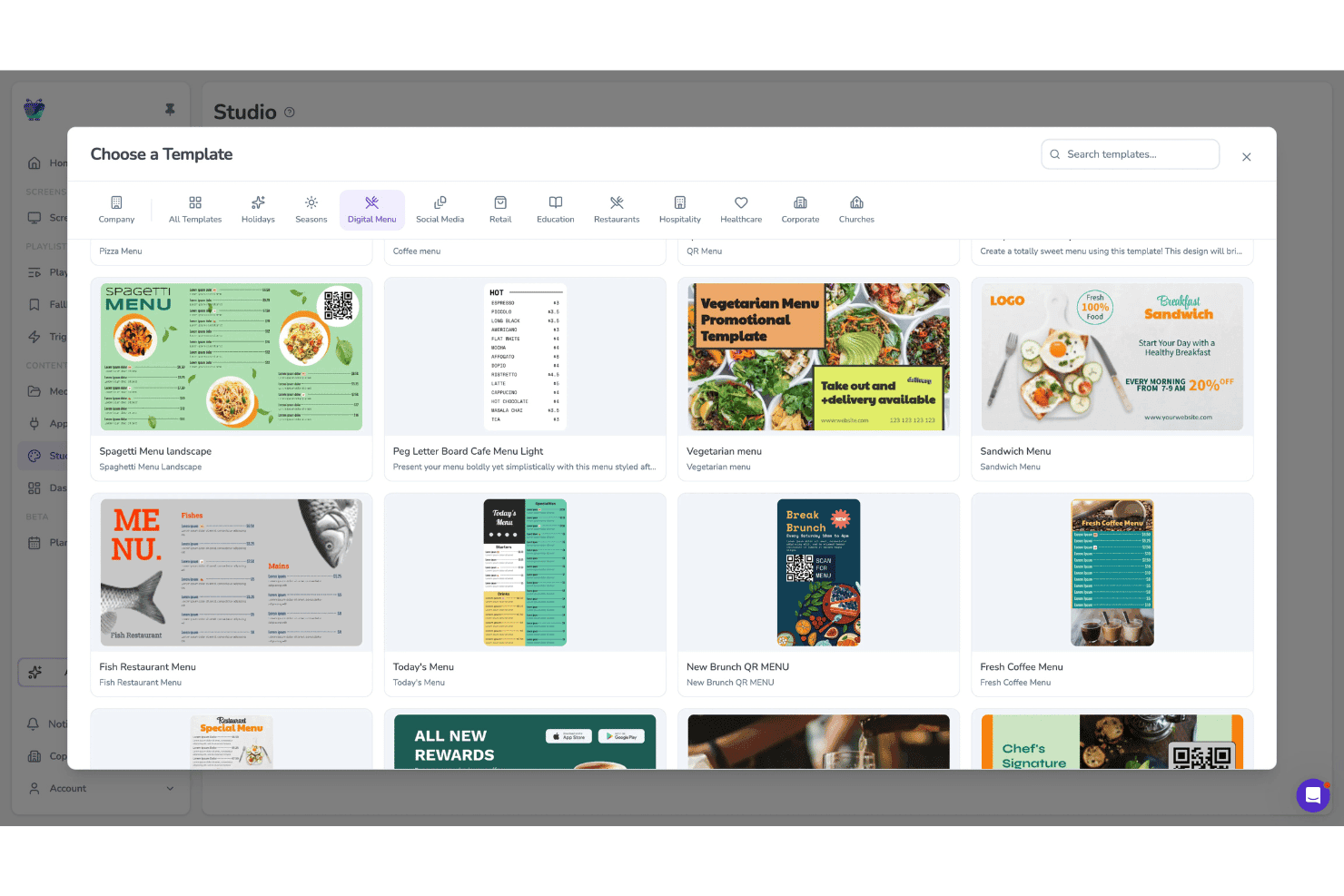
Met Fugo kunnen gebruikers kiezen uit sjablonen voor digitale menu's op schermen. Fugo is een cloudgebaseerd platform voor digitale menuborden en digitale bewegwijzering dat een ontwerpstudio met slepen en neerzetten, planning voor meerdere schermen met dagdeelplanning, beheer op afstand van apparaten en een hardware-onafhankelijke spelerapp combineert.
Voor wie is Fugo het meest geschikt?
Fugo is zeer geschikt voor exploitanten van eetgelegenheden en retailers met meerdere locaties die content voor menuborden op een gemengde hardwarevloot moeten beheren zonder gebonden te zijn aan eigen displays.
Waarom ik voor Fugo heb gekozen
Fugo staat op mijn selectie omdat het op vrijwel alle schermhardware werkt die je al bezit, van Amazon Fire TV-sticks tot Samsung Tizen-displays en Raspberry Pi-eenheden, zodat je nooit gedwongen wordt eigen hardware aan te schaffen. Ik ben vooral onder de indruk van de speciale app voor digitale menu's, waarmee je menuborden rechtstreeks in het CMS kunt maken en bijwerken, inclusief indicatoren voor uitverkochte items en allergenenpictogrammen die direct na publicatie op elke locatie worden gesynchroniseerd.
Belangrijkste functies van Fugo
- Dagdeelplanner: Stel regels in voor content op basis van tijdstip, dag van de week en feestdagen, zodat afspeellijsten voor menuborden automatisch worden gewisseld zonder handmatige updates.
- Editor voor canvas met meerdere zones: Maak schermindelingen met meerdere onafhankelijke contentzones, met ondersteuning voor gemengde media, tekstoverlays en widgets met livegegevens naast elkaar.
- Afspeelrapportage: Bekijk afspeellogboeken die bevestigen welke content op welk scherm en wanneer is afgespeeld—beschikbaar in de Core- en Enterprise-abonnementen.
- Weergave van allergenenpictogrammen: Voeg dieet- en allergenenpictogrammen per menu-item rechtstreeks toe aan en werk ze bij in de app voor digitale menu's; wijzigingen worden direct op alle verbonden schermen gesynchroniseerd.
Integraties van Fugo
Fugo biedt integraties met onder andere Power BI, Looker en Google Workspace, evenals socialemediamuren voor Facebook en X. POS-systemen kunnen via een API worden gekoppeld; in het Enterprise-abonnement is een REST API beschikbaar voor aangepaste integraties.
Pros and Cons
Pros:
- Werkt met vrijwel alle bestaande schermhardware
- Ingebouwde app voor digitale menu's voor restaurants
- Allergenen- en nalevingspictogrammen worden direct bijgewerkt
Cons:
- Geen kant-en-klare POS-koppelingen beschikbaar
- Sommige touchscreenfuncties worden als onbetrouwbaar gemeld
Learn more about Fugo: Het beste voor volledig begeleide uitrol van menuborden
- Gratis proefversie + gratis demo beschikbaar
- Vanaf $15/maand (jaarlijks gefactureerd)
Visit WebsiteCustomer Rating:4.7/5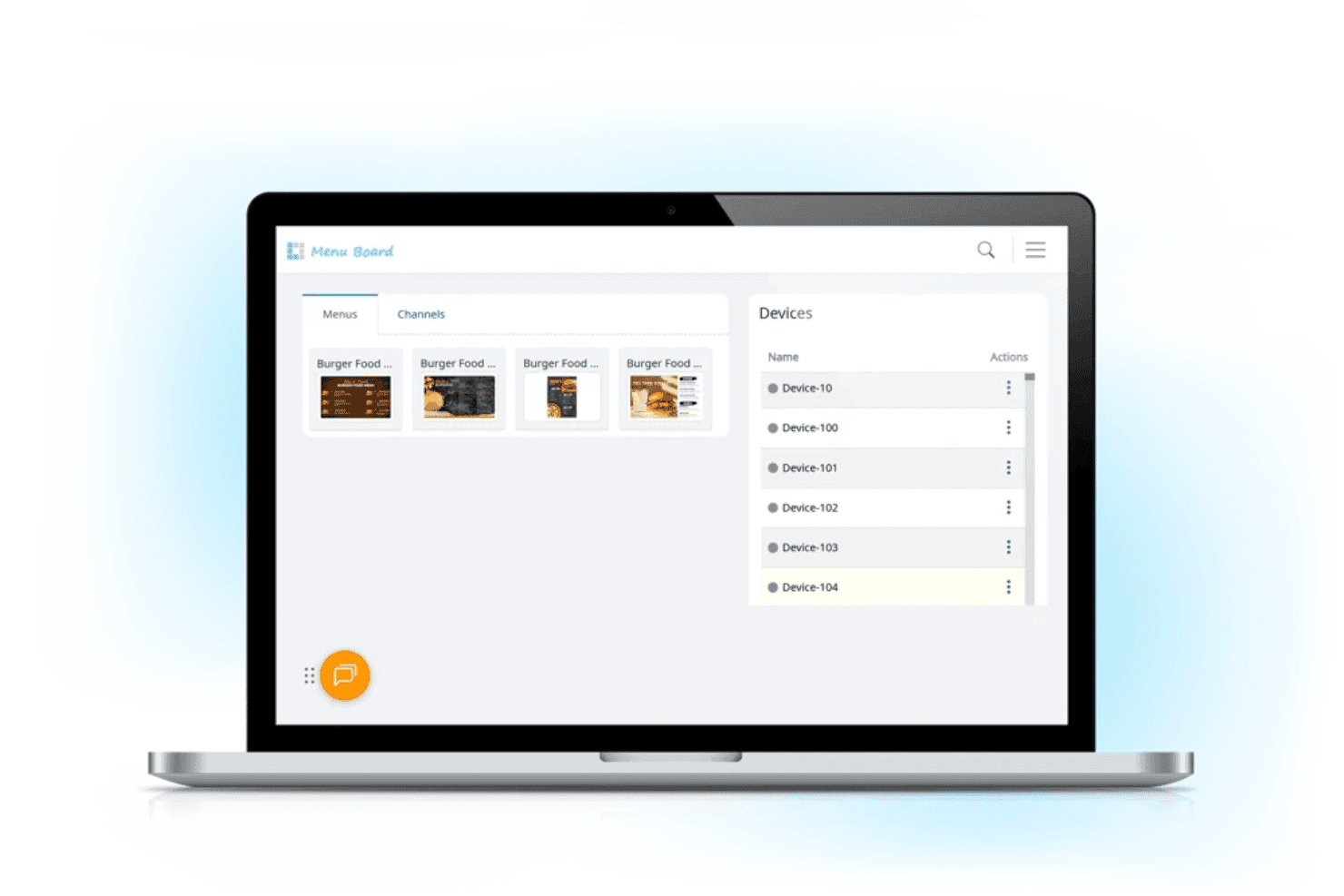
Met L Squared kunnen restaurantteams digitale menu-inhoud en verbonden schermapparaten beheren vanuit een gecentraliseerd dashboard. L Squared is een cloudplatform voor digitale menuborden en digitale bewegwijzering, ontwikkeld voor exploitanten met meerdere locaties. Het combineert een gecentraliseerd CMS, geautomatiseerde dagdeelplanning, een bibliotheek met meer dan 150 widgets en ondersteuning voor kiosken met touchscreen.
Voor wie is L Squared het meest geschikt?
L Squared is zeer geschikt voor exploitanten van ondernemingen en franchises die een volledig beheerde uitrol van begin tot eind willen—inclusief aanschaf van hardware, installatie en doorlopende ondersteuning.
Waarom ik voor L Squared heb gekozen
Ik heb L Squared geselecteerd als een van de beste oplossingen vanwege de grondige manier waarop het volledige uitroltraject van menuborden wordt afgehandeld, van de aanschaf van hardware tot installatie en doorlopende ondersteuning. Wat ik echt indrukwekkend vind, is intelligente merchandising per dagdeel, waarmee ontbijt-, lunch- en dinermenu's automatisch volgens een schema worden afgewisseld zonder dat iemand het dashboard hoeft te bedienen. In combinatie met beheer op ondernemingsniveau voor meer dan 10.000 schermen krijgen exploitanten met meerdere locaties een volledig beheerde implementatie die moeilijk te evenaren is met een zelfbedieningshulpmiddel.
Belangrijkste functies van L Squared
- Bibliotheek met widgets voor livegegevens: Krijg toegang tot meer dan 50 widgets binnen het professionele abonnement—waaronder realtime weer, nieuws, feeds van sociale media en sportuitslagen—om contextuele inhoud op elk scherm weer te geven.
- Op rollen gebaseerd toegangsbeheer: Wijs machtigingen toe tot op het niveau van individuele schermen, met ingebouwde SSO en meervoudige authenticatie voor het beheer van bedrijfsteams.
- Overschrijving voor noodberichten: Stuur veiligheidswaarschuwingen of dringende mededelingen direct naar alle verbonden schermen en onderbreek geplande inhoud automatisch.
- Ondersteuning voor kiosken met touchscreen: Implementeer interactieve schermen met touchscreen voor zelfbedieningsbestellingen, productontdekking, routewijzing en het opzoeken van allergenen- of voedingsinformatie.
Integraties van L Squared
L Squared biedt meer dan 100 integraties op basis van widgets en ingebouwde verbindingen binnen het Microsoft-ecosysteem, waaronder Microsoft 365, Power BI en Teams, evenals Cisco Meraki, Achievers en meer.
Pros and Cons
Pros:
- Menu-inhoud wordt automatisch aangepast op basis van het tijdstip
- Kiosken met touchscreen worden ondersteund voor interactief gebruik
- Bedrijfsbrede audit- en apparaatbeheerfuncties
Cons:
- Langzaam onboardingproces voor de eerste implementaties
- In één review zijn regelmatig voorkomende serviceonderbrekingen gemeld
Learn more about L Squared: Het meest geschikt voor digitale signage voor ondernemingen met meerdere locaties
- Gratis demo beschikbaar
- Prijzen op aanvraag
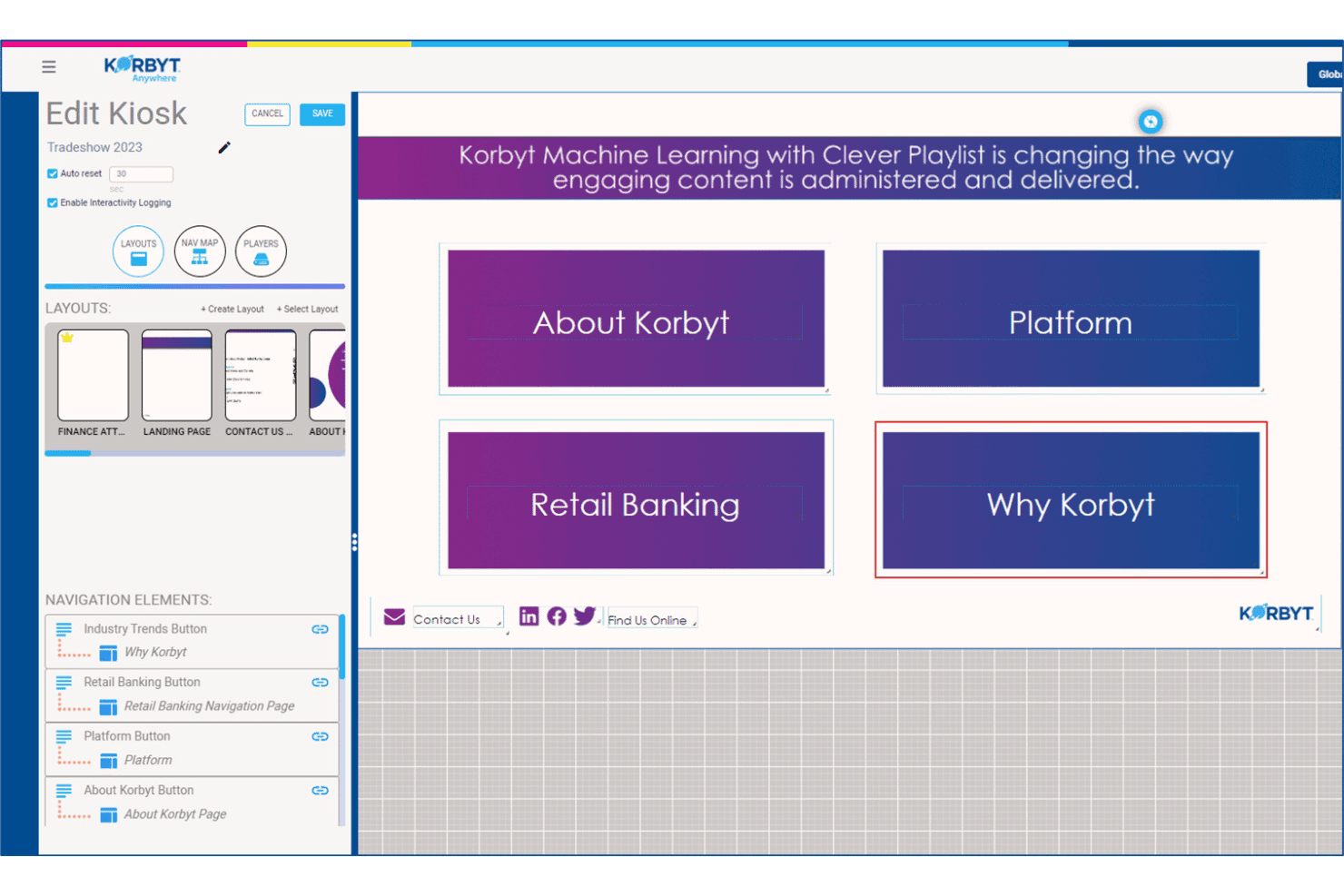
Met Korbyt kunnen gebruikers interactieve navigatie-indelingen voor kiosken maken en beheren. Korbyt is een enterpriseplatform voor digitale signage dat contentbeheer, planning voor meerdere schermen, publieksanalyses en AI-aangedreven contentcreatie levert voor grootschalige schermnetwerken.
Voor wie is Korbyt het meest geschikt?
Korbyt is zeer geschikt voor IT- en communicatieteams binnen ondernemingen die grote, verspreide schermnetwerken beheren op tientallen of honderden locaties.
Waarom ik voor Korbyt heb gekozen
Korbyt staat op mijn shortlist omdat geen enkel ander platform dat ik heb getest kan tippen aan de mogelijkheid om content tegelijkertijd op honderden locaties te beheren. Vooral slimme afspeellijsten spreken me aan: de door ML aangedreven planningsengine past automatisch aan wat er op elk scherm wordt afgespeeld op basis van locatie, dagdeel en live datatriggers, zonder handmatige tussenkomst. In combinatie met goedkeuringsworkflows op basis van rollen en vergrendelingsfuncties voor de huisstijl kunnen je regionale teams hun schermen bijwerken zonder je merkrichtlijnen te schenden.
Belangrijkste functies van Korbyt
- Publieksanalyses met Korbyt Optics: Een uitbreiding op basis van een USB-camera die de aanwezigheid van kijkers en de verblijfsduur voor schermen registreert en realtime contentwissels activeert op basis van het gedetecteerde publiek.
- Generatieve contentagent CreateAI: Genereert huisstijlgetrouwe signage-afbeeldingen op basis van een tekstprompt, met behulp van je opgeslagen logo's, lettertypen en merkkleuren.
- Ontwerper voor indelingen met meerdere zones: Een ontwerper voor slepen en neerzetten waarmee je één scherm kunt opdelen in onafhankelijke contentzones, die elk door verschillende teams of gegevensbronnen worden beheerd.
- Overschrijving voor noodberichten: Stuurt urgente meldingen onmiddellijk naar alle verbonden schermen en onderbreekt elke actieve afspeellijst in je volledige locatienetwerk.
Integraties van Korbyt
Korbyt biedt native integraties met ServiceNow, Cisco Webex, Zoom Rooms, Crestron, Barco ClickShare, Adobe Experience Manager, Google Drive, Dropbox en Box, evenals integraties binnen het Microsoft-ecosysteem.
Pros and Cons
Pros:
- Beheert content voor meerdere merken eenvoudig
- Ondersteunt lokaal geïnstalleerde, cloud- en hybride implementaties
- Ingebouwde tools voor publieksmeting op basis van camera's
Cons:
- Geen functies voor synchronisatie van retailmenu-items
- Richt zich op signage voor bedrijven en banken
Learn more about Korbyt: Het beste voor planning per dagdeel voor QSR-locaties
- 30 dagen gratis proefperiode + gratis demo beschikbaar
- Vanaf $14/scherm/maand (jaarlijks gefactureerd)
Visit WebsiteCustomer Rating:4.9/5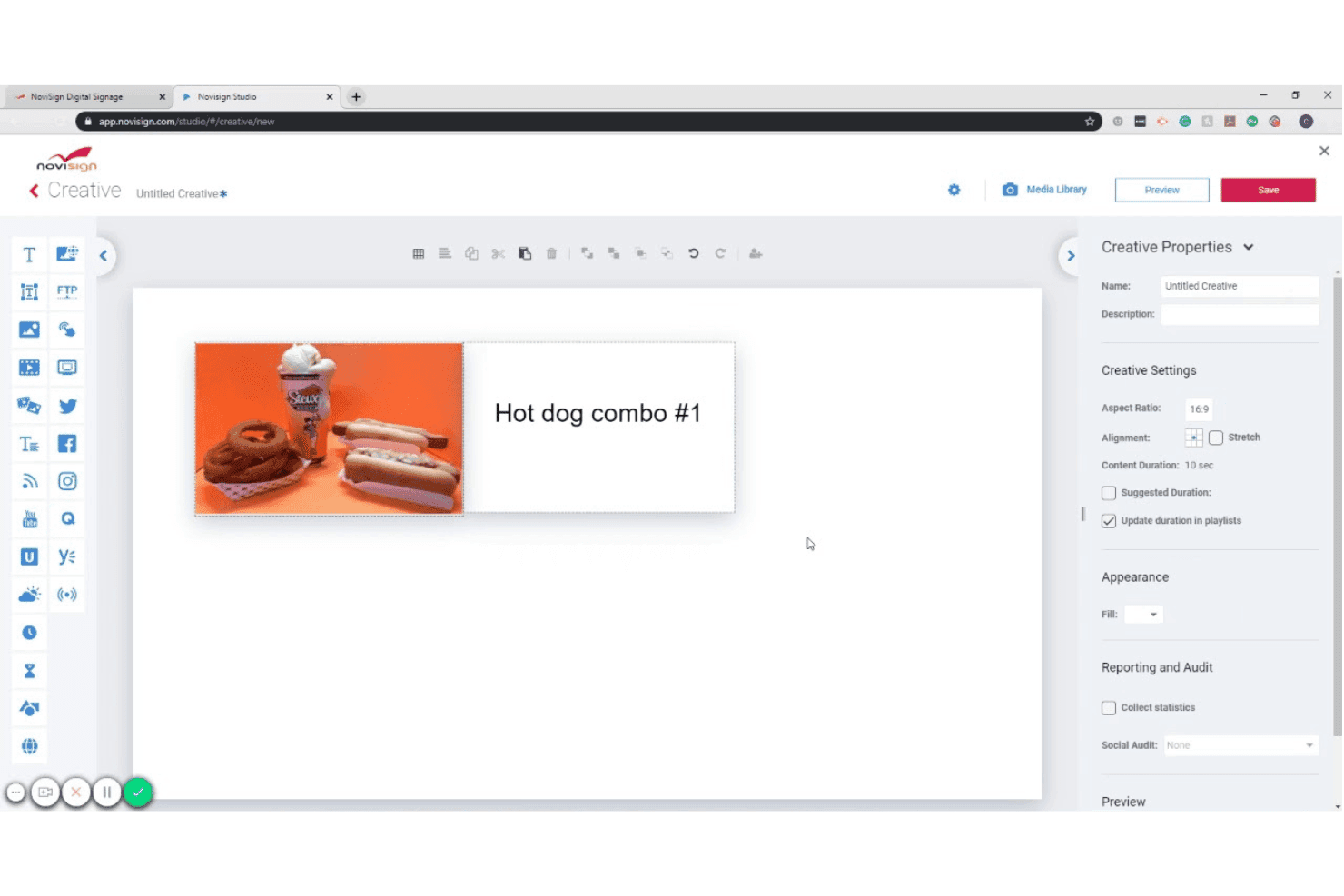
Met NoviSign kunnen gebruikers ontwerpen voor digitale schermcommunicatie met afbeeldingen en tekst maken. NoviSign is een cloudgebaseerd platform voor digitale menuborden dat een inhoudseditor met slepen-en-neerzetten, planning per dagdeel, live gegevensintegraties en schermbeheer voor meerdere locaties combineert voor Android, Samsung Tizen, LG webOS, BrightSign en andere besturingssystemen voor beeldschermen.
Voor wie is NoviSign het meest geschikt?
NoviSign is zeer geschikt voor exploitanten van QSR- en restaurants met snelle bediening die menubordinhoud op meerdere locaties beheren.
Waarom ik voor NoviSign heb gekozen
NoviSign staat op mijn shortlist vanwege de manier waarop de automatisering van de planning per dagdeel de complexe planning afhandelt waarmee QSR-exploitanten op tientallen of honderden locaties te maken hebben. Ik vind het prettig dat je onbeperkt veel afspeellijsten kunt maken die gekoppeld zijn aan specifieke dagdelen, zoals ontbijt, lunch, diner en happy hour, en dat deze automatisch kunnen wisselen zonder dat iemand de schermen hoeft aan te raken. De native synchronisatie met Toast POS is ook een echte onderscheidende factor: live menuprijzen en de beschikbaarheid van items worden direct naar je borden gestuurd zodra er iets verandert in de POS.
Belangrijkste functies van NoviSign
- Meer dan 500 ontwerpsjablonen: Kies uit een bibliotheek met branchespecifieke sjablonen, waaronder digitale menuborden, retail en horeca, en pas ze rechtstreeks aan in de canvasbewerker met slepen-en-neerzetten.
- Schermindelingen met meerdere zones: Verdeel één scherm in meerdere inhoudszones om in één gebied menu-items en tegelijkertijd in een ander gebied promotionele inhoud of socialmediafeeds weer te geven.
- Rapportage over afgespeelde inhoud: Genereer rapporten waarin wordt vastgelegd welke inhoud op welk scherm en wanneer is afgespeeld—handig voor de verificatie van coöperatieve marketing en audits van inhoudsnaleving.
- Door IoT en sensoren geactiveerde inhoud: Sluit RFID-lezers, barcodescanners en andere IoT-sensoren aan om contextuele wijzigingen in de inhoud op het scherm te activeren op basis van gebeurtenissen in de echte wereld.
Integraties van NoviSign
NoviSign biedt native integraties met Toast POS, Power BI, Tableau en Google Sheets, en maakt via Zapier verbinding met meer dan 5.000 extra apps. Het ondersteunt ook DOOH-advertentienetwerken en biedt een API voor aangepaste integraties.
Pros and Cons
Pros:
- Gecentraliseerde planning voor meerdere locaties
- Sjabloonbibliotheek voor menubordontwerp
- Beheer van meerdere merken met subaccounts
Cons:
- Geen ondersteuning voor iOS-spelers
- Minimumaantal schermen voor het Premium-abonnement
Learn more about NoviSign: Het beste voor menubordbeheer met SOC 2-certificering
- 14 dagen gratis proberen + gratis demo beschikbaar
- Vanaf $3.5/apparaat/maand (jaarlijks gefactureerd)
Visit WebsiteCustomer Rating:4.8/5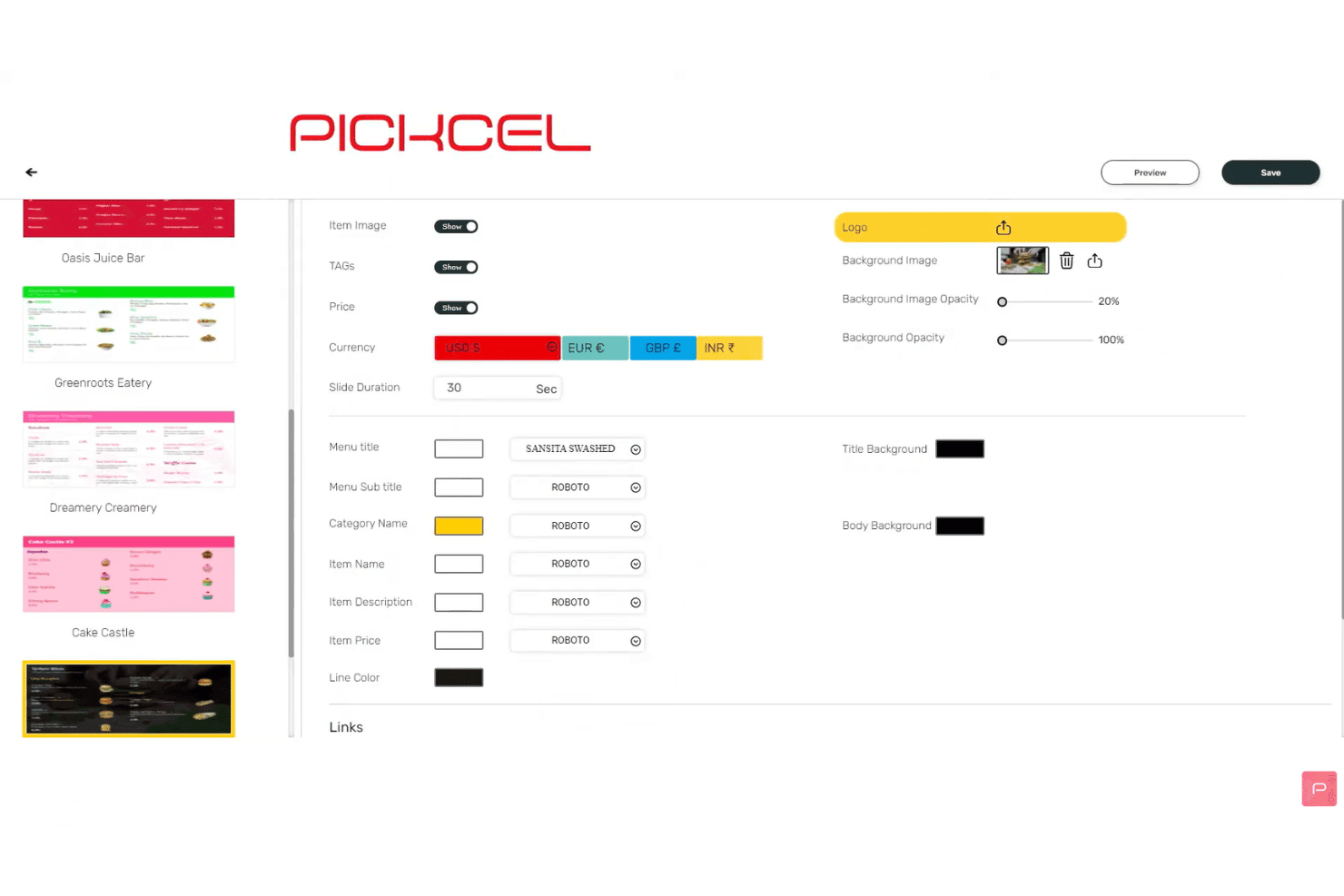
Met Pickcel kunnen gebruikers de instellingen en lettertypen voor de menuweergave aanpassen. Pickcel is een cloudgebaseerd platform voor digitale menuborden met een inhoudseditor met slepen-en-neerzetten, geautomatiseerde dagdeelplanning, planning voor meerdere schermen, POS-gegevensintegraties en beheer op afstand van apparaten van meer dan 50 typen.
Voor wie is Pickcel het meest geschikt?
Pickcel is zeer geschikt voor IT- en operationele teams bij horecaketen- en retailmerken met meerdere locaties die naast dagelijks beheer van menuborden ook behoefte hebben aan beveiligingscertificeringen op ondernemingsniveau.
Waarom ik voor Pickcel heb gekozen
Pickcel staat op mijn shortlist omdat het het enige platform voor digitale menuborden is dat ik heb gevonden en dat SOC 2 Type II- en ISO 27001-certificeringen combineert met een volledig uitgerust CMS voor menuborden. Dat is belangrijk wanneer IT-beveiligingsbeoordelingen deel uitmaken van je inkoopproces. Ik waardeer vooral de implementatieoptie op locatie, waarmee gereguleerde merken het volledige platform zelf kunnen hosten voor volledige datasoevereiniteit. De auditlogboeken en RBAC-beheerfuncties zorgen ervoor dat elke wijziging in de inhoud wordt bijgehouden en dat er op alle locaties toegangsrechten aan worden toegekend.
Belangrijkste functies van Pickcel
- Geautomatiseerde dagdeelplanning: Plan menu-inhoud automatisch te laten wisselen tussen ontbijt, lunch, diner en late avond op basis van het tijdstip van de dag of de dag van de week.
- Gegevensfeeds van Google Sheets en Excel: Koppel live spreadsheets zodat menuprijzen en items automatisch op het scherm worden bijgewerkt wanneer de brongegevens veranderen.
- Editor voor indelingen met meerdere zones: Verdeel één scherm in meerdere inhoudszones, die elk tegelijkertijd onafhankelijke media, widgets of menu-inhoud kunnen uitvoeren.
- Afspeelrapportage: Exporteer logboeken van campagneweergaven en rapporten over de beschikbaarheid van apparaten als CSV-bestanden om de levering van inhoud in je schermnetwerk te verifiëren.
Integraties van Pickcel
Pickcel biedt rechtstreekse integraties met Square, Shopify, Google Sheets, Excel en Canva, en kan worden gekoppeld aan Zapier. Er zijn een open REST API en webhooks beschikbaar voor aangepaste integraties.
Pros and Cons
Pros:
- Ondersteunt meer dan 50 apparaattypen en besturingssystemen
- Geautomatiseerde menuwisseling voor dagdeelcampagnes
- Implementatie op locatie met auditlogboeken en RBAC
Cons:
- De sjabloonkeuze is beperkter dan die van concurrenten
- Enkele meldingen van trage dashboardprestaties
Learn more about Pickcel: Het beste voor menuborden op Apple TV
- 14 dagen gratis uitproberen + gratis demo beschikbaar
- Vanaf $7/scherm/maand (jaarlijks gefactureerd)
Visit WebsiteCustomer Rating:4.5/5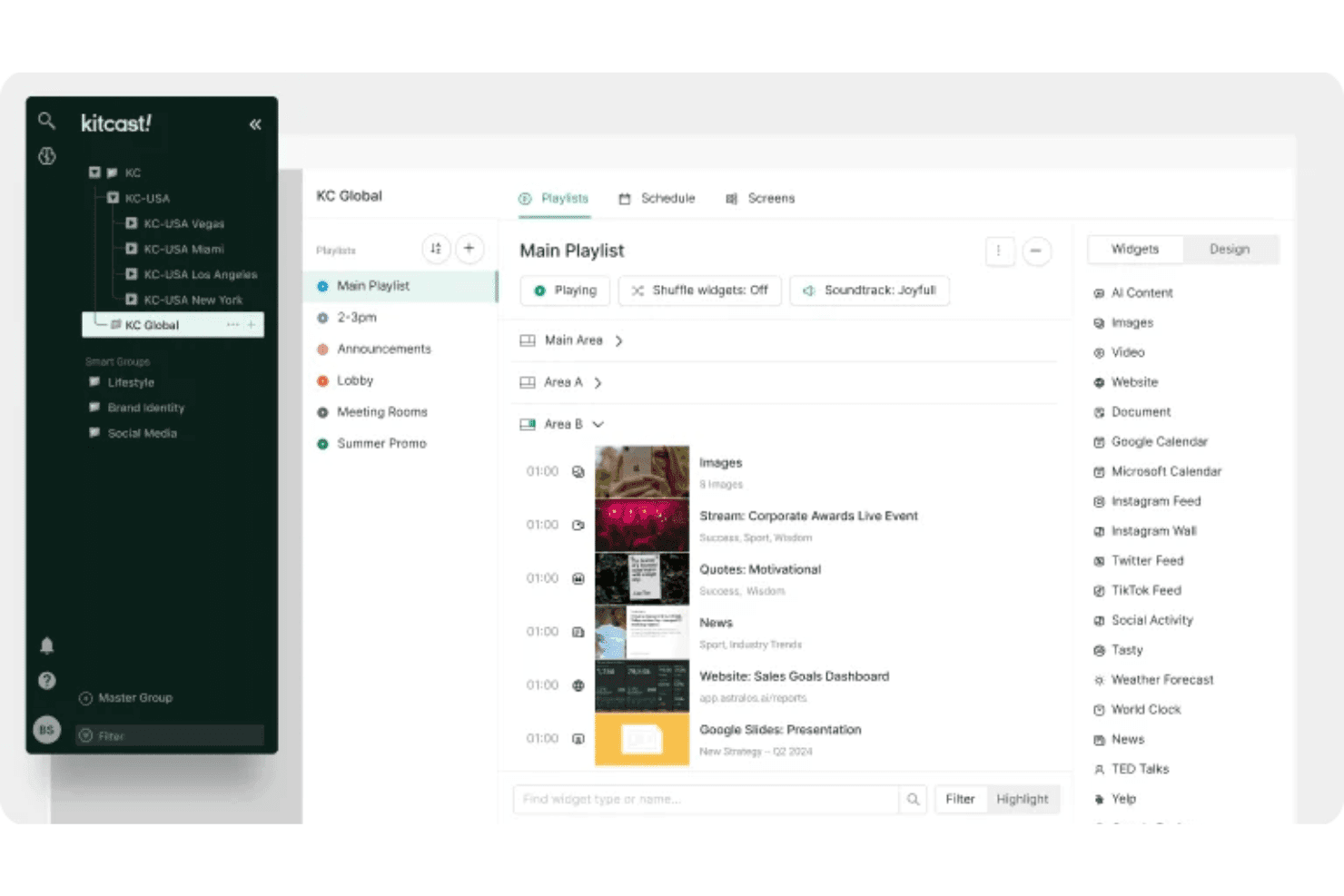
Met Kitcast kunnen gebruikers afspeellijsten en widgets over meerdere schermen organiseren. Kitcast is een cloudgebaseerd platform voor digitale signage met een oorspronkelijke Apple TV-app die contentplanning, POS-gesynchroniseerde menupublicatie, automatisering van tijdsblokken en extern beheer van meerdere schermen omvat.
Voor wie is Kitcast het meest geschikt?
Kitcast is zeer geschikt voor restaurants en cafés die Apple TV-hardware gebruiken en menuborden nodig hebben die automatisch met hun POS synchroniseren.
Waarom ik voor Kitcast heb gekozen
Kitcast staat op mijn shortlist omdat het het enige platform voor digitale signage is dat oorspronkelijk op tvOS is gebouwd. Dit betekent dat Apple TV elk element van een menubord weergeeft—livewidgets, video en dynamische prijzen—zonder de omwegen die andere platforms op Apple-hardware vereisen. Vooral de POS-synchronisatie met Square, Toast en Clover spreekt me aan: artikelen die niet op voorraad zijn, worden automatisch gedimd of verborgen zodra de voorraad verandert. In combinatie met echte automatisering van tijdsblokken verlopen overgangen van ontbijt naar lunch volgens een vooraf ingesteld schema, zonder enige handmatige tussenkomst.
Belangrijkste functies van Kitcast
- Op rollen gebaseerde machtigingen: Beheerders kunnen merkstandaarden zoals lettertypen, kleuren en indelingen bedrijfsbreed vergrendelen, terwijl lokale redacteuren prijzen en aanbiedingen binnen goedgekeurde grenzen kunnen bijwerken.
- Overschrijving voor noodmeldingen: Dankzij de CAP-integratie in het Pro-abonnement kun je onmiddellijk veiligheidswaarschuwingen of aankondigingen naar elk scherm in je netwerk sturen, waarbij alle actieve content wordt overschreven.
- Weergavelogboeken: Kitcast maakt geverifieerde registraties van welke content op welk scherm en wanneer is afgespeeld—handig voor franchiserapportage en naleving van coöperatieve marketingafspraken.
- AI-inhoudsbouwer: Genereer rechtstreeks vanuit tekstprompts menu-indelingen en promotionele beelden, zonder een afzonderlijke ontwerptool of externe middelenbibliotheek nodig te hebben.
Integraties van Kitcast
Kitcast biedt rechtstreekse integraties met Square, Toast, Clover, Lightspeed Restaurant, Revel Systems, Canva, Google Workspace en het Microsoft-ecosysteem (waaronder Microsoft 365, SharePoint en Azure AD via SCIM).
Pros and Cons
Pros:
- Oorspronkelijke Apple TV-implementatie van menuborden
- Overschrijving voor noodmeldingen op alle schermen
- Op rollen gebaseerde machtigingen voor merkbeheer
Cons:
- Beperkte documentatie over interactieve touchscreenfuncties
- Geen ingebouwde functies voor personalisatie van doelgroepen
Learn more about Kitcast: 9Het beste voor beheer van menuborden met een eeuwigdurende licentie
Mvix
- Gratis demo beschikbaar
- Vanaf $450 eenmalig
Visit WebsiteCustomer Rating:4.6/5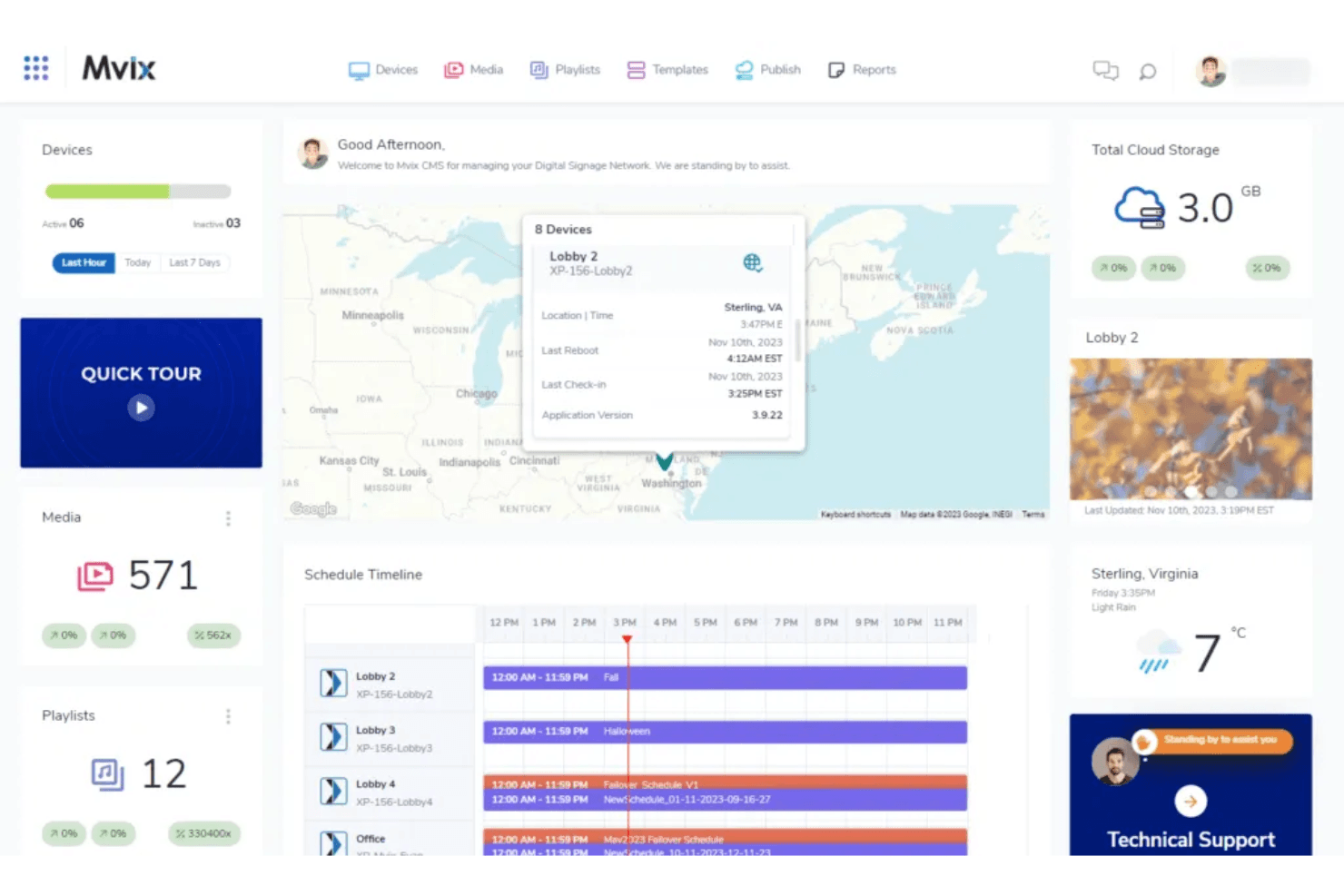
Met het dashboard van Mvix kunnen gebruikers apparaten, planningen en media in één overzicht monitoren. Mvix is een platform voor digitale menuborden en signage dat eigen mediaspelers koppelt aan een cloudgebaseerd CMS. Het biedt ontwerp van indelingen met meerdere zones, planning per dagdeel, POS-integratie en beheer van apparaten op afstand.
Voor wie is Mvix het meest geschikt?
Mvix is zeer geschikt voor exploitanten met meerdere locaties en IT-teams die terugkerende SaaS-kosten willen vermijden door hardware aan te schaffen met een levenslange CMS-licentie inbegrepen.
Waarom ik voor Mvix heb gekozen
Mvix staat op mijn shortlist omdat het het enige platform voor digitale menuborden is dat ik heb gevonden waarbij een levenslange CMS-licentie is inbegrepen bij een eenmalige hardwareaankoop, zonder terugkerende kosten per scherm. Vooral de app voor planning per dagdeel spreekt me aan, omdat deze de contentrotatie per dagdeel automatiseert (van ontbijt tot laat op de avond), zonder dat handmatige planning nodig is. De app voor het maken van menu's synchroniseert ook live prijzen en voorraadstatussen rechtstreeks vanuit Toast, Clover en Square, zodat menuborden in realtime worden bijgewerkt wanneer artikelen uitverkocht raken of prijzen veranderen.
Belangrijkste functies van Mvix
- Ontwerper voor indelingen met meerdere zones: Deel elk scherm op in maximaal 10 onafhankelijke contentzones, die elk tegelijkertijd verschillende media kunnen afspelen.
- Portaal voor apparaatstatus: Monitor het CPU-gebruik, de opslag, de signaalsterkte van wifi en de temperatuur van elke speler in je netwerk vanuit één dashboard.
- Overname voor noodmeldingen: Dankzij de integratie met het IPAWS/CAP-protocol wordt alle geplande content op elk scherm direct vervangen door noodmeldingen.
- Magische mappen: Synchroniseer content automatisch vanuit Microsoft Office 365 of Google Drive, zodat je displays worden bijgewerkt zodra bronbestanden veranderen.
Integraties van Mvix
Mvix biedt native integraties met Toast, Square, Power BI, Tableau, Klipfolio en Slack, plus sociale feeds van Facebook, Instagram en X. Het biedt ook RESTful API's en webhooks voor aangepaste verbindingen met POS-, CRM- en HR-systemen.
Pros and Cons
Pros:
- Levenslange CMS-licentie bij aanschaf van hardware
- Ontwerper voor indelingen met meerdere zones voor menuborden
- Offline afspelen houdt schermen actief
Cons:
- Voor de installatie is vaak IT-expertise nodig
- Sommige gebruikers melden hardwareproblemen
Learn more about Mvix: Het beste voor het beheer van zakelijke menubordparken
- Gratis demo beschikbaar
- Vanaf $14/maand/speler
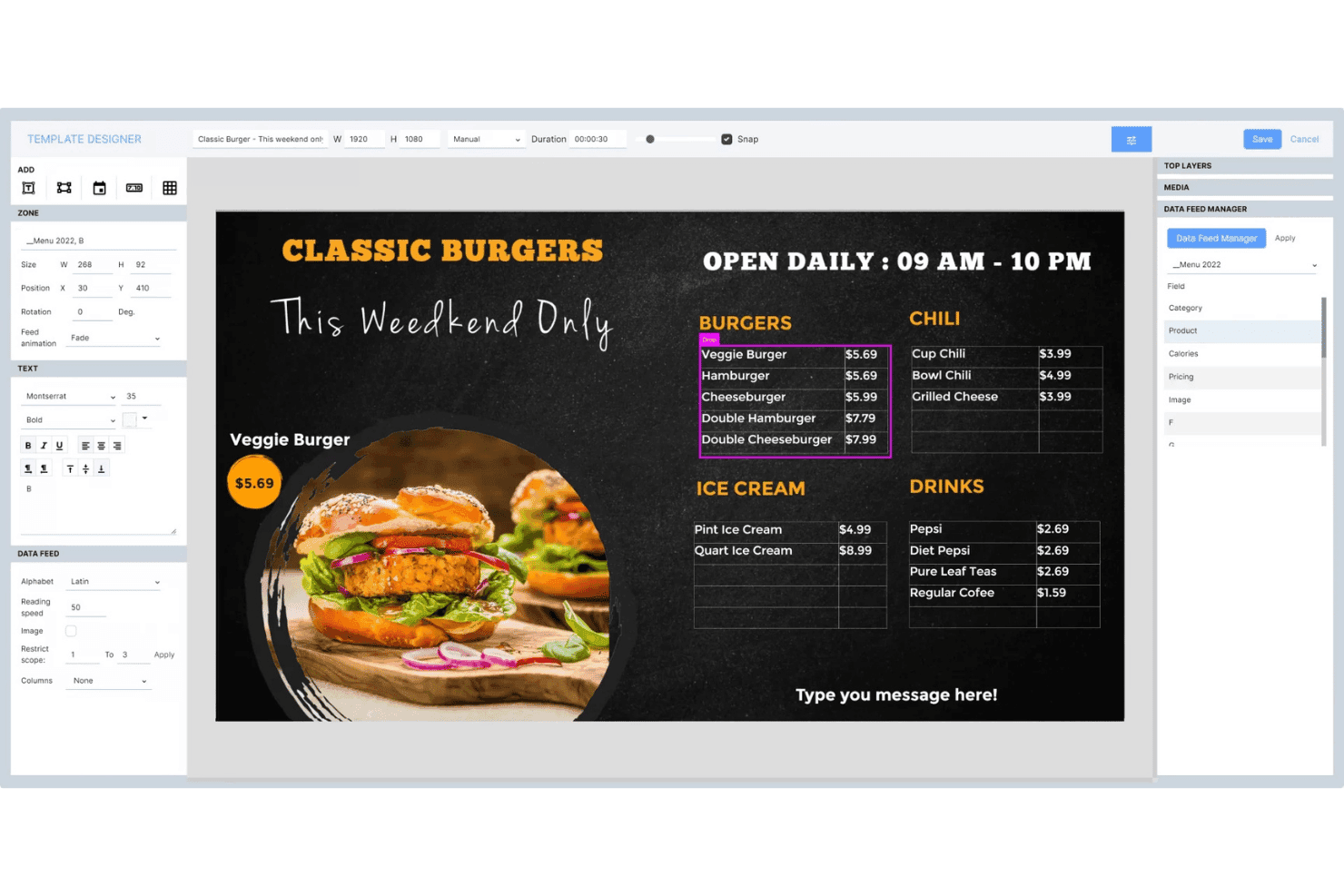
Met Navori Labs kunnen gebruikers dynamische menuborden met livegegevensfeeds ontwerpen. Navori Labs is een digitaal menubord- en signageplatform voor grootschalige implementaties, met contentbeheer voor meerdere tenants, dagdeelplanning, integratie van livegegevens en bewaking op afstand van wagenparken met duizenden displays.
Voor wie is Navori Labs het meest geschikt?
Navori Labs is zeer geschikt voor QSR-ketens en retailers met meerdere locaties die duizenden displays voor franchisevestigingen, regio's en merken vanuit één backend moeten beheren.
Waarom ik voor Navori Labs heb gekozen
Navori Labs staat op mijn shortlist omdat geen enkel ander platform dat ik heb getest het beheer van menuborden zo soepel naar duizenden locaties opschaalt. Ik ben vooral onder de indruk van de multi-tenantarchitectuur, waarmee bedrijfsteams nationale afspeellijsten kunnen instellen terwijl franchisenemers lokale content binnen vastgestelde kaders beheren. De dagdeelplanningsengine schakelt ontbijtborden automatisch over naar lunchmenu's zonder handmatige invoer, en realtime POS-synchronisatie haalt prijsinformatie en de status van niet-voorradige producten rechtstreeks naar de displays.
Belangrijkste functies van Navori Labs
- Multi-tenantarchitectuur: Scheidt content, machtigingen en gegevens voor merken, franchisevestigingen of regio's binnen één backendinstantie.
- AQUAJI-publieksanalyse: Gebruikt computer vision via verbonden camera's om bezoekersaantallen, verblijfsduur en demografische gegevens te meten voor rapportages over contentprestaties.
- Override voor noodwaarschuwingen: Integreert met CAP, OmniAlert en gebouwalarmsystemen om direct schermvullende waarschuwingen naar alle beheerde displays te sturen.
- Ondersteuning voor interactieve touchscreens: Maakt lift-and-learn, RFID/NFC-triggers, gebarenherkenning en invoer van IoT-sensoren mogelijk voor kiosk- en zelfbedieningsdisplayconfiguraties.
Integraties van Navori Labs
Navori Labs biedt native integraties met Microsoft Power BI, Vistar Media, Hivestack, Screenfeed, Facebook, Instagram, LinkedIn en X (Twitter), plus livegegevensconnectoren voor RSS-, JSON-, XML- en iCal-feeds.
Pros and Cons
Pros:
- Schaalt op naar tienduizenden schermen
- Multi-tenantbeheer voor franchisevestigingen en merken
- Geïntegreerde noodwaarschuwingen voor naleving in de retail
Cons:
- Geavanceerde functies kunnen aanvankelijk overweldigend aanvoelen
- Details over POS-compatibiliteit zijn niet openbaar vermeld
Learn more about Navori Labs:
Andere software voor digitale menuborden
Hier zijn enkele aanvullende opties voor software voor digitale menuborden die mijn selectie niet hebben gehaald, maar die nog steeds de moeite waard zijn om te bekijken:
- 11WallboardHet beste voor automatisering van met POS gesynchroniseerde menuborden
- 12OptiSignsHet beste voor grootschalige menu-updates op basis van dagdelen
- 13YodeckIdeaal voor menubordbeheer met een gratis abonnement
- 14Look Digital SignageIdeaal voor kiosken met menuborden met aanraakbediening
- 15TelemetryTVIdeaal voor door ontwikkelaars gebouwde, API-gestuurde menuborden
- 16Samsung VXTIdeaal voor menubordnetwerken van Samsung
- 17XiboIdeaal voor het plannen van open source-menuborden
- 18NowSignageIdeaal voor licenties voor menuborden met een volledig assortiment
Hoe ik software voor digitale menuborden evalueer
Ik deel mijn evaluatie op in basiscriteria waaraan elke tool moet voldoen—zoals tijdgebonden planning, beheer van displays op afstand en POS-synchronisatie—en onderscheidende factoren die een capabel platform onderscheiden van het juiste platform voor exploitanten met meerdere locaties.
Kernfunctionaliteit (basisvereisten voor deze lijst)
Bij het selecteren van tools voor mijn lijst beoordeel ik elke tool op een schaal van 0 (biedt de functionaliteit niet) tot 5 (blink uit op dit gebied) voor elke hieronder vermelde kernfunctionaliteit. Vervolgens zet ik de totaalscore van de tool om in een percentage, waarbij ik 65% als referentiepunt gebruik om de algehele geschiktheid voor de lijst te beoordelen.
- Contentmanagementsysteem: Ik zoek naar een cloud-CMS met rollen voor meerdere gebruikers, assetbibliotheken en mapstructuren waarmee teams menu's kunnen organiseren per merk, locatie of campagne zonder elkaars werk in de weg te zitten.
- Planning voor meerdere schermen: Hier wordt tijdgebonden planning echt relevant. Ik beoordeel of een platform ontbijt-naar-lunch-menuwissels kan automatiseren op tientallen schermen die zijn gegroepeerd per regio, tijdzone of winkelindeling.
- Beheer van displays op afstand: Ik controleer op monitoring van de schermstatus, offlinewaarschuwingen en mogelijkheden om op afstand opnieuw op te starten, zodat je team een uitgevallen scherm in een andere stad kan oplossen zonder iemand op pad te sturen.
- Sjablonen en ontwerptools: Een editor met slepen-en-neerzetten en dynamische gegevensvelden is hierbij belangrijk. Ik kijk of je menulay-outs in de huisstijl kunt maken die prijzen of productbeschikbaarheid automatisch invullen vanuit een verbonden gegevensbron.
- Data- en POS-integraties: Ik beoordeel realtime synchronisatie met POS-systemen zoals Square, Toast of Lightspeed. Wijzigingen in menuprijzen of artikelen die niet beschikbaar zijn, moeten binnen enkele minuten en niet pas na uren op de schermen worden weergegeven.
- Compatibiliteit met hardware en besturingssystemen: Ik kijk naar het aantal typen mediaspelers dat een platform ondersteunt. De beste opties werken met Android, BrightSign, Windows, Fire TV en smart-tv's, zodat je niet aan één hardwareleverancier vastzit.
Zodra ik een lijst heb met tools die aan de criteria voldoen, kijk ik naar wat elk platform onderscheidt.
Onderscheidende factoren (waarmee leveranciers zich onderscheiden)
Zo vergelijk ik verschillende leveranciers met elkaar:
Opvallende functies
Geautomatiseerde dynamische tijdgebonden planning is het eerste wat ik beoordeel. Ik controleer of een platform menu's automatisch kan wisselen tussen ontbijt, lunch en diner zonder handmatige triggers—en of die regels ook gelden voor verschillende tijdzones binnen wagenparken in meerdere regio's. De mogelijkheid om noodberichten te forceren is minstens zo belangrijk. Als een veiligheidswaarschuwing onmiddellijk op elk scherm moet verschijnen, zoek ik naar functies waarmee ik met één opdracht geplande content kan overschrijven. Personalisatie van content op basis van AI vormt het derde aandachtspunt. Platforms zoals Poppulo gebruiken publieksanalyses om content op het scherm aan te passen op basis van bezoekersstromen of wachtrijlengte, wat rechtstreeks invloed kan hebben op het moment waarop tijdens piekuren extra verkoop wordt gestimuleerd.
Meer dan functies alleen
Ik beoordeel de totale eigendomskosten nauwkeurig, omdat prijsmodellen per scherm snel kunnen oplopen wanneer je locaties toevoegt. Sommige leveranciers bundelen hardware, terwijl andere afzonderlijk kosten in rekening brengen voor mediaspelers, premiumsjablonen of POS-integraties. Beheer van schaalbaarheid is minstens zo belangrijk. Ik controleer of een platform je toestaat om contentrechten per regio of franchise te segmenteren, zodat het hoofdkantoor merkmaterialen kan vergrendelen terwijl lokale teams de dagelijkse specials kunnen aanpassen. Rapportage over daadwerkelijk afgespeelde content is een andere factor waar ik op let, vooral als je door leveranciers gefinancierde promoties uitvoert waarvoor geverifieerde afspeellogboeken nodig zijn om gezamenlijke marketingbudgetten terug te krijgen.
Hoe kies je software voor digitale menuborden?
Wanneer je software voor digitale menuborden beoordeelt, richt je dan op de manier waarop elke optie je in staat stelt content, updates en naleving te beheren op de schaal die je team nodig heeft—zonder toezicht of flexibiliteit op te offeren:
| Als je prioriteit ligt bij... | Let dan op... |
|---|---|
| Als je prioriteit ligt bij...Snelle menu-updates op meerdere locaties | Let dan op...Gecentraliseerde planning per groep met tijdsgebonden menu's |
| Als je prioriteit ligt bij...Merkconformiteit en controleerbaarheid | Let dan op...Op rollen gebaseerde toestemmingsbeheer en afspeellogboeken |
| Als je prioriteit ligt bij...Live synchronisatie van prijzen en artikelen vanuit het POS-systeem | Let dan op...Native, realtime POS-integraties |
| Als je prioriteit ligt bij...Minimale hardwareonderbreking tijdens de uitrol | Let dan op...Brede compatibiliteit met apparaten en besturingssystemen |
| Als je prioriteit ligt bij...Betrouwbare prestaties voor grote apparaatvloten | Let dan op...Gegarandeerde beschikbaarheid op ondernemingsniveau en waarschuwingen |
Hoe beoordeel je je selectie?
- Test tijdsgebonden menu's op schaal: Voer tijdens je proefperiode op ten minste 10 locaties een op tijd gebaseerde menuwissel uit.
- Vraag om rapportage van afspeelbewijzen: Vraag om voorbeeldlogboeken van afspeelbeurten waarin datum, locatie en inhoudsdetails worden weergegeven.
- Controleer de POS-verbindingssnelheid: Voer een live menu-update uit via je huidige POS-systeem en meet de schermupdatetijden binnen één minuut.
- Beoordeel de toegangsbeheerfuncties: Wijs op rollen gebaseerde toegangsniveaus toe aan een gesimuleerd account voor meerdere regio's en test deze binnen 48 uur.
- Afweging — eigendom versus SaaS-snelheid: Bepaal of de controle over een eeuwigdurende licentie de tragere functie-updates waard is in vergelijking met aanbieders op abonnementsbasis.
Wat is software voor digitale menuborden?
Software voor digitale menuborden is een cloudgebaseerd platform waarmee je digitale menu's op schermen op meerdere locaties kunt beheren, plannen en bijwerken. Het biedt winkel- en restaurantteams één centrale hub om menu-inhoud te beheren, dagdelen automatisch in te delen, te synchroniseren met kassasystemen en de merkconsistentie te behouden. Deze software is ontworpen voor bedrijven die snel en gecoördineerd inhoud willen wijzigen zonder handmatige updates op elke locatie. Functies
Functies van software voor digitale menuborden
Let bij het selecteren van software voor digitale menuborden op de volgende belangrijke functies:
- Contentmanagementsysteem: Centraliseert alle inhoud van je restaurantmenu's en bewegwijzering, zodat je team middelen op één plek kan organiseren, bijwerken en goedkeuren. Ondersteunt versiebeheer, geplande publicatie en gebruikersrechten voor consistente merkuitingen op grote schaal.
- Planning voor meerdere schermen: Hiermee kun je unieke digitale menudisplays toewijzen aan verschillende locaties, schermen of dagdelen. Maakt gecoördineerde menuwisselingen voor ontbijt, lunch of tijdelijke aanbiedingen mogelijk zonder handmatige updates.
- Beheer van displays op afstand: Hiermee kun je elke digitale display op alle locaties vanaf elke plek controleren, beheren en problemen oplossen. Biedt monitoring van de schermstatus, meldingen bij offline apparaten en opdrachten om apparaten opnieuw op te starten, zodat je displayproblemen snel kunt oplossen.
- Sjablonen en ontwerptools: Biedt editors met slepen-en-neerzetten, aanpasbare lay-outs, sjablonen voor menuborden, animaties en dynamische velden voor prijzen of productgegevens. Maakt het eenvoudig om opvallende menu's te maken die er op elk scherm scherp uitzien.
- POS-integraties: Synchroniseert menugegevens rechtstreeks met je kassasysteem en automatiseert prijswijzigingen, nieuwe items en updates van de beschikbaarheid van items. Vermindert handmatige invoer en houdt menu's op alle schermen up-to-date.
- Compatibiliteit met apparaten en besturingssystemen: Ondersteunt een breed scala aan mediaspelers en hardware, zoals Android, Windows, Fire TV, BrightSign en smart-tv's, zodat je elektronische menuborden op verschillende typen apparaten kunt implementeren.
- Beheer van gebruikersrollen en rechten: Hiermee kun je toegangsniveaus instellen per regio, afdeling of individu. Helpt de naleving en merkidentiteit te handhaven en geeft lokale teams tegelijkertijd de flexibiliteit om menu's naar behoefte bij te werken.
- Rapportage van afspeelbewijzen: Houdt bij wanneer en waar menu-inhoud werd weergegeven. Handig voor het verifiëren van coöperatieve reclame, naleving van wet- en regelgeving of operationele audits.
- Beheer van de middelenbibliotheek: Biedt een gecentraliseerde mediabibliotheek voor het opslaan van afbeeldingen, video's en sjablonen. Stroomlijnt het maken van inhoud en zorgt ervoor dat teams goedgekeurde middelen gebruiken.
- Ondersteuning voor offline afspelen: Zorgt ervoor dat menu's zichtbaar blijven op schermen, zelfs als de internetverbinding uitvalt. Essentieel voor het handhaven van een ononderbroken dienstverlening op alle locaties.
Veelvoorkomende AI-functies van software voor digitale menuborden
Naast de hierboven genoemde standaardfuncties van software voor digitale menuborden integreren veel van deze oplossingen AI met functies zoals:
- Door AI gestuurde personalisatie van inhoud: Gebruikt realtime publieksanalyses om menu's op digitale bewegwijzering aan te passen op basis van factoren zoals bezoekersaantallen, het tijdstip van de dag of klantdemografie, wat relevantere promoties en een betere klantbetrokkenheid ondersteunt.
- Geautomatiseerde aanbevelingen voor extra verkoop: Analyseert verkoopgegevens en klantgedrag om aanvullende producten met een hoge marge of combinaties rechtstreeks op het menubord aan te bevelen. Dit kan de verkoop stimuleren door gerichte suggesties tijdens het bestelproces onder de aandacht te brengen.
- Dynamische prijsoptimalisatie: houdt voortdurend voorraadniveaus, vraagpatronen en prijzen van concurrenten in de gaten om menuprijzen automatisch aan te passen. Zo kunt u reageren op marktveranderingen en de omzet maximaliseren zonder handmatige tussenkomst.
- Voorspellende menuplanning: gebruikt historische verkoopgegevens en externe factoren, zoals het weer of lokale evenementen, om de vraag te voorspellen en menuwijzigingen automatisch in te plannen. Zo worden uw populairste of winstgevendste items getoond op het moment dat ze waarschijnlijk het best verkopen.
- Verbetering van visuele middelen: gebruikt AI om menuafbeeldingen te verbeteren door belichting aan te passen, afbeeldingen bij te snijden of zelfs nieuwe beelden te genereren die aansluiten bij uw merkstijl. Zo blijven uw menuborden visueel aantrekkelijk zonder afhankelijk te zijn van handmatig grafisch ontwerp.
Voordelen van software voor digitale menuborden
Het implementeren van software voor digitale menuborden biedt verschillende voordelen voor uw team en uw bedrijf. Hieronder vindt u enkele voordelen waar u naar kunt uitkijken:
- Gecentraliseerd contentbeheer: krijg toegang tot een platform voor software voor digitale schermcommunicatie om menu-inhoud voor elke locatie vanuit één dashboard te beheren, bij te werken en te organiseren.
- Geautomatiseerde menuplanning: gebruik functies voor planning op meerdere schermen en dagdelen om menu's voor ontbijt, lunch of speciale evenementen te wisselen zonder het gedoe van het handmatig bijwerken van gedrukte menu's.
- POS-integratie in realtime: maak rechtstreeks verbinding met uw kassasysteem, zodat prijzen en beschikbaarheid van items op schermen binnen enkele minuten na wijzigingen worden bijgewerkt.
- Beheer van schermen op afstand: controleer de status van apparaten, los schermstoringen op en stuur dringende berichten naar elke weergavelocatie zonder de locatie te bezoeken.
- Controles voor merkconformiteit: stel gebruikersrollen en -rechten in om ervoor te zorgen dat alleen goedgekeurde inhoud wordt gepubliceerd, met ondersteuning voor auditsporen en rapporten over afspeelregistraties.
- Flexibiliteit in hardware en besturingssystemen: implementeer menuborden op verschillende typen mediaspelers, zoals Android, Windows of smart-tv's, zodat u niet aan één leverancier gebonden bent.
- AI-gestuurde personalisatie: profiteer van functies zoals doelgroepanalyses en geautomatiseerde prompts voor upselling om menu-inhoud aan te passen op basis van realtime klantgedrag.
Kosten en prijzen
Bij het selecteren van software voor digitale menuborden is inzicht in de verschillende beschikbare prijsmodellen en abonnementen vereist. De kosten variëren op basis van functies, teamgrootte, uitbreidingen en meer. De onderstaande tabel vat veelvoorkomende abonnementen, hun gemiddelde prijzen en de typische inbegrepen functies van oplossingen voor software voor digitale menuborden samen:
Vergelijkingstabel voor abonnementen van software voor digitale menuborden
| Type abonnement | Gemiddelde prijs | Veelvoorkomende functies |
|---|---|---|
| Type abonnementGratis abonnement | Gemiddelde prijs$0-$10/screen/month | Veelvoorkomende functiesBasisplanning van content, beperkte toegang tot sjablonen, basisbibliotheek voor media en ondersteuning voor één gebruiker. |
| Type abonnementPersoonlijk abonnement | Gemiddelde prijs$10-$20/screen/month | Veelvoorkomende functiesPlanning op meerdere schermen, uitgebreide sjabloonbibliotheek, cloudgebaseerd contentbeheer en beperkte POS-integratie. |
| Type abonnementBedrijfsabonnement | Gemiddelde prijs$20-$40/screen/month | Veelvoorkomende functiesRechten op basis van rollen, planning per dagdeel, beheer van schermen op afstand, POS-synchronisatie en rapportage van afspeelregistraties. |
| Type abonnementAbonnement voor grote ondernemingen | Gemiddelde prijs$40-$100/screen/month | Veelvoorkomende functiesGeavanceerde integraties, branding zonder merkvermelding, AI-gestuurde personalisatie, gedetailleerde rechtencontroles en SLA-ondersteuning. |
Veelgestelde vragen over software voor digitale menuborden
Hier vindt u antwoorden op veelgestelde vragen over software voor digitale menuborden:
Hoe verwerken softwareplatforms voor digitale menuborden grootschalige menu-updates?
Met software voor digitale menuborden kunt u menuwijzigingen tegelijk naar honderden schermen sturen via een gecentraliseerd clouddashboard. U kunt locaties per regio of merk groeperen en regels voor tijdsperioden instellen, zodat de wisseling tussen ontbijt, lunch en diner automatisch plaatsvindt. Zo blijft de inhoud op alle locaties consistent en zijn handmatige updates op elke afzonderlijke locatie niet nodig.
Kan software voor digitale menuborden rechtstreeks met mijn kassasysteem worden geïntegreerd?
Ja, de meeste softwareplatforms voor digitale menuborden bieden realtime-integraties met grote kassasystemen zoals Square, Toast of Lightspeed. Dankzij deze koppelingen worden menuprijzen en de beschikbaarheid van artikelen binnen enkele minuten nadat ze in uw kassasysteem zijn gewijzigd, op al uw schermen bijgewerkt. Test de koppeling altijd tijdens de evaluatie: werk een artikel bij in uw kassasysteem en meet hoe snel het op uw schermen verschijnt.
Welke prijsmodellen komen vaak voor bij software voor digitale menuborden?
De meeste software voor digitale menuborden wordt per scherm per maand geprijsd. Abonnementen beginnen met gratis of basisniveaus en lopen op tot zakelijke of bedrijfsabonnementen met geavanceerde functies. Sommige leveranciers brengen extra kosten in rekening voor hardware, aangepaste sjablonen of integraties. Bekijk altijd hoe de kosten kunnen veranderen wanneer u meer locaties of functies toevoegt.
Hoe werken gebruikersrollen en machtigingen in software voor digitale menuborden?
Met machtigingen op basis van rollen bepaalt u wie inhoud mag bewerken, goedkeuren en publiceren. U kunt verschillende toegangsrechten toewijzen per regio, locatie of functie, zodat merkmanagers de belangrijkste middelen beheren terwijl lokale teams aanbiedingen toevoegen. Zo gaat alleen goedgekeurde inhoud live en blijft deze voldoen aan de bedrijfsnormen.
Wat moet ik testen tijdens een proefperiode van een platform voor digitale menuborden?
Test tijdsperioden door geautomatiseerde menuwisselingen in te plannen voor ten minste 10 locaties. Vraag om voorbeeldrapporten voor afspeelregistratie om te zien hoe het afspelen wordt bijgehouden. Beoordeel de snelheid van de kassakoppeling met een live menu-update. Wijs rollen met machtigingen toe en test deze binnen een gesimuleerd account voor meerdere regio’s. Met deze tests ziet u of de software geschikt is voor uw activiteiten en schaal.