

De beste verktøyene for automatisering av netthandel samler lagerstyring, ordrebehandling, markedsføringsautomatisering og arbeidsflyter for kundestøtte – slik at du kan synkronisere lagernivåer i sanntid på tvers av Shopify, BigCommerce, WooCommerce og Amazon, utløse automatiske oppfølginger via e-post og SMS og videresende ordrer uten feil.
Når CSV-importer bryter sammen ved store SKU-volumer, forsinkede sporingsmeldinger oversvømmer kundestøttekøen din og manuell segmentering svekker gjenopprettingen av forlatte handlekurver, trenger du løsninger som automatiserer repetitive oppgaver.
Med over et tiår innen detaljhandel – fra lagerstyrer og lagersjef til leder for internasjonalt salg og frakt – har jeg samlet noen av de beste verktøyene for automatisering av netthandel.
Denne veiledningen fremhever plattformene som effektiviserer arbeidsflyter, optimaliserer ordreoppfyllelse og øker konverteringsratene fra første dag.
Why Trust Our Software Recommendations
6,700+
Reviews
20
Industry experts
16+
Evaluation factors
14
Years
Our team has been testing and reviewing software since 2012. As retail leaders ourselves, we know how difficult—and important—it is to choose the right software.
For this guide, we evaluated tools using hands-on testing and independent research, scoring tools using our selection criteria.
Our reviews reflect our independent judgment—not a sales pitch.
Sammenligningstabell: Verktøy for automatisering av netthandel
Denne sammenligningstabellen viser priser, prøveperiodedetaljer og hvilket bruksområde hvert verktøy egner seg best for.
| Tool | Best For | Trial Info | Price | ||
|---|---|---|---|---|---|
| 1 | Best for ERP-anchored order-to-cash automation | 30-day free trial | Pricing upon request | Website | |
| 2 | Best for app integrations | 14-day free trial and free plan available | From $19.99/month (billed annually) | Website | |
| 3 | Best for price monitoring | 14-day free trial | From $99/month | Website | |
| 4 | Best for task automation | Free plan available | From $25/month | Website | |
| 5 | Best for small businesses | Free plan available | From $14.99/user/month | Website | |
| 6 | Best for user analytics | Free plan available | From $120/month (billed annually) | Website | |
| 7 | Best for social media scheduling | Free plan available | From $5/month per channel (billed annually) | Website | |
| 8 | Best for customer journeys | 14-day free trial | From $199/month | Website | |
| 9 | Best for marketing automation | Free demo available | Pricing upon request | Website | |
| 10 | Best for small business CRM | 14-day free trial | From $299/month | Website |


De 10 beste verktøyene for automatisering av netthandel, gjennomgått
Hver gjennomgang av et verktøy for automatisering av netthandel gir praktisk innsikt i funksjoner, integrasjoner, priser samt fordeler og ulemper fra virkeligheten – slik at du vet nøyaktig hva du kan forvente.
 Best for ERP-anchored order-to-cash automation
- 30-day free trial
- Pricing upon request
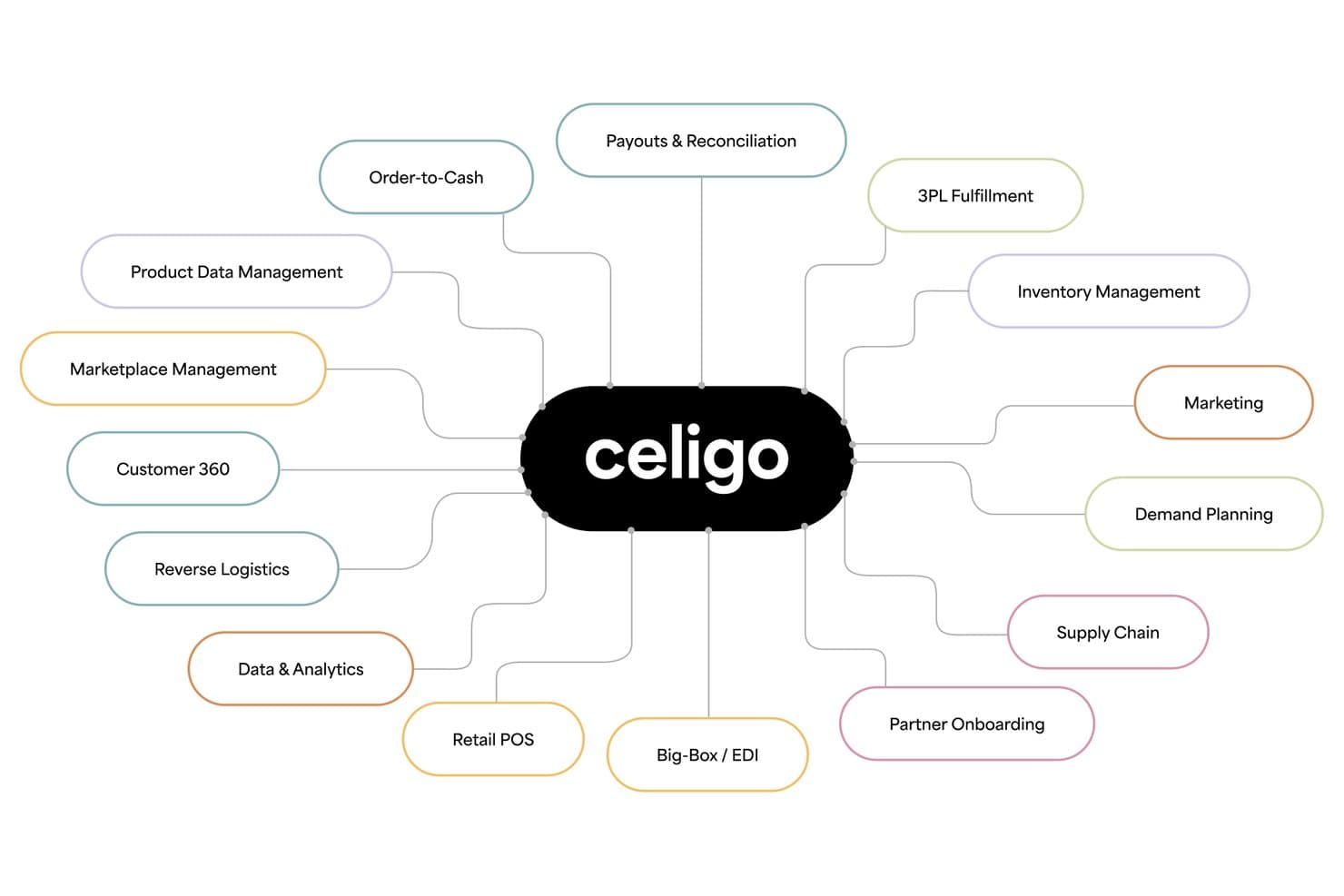
Celigo covers every ecommerce process from supply chain to payouts. Celigo is an iPaaS-based ecommerce automation platform that connects storefronts, marketplaces, ERPs, 3PLs, and marketing tools through prebuilt Integration Apps, AI-powered flow automation, and a 1,000+ connector marketplace to orchestrate order, inventory, and fulfillment workflows across channels.
Who Is Celigo Best For?
Celigo is a strong fit for mid-market and enterprise ecommerce brands running NetSuite or another ERP as their operational backbone and needing to connect it reliably to Shopify, Amazon, or wholesale channels.
Why I Picked Celigo
Celigo earns its spot on my shortlist because it handles the full order-to-cash cycle better than any other iPaaS I've evaluated, especially for brands running NetSuite as their operational core. I'm particularly impressed by its prebuilt Integration Apps for Shopify and NetSuite, which cover orders, inventory, payments, and reconciliation without requiring custom builds. Its AI exception management resolves 95% of errors automatically, and purpose-built agents like the Oversell Check Agent and Amazon Settlement Reconciliation Agent solve real operational problems I've seen trip up high-volume ecommerce teams.
Celigo Key Features
- B2B Manager for EDI: Manage EDI trading partner connections, purchase orders, ASNs, and invoices alongside DTC workflows from a single platform.
- Ora Copilot: An AI assistant embedded in the flow builder that suggests workflows and helps troubleshoot errors during automation design.
- Agent Builder: A low-code environment for creating autonomous AI agents with multi-step logic, multi-system orchestration, and built-in audit trails.
- Flat-rate pricing model: Costs are based on endpoints and flows rather than transaction volume, so peak-season order surges don't drive up your bill.
Celigo Integrations
Celigo provides native integrations with Shopify, NetSuite, Amazon, Walmart, BigCommerce, Salesforce, HubSpot, Snowflake, Stripe, and ShipStation, plus 1,000+ marketplace connectors. Custom connections support HTTP, FTP, JDBC, AS2, GraphQL, and webhooks.
Pros and Cons
Pros:
- Flat-rate pricing for high-volume order peaks
- Prebuilt AI agents for commerce operations
- Handles ERP and ecommerce automation at scale
Cons:
- Complex platform for non-technical ecommerce teams
- No built-in marketing campaign execution
Learn more about Celigo: Best for app integrations
- 14-day free trial and free plan available
- From $19.99/month (billed annually)
Visit WebsiteCustomer Rating:4.7/5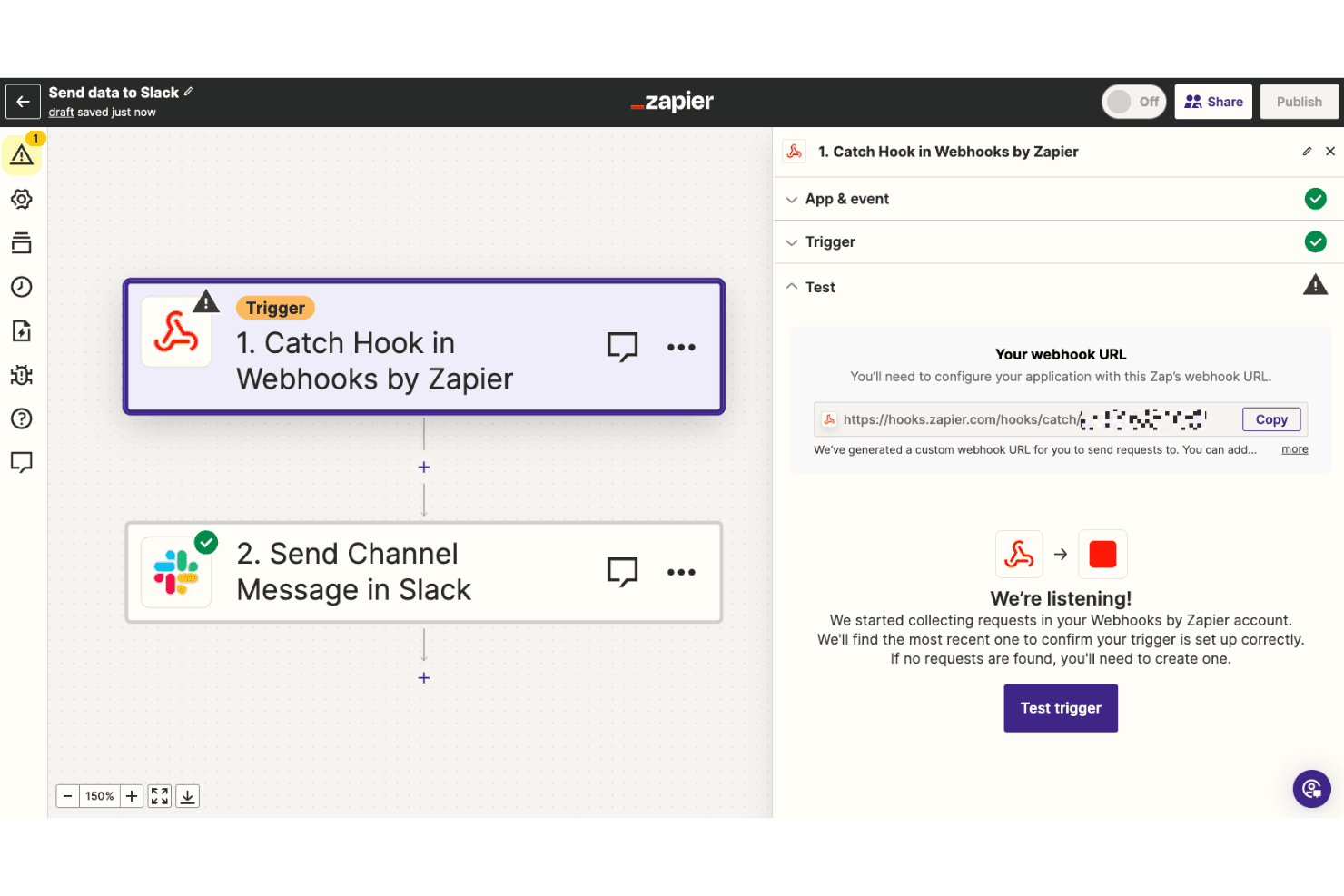
Webhooks connect Zapier with unsupported apps for automation. Zapier is a no-code workflow automation platform that connects 9,000+ apps through a trigger-and-action builder, letting ecommerce teams automate order routing, fulfillment hand-offs, inventory alerts, and customer marketing flows across tools like Shopify, WooCommerce, and BigCommerce.
Who Is Zapier Best For?
Zapier is a strong fit for DTC brands and ecommerce operations teams that need to connect their existing tool stack without writing code.
Why I Picked Zapier
Zapier earns its spot on my shortlist because no other tool comes close to its 9,000+ app ecosystem, which is why I think of it as the connective tissue of any ecommerce stack. I've used Zapier's Paths feature to build conditional order routing logic, like sending high-value Shopify orders to a priority fulfillment queue while flagging fraudulent ones in Slack, all without touching code. Copilot's natural-language builder makes spinning up these workflows fast, even for ops teams without a developer on hand.
Zapier Key Features
- Prebuilt Zap templates: A library of ready-made ecommerce workflows covers common use cases like syncing Shopify orders to Google Sheets, sending abandoned cart emails, and building Google Ads customer lists.
- Delay steps: Built-in delay actions let you stage order hand-offs, holding a fulfillment trigger until a condition window passes.
- AI by Zapier action step: Calls GPT-4 or Claude mid-workflow for tasks like order classification, customer tagging, and product description generation—no API key required.
- Webhooks by Zapier: Catch or send webhooks to connect any app or internal system not covered by a native integration.
Zapier Integrations
Zapier connects to 9,000+ apps, including Shopify, WooCommerce, BigCommerce, Square, eBay, ShipStation, Shippo, Klaviyo, Zoho Inventory, and QuickBooks Online. Webhooks, Code by Zapier, and API Request support custom integrations.
Pros and Cons
Pros:
- Extensive template library for ecommerce workflows
- Copilot AI quickly builds non-technical automations
- Connects over 9,000 business and ecommerce apps
Cons:
- Real-time inventory sync requires a separate tool
- No centralized rule engine for all channels

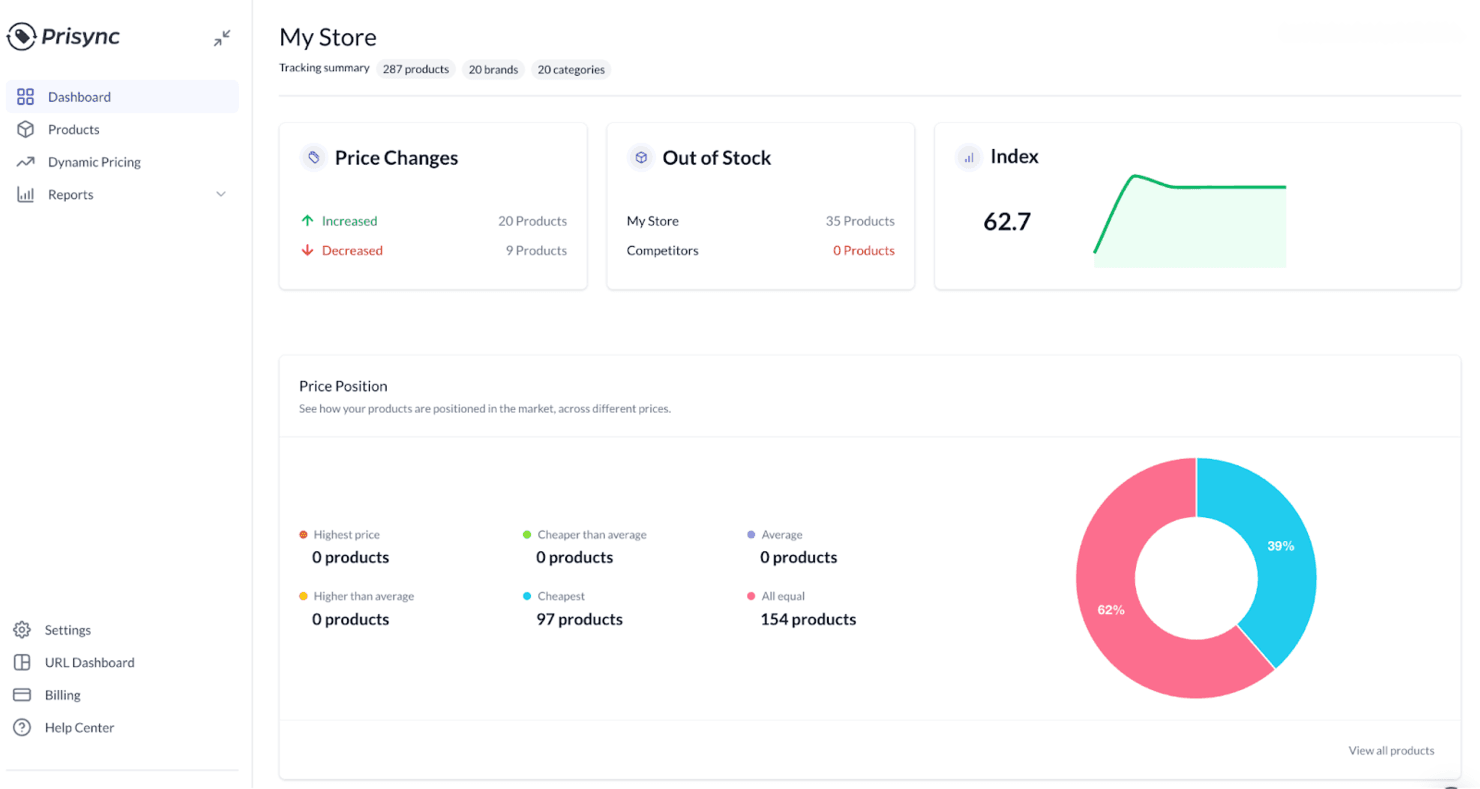
Prisync helps businesses track competitor prices and manage pricing. Prisync is a competitor price monitoring and dynamic repricing tool that tracks rival prices across unlimited URLs and sales channels, monitors stock availability, and automatically adjusts your store's prices based on configurable pricing rules.
Who Is Prisync Best For?
Prisync is a strong fit for online merchandising managers and ecommerce retailers who need to track competitor prices and automate repricing decisions across multiple channels.
Why I Picked Prisync
Prisync earns its spot on my shortlist as the best option for price monitoring because it tracks competitor prices across unlimited URLs and sales channels up to three times per day, covering product variants, stock availability, and worldwide currencies from a single dashboard. I particularly like the dynamic pricing engine, which fires off automatic price adjustments based on rules you define, like beating a competitor's price by a set percentage while protecting a margin floor, without any manual intervention.
Prisync Key Features
- Stock availability monitoring: Tracks whether competitor products are in or out of stock alongside their pricing data, so you can adjust your strategy based on supply signals.
- Product variant price tracking: Monitors prices at the variant level (e.g., size, color) rather than just the parent product, giving you a more accurate competitive picture.
- MAP monitoring: Detects when resellers list your products below the minimum advertised price, available on the Platinum plan.
- Price history analytics: Surfaces historical competitor pricing trends and category performance reports to support longer-term merchandising decisions.
Prisync Integrations
Prisync has five documented integrations: Shopify, Magento 1, Magento 2, Google Shopping, and Amazon. WooCommerce, BigCommerce, and other platforms can connect through its REST API for custom integrations.
Pros and Cons
Pros:
- Reliable customer support with proactive onboarding
- Automated repricing based on custom rules
- Tracks unlimited competitor prices and stock
Cons:
- Workflow automation limited to pricing logic only
- No order, inventory, or fulfillment automation
Learn more about Prisync:
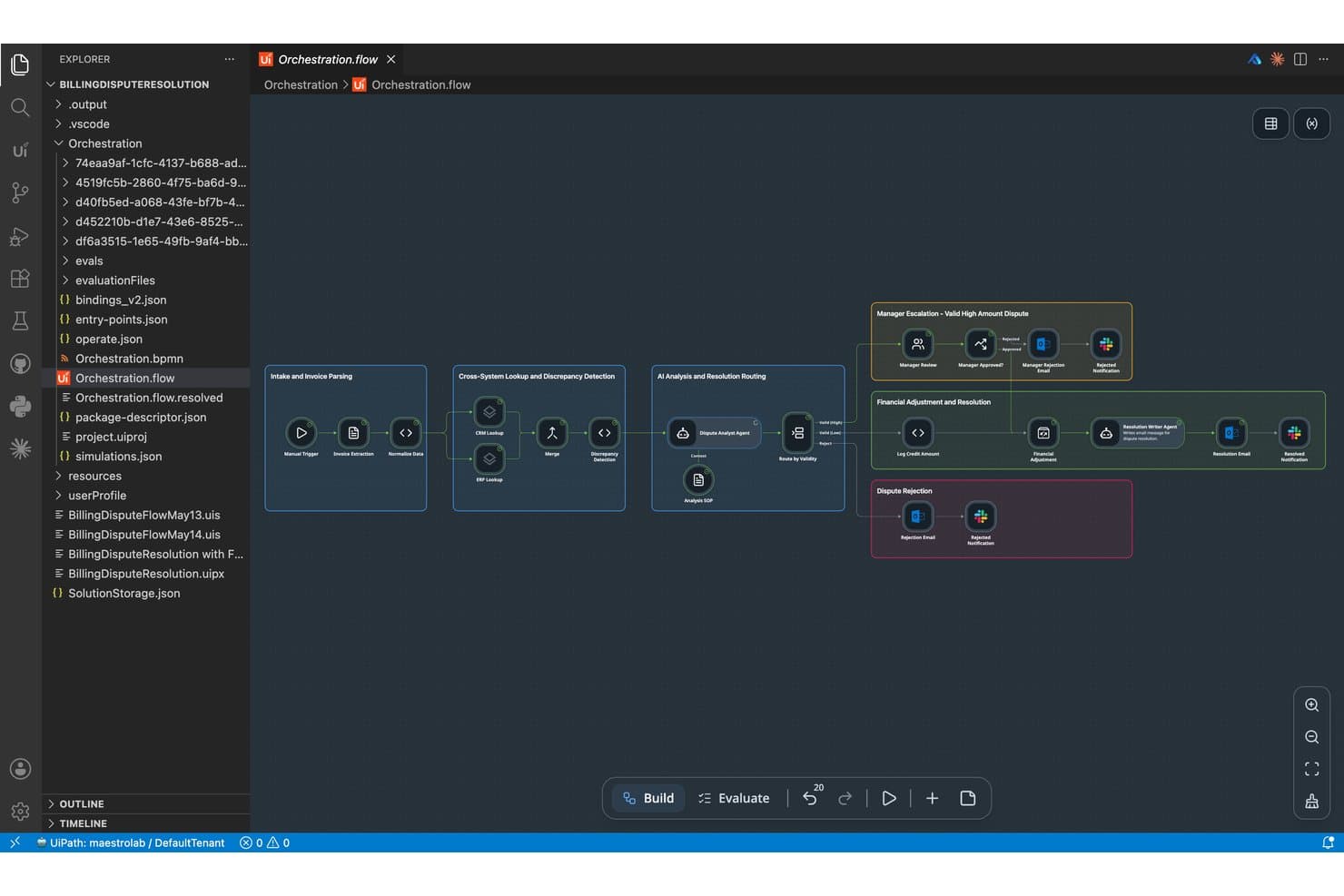
UiPath lets users build AI agent orchestration flows visually. UiPath is an enterprise RPA and agentic automation platform that combines a visual workflow builder, AI-powered document processing, and multi-system orchestration to automate back-office and operational tasks across retail and ecommerce environments.
Who Is UiPath Best For?
UiPath is a strong fit for enterprise retail and operations teams that have developer resources and need to automate complex, multi-system back-office workflows at scale.
Why I Picked UiPath
UiPath earns its spot on my list because its Maestro orchestration engine handles the kind of multi-system, back-office task automation that purpose-built ecommerce tools can't touch. I'm particularly impressed by its Document Understanding capability, which uses AI-powered OCR to extract and process invoices, purchase orders, and shipping documents automatically. In production, that's meant retailers like Landmark Group cutting invoice processing from 90 minutes to 5 minutes per invoice.
UiPath Key Features
- Maestro orchestration engine: Coordinates workflows across AI agents, robots, and human workers within a single, centralized process management layer.
- UiPath Studio and StudioX: A visual, low-code workflow builder with drag-and-drop sequencing, branching logic, error handling, and custom code support (VB.NET, C#).
- Process mining: Analyzes your existing business processes to surface automation opportunities and identify workflow inefficiencies before you build.
- Role-based access control (RBAC): Manages permissions across teams and automation folders in Orchestrator, with full audit logging for governance and compliance.
UiPath Integrations
UiPath offers 136+ prebuilt Integration Service connectors, including Shopify (Preview), WooCommerce, Oracle NetSuite, SAP, Klaviyo, Mailchimp, Stripe, and PayPal. Connector Builder and REST API support enable custom integrations for platforms without dedicated connectors.
Pros and Cons
Pros:
- Offers production-proven orchestration for large retailers
- Enables AI-driven demand and pricing workflows
- Handles complex, multi-system automation at scale
Cons:
- Requires developer resources for custom workflows
- Lacks native ecommerce marketing automation modules
Learn more about UiPath: Best for small businesses
- Free plan available
- From $14.99/user/month
Visit WebsiteCustomer Rating:4.7/5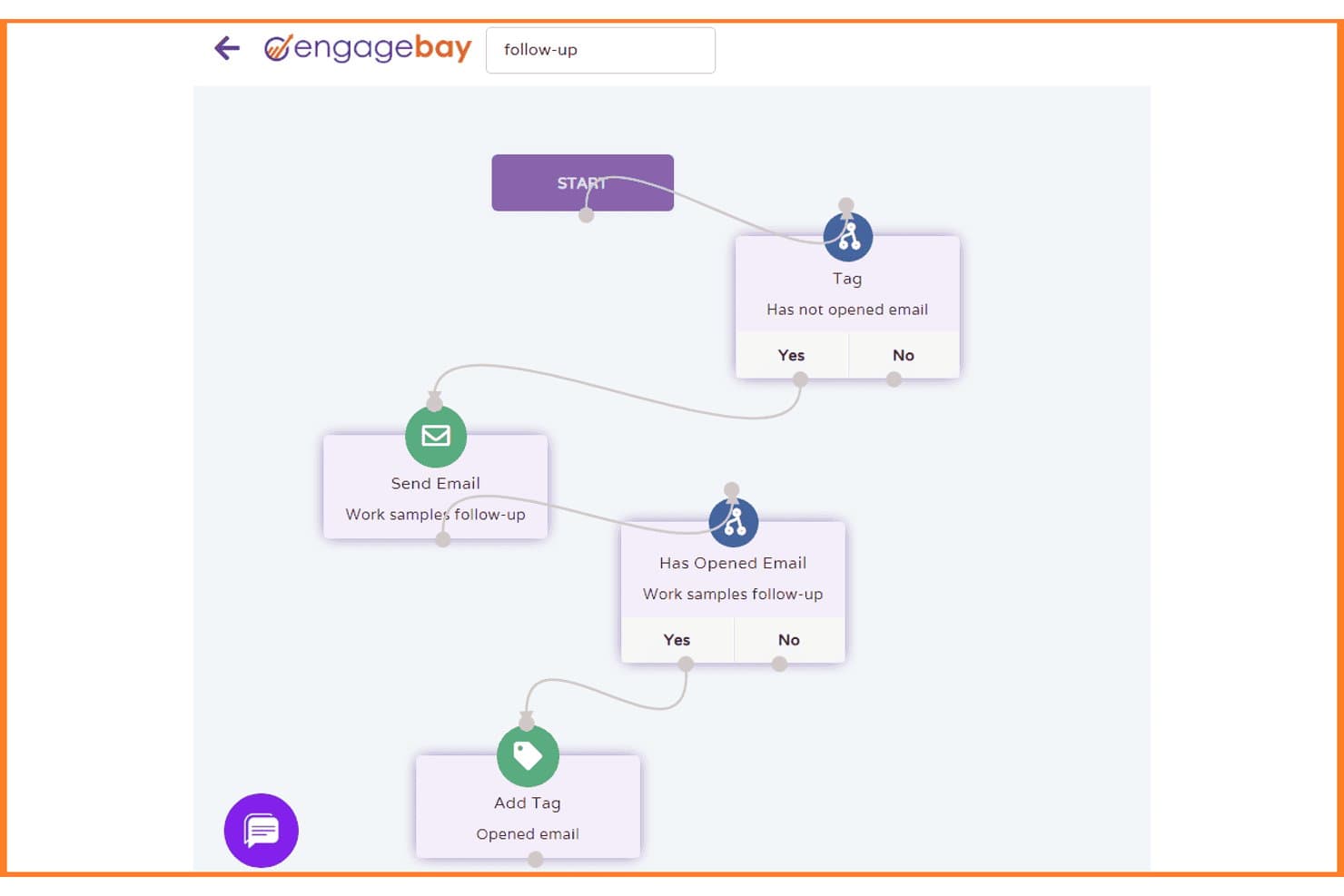
EngageBay automates follow-up emails with conditional branching workflows. EngageBay is an all-in-one CRM and marketing automation platform that combines email marketing, abandoned cart recovery, behavioral segmentation, sales pipeline management, and helpdesk into a single tool.
Who Is EngageBay Best For?
EngageBay is a practical pick for small DTC teams that need CRM, email marketing automation, and customer support in one place without paying enterprise-level prices.
Why I Picked EngageBay
I've included EngageBay in my top picks because it packs CRM, email marketing automation, and helpdesk into one platform at a price small DTC teams can actually afford. I particularly like its pre-built abandoned cart and post-purchase workflows, which trigger across email and SMS based on real Shopify events like cart abandonment and purchase history. Behavioral segmentation using smart lists lets you target customers by what they actually did, not just who they are.
EngageBay Key Features
- Lead scoring: Automatically assigns scores to contacts based on behavioral signals like email opens, link clicks, and site visits.
- Smart list segmentation: Dynamically groups contacts using filters based on tags, custom fields, and activity history.
- Helpdesk ticket automation: Routes, prioritizes, and updates support tickets using rule-based triggers and macros.
- Multi-channel broadcasting: Sends coordinated campaigns across email, SMS, and push notifications from a single workflow.
EngageBay Integrations
EngageBay offers 30+ native integrations, including Shopify, BigCommerce, Xero, Stripe, Gmail, and Slack. It also supports Zapier.
Pros and Cons
Pros:
- Shopify events enable rich behavioral segmentation
- Pre-built ecommerce workflows save setup time
- Combines crm, marketing, and helpdesk in one
Cons:
- Only basic analytics and reporting included
- No native order or inventory automation
Learn more about EngageBay: Best for user analytics
- Free plan available
- From $120/month (billed annually)
Visit WebsiteCustomer Rating:4.5/5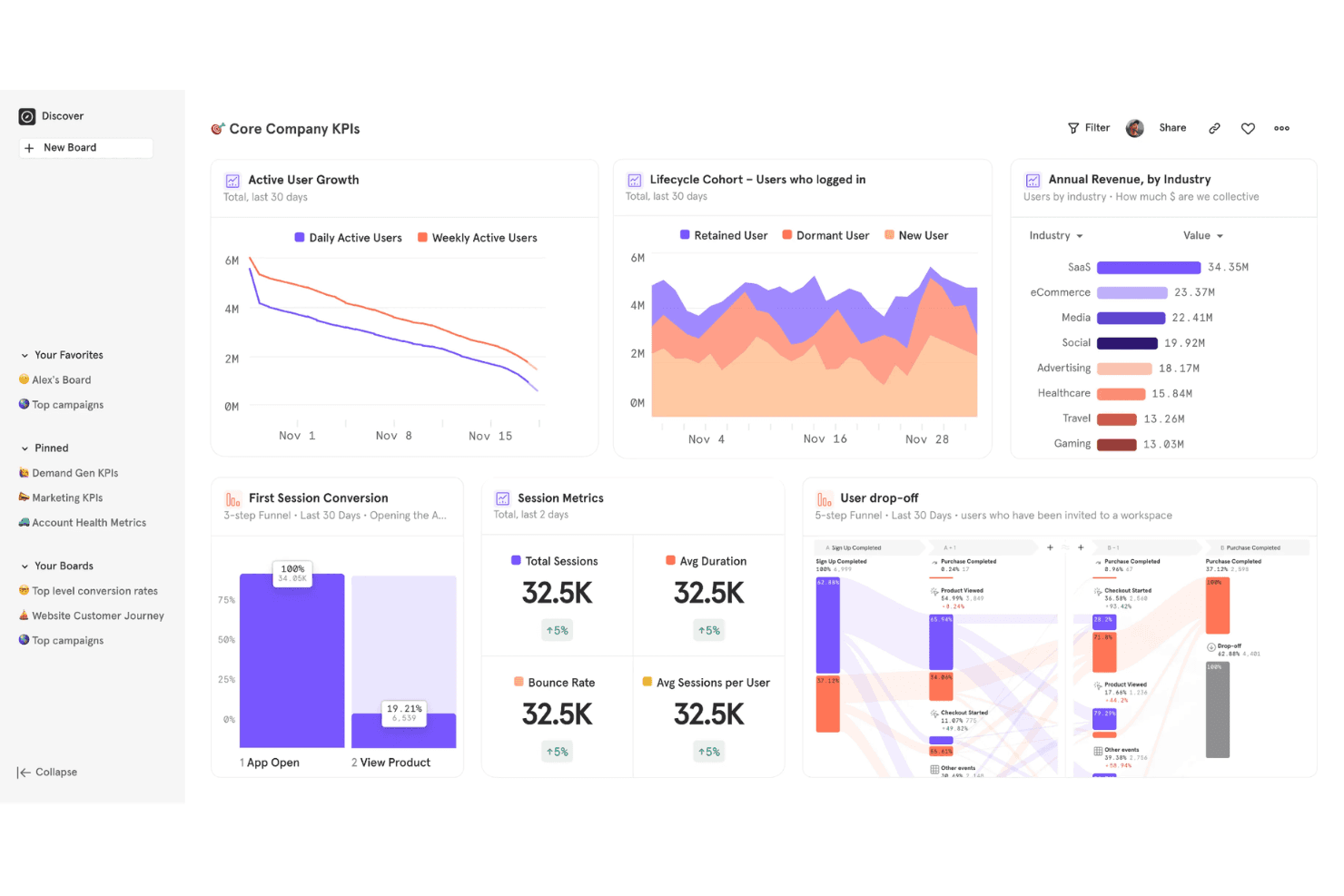
Mixpanel offers a Core Company KPIs dashboard featuring active user growth, lifecycle cohort analysis, annual revenue by industry, session metrics, and user drop-off funnels. Mixpanel is an event-based behavioral analytics platform that tracks user actions across ecommerce storefronts, surfaces funnel drop-off, cohort retention, cart analysis, and A/B testing insights.
Who Is Mixpanel Best For?
Mixpanel suits ecommerce and DTC teams who want to understand why shoppers drop off, which cohorts retain, and how product changes affect revenue—without needing a dedicated data analyst.
Why I Picked Mixpanel
Mixpanel earns its spot on my list because user analytics is where most ecommerce automation decisions should start. I love how the Cart Analysis feature lets you interrogate cart contents at every stage of the purchase journey, so you can see exactly which product categories stall at checkout. The AI Agent continuously monitors your store data and flags anomalies like a sudden drop in repeat buyer rate before you'd catch it manually, and cohort retention reports show precisely when customers lapse so you can time win-back triggers with real precision.
Mixpanel Key Features
- Funnel drop-off analysis: Multi-step funnel reports that pinpoint exactly where shoppers exit the checkout flow, filterable by device type, acquisition channel, or geography.
- Cohort retention reports: Tracks repeat purchase behavior over time, segmenting customers by acquisition source or campaign to measure time-to-second-purchase.
- Behavioral cohort syncing: Exports defined audience segments—like lapsed buyers or VIP spenders—to connected marketing platforms such as Braze or Customer.io to trigger downstream campaigns.
- Ecommerce benchmarking: Compares your store's key metrics against data from 423 billion ecommerce events globally to contextualize performance.
Mixpanel Integrations
Mixpanel offers documented integrations with Braze, MoEngage, Customer.io, Segment, Census, Workato, and Monkedo, plus a Shopify marketplace integration via Vendo. It also provides APIs and third-party connectors, including Zapier, for custom data and workflow connections.
Pros and Cons
Pros:
- Cart analysis pinpoints revenue drop-off stages
- AI surfaces anomalies in shopper behavior
- Deep behavioral analytics for ecommerce teams
Cons:
- Cannot sync or update inventory or orders
- Lacks operational workflow automation features
 Best for social media scheduling
- Free plan available
- From $5/month per channel (billed annually)
Visit WebsiteCustomer Rating:4.4/5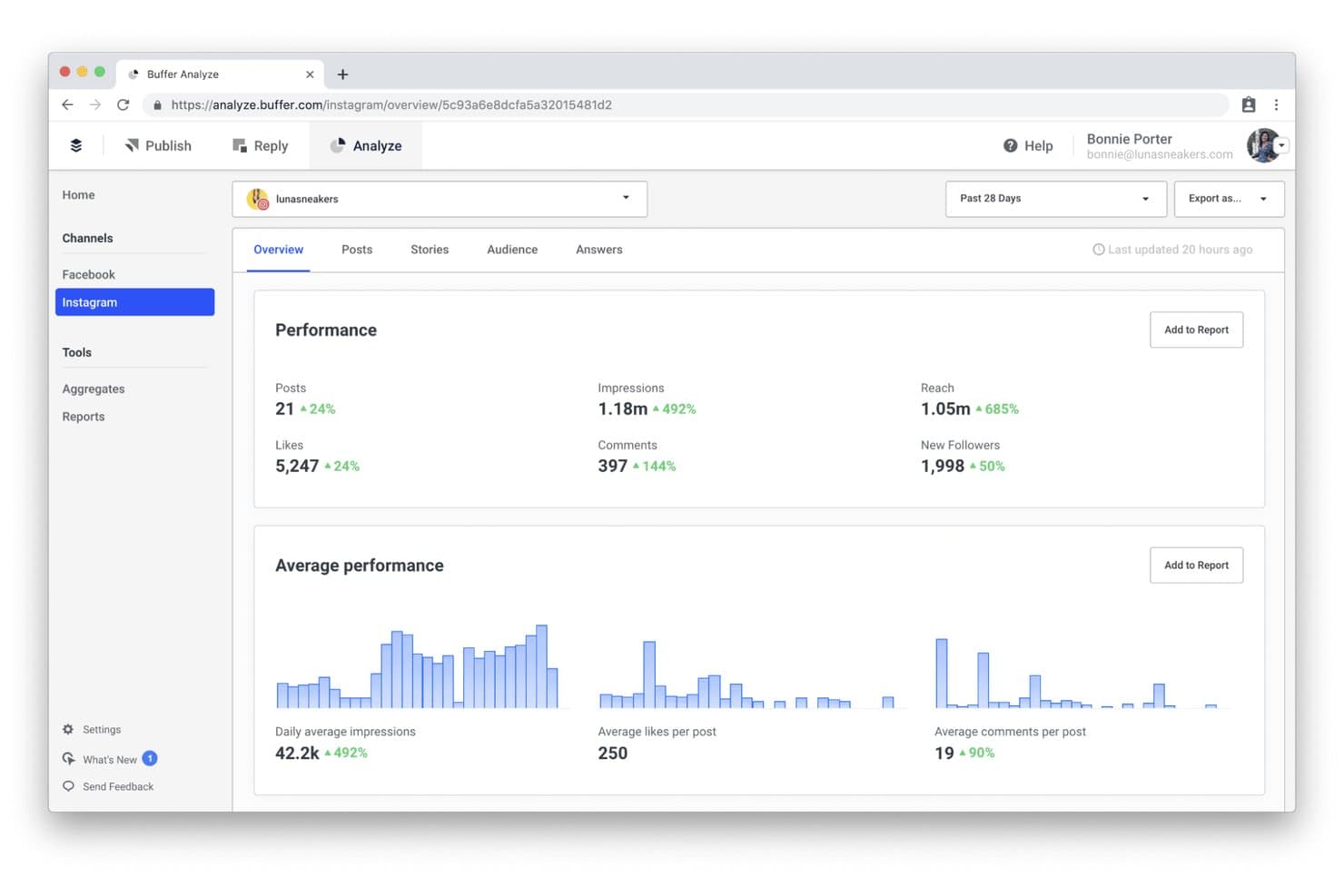
Buffer tracks Instagram performance metrics like reach, impressions, and follower growth. Buffer is a social media scheduling and management platform that lets you plan, publish, and analyze content across 11 social channels, including Instagram, TikTok, Pinterest, LinkedIn, and Threads.
Who Is Buffer Best For?
Buffer suits small DTC brands and solo marketers who want a low-cost, easy way to plan and schedule promotional content across social channels.
Why I Picked Buffer
I picked Buffer as one of the best because it takes the manual grind out of social media scheduling for ecommerce brands running content across multiple platforms. I love how the content queue lets you plan product launch posts, seasonal promotions, and back-in-stock announcements across 11 channels at once, with per-channel copy customization so each post fits its platform. The AI Assistant also speeds up content creation by drafting captions directly from a product brief.
Buffer Key Features
- Content calendar: A visual calendar that lets you map social posts around product launches, promotions, and seasonal campaigns across all connected channels.
- Per-channel copy customization: Lets you tailor post copy, hashtags, and formatting for each social platform from a single scheduling workflow.
- Start Page bio link: A built-in link-in-bio landing page you can use to direct social traffic to specific product pages or promotional URLs.
- Team content approval workflows: A review and approval system that lets team members submit posts for sign-off before they go live.
Buffer Integrations
Buffer doesn’t have native integrations with ecommerce platforms; its documented integrations include Canva, WordPress, Make, and Zapier. A public REST API supports custom connections.
Pros and Cons
Pros:
- AI Assistant drafts social captions from product info
- Helps marketing teams collaborate on content calendar
- Easily schedule posts across 11 social channels
Cons:
- Cannot sync inventory or trigger marketing actions
- No ecommerce automation or order workflows
Learn more about Buffer:
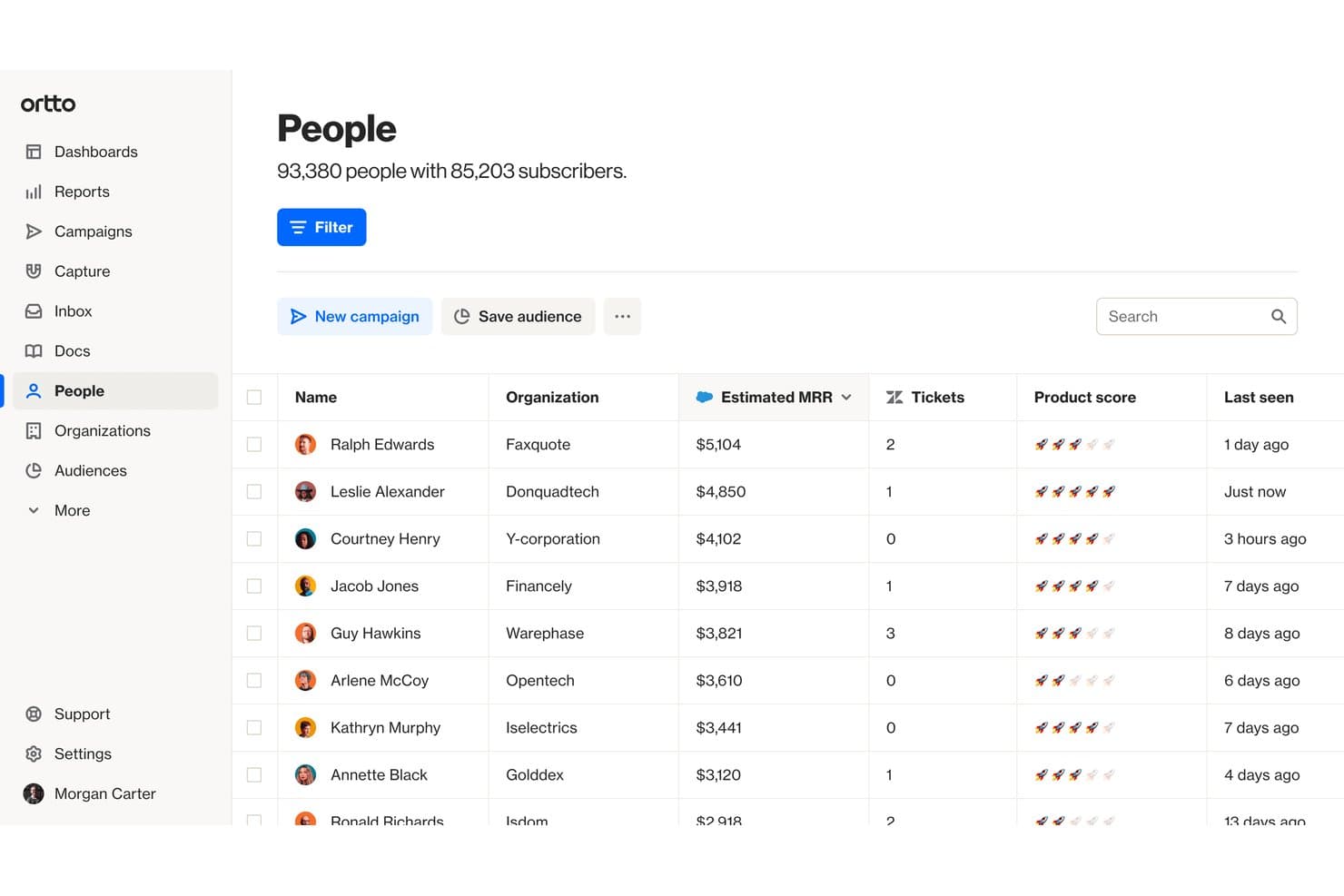
Ortto tracks customer MRR, tickets, and engagement in one view. Ortto is a marketing automation platform built on a native CDP that lets ecommerce brands automate multi-channel customer journeys across email, SMS, push notifications, and ads using a visual, canvas-based journey builder.
Who Is Ortto Best For?
Ortto is a strong fit for DTC ecommerce brands and marketing teams that want to automate the full customer lifecycle—from abandoned cart recovery to post-purchase win-back—across email, SMS, and push in one place.
Why I Picked Ortto
I picked Ortto as one of the best because its visual Journey Builder genuinely sets the bar for lifecycle automation across email, SMS, and push in a single canvas. I love how it handles multi-step abandoned checkout recovery natively, where a sequence can escalate from a reminder email to an SMS with a 10% discount offer, all without leaving the platform. The AI Decision shape takes it further, routing contacts through different journey branches based on real purchase likelihood data.
Ortto Key Features
- Prebuilt ecommerce journey templates: Ready-to-launch automation templates cover scenarios like abandoned checkout recovery, back-in-stock alerts, post-purchase sequences, and win-back campaigns.
- A/B testing within journeys: Test individual messages or entire journey branches directly inside the canvas builder to compare performance before scaling.
- Omnichannel message delivery: Send email, SMS, web push, mobile push, in-app messages, and pop-ups all from within a single journey flow.
- Revenue attribution reporting: Track revenue generated at the journey level and across your full lifecycle program without needing a separate analytics tool.
Ortto Integrations
Ortto offers native integrations with Shopify, WooCommerce, BigCommerce, Magento 2, PrestaShop, Squarespace, Salesforce, HubSpot, Gorgias, and Zendesk. It also supports a REST API, webhooks, and Zapier.
Pros and Cons
Pros:
- Strong AI features for audience and journey design
- Sophisticated abandoned cart and win-back templates
- Visual journey builder unifies omnichannel automation
Cons:
- Reporting depth limited on lower plans
- No order or inventory sync capabilities
Learn more about Ortto: Best for marketing automation
- Free demo available
- Pricing upon request
Visit WebsiteCustomer Rating:4.5/5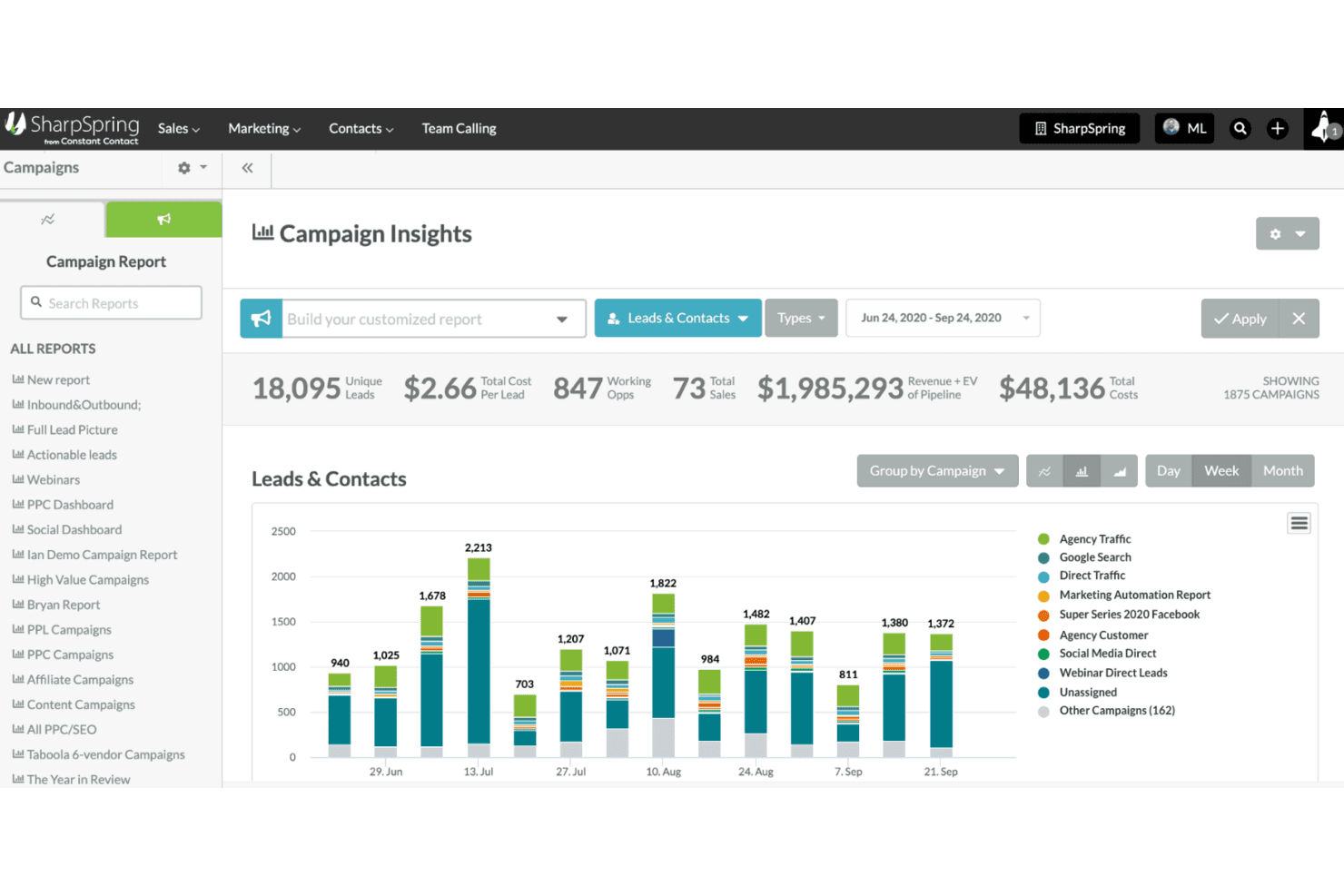
SharpSpring tracks campaign leads, costs, and revenue in one dashboard. SharpSpring is a marketing automation and CRM platform that combines behavioral email automation, lead scoring, workflow builders, and customer segmentation tools.
Who Is SharpSpring Best For?
SharpSpring is a strong fit for ecommerce marketers and digital agencies that need behavioral email automation, lead scoring, and CRM in a single platform.
Why I Picked SharpSpring
I've included SharpSpring in my top picks because its behavioral marketing automation is genuinely built for ecommerce scenarios that move revenue. I like how it handles abandoned cart sequences with dynamic product blocks and urgency timers, then automatically tags high-spend contacts as VIPs for exclusive offer flows. Its behavioral lead scoring, tracking page visits and purchase history, means your team is targeting real buying intent rather than guesswork.
SharpSpring Key Features
- Behavioral lead scoring: Automatically scores contacts based on email opens, page visits, time on page, and form submissions to surface high-intent buyers.
- VisitorID tracking: Identifies anonymous website visitors and builds behavioral profiles that feed directly into segmentation and automation workflows.
- A/B split testing for email: Tests subject lines, content, and send times across email campaigns to identify what drives the most engagement and conversions.
- Campaign ROI reporting: Tracks revenue attribution across campaigns with customizable dashboards that connect marketing activity to actual sales outcomes.
SharpSpring Integrations
SharpSpring has four documented native integrations, including Shopify, Salesforce, Litmus, and PandaDoc. Marketplace integrations include WooCommerce, Veeqo, Stripe, AdRoll, and TradeGecko; it also supports API connections and Zapier.
Pros and Cons
Pros:
- Unlimited users at every plan tier
- Includes VIP and loyalty automation flows
- Strong behavioral triggers for cart recovery
Cons:
- Native ecommerce integrations limited to Shopify
- No order or inventory automation features
Learn more about SharpSpring:
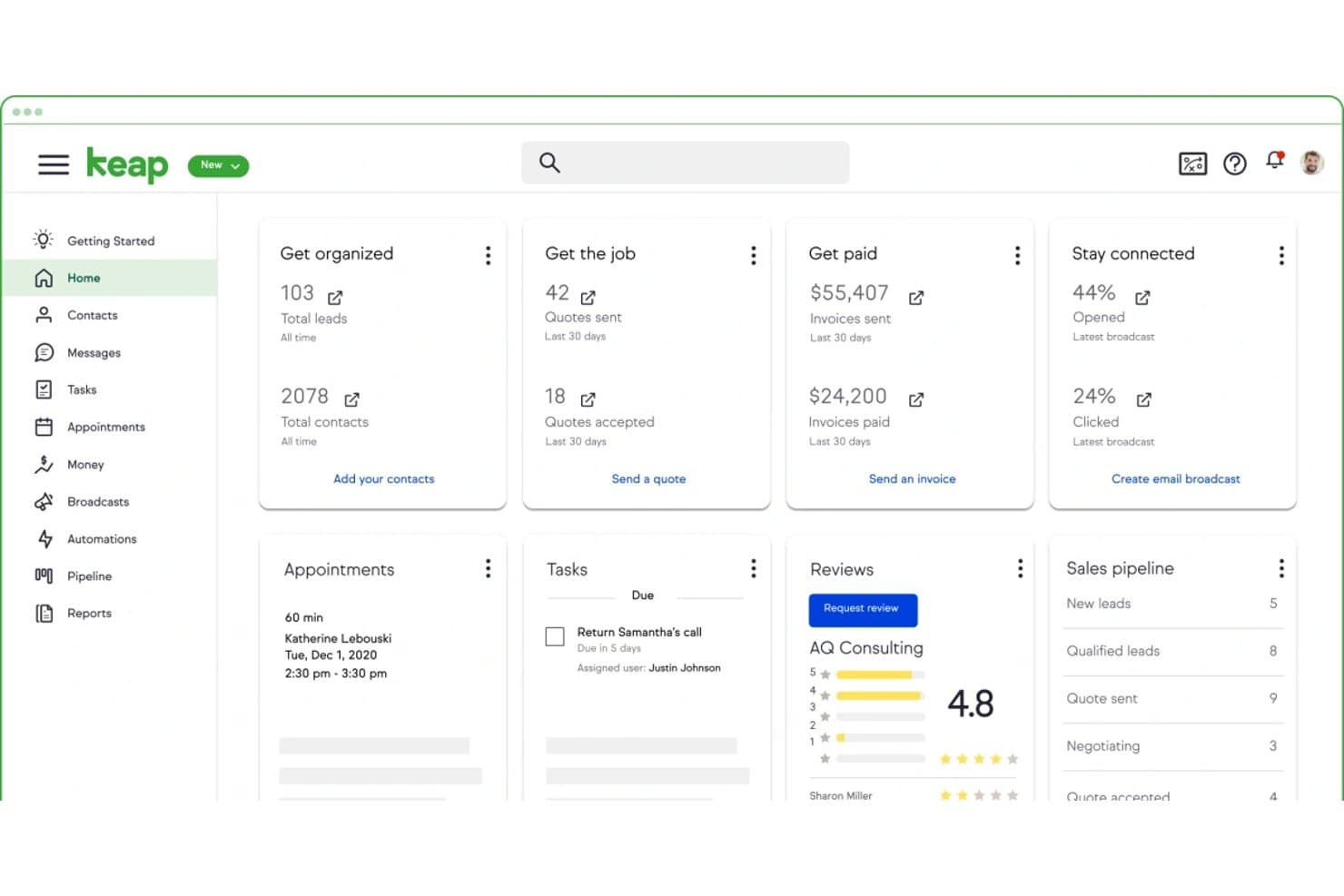
Keap centralizes leads, invoices, tasks, and email stats in one dashboard. Keap is a small business CRM and marketing automation platform that combines email and SMS marketing, sales pipeline management, checkout forms, payment processing, and a visual workflow builder with pre-built automation templates for customer lifecycle campaigns.
Who Is Keap Best For?
Keap is a strong fit for small DTC brands that want to automate customer lifecycle marketing—abandoned cart, win-back, and post-purchase sequences—without managing multiple separate tools.
Why I Picked Keap
I've included Keap in my top picks because it's one of the few small business CRM platforms that folds customer lifecycle automation directly into the buying journey. I love that it ships with 52+ pre-built automation recipes, so setting up abandoned cart sequences or post-purchase win-back campaigns takes minutes, not days. Its AI Automation Assistant can generate full campaign templates from a business goal, which I find genuinely useful for DTC brands running lean teams.
Keap Key Features
- Lead scoring: Ranks contacts by engagement and purchase behavior so you can prioritize high-value customer segments for targeted follow-up.
- Native checkout forms: Embeddable order forms with built-in upsell prompts, order bumps, and promo code support for direct sales funnels.
- Contact segmentation: Tags and filters contacts by purchase history, behavior, and demographics to enable precise list targeting.
- Subscription billing automation: Manages recurring payments, renewal reminders, and failed payment follow-ups without manual intervention.
Keap Integrations
Keap offers approximately 230 native and supported connectors overall. Relevant options include native Shopify, Keap Pay, Stripe, PayPal, and QuickBooks Online integrations, plus a REST API, webhooks, and Zapier.
Pros and Cons
Pros:
- AI assistant generates automation sequences quickly
- Pre-built automation recipes for lifecycle campaigns
- Built-in checkout forms support marketing funnels
Cons:
- Fulfillment automation requires third-party tools
- No inventory or catalog management features
Learn more about Keap:
Andre verktøy for automatisering av netthandel
Her er noen flere alternativer for verktøy for automatisering av netthandel som ikke kom med på kortlisten min, men som likevel er verdt å sjekke ut:
- 11ZendeskBest for customer support
- 12BrevoBest for email campaigns
- 13AfterShipBest for shipment tracking
- 14HubSpot MarketingBest for inbound marketing
- 15Recharge.comBest for subscription billing
- 16DripBest for email personalization
- 17Mailchimp Best for email templates
- 18ActiveCampaignBest for customer experience automation
- 19SenderBest for simple email newsletters
- 20ShipStationBest for shipping solutions
- 21KlaviyoBest for targeted email campaigns
- 22OmnisendBest for ecommerce marketing
- 23GetResponseBest for email list growth
- 24Judge.meBest for product reviews
- 25HunchBest for dynamic ad campaigns
- 26Shopify FlowBest for Shopify automation
- 27CartHookBest for post-purchase upsells
How I Evaluate Ecommerce Automation Tools
I split my evaluation into baseline criteria—like whether a tool can actually sync inventory across Shopify and Amazon—and differentiators that separate good from great.
Core Functionality (Table Stakes For This List)
When I'm selecting tools for my list, I rank each one on a scale from 0 (does not offer the functionality) to 5 (excels in this area) for each core functionality listed below. Then, I calculate the tool's total score into a percentage. Each tool needs to achieve a minimum total score of 65% to be considered for inclusion.
- Workflow Automation Builder: I look for a visual, trigger-and-action builder where teams can create multi-step automations—like tagging high-value orders and routing them to a priority queue—without code.
- Ecommerce Platform Integrations: Native connectors to platforms like Shopify, BigCommerce, WooCommerce, and Amazon matter here, especially bidirectional data access across orders, products, and customers.
- Order & Fulfillment Automation: This covers how well a tool handles real fulfillment logic—splitting orders by warehouse location, placing fraud holds, or routing items to the right 3PL based on SKU type.
- Inventory & Catalog Sync: I evaluate whether stock levels, pricing, and product data stay in sync across channels in near real time, particularly for sellers managing multiple storefronts or marketplaces.
- Customer & Marketing Triggers: Tools should fire automations based on lifecycle events—think abandoned carts, first-time purchases, or VIP spend thresholds—and connect those triggers to email, SMS, or loyalty platforms.
- Multi-Channel Rule Management: I check whether you can manage conditional logic across all your sales channels from one place, with the flexibility to set channel-specific overrides when needed.
Once I have a list of tools that meet this criteria, I consider what sets each platform apart.
Differentiating Factors (What Sets Vendors Apart)
Here's how I compare and contrast different vendors:
Standout Features
Prebuilt workflow templates are a major differentiator—I look for libraries with ready-made recipes for scenarios like back-in-stock alerts or loyalty tier upgrades, since they cut setup time dramatically. AI-powered suggestions take this further when a platform can recommend automations based on your store data or flag anomalies in order patterns. I also evaluate reporting dashboards that show automation performance metrics like tasks completed, errors caught, and estimated time saved per workflow.
Beyond Features
Scalability matters—I check whether a platform can handle order volume spikes during flash sales or holiday peaks without throttling workflows. Pricing transparency is equally important, especially how costs scale with automation usage; a tool that's affordable at 500 orders a month but unpredictable at 50,000 creates real budget risk. I also evaluate ecosystem depth, looking at native connectors to ERPs, 3PLs, and POS systems your team already uses, plus iPaaS compatibility for bridging niche tools in your stack.
Hva er verktøy for automatisering av netthandel?
Verktøy for automatisering av netthandel er programvare som automatiserer repetitive oppgaver på tvers av netthandelsdriften din – som lagersynkronisering, ordreruting, markedsføringskampanjer og kundeoppfølging.
Disse verktøyene brukes av ledere innen netthandel, markedsførere og driftsteam for å redusere manuelt arbeid, forhindre menneskelige feil og fremskynde arbeidsflyter.
Fra synkronisering av lagerbeholdning på tvers av Shopify og Amazon til utløsning av automatiserte e-post- og SMS-flyter hjelper de deg med å drive en mer effektiv og skalerbar nettbutikk.
Slik velger du verktøy for automatisering av netthandel
Å velge verktøy for automatisering av netthandel handler ikke bare om å jakte på funksjoner – det handler om å løse de faktiske utfordringene i arbeidsflyten din. Det riktige verktøyet bør redusere manuelle oppgaver, kobles til de eksisterende systemene dine og skalere med virksomheten din uten å skape nye problemer underveis.
Slik kan du dele opp valget i tydelige og ukompliserte trinn.
| Trinn | Hva du skal gjøre |
|---|---|
| TrinnKartlegg utfordringene dine | Hva du skal gjøreLag en liste over de mest tidkrevende oppgavene dine – som masseoppdateringer av SKU-er, oppfølging av forlatte handlekurver eller feil i ordreruting. |
| TrinnGå gjennom systemene dine | Hva du skal gjøreSjekk hvilke e-handelsplattformer, CRM-systemer og apper du allerede bruker, slik at du vet hva automatiseringsverktøyet må kunne integreres med. |
| TrinnPrioriter arbeidsflyter | Hva du skal gjøreBestem hvilke arbeidsflyter som skal automatiseres først – lagersynkronisering, e-postkampanjer, kundeservice – og fokuser på verktøy som er best på disse områdene. |
| TrinnKontroller funksjonsdybden | Hva du skal gjøreIkke bare kryss av i bokser – sørg for at verktøyet faktisk kan håndtere omfanget, kompleksiteten og særtilfellene dine uten å svikte. |
| TrinnTest brukervennligheten med teamet ditt | Hva du skal gjøreLa de faktiske brukerne dine sitte i førersetet. Hvis driftslederen din ikke finner ut av det på 20 minutter, passer det ikke. |
| TrinnSammenlign pris per resultat | Hva du skal gjøreSe forbi månedsavgiften. Vil dette verktøyet hente tilbake forlatte handlekurver, redusere mengden kundestøtte eller kutte ned på timer med manuell registrering? |
| TrinnUndersøk implementering og kundestøtte nøye | Hva du skal gjøreFinn ut om oppsettet gjøres på egen hånd eller av leverandøren, og hvor raskt du får hjelp hvis noe går galt i lanseringsuken. |
| TrinnGjennomfør et testprosjekt | Hva du skal gjøreFør du forplikter deg, automatiserer du én viktig arbeidsflyt – for eksempel fra ordre til levering – for å se om den raskt gir reell verdi. |
Funksjoner i verktøy for automatisering av e-handel
Ikke alle automatiseringsverktøy gjør den samme jobben – og det er nettopp poenget.
Noen fokuserer på å synkronisere lagerbeholdning på tvers av plattformer, andre automatiserer markedsføringskampanjene dine, mens enkelte knytter sammen hele teknologistakken din med betingede arbeidsflyter.
De beste verktøyene håndterer spesifikke utfordringer innen e-handel uten å tvinge deg til å lappe sammen et dusin apper.
Her er hva du bør se etter:
- Tilpassbare arbeidsflyter. Du bør kunne definere utløsere og resultater basert på de faktiske prosessene dine – som å sende SMS når en ordre med høy verdi sendes, eller rute returer til et bestemt lager.
- Lagersynkronisering på tvers av kanaler. Hvis du selger på Shopify, Amazon og BigCommerce, bør lagernivåene dine oppdateres i sanntid overalt.
- Automatiserte markedsføringsflyter. Dette omfatter e-poster om forlatte handlekurver, oppfølging etter kjøp, SMS-kampanjer og målrettede produktanbefalinger – uten at du må bygge hver enkelt fra bunnen av.
- Integrerte kundedata. Du ønsker en samlet oversikt over kjøpshistorikk, surfeatferd og engasjement – slik at CRM-, e-post- og kundestøtteverktøyene dine ikke trenger å gjette.
- Appintegrasjoner. Verktøy som Zapier og innebygde integrasjoner med Shopify, WooCommerce, Klaviyo, HubSpot og 3PL-leverandøren din kan være avgjørende for om automatiseringen lykkes.
- Rapporteringspaneler. Innsyn i sanntid i hva som fungerer – åpningsrater, leveringstider og kundefrafall – gjør det mulig å justere arbeidsflyter og dokumentere avkastningen på investeringen.
- Feilhåndtering og reserveløsninger. Hva skjer når en automatisering mislykkes eller en synkronisering faller ut? De beste verktøyene varsler om problemer, omdirigerer oppgaver og sørger for at driften ikke stopper opp.
Fordeler med verktøy for automatisering av e-handel
Automatisering av e-handel handler ikke om å gjøre mer – det handler om å gjøre de riktige tingene raskere og med færre feil. Når teamet ditt drukner i CSV-filer, forsinkede sporingsoppdateringer og manuelle kampanjeutsendelser, koster det deg salg, lojalitet og overskudd.
Dette får du når automatiseringen er riktig gjennomført:
- Færre feil og mer fornøyde kunder. Automatisering av ordreoppdateringer, returer og påfylling av lager betyr færre uteblitte forsendelser og kundestøttehenvendelser. Det gir en konkret effekt på kundelojalitet og tilfredshet.
- Sparte timer hver uke. Slutt å merke kunder manuelt, importere ordrer eller sende svar på «Hvor er pakken min?». Den tiden kan brukes på strategi i stedet for rutinearbeid.
- Bedre målretting og høyere konvertering. Bruk kundeatferd til å utløse e-poster, SMS-er og produktanbefalinger som føles personlige – uten å løfte en finger etter oppsettet.
- Reell skalerbarhet. Enten du håndterer 100 eller 10 000 ordrer i måneden, holder automatiseringen driften effektiv uten at du må ansette en ekstra koordinator hver gang volumet øker.
- Ryddigere data og bedre beslutninger. Når CRM-systemet, nettbutikken og markedsføringsverktøyene dine er synkronisert, famler du ikke i blinde. Du får innsikt i kundeatferd, avkastning på markedsføringen og flaskehalser i driften.
Kostnader og priser for verktøy for automatisering av e-handel
Verktøy for automatisering av e-handel dekker et bredt spekter av funksjoner – fra markedsføringsautomatisering og lagersynkronisering til abonnementsfakturering og kundestøtte – og prismodellene varierer derfor like mye.
Det er avgjørende å forstå hvordan du blir belastet utover den oppgitte månedsavgiften, slik at du unngår overraskelser og holder avkastningen på investeringen på rett spor.
I stedet for å samle alle verktøy i generiske abonnementsnivåer har vi brutt ned prisene etter verktøykategori.
På denne måten får du et tydelig bilde av hvilke faktorer som driver kostnadene for hver type programvare for automatisering av e-handel, hva du bør være oppmerksom på, og hvordan prisene kan øke etter hvert som nettbutikken din vokser.
| Verktøykategori | Typisk prismodell | Hva du bør være oppmerksom på |
|---|---|---|
| VerktøykategoriMarkedsføringsautomatisering | Typisk prismodellVanligvis priset etter størrelsen på kontaktlisten eller antallet sendte e-poster | Hva du bør være oppmerksom påKostnadene øker kraftig når kontaktlisten og SMS-volumet vokser. Vær oppmerksom på overforbruksgebyrer for utsendelser og begrensninger på automatiseringsarbeidsflyter på lavere nivåer. |
| VerktøykategoriSynkronisering av lagerbeholdning og bestillinger | Typisk prismodellOfte belastet etter antall SKU-er, antall bestillinger eller tilkoblede salgskanaler | Hva du bør være oppmerksom påOppsett med flere butikker og store SKU-kataloger kan presse kostnadene opp. Noen leverandører krever ekstra gebyrer for API-tilgang eller avansert rapportering. |
| VerktøykategoriAbonnementsfakturering | Typisk prismodellVanligvis tilpassede tilbud basert på en prosentandel av inntektene, i tillegg til månedlige gebyrer | Hva du bør være oppmerksom påOppstartsgebyrer og transaksjonsgebyrer er vanlig. Prisene kan variere avhengig av betalingsløsninger og hvor fleksibel faktureringen er. |
| VerktøykategoriArbeidsflytautomatisering | Typisk prismodellPer bruker eller antall oppgavekjøringer (automatiserte arbeidsflyter) | Hva du bør være oppmerksom påLavere nivåer begrenser antallet oppgavekjøringer og tilkoblinger til premium-apper, noe som krever oppgraderinger etter hvert som volumet øker. |
| VerktøykategoriKundestøtte | Typisk prismodellBelastet per agent eller brukerlisens | Hva du bør være oppmerksom påAvanserte funksjoner som støtte i flere kanaler, SLA-garantier og rapportering medfører ofte ekstra kostnader. |
Ytterligere prisbetraktninger
- Verktøy for markedsføringsautomatisering som Klaviyo, Brevo og Omnisend er ofte billige i starten, men kostnadene øker raskt når kontaktlisten eller antallet SMS-utsendelser vokser – planlegg derfor for skalering.
- Løsninger for synkronisering av lagerbeholdning og bestillinger kan ha tilleggsgebyrer for flere netthandelsplattformer eller lagre. Hvis du driver i flere kanaler, bør du sette av ekstra budsjett til disse integrasjonene.
- Plattformer for abonnementsfakturering som Recharge krever ofte oppstartsgebyrer og kan belaste transaksjonsgebyrer eller prosentandeler av inntektene, noe som påvirker lønnsomheten for mindre abonnementer.
- Plattformer for arbeidsflytautomatisering som Zapier begrenser antallet gratis oppgavekjøringer eller oppgavekjøringer på lavere nivåer, og avanserte arbeidsflyter med betinget logikk krever vanligvis betalte abonnementer.
- Leverandører av kundestøtteprogramvare, inkludert Zendesk, kan kreve betaling for flere støttekanaler (chat, telefon) og raskere SLA-nivåer. Ta derfor høyde for dette i budsjettet hvis du trenger kundestøtte på høyt nivå.
Hvis netthandelsbedrifter forstår disse prisstrukturene på forhånd, kan de unngå uventet høye kostnader og velge et verktøy som samsvarer med både dagens behov og fremtidig vekst. Velg med omhu for å holde automatiseringskostnadene forutsigbare og håndterbare etter hvert som nettbutikken vokser.
Vanlige spørsmål om verktøy for netthandelsautomatisering
Her er svar på noen vanlige spørsmål om verktøy for netthandelsautomatisering:
Hvordan håndterer verktøy for netthandelsautomatisering datasikkerhet og samsvar?
Datasikkerhet er viktig når du automatiserer kundeinformasjon og betalingsdata. De beste plattformene for netthandelsautomatisering følger bransjestandarder som GDPR og PCI DSS, krypterer data under overføring og lagring, og tilbyr tilgangskontroller basert på roller.
Kontroller alltid et verktøys sikkerhetssertifiseringer og hvordan leverandøren håndterer sikkerhetskopier og varsler om datainnbrudd, slik at du beskytter nettbutikken og kundenes tillit.
Kan verktøy for netthandelsautomatisering integreres med min eksisterende netthandelsplattform og CRM?
De fleste ledende verktøy tilbyr innebygde integrasjoner med populære netthandelsplattformer som Shopify, WooCommerce og BigCommerce, samt markedsplasser som Amazon.
De kan også kobles til CRM-systemer som HubSpot, Salesforce og Klaviyo. Når du velger et verktøy, bør du kontrollere at integrasjonene dekker appene du er avhengig av, og at de støtter datasynkronisering i sanntid for å holde arbeidsflytene sømløse.
Hvor mye teknisk kompetanse trenger jeg for å konfigurere og administrere netthandelsautomatisering?
Hvor komplisert konfigureringen er, varierer mye. Noen plattformer har dra-og-slipp-redigerere og forhåndsbygde maler som alle kan bruke.
Andre, særlig verktøy for arbeidsflytautomatisering eller RPA-verktøy som UiPath, kan kreve støtte fra utviklere for avanserte tilpasninger. Ta hensyn til teamets tekniske kapasitet og tilgangen på hjelp med innføring og kundestøtte når du tar valget.
Fungerer verktøy for netthandelsautomatisering for salg i flere kanaler og på tvers av landegrenser?
Ja, men det avhenger av verktøyet. Løsninger for synkronisering av lagerbeholdning og bestillinger støtter vanligvis oppsett med flere kanaler og synkroniserer lagerbeholdning og bestillinger på tvers av Shopify, Amazon, BigCommerce og andre plattformer.
Plattformer for markedsføringsautomatisering støtter vanligvis kampanjer på flere språk og med geografisk målretting. Kontroller om verktøyet håndterer valutaomregning, skatteregler og regionalt samsvar hvis du selger internasjonalt.
Hvordan forbedrer automatiseringsverktøy for netthandel kundebevaring og lojalitet?
Automatiseringsplattformer forbedrer kundebevaringen ved å utløse personaliserte e-post- og SMS-kampanjer basert på kundeatferd – som oppfølging etter kjøp, produktanbefalinger og lojalitetsbelønninger.
De hjelper deg med å segmentere kunder for målrettet markedsføring og automatisere administrasjonen av lojalitetsprogrammer, slik at du kan skape kontinuerlig engasjement uten manuelt arbeid.
Hva bør jeg forvente når det gjelder løpende vedlikehold og støtte for automatiseringsverktøy for netthandel?
Automatisering er ikke «konfigurer det og glem det». Du må overvåke arbeidsflyter for å oppdage feil, oppdatere utløsere etter hvert som virksomheten endrer seg, og administrere integrasjoner når API-er oppdateres.
Gode leverandører tilbyr proaktiv støtte, detaljerte oversikter og varsler for å oppdage problemer tidlig. Sørg for at leverandørens supportkanaler og tjenestenivåavtaler passer til driftsbehovene dine.