

Programvare for oppgavehåndtering i detaljhandelen holder butikkteamene samkjørte ved at du kan tildele, følge opp og fullføre driftsoppgaver på alle lokasjoner – enten du driver én enkelt butikk eller en global kjede. Når du trenger at alle butikkene oppfyller standardene, ruller ut kampanjer og dokumenterer at arbeidet er utført, er du avhengig av disse verktøyene for å ha kontroll. Denne veiledningen skreller bort markedsføringsspråket for å vise deg de beste alternativene for 2026, med fokus på løsninger som kobler hovedkontoret sammen med ansatte i butikk, støtter sanntidsoversikt og bruker kunstig intelligens til å forbedre gjennomføring, hylleetterlevelse og engasjement i teamet. Hvis du ønsker å styrke butikkdriften og oppnå jevne resultater, har du kommet til rett sted.
Why Trust Our Software Recommendations
6,700+
Reviews
20
Industry experts
16+
Evaluation factors
14
Years
Our team has been testing and reviewing software since 2012. As retail leaders ourselves, we know how difficult—and important—it is to choose the right software.
For this guide, we evaluated tools using hands-on testing and independent research, scoring tools using our selection criteria.
Our reviews reflect our independent judgment—not a sales pitch.
Sammenligningstabell: Programvare for oppgavehåndtering i detaljhandelen
Denne sammenligningstabellen oppsummerer prisopplysninger for mine beste utvalgte programvarer for oppgavehåndtering i detaljhandelen.
| Tool | Best For | Trial Info | Price | ||
|---|---|---|---|---|---|
| 1 | Best for AI photo audits across store locations | 14-day free trial + free demo available | Pricing upon request | Website | |
| 2 | Best for linking store tasks to frontline training | Free demo available | Pricing upon request | Website | |
| 3 | Best for AI-driven shelf and store task execution | Free demo available | Pricing upon request | Website | |
| 4 | Best for HQ-to-store task execution at scale | Free demo available | Pricing upon request | Website | |
| 5 | Best for AI-scored photo audits across store networks | Free demo available | Pricing upon request | Website | |
| 6 | Best for AI shelf compliance across store networks | 15-day free trial + free demo available | Pricing upon request | Website | |
| 7 | Best for AI-driven shelf compliance at scale | Free demo available | Pricing upon request | Website | |
| 8 | Best for frontline task execution at scale | Free demo available | Pricing upon request | Website | |
| 9 | Best for gamified frontline task and compliance ops | Not available | Pricing upon request | Website | |
| 10 | Best for chain-wide store execution at scale | Free demo available | Pricing upon request | Website |


Anmeldelser av programvare for oppgavehåndtering i detaljhandelen
Nedenfor finner du mine detaljerte sammendrag av den beste programvaren for oppgavehåndtering i detaljhandelen som kom med på kortlisten min. Anmeldelsene mine gir et detaljert innblikk i funksjonene, de beste bruksområdene og mulighetene i hver programvare, slik at du kan finne den beste løsningen for deg.
 Best for AI photo audits across store locations
- 14-day free trial + free demo available
- Pricing upon request
Visit WebsiteCustomer Rating:4.9/5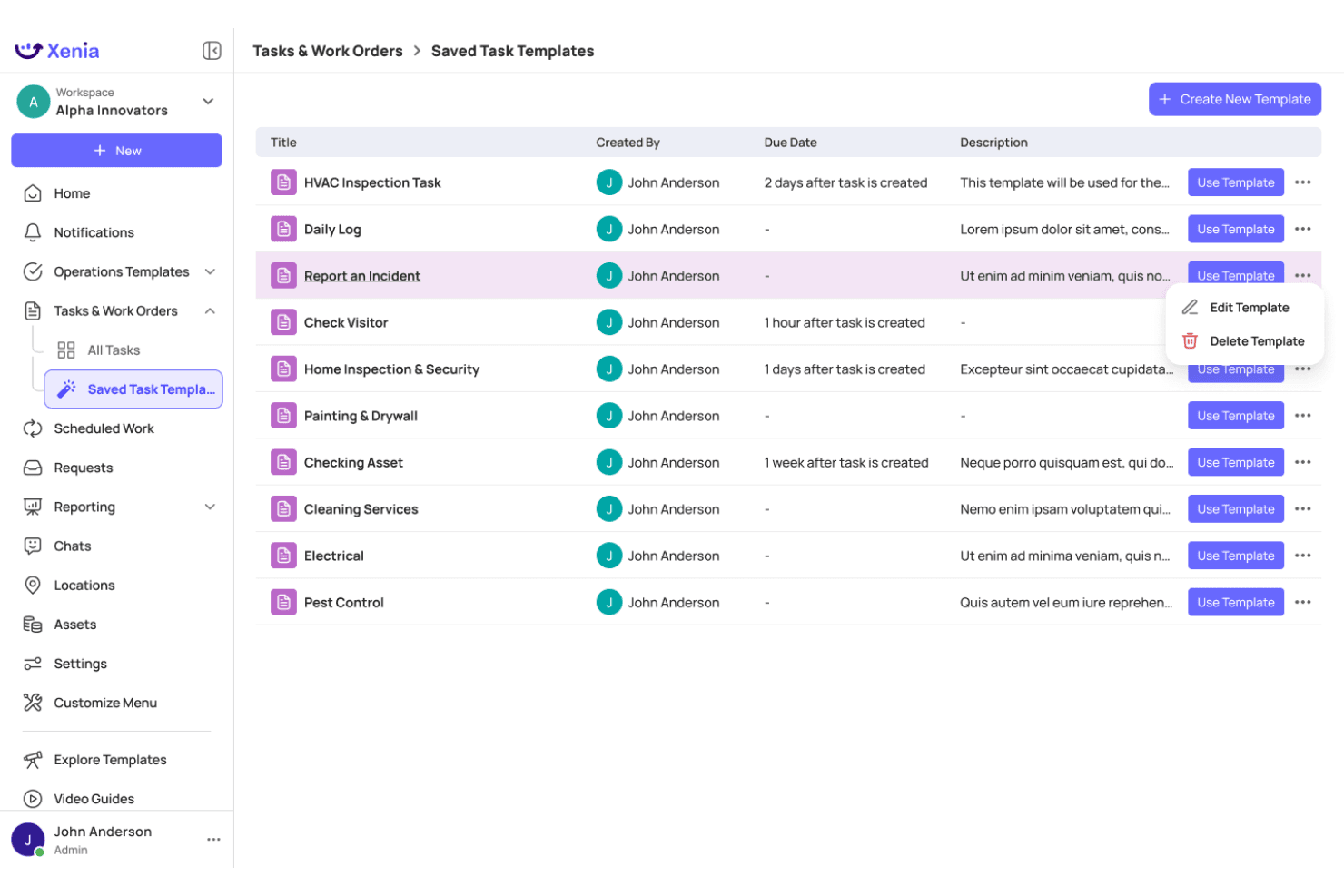
Xenia lets users manage and reuse saved task templates efficiently. Xenia is a multi-location retail task management platform with AI-powered photo audits, digital inspections, frontline communications, and real-time compliance dashboards across store networks.
Who Is Xenia Best For?
Xenia is a strong fit for multi-location retail and convenience store operators who need AI-powered photo audits to verify brand standards across dozens or hundreds of sites.
Why I Picked Xenia
I picked Xenia as one of the best because its AI Photo Rollouts feature does something no manual audit process can: it automatically analyzes submitted store photos to flag planogram deviations, brand standard violations, and cleanliness issues across hundreds of locations at once. I've found the computer vision detection especially valuable when rolling out new signage or fixture changes, where visual confirmation at scale would otherwise require a small army of district managers.
Xenia Key Features
- AI analytical agent: Query operational data in natural language to generate instant reports and visualizations across your store network.
- Broadcast announcements with acknowledgment: Push corporate directives to frontline teams and require digital sign-off to confirm receipt.
- Offline mobile task execution: Complete and update tasks without an internet connection, with automatic syncing when connectivity returns.
- 1,000+ pre-built task templates: Deploy ready-made checklists for common retail workflows, or convert existing PDFs and paper forms using the AI template builder.
Xenia Integrations
Xenia offers native integrations across HRIS and workforce platforms like Workday, ADP, UKG, and 7shifts, BI tools including Power BI, Tableau, and Qlik, plus SSO providers like Okta and Microsoft Entra ID. It also provides a public REST API with webhook support for custom integrations.
Pros and Cons
Pros:
- Offline mobile app supports in-store execution
- Assigns tasks across multiple retail locations
- AI photo audits auto-flag brand compliance
Cons:
- Mobile app ratings lower than desktop platform
- No native planogram or POS integrations
Learn more about Xenia: Best for linking store tasks to frontline training
- Free demo available
- Pricing upon request
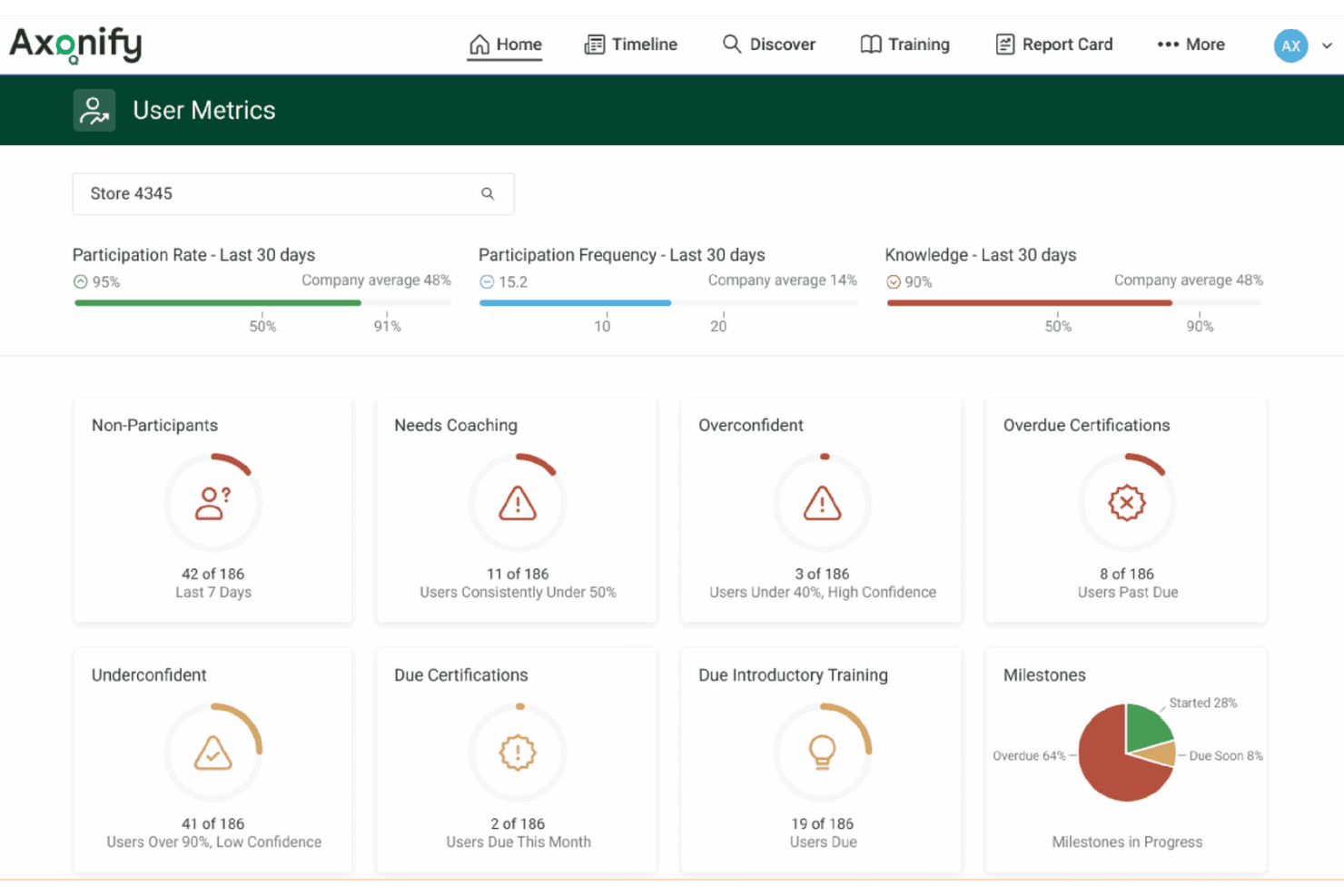
Axonify surfaces coaching opportunities and participation gaps at a glance. Axonify is a frontline enablement platform that combines task assignment and tracking, microlearning, audits and inspections, and two-way communications in a single mobile app built for retail store teams.
Who Is Axonify Best For?
Axonify is a strong fit for enterprise retailers who want task assignments and frontline training to live in the same platform rather than separate tools.
Why I Picked Axonify
Axonify earns its spot on my shortlist because it's the only platform I've found that ties task assignments directly to microlearning, so when a store associate is assigned a planogram reset, the platform can reinforce the exact training content behind it. I particularly like Task Initiatives, which connect operational tasks to broader programs like seasonal promotions and sync them with targeted communications in the same workflow. The AI-generated checklists and spaced repetition engine mean associates aren't just completing tasks, they're retaining the knowledge to execute them correctly.
Axonify Key Features
- Max AI assistant: A built-in conversational AI that answers on-the-job questions from frontline workers in 60+ languages, drawing from your organization's own content library.
- Axonify Checkpoint: A digital audit and inspection module with configurable templates, timestamped photo capture, and automatic corrective task generation for failed checklist items.
- Spaced repetition engine: An adaptive microlearning system that reinforces knowledge at scientifically timed intervals to counter knowledge loss between training sessions.
- Frontline gamification: Leaderboards, points, and redeemable rewards tied to task completion and training milestones to drive daily associate engagement.
Axonify Integrations
Axonify offers native integrations with Workday, UKG, SAP SuccessFactors, Cornerstone, ADP, Ceridian, and more, plus an open API for custom connections to HCM, LMS, WFM, and BI systems.
Pros and Cons
Pros:
- Supports 60+ languages for diverse teams
- No company email required for frontline access
- Combines task assignments directly with microlearning
Cons:
- Advanced communications may require paid add-ons
- Lacks AI-driven planogram photo verification
Learn more about Axonify: Best for AI-driven shelf and store task execution
- Free demo available
- Pricing upon request
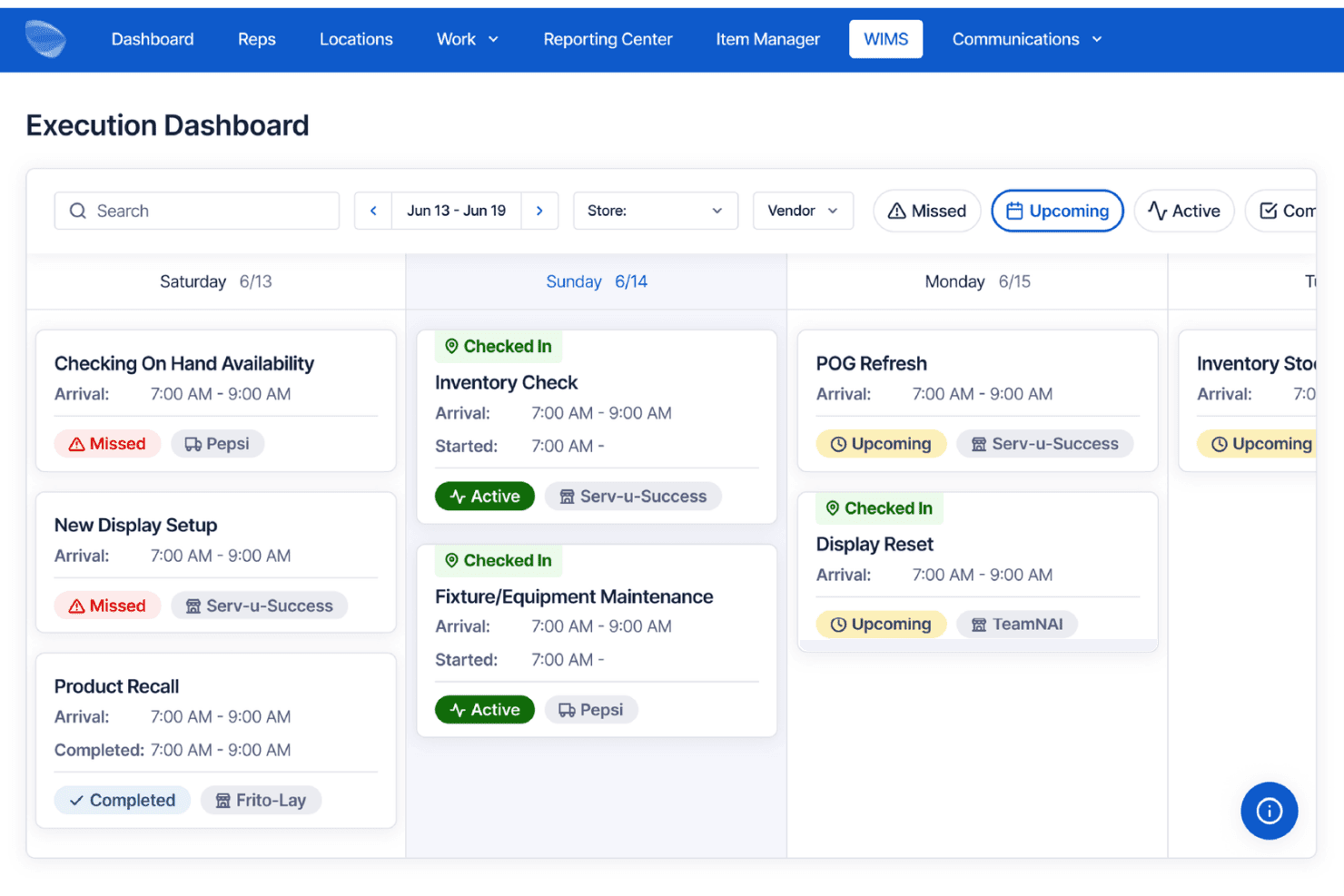
Movista's Execution Dashboard tracks field rep tasks by day and status. Movista is a retail execution platform that combines AI-powered shelf compliance, task assignment, workforce scheduling, vendor collaboration, and in-store communications across distributed store networks.
Who Is Movista Best For?
Movista is a strong fit for enterprise retailers and multi-location brands that need to coordinate task execution across large store networks involving both internal teams and third-party vendors.
Why I Picked Movista
Movista earns its spot on my shortlist because of ShelfCheck AI, which uses computer vision to automatically scan shelves, flag planogram deviations, and detect out-of-stocks at the SKU level with 97%+ accuracy. I find this especially useful because shelf findings can trigger follow-up tasks directly inside the platform, so nothing slips through after an audit. The Vendor Collaboration module also stands out to me: it lets you assign and track tasks across third-party service providers without switching tools or sending emails.
Movista Key Features
- Recurring task cloning: Duplicate and redeploy repeating task sets—like seasonal resets or promotional cycles—across store networks without rebuilding them from scratch.
- GPS breadcrumbing and geofencing: Logs field associate location trails and validates on-site presence using geofence triggers tied to specific store locations.
- In-app training with scored assessments: Attach training documents, videos, and quizzes directly to tasks so associates can complete learning and execution in one place.
- Automated payroll export: Tracks time by clock-in, store visit, and project task, then exports categorized labor data directly to payroll processors.
Movista Integrations
Movista offers native integrations with RELEX Solutions, Google Looker, Scandit, and more, and provides a fully documented RESTful API for custom integrations across payroll, HR, CRM, expense, and business intelligence systems.
Pros and Cons
Pros:
- Offline mode supports low-connectivity environments
- Assigns tasks to vendors and partners
- AI shelf compliance detects planogram errors
Cons:
- Legacy mobile app stability complaints
- Limited pre-built reporting and analytics
Learn more about Movista: Best for HQ-to-store task execution at scale
- Free demo available
- Pricing upon request
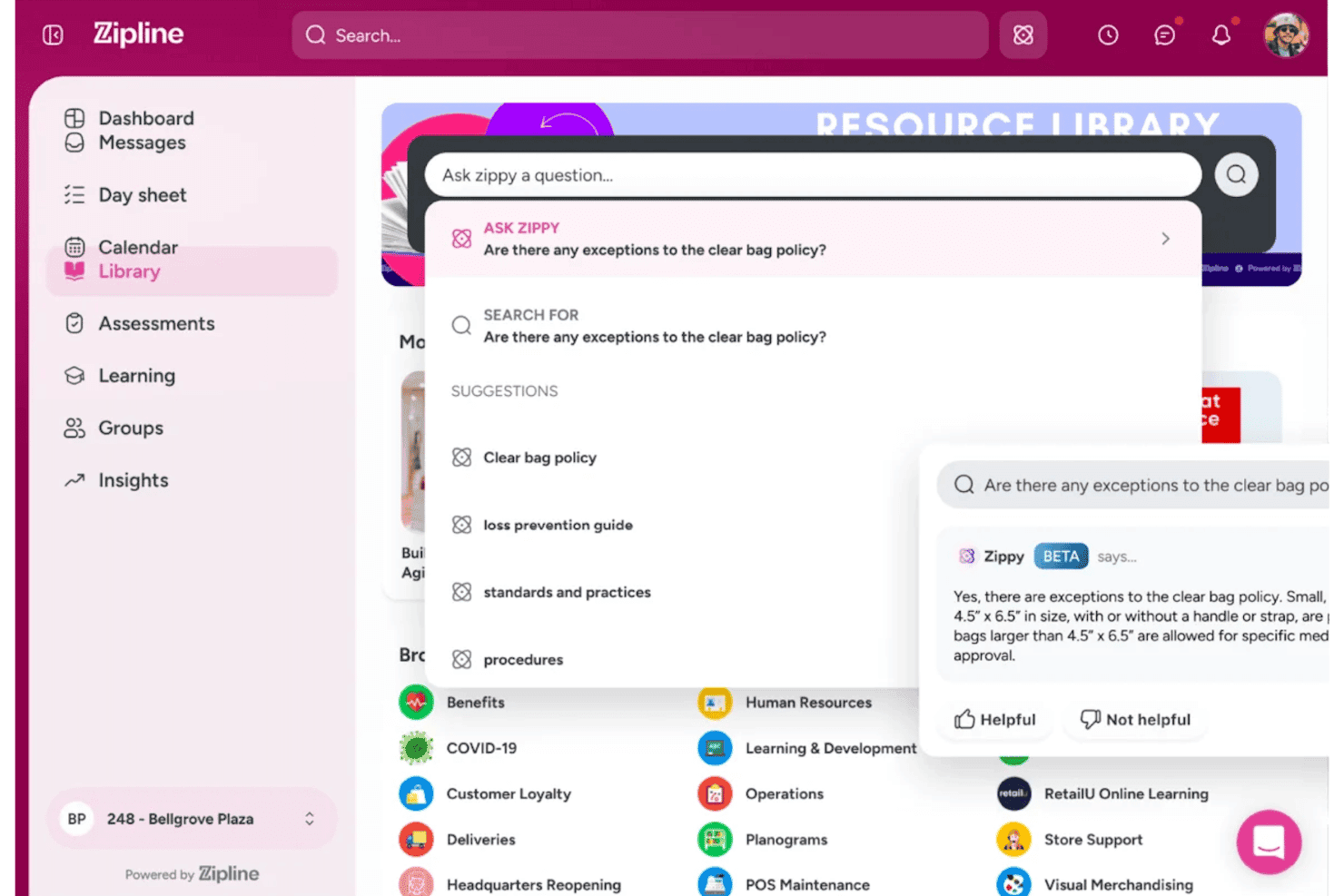
Zipline lets users ask an AI assistant questions about store policies. Zipline is a retail task management platform built for multi-location brands, combining HQ-to-store task distribution, frontline communications, mobile store audits, and AI-powered execution tracking across complex store hierarchies.
Who Is Zipline Best For?
Zipline is a strong fit for enterprise retail chains that need to coordinate task execution across dozens or hundreds of store locations from a central HQ team.
Why I Picked Zipline
I picked Zipline as one of the best because no other platform I've seen translates HQ directives into store-level action as cleanly at scale. The corporate calendar gives headquarters a real-time view of task load across every banner, region, and store format, while AI-powered message forecasting flags days when stores are already at capacity. Each associate gets a personalized Day Sheet scoped to their role and shift, so a floor associate at a 500-location chain sees exactly what's relevant to them, not everything.
Zipline Key Features
- Visual Confirmation: Photo-based task approval lets store teams submit proof that visual standards, displays, and merchandising setups have been correctly executed.
- Mobile store audits: Customizable digital audit forms with offline functionality, photo uploads, and cross-location comparison tools for on-the-floor compliance checks.
- Zippy AI assistant: A role- and location-aware AI assistant that answers associate questions in real time, pulling from brand SOPs and policies with source citations.
- WFM integrations: Native connections to UKG, Legion, and Dayforce surface schedules, enable clock-in/out, and restrict work content when associates are off the clock.
Zipline Integrations
Zipline offers native integrations with UKG, Legion, Dayforce, Adobe Learning Manager, and more. A RESTful API (with OAuth 2.0 and GraphQL support) is available for custom integrations.
Pros and Cons
Pros:
- AI-powered assistant trained on retail policies
- Visual Confirmation with photo-based task approval
- Hierarchical task distribution for complex retail chains
Cons:
- Android app rated lower than iOS app
- No AI planogram verification for shelf photos
Learn more about Zipline: Best for AI-scored photo audits across store networks
- Free demo available
- Pricing upon request
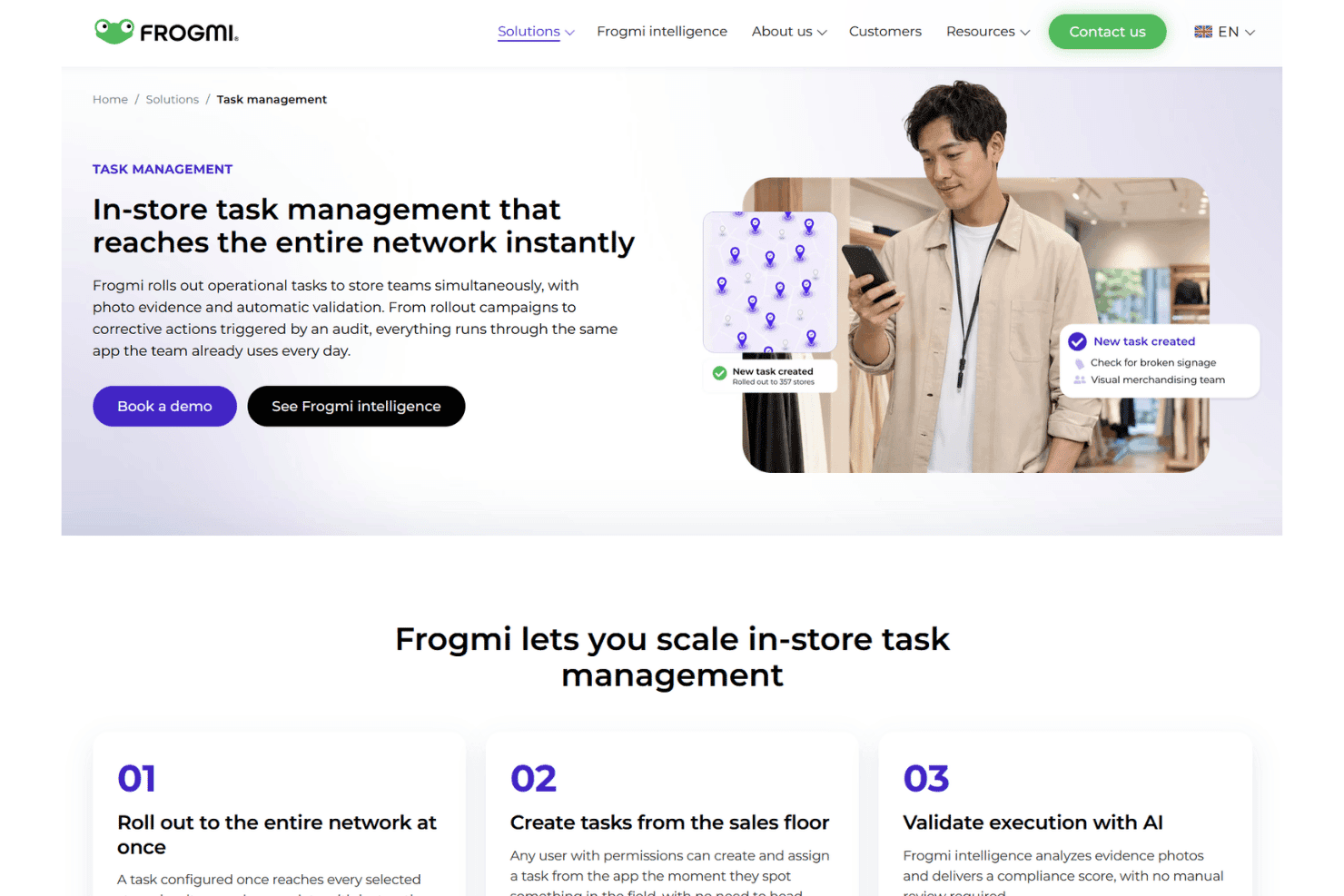
Frogmi rolls out in-store tasks across entire retail networks instantly. Frogmi is a retail task management platform that combines store audits, task assignment, corporate communications, and AI-scored photo compliance across multi-location store networks.
Who Is Frogmi Best For?
Frogmi is a strong fit for multi-location retail chains where corporate teams need to verify brand and operational standards through photo evidence across dozens or hundreds of stores.
Why I Picked Frogmi
Frogmi earns its spot on my shortlist because of how it handles photo-based compliance at scale using its AI layer, Frogmi Intelligence, which scores submitted store photos from 0% to 100% and breaks down findings by sub-area. I'm particularly impressed by how audit non-compliance automatically triggers corrective tasks pre-loaded with photos, context, and deadlines, so nothing falls through the cracks between detection and resolution. That closed-loop between AI-scored audits and task generation is what makes Frogmi a genuinely distinct pick for multi-location retail chains.
Frogmi Key Features
- Corporate communication module: Send targeted announcements directly to employees' phones with individual read receipts that timestamp when each recipient reads, confirms, or responds.
- Employee AI assistant: An in-app chatbot that answers frontline staff questions using your organization's uploaded documents, without requiring staff to leave the app.
- SKU-level micro-task assignment: Assign individual tasks per product per store through the Product Execution module, enabling shelf-level traceability for restocking, pricing, and display compliance.
- Offline audit mode: Run checklists and capture evidence in low-connectivity areas, with automatic data sync once the device reconnects.
Frogmi Integrations
Frogmi supports two-way API connections with ERP, inventory, and planning systems, along with SSO and MFA compatibility for enterprise identity providers. An API is available for custom integrations.
Pros and Cons
Pros:
- Supports offline audits in low-connectivity stores
- Automatically creates corrective tasks from audits
- AI scores photos for compliance instantly
Cons:
- Planogram editing requires a separate solution
- Very limited public user reviews available
Learn more about Frogmi: 6Best for AI shelf compliance across store networks
Pazo
- 15-day free trial + free demo available
- Pricing upon request
Visit WebsiteCustomer Rating:4.7/5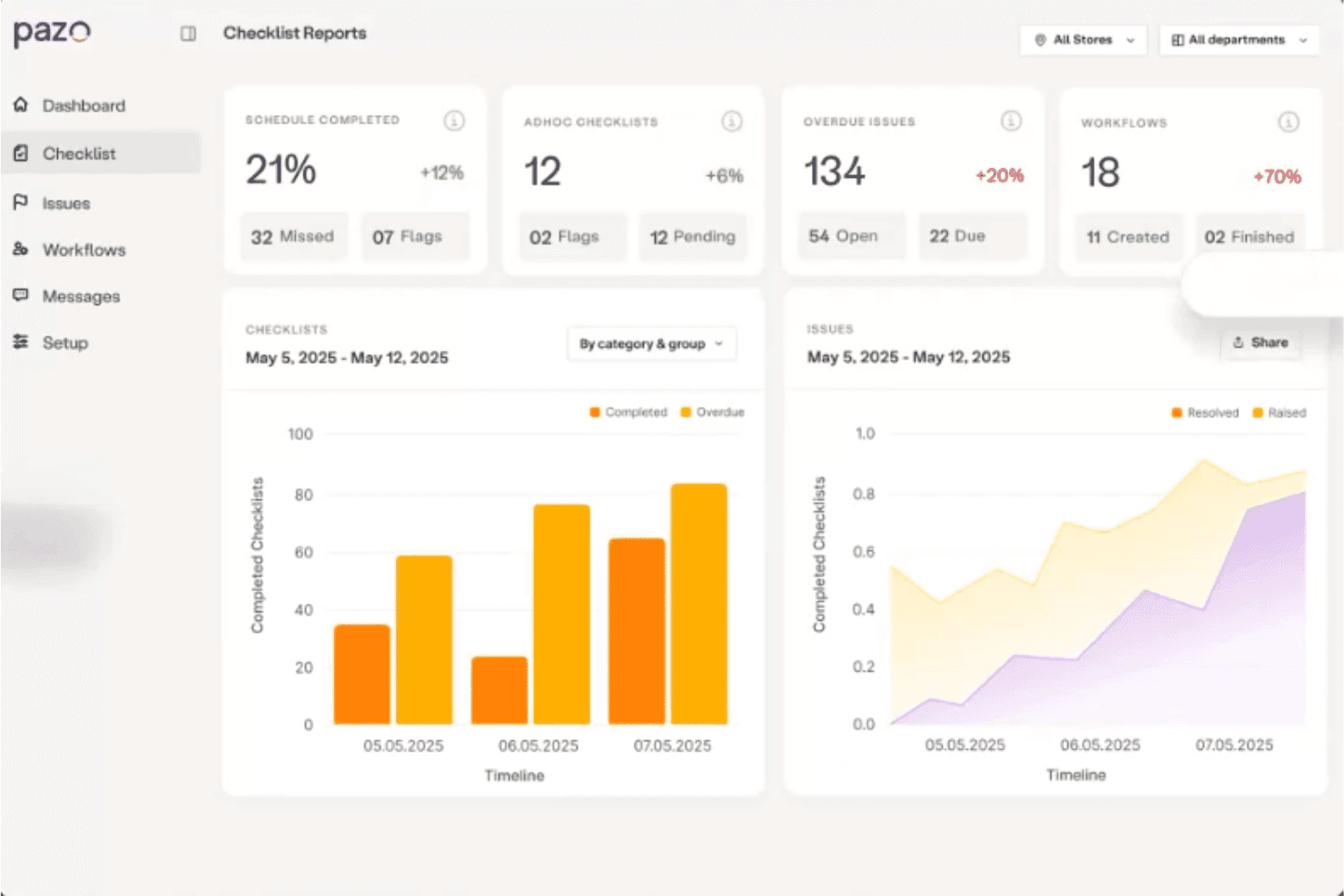
Pazo centralizes checklist reports, issues, and workflows in one dashboard. Pazo is a mobile-first retail task management platform built for multi-location store networks, combining AI-powered shelf compliance, digital audits, smart checklists, and field execution tools across store, district, and HQ tiers.
Who Is Pazo Best For?
Pazo is a strong fit for multi-location retail chains where district managers and HQ teams need to enforce visual merchandising standards and planogram compliance across dozens or hundreds of stores.
Why I Picked Pazo
Pazo earns its spot on my shortlist because of how it handles AI-powered planogram compliance across dozens or hundreds of stores at once. I love that shelf photos are analyzed against planogram standards in roughly 3 seconds, automatically flagging misplaced SKUs and missing items before they become a sales problem. When a deviation is detected, Pazo auto-generates an escalation ticket so nothing slips through. That kind of closed-loop shelf verification is genuinely hard to replicate with manual audit workflows.
Pazo Key Features
- Pre-Journey Plans (PJPs): Structure district manager store visits with geofenced check-ins, multi-step approvals, and real-time proof-of-visit documentation.
- Employee micro-training modules: Deliver mobile-based onboarding and SOP training directly in the app, with completion tracking tied to compliance records.
- Gamification and recognition tools: Reward frontline associates for task completion and audit performance with in-app recognition tied to measurable store metrics.
- Scheduled compliance reporting: Generate and export PDF or PowerPoint reports filtered by store, region, or task type, with live sync to Google Sheets and BI tools like Tableau and Power BI.
Pazo Integrations
Native integrations are not clearly documented, but the platform connects with tools like Google Sheets, along with the Microsoft ecosystem including Azure.
Pros and Cons
Pros:
- Gamification and recognition for frontline teams
- Mobile app works offline for store staff
- AI shelf photo compliance checks in seconds
Cons:
- Lacks native integration with popular retail tools
- No built-in multilingual support detailed
Learn more about Pazo: Best for AI-driven shelf compliance at scale
- Free demo available
- Pricing upon request
Visit WebsiteCustomer Rating:4.4/5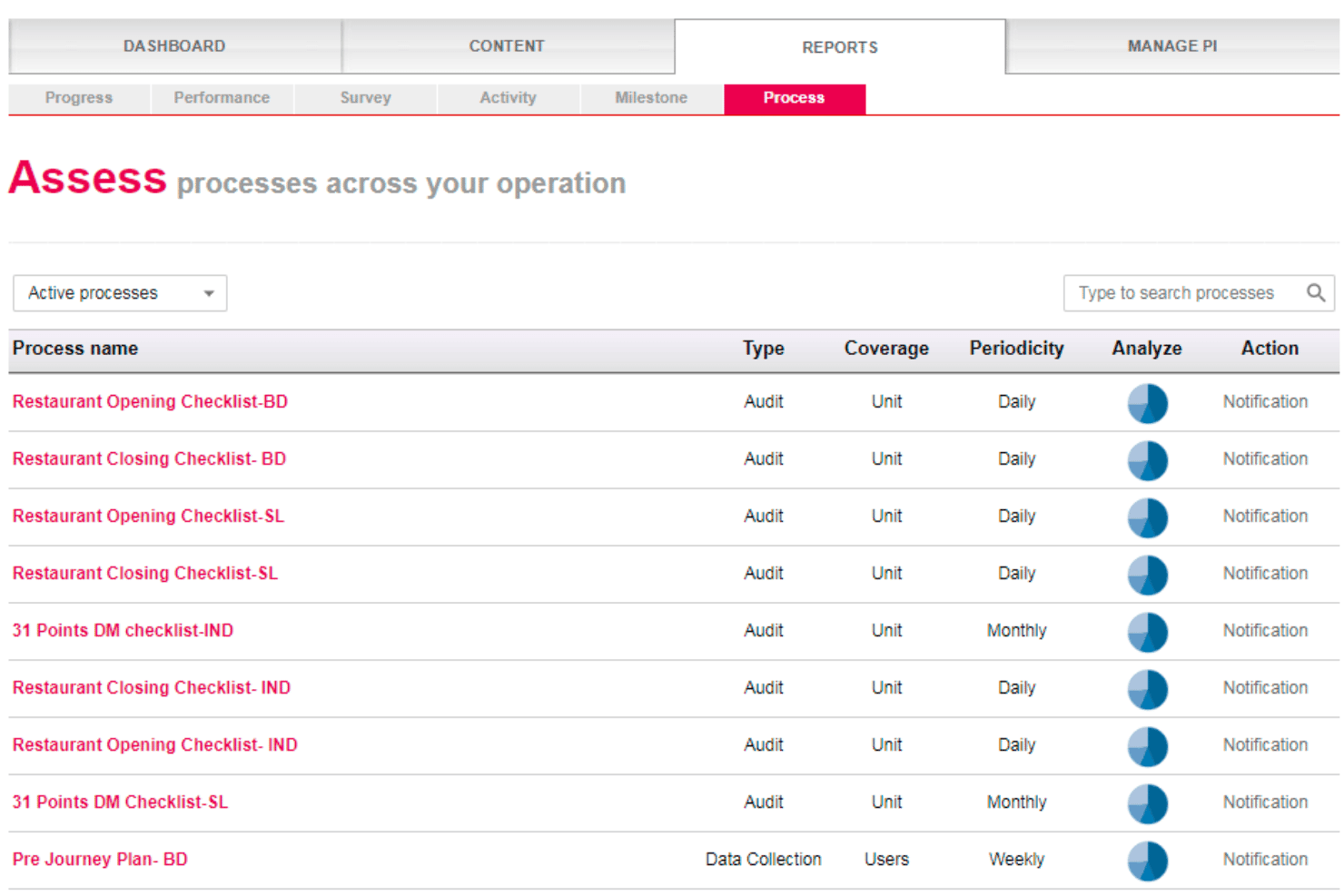
Wooqer helps retail teams manage recurring audits and checklists, track compliance, and trigger corrective actions across locations. Wooqer is a retail task management platform built around AI-powered visual compliance, offering no-code workflow building, mobile-first task execution, planogram verification via computer vision, audit management, and multi-level reporting across store networks.
Who Is Wooqer Best For?
Wooqer is a strong fit for enterprise retail chains that need AI-powered planogram compliance and audit execution across hundreds or thousands of store locations.
Why I Picked Wooqer
Wooqer earns its spot on my shortlist because of SensEye, its computer vision engine that scores planogram compliance directly from smartphone photos and auto-generates corrective tasks when shelves fall short. I picked it specifically for large retail chains: Spencer's Retail moved from 60% to 95% audit compliance in three months, and Lifestyle Stores cut VM rollout time from weeks to same-day using SensEye verification across 200+ locations.
Wooqer Key Features
- No-code workflow builder: Create and configure task workflows, checklists, and audits using a drag-and-drop interface without writing any code.
- Offline mobile mode: The iOS and Android app lets frontline associates complete tasks without internet connectivity, syncing automatically when back online.
- Automated task escalation: When a task isn't completed on time, the platform routes it to the appropriate supervisor based on your defined escalation rules.
- Role-based dashboards: Executive, operations, store, and audit dashboards each surface the metrics and task views relevant to that specific level of your retail hierarchy.
Wooqer Integrations
Native integrations are not currently listed, but a RESTful API is available for custom integrations, and SSO is supported via SAML 2.0 and OAuth 2.0.
Pros and Cons
Pros:
- Full offline mode for mobile associates
- No per-user license caps frontline adoption
- AI-powered planogram compliance directly from photos
Cons:
- Store dashboard details reported as insufficient
- No public integrations directory available online
Learn more about Wooqer: Best for frontline task execution at scale
- Free demo available
- Pricing upon request
Visit WebsiteCustomer Rating:4.5/5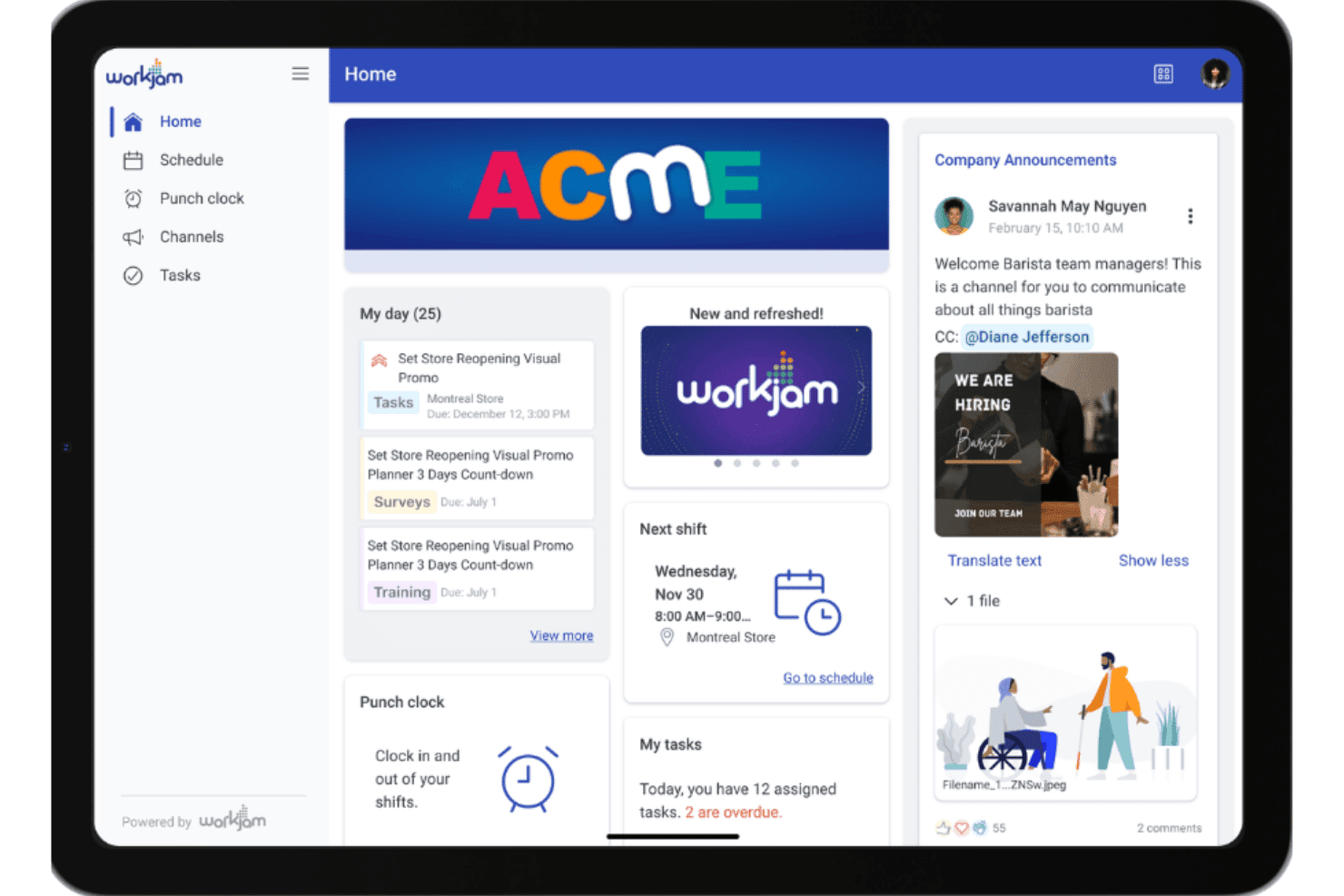
WorkJam centralizes schedules, tasks, and announcements in one home dashboard. WorkJam is a frontline workforce platform that combines task assignment, audit management, employee communications, and learning into a single mobile app built specifically for deskless retail teams.
Who Is WorkJam Best For?
WorkJam is a strong fit for enterprise retailers with large, distributed frontline workforces—think 500+ associates across dozens or hundreds of locations.
Why I Picked WorkJam
WorkJam earns its spot on my shortlist because no other platform I've tested matches its ability to push task execution across hundreds of locations without losing visibility at the associate level. I'm particularly impressed by the Target Audience Engine, which routes tasks by role, shift, tenure, and certification automatically, so the right task reaches the right person without manager intervention. When an audit fails, WorkJam instantly triggers a corrective task with required photo proof, keeping compliance loops closed at scale.
WorkJam Key Features
- 50+ language inline translation: Translates messages and directives in real time within the app, so associates across multilingual workforces receive communications in their preferred language.
- Gamification with leaderboards and badges: Associates earn recognition tied to task completion and learning milestones, surfaced through in-app leaderboards and achievement badges.
- Offline task access with auto-sync: Associates can view and complete tasks without an active network connection, with progress syncing automatically once connectivity is restored.
- Weighted audit scoring: Audit forms assign configurable point weights to individual checklist items, producing scored results rather than a simple pass/fail outcome.
WorkJam Integrations
WorkJam offers native integrations with UKG, Legion, ADP, Blue Yonder, Microsoft Teams, Google Cloud, and DailyPay, along with API-first bidirectional connectors to ERP, WMS, POS, CRM, and HRIS systems.
Pros and Cons
Pros:
- Offers photo-verified planogram and audit workflows
- Supports real-time multilingual frontline communication
- Assigns tasks based on role, shift, and certifications
Cons:
- No AI-powered shelf compliance verification
- Occasional frontline app slowdowns and login issues
Learn more about WorkJam: Best for gamified frontline task and compliance ops
- Not available
- Pricing upon request
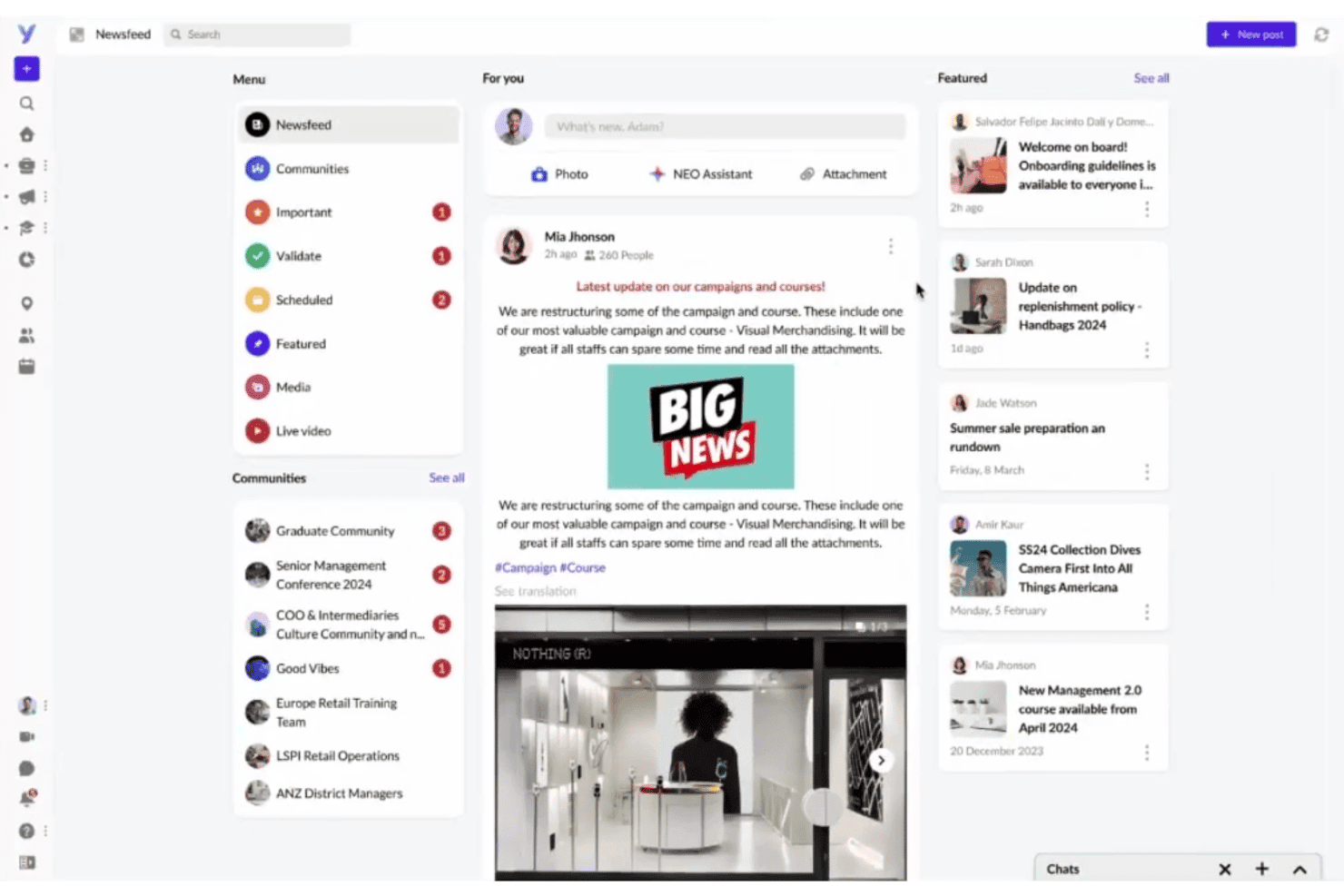
YOOBIC centralizes team news, communities, and updates in one newsfeed. YOOBIC is a mobile-first retail task management platform that combines mission-based task assignment, digital store audits, AI-powered visual compliance verification, and frontline communications in a single app.
Who Is YOOBIC Best For?
YOOBIC is a strong fit for multi-location retail brands that need to close the gap between HQ directives and in-store execution across large frontline teams.
Why I Picked YOOBIC
YOOBIC earns its spot on my shortlist because of how it turns routine compliance ops into something frontline teams actually engage with. I love that its gamified Missions framework lets you assign tasks with mandatory photo proof and logic-branching audit forms, then back that up with AI Visual Compliance, which automatically scores planogram execution from shelf photos without a manual reviewer. The corporate calendar governance layer is what really separates it: it controls how many HQ directives hit any given store on a single day.
YOOBIC Key Features
- NEO AI assistant: An in-app chatbot that answers frontline questions using verified internal content like policies, SOPs, and product playbooks, with support for text and voice queries.
- Multi-language auto-translation: Automatically translates task instructions, communications, and training content so multilingual store teams receive directives in their preferred language.
- Retail audit module: Digital audit forms with mandatory photo evidence, e-signatures, and automated corrective action plans that assign owners and deadlines when items fail.
- Corporate calendar governance: A centralized execution calendar that controls how many HQ directives are sent to any store on a given day to prevent frontline overload.
YOOBIC Integrations
YOOBIC offers native integrations with UKG, Legion, SAP, Salesforce, Tableau, RetailNext, IQVIA, OpenSesame, and connectivity across the Microsoft ecosystem. A public REST API is available for custom integrations.
Pros and Cons
Pros:
- Corporate calendar prevents frontline task overload
- AI verifies planogram compliance from store photos
- Gamified missions boost frontline team engagement
Cons:
- Offline mode is limited in low-connectivity areas
- No built-in shift or labor scheduling
Learn more about YOOBIC: Best for chain-wide store execution at scale
- Free demo available
- Pricing upon request
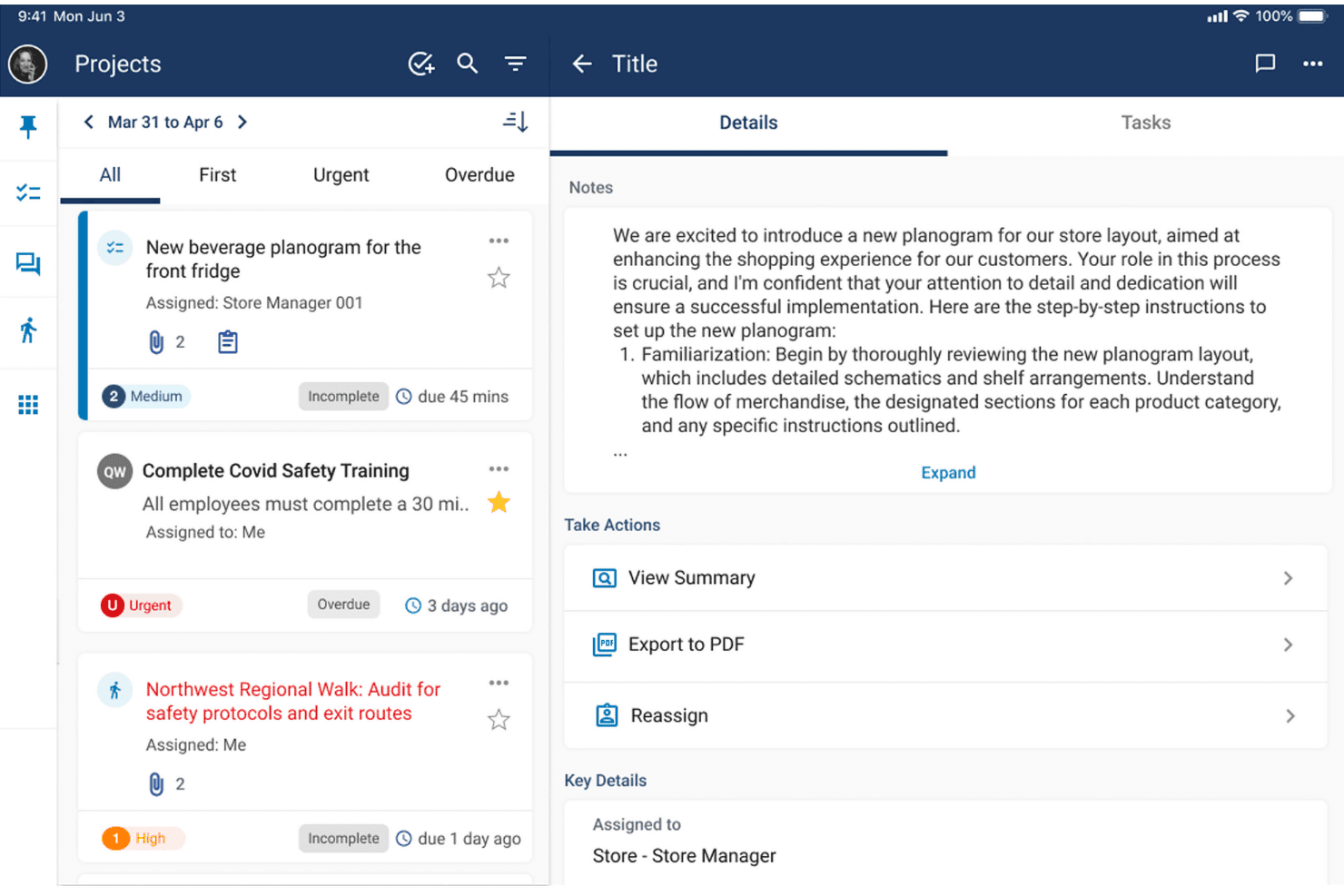
Workcloud Task Management displays task details with notes and action options. Workcloud Task Management is an enterprise retail task management platform from Zebra that combines rules-based task routing, mobile store execution, compliance auditing, frontline messaging, and BI reporting across large store networks.
Who Is Workcloud Task Management Best For?
Workcloud Task Management is built for large retail chains—think hundreds or thousands of locations—where HQ needs reliable, verifiable execution across every store.
Why I Picked Workcloud Task Management
Workcloud Task Management earns its spot on my shortlist because of how it handles execution at genuine enterprise scale, across hundreds or thousands of locations simultaneously. I'm particularly impressed by Corporate Calendar Governance, which prevents any single store from being buried under conflicting directives from HQ, regional, and district teams on the same day. The Workcloud Walks module closes the compliance loop automatically: when an audit flags a gap, the system generates and routes a corrective task without anyone manually following up.
Workcloud Task Management Key Features
- Workcloud Walks: A mobile inspection module that lets teams conduct store audits with photo and video capture, using standardized digital forms that automatically generate corrective tasks when gaps are found.
- Workcloud Comm: A secure frontline messaging app that delivers role- and location-targeted messages with geo-fenced delivery, read receipts, and engagement analytics visible to HQ and district managers.
- Workcloud Task Agent: A GenAI co-pilot embedded in the messaging app that answers associates' natural-language questions with step-by-step SOP guidance drawn from verified corporate data, in multiple languages.
- Workcloud BI: A real-time reporting module with customizable dashboards, drill-down views by region and store, peer benchmarking, and AI-powered insights for labor forecasting and operational performance.
Workcloud Task Management Integrations
Workcloud Task Management offers a wide range of certified connectors through its Workcloud Integration & Orchestration (IO) layer, including SAP, Oracle Fusion Cloud, Salesforce, and ServiceNow.
Pros and Cons
Pros:
- Automatic corrective tasks from compliance audits
- Corporate calendar governance prevents directive conflicts
- GenAI task agent answers frontline SOP questions
Cons:
- No free trial or self-serve sign-up
- Mobile app experiences slow startup loading
Learn more about Workcloud Task Management:
Annen programvare for oppgavehåndtering i detaljhandelen
Her er noen flere alternativer for programvare for oppgavehåndtering i detaljhandelen som ikke kom med på kortlisten min, men som likevel er verdt å se nærmere på:
- 11OPSCENTER Task ManagerBest for multilingual, enterprise-scale store ops
- 12TaqticsBest for AI-driven planogram compliance checks
- 13RepslyBest for CPG field team retail execution
- 14OcastaBest for unified task and comms on one app
- 15StoreForceBest for aligning store tasks to labor hours
- 16Cegid Retail OneBest for matching store tasks to labor budgets
- 17GoSpotCheckBest for AI-driven shelf execution in the field
- 18BindyBest for audit-led task execution across store networks
How I Evaluate Retail Task Management Software
I split my evaluation into baseline execution capabilities every tool must have and the differentiators—like AI photo audits, smart task prioritization, and frontline engagement features—that separate the best from the rest.
Core Functionality (Table Stakes For This List)
When I'm selecting tools for my list, I rank each one on a scale from 0 (does not offer the functionality) to 5 (excels in this area) for each core functionality listed below. I then calculate the tool's total score into a percentage, using 65% as a benchmark to help assess its overall fit for the list.
- Task Assignment & Distribution: I evaluate how each tool routes tasks from HQ to specific stores, roles, or regions—and whether it supports recurring templates or rule-based targeting.
- Store-Level Task Tracking: Real-time completion dashboards matter here. I look for drill-down views that show status by store, district, and individual associate.
- Mobile Frontline Access: Store associates work the floor, not a desk. I check for a native mobile app with offline mode and push notifications suited to retail environments.
- Photo & Proof-of-Execution: I look at how each tool handles photo uploads, checklists, and form submissions to verify merchandising resets or planogram compliance on-site.
- Two-Way Store Communication: Messaging tied directly to tasks keeps context intact. I evaluate whether HQ and store teams can collaborate without switching to a separate channel.
- Reporting & Compliance Dashboards: I check for configurable dashboards that let you filter by region, store, or task type and track compliance scores across the network.
Once I have a list of tools that meet the criteria, I consider what sets each platform apart.
Differentiating Factors (What Sets Vendors Apart)
Here's how I compare and contrast different vendors:
Standout Features
AI planogram verification is a big one. I check whether a tool's computer vision can score shelf compliance from a photo, flag misplaced SKUs, and detect out-of-stocks without a manual review. Smart task prioritization also matters—I look for dynamic task lists that reorder based on store traffic and labor availability, so associates hit the highest-impact work first. Tools like YOOBIC and Zipline approach this differently, but the goal is the same: less guesswork on the floor. I also evaluate corporate calendar governance, which caps how many directives hit a store on a given day to prevent task overload during peak periods.
Beyond Features
I evaluate how quickly a platform deploys across a multi-store fleet—template libraries and pre-built retail workflows from vendors like Zipline and YOOBIC can cut rollout from months to weeks. Frontline usability matters just as much: I check whether shared-device logins, offline mode in stockrooms, and minimal-click interfaces actually work for hourly associates on the floor. I also look at how licensing scales with seasonal headcount swings, since a per-user model can spike costs during peak hiring periods.
Slik velger du programvare for oppgavehåndtering i detaljhandelen
Det som virkelig betyr noe når du velger programvare for oppgavehåndtering i detaljhandelen, er hvor godt den løser utfordringene med koordinering mellom hovedkontoret og butikkene, og hvor godt den støtter teamene dine ute i butikkene:
| Hvis prioriteten din er … | Se etter … |
|---|---|
| Hvis prioriteten din er …Sanntidsoversikt på tvers av lokasjoner | Se etter …Direkte oversikter og varmekart for fullføring |
| Hvis prioriteten din er …Fotodokumentasjon og etterlevelse | Se etter …Funksjoner for KI-basert fotokontroll og verifisering av planogrammer |
| Hvis prioriteten din er …Forankring hos butikkteamet | Se etter …Mobilapper utviklet for delte enheter og bruk uten nett |
| Hvis prioriteten din er …Skalering av gjennomføringen til flere butikker | Se etter …Verktøy for massetildeling og malbiblioteker |
| Hvis prioriteten din er …Kobling mellom oppgaver og opplæring | Se etter …Integrasjon mellom oppgaver og læring samt sporing av sertifiseringer |
Slik vurderer du kortlisten din
- Test direkte oversikter: Be om en demonstrasjon med reelle historiske data fra minst 10 butikker.
- Kontroller nøyaktigheten til KI-kontrollen: Last opp mer enn 20 hyllebilder og sammenlign etterlevelsesscoren fra KI med den manuelle vurderingen.
- Prøv mobiltilgang for butikkansatte: La 3–5 butikkansatte fullføre rutineoppgaver på både delte iOS- og Android-enheter.
- Be om utrullingsdokumentasjon: Be leverandøren om en sjekkliste for implementering eller en prosjektplan som er brukt med en annen kjede med mer enn 50 lokasjoner.
- Velg mellom omfattende maler og sterk KI: Finn ut om du verdsetter mer foreskrivende, detaljhandelsspesifikke arbeidsflyter, eller om du ønsker avanserte KI-funksjoner for etterlevelse, siden få plattformer utmerker seg på begge områder.
Hva er programvare for oppgavehåndtering i detaljhandelen?
Programvare for oppgavestyring i varehandelen er digitale plattformer som lar detaljhandelsvirksomheter tildele, spore og administrere driftsoppgaver på tvers av flere butikksteder. Disse verktøyene hjelper hovedkontoret med å distribuere instrukser, overvåke fullføring i sanntid og bekrefte utførelsen i butikk med dokumentasjon som bilder eller sjekklister. De støtter også toveiskommunikasjon, samsvarsrapportering og mobiltilgang for butikkansatte. Bruk av denne programvaren bidrar til å opprettholde ensartede standarder, koordinere prosjekter og administrere kampanjer på tvers av butikknettverk.
Funksjoner i programvare for oppgavestyring i varehandelen
Når du velger programvare for oppgavestyring i varehandelen, bør du se etter følgende viktige funksjoner:
- Tildeling og distribusjon av oppgaver: Distribuer daglige oppgaver fra hovedkontoret til bestemte butikker, roller eller regioner. Opprett gjentakende tildelinger eller målrettede oppgaver basert på regler knyttet til butikktyper eller resultater.
- Oppfølging av oppgaver på butikkenhetsnivå: Overvåk fremdriften i sanntid på tvers av enkeltbutikker, distrikter eller medarbeidere, slik at butikksjefer får sanntidsinnsikt i åpne, pågående eller fullførte oppgaver.
- Mobiltilgang for butikkansatte: Tilby en innebygd mobilapp utviklet for delte enheter og bruk uten nett. Gjør det mulig for butikkmedarbeidere å se og fullføre oppgaver fra salgsgulvet, lagerrommet eller hvor som helst i butikken.
- Bilder og dokumentasjon på utførelse: La ansatte laste opp bilder eller fylle ut sjekklister for å vise at arbeidet er fullført. Bekreft endringer i varepresentasjonen, kampanjer eller omlegginger av planogrammer med visuell dokumentasjon.
- Toveiskommunikasjon med butikkene: Koble hovedkontoret og butikkteamene direkte sammen i plattformen. Bruk kontekstbaserte meldinger knyttet til bestemte oppgaver eller prosjekter for tydelighet og raskere problemløsning.
- Rapportering og samsvarsoversikter: Følg med på fullføringsgrader og samsvarsindikatorer gjennom tilpassbare oversikter med sanntidsdata. Filtrer rapporter etter region, sted eller oppgavetype for å identifisere trender eller mangler.
- Malbiblioteker for gjentakbare prosesser: Opprett og distribuer standardiserte maler for hyppige oppgaver eller sesongbaserte utrullinger. Spar tid og sørg for ensartethet i driften av butikkene.
- Kalender- og planleggingsverktøy: Visualiser alle tildelte oppgaver og frister i en delt kalender. Unngå overbelastning ved å administrere tidspunkt for instrukser på tvers av flere kampanjer eller prosjekter.
- Brukerroller og tillatelser: Tildel ulike tilgangsnivåer for ledere, medarbeidere og ansatte ved hovedkontoret. Kontroller hvem som kan opprette, redigere, tildele eller fullføre oppgaver, for å beskytte sensitive arbeidsflyter.
- Revisjonsspor og oppgavehistorikk: Spor alle endringer, oppdateringer og fullføringsstatuser for hver oppgave. Oppretthold en oversikt over hvem som gjorde hva og når, av hensyn til ansvarlighet og samsvar.
Vanlige AI-funksjoner i programvare for oppgavestyring i varehandelen
I tillegg til de vanlige funksjonene i programvare for oppgavestyring i varehandelen som er nevnt ovenfor, innlemmer mange av disse løsningene AI med funksjoner som:
- AI-basert bildegranskning og samsvarsvurdering: Bruker datamaskinsyn til automatisk å analysere bilder av hyller, kontrollere samsvar med planogrammer og flagge feilplasserte eller manglende produkter uten manuell gjennomgang. Dette bidrar til å effektivisere revisjoner og opprettholde standarder for varepresentasjon på tvers av lokasjoner.
- Smart prioritering av oppgaver: Omorganiserer oppgavelistene dynamisk for hver butikk eller medarbeider basert på sanntidsfaktorer som kundetrafikk i butikken, tilgjengelig bemanning og historiske fullføringsgrader. Dette bidrar til å optimalisere den daglige arbeidsmengden rundt arbeidet som har størst effekt.
- Automatisk avviksdeteksjon: Overvåker data om fullføring av oppgaver og butikkresultater for å identifisere uvanlige mønstre, for eksempel plutselige fall i samsvar eller gjentatte oppgaver som ikke blir utført. Systemet varsler ledere slik at de kan håndtere problemer før de eskalerer.
- Oppretting av oppgaver med naturlig språk: Lar ledere eller ansatte ved hovedkontoret tildele oppgaver ved å skrive eller snakke med formuleringer i naturlig språk. AI tolker hensikten, fyller ut oppgavedetaljene og ruter tildelingene til riktige butikker eller roller, slik at tiden brukt på manuell registrering reduseres.
- Prediktiv prognostisering av bemanning og arbeidsmengde: Analyserer historiske data og aktuelle trender for å prognostisere bemanningsbehov og oppgavevolum for kommende perioder. Dette hjelper deg med å fordele ressurser mer nøyaktig og unngå å overbelaste teamene dine.
Fordeler med programvare for oppgavestyring i varehandelen
Implementering av programvare for oppgavestyring i varehandelen gir flere fordeler for teamet og virksomheten din. Her er noen av fordelene du kan se frem til:
- Konsekvent gjennomføring i butikk: Erstatt fragmenterte regneark og generiske verktøy for oppgavehåndtering med sentraliserte oppdrag, oppfølging av fullføring, sjekklister og fotodokumentasjon.
- Raskere problemløsning: Koble sammen hovedkontoret og butikkteamene med kontekstbasert toveis kommunikasjon som er innebygd direkte i hver oppgave, slik at tiden som går tapt på å bytte mellom kanaler, reduseres.
- Bedre opplevelse for ansatte i førstelinjen: Gi medarbeiderne en brukervennlig mobilapp som er utviklet for delt bruk ute i butikken, inkludert tilgang uten nett og push-varsler, slik at de enkelt kan se og fullføre oppgaver.
- Bedre oppfølging av etterlevelse: Filtrer data om etterlevelse og gjennomføring etter sted, region eller oppgave ved hjelp av tilpassbare kontrollpaneler som avdekker mangler og muligheter.
- Effektiv utrulling av kampanjer: Lanser kampanjer, sesongmessige endringer og tilbakevendende prosesser raskere ved hjelp av malbiblioteker og verktøy for masseoppdrag tilpasset varehandelen.
- Smartere ressursallokering: Bruk AI-drevne funksjoner som prediktiv prognostisering av arbeidsmengde og smart prioritering av oppgaver for å tilpasse arbeidskraften til det mest verdifulle arbeidet hver dag.
- Ansvarliggjøring klar for revisjon: Oppretthold en fullstendig oversikt over oppgavehistorikk, bildeopplastinger og detaljer om fullføring for å støtte revisjoner og styrke den operative ansvarliggjøringen.
Kostnader og priser for programvare for oppgavehåndtering i varehandelen
Valg av programvare for oppgavehåndtering i varehandelen krever en forståelse av de ulike prismodellene og abonnementene som er tilgjengelige. Kostnadene varierer avhengig av funksjoner, teamstørrelse, tillegg og mer. Tabellen nedenfor oppsummerer vanlige abonnementer, gjennomsnittsprisene deres og typiske funksjoner som er inkludert i programvareløsninger for oppgavehåndtering i varehandelen:
Sammenligningstabell for programvare for oppgavehåndtering i varehandelen
| Abonnementstype | Gjennomsnittspris | Vanlige funksjoner |
|---|---|---|
| AbonnementstypeGratisabonnement | Gjennomsnittspris$0 | Vanlige funksjonerGrunnleggende oppdragstildeling, begrenset antall brukere, enkle kontrollpaneler og grunnleggende mobiltilgang. |
| AbonnementstypePersonlig abonnement | Gjennomsnittspris$5–$15/bruker/måned | Vanlige funksjonerOppgavefordeling til én enkelt butikk, enkel rapportering, begrenset bildeopplasting og e-postvarsler. |
| AbonnementstypeBedriftsabonnement | Gjennomsnittspris$15–$40/bruker/måned | Vanlige funksjonerStøtte for flere butikker, avanserte kontrollpaneler for etterlevelse, innebygd mobilapp, funksjoner for fotodokumentasjon og teamkommunikasjon. |
| AbonnementstypeVirksomhetsabonnement | Gjennomsnittspris$40–$100+/bruker/måned | Vanlige funksjonerTilpassede integrasjoner, AI-basert planogramverifisering, avanserte tillatelser, revisjonsspor, prioritert kundestøtte og SLA-er. |
Vanlige spørsmål om programvare for oppgavehåndtering i detaljhandelen
Her er svar på vanlige spørsmål om programvare for oppgavehåndtering i detaljhandelen:
Hvordan vurderer jeg om programvare for oppgavehåndtering i detaljhandelen vil fungere for flere butikksteder?
Start med å se etter sanntidsdashbord, massevis av oppgaver og rapportering på region- eller butikknivå. Du bør ha mobiltilgang for medarbeidere og administratorkontroller som lar hovedkontoret filtrere, tildele og følge opp oppgaver på tvers av alle butikkene. Be hver leverandør om en demonstrasjon med data fra minst 10 steder for å se om plattformen håndterer omfanget av nettverket deres.
Kan programvare for oppgavehåndtering i detaljhandelen integreres med POS- og bemanningsstyringsverktøyene mine?
Ja, mange plattformer for oppgavehåndtering i detaljhandelen tilbyr integrasjoner med POS-, HR- og planleggingsverktøy. Sjekk leverandørens liste over integrasjoner eller markedsplass, og spør om ferdigbygde koblinger eller API-er for de spesifikke systemene dine. Direkte integrasjoner gjør det enklere å koble oppgavedata sammen med salgs- og arbeidskraftinformasjon fra butikkene.
Hva er forskjellen mellom AI-fotorevisjoner og manuell dokumentasjon av oppgaver?
AI-fotorevisjoner bruker datasyn til automatisk å skanne bilder av hyller eller utstillinger og markere manglende produkter eller utsolgte varer uten manuell gjennomgang. Ved manuell dokumentasjon laster butikkteamene opp bilder som ledere må kontrollere. AI-revisjoner sparer tid og oppdager problemer tidligere, men bør testes for nøyaktighet med egne eksempler på planogrammer før man stoler fullt ut på automatisering.
Hvordan involverer jeg medarbeidere i førstelinjen i prosessen for oppgavehåndtering?
Se etter mobiltilpassede plattformer med innlogging på delte enheter, frakoblet modus og enkle sjekklister. Velg verktøy som gjør det enkelt for medarbeidere å laste opp bilder eller legge igjen kommentarer direkte i hver oppgave, i stedet for å bytte til separate meldingsapper. Testing med faktiske butikkmedarbeidere før utrulling bidrar til å sikre brukervennlighet.
Hvordan bør jeg budsjettere for programvare for oppgavehåndtering i detaljhandelen hvis antallet ansatte varierer sesongmessig?
Spør leverandørene om fleksibilitet i lisensieringen. Noen tilbyr flytende eller samtidige brukerlisenser, eller gjør det enkelt å justere antallet etter sesong. Hvis du betaler per bruker, må du forsikre deg om at du kan skalere ned etter travle perioder uten ekstra kostnader. Ta høyde for behovet for ytterligere opplæring eller støtte under større sesongbaserte rekrutteringsperioder.