

Programvare for digital skilting i restauranter gir deg en digital måte å administrere, vise og oppdatere menyer eller reklameinnhold på tvers av skjermene i restauranten. Hvis du ser etter de beste alternativene, leter du sannsynligvis etter måter å holde menyene oppdaterte på, gjøre kampanjene mer iøynefallende eller ganske enkelt bli kvitt stresset med utskrifter i siste liten.
I denne veiledningen finner du verktøy som hjelper teamet ditt med å være fleksibelt, øke gjesteengasjementet og gi deg bedre kontroll over det kundevendte innholdet – i tillegg til hva som gjør hver plattform til et smart valg for restaurantdrift.
Why Trust Our Software Recommendations
6,700+
Reviews
20
Industry experts
16+
Evaluation factors
14
Years
Our team has been testing and reviewing software since 2012. As retail leaders ourselves, we know how difficult—and important—it is to choose the right software.
For this guide, we evaluated tools using hands-on testing and independent research, scoring tools using our selection criteria.
Our reviews reflect our independent judgment—not a sales pitch.
Sammenligningstabell for programvare for digital skilting i restauranter
Denne sammenligningstabellen oppsummerer prisdetaljene for mine beste utvalgte programmer for digital skilting i restauranter:
| Tool | Best For | Trial Info | Price | ||
|---|---|---|---|---|---|
| 1 | Best for interactive touch menu displays | 30-day free trial + free demo available | From $14/screen/month (billed annually) | Website | |
| 2 | Best for user-friendly content creation tools | Free trial + free demo available | From $11/display/month | Website | |
| 3 | Best for centralized content management | Free demo available | Pricing upon request | Website | |
| 4 | Best for automated menu scheduling | Free demo available | From $450 one-time | Website | |
| 5 | Best for enterprise-level deployment | Not available | Pricing upon request | Website | |
| 6 | Best for template variety and customization | 14-day free trial + free demo available | From $10/screen/month | Website | |
| 7 | Best for rapid menu board updates across locations | Free plan available | From $8/screen/month (billed annually) | Website | |
| 8 | Best for real-time audience analytics | Free demo available | Pricing upon request | Website | |
| 9 | Best for dynamic content animations | 14-day free trial + free demo available | From $7/screen/month (billed annually) | Website | |
| 10 | Best for smooth third-party integrations | 14-day free trial | From $20/screen/month (billed annually) | Website |


Anmeldelser av den beste programvaren for digital skilting i restauranter
Nedenfor finner du mine detaljerte sammendrag av den beste programvaren for digital skilting i restauranter som kom med på kortlisten. Anmeldelsene mine gir en detaljert gjennomgang av funksjonene, de beste bruksområdene og integrasjonene til hver plattform, slik at du kan finne den beste løsningen for deg.
 Best for interactive touch menu displays
- 30-day free trial + free demo available
- From $14/screen/month (billed annually)
Visit WebsiteCustomer Rating:4.9/5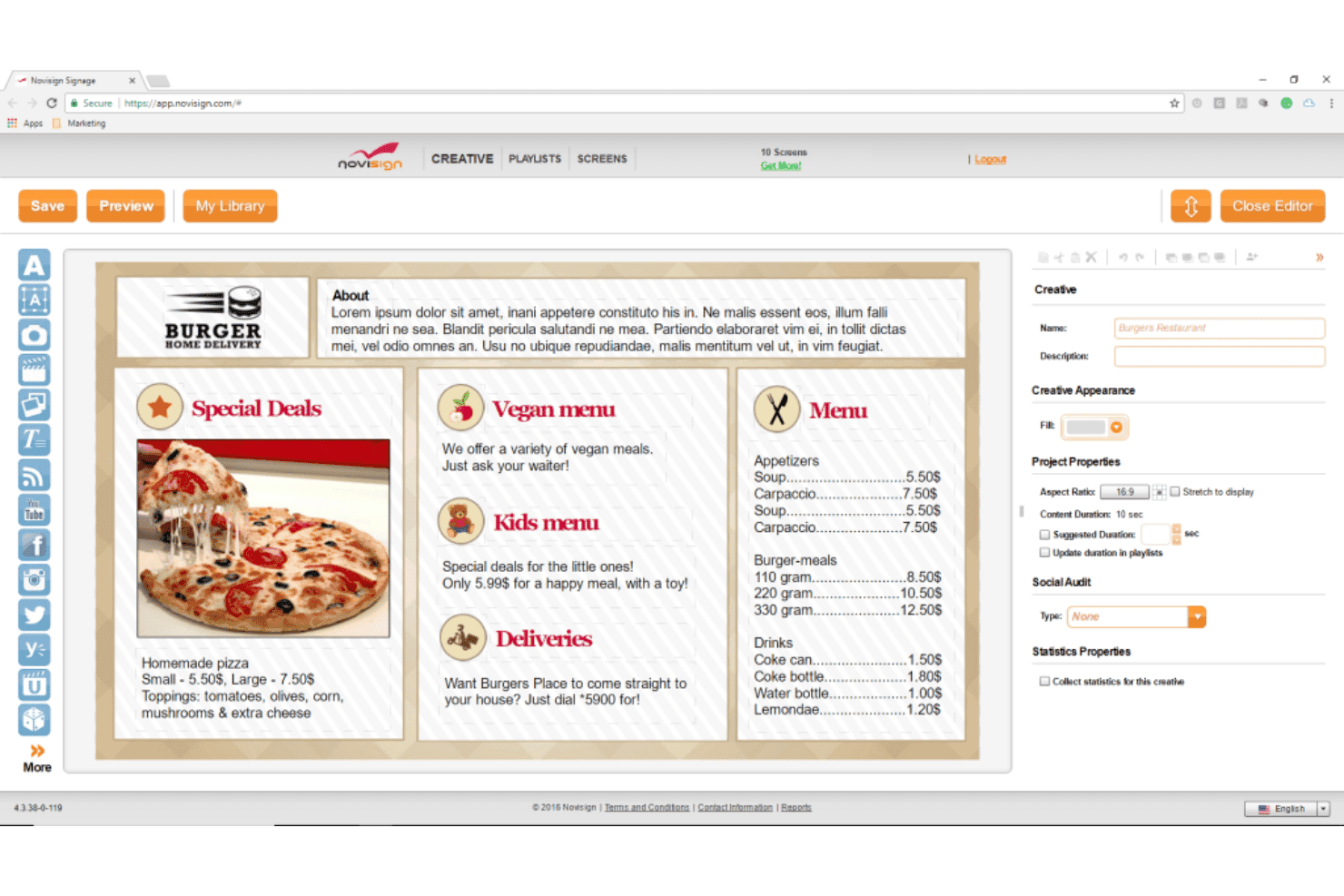
NoviSign includes a drag-and-drop editor for creating restaurant menu boards with sections for special deals, vegan menu, kids menu, deliveries, and pricing. NoviSign is a cloud-based digital signage platform built for restaurants, covering TV menu board design, dayparting scheduling, multi-location content management, and interactive touch display support across Android, Windows, ChromeOS, and smart TV operating systems.
Who Is NoviSign Best For?
NoviSign is a strong fit for quick-service restaurants and franchise operators managing menu boards across multiple locations from a single cloud dashboard.
Why I Picked NoviSign
NoviSign earns its spot on my shortlist because of how well it handles interactive touch menu displays. I love that you can build configurable touch zones directly into menu board layouts, letting customers browse item categories or tap for details without any custom development. On top of that, the day-parting feature automatically switches between breakfast, lunch, and dinner menus on a set schedule, which keeps the touch experience contextually accurate throughout the day.
NoviSign Key Features
- Menu board design studio: Build and update drag-and-drop digital menu boards with images, pricing, and descriptions.
- Native Toast POS integration: Sync menu items and prices automatically with your restaurant POS.
- Multi-location content management: Push updates and playlists to thousands of screens from a single dashboard.
- Template and widget library: Access hundreds of restaurant-specific templates with built-in widgets for weather, social, and video.
NoviSign Integrations
NoviSign offers native integrations with Power BI, DataBox, Chartio, Tableau, Clover, Lightspeed, Salesforce, Canva, Ominalert, and more. An API is available for custom integrations.
Pros and Cons
Pros:
- Reliable offline playback during internet outages
- Multi-zone layout designer with widgets built-in
- Interactive touchscreen support for menu navigation
Cons:
- Animation capabilities not as advanced as peers
- Setup interface has steep learning curve
Learn more about NoviSign: Best for user-friendly content creation tools
- Free trial + free demo available
- From $11/display/month
Visit WebsiteCustomer Rating:4.8/5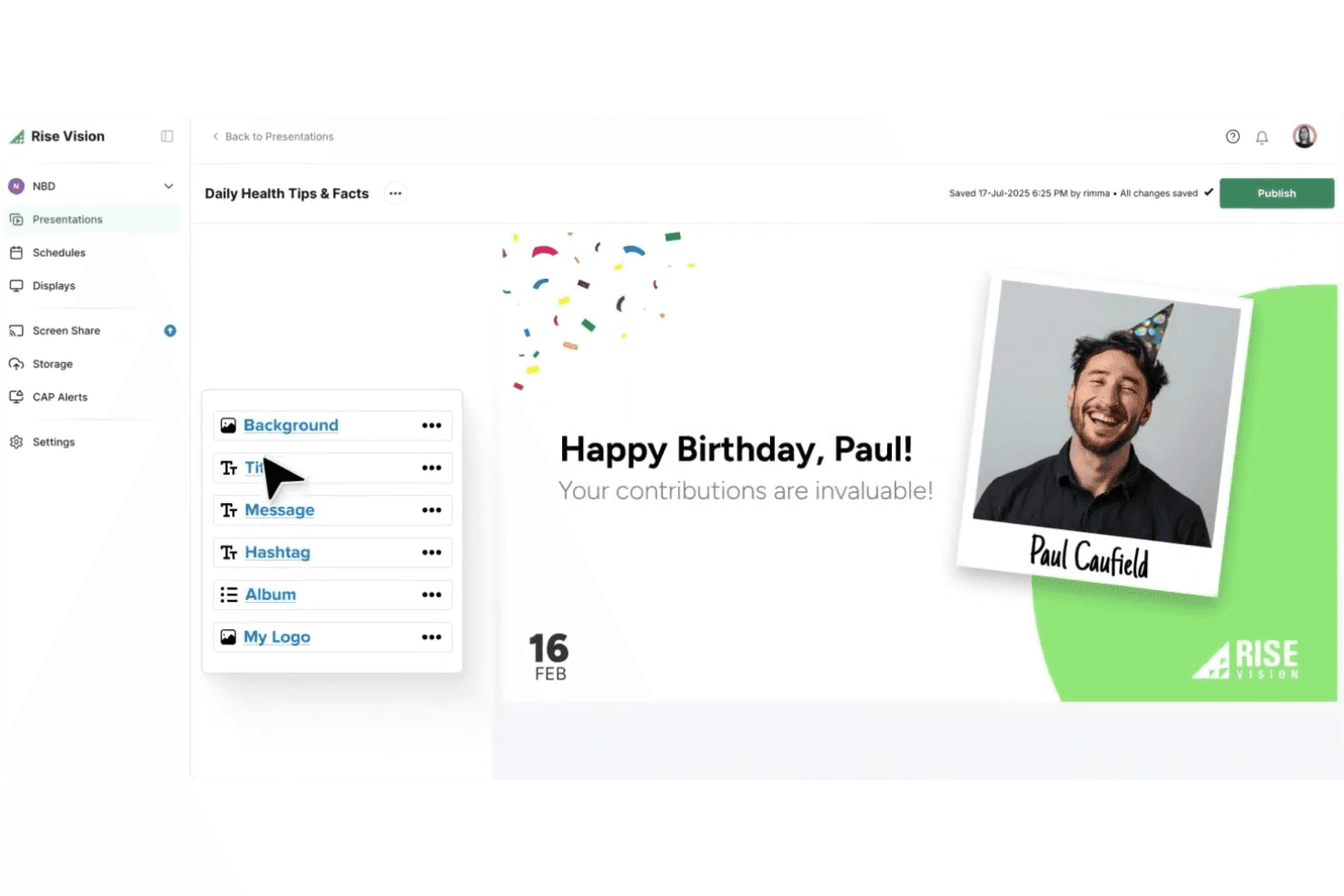
Rise Vision includes a drag-and-drop presentation editor for creating employee birthday digital signage with custom photos, messages, and branding. Rise Vision is a cloud-based digital signage platform for restaurants, built around digital menu boards, dayparting scheduling, multi-location content management, and in-store promotional displays.
Who Is Rise Vision Best For?
Rise Vision is a strong fit for independent restaurants and small-to-mid-size chains that need to manage digital menu boards and in-store screens without a dedicated design team.
Why I Picked Rise Vision
Rise Vision earns its spot on my shortlist because the content creation experience genuinely stands apart for restaurant teams without a dedicated designer. I love the 750+ animated, restaurant-specific templates — you can swap in your own pricing, food photography, and branding in minutes. The built-in AI design tool takes it further, turning a simple text prompt into a branded, animated presentation that's ready to deploy across your screens.
Rise Vision Key Features
- Dayparting and scheduled content: Automatically rotate breakfast, lunch, and dinner menus by time of day across screens.
- Multi-location dashboard: Manage and update displays for multiple restaurants from a centralized cloud platform.
- Remote monitoring and alerts: Get notified when screens go offline and monitor device health from any location.
- Emergency alert integrations: Instantly broadcast CAP-based emergency alerts to any or all screens in your network.
Rise Vision Integrations
Rise Vision offers native integrations with Canva, Google Slides, Power BI, Domo, Google Sheets, Microsoft PowerPoint, Microsoft Calendar, Google Calendar, Meta (Facebook and Instagram), YouTube, and more.
Pros and Cons
Pros:
- Supports dayparting for meal-specific displays
- Includes hundreds of animated menu templates
- Fast, centralized updates across multiple locations
Cons:
- Lacks nutrition or allergen auto-tagging features
- Lacks native automated POS inventory link
Learn more about Rise Vision: Best for centralized content management
- Free demo available
- Pricing upon request
Visit WebsiteCustomer Rating:4.6/5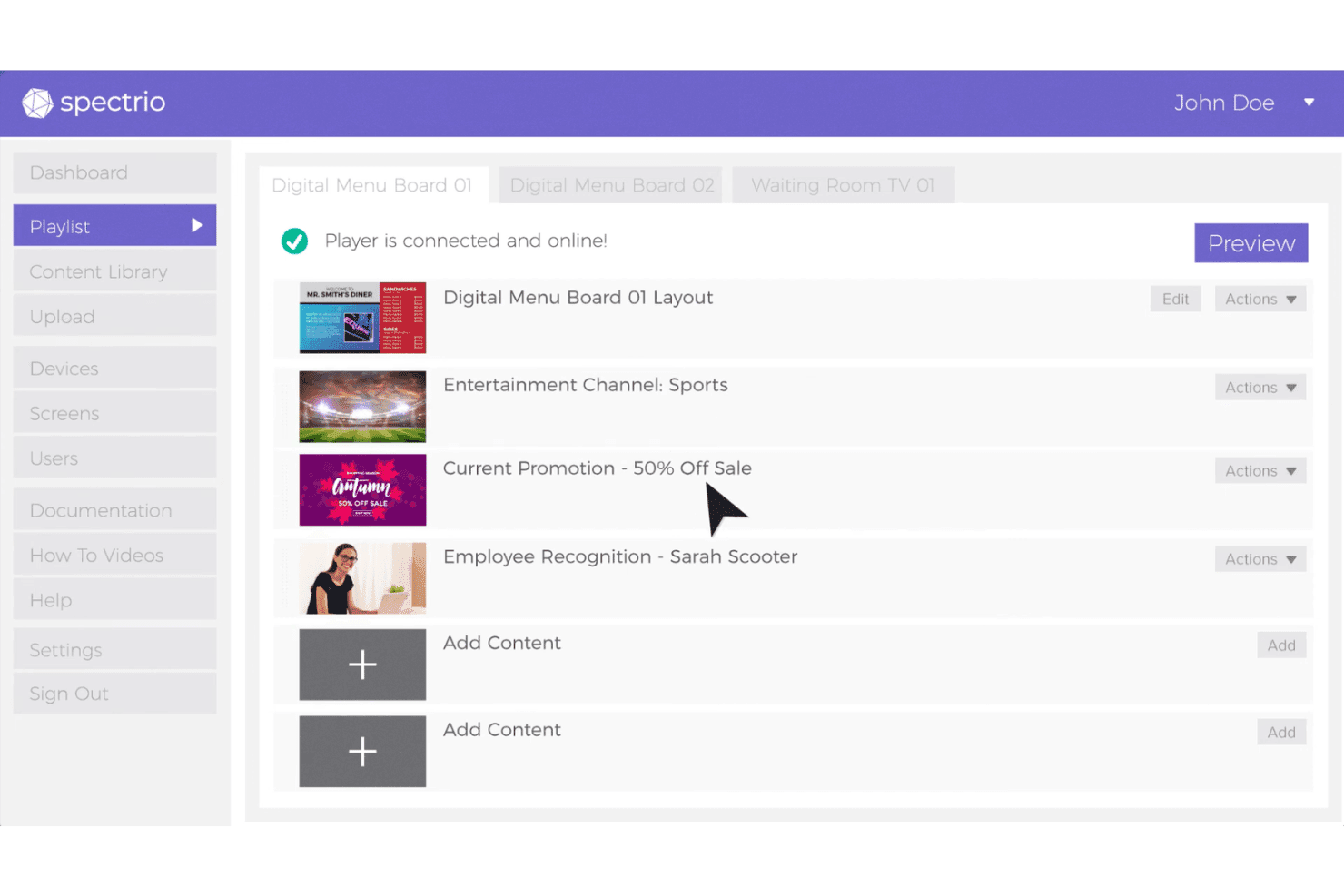
Spectrio includes a playlist management interface where users can organize digital signage content across multiple screen locations. Spectrio is a cloud-based digital signage platform built for multi-location restaurant and QSR operators, offering menu board management, time-parted content scheduling, POS integration, and centralized content control across large screen networks.
Who Is Spectrio Best For?
Spectrio is a strong fit for multi-location QSR chains and franchise operators who need centralized control over menu boards and content across dozens or hundreds of screens.
Why I Picked Spectrio
Spectrio earns its spot on my shortlist because of how it handles content governance at scale. I love that the platform lets my team assign role-based permissions to unlimited users and push updates to thousands of screens at once. The grouping and tagging system lets me organize displays by location or region, so I'm never applying a change to the wrong screens. The time-parting scheduler also lets me set breakfast, lunch, and dinner menus to flip automatically.
Spectrio Key Features
- Real-time content triggering: Trigger changes on screens using sensors, remotes, or connected apps.
- Menu board app with POS integration: Connect digital menus directly to your POS for accurate updates.
- Proof-of-play reporting: Track exactly which content was displayed and when on each screen.
- Multi-language support: Display menu content in several languages to serve a diverse customer base.
Spectrio Integrations
Spectrio offers native integrations with BrightSign, Power BI, Zoom, Facebook, Instagram, YouTube, Yelp, Slack, ScreenCast, Zoning, and more. An API and SDK are available for custom integrations.
Pros and Cons
Pros:
- Supports POS-triggered upsell and LTO displays
- Extensive F&B template and content library
- Centralized management for large menu board fleets
Cons:
- Lacks detailed nutrition and allergen metadata options
- Device hardware sometimes requires frequent troubleshooting
Learn more about Spectrio: 4Best for automated menu scheduling
Mvix
- Free demo available
- From $450 one-time
Visit WebsiteCustomer Rating:4.6/5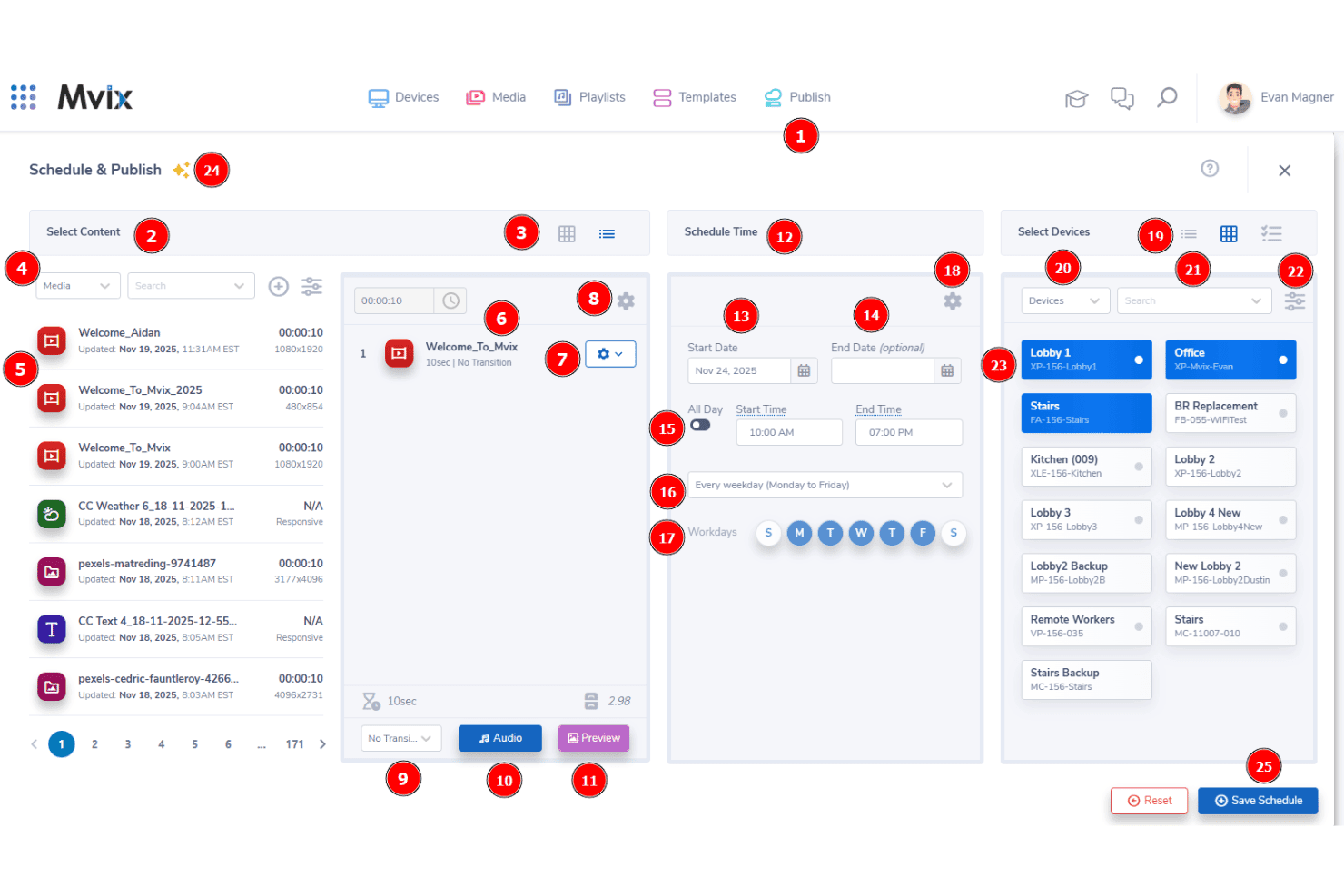
Mvix provides a Schedule & Publish interface that lets users select content, set schedules, and assign specific display devices for digital signage campaigns. Mvix is a cloud-based digital signage platform built for restaurant menu boards, offering content scheduling, dynamic pricing, multi-zone templates, POS integration, and centralized multi-location screen management.
Who Is Mvix Best For?
Mvix is a strong fit for multi-location restaurant operators and franchise groups that need centralized control over menu content across many screens.
Why I Picked Mvix
I picked Mvix as one of the best because its menu scheduling tools go further than basic dayparting. I can pre-build breakfast, lunch, and dinner menus and schedule them to switch automatically by time of day, day of week, or season. For holiday promotions or limited-time events, I set a themed menu to run on specific dates, and it reverts automatically when the window closes. Bulk scheduling by group or location tag means I push those changes to dozens of screens at once.
Mvix Key Features
- Device health portal: View screen status and issue remote reboots for proactive uptime management.
- POS integrations: Sync menu items and pricing automatically with supported point-of-sale systems.
- Multi-zone template layouts: Design custom menu screens with up to ten content zones for varied promotions.
- Offline playback: Continue displaying scheduled menus and media even during internet outages.
Mvix Integrations
Mvix offers native integrations with Canva, Google Calendar, Google Sheets, Microsoft 365, MS Teams, Slack, Facebook, Instagram, YouTube, Power BI, and Tableau. POS system integrations are available via the Menu Maker add-on. An API is available for custom integrations.
Pros and Cons
Pros:
- Multi-location menu control and deployment
- FDA-compliant nutrition and allergen info display
- Automated dayparting and schedule-based menu switching
Cons:
- Fewer real-time menu design editing options
- POS sync requires paid add-on
Learn more about Mvix:
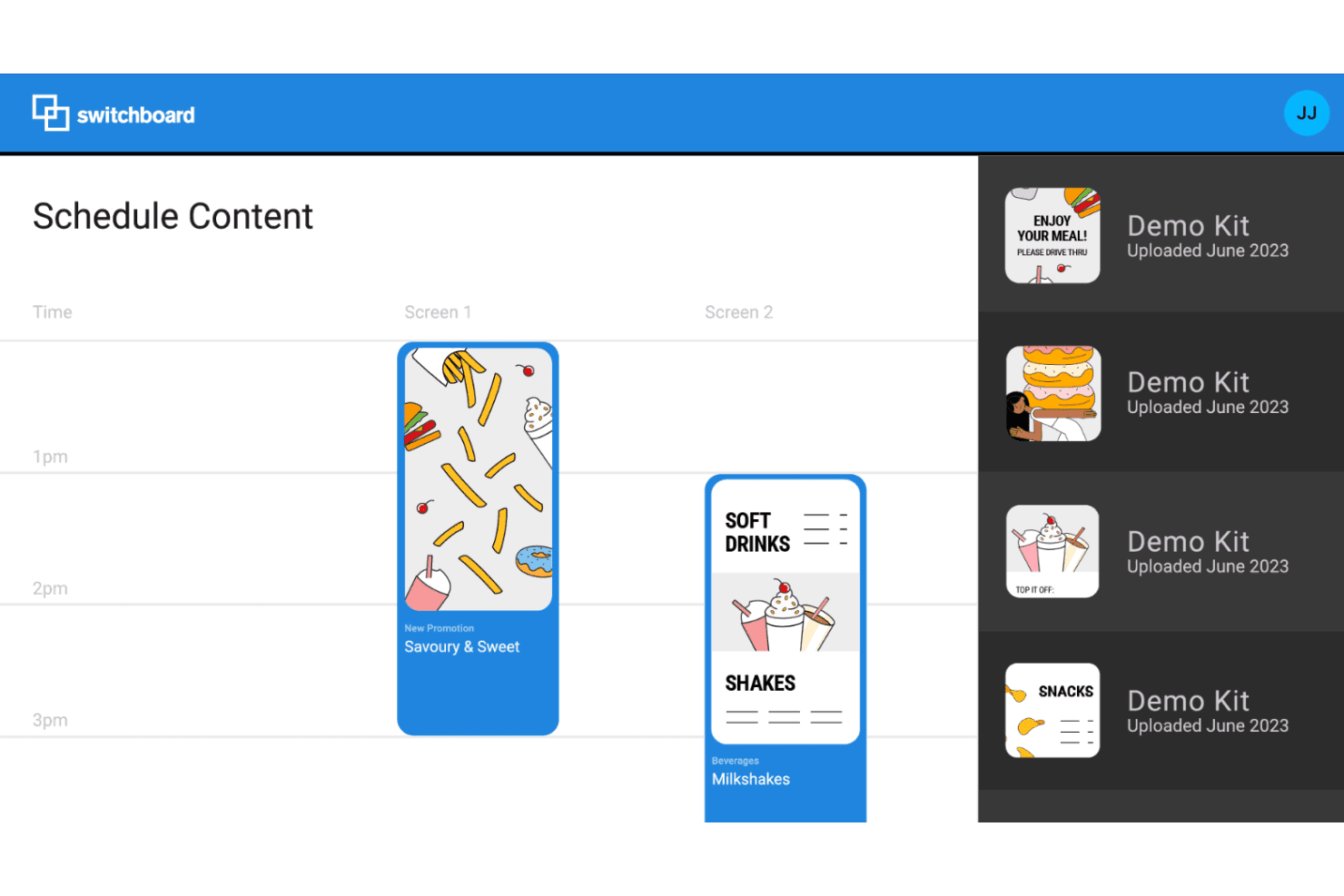
Coates Switchboard includes a drag-and-drop content scheduling interface that lets users assign promotional digital signage content across multiple screens by time slot. Coates Group is an enterprise digital menu board platform that pairs proprietary Switchboard™ CMS software with indoor and outdoor display hardware to manage, schedule, and deliver data-driven menu content across QSR restaurant and drive-thru environments.
Who Is Coates Switchboard Best For?
Coates Switchboard is built for global QSR chains and enterprise franchise networks that need to deploy and manage digital menu boards across dozens or hundreds of locations.
Why I Picked Coates Switchboard
Coates Switchboard earns its spot on my shortlist because Switchboard™ CMS is genuinely built for enterprise scale. I've seen few platforms handle fleet management across hundreds of locations with hierarchy-based permissions and bulk deployment the way Coates does. What I find most compelling is how Switchboard™ triggers content changes automatically using live order basket data, weather conditions, and location-level segmentation, without any manual intervention from the team.
Coates Switchboard Key Features
- Indoor and outdoor digital menu boards: Supports both weatherproof outdoor and configurable indoor digital signage displays.
- Templated content builder: Provides smart content templates that can be adapted for different locations and dayparts.
- Centralized asset management: Allows teams to push content updates and manage assets from a unified interface.
- Real-time analytics dashboard: Delivers data on screen engagement, menu performance, and content effectiveness.
Coates Switchboard Integrations
Native integrations are not publicly listed.
Pros and Cons
Pros:
- Centralized asset management for hundreds of locations
- Supports automated content based on real-time data
- Performance proven at global QSR scale
Cons:
- Onboarding requires custom enterprise implementation
- No public self-serve demo available
Learn more about Coates Group: Best for template variety and customization
- 14-day free trial + free demo available
- From $10/screen/month
Visit WebsiteCustomer Rating:4.8/5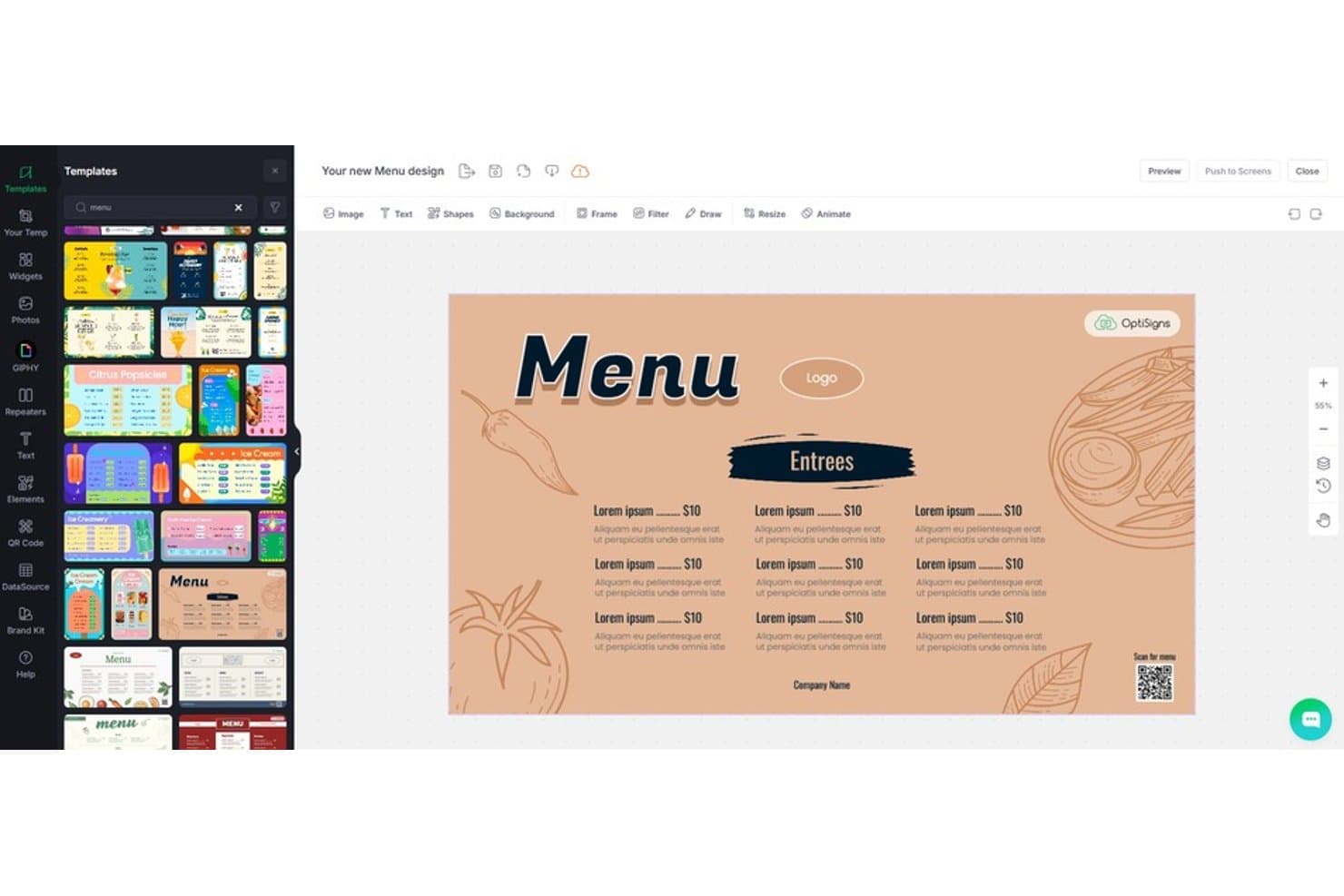
OptiSigns includes a menu design editor with customizable restaurant menu templates, drag-and-drop tools, and a live preview for digital signage. OptiSigns is a cloud-based digital signage platform that lets restaurants build and manage menu boards, schedule dayparted content, sync displays with POS systems, and control screens across multiple locations from a single dashboard.
Who Is OptiSigns Best For?
OptiSigns fits multi-location restaurant operators and franchise owners who need centralized content control with flexible, on-brand digital menu board design.
Why I Picked OptiSigns
I picked OptiSigns as one of the best because its template library is genuinely unmatched for restaurant use. With 5,000+ templates that include restaurant-specific menu board layouts, I can build multi-zone split-screen displays that separate featured items, daily specials, and drink promotions without starting from scratch. The Designer app lets me customize fonts, colors, and brand assets directly, so every screen reflects the restaurant's identity at a granular level.
OptiSigns Key Features
- Dayparting and scheduling: Set content to automatically switch at specific times for breakfast, lunch, or dinner menus.
- POS integration: Sync menu data and pricing with Square or Toast POS to keep displays up-to-date.
- Multi-location screen management: Control and update content across all restaurant locations from one dashboard.
- Remote device monitoring: Check screen status, push updates, and troubleshoot devices from anywhere.
OptiSigns Integrations
OptiSigns offers native integrations with Power BI, Tableau, OptiSound, Canva, Vimeo, Trello, Jira, Notion, Twitch, and more. An API is available for custom integrations.
Pros and Cons
Pros:
- Advanced dayparting and playlist scheduling
- Supports offline playback for screen reliability
- Huge library of menu and promo templates
Cons:
- Multi-language support setup can be complex
- POS changes occasionally delay on screen
Learn more about OptiSigns: Best for rapid menu board updates across locations
- Free plan available
- From $8/screen/month (billed annually)
Visit WebsiteCustomer Rating:4.8/5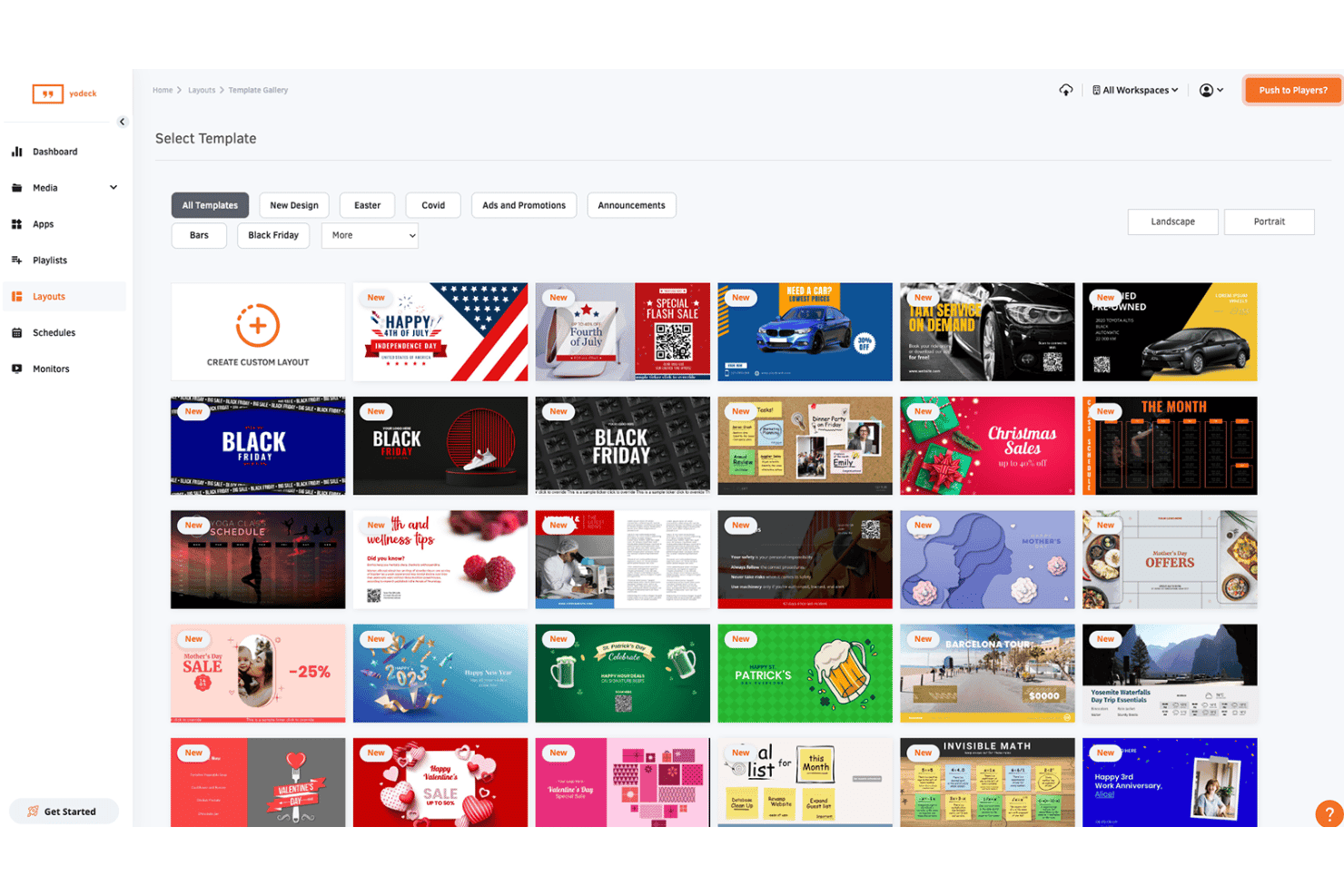
Yodeck includes a template gallery with categorized digital signage layouts for holidays, promotions, and events. Yodeck is a cloud-based digital signage platform built around menu management, offering drag-and-drop layout editing, dayparting scheduling, multi-location screen control, and a library of food-service templates.
Who Is Yodeck Best For?
Yodeck, which runs smoothly on Raspberry Pi media players, is a strong fit for multi-location restaurant operators and franchise networks that need centralized control over menu board content across many screens.
Why I Picked Yodeck
I've included Yodeck in my top picks because its DSMenu app makes pushing menu changes across dozens of screens genuinely fast. I can update pricing or pull an item from an entire location network from one central dashboard, without touching individual screens. The layered scheduling system handles dayparting automatically, rotating breakfast, lunch menu, and dinner menus on their own once configured, which removes a recurring manual task from my team's plate entirely.
Yodeck Key Features
- PosterMyWall integration: Design and update promotional creatives directly within the platform for instant display.
- Interactive kiosk app: Turn digital screens into self-serve touch points for menu browsing and ordering.
- 90+ free signage apps: Access a library of widgets for social media, weather, QR codes, and more on your screens.
- Role-based permissions: Assign custom access levels for teams managing content at different locations.
Yodeck Integrations
Yodeck offers native integrations with 160+ apps including Daily Feed, Weather Wall, Bloomberg, Notion, Microsoft Planner, Fathom, Zoho, Xero, Tableau, and Power BI. An API is available for custom integrations.
Pros and Cons
Pros:
- Broad selection of restaurant-specific templates
- Automatic dayparting for breakfast, lunch, dinner
- Centralized menu control for multiple locations
Cons:
- Live item 86 capabilities missing
- No native POS menu sync
Learn more about Yodeck: Best for real-time audience analytics
- Free demo available
- Pricing upon request
Visit WebsiteCustomer Rating:4.7/5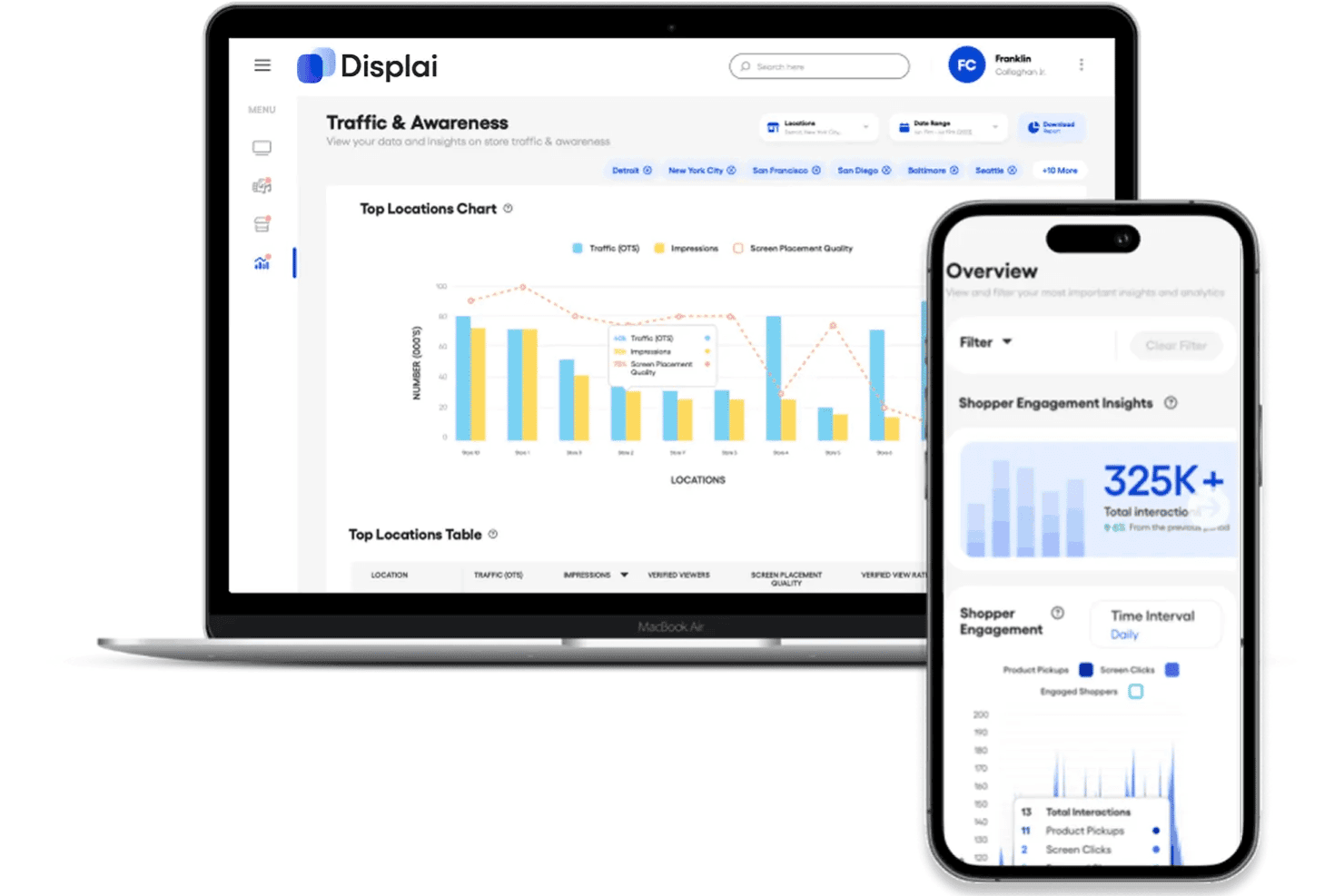
Displai combines traffic, impressions, screen placement quality, and shopper engagement insights in a cross-device analytics dashboard for multiple store locations. Displai is a cloud-based digital signage platform built for restaurant chains, combining POS-connected restaurant digital menu board solutions, dayparting scheduling, multi-location content management, and AI-powered audience analytics.
Who Is Displai Best For?
Displai suits multi-location restaurant groups and franchise operators managing signage networks that span dozens to thousands of locations from a single dashboard.
Why I Picked Displai
Displai earns its spot on my shortlist because of its Visitor InSight analytics, which tracks real-time foot traffic, viewer demographics, and content performance across screens. I particularly like that it layers sentiment analysis on top, connecting what's playing on your menu boards to actual guest behavior in the space. Pairing this with dayparting rules means I can refine which promotions run at peak hours based on what the data shows is actually working.
Displai Key Features
- POS-integrated menu boards: Create dynamic digital menus that connect directly with Toast, Square, and Lightspeed for real-time price and item updates.
- Centralized multi-location management: Schedule and update content across hundreds or thousands of restaurant displays from a single cloud dashboard.
- PosterMyWall template access: Use over 22,500 designer-created templates for menus, promos, or branded visuals through the built-in integration.
- Self-service kiosk support: Add in-store kiosks for customers to browse menus, customize orders, and pay directly on connected tablets or terminals.
Displai Integrations
Displai offers native integrations with Toast, Square, Lightspeed, 7Shifts, Instagram, YouTube, PosterMyWall, DS Menu, RetailNext, and BrightSign, and provides an API for custom integrations.
Pros and Cons
Pros:
- Bulk content scheduling for dayparting
- POS-synced menu updates for each location
- Real-time foot traffic and audience analytics
Cons:
- Limited preview mode for remote screen management
- Occasional device offline or sync issues
Learn more about Displai: Best for dynamic content animations
- 14-day free trial + free demo available
- From $7/screen/month (billed annually)
Visit WebsiteCustomer Rating:4.5/5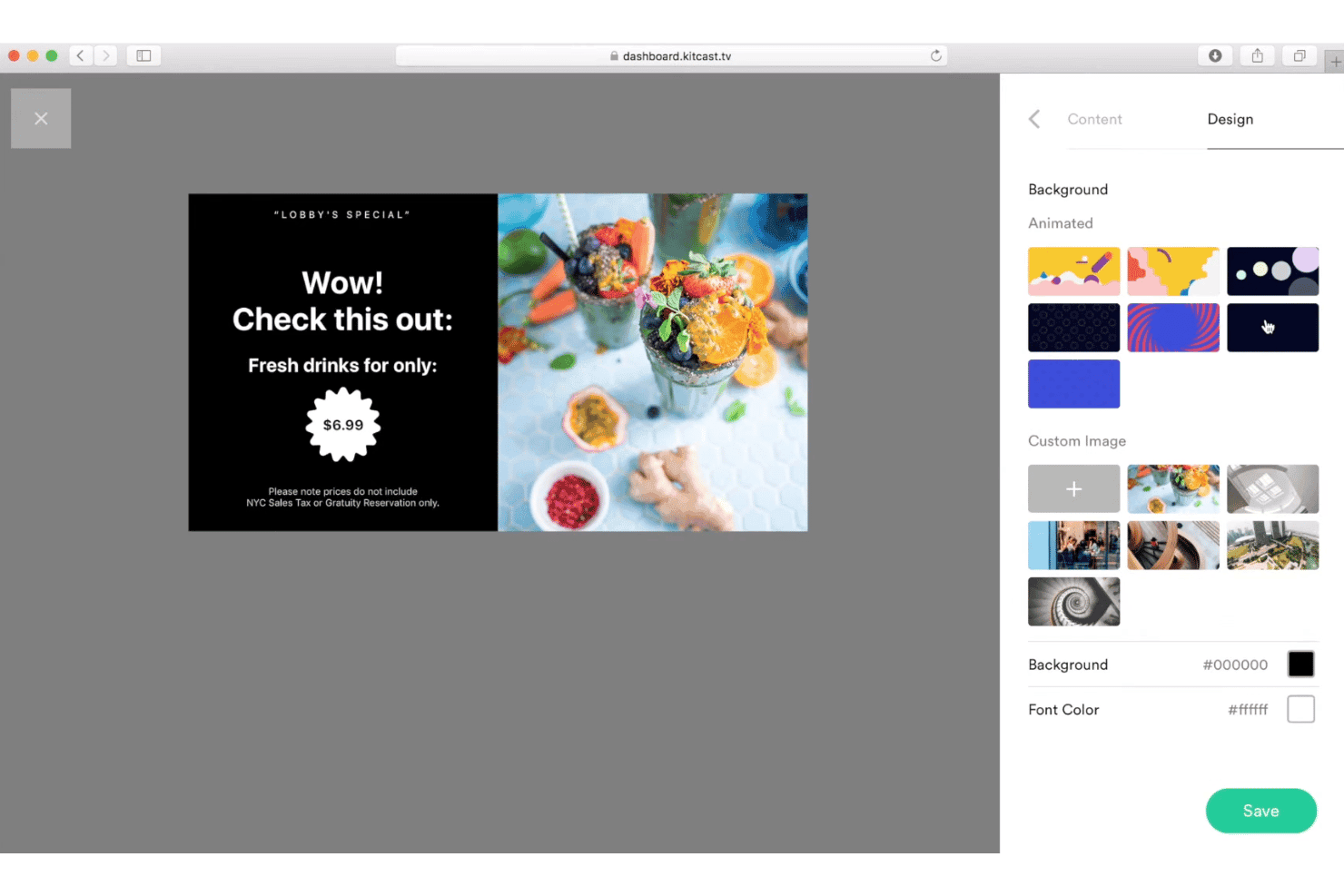
Kitcast includes a design panel where users can customize backgrounds, colors, and images for digital signage promotions. Kitcast is a cloud-based digital signage platform with animated menu board templates, daypart scheduling, multi-location content management, and remote device control across Apple TV, Android TV, Fire TV, and other displays.
Who Is Kitcast Best For?
Kitcast is a strong fit for multi-location restaurant chains and franchise operators who need centralized content control across Apple TV or Fire TV displays.
Why I Picked Kitcast
I picked Kitcast as one of the best because its animated Smart Templates are genuinely built for restaurants. I can design a happy hour promotion with motion graphics, schedule it to go live at 3 PM, and push it across every location without touching a single screen. The AI Menu Generator also lets me type a dish description and get a polished, animated menu card in seconds.
Kitcast Key Features
- Daypart scheduling: Schedule menu boards and promos to update automatically for breakfast, lunch, dinner, or happy hour.
- Role-based access control: Assign editing permissions so individual store managers can control their own displays within a chain.
- Offline playback: Keep menus and key messaging visible on screens even during internet outages.
- Multi-platform device support: Manage content across Apple TV, Fire TV, Android TV, LG webOS, and Samsung Tizen displays.
Kitcast Integrations
Kitcast offers native integrations with Canva, Dropbox, Vimeo, Power BI, Tableau, TEDx, Google Drive, Instagram, TikTok, and more. An API is available for custom integrations.
Pros and Cons
Pros:
- Role-based permissions for chain locations
- Offline playback keeps menus visible
- Animated menu templates for restaurants
Cons:
- Advanced features require higher-tier plans
- Manual entry required for menu changes
Learn more about Kitcast: Best for smooth third-party integrations
- 14-day free trial
- From $20/screen/month (billed annually)
Visit WebsiteCustomer Rating:4.5/5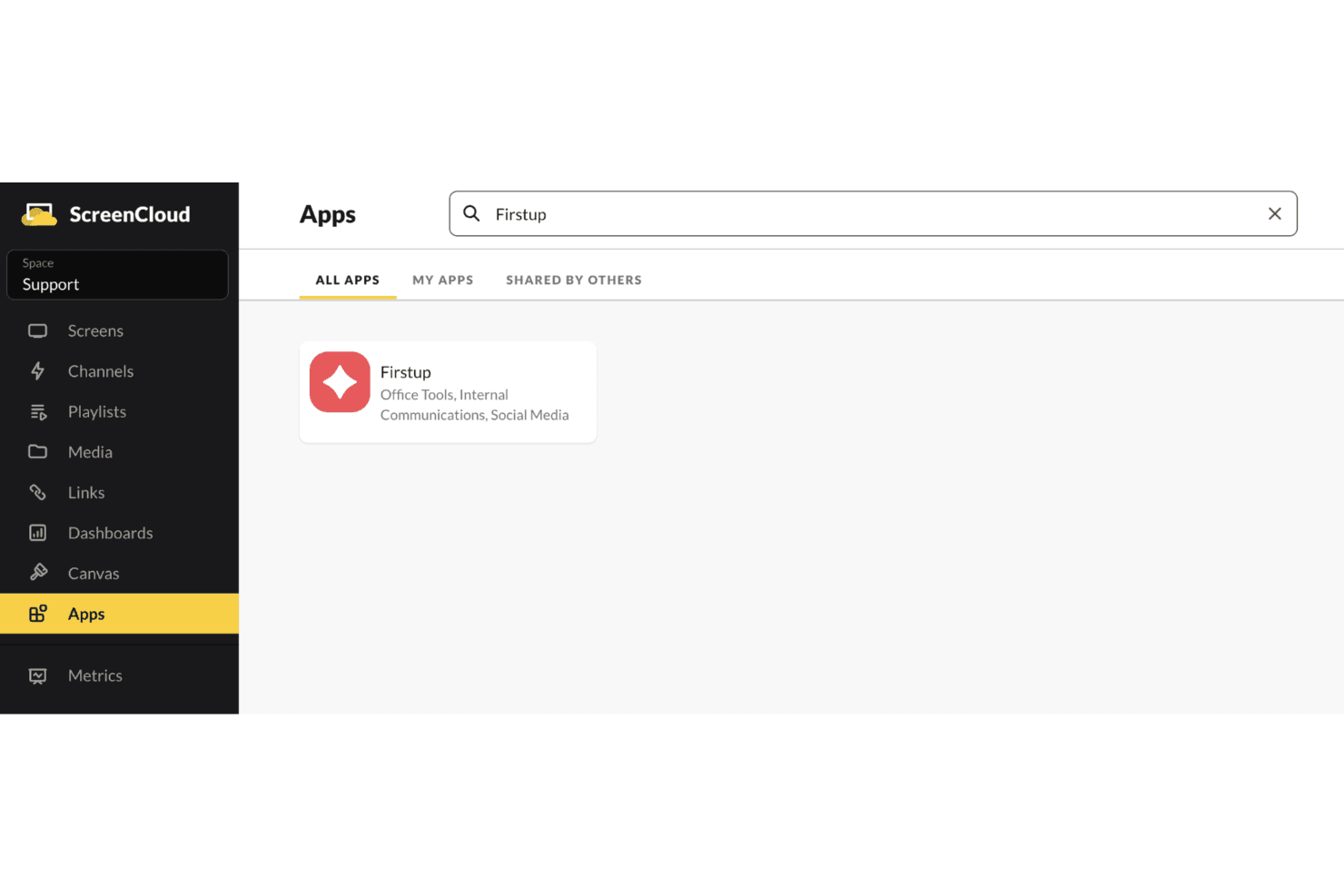
ScreenCloud includes an Apps marketplace where users can search for and install integrations like Firstup for internal communications and social media. ScreenCloud is a cloud-based digital signage platform that lets restaurant teams build and manage menu boards, schedule dayparted content, and control displays across multiple locations from a central dashboard.
Who Is ScreenCloud Best For?
ScreenCloud is a strong fit for multi-location restaurant chains and franchise groups that need centralized control over screen content across many sites.
Why I Picked ScreenCloud
I've included ScreenCloud in my top picks because its App Store gives restaurant teams direct access to over 100 integrations without custom development work. I particularly like how it connects Google Sheets to live menu boards, so a price change in a spreadsheet updates on-screen instantly without rebuilding any layouts. The GraphQL API also lets my team pull in data from dashboards and POS-adjacent tools, making it one of the more open and connectable platforms in this category.
ScreenCloud Key Features
- Menu board design templates: Access customizable templates built for restaurant menus with support for items, categories, prices, and images.
- Smart content scheduling: Automatically display breakfast, lunch, or dinner menus by setting dayparting and expiry rules for your screens.
- Centralized screen management: Control, monitor, and update multiple screens across several locations from a single cloud platform.
- Role-based permissions: Assign specific user roles to control who can edit, update, or approve content for different restaurant sites.
ScreenCloud Integrations
ScreenCloud offers over 80 native integrations, including Bonusly, Firstup, Unily, Canva, YouTube, Power BI, Vimeo, Simpplr, and Slack. An API and webhooks are available for custom integrations.
Pros and Cons
Pros:
- Menu board builder includes calorie and category fields
- Detailed screen health and proof-of-play logs
- Supports granular user roles and permissions
Cons:
- Bulk template edits require manual updates by location
- No direct POS integrations for menu sync
Learn more about ScreenCloud:
Annen programvare for digital skilting i restauranter
Her er noen flere alternativer for programvare for digital skilting i restauranter som ikke kom med på kortlisten min, men som likevel er verdt å se nærmere på:
- 11BrightSignBest for robust hardware reliability
- 12AIScreenBest for quick device onboarding
- 13TelemetryTVBest for granular user permissions control
- 14Samsung VXTBest for touchscreen ordering integration
- 15DotSignageBest for remote price and availability updates
- 16EvergreenBest for local menu item promotions
- 17Skoop SignageBest for loyalty program display features
How I Evaluate Restaurant Digital Signage Software
I evaluate restaurant digital signage tools across two layers: the baseline functionality—menu boards, dayparting, POS sync—that earns a spot on the list, and the factors that set one platform apart.
Core Functionality (Table Stakes For This List)
When I'm selecting tools for my list, I rank each one on a scale from 0 (does not offer the functionality) to 5 (excels in this area) for each core functionality listed below. Then, I calculate the tool's total score into a percentage. Each tool needs to achieve a minimum total score of 65% to be considered for inclusion.
- Digital Menu Boards: I look for item-level editing with modifiers, pricing zones, and category grouping—not just static image uploads dressed up as menu boards.
- Dayparting & Scheduling: I check whether the tool auto-switches menus by time of day and day of week, like flipping from breakfast to lunch without staff input.
- Multi-Location Management: Managing screens across dozens of sites means I look for cloud dashboards with grouping, tagging, and role-based access by region.
- POS & Data Integration: Real-time sync with POS platforms like Toast or Square matters. I check for automatic price updates and 86'd item removal on all screens.
- Media & Template Library: Templates should be built for food service, with multi-zone layouts that support menu items, promotional videos, and branded imagery.
- Remote Device Control: Screen outages during a dinner rush are costly, so I look for remote monitoring, health alerts, and local caching for offline playback.
Once I have a list of tools that meet the criteria, I consider what sets each platform apart.
Differentiating Factors (What Sets Vendors Apart)
Here's how I compare and contrast different vendors:
Standout Features
Drive-thru optimization is a major differentiator. I look for high-brightness display support with dynamic upsell prompts tied to cart contents, since that setup directly impacts average order value during peak windows. Multi-location templates also matter for franchise operators who need centralized brand control but local overrides for regional pricing or menu items. I evaluate nutritional compliance display features too, checking whether platforms auto-populate calorie counts and allergen icons from a single data source.
Beyond Features
Hardware flexibility is a big one. I check whether a platform supports popular media players like BrightSign, Chrome devices, and Amazon Fire TV, or locks you into proprietary hardware. That choice shapes your total cost, especially when you're outfitting dozens of locations. Reliability matters just as much—local caching should keep your menus on screen during internet outages so you never show a blank board mid-service. I also evaluate pricing models closely, looking at per-screen vs. per-location licensing to understand how costs scale for multi-unit operators.
Slik velger du programvare for digital skilting i restauranter
Det er lett å gå seg vill i lange funksjonslister og kompliserte prismodeller. For å hjelpe deg med å holde fokus mens du går gjennom den unike prosessen med å velge programvare, får du her en sjekkliste over faktorer du bør ha i tankene:
| Faktor | Hva du bør vurdere |
|---|---|
| FaktorSkalerbarhet | Hva du bør vurdereVil verktøyet håndtere det nåværende antallet lokasjoner og skjermer, og støtte fremtidig vekst uten kostbare tillegg eller bytte av plattform? |
| FaktorIntegrasjoner | Hva du bør vurdereKan det kobles til POS-systemet, lagerstyringen og markedsføringsverktøyene dine uten ekstra oppsett? Hvis ikke, hva kreves av tilpassede integrasjoner eller løpende synkronisering? |
| FaktorTilpasningsmuligheter | Hva du bør vurdereEr utformingen av menytavlene, planleggingen og merkevareprofileringen fullt ut fleksible etter behovene dine, eller er du begrenset av systemets maler? |
| FaktorBrukervennlighet | Hva du bør vurdereVil ansatte i førstelinjen og ledere enkelt ta det i bruk? Se etter intuitive kontrollpaneler, dra-og-slipp-utforming og minimalt behov for opplæring ved lansering. |
| FaktorImplementering og oppstart | Hva du bør vurdereHva er tidsplanen for lansering på hvert sted? Spør om installasjonsstøtte, pilotprogrammer, dokumentasjon for oppstart og vanlige utfordringer. |
| FaktorKostnad | Hva du bør vurdereFå oversikt over alle løpende og engangsbaserte kostnader. Avhenger kostnadene av antallet skjermer, brukere, lokasjoner eller integrasjoner? Påløper det kostnader for fremtidige endringer? |
| FaktorSikkerhetstiltak | Hva du bør vurdereTilbyr plattformen datakryptering, brukertillatelser og fjernlåsing av enheter? Oppfyller den organisasjonens krav til IT og samsvar? |
| FaktorTilgjengelig brukerstøtte | Hva du bør vurdereTilbys brukerstøtte på kvelder og i helger for å samsvare med restaurantens åpningstider? Kontroller responstider, eskaleringsrutiner og kundereferanser for innsikt fra virkelige brukere. |
Hva er programvare for digital skilting i restauranter?
Programvare for digital skilting i restauranter lar deg administrere, planlegge og vise digitale menyer og kampanjer på skjermer rundt omkring i restauranten eller restaurantkjeden. Disse verktøyene hjelper deg med å holde menytavlene oppdaterte, automatisere endringer basert på klokkeslett eller lagerbeholdning og sende ut enhetlig innhold med merkevareprofil til flere lokasjoner – alt fra én sentral plattform.
Funksjoner i programvare for digital skilting i restauranter
Når du velger programvare for digital skilting i restauranter, bør du se etter følgende nøkkelfunksjoner:
- Digitale menytavler: Bygg og rediger visuelt engasjerende menyer med varer, priser, beskrivelser og bilder som kan oppdateres i sanntid på tvers av flere skjermer.
- Dagdelingsplanlegging og tidsplanlegging: Bytt automatisk mellom menyer eller innhold basert på tidspunkt på dagen, ukedag eller kampanjer, slik at frokost-, lunsj- og middagsmenyer vises til riktig tid.
- Administrasjon av flere lokasjoner: Styr menyer, innhold og skjermstatus sentralt for alle lokasjoner fra ett enkelt kontrollpanel, slik at du sparer tid og sikrer enhetlighet på tvers av nettverket.
- POS-integrasjon: Synkroniser menydata, priser og varer som ikke er på lager direkte fra kassasystemet ditt, slik at de digitale tavlene er korrekte og manuelle registreringsfeil reduseres.
- Fjernovervåking av enheter: Kontroller tilstanden og statusen til hver skjerm eksternt, send innholdsoppdateringer umiddelbart og motta varsler om tilkoblings- eller visningsproblemer.
- Mall- og mediebibliotek: Få tilgang til og tilpass profesjonelt utformede maler og forhåndslastet grafikk for å lage kampanjer, menyfremhevinger eller kunngjøringer om arrangementer raskt.
- Støtte for interaktiv berøring: Aktiver kundefunksjoner som selvbetjent bestilling, forslag om tilleggskjøp eller tilbakemeldingskiosker for å øke engasjementet og gjøre det enklere for kundene.
- Visning av næringsinnhold og allergener: Vis automatisk kaloriinnhold, ingredienslister og allergeninformasjon for å oppfylle kravene og informere gjestene.
- Mulighet for avspilling uten nett: Sørg for at menyer og kampanjer fortsatt vises på skjermene selv om internettforbindelsen går ned, slik at risikoen for tomme skjermer under driften reduseres.
- Tilgangskontroller for brukere: Tildel teamroller, tillatelser og nivåer for innholdsgodkjenning, slik at bare autorisert personale kan endre menyer eller publisere nytt innhold.
Fordeler med programvare for digital skilting i restauranter
Implementering av programvare for digital skilting i restauranter gir flere fordeler for teamet og virksomheten din. Her er noen av fordelene du kan se frem til:
- Sentralisert menyadministrasjon: Oppdater, planlegg og publiser endringer på tvers av flere lokasjoner umiddelbart fra ett kontrollpanel, noe som forbedrer nøyaktigheten og effektiviteten.
- Flere muligheter for tilleggssalg: Bruk automatisk tidsplanlegging, visuelle elementer og dagdelingsplanlegging for å fremheve tidsbegrensede tilbud, kampanjer og varer for tilleggssalg akkurat ved kjøpspunktet.
- Færre manuelle feil: Synkroniser med POS-systemet for å sikre at priser og menyvarer alltid er oppdaterte, slik at feil og risiko for manglende samsvar med krav reduseres.
- Bedre gjesteopplevelse: Hold menyene lettleste, oppdaterte og visuelt tiltalende, og vis nærings- og allergeninformasjon etter behov.
- Driftsmessig robusthet: Lokal mellomlagring og fjernovervåking av enheter bidrar til å forhindre tomme skjermer, selv ved tilkoblingsproblemer.
- Konsekvent merkevareprofil: Standardiserte maler og verktøy for flere lokasjoner opprettholder en enhetlig merkevareprofil, samtidig som lokale variasjoner fortsatt er mulig der det er nødvendig.
- Bedre håndtering av krav: Vis automatisk kaloriinnhold og ingrediensdetaljer for å oppfylle regulatoriske retningslinjer og øke forbrukernes tillit.
Kostnader og priser for programvare for digital skilting i restauranter
Valg av programvare for digital skilting i restauranter krever en forståelse av de ulike prismodellene og abonnementene som er tilgjengelige. Kostnadene varierer basert på funksjoner, teamstørrelse, tillegg og mer. Tabellen nedenfor oppsummerer vanlige abonnementer, gjennomsnittsprisene deres og typiske funksjoner som er inkludert i programvareløsninger for digital skilting i restauranter:
Sammenligningstabell for abonnementer på programvare for digital skilting i restauranter
| Abonnementstype | Gjennomsnittspris | Vanlige funksjoner |
|---|---|---|
| AbonnementstypeGratisabonnement | Gjennomsnittspris$0 | Vanlige funksjonerGrunnleggende maler for menytavler, begrenset lagringsplass, støtte for én lokasjon og fellesskapsbasert brukerstøtte. |
| AbonnementstypePersonlig abonnement | Gjennomsnittspris$10–$35/lokasjon/måned | Vanlige funksjonerTilpassbare oppsett, dagdelingsplanlegging, grunnleggende fjernadministrasjon og tilgang for én bruker. |
| AbonnementstypeForretningsabonnement | Gjennomsnittspris$40–$120/lokasjon/måned | Vanlige funksjonerStyring av flere lokasjoner, POS-integrasjon, avansert tidsplanlegging, brukertillatelser og tilgang til malbiblioteker. |
| AbonnementstypeVirksomhetsabonnement | Gjennomsnittspris$125+/lokasjon/måned | Vanlige funksjonerAPI-tilgang, avansert enhetsadministrasjon, brukerstøtte med SLA, tilpasset merkevareprofil og integrasjon med virksomhetssystemer. |
Vanlige spørsmål om programvare for digital skilting i restauranter
Her er noen svar på vanlige spørsmål om programvare for digital skilting i restauranter:
Hvordan integreres programvare for digital skilting med POS-systemet mitt?
De fleste løsninger for digital skilting i restauranter kobles direkte til POS-systemet ditt for automatisk å hente menydata, priser og varer som er utsolgt. Dette holder de digitale menytavlene oppdaterte uten at du må gjøre de samme manuelle oppdateringene i begge systemene.
Kan jeg administrere menyer og kampanjer for flere lokasjoner fra én konto?
Ja, de fleste løsninger tilbyr sentraliserte kontrollpaneler der du kan sende ut oppdateringer, styre merkevareprofileringen og administrere lokasjonsspesifikke priser eller kampanjer på alle stedene dine fra én enkelt konto.
Hva skjer hvis internettforbindelsen min blir borte?
Mange plattformer bruker lokal hurtigbufring på mediespillere eller skjermer, slik at menyen og kampanjeinnholdet fortsatt vises selv ved et internettbrudd. Dette reduserer forstyrrelsene under travle skift.
Må jeg kjøpe spesialisert maskinvare til digitale menytavler?
Ikke alltid. Mange leverandører støtter skjermer i profesjonell kvalitet, smart-TV-er og populære mediespillere som BrightSign eller Amazon Fire TV, slik at du kan velge maskinvare som passer restaurantens behov og budsjett.
Hvordan sørger jeg for at menyene mine overholder merkingsforskriftene?
Se etter programvare som automatisk henter inn kaloriinnhold, allergener og ingrediensdetaljer fra menydatabasen din. Det hjelper deg med å oppfylle lokale og føderale krav med mindre manuelt arbeid.