

Det er ikke enkelt å drive en butikk, og det kan være en skikkelig hodepine å administrere teamets arbeidsplan. Du må håndtere endringer i siste liten, uventet fravær og fordeling av arbeidstimer for å holde alle fornøyde. Det er her programvare for skiftplanlegging av butikkansatte kommer inn. Den hjelper deg med å spare tid, redusere konflikter og holde teamet organisert.
Jeg har brukt flere år på å teste og vurdere disse verktøyene for å finne de beste alternativene for deg. I denne artikkelen deler jeg mine beste anbefalinger, med fokus på hva som skiller hver av dem ut. Målet mitt er å hjelpe deg med å finne en løsning som passer behovene dine og gjør hverdagen enklere. La oss dykke ned i verdenen av programvare for skiftplanlegging og finne ut hva som fungerer best for teamet ditt.
Hvorfor du kan stole på våre programvareanbefalinger
6,700+
Reviews
20
Industry experts
16+
Evaluation factors
14
Years
Teamet vårt har testet og anmeldt programvare siden 2012. Vi er selv ledere i detaljhandelen, så vi vet hvor vanskelig og hvor viktig det er å velge riktig programvare.
I denne guiden har vi vurdert verktøyene gjennom praktisk testing og uavhengig research og gitt dem poeng ut fra våre utvelgelseskriterier.
Anmeldelsene våre bygger på vår uavhengige vurdering, ikke på salgsargumenter.
Sammenligningstabell for programvare for skiftplanlegging av butikkansatte
Denne sammenligningstabellen oppsummerer prisopplysningene for mine beste utvalgte programmer for skiftplanlegging av butikkansatte:
| Tool | Best For | Trial Info | Price | ||
|---|---|---|---|---|---|
| 1 | Best for deskless teams | Free plan available | From $29/month (billed annually) | Website | |
| 2 | Best with built-in biometric security | 30-day free trial | From $50/month | Website | |
| 3 | Best for labor compliance | 14-day free trial + free demo available | From $5/user/month | Website | |
| 4 | Best for mobile scheduling | Free trial available | From $2.50/user/month | Website | |
| 5 | Best for integration capabilities | 30-day free trial + free demo available | Pricing upon request | Website | |
| 6 | Best for complex scheduling | Free demo available | Pricing upon request | Website | |
| 7 | Best for global workforce | Free demo available | Pricing upon request | Website | |
| 8 | Best for seasonal businesses | Free 14-day trial + free plan + free demo available | From $2/active member/month (billed annually) | Website | |
| 9 | Best for contact centers | Free demo available | Pricing upon request | Website | |
| 10 | Best for small retailers | Free trial + free plan available | From $1.70/user/month (billed annually) | Website |


Anmeldelse av den beste programvaren for skiftplanlegging av butikkansatte
Nedenfor finner du mine detaljerte sammendrag av den beste programvaren for skiftplanlegging av butikkansatte som kom med på utvalgslisten min. Anmeldelsene mine gir et detaljert innblikk i de viktigste funksjonene, fordelene & ulempene, integrasjonene og de ideelle bruksområdene for hvert verktøy, slik at du kan finne det beste alternativet for deg.
 Best for deskless teams
- Free plan available
- From $29/month (billed annually)
Visit WebsiteCustomer Rating:4.6/5
Connecteam streamlines management for deskless teams across all industries. Connecteam is an employee management tool for deskless teams, offering scheduling, time tracking, task management, and communication tools. It's designed for various industries, such as retail, and suits both small businesses and large enterprises.
Why I picked Connecteam: Connecteam focuses on deskless teams with features like time tracking and task management, making it ideal for industries like retail. Its standout feature is the scheduling tool that allows you to manage shifts efficiently. The communication tools keep your team connected, ensuring everyone stays informed. The HR functionalities help streamline administrative tasks, saving you time and effort.
Standout features & integrations:
Features include time tracking that helps monitor employee hours accurately, task management to assign and track tasks easily, and communication tools to keep your team engaged and informed.
Integrations include Gusto, QuickBooks, Xero, Zapier, Google Calendar, Microsoft Outlook, Slack, HubSpot, Salesforce, and BambooHR.
Pros and Cons
Pros:
- Suitable for various industries
- Efficient time tracking
- Strong communication tools
- Customizable task management
- Easy mobile access
Cons:
- Weekly-only bulk edits
- Occasional app glitches
- Limited advanced analytics
- Export options require upgrade
- Less intuitive mobile calendar
Learn more about Connecteam: Best with built-in biometric security
- 30-day free trial
- From $50/month
Visit WebsiteCustomer Rating:4.5/5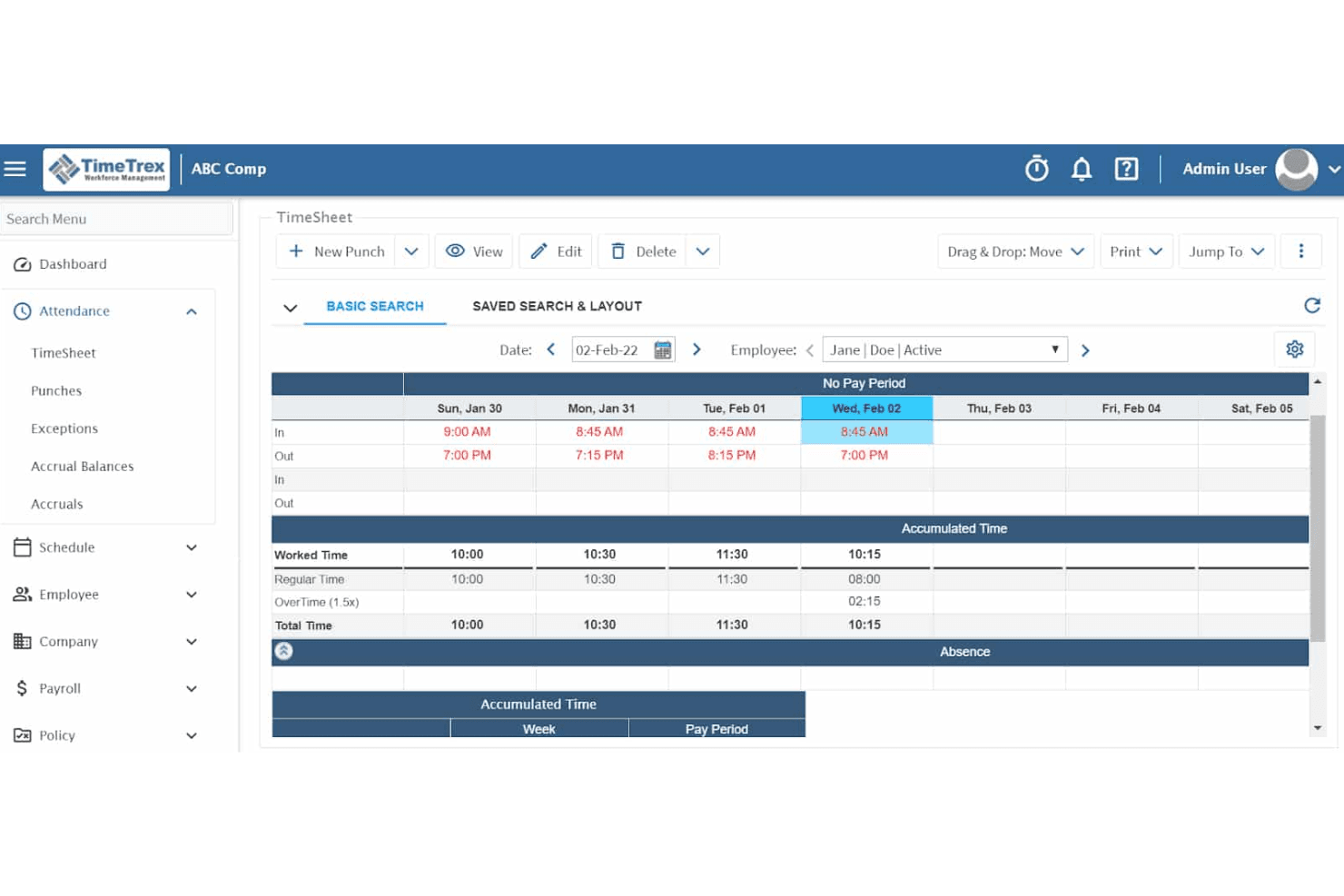
TimeTrex's time and attendance feature ensures accurate data collection for payroll and compliance. TimeTrex is a workforce management platform that combines employee scheduling, time and attendance tracking, payroll processing, and HR management in a single system.
Who Is TimeTrex Best For?
TimeTrex suits multi-location retail and franchise operators who need tight control over clock-in integrity and time theft across multiple sites.
Why I Picked TimeTrex
I picked TimeTrex as one of the best because its biometric facial recognition timeclocks are included from the base Professional tier, not locked behind an enterprise upsell. In a retail environment with high staff turnover and part-time workers clocking in across multiple tills, that distinction matters. I also like that geofencing works alongside biometrics, so a manager running three store locations can restrict clock-ins to a specific physical perimeter at each site.
TimeTrex Key Features
- Drag-and-drop schedule builder: Lets managers quickly assign and adjust shifts for multiple employees in a visual calendar view.
- Multi-location reporting: Consolidates time, attendance, and scheduling data across several store locations into unified dashboards.
- Job costing module: Tracks labor spend by department, role, or project for more detailed payroll and operational analysis.
- Employee availability and time-off requests: Employees can submit their shift preferences and request days off directly through the platform.
TimeTrex Integrations
TimeTrex offers native integrations with ADP, QuickBooks, Sage, and Paychex. An API is available for custom integrations.
Pros and Cons
Pros:
- Open-source edition available for self-hosted deployments
- Payroll and scheduling managed in one platform
- Built-in biometric clock-in prevents buddy punching
Cons:
- Mobile app experience lags behind newer rivals
- Scheduling interface feels dated compared to competitors
Learn more about TimeTrex: Best for labor compliance
- 14-day free trial + free demo available
- From $5/user/month
Visit WebsiteCustomer Rating:4.6/5
Deputy simplifies retail workforce scheduling and ensures labor-law compliance. Deputy is a scheduling and workforce management software for businesses of all sizes, particularly in retail. It helps with scheduling, time tracking, and task management, ensuring compliance with labor laws.
Why I picked Deputy: Deputy focuses on labor compliance, offering features that help your team stay within legal requirements. The scheduling tool automatically calculates overtime and ensures fair shift distribution. It provides real-time insights into labor costs and compliance. The time and attendance tracking features help prevent time theft and ensure accurate payroll processing.
Standout features & integrations:
Features include a shift swapping feature that allows employees to swap shifts with ease, an automated scheduling tool that creates schedules based on employee availability, and a task management system that assigns and tracks tasks efficiently.
Integrations include Xero, QuickBooks, ADP, Gusto, Square, MYOB, NetSuite, BambooHR, Vend, and Shopify.
Pros and Cons
Pros:
- Supports multiple locations
- Flexible scheduling options
- Detailed labor cost insights
Cons:
- Initial setup can be complex
- Restrictive leave approval logic
Learn more about Deputy: Best for mobile scheduling
- Free trial available
- From $2.50/user/month
Visit WebsiteCustomer Rating:4.5/5
When I Work offers mobile-friendly, flexible scheduling for on-the-go retail teams. When I Work is a scheduling and communication tool for businesses that need mobile-friendly solutions. It's ideal for industries like retail where team members are often on the go and require flexible scheduling options.
Why I picked When I Work: When I Work excels in mobile scheduling, offering a user-friendly mobile app that lets your team manage schedules anytime. The app allows employees to clock in and out from their phones, making it convenient for those on the move. It also provides shift reminders to ensure your team doesn’t miss their shifts. The communication tools keep everyone connected, enhancing team coordination.
Standout features & integrations:
Features include a shift swapping feature that allows employees to easily trade shifts, a team messaging tool to facilitate communication, and a time tracking feature that ensures accurate payroll processing.
Integrations include QuickBooks, Gusto, ADP, BambooHR, Square, Xero, Google Calendar, Microsoft Outlook, Slack, and Salesforce.
Pros and Cons
Pros:
- Efficient time tracking
- Instant shift notifications
- Easy shift swapping
Cons:
- Chat requires separate app
- Limited custom fields
Learn more about When I Work: Best for integration capabilities
- 30-day free trial + free demo available
- Pricing upon request
Visit WebsiteCustomer Rating:4.3/5
Workday unifies scheduling, tracking, and analytics for large workforce operations. Workday is a cloud-based workforce management solution ideal for large organizations that need integrated HR and payroll systems. It provides scheduling, time tracking, and workforce analytics to enhance operational efficiency.
Why I picked Workday: Workday excels in integration capabilities, making it a top choice for organizations needing unified systems. The platform connects HR and payroll, reducing administrative overhead. Its analytics tools provide insights into workforce performance, helping you make data-driven decisions. The scheduling features are adaptable, supporting complex organizational needs.
Standout features & integrations:
Features include a mobile app for on-the-go access to schedules and time tracking, a customizable dashboard that lets you tailor your view, and a compliance management feature to ensure adherence to labor laws.
Integrations include Salesforce, Adobe, Slack, Microsoft Teams, SAP, Oracle, Kronos, ServiceNow, ADP, and Google Workspace.
Pros and Cons
Pros:
- Mobile access for convenience
- Flexible scheduling options
- Detailed workforce analytics
Cons:
- Complex reporting customization
- Inflexible scheduling workflows
Learn more about Workday:

Shiftboard handles complex scheduling with advanced time tracking and compliance tools. Shiftboard is a scheduling software for industries that require complex scheduling solutions, such as healthcare and manufacturing. It offers advanced scheduling, time tracking, and compliance management to ensure efficiency and accuracy.
Why I picked Shiftboard: Shiftboard is tailored for complex scheduling needs, providing features that handle intricate shift patterns and rotations. The software allows you to set up rules and constraints to ensure compliance and fair scheduling. Its advanced reporting tools offer insights into workforce productivity and labor costs. The real-time updates keep your team informed of any schedule changes, reducing confusion.
Standout features & integrations:
Features include an advanced rule-based scheduling engine that ensures compliance with labor laws, a real-time communication tool that keeps your team updated, and a comprehensive reporting feature that provides insights into workforce efficiency.
Integrations include ADP, SAP, Oracle, Microsoft Dynamics, QuickBooks, Kronos, Workday, BambooHR, Paychex, and Gusto.
Pros and Cons
Pros:
- Ensures compliance with labor laws
- Advanced rule-based scheduling
- Handles complex shift patterns
Cons:
- Delayed real-time schedule updates
- Missing shift overlaps alert
Learn more about Shiftboard: 7Best for global workforce
UKG
- Free demo available
- Pricing upon request
Visit WebsiteCustomer Rating:4.4/5
UKG unifies scheduling, tracking, and HR for complex global workforces. UKG is a workforce management solution for enterprises with a global presence. It combines scheduling, time tracking, and HR management to support complex and diverse workforce needs across different regions.
Why I picked UKG: UKG is designed for managing a global workforce, offering features that accommodate diverse compliance requirements. It provides tools for scheduling and tracking time across multiple locations, ensuring consistency. The software supports multilingual capabilities, making it accessible to your international team. Its compliance management features help navigate different labor laws, reducing risks.
Standout features & integrations:
Features include compliance management that helps you adhere to various international labor laws, a multilingual interface that supports diverse teams, and advanced scheduling tools that manage complex shift patterns across multiple regions.
Integrations include SAP, Oracle, Workday, Microsoft Dynamics, Salesforce, ADP, Kronos, QuickBooks, BambooHR, and Gusto.
Pros and Cons
Pros:
- Reduces compliance risks
- Manages complex shift patterns
- Multilingual capabilities
Cons:
- Hard to navigate mobile app
- Occasional syncing issues
Learn more about UKG: Best for seasonal businesses
- Free 14-day trial + free plan + free demo available
- From $2/active member/month (billed annually)

ZoomShift helps retail teams manage shifting schedules and seasonal staffing needs. ZoomShift is a scheduling tool for businesses with fluctuating staffing needs, such as those in retail and hospitality. It offers shift scheduling, time tracking, and team communication features to help manage seasonal changes efficiently.
Why I picked ZoomShift: ZoomShift caters to seasonal businesses by providing flexible scheduling options that adapt to changing workforce needs. Its drag-and-drop schedule builder lets you quickly adjust shifts as demand changes. The time tracking feature ensures accurate payroll processing during busy seasons. Notifications keep your team informed, reducing confusion and last-minute changes.
Standout features & integrations:
Features include a time off management tool that lets your team request and approve time off easily, a payroll export feature that simplifies payroll processing, and a budgeting tool to help manage labor costs effectively.
Integrations include QuickBooks, Gusto, ADP, Xero, Paychex, BambooHR, Square, Google Calendar, Microsoft Outlook, and Slack.
Pros and Cons
Pros:
- Supports seasonal staffing
- Effective budgeting tools
- Quick payroll export
Cons:
- Limited advanced features
- Simple shift rotation only
Learn more about ZoomShift:

Calabrio optimizes contact-center scheduling, performance, and service quality. Calabrio is a workforce optimization software for contact centers, focusing on scheduling, performance analytics, and quality management. It helps businesses enhance customer service by optimizing employee performance and operational efficiency.
Why I picked Calabrio: Calabrio is tailored for contact centers, offering features that improve scheduling accuracy and employee engagement. The software provides detailed analytics to help you understand performance trends and make informed decisions. Its quality management tools support consistent customer service delivery. The customizable dashboards allow you to monitor key metrics that matter to your team.
Standout features & integrations:
Features include a speech analytics tool that provides insights into customer interactions, a quality management system that ensures consistent service, and a performance dashboard that helps track key metrics efficiently.
Integrations include Salesforce, Microsoft Dynamics, SAP, Oracle, Cisco, Avaya, Genesys, Five9, NICE, and Amazon Connect.
Pros and Cons
Pros:
- Accurate scheduling tools
- Customizable dashboards
- Detailed performance analytics
Cons:
- Limited scheduling flexibility
- Slow loading dashboards
Learn more about Verint: 10Best for small retailers
Sling
- Free trial + free plan available
- From $1.70/user/month (billed annually)

Sling streamlines retail scheduling and keeps teams organized and connected. Sling is a scheduling and communication tool for small retail businesses, offering features like shift management, time tracking, and team communication. It helps streamline scheduling processes and keeps teams connected and organized.
Why I picked Sling: Sling is ideal for small retailers, emphasizing ease of use and affordability. The shift management feature allows your team to manage schedules efficiently. It offers time tracking to ensure accurate payroll processing. Communication tools keep your team informed and engaged, making it a great fit for small operations.
Standout features & integrations:
Features include a time clock that helps track employee hours accurately, a newsfeed that keeps everyone updated on important announcements, and a task list to assign and manage tasks efficiently.
Integrations include Google Calendar, Microsoft Outlook, Apple Calendar, Slack, Gusto, QuickBooks, ADP, BambooHR, Square, and Xero.
Pros and Cons
Pros:
- Customizable notifications
- Suitable for small teams
- Simple shift swapping
Cons:
- Limited admin role options
- Complex rotating shift setup
Learn more about Sling:
Annen programvare for skiftplanlegging av butikkansatte
Her er noen flere alternativer for programvare for skiftplanlegging av butikkansatte som ikke kom med på utvalgslisten min, men som likevel er verdt å undersøke:
- 11ADP WorkForce SuiteBest for large enterprises
- 12TCP SoftwareBest for time tracking
- 13ShiftlabBest for performance metrics
- 14Workforce.comBest for workforce analytics
- 15HomebaseBest for free scheduling tools
- 16LegionBest for AI-driven scheduling
- 17KenjoBest for small HR teams
How I Evaluate Retail Employee Scheduling Software
I split my evaluation into two layers: the baseline a tool must clear—like POS-linked forecasting and fair workweek compliance—and the differentiators that set the best options apart.
Core Functionality (Table Stakes For This List)
When I'm selecting tools for my list, I rank each one on a scale from 0 (does not offer the functionality) to 5 (excels in this area) for each core functionality listed below. Then, I calculate the tool's total score into a percentage. Each tool needs to achieve a minimum total score of 65% to be considered for inclusion.
- Shift Scheduling & Templates: I look for drag-and-drop builders with reusable templates so a manager can clone last week's schedule across departments in a few clicks.
- Demand-Based Forecasting: I check whether the tool pulls POS or foot traffic data to project staffing needs—like ramping up coverage ahead of a weekend promo.
- Mobile Employee Self-Service: Associates should be able to swap shifts, set availability, and submit time-off requests from their phones without calling a manager.
- Labor Law Compliance: I evaluate how the platform handles overtime caps, required break windows, and predictive scheduling rules for hourly retail teams.
- Time & Attendance Tracking: I look for built-in clock-in/out tied to the schedule—geofencing and exception alerts help managers catch no-shows before a shift gap grows.
- Team Communication: I check whether managers can push announcements and message individuals or groups.
Once I have a list of tools that meet this criteria, I consider what sets each platform apart.
Differentiating Factors (What Sets Vendors Apart)
Here's how I compare and contrast different vendors:
Standout Features
AI auto-scheduling is a major differentiator. I look for tools that generate a full week's schedule by factoring in availability, skills, and labor targets so managers aren't spending hours on manual adjustments. A shift marketplace adds real value for multi-location retailers, giving associates a way to pick up open shifts at nearby stores without a chain of phone calls. I also check for task management tied to shifts, where opening checklists or restocking duties are assigned alongside the schedule itself.
Beyond Features
POS and payroll integrations matter a lot here. I check whether a platform connects natively to systems like Shopify, Square, or Lightspeed so forecasted sales data actually drives scheduling decisions. Payroll connectors are equally important—if timesheets need manual export, that's a gap your payroll team will feel every pay period. Scalability is another factor I evaluate closely, especially for franchise operators who need district-level hierarchies and cross-store labor pools. Pricing transparency also plays a role; I look at whether core features like compliance tools or forecasting sit behind premium tiers.
Slik velger du programvare for skiftplanlegging av butikkansatte
Det er lett å gå seg vill i lange funksjonslister og kompliserte prisstrukturer. For å hjelpe deg med å holde fokus mens du går gjennom den unike prosessen med å velge programvare, har jeg laget en sjekkliste over faktorer du bør ha i bakhodet:
| Faktor | Hva du bør vurdere |
|---|---|
| FaktorSkalerbarhet | Hva du bør vurdereKan programvaren vokse med virksomheten din? Vurder om den kan håndtere flere ansatte eller lokasjoner når virksomheten utvides. |
| FaktorIntegrasjoner | Hva du bør vurdereKan den kobles til de eksisterende systemene dine? Sjekk om den kan integreres med lønnssystemer, HR-programvare eller andre verktøy du bruker. |
| FaktorTilpasningsmuligheter | Hva du bør vurdereKan du tilpasse den etter behovene dine? Se etter muligheter for å tilpasse arbeidsplaner, rapporter og varsler. |
| FaktorBrukervennlighet | Hva du bør vurdereEr grensesnittet intuitivt? Test hvor brukervennlig det er for å sikre at teamet raskt kan lære seg å bruke det. |
| FaktorImplementering og innføring | Hva du bør vurdereHvor lang tid vil det ta å sette opp systemet? Vurder tiden og ressursene som kreves for å få det på plass og til å fungere problemfritt. |
| FaktorKostnad | Hva du bør vurderePasser det inn i budsjettet ditt? Sammenlign prisplanene og sørg for at det ikke finnes skjulte gebyrer eller uventede kostnader. |
| FaktorSikkerhetstiltak | Hva du bør vurdereEr dataene dine beskyttet? Kontroller sikkerhetstiltakene som er på plass for å beskytte informasjon om ansatte og virksomheten. |
| FaktorKrav til overholdelse | Hva du bør vurdereBidrar det til å oppfylle lovpålagte krav? Sørg for at det støtter overholdelse av arbeidsmiljølovgivning som gjelder for bransjen og stedet virksomheten holder til. |
Hva er programvare for skiftplanlegging av butikkansatte?
Programvare for skiftplanlegging av butikkansatte er et verktøy som hjelper virksomheter med å administrere arbeidsplanene til de ansatte på en effektiv måte. Butikkledere, HR-medarbeidere og teamledere bruker vanligvis disse verktøyene for å sikre tilstrekkelig bemanning på hvert skift og redusere planleggingskonflikter. Funksjoner for automatisert skiftplanlegging, bytte av skift og tidsregistrering bidrar til å administrere skift, forbedre kommunikasjonen og sikre overholdelse av arbeidsmiljølovgivningen. Alt i alt sparer disse verktøyene tid og forbedrer driftseffektiviteten i butikkvirksomheter.
Funksjoner
Her er de viktigste funksjonene all god programvare for vaktplanlegging av butikkansatte bør ha:
- Automatisk planlegging: Oppretter automatisk vaktplaner basert på de ansattes tilgjengelighet og virksomhetens behov, noe som sparer tid og reduserer feil.
- Bytte av vakter: Lar ansatte enkelt bytte vakter med kolleger, noe som bidrar til å opprettholde bemanning og fleksibilitet.
- Tidsregistrering: Overvåker de ansattes arbeidstimer nøyaktig for å sikre korrekt lønnsbehandling og overholdelse av arbeidsmiljølovgivningen.
- Varsler: Sender varsler og påminnelser til ansatte om kommende vakter og endringer i vaktplanen, noe som forbedrer kommunikasjonen.
- Mobil tilgang: Tilbyr en mobilapp for tilgang til vaktplaner og tidsregistrering når du er på farten, noe som gjør hverdagen enklere for de ansatte.
- Regelverksetterlevelse: Bidrar til å sikre at arbeidsmiljølovgivning og forskrifter følges, slik at risikoen for juridiske problemer reduseres.
- Tilpassbar rapportering: Tilbyr skreddersydde rapporter for å følge med på arbeidsstyrkens produktivitet og arbeidskostnader, noe som støtter velinformerte beslutninger.
- Integrasjonsmuligheter: Kobler sammen lønns-, HR- og andre systemer for å effektivisere drift og datahåndtering.
- Selvbetjening for ansatte: Lar ansatte se vaktplaner, be om fri og administrere tilgjengeligheten sin, slik at de får større kontroll.
- Ytelsesanalyse: Gir innsikt i de ansattes prestasjoner og produktivitet, og støtter datadrevne beslutninger i ledelsen.
Fordeler
Implementering av programvare for vaktplanlegging av butikkansatte gir flere fordeler for teamet og virksomheten din. Her er noen av fordelene du kan se frem til:
- Tidsbesparelser: Automatisk planlegging reduserer tiden som brukes på å opprette og justere vaktplaner manuelt.
- Forbedret kommunikasjon: Varsler og mobil tilgang holder teamet informert om vakter og endringer, slik at misforståelser reduseres.
- Fleksibilitet: Funksjoner for bytte av vakter og selvbetjening gir ansatte kontroll over vaktplanene sine, noe som øker arbeidstilfredsheten.
- Sikret regelverksetterlevelse: Regelverksstyring hjelper deg med å overholde arbeidsmiljølovgivningen og minimerer juridisk risiko.
- Nøyaktig lønnsbehandling: Tidsregistrering sikrer presis registrering av arbeidstimer, noe som fører til korrekt lønnsbehandling.
- Datadrevne beslutninger: Ytelsesanalyse og tilpassbare rapporter gir innsikt som hjelper deg med å ta velinformerte beslutninger i ledelsen.
- Økt effektivitet: Integrasjonsmuligheter effektiviserer driften ved å koble sammen lønns- og HR-systemer, noe som reduserer administrativt arbeid.
Kostnader og priser
Ved valg av programvare for vaktplanlegging av butikkansatte er det viktig å forstå de ulike prismodellene og abonnementene som er tilgjengelige. Kostnadene varierer basert på funksjoner, teamstørrelse, tillegg og mer. Tabellen nedenfor oppsummerer vanlige abonnementer, gjennomsnittsprisene deres og typiske funksjoner som er inkludert i løsninger for vaktplanlegging av butikkansatte:
Sammenligningstabell for programvare for vaktplanlegging av butikkansatte
| Abonnementstype | Gjennomsnittspris | Vanlige funksjoner |
|---|---|---|
| AbonnementstypeGratisabonnement | Gjennomsnittspris$0 | Vanlige funksjonerGrunnleggende planlegging, bytte av vakter og varsler. |
| AbonnementstypePersonlig abonnement | Gjennomsnittspris$5-$15/bruker/måned | Vanlige funksjonerAvansert planlegging, tidsregistrering og mobil tilgang. |
| AbonnementstypeBedriftsabonnement | Gjennomsnittspris$20-$35/bruker/ måned | Vanlige funksjonerRegelverksetterlevelse, integrasjonsmuligheter og ytelsesanalyse. |
| AbonnementstypeVirksomhetsabonnement | Gjennomsnittspris$40-$60/bruker/ måned | Vanlige funksjonerTilpassbar rapportering, dedikert kundestøtte og forbedrede sikkerhetsfunksjoner. |
Vanlige spørsmål
Her er noen svar på vanlige spørsmål om programvare for planlegging av ansatte i detaljhandelen:
Hvor sikker er programvare for planlegging av ansatte i detaljhandelen?
Ja, programvare for planlegging av ansatte i detaljhandelen er som regel sikker. De fleste løsninger bruker kryptering for å beskytte dataene dine og overholde bransjestandarder. Når du vurderer alternativer, bør du se etter funksjoner som tofaktorautentisering og regelmessige sikkerhetsoppdateringer. Gå alltid gjennom leverandørens personvernerklæring og spør om praksisen deres for databeskyttelse for å sikre at informasjonen din er trygg.
Kan programvare for planlegging av ansatte i detaljhandelen integreres med eksisterende systemer?
Ja, det meste av programvaren for planlegging av ansatte i detaljhandelen kan integreres med eksisterende systemer som lønn, HR og kommunikasjonsverktøy. Sjekk programvarens integrasjonsmuligheter for å se om den støtter systemene du bruker. Dette kan bidra til å redusere manuell dataregistrering og effektivisere arbeidsflyten. Noen verktøy tilbyr API-tilgang for tilpassede integrasjoner, noe som gir enda større fleksibilitet.
Kreves det opplæring for å bruke programvare for planlegging av ansatte i detaljhandelen?
Ja, det kreves ofte noe opplæring, men mange løsninger tilbyr intuitive grensesnitt som minimerer læringskurven. Se etter programvare som tilbyr opplæringsressurser som videoer, webinarer og brukerveiledninger. Disse ressursene kan hjelpe teamet ditt med å komme raskt i gang.
Kan programvare for planlegging av ansatte i detaljhandelen håndtere flere lokasjoner?
Ja, mange løsninger for programvare til planlegging av ansatte i detaljhandelen er utviklet for å administrere flere lokasjoner. Med disse verktøyene kan du lage arbeidsplaner for ulike lokasjoner fra én enkelt plattform, noe som gjør det enklere å føre tilsyn med driften. Sjekk om programvaren tilbyr lokasjonsbasert rapportering og samsvarsadministrasjon for å sikre at den dekker behovene dine.
Hva skjer hvis det oppstår et driftsavbrudd i programvaren?
Ved et driftsavbrudd i programvaren har de fleste leverandører beredskapsplaner for å minimere forstyrrelser. Se etter leverandører som tilbyr pålitelig kundestøtte og åpen kommunikasjon om tjenesteproblemer. Det er lurt å ha sikkerhetsrutiner på plass, for eksempel å eksportere arbeidsplaner regelmessig, for å sikre kontinuitet. Noen verktøy tilbyr også frakoblet tilgang til viktige funksjoner.