

Recensione di Jimdo: vantaggi, svantaggi, funzionalità e prezzi
Jimdo eccelle per semplicità, rendendolo perfetto per piccole imprese e creatori che desiderano un costruttore di siti web per il commercio elettronico facile e senza complicazioni.

Recensiamo gli strumenti in modo indipendente, e le commissioni aiutano a finanziare i nostri test. Consulta la nostra politica sulla trasparenza, la nostra metodologia o suggerisci uno strumento.
Jimdo is an ecommerce website builder for small business owners and solopreneurs who need to get an online store live fast. If you want a quicker, simpler path to selling online than Wix offers, Jimdo's AI-driven setup is worth a close look. Wix gives you more design control, but it asks for considerably more time and decision-making upfront. Jimdo trades that flexibility for speed.
Jimdo Evaluation Summary

3.5/5
- From $11/month
- Free plan available
Perché fidarsi dei nostri consigli sui software
6,700+
Reviews
20
Industry experts
16+
Evaluation factors
14
Years
Il nostro team testa e recensisce software dal 2012. In quanto leader del retail noi stessi, sappiamo quanto sia difficile — e importante — scegliere il software giusto.
Per questa guida, abbiamo valutato gli strumenti attraverso test pratici e ricerche indipendenti, assegnando un punteggio agli strumenti in base ai nostri criteri di selezione.
Le nostre recensioni riflettono il nostro giudizio indipendente, non un discorso di vendita.
Jimdo Overview
In my opinion, Jimdo offers a reliable option for small businesses and creatives seeking an easy-to-use ecommerce website builder. While its interface is intuitive and pricing competitive, it lacks some advanced features found in competitors like Squarespace, Shopify, or Wix. Jimdo shines in simplicity, making it ideal for those who prioritize straightforward setup over extensive customization. However, for larger businesses needing more complex integrations and features, you might find other platforms more suitable. Overall, if you're looking for a budget-friendly, user-friendly option without the need for extensive technical support, Jimdo is worth considering.
Pros
- You can quickly set up your online store without any coding skills.
- The user-friendly interface makes managing your site easy.
- It offers clean, professional templates that look great.
Cons
- You might find the customization options limited compared to other platforms.
- It lacks advanced ecommerce features that some businesses need.
- Customer support can be slow, which might frustrate your team.


Is Jimdo Right For Your Needs?
Who Would be a Good Fit for Jimdo?
Jimdo is ideal for small businesses, freelancers, and creative professionals who need a simple and quick way to launch an online store. Its ease of use allows you to focus on your work without getting bogged down by technical details. If you’re in a creative field like photography or art, Jimdo’s clean templates can showcase your work beautifully. For those who want to manage their site without coding, Jimdo’s intuitive interface is a plus.
- Small RetailersJimdo’s straightforward setup and management tools make it perfect for small retail businesses looking to sell online.
- FreelancersIf you’re a freelancer, Jimdo’s easy-to-use platform can help you create a professional online presence quickly.
- Creative ProfessionalsArtists and photographers will appreciate Jimdo’s attractive templates that highlight visual content beautifully.
- Local BusinessesLocal businesses can benefit from Jimdo’s simple design tools to create an engaging online storefront with built-in business listings.
- StartupsStartups with limited resources can use Jimdo to establish an online store without needing technical expertise.
- Personal ProjectsFor personal projects, Jimdo offers a hassle-free way to build and maintain a simple ecommerce site.
Who Would be a Bad Fit for Jimdo?
Jimdo isn’t the best choice for large enterprises or businesses needing extensive HTML & CSS customization, as well as advanced ecommerce features. If your team requires complex integrations, detailed analytics, or specialized tools, you'll find Jimdo lacking. Companies in highly competitive industries might need a more robust platform to stand out. For those needing extensive customer support, Jimdo's limited service might be frustrating.
- Large EnterprisesJimdo’s limited customization and feature set won’t meet the demands of large, complex organizations.
- Tech CompaniesTech companies needing advanced integrations and analytics will find Jimdo’s offerings insufficient.
- Ecommerce GiantsFor large ecommerce businesses, Jimdo lacks the advanced features needed to compete effectively.
- Creative AgenciesAgencies that handle web design for multiple clients may find Jimdo’s templates too limiting.
- Corporate TeamsCorporate teams requiring specialized tools and detailed tracking will find Jimdo’s features too basic.
- High-Traffic SitesSites expecting high traffic volumes might need a more robust platform than what Jimdo offers.
La Nostra Metodologia di Recensione
Come Testiamo e Valutiamo gli Strumenti
Abbiamo trascorso anni a costruire, perfezionare e migliorare il nostro sistema di test e valutazione dei software. Il nostro schema di valutazione è progettato per cogliere le sfumature della selezione dei software e per comprendere cosa rende uno strumento efficace, concentrandosi su aspetti critici del processo decisionale. Qui sotto puoi vedere esattamente come funzionano i nostri test e valutazioni attraverso sette criteri. Questo ci permette di fornire una valutazione imparziale del software basata su funzionalità principali, caratteristiche distintive, facilità d’uso, onboarding, supporto clienti, integrazioni, recensioni dei clienti e rapporto qualità-prezzo.
Funzionalità di base (25% della valutazione finale)
Il punto di partenza della nostra valutazione è sempre la funzionalità principale dello strumento. Ha le funzioni e le caratteristiche di base che un utente si aspetterebbe? Alcune di queste funzionalità sono bloccate a piani tariffari di livello superiore? Alla base, ci aspettiamo che uno strumento regga il confronto con le capacità minime dei suoi concorrenti.
Caratteristiche distintive (25% della valutazione finale)
Successivamente valutiamo caratteristiche distintive e non comuni che vadano oltre la normale funzionalità presente in strumenti simili. Un punteggio alto riflette funzionalità specializzate o uniche che rendono il prodotto più veloce, efficiente o che offrano valore aggiunto all’utente. Valutiamo anche quanto sia facile integrare il software con altri strumenti della consueta infrastruttura tecnologica per espanderne la funzionalità e l’utilità. Gli strumenti che offrono molte integrazioni native, connessioni di terze parti e accesso API per costruire integrazioni personalizzate ottengono il punteggio più alto.
Facilità d’uso (10% della valutazione finale)
Consideriamo quanto sia rapido e semplice eseguire le attività definite nelle funzionalità di base utilizzando lo strumento. I software che ottengono un punteggio alto sono ben progettati, intuitivi, offrono app mobili, modelli pronti e rendono compiti complessi relativamente semplici.
Onboarding (10% della valutazione finale)
Sappiamo quanto sia importante una rapida adozione da parte del team per una nuova piattaforma, quindi valutiamo quanto sia facile imparare a usare uno strumento con una formazione minima. Esaminiamo quanto tempo impiega un membro del team a configurarsi e iniziare a utilizzare lo strumento senza esperienza. Le soluzioni con punteggi elevati richiedono poco o nessun supporto.
Supporto clienti (10% della valutazione finale)
Valutiamo quanto sia rapido e facile ricevere assistenza e trovare aiuto tramite telefono, live chat o base di conoscenza. Gli strumenti e le aziende che forniscono un supporto in tempo reale ottengono i punteggi migliori, mentre i chatbot hanno i punteggi più bassi.
Recensioni dei clienti (10% della valutazione finale)
Oltre ai nostri test e valutazioni, consideriamo il net promoter score dei clienti attuali e passati. Esaminiamo la loro propensione, data la possibilità, a scegliere nuovamente lo strumento per le sue funzionalità di base. Un punteggio elevato riflette un alto net promoter score da clienti attuali o passati.
Rapporto qualità-prezzo (10% della valutazione finale)
Infine, considerando tutti gli altri criteri, valutiamo il prezzo medio dei piani base rispetto alle funzionalità fondamentali e teniamo in considerazione il valore degli altri criteri di valutazione. Il software che offre di più, a meno, ottiene punteggi più alti.
Core Features
Drag-and-Drop Editor: You can easily build your site by dragging elements where you want them, saving time and effort. It’s intuitive even if you’re not tech-savvy.
Responsive Design: Your site automatically adjusts to look good on any device, and Jimdo’s built-in bandwidth allocation helps ensure pages load smoothly on both desktop and mobile.
SEO Tools: Jimdo provides basic SEO settings to help your site rank better in search engines. It’s perfect for improving your online visibility without hiring an expert.
Online Store Management: Manage your products and orders with straightforward tools that simplify your workflow. It’s everything you need to run a small online store.
Blogging Capabilities: You can easily add a blog to your site to engage with your audience, share posts on social media, and drive traffic. It’s a handy tool for content marketing.
Customizable Templates: Choose from a variety of templates with flexible design options to match your brand’s style. You’ll find a design that makes your site stand out.
Ease of Use
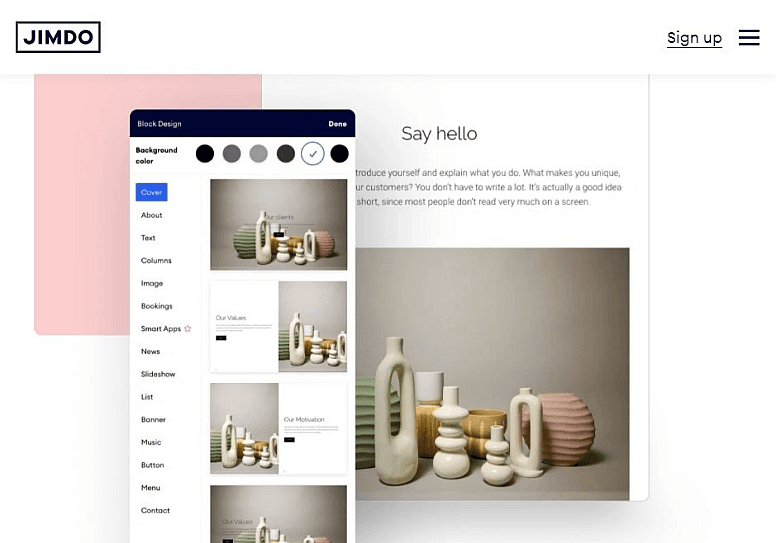
Jimdo stands out for its user-friendly design, offering enough functionality to let anyone create a professional ecommerce site without no coding. The drag-and-drop editor simplifies the website building process, and its responsive design ensures your site looks good on mobile devices, desktops, and tablets. You’ll appreciate the straightforward interface that lets you focus on your work, not on figuring out complex tools. For small businesses and creative professionals, Jimdo’s simplicity is a major advantage.

Integrations
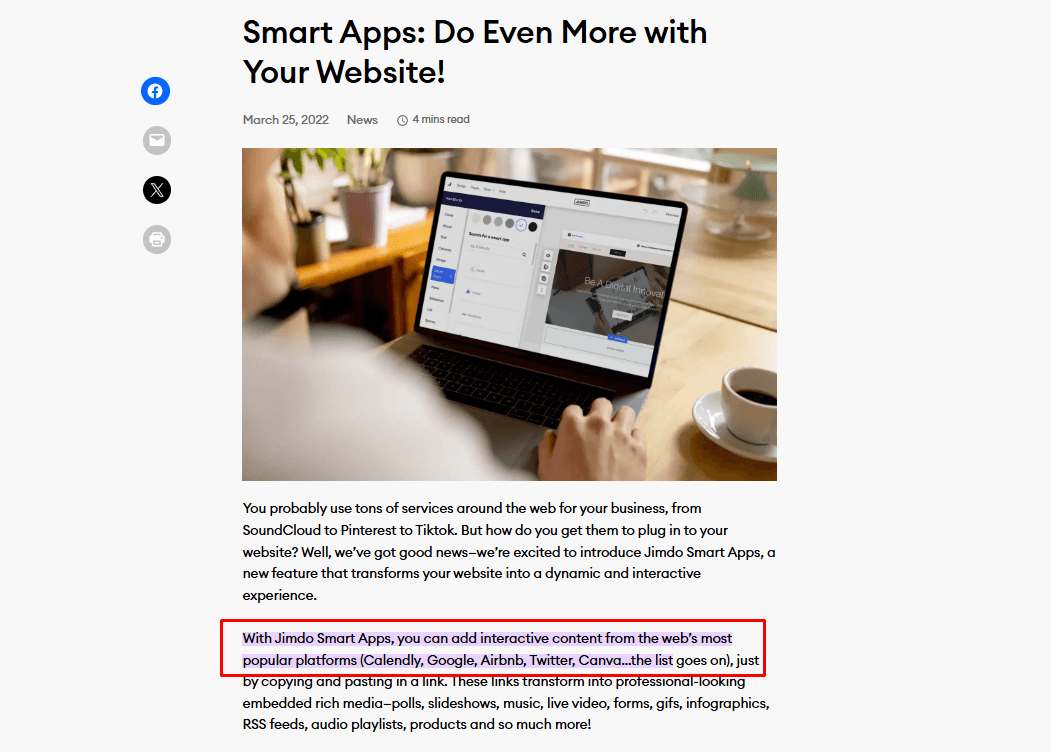
Jimdo integrates with Google Analytics, Facebook Pixel, Instagram, Pinterest, Mailchimp, PayPal, Stripe, YouTube, Twitter, Calendly, and Google Search Console. Jimdo also offers Smart Apps connections, allowing you to add interactive content from external platforms.
Jimdo does not currently offer an API or direct connections with third-party integration tools.
Jimdo Specs
- A/B Testing: No
- API: No
- Data Export: Yes
- Data Import: Yes
- External Integrations: Yes
- Landing Pages: Yes
- Multi-User: Yes
- Third-Party Plugins/Add-Ons: Yes


