

Recensione di Fishbowl: pro, contro, funzionalità e prezzi
Fishbowl si distingue per il solido controllo dell'inventario, ma ho riscontrato che la curva di apprendimento e i prezzi lo rendono più adatto alle aziende in crescita pronte a investire seriamente nella gestione dell'inventario.

Recensiamo gli strumenti in modo indipendente, e le commissioni aiutano a finanziare i nostri test. Consulta la nostra politica sulla trasparenza, la nostra metodologia o suggerisci uno strumento.
Fishbowl is a stock management software built for small to mid-sized manufacturers and distributors that need warehouse management, work orders, and multi-location tracking in one place. I'd consider it most seriously if your business runs on QuickBooks—Fishbowl's native QuickBooks integration is tighter than what you'll get from alternatives like inFlow Inventory, making it a stronger fit for teams that don't want to migrate their accounting stack but still need a dedicated inventory system.
Fishbowl Evaluation Summary
4/5
- From $229/month (billed annually)
- Free demo available
Perché fidarsi dei nostri consigli sui software
6,700+
Reviews
20
Industry experts
16+
Evaluation factors
14
Years
Il nostro team testa e recensisce software dal 2012. In quanto leader del retail noi stessi, sappiamo quanto sia difficile — e importante — scegliere il software giusto.
Per questa guida, abbiamo valutato gli strumenti attraverso test pratici e ricerche indipendenti, assegnando un punteggio agli strumenti in base ai nostri criteri di selezione.
Le nostre recensioni riflettono il nostro giudizio indipendente, non un discorso di vendita.
Fishbowl Overview
When judging Fishbowl as inventory management software, its advanced automation, barcode scanning, and deep integration with accounting tools set it apart for retailers with complex needs. The interface feels dated, and onboarding takes time, but support is responsive, and features are extensive. Pricing is higher than some, yet you get strong multi-location and manufacturing capabilities.
Fishbowl is best for businesses ready to invest in a scalable solution—especially those juggling multiple warehouses or needing real-time inventory data across channels. If you’re comparing options, Fishbowl stands out for depth, but not for simplicity.
Pros
- Responsive and knowledgeable customer support.
- Strong multi-location and manufacturing tracking.
- Advanced automation for purchase and work orders.
Cons
- Ongoing costs are higher than many alternatives.
- Interface feels dated compared to newer tools.
- Reporting features are limited and lack flexibility.
Is Fishbowl Right For Your Needs?
Who Would be a Good Fit for Fishbowl?
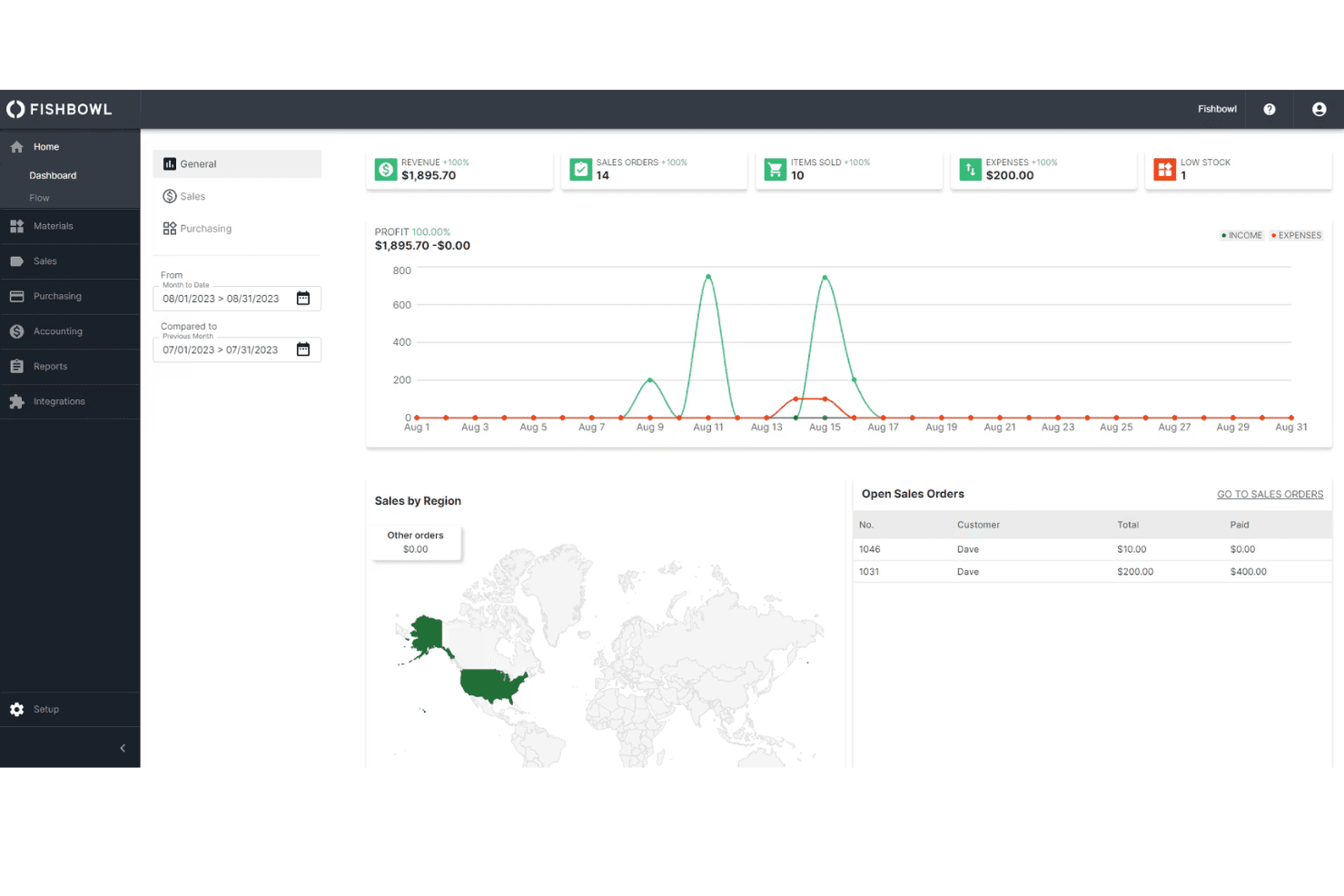
Fishbowl is a strong choice for businesses that need advanced inventory tracking, automation, and manufacturing features. It’s best for teams managing multiple warehouses, complex supply chains, or production workflows. Fishbowl is especially well-suited for industries where inventory accuracy and process automation are essential for growth and compliance.
If your business relies on real-time inventory data, barcode scanning, or deep integration with accounting systems, Fishbowl’s feature set is going to deliver real value.
- Mid-Sized BusinessesScalable features and integrations fit growing companies with expanding needs.
- Food and Beverage ProducersBatch tracking and expiration date management help with compliance.
- Automotive Parts SuppliersBarcode scanning and lot tracking simplify high-SKU environments.
- Retail ChainsCentralized inventory and POS integrations support multi-store operations.
- Wholesale DistributorsMulti-location tracking and automated reorder points help manage large inventories.
- Manufacturing OperationsFishbowl’s work order and bill of materials features support complex production needs.
Who Would be a Bad Fit for Fishbowl?
Fishbowl isn’t ideal for businesses that need simple, low-cost inventory tools or those with minimal inventory complexity. Small businesses, service-based companies, and teams with basic inventory needs may find the investment and feature set more than they require.
If your team wants a modern, intuitive interface or relies on highly customizable reporting, you’ll likely find Fishbowl limiting.
- NonprofitsComplexity and cost outweigh benefits for simple inventory tracking.
- E-commerce-Only BrandsLimited native ecommerce integrations compared to other platforms.
- StartupsHigh upfront and ongoing costs don’t fit tight budgets.
- Service-Based CompaniesLack of service scheduling or project tracking limits usefulness.
- Small Retail ShopsFishbowl’s advanced features and pricing exceed basic inventory needs.
- Teams Needing Custom ReportsReporting tools lack the flexibility for highly tailored analytics.
La Nostra Metodologia di Recensione
Come Testiamo e Valutiamo gli Strumenti
Abbiamo trascorso anni a costruire, perfezionare e migliorare il nostro sistema di test e valutazione dei software. Il nostro schema di valutazione è progettato per cogliere le sfumature della selezione dei software e per comprendere cosa rende uno strumento efficace, concentrandosi su aspetti critici del processo decisionale. Qui sotto puoi vedere esattamente come funzionano i nostri test e valutazioni attraverso sette criteri. Questo ci permette di fornire una valutazione imparziale del software basata su funzionalità principali, caratteristiche distintive, facilità d’uso, onboarding, supporto clienti, integrazioni, recensioni dei clienti e rapporto qualità-prezzo.
Funzionalità di base (25% della valutazione finale)
Il punto di partenza della nostra valutazione è sempre la funzionalità principale dello strumento. Ha le funzioni e le caratteristiche di base che un utente si aspetterebbe? Alcune di queste funzionalità sono bloccate a piani tariffari di livello superiore? Alla base, ci aspettiamo che uno strumento regga il confronto con le capacità minime dei suoi concorrenti.
Caratteristiche distintive (25% della valutazione finale)
Successivamente valutiamo caratteristiche distintive e non comuni che vadano oltre la normale funzionalità presente in strumenti simili. Un punteggio alto riflette funzionalità specializzate o uniche che rendono il prodotto più veloce, efficiente o che offrano valore aggiunto all’utente. Valutiamo anche quanto sia facile integrare il software con altri strumenti della consueta infrastruttura tecnologica per espanderne la funzionalità e l’utilità. Gli strumenti che offrono molte integrazioni native, connessioni di terze parti e accesso API per costruire integrazioni personalizzate ottengono il punteggio più alto.
Facilità d’uso (10% della valutazione finale)
Consideriamo quanto sia rapido e semplice eseguire le attività definite nelle funzionalità di base utilizzando lo strumento. I software che ottengono un punteggio alto sono ben progettati, intuitivi, offrono app mobili, modelli pronti e rendono compiti complessi relativamente semplici.
Onboarding (10% della valutazione finale)
Sappiamo quanto sia importante una rapida adozione da parte del team per una nuova piattaforma, quindi valutiamo quanto sia facile imparare a usare uno strumento con una formazione minima. Esaminiamo quanto tempo impiega un membro del team a configurarsi e iniziare a utilizzare lo strumento senza esperienza. Le soluzioni con punteggi elevati richiedono poco o nessun supporto.
Supporto clienti (10% della valutazione finale)
Valutiamo quanto sia rapido e facile ricevere assistenza e trovare aiuto tramite telefono, live chat o base di conoscenza. Gli strumenti e le aziende che forniscono un supporto in tempo reale ottengono i punteggi migliori, mentre i chatbot hanno i punteggi più bassi.
Recensioni dei clienti (10% della valutazione finale)
Oltre ai nostri test e valutazioni, consideriamo il net promoter score dei clienti attuali e passati. Esaminiamo la loro propensione, data la possibilità, a scegliere nuovamente lo strumento per le sue funzionalità di base. Un punteggio elevato riflette un alto net promoter score da clienti attuali o passati.
Rapporto qualità-prezzo (10% della valutazione finale)
Infine, considerando tutti gli altri criteri, valutiamo il prezzo medio dei piani base rispetto alle funzionalità fondamentali e teniamo in considerazione il valore degli altri criteri di valutazione. Il software che offre di più, a meno, ottiene punteggi più alti.
Core Features
AI-Driven Replenishment
Fishbowl uses AI to forecast demand and automatically generate purchase orders, helping you avoid stockouts and overstock. This keeps inventory levels optimized without manual guesswork.
Multi-Location Inventory Tracking
Track inventory across unlimited warehouses and locations in real time. You get full visibility and control over stock movement, transfers, and counts.
Barcode Scanning
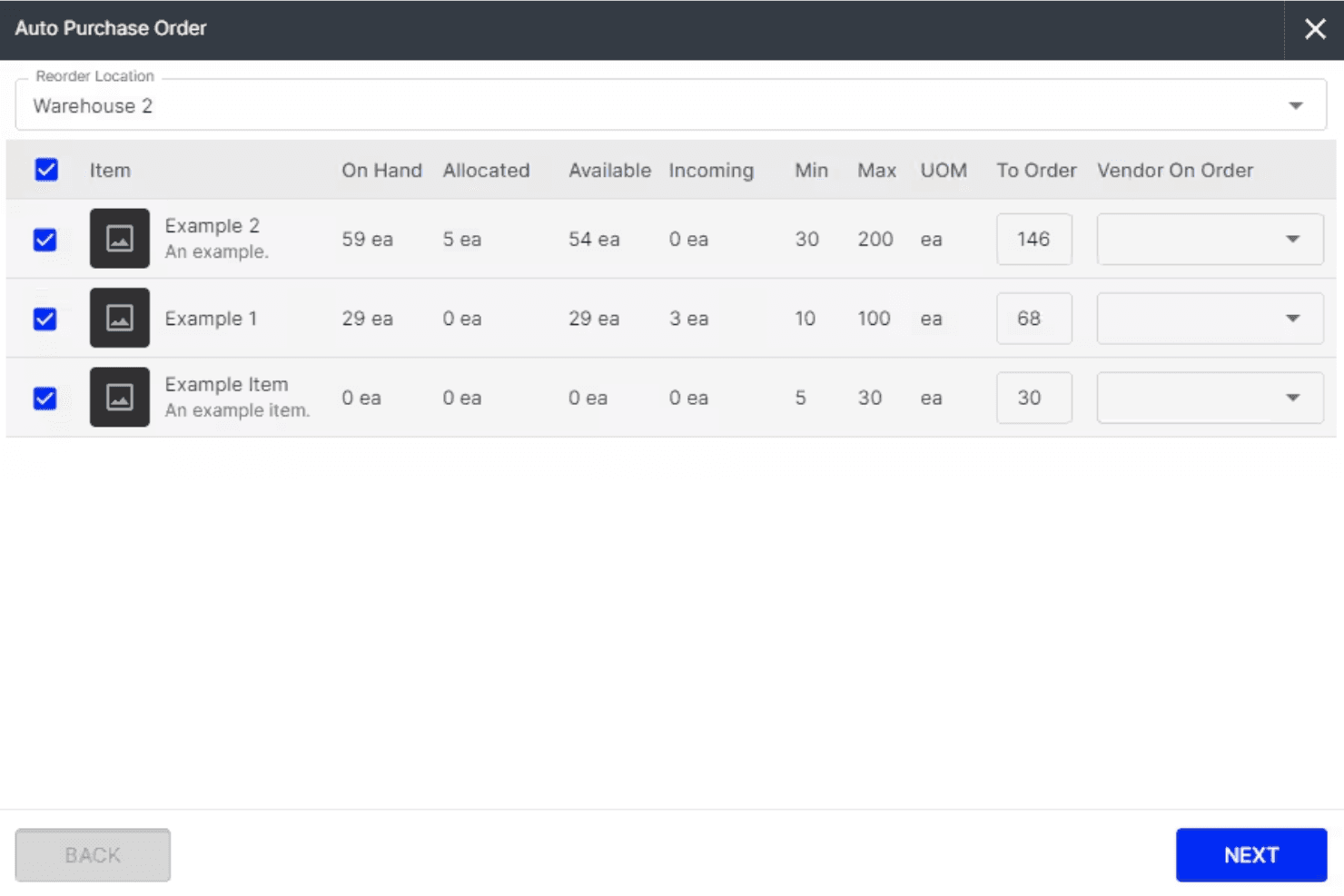
Fishbowl’s mobile app supports barcode scanning for fast receiving, picking, and cycle counts. This reduces errors and speeds up warehouse operations.
Manufacturing Work Orders
Create, edit, and manage work orders and bills of materials directly in Fishbowl. You can update builds mid-production and track labor and materials for accurate costing.
Lot, Serial, and Expiry Tracking
Fishbowl tracks lots, serial numbers, and expiration dates for full traceability. This is essential for regulated industries and quick product recalls.
Automated Workflow Management
Automate routine tasks like purchase order creation, stock transfers, and order fulfillment. Fishbowl’s automation saves time and keeps processes consistent.
Ease of Use
Fishbowl’s interface feels dated and can be overwhelming at first, especially for teams new to advanced inventory systems. Many users mention that setup and onboarding require significant time and training. Experienced inventory managers will adapt quickly, but smaller teams or those seeking simplicity may find the system less intuitive than newer options.
However, once configured, the workflows are logical, and the automation features save time on daily tasks.
Integrations
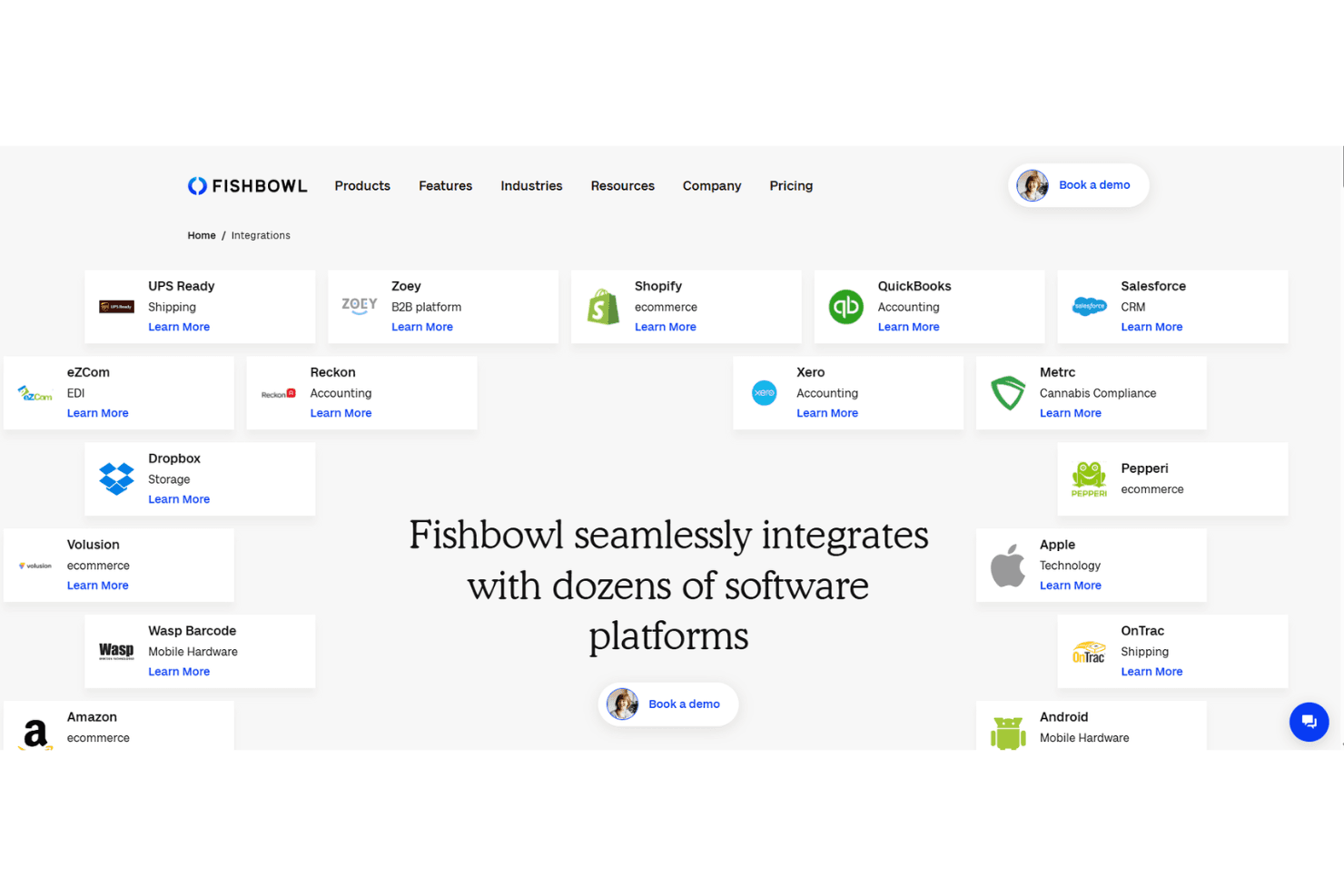
Fishbowl integrates with QuickBooks, Shopify, Salesforce, Xero, Amazon, HubSpot, UPS Ready, eBay, BigCommerce, and ShipStation, among others.
Fishbowl also offers an API and connects with third-party integration tools.
Fishbowl Specs
- API: Yes
- Barcode Scanning: No
- Budgeting: No
- Calendar Management: Yes
- Customer Management: Yes
- Dashboard: Yes
- Data Export: Yes
- Data Import: Yes
- Data Visualization: Yes
- External Integrations: Yes
- Forecasting: Yes
- Inventory Tracking: Yes
- Multi-User: Yes
- Notifications: Yes
- Order Management: Yes
- POS Integration: No
- Product Catalog: Yes
- Purchase Orders: No
- Reorder Automation: No
- SAP Integration: No
- Scheduling: Yes
- Shipping Management: Yes
- Status Notifications: No
- Stock Level Monitoring: No
- Supplier Management: Yes
- Third-Party Plugins/Add-Ons: Yes
- Warehouse Management: Yes


