

Recensione di Board: vantaggi, svantaggi, funzionalità e prezzi
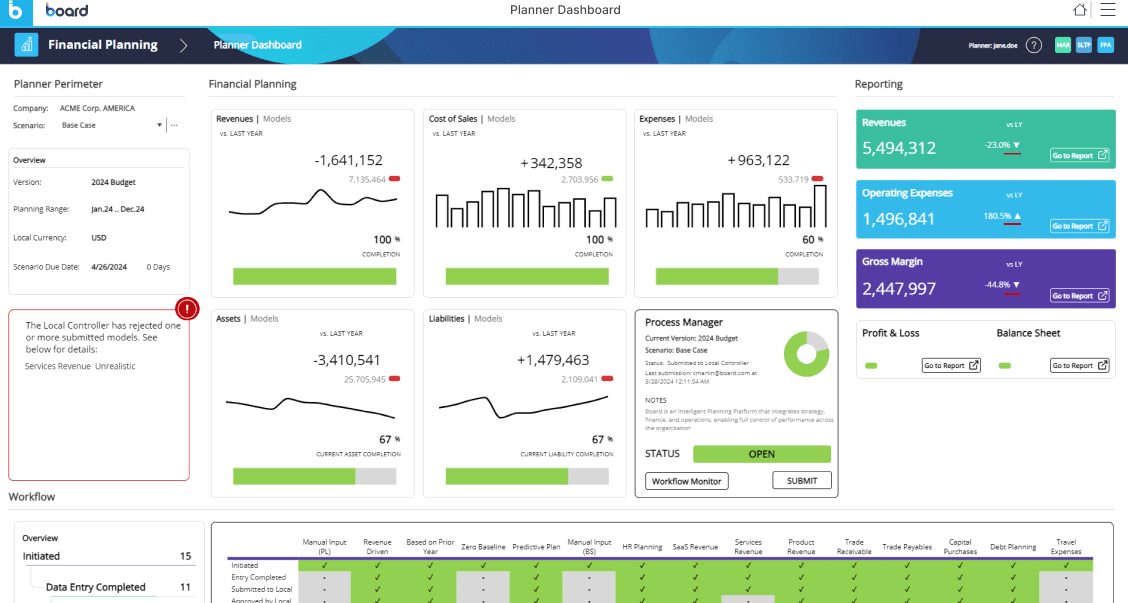
Board eccelle nella pianificazione della vendita al dettaglio integrando la visualizzazione dei dati con le funzionalità di pianificazione, risultando ideale per i team che cercano analisi basate sui dati.

Recensiamo gli strumenti in modo indipendente, e le commissioni aiutano a finanziare i nostri test. Consulta la nostra politica sulla trasparenza, la nostra metodologia o suggerisci uno strumento.
Board is a retail planning software for retailers who need to connect merchandise planning, demand forecasting, and financial planning in one place. I'd look at it seriously if your team has outgrown spreadsheets but finds something like Anaplan too technically demanding to configure and maintain without a dedicated admin. Board brings BI and planning into the same environment, so you're not managing separate tools just to get a complete picture of your business.
Board Evaluation Summary
4.4/5
- Pricing upon request
- Free demo available
Perché fidarsi dei nostri consigli sui software
6,700+
Reviews
20
Industry experts
16+
Evaluation factors
14
Years
Il nostro team testa e recensisce software dal 2012. In quanto leader del retail noi stessi, sappiamo quanto sia difficile — e importante — scegliere il software giusto.
Per questa guida, abbiamo valutato gli strumenti attraverso test pratici e ricerche indipendenti, assegnando un punteggio agli strumenti in base ai nostri criteri di selezione.
Le nostre recensioni riflettono il nostro giudizio indipendente, non un discorso di vendita.
Board Overview
In my opinion, Board is a solid choice for retail planning, especially for teams that prioritize data integration and visualization. Its standout feature is the ability to seamlessly blend analytics with planning, which makes it a strong contender against competitors. However, its onboarding process could be smoother, and some users might find the initial setup challenging. Board excels in environments that require detailed data analysis, such as fashion retail or supply chain management. If you're looking for an intuitive interface with strong analytics capabilities, Board might be the right fit for your team.
Pros
- You can easily visualize data with its advanced analytics tools.
- The software integrates planning and analytics in one platform.
- Your team will find the interface intuitive and user-friendly.
Cons
- Initial setup can be time-consuming for your team.
- Onboarding might require extra effort from your IT department.
- Some users find the customer support response time slower than expected.
Is Board Right For Your Needs?
Who Would be a Good Fit for Board?
Board is well-suited for retail teams and business analysts who need to integrate data analytics with planning. If your team works in fashion retail or supply chain management, Board's data visualization tools and intuitive interface make it a valuable asset. The software's ability to combine planning and analytics in one platform allows your team to make informed decisions quickly and efficiently.
- Fashion RetailBoard's data visualization helps your team manage inventory and predict trends effectively.
- Grocery ChainsYou can use Board to analyze sales data and optimize stock levels efficiently.
- Supply Chain ManagementBoard's planning capabilities let your department forecast demand with accuracy.
- Business AnalystsThe software provides you with powerful analytics tools for detailed data insights.
- Merchandising TeamsBoard helps your team plan product assortments by integrating analytics with planning.
- Retail OperationsYou can streamline operations by using Board's intuitive interface and advanced planning tools.
Who Would be a Bad Fit for Board?
Board might not be the best choice for small startups or businesses with limited IT resources. If your team lacks the time or expertise for a complex initial setup, you might find Board's onboarding process challenging. Additionally, if your company relies on quick customer support responses, Board's slower response times could be a drawback. It's not ideal for teams that don't need extensive data analytics or detailed planning capabilities.
- Small StartupsYour team might struggle with the complexity of Board's setup and onboarding process.
- Limited IT ResourcesWithout IT support, you could find Board's customization options overwhelming.
- Fast-Paced RetailBoard's slower customer support might not meet your urgent needs.
- Basic Inventory ManagementIf your team only needs simple inventory tools, Board's advanced features may be unnecessary.
- Short-Term ProjectsBoard's comprehensive planning tools could be excessive for temporary projects.
- Cost-Sensitive TeamsIf budget constraints are a concern, you might find Board's value for money not ideal.
La Nostra Metodologia di Recensione
Come Testiamo e Valutiamo gli Strumenti
Abbiamo trascorso anni a costruire, perfezionare e migliorare il nostro sistema di test e valutazione dei software. Il nostro schema di valutazione è progettato per cogliere le sfumature della selezione dei software e per comprendere cosa rende uno strumento efficace, concentrandosi su aspetti critici del processo decisionale. Qui sotto puoi vedere esattamente come funzionano i nostri test e valutazioni attraverso sette criteri. Questo ci permette di fornire una valutazione imparziale del software basata su funzionalità principali, caratteristiche distintive, facilità d’uso, onboarding, supporto clienti, integrazioni, recensioni dei clienti e rapporto qualità-prezzo.
Funzionalità di base (25% della valutazione finale)
Il punto di partenza della nostra valutazione è sempre la funzionalità principale dello strumento. Ha le funzioni e le caratteristiche di base che un utente si aspetterebbe? Alcune di queste funzionalità sono bloccate a piani tariffari di livello superiore? Alla base, ci aspettiamo che uno strumento regga il confronto con le capacità minime dei suoi concorrenti.
Caratteristiche distintive (25% della valutazione finale)
Successivamente valutiamo caratteristiche distintive e non comuni che vadano oltre la normale funzionalità presente in strumenti simili. Un punteggio alto riflette funzionalità specializzate o uniche che rendono il prodotto più veloce, efficiente o che offrano valore aggiunto all’utente. Valutiamo anche quanto sia facile integrare il software con altri strumenti della consueta infrastruttura tecnologica per espanderne la funzionalità e l’utilità. Gli strumenti che offrono molte integrazioni native, connessioni di terze parti e accesso API per costruire integrazioni personalizzate ottengono il punteggio più alto.
Facilità d’uso (10% della valutazione finale)
Consideriamo quanto sia rapido e semplice eseguire le attività definite nelle funzionalità di base utilizzando lo strumento. I software che ottengono un punteggio alto sono ben progettati, intuitivi, offrono app mobili, modelli pronti e rendono compiti complessi relativamente semplici.
Onboarding (10% della valutazione finale)
Sappiamo quanto sia importante una rapida adozione da parte del team per una nuova piattaforma, quindi valutiamo quanto sia facile imparare a usare uno strumento con una formazione minima. Esaminiamo quanto tempo impiega un membro del team a configurarsi e iniziare a utilizzare lo strumento senza esperienza. Le soluzioni con punteggi elevati richiedono poco o nessun supporto.
Supporto clienti (10% della valutazione finale)
Valutiamo quanto sia rapido e facile ricevere assistenza e trovare aiuto tramite telefono, live chat o base di conoscenza. Gli strumenti e le aziende che forniscono un supporto in tempo reale ottengono i punteggi migliori, mentre i chatbot hanno i punteggi più bassi.
Recensioni dei clienti (10% della valutazione finale)
Oltre ai nostri test e valutazioni, consideriamo il net promoter score dei clienti attuali e passati. Esaminiamo la loro propensione, data la possibilità, a scegliere nuovamente lo strumento per le sue funzionalità di base. Un punteggio elevato riflette un alto net promoter score da clienti attuali o passati.
Rapporto qualità-prezzo (10% della valutazione finale)
Infine, considerando tutti gli altri criteri, valutiamo il prezzo medio dei piani base rispetto alle funzionalità fondamentali e teniamo in considerazione il valore degli altri criteri di valutazione. Il software che offre di più, a meno, ottiene punteggi più alti.
Core Features
Demand Forecasting
Board lets you predict future demand using advanced analytics, helping your team avoid overstock or stockouts. This feature is vital for planning accurate inventory levels.
Inventory Management
You can track and manage your inventory efficiently, ensuring your supply chain operates smoothly. It helps you reduce waste and optimize stock levels.
Data Integration
Board integrates customer insights into your planning processes, enhancing decision-making. This feature lets you align supply with real-time market demands.
User-Friendly Interface
The intuitive design makes it easy for your team to navigate and use the software effectively. It reduces the learning curve for new users.
Scenario Planning
You can model different business scenarios to see potential outcomes, aiding strategic planning. This helps your team prepare for various market conditions.
Report Generation
Board allows you to create detailed reports quickly, giving you insights into your operations. This feature supports data-driven decisions.

Ease of Use
Board offers a user-friendly interface that lets your team navigate its features with ease. The intuitive design means less time spent on training, allowing you to focus on planning and analysis. Compared to other software, Board excels in usability, with clear dashboards and straightforward navigation. Users appreciate the simplicity of setting up reports and visualizations, making it accessible even for those less tech-savvy in your team.
Integrations
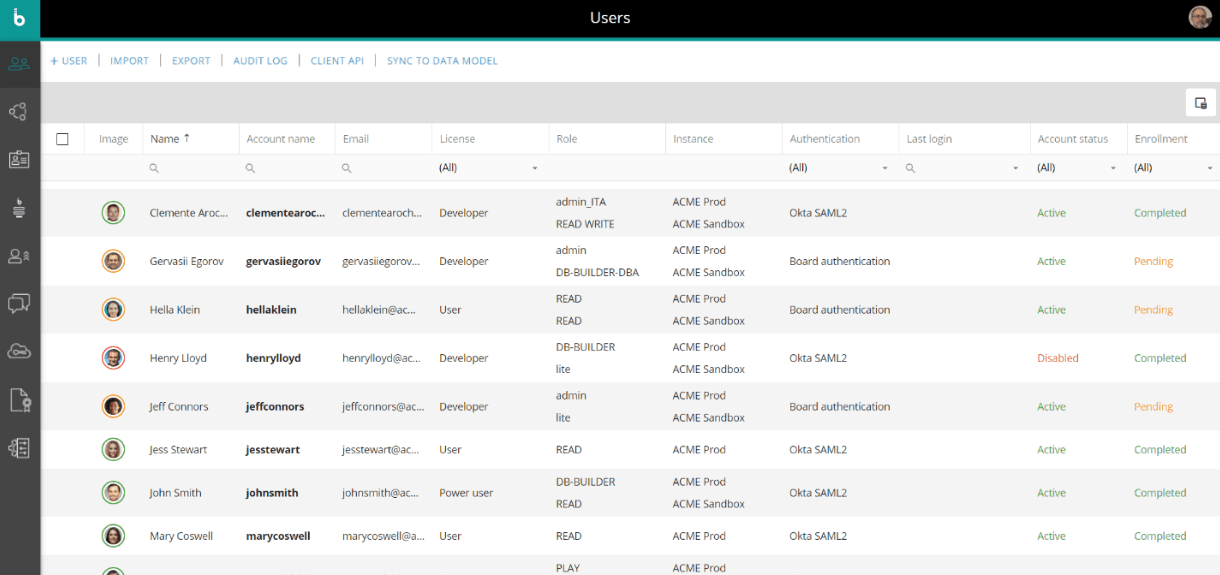
Board integrates natively with SAP systems, JDBC data sources, REST APIs, Text File Data Reader, Azure File Share, SFTP, Azure, Google and AWS S3 storage, and Power BI. Board also offers public APIs for custom connections and can work with third-party integration tools via those APIs.
Board Specs
- A/B Testing: No
- Access Management: No
- Analytics: Yes
- API: Yes
- Conversion Tracking: No
- Custom Reports: No
- Customer Management: No
- Dashboards: No
- Data Export: Yes
- Data Import: Yes
- Data Mining: No
- Data Visualization: Yes
- External Integrations: Yes
- Forecasting: Yes
- Inventory Tracking: No
- Keyword Tracking: No
- Link Tracking: No
- Multi-User: Yes
- Notifications: Yes
- Project Management: No
- Reports: No
- Scenario Planning: No
- SEO: No
- Supplier Management: No
- Visualization: No


