

Avis sur Zendesk : Avantages, Inconvénients, Fonctionnalités et Tarifs
Zendesk se démarque parmi les logiciels de service client pour le e-commerce grâce à son interface intuitive et ses puissantes capacités d’intégration.

Nous évaluons les outils de façon indépendante, et les commissions contribuent à financer nos tests. Consultez notre politique de transparence, notre méthodologie, ou suggérez un outil.
Zendesk is a live shopping platform built for retail and ecommerce teams that need to manage real-time customer engagement during live sale events. I'd consider it over something like Bambuser if your team needs deeper support ticketing and conversation management woven into the live commerce experience—Zendesk brings more structure to customer interactions and post-sale follow-up than most dedicated live shopping tools can offer.
Zendesk Evaluation Summary
4.3/5
- From $19/user/month (billed annually)
- 14-day free trial
Pourquoi faire confiance à nos recommandations de logiciels
6,700+
Reviews
20
Industry experts
16+
Evaluation factors
14
Years
Notre équipe teste et évalue des logiciels depuis 2012. En tant que dirigeants du commerce de détail nous-mêmes, nous savons à quel point il est difficile — et important — de choisir le bon logiciel.
Pour ce guide, nous avons évalué les outils grâce à des tests pratiques et une recherche indépendante, en notant les outils selon nos critères de sélection.
Nos avis reflètent notre jugement indépendant — et non un argumentaire de vente.
Zendesk Overview
In my opinion, Zendesk is a solid choice for ecommerce customer service and help desk software, offering a user-friendly interface and extensive integration options. It excels in providing a comprehensive set of features that cater to online retailers and support teams. However, its pricing can be a bit steep for smaller businesses, and the onboarding process might require some improvement. Compared to other software, Zendesk stands out with its strong customer support and reliable performance, but it might not be the best fit for those who need a more budget-friendly solution. If your team values robust features and integration capabilities, Zendesk could be a great fit.
Pros
- You get a user-friendly interface that's easy for your team to navigate.
- The ticketing system efficiently manages customer interactions using automation.
- It offers strong customer support to help your team resolve issues quickly.
Cons
- Your team might find the onboarding process a bit complex.
- It can feel overwhelming with too many features for small teams.
- Some users report occasional performance slowdowns during high traffic.
Is Zendesk Right For Your Needs?
Who Would be a Good Fit for Zendesk?
Zendesk is a great fit for online retailers and large support teams who need to handle a high volume of customer queries efficiently. If your team values a user-friendly interface and a powerful ticketing system to manage interactions, Zendesk's capabilities can help streamline your operations. It’s especially useful for industries like fashion and electronics, where quick response times and organized support are crucial for maintaining customer satisfaction.
- Large RetailersYour large customer base benefits from Zendesk's efficient ticketing and customer interaction management.
- Support TeamsYour team finds its user-friendly interface and strong support helpful in managing customer issues.
- Fashion IndustryYou can quickly handle high volumes of customer queries with Zendesk's powerful ticketing system.
- Electronics CompaniesYour company benefits from Zendesk's organized support, helping you maintain customer satisfaction.
- Ecommerce PlatformsYou can enhance customer service efficiency with Zendesk's extensive feature set and capabilities.
- Customer Service DepartmentsYour department can manage diverse customer interactions effectively using Zendesk's robust support features.
Who Would be a Bad Fit for Zendesk?
Zendesk might not be the best fit for small startups or solo entrepreneurs who have limited budgets and simpler customer service needs. If your team doesn't handle a high volume of customer interactions daily, Zendesk's extensive features could feel overwhelming and unnecessary. Additionally, if you're looking for a quick and straightforward onboarding process, Zendesk might not meet your expectations due to its complexity.
- Small StartupsYour limited budget and simpler needs make Zendesk's extensive features overwhelming and unnecessary.
- Solo EntrepreneursYou might find Zendesk's complexity unnecessary without a high volume of customer interactions.
- Budget-Conscious TeamsYour team could find Zendesk's cost prohibitive for basic customer service needs.
- Simple Service NeedsYou might not need Zendesk's extensive features if you handle a few customer interactions.
- Non-Tech-Savvy UsersYour team may struggle with Zendesk's complexity without strong technical skills.
- Quick Onboarding SeekersYou might find Zendesk's onboarding process too complex if you need a fast setup.
Notre méthodologie d'évaluation
Comment nous testons et notons les outils
Nous avons passé des années à construire, affiner et améliorer notre système de test et de notation des logiciels. Notre grille d’évaluation est conçue pour prendre en compte toutes les subtilités du choix d’un logiciel et identifier ce qui rend un outil efficace, en se concentrant sur les aspects essentiels du processus de décision. Vous pouvez voir ci-dessous comment fonctionne notre système de test et de notation selon sept critères. Il nous permet de fournir une évaluation impartiale des logiciels selon leur fonctionnalité principale, leurs caractéristiques remarquables, la facilité d’utilisation, l’intégration, l’onboarding, le service client, les avis clients et le rapport qualité-prix.
Fonctionnalité principale (25% de la note finale)
Le point de départ de notre évaluation est toujours la fonctionnalité de base de l’outil. Possède-t-il les fonctions et caractéristiques attendues par un utilisateur ? Certaines de ces fonctionnalités essentielles sont-elles réservées à des plans tarifaires supérieurs ? Nous attendons d’un outil qu’il se mesure aux capacités minimales proposées par ses concurrents.
Caractéristiques remarquables (25% de la note finale)
Ensuite, nous évaluons les caractéristiques remarquables et uniques qui vont au-delà des fonctionnalités de base normalement attendues d’un outil similaire. Une note élevée reflète des fonctionnalités spécialisées qui rendent le produit plus rapide, plus efficace, ou apportent une valeur ajoutée pour l’utilisateur. Nous évaluons également la facilité d’intégration avec d’autres outils généralement présents dans l’écosystème technique afin d’étendre la fonctionnalité et l’utilité du logiciel. Les outils qui proposent de nombreuses intégrations natives, des connexions avec des solutions tierces, et un accès API pour des intégrations personnalisées obtiennent la meilleure note.
Facilité d’utilisation (10% de la note finale)
Nous analysons la rapidité et la simplicité d’exécution des tâches affectées aux fonctionnalités principales via l’outil. Les logiciels les mieux notés sont bien conçus, intuitifs, offrent des applications mobiles, incluent des modèles prêts à l’emploi et simplifient les opérations complexes.
Onboarding (10% de la note finale)
Nous savons à quel point l’adoption rapide d’une nouvelle plateforme est cruciale pour une équipe. Nous évaluons donc la facilité d’apprentissage et de prise en main d’un outil avec un minimum de formation. Nous examinons la rapidité à laquelle un membre d’équipe peut s’installer et commencer à utiliser l’outil sans expérience préalable. Les solutions les mieux notées montrent qu’elles nécessitent peu ou pas d’assistance.
Service client (10% de la note finale)
Nous évaluons la vitesse et la simplicité pour obtenir de l’aide ou se débloquer par téléphone, chat en direct, ou base de connaissances. Les outils et sociétés qui offrent une assistance en temps réel obtiennent la meilleure note, tandis que les chatbots sont moins bien évalués.
Avis clients (10% de la note finale)
Au-delà de nos propres tests et évaluations, nous tenons compte du score de recommandation (NPS) des clients actuels et passés. Nous examinons leur probabilité de choisir à nouveau l’outil pour sa fonctionnalité principale. Un logiciel bien noté reflète un NPS élevé de la part des clients actuels ou passés.
Rapport qualité-prix (10% de la note finale)
Enfin, au regard de tous les autres critères, nous évaluons le prix moyen des offres de départ au regard des fonctionnalités clés, et tenons compte de la valeur ajoutée selon les autres critères. Les logiciels qui offrent plus pour moins obtiennent une meilleure note.
New Product Updates from Zendesk
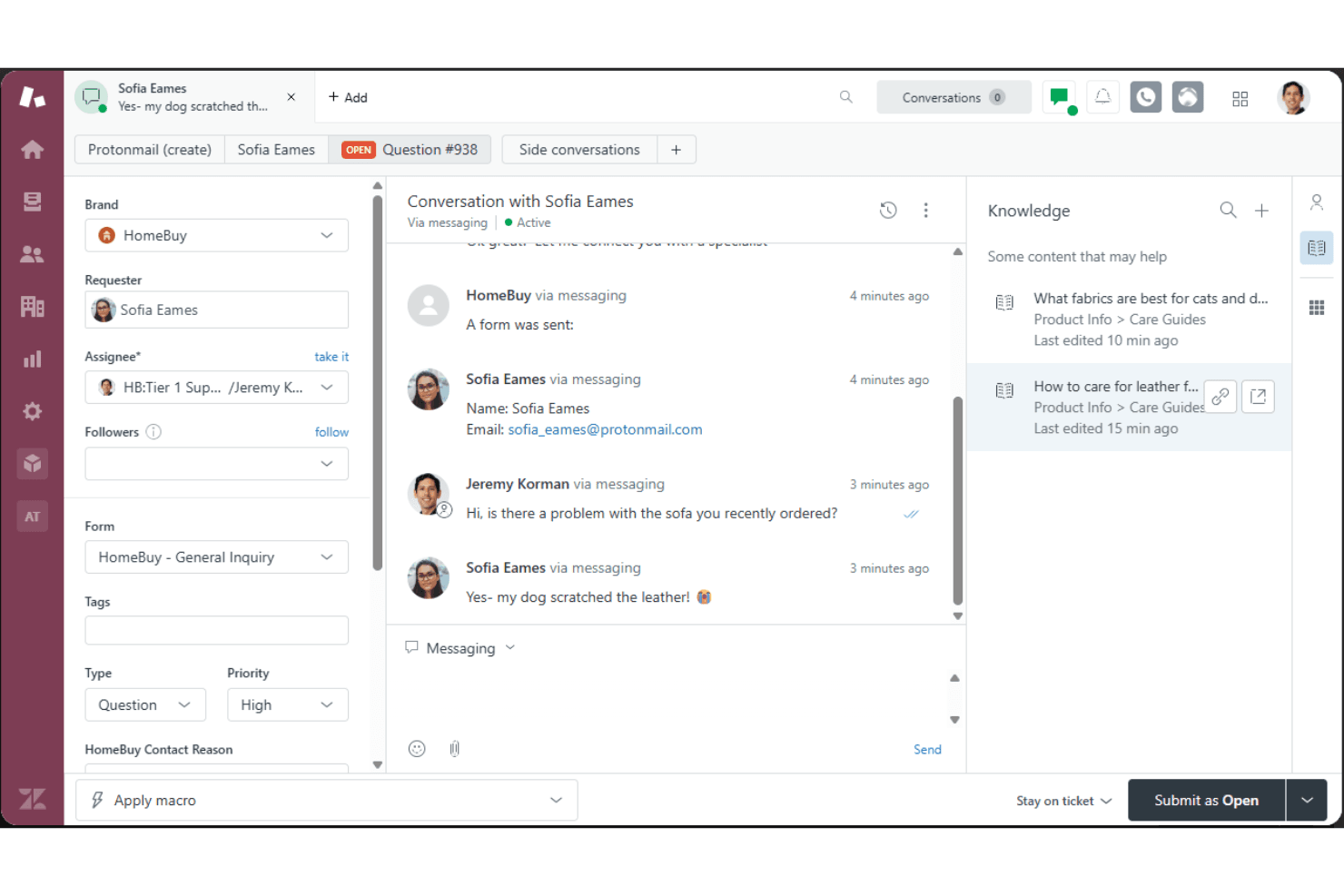
Zendesk Adds Email AI Replies and Predictive Routing
Zendesk adds configurable Knowledge and Welcome replies to email AI agents with agentic AI, plus predictive routing for email tickets in omnichannel routing. These updates help teams shape email response flows and route eligible tickets to the agent predicted to resolve them fastest. Highlights include:
- Knowledge Reply: Customize how email AI agents answer questions using connected knowledge sources.
- Welcome Reply: Add pre-conversation logic for routing, actions, integrations, or escalation before the AI agent responds.
- Predictive Email Routing: Route eligible email tickets using agent availability, workload, and performance signals.
- Expanded Email Coverage: Apply predictive routing to email, web form, side conversation, and API-created tickets.
Visit Zendesk’s official site for more details.
Zendesk Adds Email AI Replies and Predictive Routing
Zendesk adds configurable Knowledge and Welcome replies to email AI agents with agentic AI, plus predictive routing for email tickets in omnichannel routing. These updates help teams shape email response flows and route eligible tickets to the agent predicted to resolve them fastest. Highlights include:
- Knowledge Reply: Customize how email AI agents answer questions using connected knowledge sources.
- Welcome Reply: Add pre-conversation logic for routing, actions, integrations, or escalation before the AI agent responds.
- Predictive Email Routing: Route eligible email tickets using agent availability, workload, and performance signals.
- Expanded Email Coverage: Apply predictive routing to email, web form, side conversation, and API-created tickets.
Visit Zendesk’s official site for more details.
Zendesk Makes Employee Service AI Agents Generally Available
Zendesk has made employee service AI agents generally available for eligible customers, helping teams deliver faster employee support across key channels with richer knowledge coverage and automation. The update improves self-service resolution while providing clearer controls for how many issues AI can resolve each month. Highlights include:
- Multi-Channel Support: Deliver AI-powered employee help through the help center, Slack, and Microsoft Teams.
- Knowledge Connectors: Connect more than 20 sources, including Google Drive, SharePoint, Confluence, Notion, Slack, Teams, and Box.
- Permission-Aware Access: Respect resource-level permissions across connected knowledge sources.
- Advanced Action Flows: Let AI agents run multi-system workflows and resolve requests end to end.
- Human Escalation: Create tickets automatically when a request needs human support.
Visit Zendesk’s official site for more details.
Zendesk Updates AutoQA Tone Scoring
Zendesk has updated the way AutoQA calculates tone scores for QA users, making the evaluation more specific to observable, professional conduct. This helps teams rely on clearer, more consistent tone assessments without needing to change their current setup. Highlights include:
- Professional Conduct: Focuses tone scoring on observable behaviors in agent responses.
- Emotion Exclusion: Removes assessments of emotions such as frustration.
- Automatic Rollout: Applies to all Zendesk QA accounts without manual setup.
- Updated Scoring: Uses a revised calculation method that may change average tone scores.
- Compliance Focus: Aligns AutoQA tone evaluation with stricter privacy and regulatory expectations.
Visit Zendesk’s official site for more details.
Zendesk Adds Smartsheet Connector for Action Flows
Zendesk Action Flows can now connect with Smartsheet to manage sheet and row data without duplicating work across systems. Workflows can create rows, retrieve details, and update records as support tasks progress. Highlights include:
- Smartsheet Connector: Connects Zendesk Action Flows with Smartsheet.
- Add Rows: Creates new rows from support workflows.
- Read and Search: Finds and retrieves existing Smartsheet data.
- Update Rows: Updates Smartsheet records as work progresses.
- Workflow Integration: Links customer support activity with project and process tracking.
Visit Zendesk’s official site for more details.
Zendesk Contact Center Adds Outbound User Search
Zendesk Contact Center now includes outbound user search, helping agents initiate calls faster without switching tools. This streamlines outreach workflows and reduces time spent manually finding contact details. Highlights include:
- User Search: Finds Zendesk users by name or phone number.
- Saved Phone Numbers: Shows available numbers when a user has more than one.
- Direct Outbound Calling: Lets agents place calls from the dialer after selecting a user.
- Permission-Based Results: Only shows users the agent is allowed to access.
- Manual Dialing: Keeps keypad dialing available alongside user search.
Visit Zendesk’s official site for more details.
Zendesk Connects Salesforce as an External Knowledge Source
Zendesk connects Salesforce content to AI agents, Copilot, search, and generative search as an external knowledge source. This makes existing Salesforce knowledge easier to reuse across support workflows. Highlights include:
- Salesforce Knowledge Source: Lets teams connect Salesforce content directly to Zendesk.
- AI Agent Access: Makes Salesforce knowledge available to Zendesk AI agents.
- Copilot Support: Gives Copilot access to connected Salesforce content.
- Search Integration: Extends Salesforce content to standard and generative search experiences.
Visit Zendesk’s official site for more details.
Zendesk Updates Ticket Merging and Multi-Recipient Email Handling
Zendesk introduces a redesigned ticket merge sidebar and multi-recipient email tickets that create linked tickets for each support address. These updates make it easier to review merged tickets and coordinate requests across teams. Highlights include:
- Ticket Merge Sidebar: Replaces the popup modal with a sidebar that improves ticket visibility and merge context.
- Rich Text Support: Preserves HTML and formatting when tickets are merged.
- Merge Visibility: Adds status indicators, hover details, and clearer warnings during bulk merges.
- Multi-Recipient Email Tickets: Creates a separate ticket for each support address included on an inbound email.
- Linked Ticket IDs: Connects related tickets with a multi-recipient email ID for easier tracking.
Visit Zendesk’s official site for more details.
 Opens new window
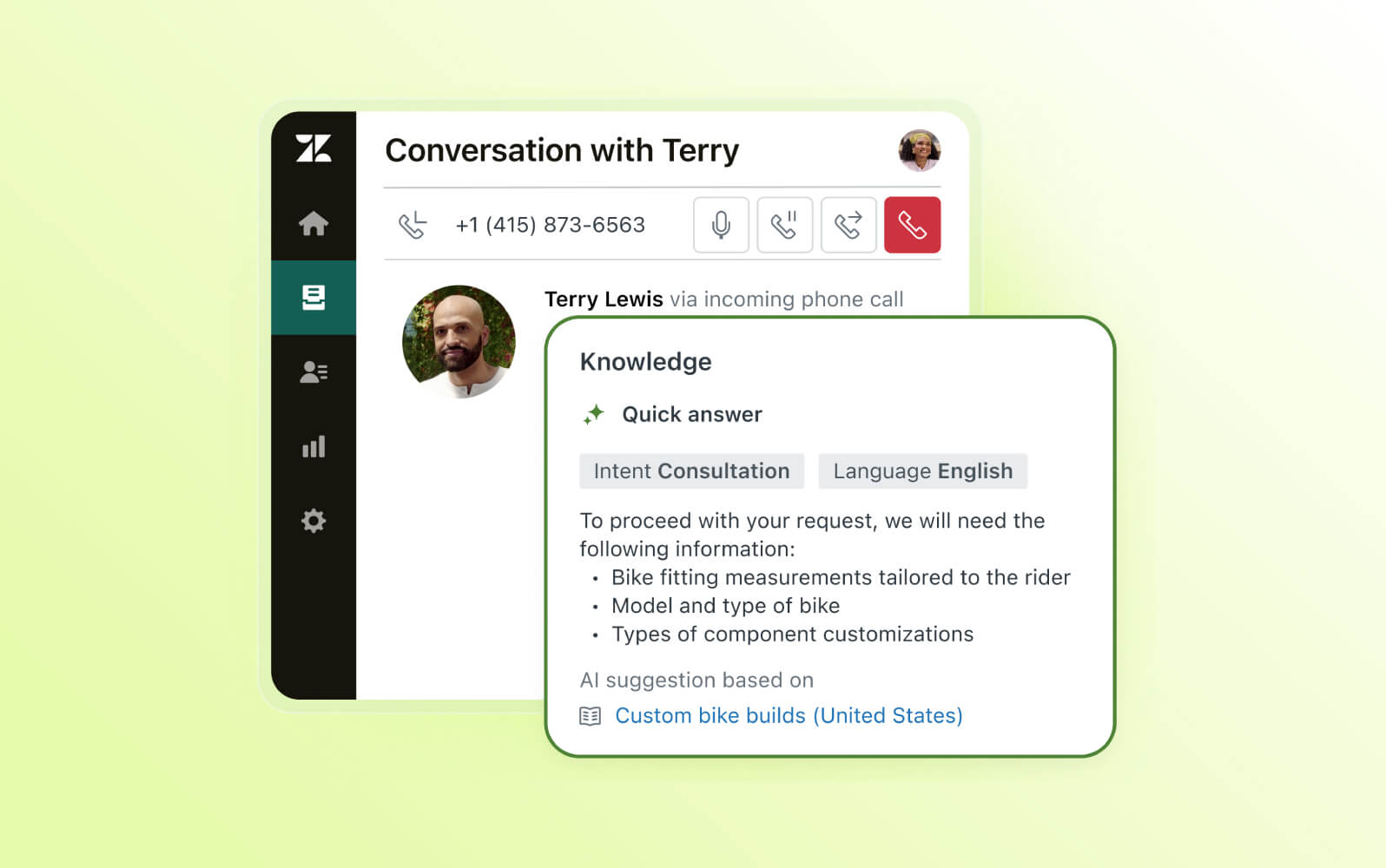
Zendesk Voice AI Agents Reach General Availability
Zendesk makes Voice AI Agents generally available with generative procedures, native voice routing, contextual handoffs, testing tools, and multilingual support. These capabilities help automate more phone conversations while giving agents the context needed to continue escalated calls. Highlights include:
- End-to-End Voice Automation: Handles calls from greeting and intent capture through resolution and wrap-up.
- Contextual Handoffs: Transfers calls with transcripts, summaries, and detected intent for human agents.
- Generative Actions: Supports API calls, database lookups, ticket updates, SMS messages, and email replies.
- Testing Widget: Lets teams test Voice AI Agents in the browser before assigning them to live phone lines.
- Multilingual Support: Supports conversations in 53 languages with language-specific voices and locales.
Visit Zendesk’s official site for more details.
 Opens new window
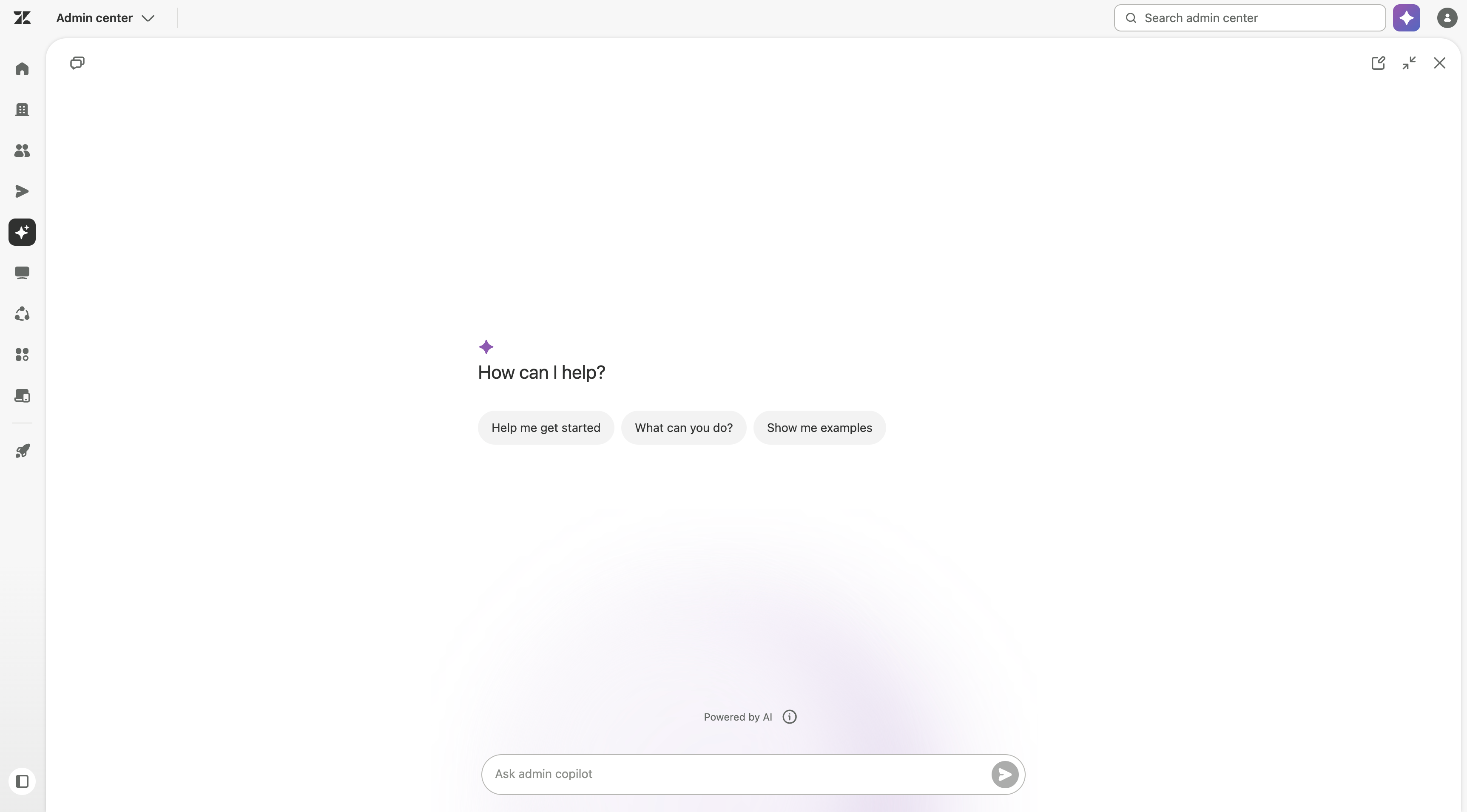
Zendesk Adds HubSpot Knowledge and Admin Copilot Controls
Zendesk adds HubSpot content across AI agents, Copilot, search, and generative search, plus role-based Admin Copilot access, expanded view, and QA recommendations. These updates improve knowledge access and admin control. Highlights include:
- HubSpot Knowledge Source: Makes HubSpot content available across AI agents, Copilot, search, and generative search.
- Role-Based Access: Lets admins control which custom roles can use Admin Copilot.
- Expanded View: Gives admins more space to review detailed Copilot responses.
- QA Recommendations: Adds Zendesk QA guidance to the recommendations feed.
Visit Zendesk’s official site for more details.
Zendesk Specs
- Analytics: Yes
- API: Yes
- Batch Permissions & Access: No
- Call Integration: Yes
- Chat: Yes
- Contact Management: Yes
- Contact Sharing: Yes
- CRM Integration: Yes
- Customer Management: Yes
- Customer Service: Yes
- Dashboard: Yes
- Data Export: Yes
- Data Import: Yes
- Data Visualization: Yes
- Email Integration: Yes
- Escalation Management: Yes
- External Integrations: Yes
- Instant Chat Integration: Yes
- Knowledge Base: Yes
- Lead Management: No
- Lead Scoring: No
- Multi-User: Yes
- Notifications: Yes
- Real-time Alerts: Yes
- Scheduling: Yes
- Self-service Portal: Yes
- Social Media Integration: Yes
- Support Forum: Yes
- Third-Party Plugins/Add-Ons: Yes
- Ticket Management: Yes
- Workflow Management: Yes
Zendesk FAQs
Zendesk Company Overview & History
Zendesk, Inc. is headquartered in San Francisco, California, and employs over 5,000 people globally. Founded in Copenhagen, Denmark, in 2007, Zendesk provides SaaS products focused on customer support and communications. The company is known for its flexible work culture and has notable clients, including Shopify and Slack. Zendesk supports over 150,000 customers worldwide, making it a leader in the customer service software industry.
Zendesk Major Milestones
- 2007: Founded in Copenhagen, Denmark by Mikkel Svane, Alexander Aghassipour, and Morten Primdahl.
- 2008: Released its first product focusing on customer support solutions.
- 2014: Went public with an IPO on the New York Stock Exchange.
- 2019: Reached over $800 million in annual revenue.
- 2021: Acquired Momentive, the parent company of SurveyMonkey.
- 2022: Featured in the news for its significant growth and expansion in product offerings.