


Avis sur monday.com : avantages, inconvénients, fonctionnalités et tarifs



monday AI Workspace is a retail inventory management software for retail and ecommerce teams that need to track stock levels, manage purchase orders, and coordinate fulfillment across channels within a customizable, AI-assisted workspace. I'd consider it if you want more flexibility than a purpose-built tool like Cin7—particularly if your team already manages projects and operations in monday.com and wants inventory workflows built into the same environment rather than a separate, siloed platform.
monday AI Workspace Evaluation Summary

- From $9/user/month (billed annually)
- Free plan available
Pourquoi faire confiance à nos recommandations de logiciels
Notre équipe teste et évalue des logiciels depuis 2012. En tant que dirigeants du commerce de détail nous-mêmes, nous savons à quel point il est difficile — et important — de choisir le bon logiciel.
Pour ce guide, nous avons évalué les outils grâce à des tests pratiques et une recherche indépendante, en notant les outils selon nos critères de sélection.
Nos avis reflètent notre jugement indépendant — et non un argumentaire de vente.
monday AI Workspace Overview
In my opinion, monday.com stands out as a flexible option for retail inventory management, especially for teams that value integrations and automations. Its standout features, like customizable automations and a wide range of integrations, make it a good choice for retail teams looking to reduce app-switching. However, its onboarding can be a bit challenging due to outdated training resources. I think it’s best suited for small to medium businesses that need a tool to manage inventory alongside other project tasks. While it might not be the easiest for beginners, its value for money and extensive features make it worth considering.
pros
-
You can customize workflows to fit your team's specific needs.
-
Automations save your team time on repetitive tasks.
-
The interface is visually appealing and easy to navigate.
cons
-
Your team might find the onboarding process a bit challenging.
-
Customer support can sometimes be slow to respond.
-
Advanced features may require a learning curve for new users.
Is monday AI Workspace Right For Your Needs?
Who Would be a Good Fit for monday AI Workspace?
monday.com is a good fit for small to medium-sized businesses and retail teams needing customizable workflows and automations. If your team values visual project tracking and task management, monday.com’s interface will keep you organized. Marketing departments and project managers will appreciate the ability to tailor boards to their specific tasks, making it easier to track inventory alongside other project goals. Teams looking for a tool that offers flexibility and a wide range of functionality will find it beneficial.
-
Small Retailers
Your small retail business can benefit from monday.com's customizable boards to manage inventory and sales tasks efficiently.
-
Marketing Teams
Marketing teams will find the visual layout ideal for tracking campaigns and coordinating tasks across multiple channels.
-
Project Managers
Project managers can use its automations to streamline task assignments and monitor project timelines with ease.
-
Inventory Managers
Inventory managers will appreciate the ability to create specific workflows for tracking stock levels and supplier orders.
-
Event Planners
Event planners can organize tasks and timelines visually, ensuring nothing falls through the cracks before the big day.
-
Product Development
Product development teams can track progress and manage tasks across different stages from conception to launch.
Who Would be a Bad Fit for monday AI Workspace?
monday.com might not be the best fit for large enterprises or highly specialized industries requiring complex, industry-specific features. If your business relies heavily on intricate inventory systems or requires extensive customization beyond what's offered, monday.com may fall short. Teams that need detailed supply chain management or advanced analytics might find the platform lacking, as it’s more focused on task management and collaboration rather than deep data analysis.
-
Large Enterprises
Large enterprises might find monday.com's features too simplistic for their complex inventory and data needs.
-
Supply Chain Teams
Supply chain teams that need detailed tracking and analytics may require more specialized software than what monday.com offers.
-
Manufacturing Departments
Manufacturing departments needing intricate production tracking might find monday.com’s capabilities insufficient for their detailed processes.
-
Finance Departments
Finance teams that require advanced financial reporting and analytics might find monday.com lacking in these specific functionalities.
-
Healthcare Providers
Healthcare providers needing compliance and detailed patient data management might not find the necessary features in monday.com.
-
Legal Departments
Legal departments needing document tracking and compliance features might find monday.com insufficient for their specific requirements.
Notre méthodologie d'évaluation
Comment nous testons et notons les outils
Nous avons passé des années à construire, affiner et améliorer notre système de test et de notation des logiciels. Notre grille d’évaluation est conçue pour prendre en compte toutes les subtilités du choix d’un logiciel et identifier ce qui rend un outil efficace, en se concentrant sur les aspects essentiels du processus de décision. Vous pouvez voir ci-dessous comment fonctionne notre système de test et de notation selon sept critères. Il nous permet de fournir une évaluation impartiale des logiciels selon leur fonctionnalité principale, leurs caractéristiques remarquables, la facilité d’utilisation, l’intégration, l’onboarding, le service client, les avis clients et le rapport qualité-prix.
Fonctionnalité principale (25% de la note finale)
Le point de départ de notre évaluation est toujours la fonctionnalité de base de l’outil. Possède-t-il les fonctions et caractéristiques attendues par un utilisateur ? Certaines de ces fonctionnalités essentielles sont-elles réservées à des plans tarifaires supérieurs ? Nous attendons d’un outil qu’il se mesure aux capacités minimales proposées par ses concurrents.
Caractéristiques remarquables (25% de la note finale)
Ensuite, nous évaluons les caractéristiques remarquables et uniques qui vont au-delà des fonctionnalités de base normalement attendues d’un outil similaire. Une note élevée reflète des fonctionnalités spécialisées qui rendent le produit plus rapide, plus efficace, ou apportent une valeur ajoutée pour l’utilisateur. Nous évaluons également la facilité d’intégration avec d’autres outils généralement présents dans l’écosystème technique afin d’étendre la fonctionnalité et l’utilité du logiciel. Les outils qui proposent de nombreuses intégrations natives, des connexions avec des solutions tierces, et un accès API pour des intégrations personnalisées obtiennent la meilleure note.
Facilité d’utilisation (10% de la note finale)
Nous analysons la rapidité et la simplicité d’exécution des tâches affectées aux fonctionnalités principales via l’outil. Les logiciels les mieux notés sont bien conçus, intuitifs, offrent des applications mobiles, incluent des modèles prêts à l’emploi et simplifient les opérations complexes.
Onboarding (10% de la note finale)
Nous savons à quel point l’adoption rapide d’une nouvelle plateforme est cruciale pour une équipe. Nous évaluons donc la facilité d’apprentissage et de prise en main d’un outil avec un minimum de formation. Nous examinons la rapidité à laquelle un membre d’équipe peut s’installer et commencer à utiliser l’outil sans expérience préalable. Les solutions les mieux notées montrent qu’elles nécessitent peu ou pas d’assistance.
Service client (10% de la note finale)
Nous évaluons la vitesse et la simplicité pour obtenir de l’aide ou se débloquer par téléphone, chat en direct, ou base de connaissances. Les outils et sociétés qui offrent une assistance en temps réel obtiennent la meilleure note, tandis que les chatbots sont moins bien évalués.
Avis clients (10% de la note finale)
Au-delà de nos propres tests et évaluations, nous tenons compte du score de recommandation (NPS) des clients actuels et passés. Nous examinons leur probabilité de choisir à nouveau l’outil pour sa fonctionnalité principale. Un logiciel bien noté reflète un NPS élevé de la part des clients actuels ou passés.
Rapport qualité-prix (10% de la note finale)
Enfin, au regard de tous les autres critères, nous évaluons le prix moyen des offres de départ au regard des fonctionnalités clés, et tenons compte de la valeur ajoutée selon les autres critères. Les logiciels qui offrent plus pour moins obtiennent une meilleure note.
Core Features
Customizable Dashboards: You can create custom dashboards to fit your team's workflow, making it easy to track inventory status at a glance. This flexibility lets you visualize data in a way that meets your specific needs.
Task Management: monday.com helps you assign and track tasks with real-time notifications, ensuring your team stays on top of inventory management tasks. It keeps everyone aligned with clear responsibilities and deadlines.
Automations: Automate repetitive tasks like inventory updates to save time and reduce manual errors. This feature helps your team stay efficient and focused on more strategic work.
Inventory Tracking: Monitor stock levels in real-time with easy-to-use tracking tools. It ensures you’re always informed about what’s in stock and what needs replenishing.
Reporting Tools: Generate reports to analyze inventory trends and make informed decisions. This feature gives you insights into your inventory performance and helps plan future needs.
Collaboration Tools: Facilitate communication and collaboration among your team members and key stakeholders with integrated chat and file sharing. It ensures everyone is on the same page without switching between apps.
Standout Features
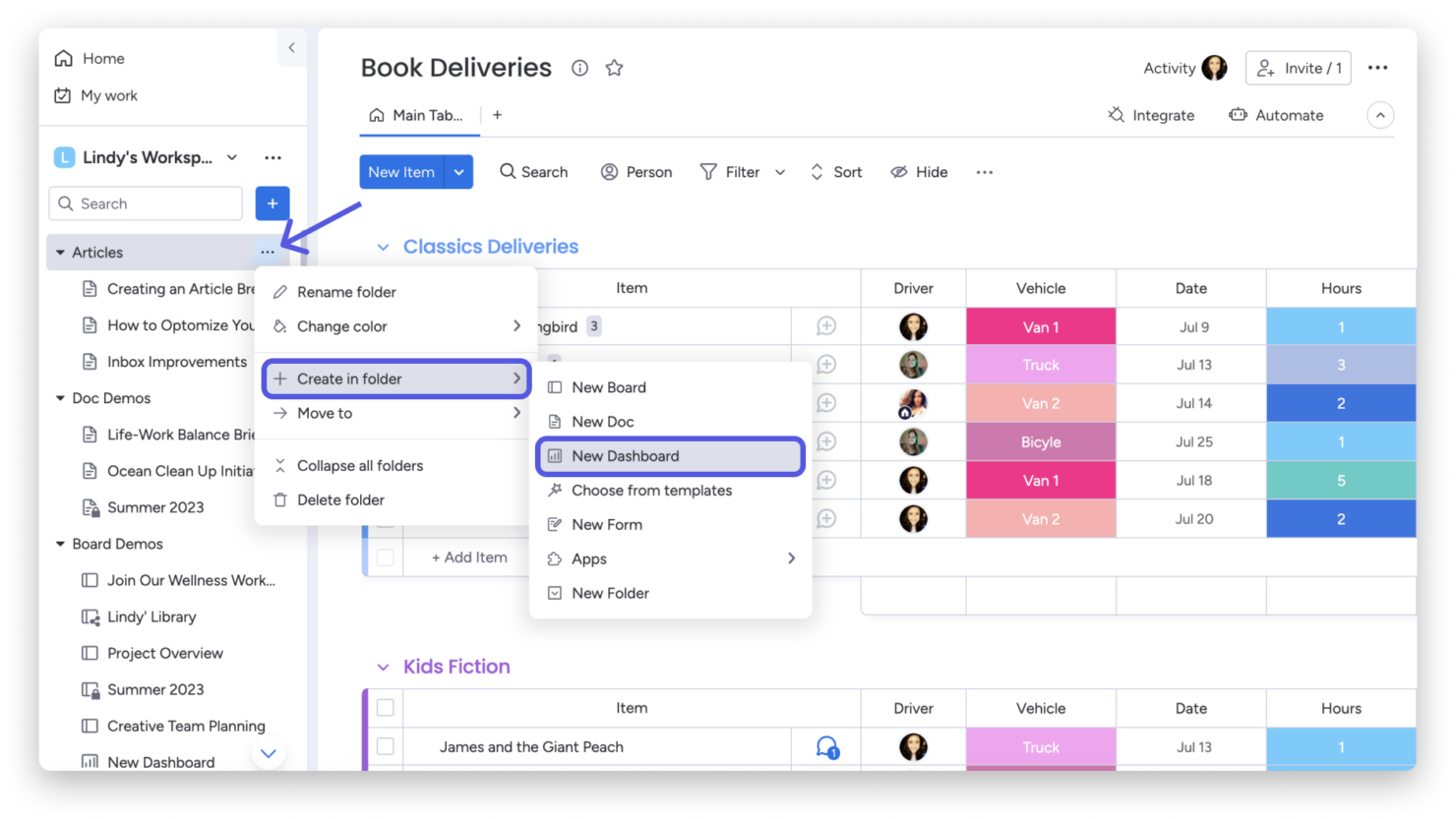
Visual Project Tracking: monday.com offers a visually appealing interface that makes it easy to track project progress, due dates, and task dependencies at a glance. This feature stands out for its ease of use, helping your team stay organized.
Custom Automations: Create tailored automations that fit your specific processes, reducing manual work and increasing efficiency. This unique feature allows you to automate tasks that are specific to your business needs.

Ease of Use
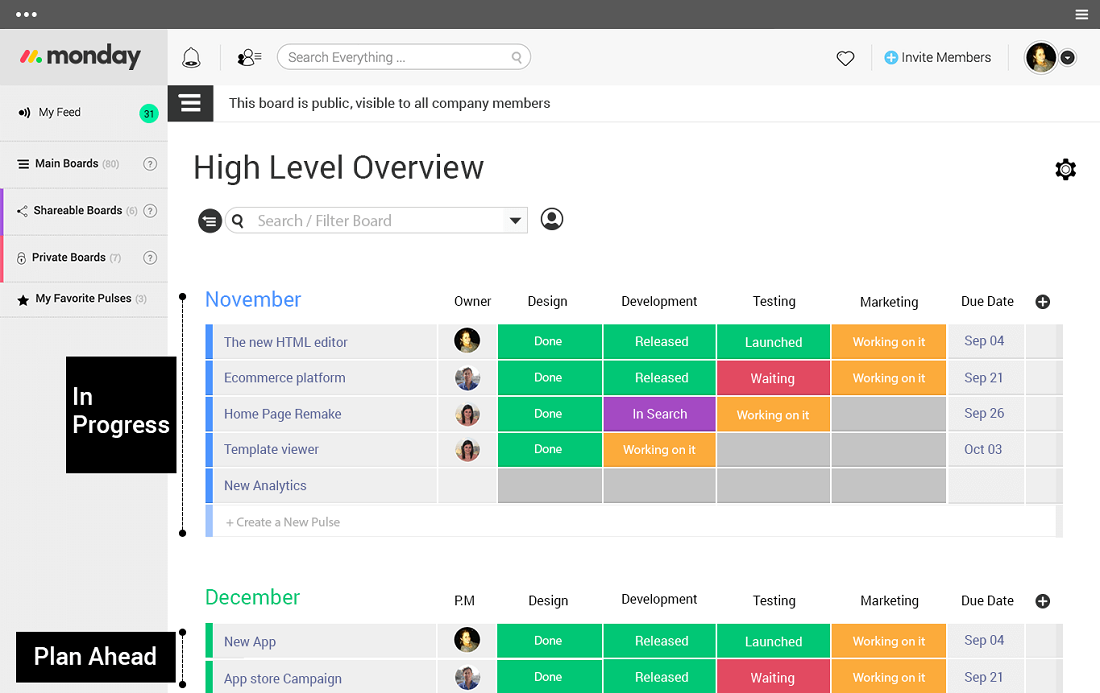
I think monday.com is user-friendly with its intuitive interface and visual project tracking, making it easy for your team to manage tasks and inventory. While there’s a learning curve for advanced features, the drag-and-drop functionality and customizable dashboards simplify daily operations. Compared to other options, the ease of customization stands out, letting you tailor the platform to suit your specific needs. This flexibility makes it accessible for teams who want a straightforward tool without sacrificing functionality.
Onboarding
monday.com's onboarding experience can be a bit challenging due to its complex features and sometimes outdated training resources. While there are tutorials and guides available, new users might need some time to fully grasp the platform's capabilities. Your team might benefit from the available support channels, but response times can vary. Despite these hurdles, once you’re familiar with the interface, the time to value is significant, as the platform's flexibility and functionality become clear.
Customer Support
monday.com's customer support can be hit or miss, with some users noting slow response times. While they offer various support channels like email and chat, the assistance quality can vary. Your team might need patience when seeking help, but once connected, the support staff is generally helpful. They also provide a knowledge base and community forums, which can be useful for troubleshooting and learning from other users' experiences.

Integrations
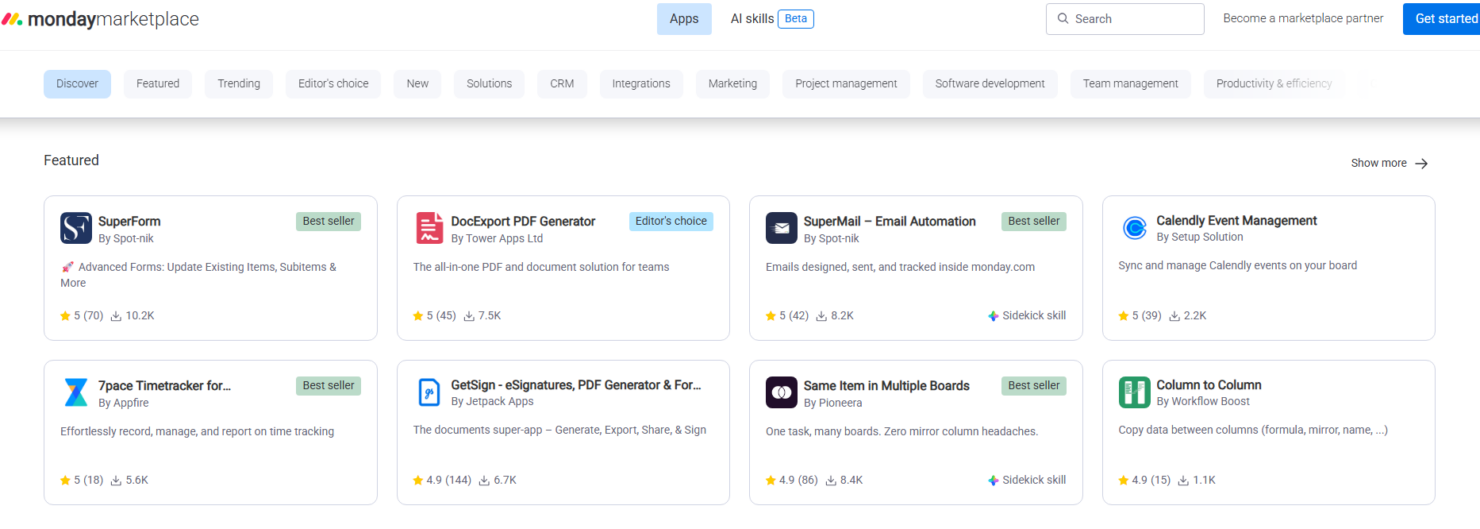
monday.com integrates with Slack, , Microsoft Teams, Google Workspace, Gmail, Google Drive GitLab, Mailchimp, Excel, Outlook, Trello, Jira, DocuSign, HubSpot, and LinkedIn.
monday.com also offers an open API and connects with third-party integration tools.
Value for Money
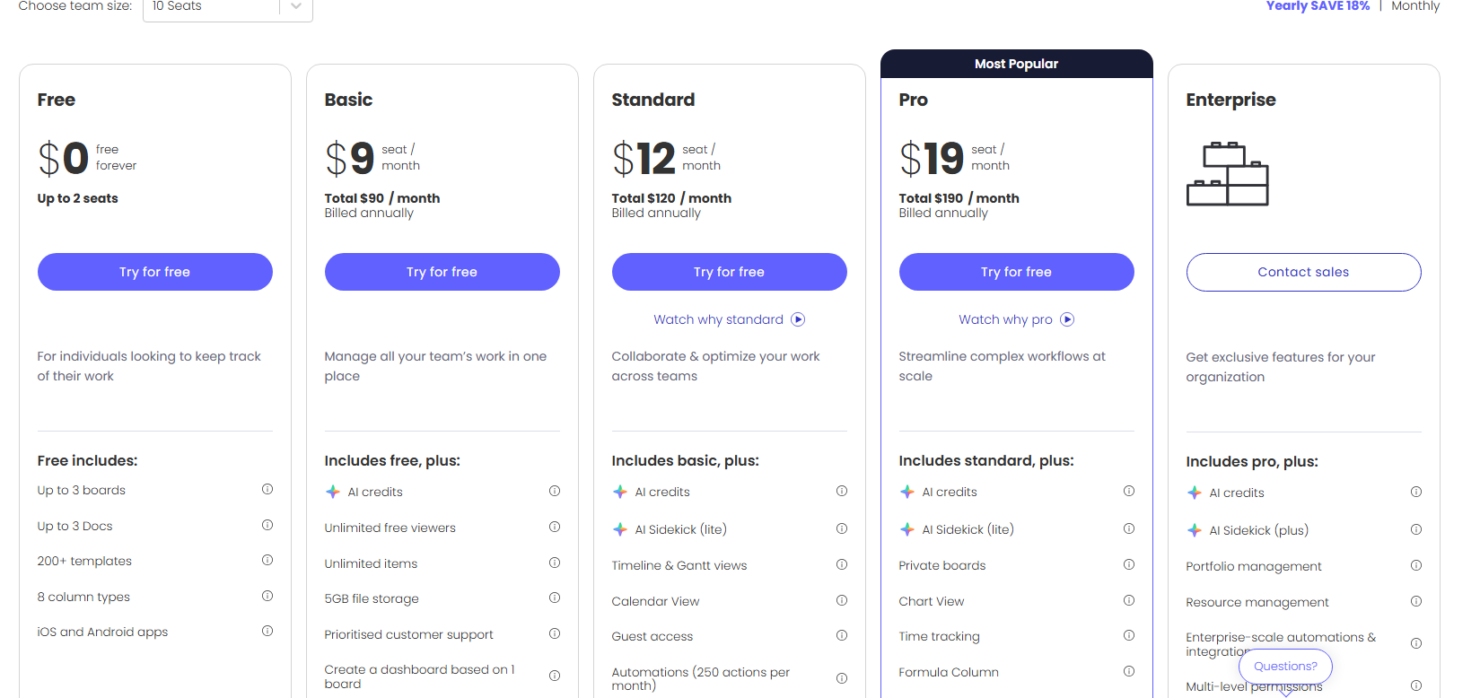
monday.com pricing offers good value with its flexible pricing tiers, catering to different team sizes and needs. You get a range of features that justify the cost, with options to scale as your team grows. A free trial is available, letting you evaluate the software before committing to a paid plan.
- Free Plan: $0 forever includes up to 2 seats with boards, docs, templates, and basic task tracking.
- Basic: $9 per seat/month. Adds unlimited boards and 5GB file storage.
- Standard: $12 per seat/month (billed annually) adds unlimited boards and items with timeline and Gantt chart views for team collaboration.
- Pro: $19 per seat/month (billed annually) includes automations, integrations, private boards, chart views, and time tracking.
- Enterprise: Contact sales for pricing, provides advanced reporting, portfolio management, resource management, and enterprise-grade permission controls.
New Product Updates from monday AI Workspace
monday AI Workspace Adds Human Approval Routing
monday AI Workspace adds a human-in-the-loop approval block that sends approval requests and branches AI Workflows based on the response. The update lets teams incorporate human decisions into automated workflows before determining which path the workflow should follow. Highlights include:
- Human Approval Block: Adds a human approval step directly within AI Workflows.
- Approval Requests: Sends requests to users when human input is required.
- Conditional Routing: Routes the workflow to different paths based on the approval response.
Visit monday AI Workspace’s official site for more details.
 for more details.
monday.com Adds Managed Columns Across Boards
monday.com adds Managed Column to help teams create reusable status, dropdown, and label columns with predefined labels across boards. The update helps organizations standardize workflows and sync column updates automatically from one central source. Highlights include:
- Reusable Managed Columns: Teams can reuse standardized status, dropdown, priority, and label columns across multiple boards.
- Centralized Label Syncing: Updates made to Managed Columns automatically sync across connected boards for more consistent workflows.
Visit monday.com's official site for more details.

monday.com Adds Clearer AI Result Feedback in Cells
monday.com adds clearer feedback for AI-generated cell results to help users review and improve AI outputs more easily. The update helps teams adjust prompts and inputs for more accurate and useful results. Highlights include:
- Clearer AI Feedback: Users can better understand AI-generated results directly within cells.
- Prompt Refinement Support: Teams can adjust prompts and inputs more effectively to improve AI outcomes.
Visit monday.com’s official site for more details.
monday.com Enhances List View With Column Mapping
monday.com adds column mapping to List View, allowing users to include board-specific columns for better visibility. This update helps teams view and manage data across multiple boards more efficiently. Highlights include:
- Add Board-Specific Columns: Users can now add unique board-specific columns to the List View, allowing for a more personalized data organization.
- Map Columns Across Boards: This feature enables users to map columns across different boards, ensuring that all data is accurately represented and easily accessible.
- Complete Visibility: By mapping columns, users can achieve complete visibility of their workflow, enhancing decision-making and productivity.
Visit monday.com's official site for more details.
monday AI Workspace Specs
- API
- Batch Permissions & Access
- Budgeting
- Calendar Management
- Collaboration Support
- Contact Management
- Contact Sharing
- Customer Management
- Dashboard
- Dashboards
- Data Export
- Data Import
- Data Visualization
- Dependency Tracking
- Document Sharing
- Expense Tracking
- External Integrations
- File Sharing
- Gantt Charts
- Kanban Boards
- Multi-User
- Notifications
- Project Management
- Resource Management
- Scheduling
- Task Scheduling/Tracking
- Third-Party Plugins/Add-Ons
- Time Management
- Travel Management
- Workflow Management
monday AI Workspace FAQs
How does monday.com handle data security and compliance?
Can I customize monday.com to fit my business processes?
Is there a limit to the number of users on monday.com?
What kind of customer support does monday.com offer?
Can I use monday.com on mobile devices?
How easy is it to switch from another software to monday.com?
Does monday.com support remote team collaboration?
Can I track project progress in real time with monday.com?
monday AI Workspace Company Overview & History
monday.com, headquartered in Tel Aviv, Israel, was founded in 2012 by Roy Mann, Eran Kampf, and Eran Zinman. Originally named Dapulse, it began as an internal tool at Wix.com before becoming a standalone product. Known for its innovative work management platform, monday.com emphasizes transparency and collaboration. It's a publicly traded company on Nasdaq and boasts a diverse client base, including notable companies across various industries.
monday.com Major Milestones
- 2012: Founded as Dapulse by Roy Mann, Eran Kampf, and Eran Zinman.
- 2017: Rebranded to monday.com.
- 2021: Became a publicly traded company on Nasdaq.
- 2020: Featured on Forbes' Cloud 100 list.