

Jimdo-arvostelu: hyvät ja huonot puolet, ominaisuudet ja hinnoittelu
Jimdo loistaa yksinkertaisuudellaan, joten se sopii täydellisesti pienyrityksille ja sisällöntuottajille, jotka haluavat helppokäyttöisen ja vaivattoman verkkokauppasivustojen rakennustyökalun.

We review tools independently, and commissions help fund our testing. See our transparency policy, our methodology, or suggest a tool.
Jimdo is an ecommerce website builder for small business owners and solopreneurs who need to get an online store live fast. If you want a quicker, simpler path to selling online than Wix offers, Jimdo's AI-driven setup is worth a close look. Wix gives you more design control, but it asks for considerably more time and decision-making upfront. Jimdo trades that flexibility for speed.
Jimdo Evaluation Summary

3.5/5
- From $11/month
- Free plan available
Miksi luottaa ohjelmistosuosituksiimme
6,700+
Reviews
20
Industry experts
16+
Evaluation factors
14
Years
Tiimimme on testannut ja arvioinut ohjelmistoja vuodesta 2012 lähtien. Julkaisijoina ja mediatoimijoina tiedämme itse, kuinka vaikeaa — ja tärkeää — oikean ohjelmiston valitseminen on.
Tätä opasta varten arvioimme työkaluja käytännön testauksen ja itsenäisen tutkimuksen avulla, pisteyttäen työkalut valintakriteeriemme perusteella.
Arvostelumme perustuvat inhimilliseen toimitukselliseen harkintaamme, eivät myyntipuheeseen.
Jimdo Overview
In my opinion, Jimdo offers a reliable option for small businesses and creatives seeking an easy-to-use ecommerce website builder. While its interface is intuitive and pricing competitive, it lacks some advanced features found in competitors like Squarespace, Shopify, or Wix. Jimdo shines in simplicity, making it ideal for those who prioritize straightforward setup over extensive customization. However, for larger businesses needing more complex integrations and features, you might find other platforms more suitable. Overall, if you're looking for a budget-friendly, user-friendly option without the need for extensive technical support, Jimdo is worth considering.
Pros
- You can quickly set up your online store without any coding skills.
- The user-friendly interface makes managing your site easy.
- It offers clean, professional templates that look great.
Cons
- You might find the customization options limited compared to other platforms.
- It lacks advanced ecommerce features that some businesses need.
- Customer support can be slow, which might frustrate your team.


Is Jimdo Right For Your Needs?
Who Would be a Good Fit for Jimdo?
Jimdo is ideal for small businesses, freelancers, and creative professionals who need a simple and quick way to launch an online store. Its ease of use allows you to focus on your work without getting bogged down by technical details. If you’re in a creative field like photography or art, Jimdo’s clean templates can showcase your work beautifully. For those who want to manage their site without coding, Jimdo’s intuitive interface is a plus.
- Small RetailersJimdo’s straightforward setup and management tools make it perfect for small retail businesses looking to sell online.
- FreelancersIf you’re a freelancer, Jimdo’s easy-to-use platform can help you create a professional online presence quickly.
- Creative ProfessionalsArtists and photographers will appreciate Jimdo’s attractive templates that highlight visual content beautifully.
- Local BusinessesLocal businesses can benefit from Jimdo’s simple design tools to create an engaging online storefront with built-in business listings.
- StartupsStartups with limited resources can use Jimdo to establish an online store without needing technical expertise.
- Personal ProjectsFor personal projects, Jimdo offers a hassle-free way to build and maintain a simple ecommerce site.
Who Would be a Bad Fit for Jimdo?
Jimdo isn’t the best choice for large enterprises or businesses needing extensive HTML & CSS customization, as well as advanced ecommerce features. If your team requires complex integrations, detailed analytics, or specialized tools, you'll find Jimdo lacking. Companies in highly competitive industries might need a more robust platform to stand out. For those needing extensive customer support, Jimdo's limited service might be frustrating.
- Large EnterprisesJimdo’s limited customization and feature set won’t meet the demands of large, complex organizations.
- Tech CompaniesTech companies needing advanced integrations and analytics will find Jimdo’s offerings insufficient.
- Ecommerce GiantsFor large ecommerce businesses, Jimdo lacks the advanced features needed to compete effectively.
- Creative AgenciesAgencies that handle web design for multiple clients may find Jimdo’s templates too limiting.
- Corporate TeamsCorporate teams requiring specialized tools and detailed tracking will find Jimdo’s features too basic.
- High-Traffic SitesSites expecting high traffic volumes might need a more robust platform than what Jimdo offers.
Our Review Methodology
How We Test & Score Tools
We’ve spent years building, refining, and improving our software testing and scoring system. The rubric is designed to capture the nuances of software selection and what makes a tool effective, focusing on critical aspects of the decision-making process.
Below, you can see exactly how our testing and scoring works across seven criteria. It allows us to provide an unbiased evaluation of the software based on core functionality, standout features, ease of use, onboarding, customer support, integrations, customer reviews, and value for money.
Core Functionality (25% of final scoring)
The starting point of our evaluation is always the core functionality of the tool. Does it have the basic features and functions that a user would expect to see? Are any of those core features locked to higher-tiered pricing plans? At its core, we expect a tool to stand up against the baseline capabilities of its competitors.
Standout Features (25% of final scoring)
Next, we evaluate uncommon standout features that go above and beyond the core functionality typically found in tools of its kind. A high score reflects specialized or unique features that make the product faster, more efficient, or offer additional value to the user.
We also evaluate how easy it is to integrate with other tools typically found in the tech stack to expand the functionality and utility of the software. Tools offering plentiful native integrations, 3rd party connections, and API access to build custom integrations score best.
Ease of Use (10% of final scoring)
We consider how quick and easy it is to execute the tasks defined in the core functionality using the tool. High scoring software is well designed, intuitive to use, offers mobile apps, provides templates, and makes relatively complex tasks seem simple.
Onboarding (10% of final scoring)
We know how important rapid team adoption is for a new platform, so we evaluate how easy it is to learn and use a tool with minimal training. We evaluate how quickly a team member can get set up and start using the tool with no experience. High scoring solutions indicate little or no support is required.
Customer Support (10% of final scoring)
We review how quick and easy it is to get unstuck and find help by phone, live chat, or knowledge base. Tools and companies that provide real-time support score best, while chatbots score worst.
Customer Reviews (10% of final scoring)
Beyond our own testing and evaluation, we consider the net promoter score from current and past customers. We review their likelihood, given the option, to choose the tool again for the core functionality. A high scoring software reflects a high net promoter score from current or past customers.
Value for Money (10% of final scoring)
Lastly, in consideration of all the other criteria, we review the average price of entry level plans against the core features and consider the value of the other evaluation criteria. Software that delivers more, for less, will score higher.
Core Features
Drag-and-Drop Editor: You can easily build your site by dragging elements where you want them, saving time and effort. It’s intuitive even if you’re not tech-savvy.
Responsive Design: Your site automatically adjusts to look good on any device, and Jimdo’s built-in bandwidth allocation helps ensure pages load smoothly on both desktop and mobile.
SEO Tools: Jimdo provides basic SEO settings to help your site rank better in search engines. It’s perfect for improving your online visibility without hiring an expert.
Online Store Management: Manage your products and orders with straightforward tools that simplify your workflow. It’s everything you need to run a small online store.
Blogging Capabilities: You can easily add a blog to your site to engage with your audience, share posts on social media, and drive traffic. It’s a handy tool for content marketing.
Customizable Templates: Choose from a variety of templates with flexible design options to match your brand’s style. You’ll find a design that makes your site stand out.
Ease of Use
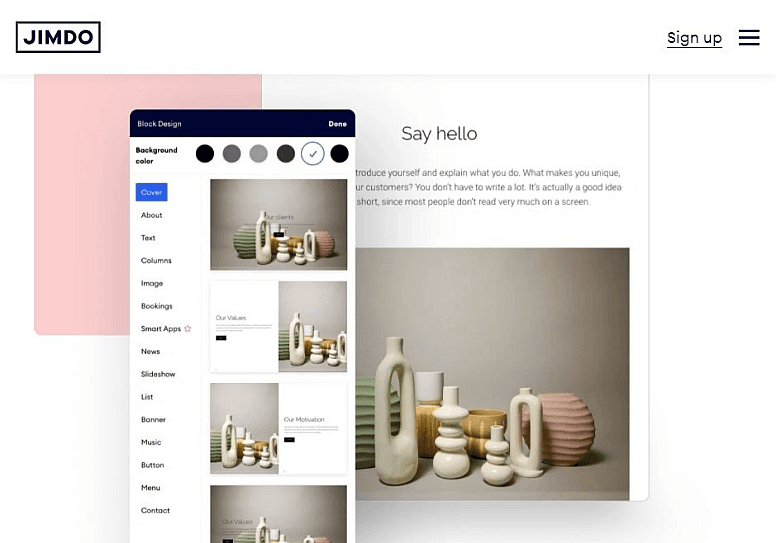
Jimdo stands out for its user-friendly design, offering enough functionality to let anyone create a professional ecommerce site without no coding. The drag-and-drop editor simplifies the website building process, and its responsive design ensures your site looks good on mobile devices, desktops, and tablets. You’ll appreciate the straightforward interface that lets you focus on your work, not on figuring out complex tools. For small businesses and creative professionals, Jimdo’s simplicity is a major advantage.

Integrations
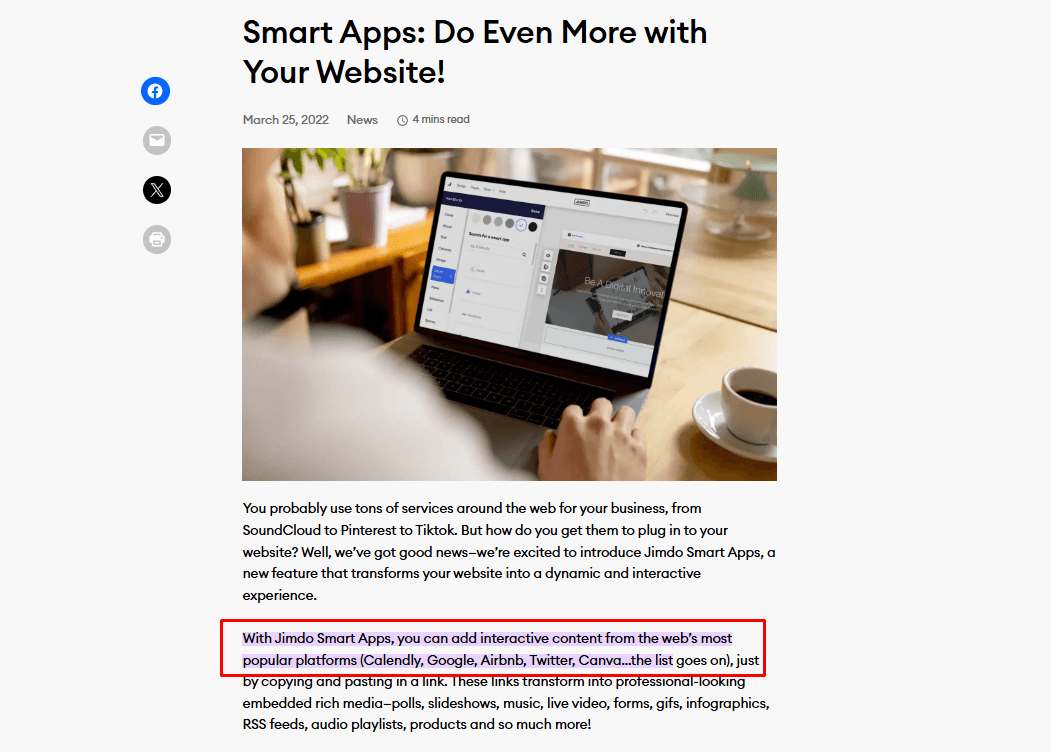
Jimdo integrates with Google Analytics, Facebook Pixel, Instagram, Pinterest, Mailchimp, PayPal, Stripe, YouTube, Twitter, Calendly, and Google Search Console. Jimdo also offers Smart Apps connections, allowing you to add interactive content from external platforms.
Jimdo does not currently offer an API or direct connections with third-party integration tools.
Jimdo Specs
- A/B Testing: No
- API: No
- Data Export: Yes
- Data Import: Yes
- External Integrations: Yes
- Landing Pages: Yes
- Multi-User: Yes
- Third-Party Plugins/Add-Ons: Yes


