

Reseña de Jimdo: ventajas, desventajas, características y precios
Jimdo destaca por su sencillez, lo que lo hace perfecto para pequeñas empresas y creadores que quieren un creador de sitios web de comercio electrónico fácil y sin complicaciones.

Revisamos las herramientas de forma independiente y las comisiones ayudan a financiar nuestras pruebas. Consulta nuestra política de transparencia, nuestra metodología o sugiere una herramienta.
Jimdo is an ecommerce website builder for small business owners and solopreneurs who need to get an online store live fast. If you want a quicker, simpler path to selling online than Wix offers, Jimdo's AI-driven setup is worth a close look. Wix gives you more design control, but it asks for considerably more time and decision-making upfront. Jimdo trades that flexibility for speed.
Jimdo Evaluation Summary
3.5/5
- From $11/month
- Free plan available
Por qué confiar en nuestras recomendaciones de software
6,700+
Reviews
20
Industry experts
16+
Evaluation factors
14
Years
Nuestro equipo lleva probando y evaluando software desde 2012. Como líderes del sector retail, sabemos lo difícil —y lo importante— que es elegir el software adecuado.
Para esta guía, evaluamos las herramientas mediante pruebas prácticas e investigación independiente, puntuando las herramientas según nuestros criterios de selección.
Nuestras reseñas reflejan nuestro criterio independiente, no un discurso de ventas.
Jimdo Overview
In my opinion, Jimdo offers a reliable option for small businesses and creatives seeking an easy-to-use ecommerce website builder. While its interface is intuitive and pricing competitive, it lacks some advanced features found in competitors like Squarespace, Shopify, or Wix. Jimdo shines in simplicity, making it ideal for those who prioritize straightforward setup over extensive customization. However, for larger businesses needing more complex integrations and features, you might find other platforms more suitable. Overall, if you're looking for a budget-friendly, user-friendly option without the need for extensive technical support, Jimdo is worth considering.
Pros
- You can quickly set up your online store without any coding skills.
- The user-friendly interface makes managing your site easy.
- It offers clean, professional templates that look great.
Cons
- You might find the customization options limited compared to other platforms.
- It lacks advanced ecommerce features that some businesses need.
- Customer support can be slow, which might frustrate your team.


Is Jimdo Right For Your Needs?
Who Would be a Good Fit for Jimdo?
Jimdo is ideal for small businesses, freelancers, and creative professionals who need a simple and quick way to launch an online store. Its ease of use allows you to focus on your work without getting bogged down by technical details. If you’re in a creative field like photography or art, Jimdo’s clean templates can showcase your work beautifully. For those who want to manage their site without coding, Jimdo’s intuitive interface is a plus.
- Small RetailersJimdo’s straightforward setup and management tools make it perfect for small retail businesses looking to sell online.
- FreelancersIf you’re a freelancer, Jimdo’s easy-to-use platform can help you create a professional online presence quickly.
- Creative ProfessionalsArtists and photographers will appreciate Jimdo’s attractive templates that highlight visual content beautifully.
- Local BusinessesLocal businesses can benefit from Jimdo’s simple design tools to create an engaging online storefront with built-in business listings.
- StartupsStartups with limited resources can use Jimdo to establish an online store without needing technical expertise.
- Personal ProjectsFor personal projects, Jimdo offers a hassle-free way to build and maintain a simple ecommerce site.
Who Would be a Bad Fit for Jimdo?
Jimdo isn’t the best choice for large enterprises or businesses needing extensive HTML & CSS customization, as well as advanced ecommerce features. If your team requires complex integrations, detailed analytics, or specialized tools, you'll find Jimdo lacking. Companies in highly competitive industries might need a more robust platform to stand out. For those needing extensive customer support, Jimdo's limited service might be frustrating.
- Large EnterprisesJimdo’s limited customization and feature set won’t meet the demands of large, complex organizations.
- Tech CompaniesTech companies needing advanced integrations and analytics will find Jimdo’s offerings insufficient.
- Ecommerce GiantsFor large ecommerce businesses, Jimdo lacks the advanced features needed to compete effectively.
- Creative AgenciesAgencies that handle web design for multiple clients may find Jimdo’s templates too limiting.
- Corporate TeamsCorporate teams requiring specialized tools and detailed tracking will find Jimdo’s features too basic.
- High-Traffic SitesSites expecting high traffic volumes might need a more robust platform than what Jimdo offers.
Nuestra Metodología de Revisión
Cómo Probamos y Puntamos Herramientas
Hemos pasado años construyendo, perfeccionando y mejorando nuestro sistema de pruebas y puntuación de software. La rúbrica está diseñada para captar los matices de la selección de software y lo que hace que una herramienta sea eficaz, enfocándose en los aspectos críticos del proceso de toma de decisiones. A continuación, puedes ver exactamente cómo funcionan nuestras pruebas y puntuaciones en siete criterios. Esto nos permite brindar una evaluación imparcial del software según la funcionalidad principal, características destacadas, facilidad de uso, incorporación, soporte al cliente, integraciones, reseñas de usuarios y relación calidad-precio.
Funcionalidad Principal (25% de la puntuación final)
El punto de partida de nuestra evaluación siempre es la funcionalidad principal de la herramienta. ¿Cuenta con las características y funciones básicas que un usuario esperaría ver? ¿Alguna de esas funcionalidades está limitada a planes de precios superiores? En esencia, esperamos que una herramienta se compare favorablemente con las capacidades básicas de sus competidores.
Características Destacadas (25% de la puntuación final)
A continuación, evaluamos las características sobresalientes poco comunes que van más allá de la funcionalidad principal que normalmente se encuentra en herramientas similares. Una alta puntuación refleja funcionalidades especializadas o únicas que hacen que el producto sea más rápido, eficiente o aporte un valor extra al usuario. También evaluamos qué tan fácil es integrar la herramienta con otras comúnmente usadas en el entorno tecnológico para ampliar la funcionalidad y utilidad del software. Las herramientas que ofrecen numerosas integraciones nativas, conexiones de terceros y acceso a API para crear integraciones personalizadas obtienen la mejor puntuación.
Facilidad de Uso (10% de la puntuación final)
Consideramos qué tan rápido y fácil es realizar las tareas definidas en la funcionalidad principal usando la herramienta. El software de alta puntuación está bien diseñado, es intuitivo, ofrece aplicaciones móviles, proporciona plantillas y hace que tareas relativamente complejas parezcan simples.
Incorporación (10% de la puntuación final)
Sabemos lo importante que es que un equipo adopte rápidamente una nueva plataforma, así que evaluamos qué tan fácil es aprender y usar la herramienta con mínima capacitación. Analizamos cuánto tiempo tarda un miembro del equipo en prepararse y comenzar a usar la herramienta sin experiencia previa. Las soluciones con alta puntuación requieren poco o ningún soporte.
Soporte al Cliente (10% de la puntuación final)
Revisamos qué tan rápido y fácil es obtener ayuda por teléfono, chat en vivo o base de conocimientos. Las herramientas y empresas que ofrecen soporte en tiempo real obtienen la mejor puntuación, mientras que los chatbots obtienen la peor.
Reseñas de Clientes (10% de la puntuación final)
Además de nuestras pruebas y evaluaciones, consideramos el puntaje neto de promotores de clientes actuales y pasados. Revisamos la probabilidad de que elijan de nuevo la herramienta para la funcionalidad principal. Un software con alta puntuación refleja un alto NPS de clientes actuales o pasados.
Relación Calidad-Precio (10% de la puntuación final)
Por último, considerando todos los demás criterios, revisamos el precio promedio de los planes de nivel básico frente a las características principales y consideramos el valor de los otros criterios de evaluación. El software que ofrece más por menos, tendrá una puntuación más alta.
Core Features
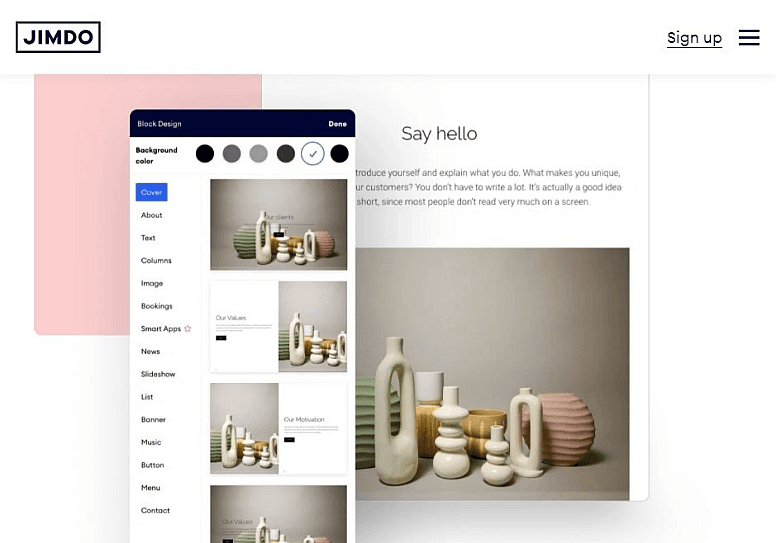
Drag-and-Drop Editor: You can easily build your site by dragging elements where you want them, saving time and effort. It’s intuitive even if you’re not tech-savvy.
Responsive Design: Your site automatically adjusts to look good on any device, and Jimdo’s built-in bandwidth allocation helps ensure pages load smoothly on both desktop and mobile.
SEO Tools: Jimdo provides basic SEO settings to help your site rank better in search engines. It’s perfect for improving your online visibility without hiring an expert.
Online Store Management: Manage your products and orders with straightforward tools that simplify your workflow. It’s everything you need to run a small online store.
Blogging Capabilities: You can easily add a blog to your site to engage with your audience, share posts on social media, and drive traffic. It’s a handy tool for content marketing.
Customizable Templates: Choose from a variety of templates with flexible design options to match your brand’s style. You’ll find a design that makes your site stand out.
Ease of Use
Jimdo stands out for its user-friendly design, offering enough functionality to let anyone create a professional ecommerce site without no coding. The drag-and-drop editor simplifies the website building process, and its responsive design ensures your site looks good on mobile devices, desktops, and tablets. You’ll appreciate the straightforward interface that lets you focus on your work, not on figuring out complex tools. For small businesses and creative professionals, Jimdo’s simplicity is a major advantage.

Integrations
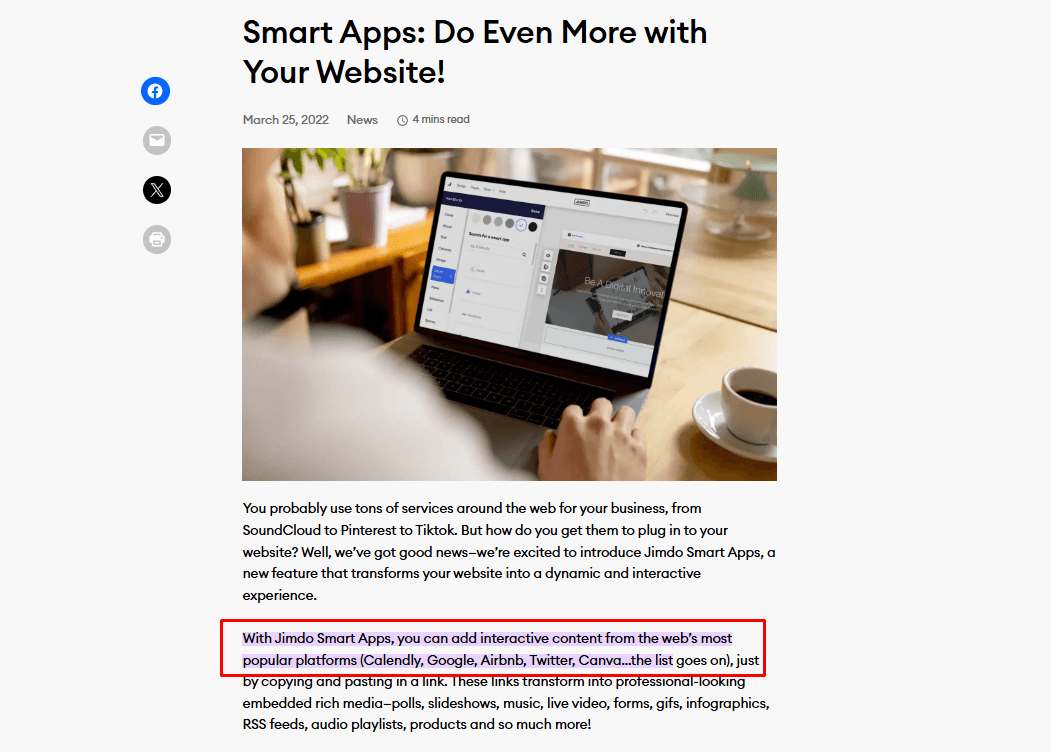
Jimdo integrates with Google Analytics, Facebook Pixel, Instagram, Pinterest, Mailchimp, PayPal, Stripe, YouTube, Twitter, Calendly, and Google Search Console. Jimdo also offers Smart Apps connections, allowing you to add interactive content from external platforms.
Jimdo does not currently offer an API or direct connections with third-party integration tools.
Jimdo Specs
- A/B Testing: No
- API: No
- Data Export: Yes
- Data Import: Yes
- External Integrations: Yes
- Landing Pages: Yes
- Multi-User: Yes
- Third-Party Plugins/Add-Ons: Yes


