
Reseña de Wrike: ventajas, desventajas, características y precios
Wrike destaca por su interfaz intuitiva y sus versátiles funciones de gestión de proyectos, lo que lo convierte en una de las mejores opciones de soluciones ERP para comercio electrónico.

Revisamos las herramientas de forma independiente y las comisiones ayudan a financiar nuestras pruebas. Consulta nuestra política de transparencia, nuestra metodología o sugiere una herramienta.
Wrike is an ecommerce ERP software for retail and ecommerce teams that need to manage projects, operations, and cross-departmental workflows in one place. I'd consider it if you want more adaptability and a shorter implementation timeline than a traditional ERP like NetSuite, while still getting the centralized visibility that larger or fast-scaling operations need.
Wrike Evaluation Summary
4.3/5
- From $10/user/month (billed annually)
- Free plan + 14-day free trial available
Por qué confiar en nuestras recomendaciones de software
6,700+
Reviews
20
Industry experts
16+
Evaluation factors
14
Years
Nuestro equipo lleva probando y evaluando software desde 2012. Como líderes del sector retail, sabemos lo difícil —y lo importante— que es elegir el software adecuado.
Para esta guía, evaluamos las herramientas mediante pruebas prácticas e investigación independiente, puntuando las herramientas según nuestros criterios de selección.
Nuestras reseñas reflejan nuestro criterio independiente, no un discurso de ventas.
Wrike Overview
In my opinion, Wrike is a solid choice for teams needing a flexible ecommerce ERP tool. Its standout features like customizable dashboards and strong integration capabilities make it appealing. However, its pricing might be a downside for budget-conscious businesses. Wrike excels in project management for marketing and creative teams, thanks to its robust task management and collaboration features. It might not be the best fit for small businesses with simple needs due to its complexity. When compared to other tools, like Asana, Trello, or Clickup, Wrike's interface and integrations give it an edge, although onboarding can be smoother. Overall, it's a worthy consideration if your team values flexibility and detailed project tracking.
Pros
- You can customize dashboards to fit your team's workflow.
- Task management tools simplify tracking your projects.
- Collaboration features improve team communication.
Cons
- The interface might feel overwhelming at first.
- Learning all features can take time.
- Some users find customer support response times slow.
Is Wrike Right For Your Needs?
Who Would be a Good Fit for Wrike?
Wrike is ideal for marketing teams and creative agencies that need detailed project tracking. Its customizable dashboards and strong task management features help your team stay organized. If you're in a fast-paced environment, Wrike's collaboration tools ensure everyone stays in the loop. For departments handling multiple projects, Wrike's ability to manage tasks and timelines is invaluable. If you need to integrate various workflows, Wrike's flexibility makes it a strong choice.
- Marketing TeamsWrike's task management and collaboration tools keep your campaigns on track and your team aligned.
- Creative AgenciesIts customizable dashboards help you manage multiple client projects efficiently and keep everyone informed.
- Project ManagersWrike simplifies project tracking with its intuitive interface and detailed task management capabilities.
- Large EnterprisesThe software’s robust features and scalability make it suitable for managing complex projects across departments.
- Remote TeamsWrike's collaboration features make communication seamless, ensuring everyone stays connected and productive.
- Product DevelopmentIts detailed project timelines and task management tools help streamline your product launch processes.
Who Would be a Bad Fit for Wrike?
Wrike might not suit small businesses or startups with straightforward project needs. Its robust features can be overwhelming if your team doesn't require complex project management tools. If you have limited resources for training, Wrike's learning curve could be a challenge. For teams that prefer a simple interface and quick setup, Wrike's detailed features may feel excessive. Additionally, if immediate customer support is crucial, you might find Wrike's response times lacking.
- Small StartupsThe complexity of Wrike's features can overwhelm small teams with basic project management needs.
- FreelancersWrike's extensive capabilities might be more than necessary for managing individual projects.
- Non-Technical TeamsIf your team struggles with tech, Wrike's interface could pose a challenge.
- Budget-Conscious CompaniesThe cost of Wrike might not justify its features for those looking to minimize expenses.
- Simple Task ManagementFor managing basic tasks, Wrike's detailed features can feel unnecessary.
- Immediate Support NeedsIf quick customer support is a priority, Wrike's response times might not meet your expectations.
Nuestra Metodología de Revisión
Cómo Probamos y Puntamos Herramientas
Hemos pasado años construyendo, perfeccionando y mejorando nuestro sistema de pruebas y puntuación de software. La rúbrica está diseñada para captar los matices de la selección de software y lo que hace que una herramienta sea eficaz, enfocándose en los aspectos críticos del proceso de toma de decisiones. A continuación, puedes ver exactamente cómo funcionan nuestras pruebas y puntuaciones en siete criterios. Esto nos permite brindar una evaluación imparcial del software según la funcionalidad principal, características destacadas, facilidad de uso, incorporación, soporte al cliente, integraciones, reseñas de usuarios y relación calidad-precio.
Funcionalidad Principal (25% de la puntuación final)
El punto de partida de nuestra evaluación siempre es la funcionalidad principal de la herramienta. ¿Cuenta con las características y funciones básicas que un usuario esperaría ver? ¿Alguna de esas funcionalidades está limitada a planes de precios superiores? En esencia, esperamos que una herramienta se compare favorablemente con las capacidades básicas de sus competidores.
Características Destacadas (25% de la puntuación final)
A continuación, evaluamos las características sobresalientes poco comunes que van más allá de la funcionalidad principal que normalmente se encuentra en herramientas similares. Una alta puntuación refleja funcionalidades especializadas o únicas que hacen que el producto sea más rápido, eficiente o aporte un valor extra al usuario. También evaluamos qué tan fácil es integrar la herramienta con otras comúnmente usadas en el entorno tecnológico para ampliar la funcionalidad y utilidad del software. Las herramientas que ofrecen numerosas integraciones nativas, conexiones de terceros y acceso a API para crear integraciones personalizadas obtienen la mejor puntuación.
Facilidad de Uso (10% de la puntuación final)
Consideramos qué tan rápido y fácil es realizar las tareas definidas en la funcionalidad principal usando la herramienta. El software de alta puntuación está bien diseñado, es intuitivo, ofrece aplicaciones móviles, proporciona plantillas y hace que tareas relativamente complejas parezcan simples.
Incorporación (10% de la puntuación final)
Sabemos lo importante que es que un equipo adopte rápidamente una nueva plataforma, así que evaluamos qué tan fácil es aprender y usar la herramienta con mínima capacitación. Analizamos cuánto tiempo tarda un miembro del equipo en prepararse y comenzar a usar la herramienta sin experiencia previa. Las soluciones con alta puntuación requieren poco o ningún soporte.
Soporte al Cliente (10% de la puntuación final)
Revisamos qué tan rápido y fácil es obtener ayuda por teléfono, chat en vivo o base de conocimientos. Las herramientas y empresas que ofrecen soporte en tiempo real obtienen la mejor puntuación, mientras que los chatbots obtienen la peor.
Reseñas de Clientes (10% de la puntuación final)
Además de nuestras pruebas y evaluaciones, consideramos el puntaje neto de promotores de clientes actuales y pasados. Revisamos la probabilidad de que elijan de nuevo la herramienta para la funcionalidad principal. Un software con alta puntuación refleja un alto NPS de clientes actuales o pasados.
Relación Calidad-Precio (10% de la puntuación final)
Por último, considerando todos los demás criterios, revisamos el precio promedio de los planes de nivel básico frente a las características principales y consideramos el valor de los otros criterios de evaluación. El software que ofrece más por menos, tendrá una puntuación más alta.
Core Features
Task Management
Easily create, assign, and use list or kanban views track tasks to keep your projects organized. Your team can see progress at a glance.
Custom Workflows
Tailor workflows to match your team's specific needs, ensuring everyone follows the right process. This flexibility boosts productivity.
Time Tracking
Monitor how much time your team spends on tasks to better manage resources. It helps identify areas for efficiency improvements.
Collaboration Tools
Share files, communicate within tasks, and receive notifications to keep your team aligned. It reduces email clutter and enhances teamwork.
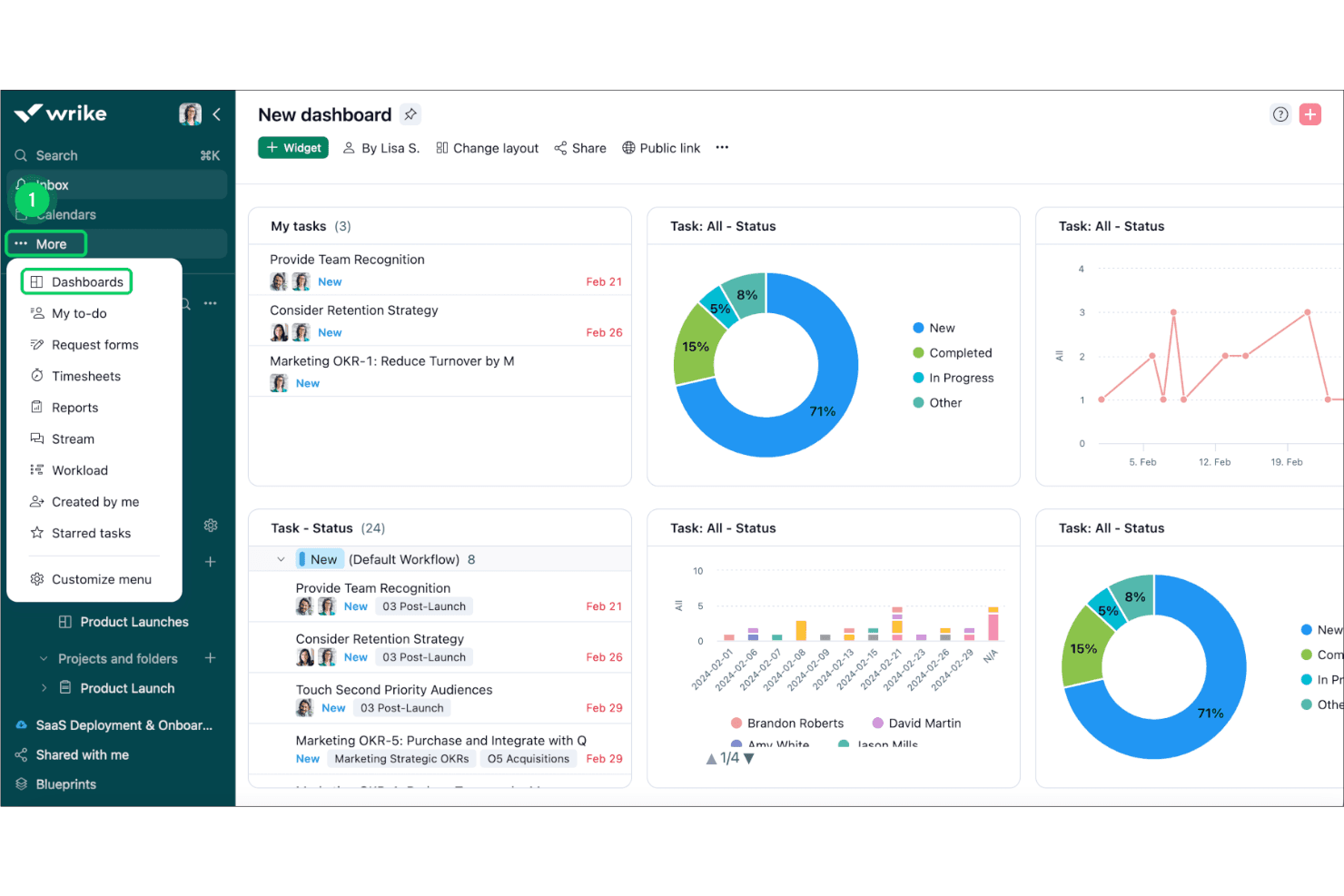
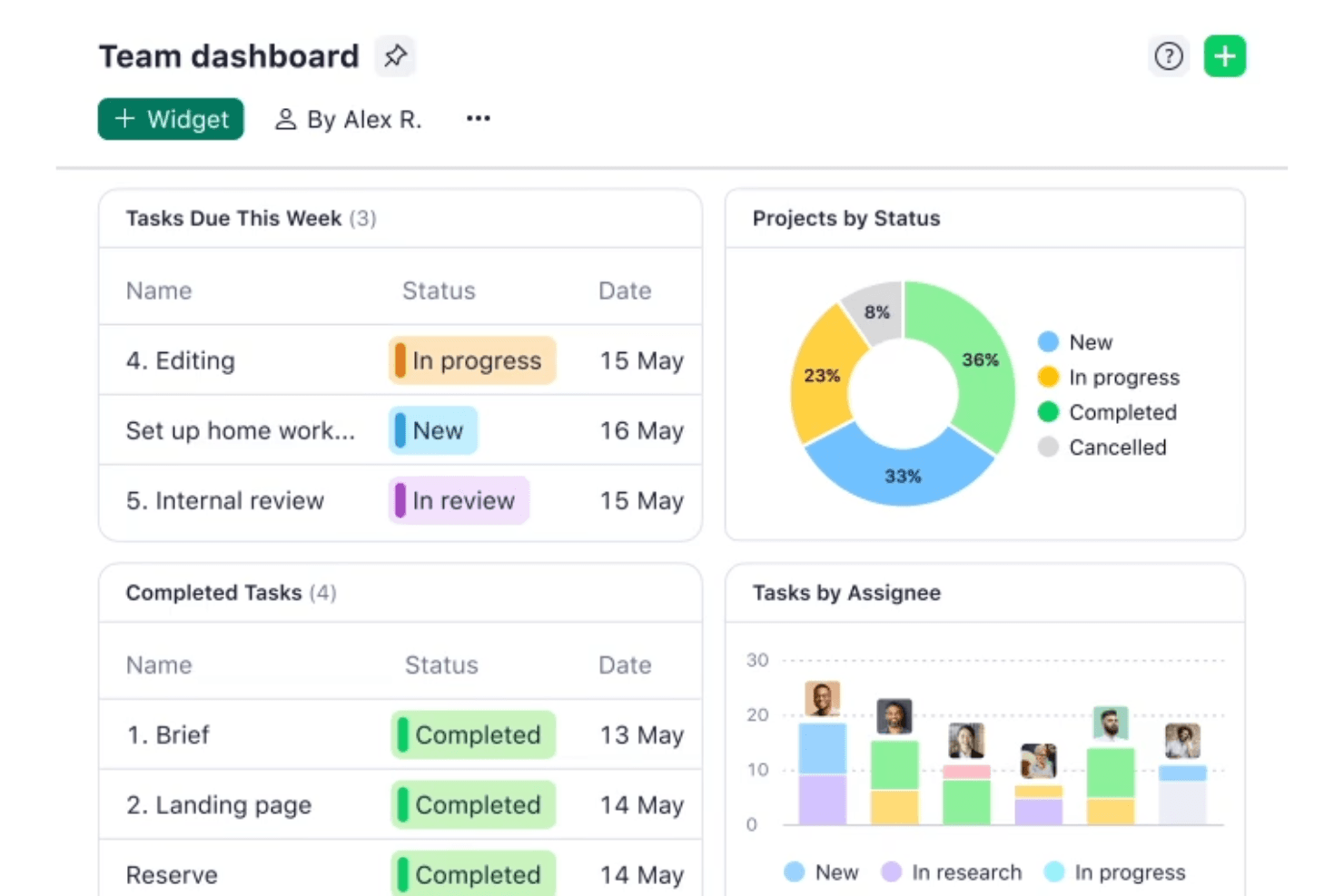
Dashboard Customization
Design dashboards that highlight the most important data for your team. This feature allows you to focus on what matters most.
Reporting and Analytics
Generate real-time reports to understand project performance and make informed decisions. These insights help you improve future projects.
Standout Features
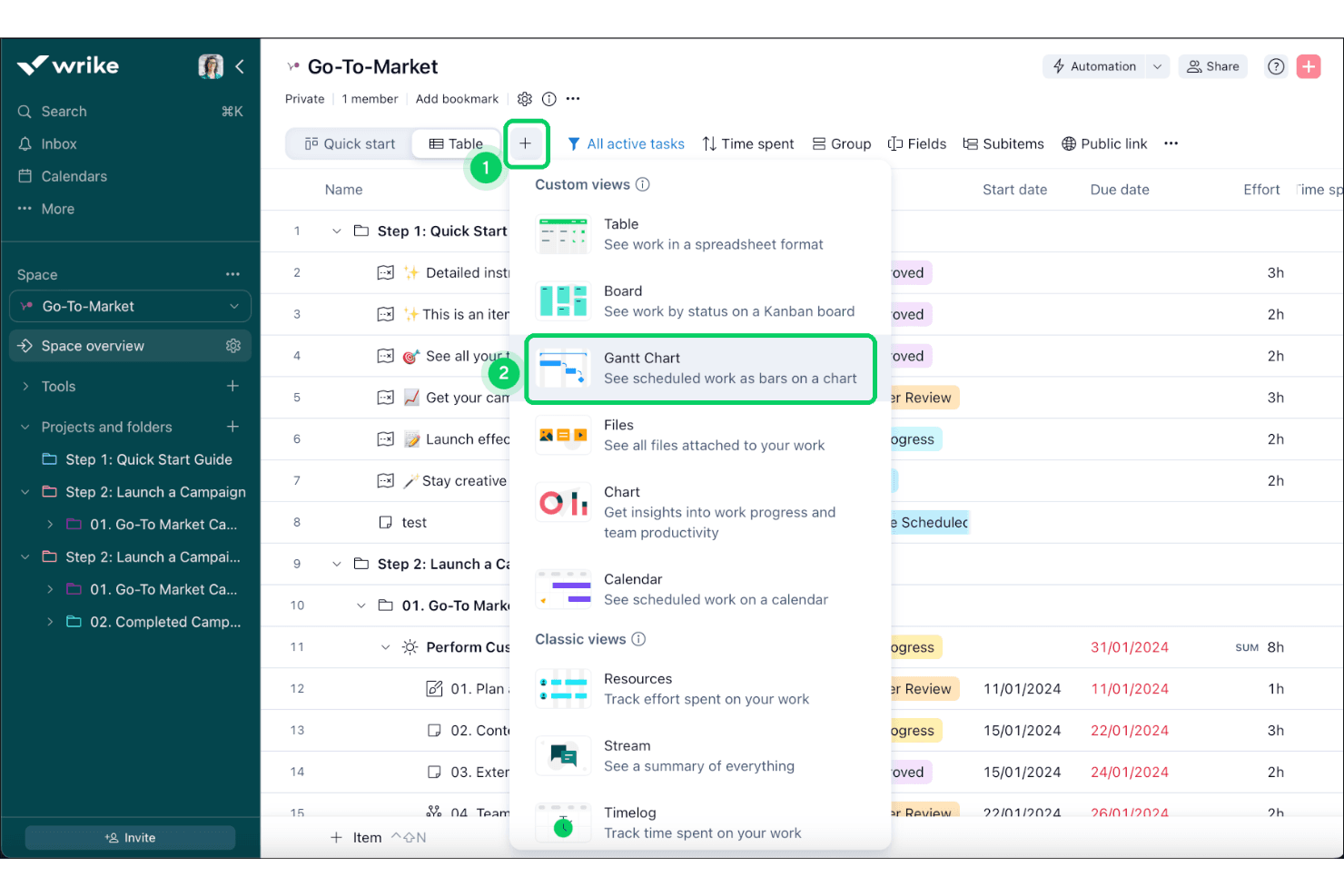
Gantt Charts
Visualize project timelines and dependencies to better manage complex projects. This feature makes planning more intuitive and effective.
Request Forms
Standardize how you receive work requests to ensure all necessary information is captured. It streamlines the intake process and reduces back-and-forth communication.
Ease of Use
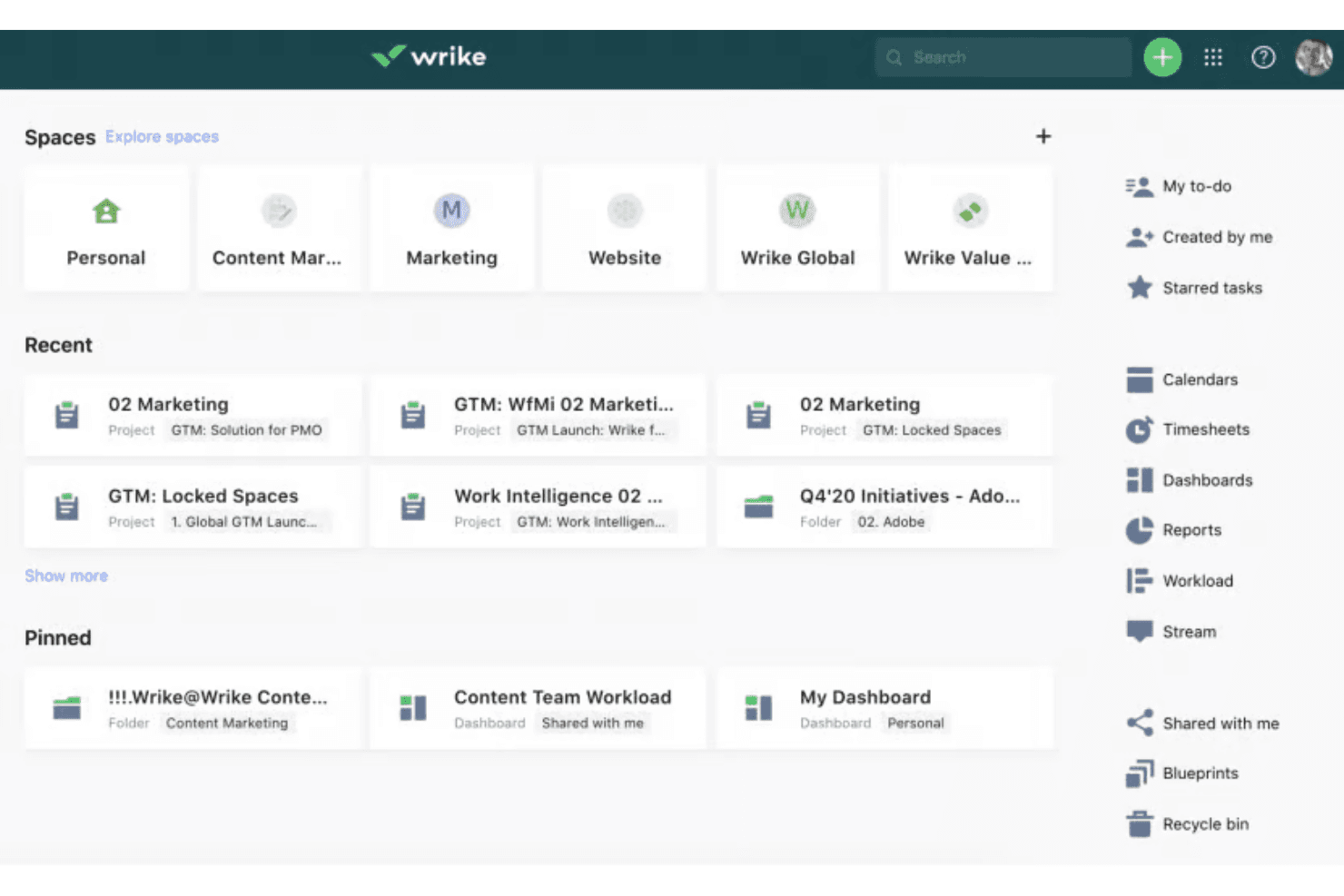
Wrike's user interface is intuitive, but it can feel overwhelming for newcomers due to its extensive features. Once you get the hang of it, navigating through tasks and customizing dashboards becomes straightforward. The drag-and-drop functionality in Gantt charts simplifies project planning. However, if your team isn’t tech-savvy, the learning curve might be a hurdle. Overall, Wrike offers a solid balance between functionality and usability, making it a viable option for teams willing to invest time in learning.
Onboarding
Wrike offers a structured onboarding experience with tutorials and guides to help new users get started. However, the comprehensive feature set can make the onboarding process feel lengthy. The available resources, such as webinars and community forums, are valuable for learning. If your team is new to complex software, expect a learning curve. Despite this, the support provided ensures that you can gradually unlock Wrike's full potential, making it worth the initial effort.
Customer Support
Wrike provides multiple support options, including email and live chat, but some users find response times slower than expected. The help center and community forums offer valuable self-service resources. If your team requires immediate assistance, the delay might be frustrating. However, once connected, the support team is knowledgeable and helpful. Overall, while support is reliable, it could be more prompt to better meet your team's needs.
Integrations
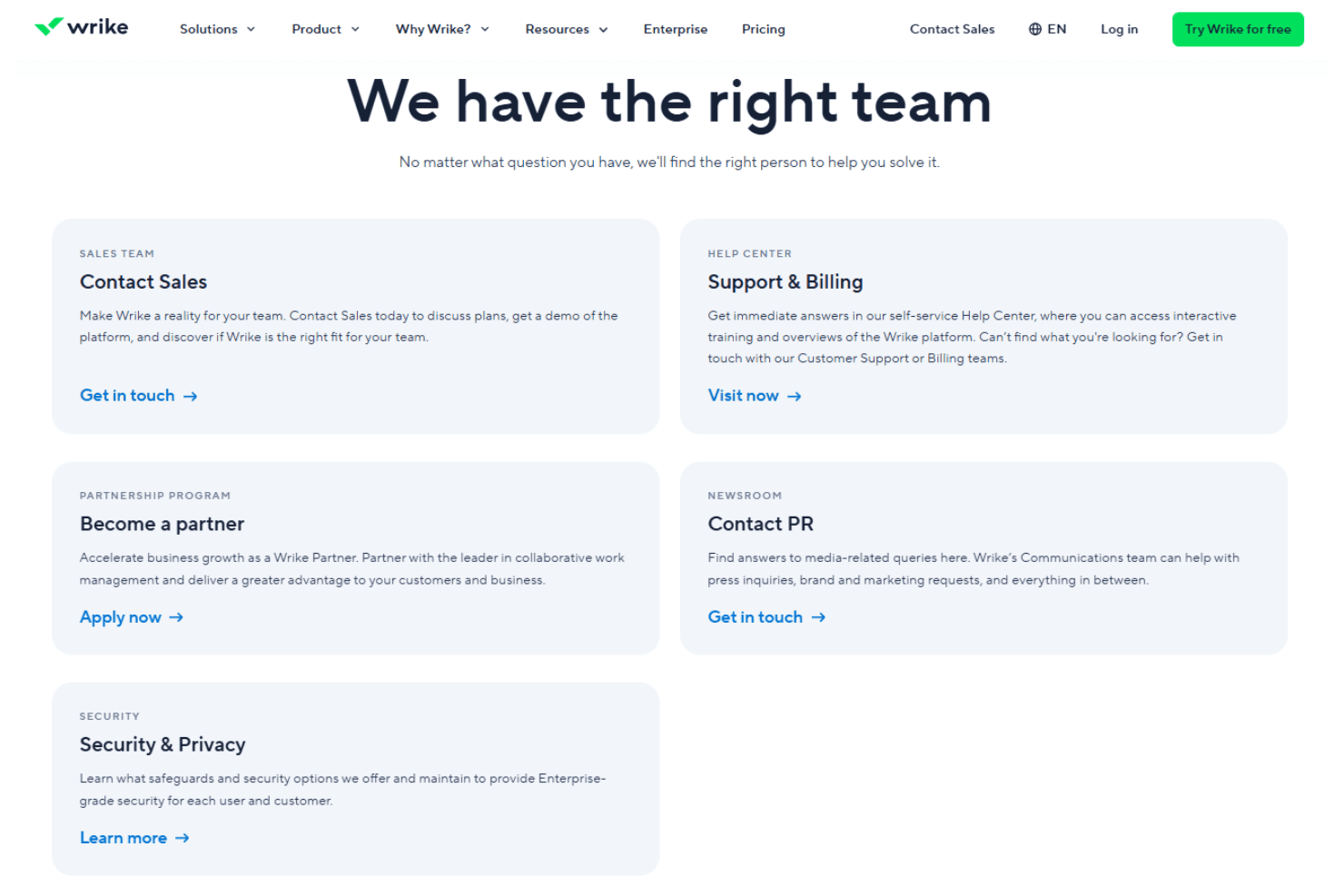
Wrike integrates with Microsoft Teams, Slack, Adobe Creative Cloud, Salesforce, Google Workspace, Dropbox, Microsoft Outlook, HubSpot, Jira, and Zendesk. Wrike also offers an API and connects with third-party integration tools.
Value for Money
Wrike gives solid work and project management value for teams that need structure, and users often like that you can start with a free plan and a free 14-day trial to test before buying. Wrike’s pricing feel justified as you get more features and automation tailored to your team’s work complexity with each tier, and the newer Apex tier brings advanced workflows and analytics for big teams while pricing stays custom.
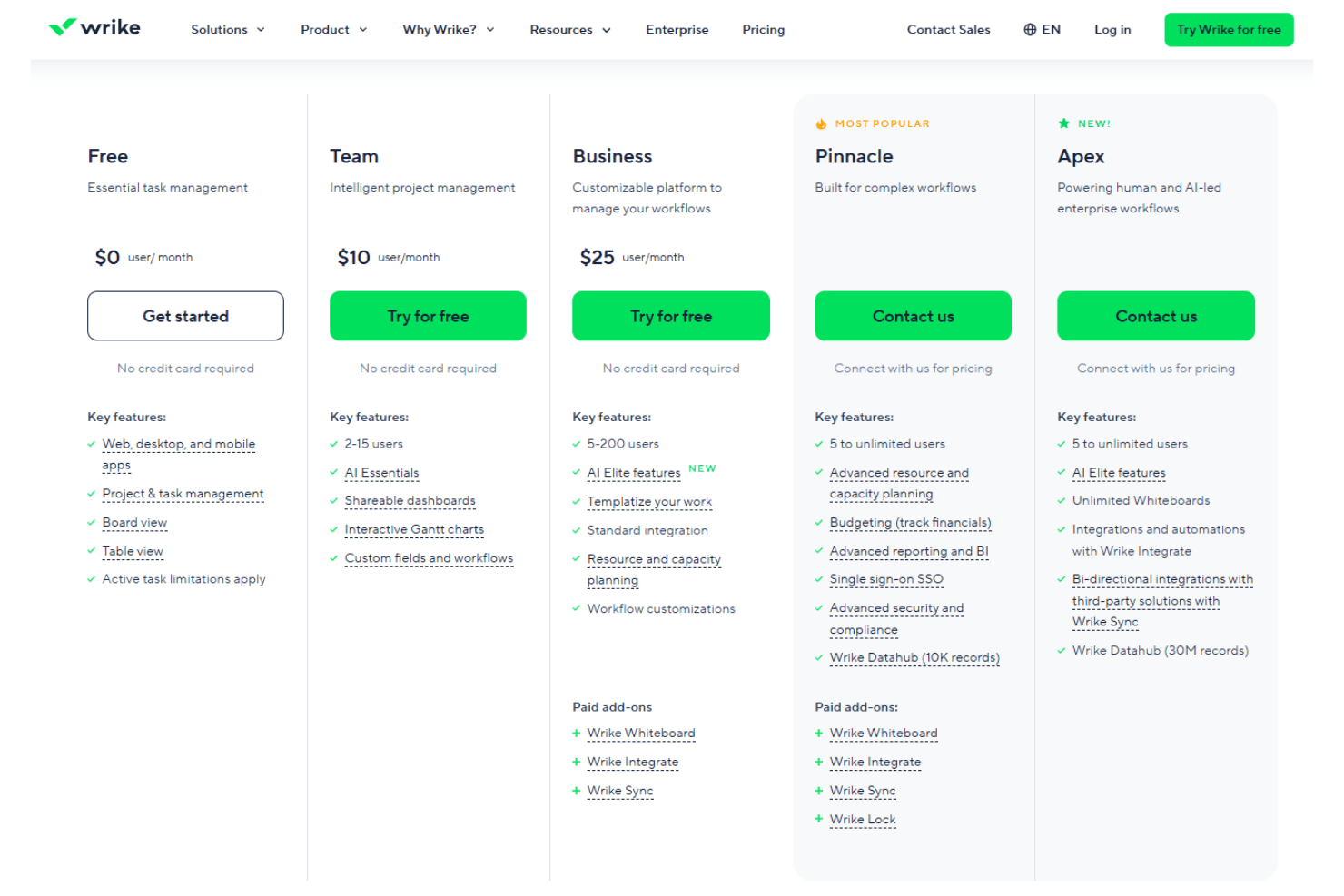
- Free: $0 per user/month. Basic task and project tools to start organizing work.
- Team: $10 per user/month. Adds dashboards, Gantt charts, and enhanced project views.
- Business: $25 per user/month. Includes advanced workflows, resource planning, and deeper customization.
- Pinnacle: Contact sales. Adds advanced reporting, BI, and expanded enterprise features.
- Apex: Contact sales. Top-tier plan with enterprise-grade workflows, AI tools, and integrations.
New Product Updates from Wrike
Wrike Adds Klaxoon MCP Integration
Wrike’s MCP integration with Klaxoon is now generally available, making it easier for teams and AI agents to work across task execution and collaborative whiteboarding. The release improves continuity of context and reduces friction when linking or updating Klaxoon boards from Wrike workflows. Highlights include:
- Cross-Tool Context: Let AI agents move between Wrike tasks and Klaxoon whiteboards without losing context.
- Whiteboard ID Access: Retrieve the ID of a Klaxoon board attached to a Wrike task.
- API Attachment Controls: Attach or detach Klaxoon whiteboards from Wrike tasks or projects programmatically.
- Task Context Access: Use Wrike task information alongside whiteboard content in AI workflows.
- Marketplace Availability: Access the integration through Claude and OpenAI marketplaces.
Visit Wrike’s official site for more details.
Wrike MCP Adds Intelligent Resource Allocation
Wrike MCP adds intelligent resource allocation to help teams staff work more effectively and with fewer bottlenecks. By recommending the right people earlier, it supports faster planning and more realistic commitments. Highlights include:
- Assignee Recommendations: Suggest team members for projects, folders, spaces, or tasks.
- Capacity Awareness: Consider current availability and flag potential overloads.
- Skills Matching: Match assignees to required skills and job roles.
- Candidate Filtering: Narrow recommendations by team or space.
- Workload Impact: Show how proposed assignments affect workload by day or week.
- Approval Before Assignment: Let users review recommendations before applying them.
Visit Wrike’s official site for more details.
 Opens new window
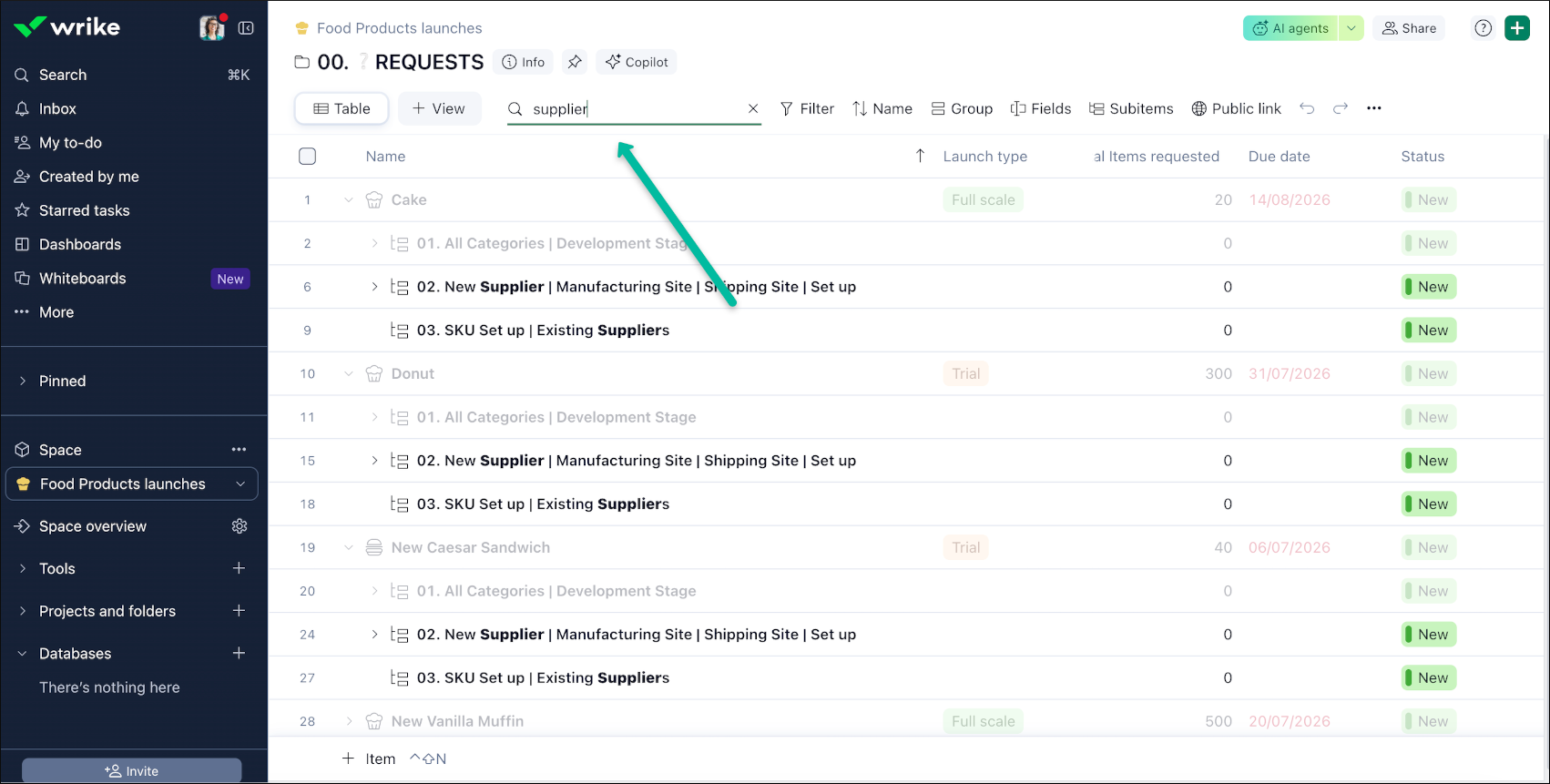
Wrike Adds Quick Search to Table View
Wrike’s Table View now includes Quick Search, making it easier to locate work items without manually scanning long tables. This improves navigation and speeds up everyday work by surfacing relevant results immediately, even in large datasets. Highlights include:
- Full-Table Search: Search across the entire Table View, including items not yet loaded.
- Multiple Fields: Find matches in task titles, descriptions, and other fields.
- Highlighted Matches: See matching keywords highlighted in item names for faster scanning.
Visit Wrike’s official site for more details.
 Opens new window
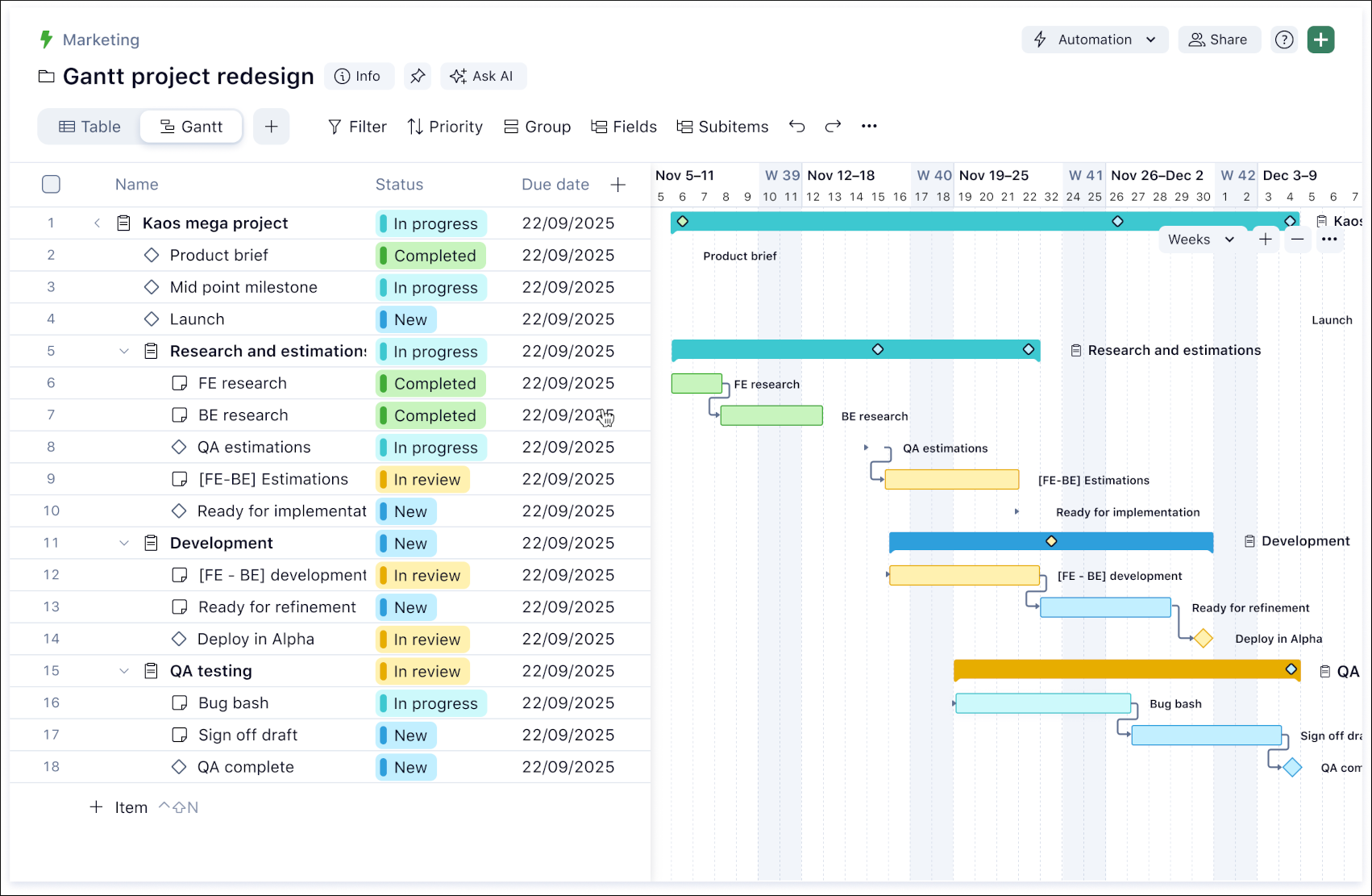
Wrike Adds Cross-Project Dependencies in Gantt
Wrike adds project-to-project dependencies, milestones on project bars, predecessor delay details, dependency notifications, and API access in Gantt. These updates give teams clearer visibility into how project changes affect broader programme and portfolio timelines. Highlights include:
- Cross-Project Dependencies: Link projects directly in Gantt or from the item view.
- Milestone Visibility: Show project milestones directly on Gantt project bars.
- Delay Details: See which predecessor project caused a conflict and the estimated delay.
- Dependency Notifications: Notify teams when a direct predecessor project changes status.
- API Access: Use project dependency data in integrations and custom reporting.
Visit Wrike’s official site for more details.
 Opens new window
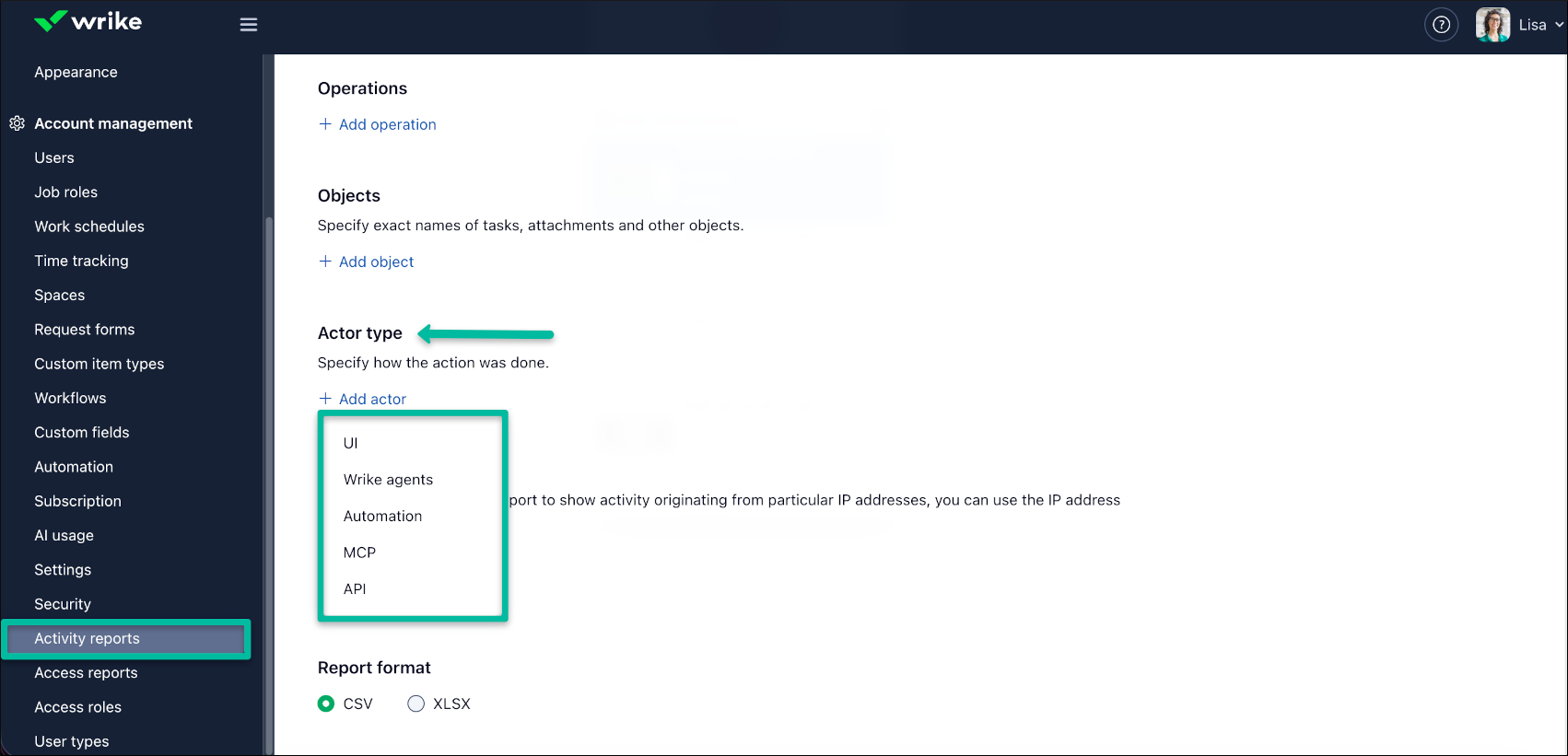
Wrike Activity Reports Add Actor Type Details
Wrike has enhanced Activity Reports to improve audit clarity and admin oversight. You can now see not just what changed, but the type of actor that made the change, making it easier to trace sources and validate governance. Highlights include:
- Actor Type: Identifies whether changes came from the UI, Automation, Wrike Agents, API, or MCP.
- App Name: Shows the application involved in a change when available.
- Client ID: Adds client identification details for applicable activity.
- Actor Type Filters: Lets admins filter reports by the source of changes.
- Audit Visibility: Helps teams distinguish human, automated, API, and AI-driven activity.
Visit Wrike’s official site for more details.
 Opens new window
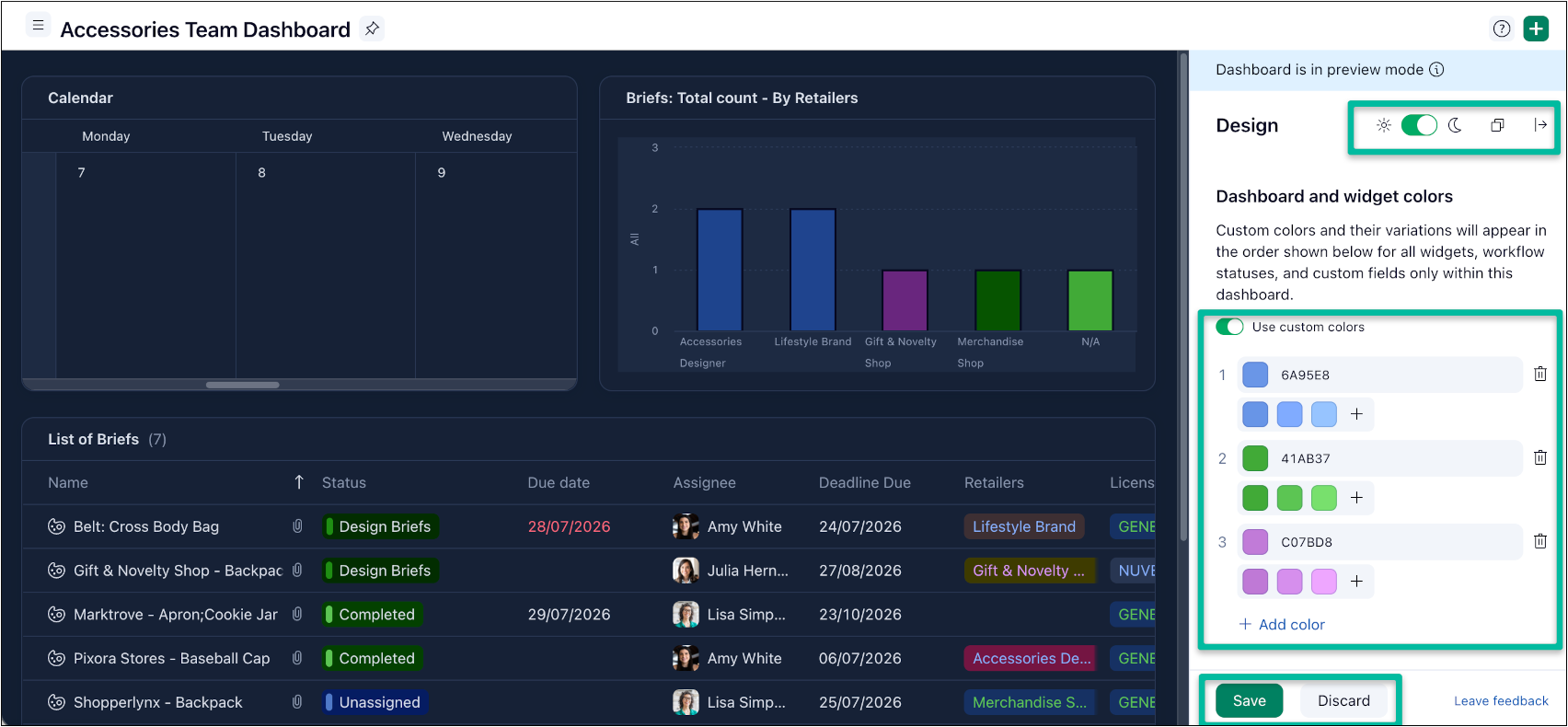
Wrike Adds Custom Color Palettes for Dashboards
Wrike has introduced Dashboards Color Customization to help teams make dashboards clearer and more consistent at a glance. You can create custom color palettes and reuse them across dashboard widgets to match your team’s terminology and visual standards. Highlights include:
- Custom Color Palettes: Lets users build color palettes for individual dashboards.
- Widget-Wide Styling: Applies palette colors across dashboard widgets, workflow statuses, and custom fields.
- Color Controls: Supports HEX codes, eyedropper selection, and reusable color presets.
- Design Preview: Lets users preview dashboard colors in light and dark mode before saving.
- Widget Reset: Allows individual widgets to revert to default colors without changing the full dashboard.
- Dashboard-Level Scope: Keeps customization limited to the selected dashboard without changing account-wide colors.
Visit Wrike’s official site for more details.
 Opens new window
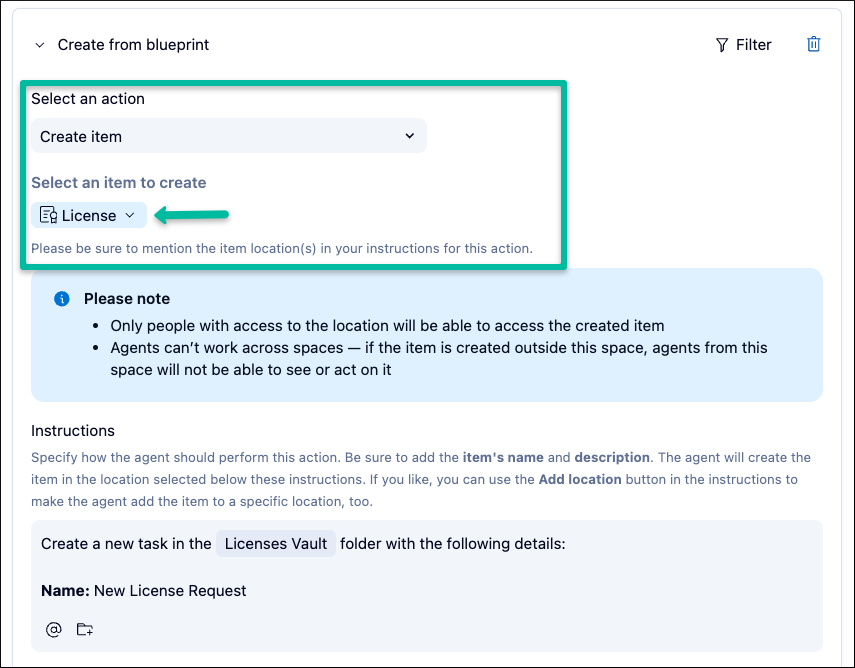
Wrike AI Agents Create Full Blueprints and Formatted Items
Wrike AI Agents can create complete blueprint structures in one step and generate formatted descriptions with headings, lists, checkboxes, bold text, and highlights. These updates reduce manual setup for standardized workflows. Highlights include:
- Blueprint Creation: Creates parent items and subtasks from a selected blueprint in one step.
- Standardized Workflows: Launches predefined project structures automatically when triggered.
- Rich Descriptions: Generates formatted content with headings, bullets, checkboxes, bold text, and highlights.
- Formatting Preservation: Keeps rich formatting in execution logs and the testing playground.
Visit Wrike’s official site for more details.
 Opens new window
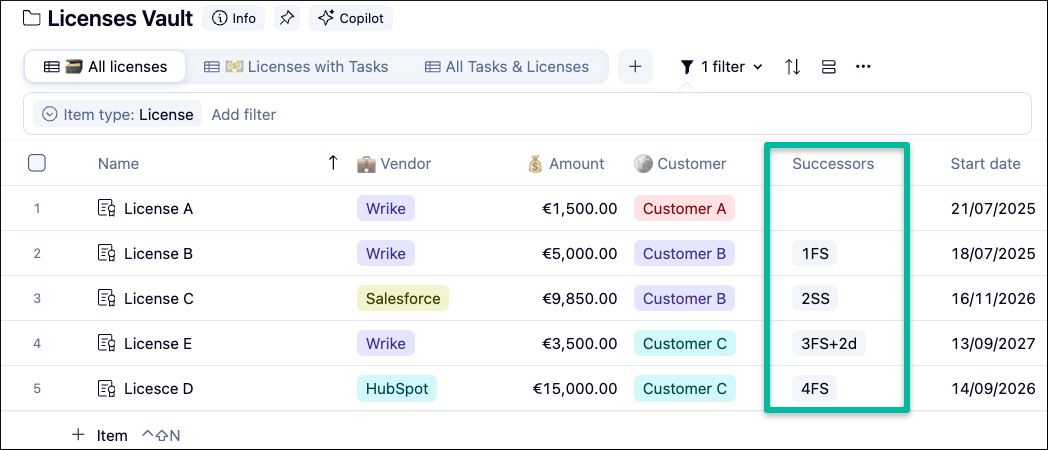
Wrike Adds Successors Column for Task Dependencies
Wrike adds a Successors column to Table and Gantt views with direct dependency editing and bi-directional syncing with Predecessors. This gives teams a clearer way to manage downstream task relationships. Highlights include:
- Successors Column: Shows which downstream tasks depend on the current task.
- Direct Editing: Lets users add or edit dependencies using row numbers, dependency types, and lag duration.
- Bi-Directional Sync: Updates the Predecessors column automatically when successor relationships change.
- Table and Gantt Support: Makes the column available in both Table view and the Gantt chart table.
Visit Wrike’s official site for more details.
 Opens new window
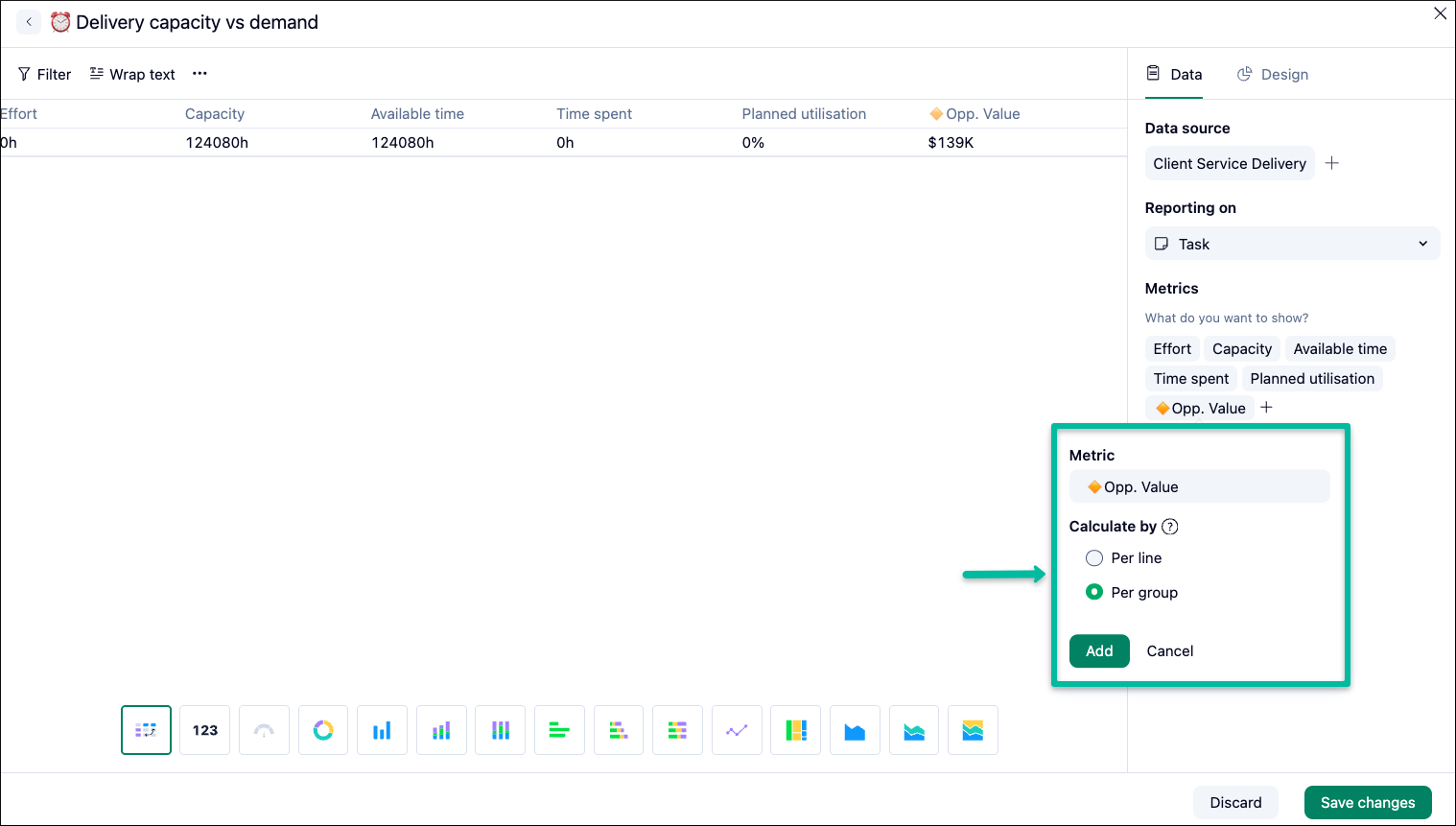
Wrike Adds Reference Lines and Custom Field Calculation Controls
Wrike lets users add reference lines to column, bar, line, and area charts, while calculated custom fields can now be computed per line or per group. These updates give teams more control over how targets, thresholds, and formula-based metrics appear in dashboards. Highlights include:
- Reference Lines: Adds target, threshold, or benchmark lines to supported Dashboard charts.
- Custom Labels: Lets users customize reference line labels and colors.
- Per-Line Calculations: Applies calculated field formulas to each row before summarizing results.
- Per-Group Calculations: Applies formulas after grouped values are totaled for metrics such as ROI.
Visit Wrike’s official site for more details.
 Opens new window
Wrike Adds Organization-Wide AI Usage Tracking
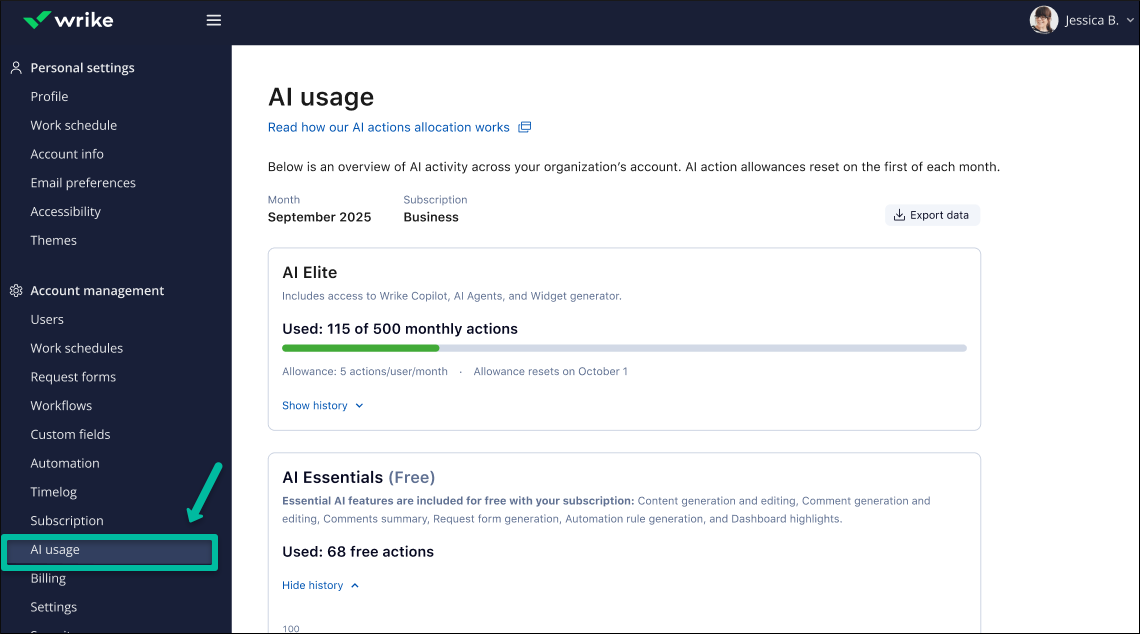
Wrike gives Account Admins a dedicated AI Usage view to monitor AI Essentials and AI Elite activity across the organization, including monthly trends and breakdowns by user, feature, and Agent. Admins can also export the data to CSV for deeper reporting and analysis. Highlights include:
- AI Usage Trends: Tracks monthly AI usage across the organization.
- User Breakdown: Shows usage by individual users.
- Feature and Agent Breakdown: Separates usage by AI features and Agents.
- CSV Export: Exports usage data for further reporting and analysis.
Visit Wrike’s official site for more details.
Wrike Specs
- API: Yes
- Batch Permissions & Access: Yes
- Budgeting: Yes
- Calendar Management: Yes
- Collaboration Support: Yes
- Contact Management: Yes
- Contact Sharing: No
- Customer Management: No
- Dashboard: Yes
- Dashboards: Yes
- Data Export: Yes
- Data Import: Yes
- Data Visualization: Yes
- Dependency Tracking: Yes
- Document Sharing: Yes
- Expense Tracking: Yes
- External Integrations: Yes
- File Sharing: Yes
- Gantt Charts: Yes
- Kanban Boards: Yes
- Multi-User: Yes
- Notifications: Yes
- Project Management: Yes
- Resource Management: Yes
- Scheduling: Yes
- Task Scheduling/Tracking: Yes
- Third-Party Plugins/Add-Ons: Yes
- Time Management: Yes
- Travel Management: No
- Workflow Management: Yes
Wrike FAQs
Wrike Company Overview & History
Wrike, Inc. is a project management software company founded in 2006 by Andrew Filev, with its headquarters located in San Jose, California. As of October 2023, Wrike employs around 1,000 people and has offices in various locations, including India, Dallas, and Dublin. Known for its work culture and innovative project management solutions, Wrike serves notable clients across different industries. It was acquired by Citrix Systems in 2021 for $2.25 billion and later transitioned to ownership under Vista Equity Partners and Evergreen Coast Capital in 2022.
Wrike Major Milestones
- 2006: Founded by Andrew Filev.
- 2012: Received $1 million in investment.
- 2013: Secured $10 million in funding.
- 2021: Acquired by Citrix Systems for $2.25 billion.
- 2022: Transitioned to ownership under Vista Equity Partners and Evergreen Coast Capital.