

Jimdo-Test: Vorteile, Nachteile, Funktionen und Preise
Jimdo überzeugt durch seine Einfachheit und ist damit perfekt für kleine Unternehmen und Kreative, die einen unkomplizierten E-Commerce-Website-Baukasten suchen.

Wir bewerten Tools unabhängig und Provisionen helfen, unsere Tests zu finanzieren. Siehe unsere transparente Richtlinie, unsere Methodik oder schlagen Sie ein Tool vor.
Jimdo is an ecommerce website builder for small business owners and solopreneurs who need to get an online store live fast. If you want a quicker, simpler path to selling online than Wix offers, Jimdo's AI-driven setup is worth a close look. Wix gives you more design control, but it asks for considerably more time and decision-making upfront. Jimdo trades that flexibility for speed.
Jimdo Evaluation Summary

3.5/5
- From $11/month
- Free plan available
Warum Sie unseren Software-Empfehlungen vertrauen können
6,700+
Reviews
20
Industry experts
16+
Evaluation factors
14
Years
Unser Team testet und bewertet Software seit 2012. Als Führungskräfte im Einzelhandel selbst wissen wir, wie schwierig – und wichtig – es ist, die richtige Software auszuwählen.
Für diesen Leitfaden haben wir Tools mithilfe von praktischen Tests und unabhängiger Recherche bewertet und dabei die Tools anhand unserer Bewertungskriterien bewertet.
Unsere Bewertungen spiegeln unser unabhängiges Urteilsvermögen wider – keine Verkaufsstrategie.
Jimdo Overview
In my opinion, Jimdo offers a reliable option for small businesses and creatives seeking an easy-to-use ecommerce website builder. While its interface is intuitive and pricing competitive, it lacks some advanced features found in competitors like Squarespace, Shopify, or Wix. Jimdo shines in simplicity, making it ideal for those who prioritize straightforward setup over extensive customization. However, for larger businesses needing more complex integrations and features, you might find other platforms more suitable. Overall, if you're looking for a budget-friendly, user-friendly option without the need for extensive technical support, Jimdo is worth considering.
Pros
- You can quickly set up your online store without any coding skills.
- The user-friendly interface makes managing your site easy.
- It offers clean, professional templates that look great.
Cons
- You might find the customization options limited compared to other platforms.
- It lacks advanced ecommerce features that some businesses need.
- Customer support can be slow, which might frustrate your team.


Is Jimdo Right For Your Needs?
Who Would be a Good Fit for Jimdo?
Jimdo is ideal for small businesses, freelancers, and creative professionals who need a simple and quick way to launch an online store. Its ease of use allows you to focus on your work without getting bogged down by technical details. If you’re in a creative field like photography or art, Jimdo’s clean templates can showcase your work beautifully. For those who want to manage their site without coding, Jimdo’s intuitive interface is a plus.
- Small RetailersJimdo’s straightforward setup and management tools make it perfect for small retail businesses looking to sell online.
- FreelancersIf you’re a freelancer, Jimdo’s easy-to-use platform can help you create a professional online presence quickly.
- Creative ProfessionalsArtists and photographers will appreciate Jimdo’s attractive templates that highlight visual content beautifully.
- Local BusinessesLocal businesses can benefit from Jimdo’s simple design tools to create an engaging online storefront with built-in business listings.
- StartupsStartups with limited resources can use Jimdo to establish an online store without needing technical expertise.
- Personal ProjectsFor personal projects, Jimdo offers a hassle-free way to build and maintain a simple ecommerce site.
Who Would be a Bad Fit for Jimdo?
Jimdo isn’t the best choice for large enterprises or businesses needing extensive HTML & CSS customization, as well as advanced ecommerce features. If your team requires complex integrations, detailed analytics, or specialized tools, you'll find Jimdo lacking. Companies in highly competitive industries might need a more robust platform to stand out. For those needing extensive customer support, Jimdo's limited service might be frustrating.
- Large EnterprisesJimdo’s limited customization and feature set won’t meet the demands of large, complex organizations.
- Tech CompaniesTech companies needing advanced integrations and analytics will find Jimdo’s offerings insufficient.
- Ecommerce GiantsFor large ecommerce businesses, Jimdo lacks the advanced features needed to compete effectively.
- Creative AgenciesAgencies that handle web design for multiple clients may find Jimdo’s templates too limiting.
- Corporate TeamsCorporate teams requiring specialized tools and detailed tracking will find Jimdo’s features too basic.
- High-Traffic SitesSites expecting high traffic volumes might need a more robust platform than what Jimdo offers.
Unsere Bewertungsmethodik
Wie Wir Tools Testen & Bewerten
Wir haben über Jahre hinweg unser System zur Softwarebewertung und -testung entwickelt, verfeinert und verbessert. Die Bewertungsmatrix ist darauf ausgelegt, die Feinheiten der Softwareauswahl und die Effektivität eines Tools einzufangen, wobei der Fokus auf entscheidende Aspekte des Auswahlprozesses liegt. Nachfolgend sehen Sie genau, wie unser Test- und Bewertungssystem anhand von sieben Kriterien funktioniert. Dies ermöglicht uns, eine unvoreingenommene Bewertung der Software basierend auf Kernfunktionen, besonderen Merkmalen, Benutzerfreundlichkeit, Einarbeitung, Kundensupport, Integrationen, Kundenrezensionen und Preis-Leistungs-Verhältnis anzubieten.
Kernfunktionen (25% der Gesamtnote)
Der Ausgangspunkt unserer Bewertung ist immer die Kernfunktionalität des Tools. Verfügt es über die grundlegenden Funktionen, die ein Nutzer erwarten würde? Sind wichtige Kernfunktionen eventuell nur in höherpreisigen Tarifen enthalten? Ein Tool sollte im Kern mindestens mit den Basisfunktionen der Wettbewerber mithalten können.
Besondere Funktionen (25% der Gesamtnote)
Anschließend bewerten wir außergewöhnliche Funktionen, die über die normalen Kernfunktionen vergleichbarer Tools hinausgehen. Ein hoher Score spiegelt spezialisierte oder einzigartige Funktionen wider, die das Produkt schneller, effizienter oder wertvoller für die Nutzer machen. Wir bewerten außerdem, wie einfach sich das Tool mit anderen Programmen, die typischerweise zum Technologie-Stack gehören, integrieren lässt, um dessen Funktionalität und Nutzwert zu erweitern. Tools mit zahlreichen nativen Integrationen, Drittanbieteranbindungen und API-Zugang für eigene Entwicklungen schneiden hier am besten ab.
Benutzerfreundlichkeit (10% der Gesamtnote)
Wir betrachten, wie schnell und einfach es ist, die Kernaufgaben mit dem Tool zu erledigen. Software, die gut gestaltet und intuitiv zu bedienen ist, mobile Apps bietet, Vorlagen zur Verfügung stellt und komplexe Aufgaben einfach erscheinen lässt, erzielt die besten Werte.
Einarbeitung (10% der Gesamtnote)
Wir wissen, wie wichtig die schnelle Einführung eines neuen Tools im Team ist. Daher evaluieren wir, wie einfach es mit minimalem Training ist, das Tool kennenzulernen. Wir ermitteln, wie schnell ein Teammitglied ohne Vorerfahrung startklar ist. Lösungen, die kaum oder gar keine Unterstützung benötigen, erhalten die höchste Punktzahl.
Kundensupport (10% der Gesamtnote)
Wir überprüfen, wie schnell und einfach man Hilfe per Telefon, Live-Chat oder Wissensdatenbank erhält. Tools und Anbieter, die Echtzeit-Support bieten, schneiden am besten ab; Chatbots liegen am unteren Ende.
Kundenrezensionen (10% der Gesamtnote)
Zusätzlich zu unseren eigenen Tests ziehen wir den Net-Promoter-Score bestehender und früherer Kunden heran. Wir überprüfen, wie wahrscheinlich sie das Tool erneut für die Kernfunktionen wählen würden. Ein hoher Score spiegelt einen hohen Net-Promoter-Score wider.
Preis-Leistungs-Verhältnis (10% der Gesamtnote)
Schließlich bewerten wir im Kontext aller anderen Kriterien den Durchschnittspreis von Einstiegsplänen im Verhältnis zu den Kernfunktionen und betrachten den Wert der übrigen Kriterien. Software, die mehr zu geringeren Kosten bietet, schneidet hier besser ab.
Core Features
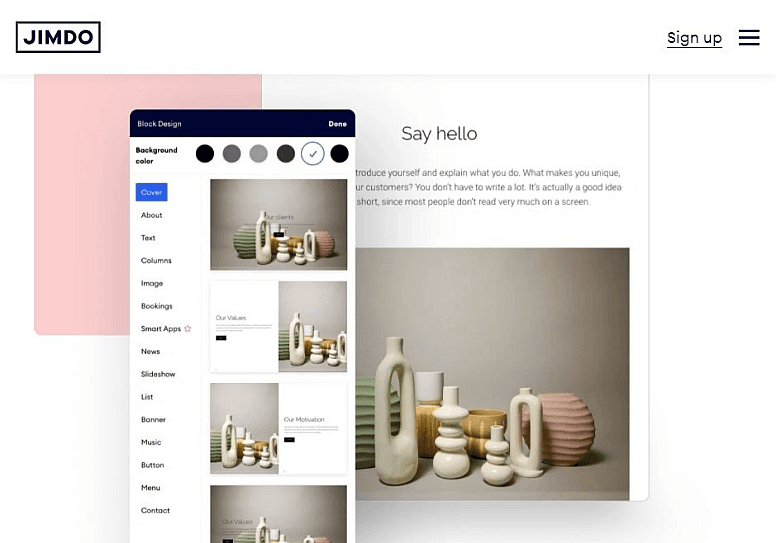
Drag-and-Drop Editor: You can easily build your site by dragging elements where you want them, saving time and effort. It’s intuitive even if you’re not tech-savvy.
Responsive Design: Your site automatically adjusts to look good on any device, and Jimdo’s built-in bandwidth allocation helps ensure pages load smoothly on both desktop and mobile.
SEO Tools: Jimdo provides basic SEO settings to help your site rank better in search engines. It’s perfect for improving your online visibility without hiring an expert.
Online Store Management: Manage your products and orders with straightforward tools that simplify your workflow. It’s everything you need to run a small online store.
Blogging Capabilities: You can easily add a blog to your site to engage with your audience, share posts on social media, and drive traffic. It’s a handy tool for content marketing.
Customizable Templates: Choose from a variety of templates with flexible design options to match your brand’s style. You’ll find a design that makes your site stand out.
Ease of Use
Jimdo stands out for its user-friendly design, offering enough functionality to let anyone create a professional ecommerce site without no coding. The drag-and-drop editor simplifies the website building process, and its responsive design ensures your site looks good on mobile devices, desktops, and tablets. You’ll appreciate the straightforward interface that lets you focus on your work, not on figuring out complex tools. For small businesses and creative professionals, Jimdo’s simplicity is a major advantage.

Integrations
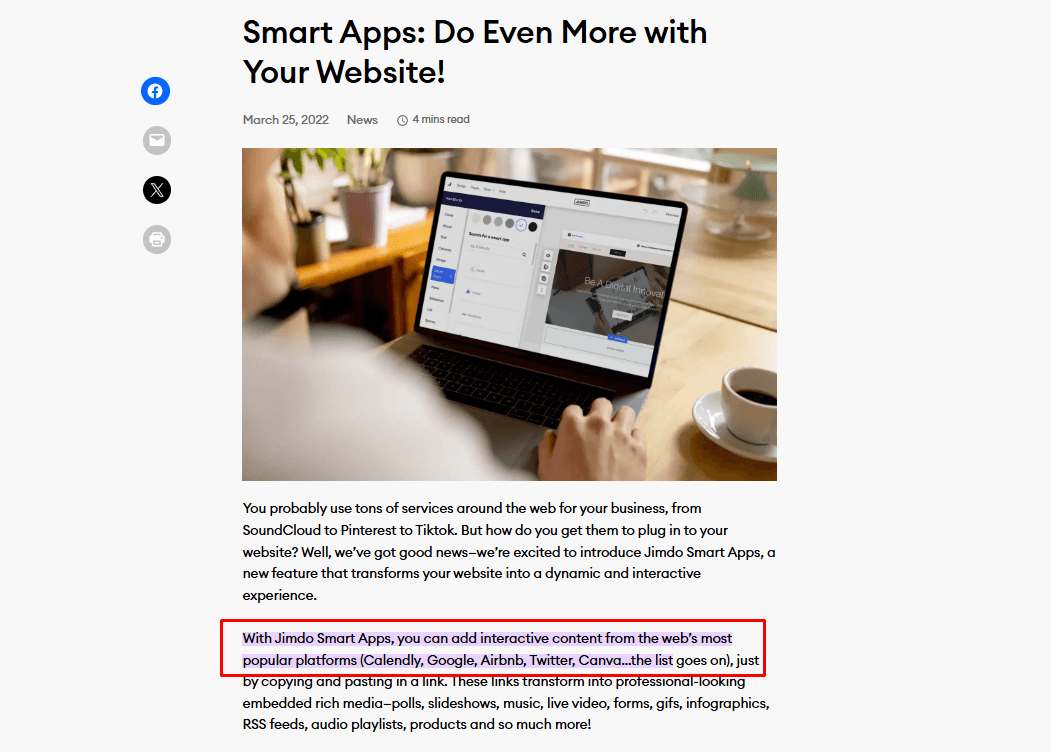
Jimdo integrates with Google Analytics, Facebook Pixel, Instagram, Pinterest, Mailchimp, PayPal, Stripe, YouTube, Twitter, Calendly, and Google Search Console. Jimdo also offers Smart Apps connections, allowing you to add interactive content from external platforms.
Jimdo does not currently offer an API or direct connections with third-party integration tools.
Jimdo Specs
- A/B Testing: No
- API: No
- Data Export: Yes
- Data Import: Yes
- External Integrations: Yes
- Landing Pages: Yes
- Multi-User: Yes
- Third-Party Plugins/Add-Ons: Yes


