

10 Best Retail Pricing Software Solutions Picked for 2026

Best Retail Pricing Software Shortlist


Retail pricing software helps your team set, manage, and optimize product prices across channels using automation, analytics, and real-time data. If you’re searching for the best retail pricing software, you’re likely looking to keep up with shifting market conditions, outpace competitors, and protect your margins—without adding manual work or risking pricing errors. In this guide, you’ll find a curated list of top solutions for 2026, with clear details on what each tool does best, so you can confidently choose the right fit for your business.
Why Trust Our Software Recommendations
Our team has been testing and reviewing software since 2012. As retail leaders ourselves, we know how difficult—and important—it is to choose the right software.
For this guide, we evaluated tools using hands-on testing and independent research, scoring ools using our selection criteria.
Our reviews reflect our independent judgment—not a sales pitch.
Best Retail Pricing Software Summary
This comparison chart summarizes pricing details for my top retail pricing software selections to help you find the best one for your budget and business needs.
| Tool | Best For | Trial Info | Price | ||
|---|---|---|---|---|---|
| 1 | Best for real-time omnichannel price adjustments | No free trial available | Pricing upon request | Website | |
| 2 | Best for advanced price modeling for grocery chains | Free demo available | Pricing upon request | Website | |
| 3 | Best for spreadsheet-style pricing with AI | Free plan + free demo | From $379/month | Website | |
| 4 | Best for competitor price tracking for ecommerce | 14-day free trial | From $99/month | Website | |
| 5 | Best for dynamic price automation in omnichannel | Free demo available | From €399/month | Website | |
| 6 | Best for real-time price benchmarking across markets | Free demo available | Pricing upon request | Website | |
| 7 | Best for in-store and online price intelligence | Free demo available | Pricing upon request | Website | |
| 8 | Best for configurable pricing analytics for enterprises | Free demo available | Pricing upon request | Website | |
| 9 | Best for AI-driven price optimization for large retailers | Free demo available | Pricing upon request | Website | |
| 10 | Best for predictive pricing powered by demand forecasting | Free demo available | Pricing upon request | Website |
Best Retail Pricing Software Reviews
Below are my detailed summaries of the top retail pricing software that made it onto my shortlist. My reviews offer a detailed look at the features, pricing, and integrations of each software to help you find the best one for you.

Best for real-time omnichannel price adjustments
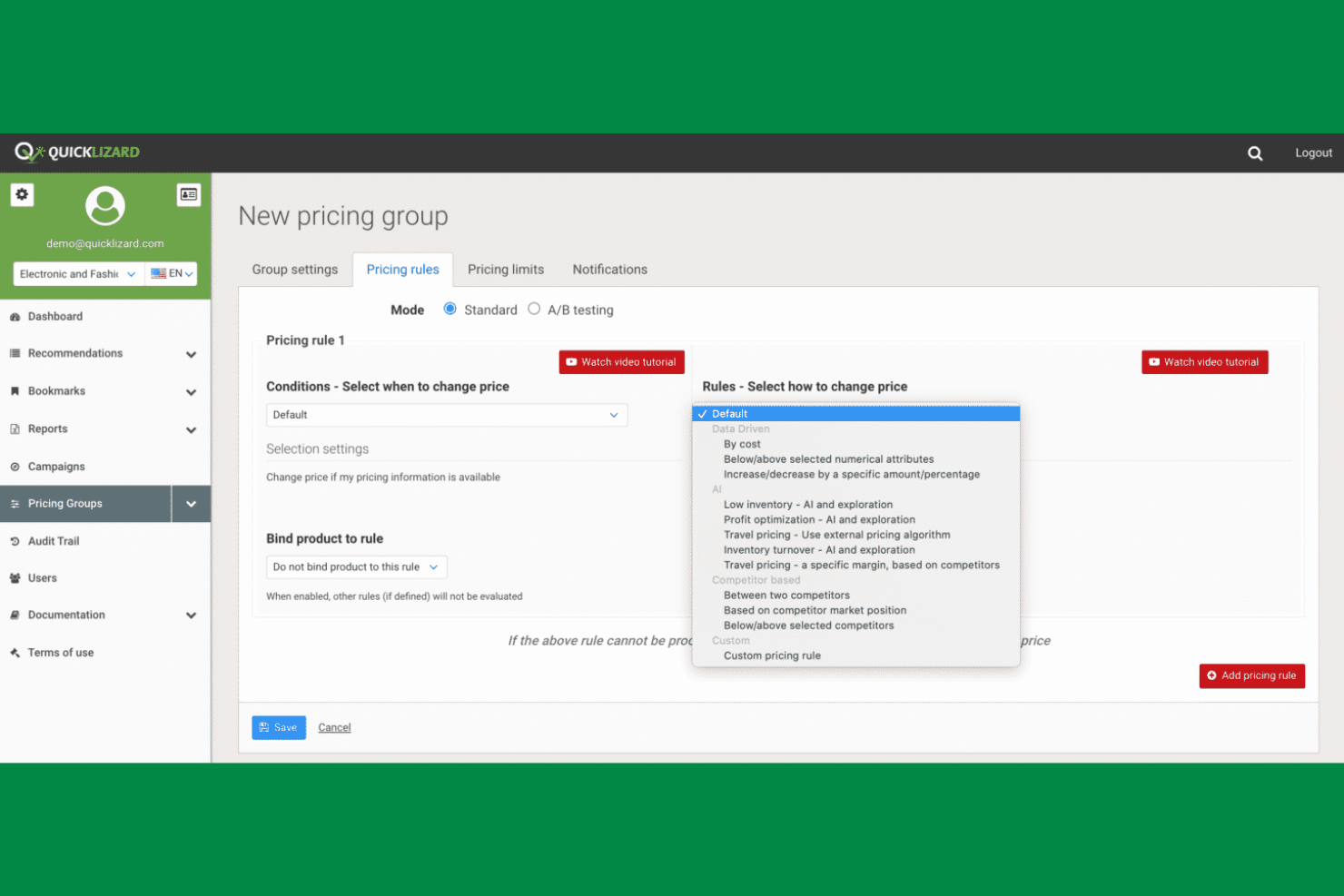
Quicklizard is built for retailers and brands that need to adjust prices instantly across online and offline channels. The platform appeals to pricing and ecommerce teams looking to automate real-time price changes based on market data, inventory, and demand. Quicklizard’s omnichannel engine helps you keep pricing consistent and competitive, no matter where your customers shop.
Why I Picked Quicklizard
What sets Quicklizard apart is its ability to deliver real-time price adjustments across both digital and physical retail channels. The platform’s dynamic pricing engine lets you automate pricing decisions based on live market trends, competitor activity, and inventory levels. I appreciate how Quicklizard supports omnichannel consistency, so your customers see aligned prices whether they’re shopping online or in-store. This makes it a strong fit for retailers who need to react quickly to market changes and keep pricing strategies unified across every channel.
Quicklizard Key Features
Some other features that make Quicklizard useful for retail pricing teams include:
- Rule-Based Pricing Engine: Set custom pricing rules to automate decision-making based on your business logic.
- Competitor Price Monitoring: Track competitor prices in real time to inform your own pricing strategies.
- A/B Price Testing: Run experiments with different price points to measure impact on sales and margin.
- Analytics Dashboard: Access visual reports and dashboards to monitor pricing performance and trends.
Quicklizard Integrations
Integrations include SAP, Oracle, Adobe Commerce, Salesforce Commerce Cloud, Shopify, Kafka, Delavo, DataWeave, TGN, and Bright Data.
Pros and Cons
Pros:
- Competitor price monitoring with automated alerts
- Supports A/B testing for pricing strategies
- Real-time price updates across all channels
Cons:
- Integration setup can require vendor assistance
- Fewer retail-specific templates than some competitors

Yieldigo
Best for advanced price modeling for grocery chains

Yieldigo is designed for grocery chains and supermarkets that need advanced price modeling to manage complex assortments. The platform appeals to pricing managers and category teams looking to optimize prices using predictive analytics and demand forecasting. Yieldigo helps you balance margin, volume, and competitiveness in a fast-moving grocery environment.
Why I Picked Yieldigo
Yieldigo stands out for its advanced price modeling capabilities tailored specifically for grocery chains. The platform uses predictive analytics to simulate the impact of price changes across thousands of SKUs, helping you understand how adjustments affect both margin and sales volume. I like that Yieldigo incorporates demand forecasting and elasticity modeling, which are essential for managing the fast-moving and highly competitive grocery sector. This makes it a strong choice for pricing teams that need to balance profitability with customer price perception in a complex retail environment.
Yieldigo Key Features
Some other features that make Yieldigo valuable for grocery pricing teams include:
- Scenario Planning Tools: Model multiple pricing scenarios to compare outcomes before making changes.
- Competitor Price Tracking: Monitor competitor prices to inform your own pricing decisions.
- Automated Price Recommendations: Receive system-generated price suggestions based on your business rules.
- Centralized Price Management Dashboard: Manage and review all pricing activities from a single interface.
Yieldigo Integrations
Integrations include Colruyt, Metro, Makro, SuperPharm, Newpharma, Bonami, Ahold, Erocash, Admenta, Lékárna CZ, Delia, Healthspan, and more.
Pros and Cons
Pros:
- Automated price recommendations based on rules
- Scenario planning for multiple pricing strategies
- Advanced price modeling for grocery assortments
Cons:
- No self-service onboarding documentation available
- Limited retail verticals
New Product Updates from Yieldigo

Yieldigo Adds Export Scheduling and Promotions Overview
Yieldigo adds export scheduling with exclusion periods and a Promotions Overview for product-level promotion timelines. These updates improve pricing operations and promotion visibility. For more information, visit Yieldigo’s official site.
 .
.
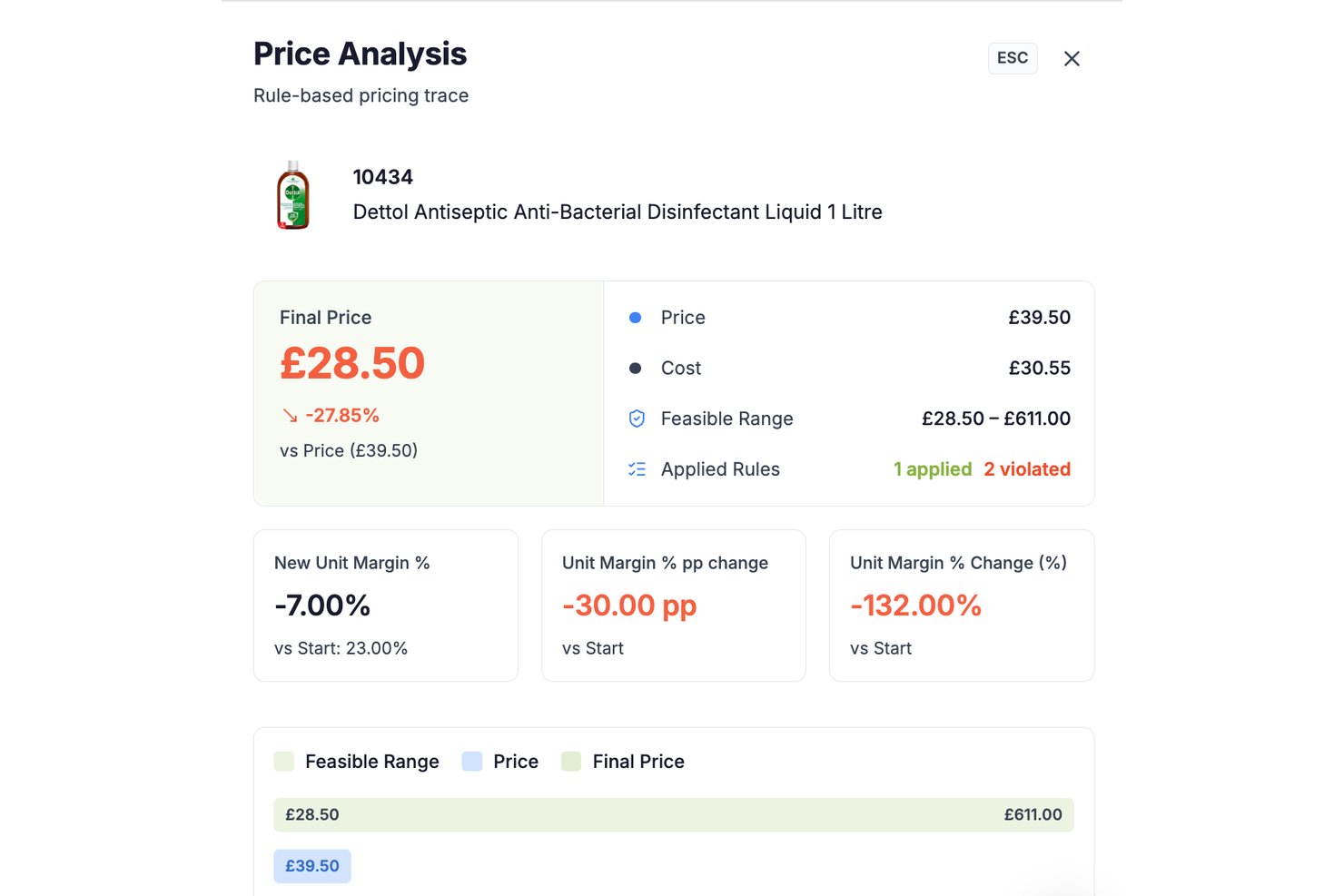
RetailGrid is a retail pricing platform that combines a spreadsheet-style AI workspace with agentic price optimization, competitor monitoring, elasticity analysis, and rules-based pricing across your catalog.
Who Is RetailGrid Best For?
RetailGrid is built for mid-market retailers with catalogs of thousands of SKUs who need pricing intelligence without a months-long enterprise implementation.
Why I Picked RetailGrid
RetailGrid earns its spot on my shortlist because of how it handles AI transparency in a way most pricing tools don't. Every recommendation the AI agents make shows its full reasoning, including which rules fired, which were violated, and the exact margin impact before you apply a change. That per-SKU audit trail means I can walk into a category review with a clear answer for every price move, not just a black-box output.
RetailGrid Key Features
- AI workspace: A spreadsheet-inspired pricing grid with live sales, competitor, and inventory data.
- Rules-based pricing engine: Apply and manage custom pricing rules across your entire product catalog.
- Competitor price monitoring: Automated collection of prices from direct competitors, Google Shopping, and Amazon.
- Elasticity analysis: Quantifies and visualizes each SKU’s price sensitivity using historical sales and market data.
RetailGrid Integrations
RetailGrid offers native integrations with Shopify, Magento, BigCommerce, WooCommerce, Wix, and SAP Commerce Cloud. An API is available for custom integrations.
Pros and Cons
Pros:
- Real-time elasticity and competitor data built in
- Spreadsheet-like interface familiar to retail teams
- Transparent AI decision audit for every SKU
Cons:
- Requires clean product data for full functionality
- Limited support for brick-and-mortar store pricing

Prisync
Best for competitor price tracking for ecommerce
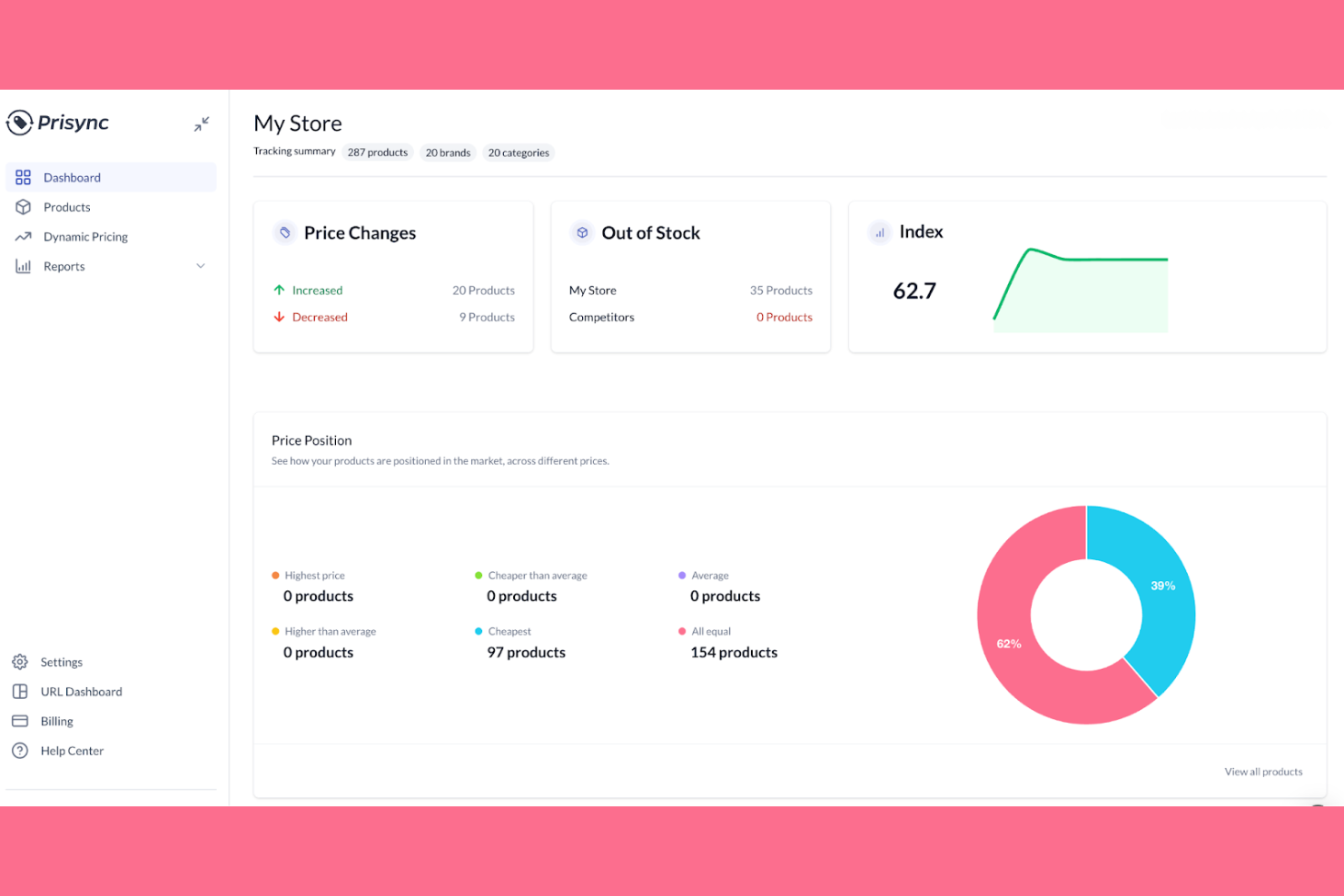
Prisync is built for ecommerce businesses that need to monitor and respond to competitor pricing in real time. The platform appeals to online retailers and brands looking to automate price tracking across multiple competitors and channels. Prisync helps you keep your pricing competitive and data-driven by collecting, comparing, and reporting on market prices automatically.
Why I Picked Prisync
For ecommerce teams focused on staying ahead of competitors, Prisync offers specialized tools for automated price tracking and market analysis. The platform collects competitor pricing data from multiple sources and updates it several times a day, so you always have current information. I appreciate that Prisync includes dynamic pricing rules, letting you set automated price adjustments based on competitor movements. Its detailed price comparison reports make it easier to spot trends and react quickly in fast-changing ecommerce markets.
Prisync Key Features
Some other features in Prisync that are useful for ecommerce teams include:
- Batch Product Import: Upload large product lists using CSV files for quick onboarding and updates.
- MAP Monitoring: Track minimum advertised price violations to protect brand value and compliance.
- Stock Availability Tracking: Monitor competitor stock levels alongside pricing data for a fuller market view.
- Customizable Alerts: Set up notifications for specific price changes or competitor actions that matter to your business.
Prisync Integrations
Integrations include Shopify, Amazon, Google Shopping, and other platforms via API.
Pros and Cons
Pros:
- Custom alerts for important price changes
- Dynamic pricing rules for automated adjustments
- Frequent competitor price updates for accurate tracking
Cons:
- Manual product matching can take time
- Limited analytics for deeper trend insights

Best for dynamic price automation in omnichannel
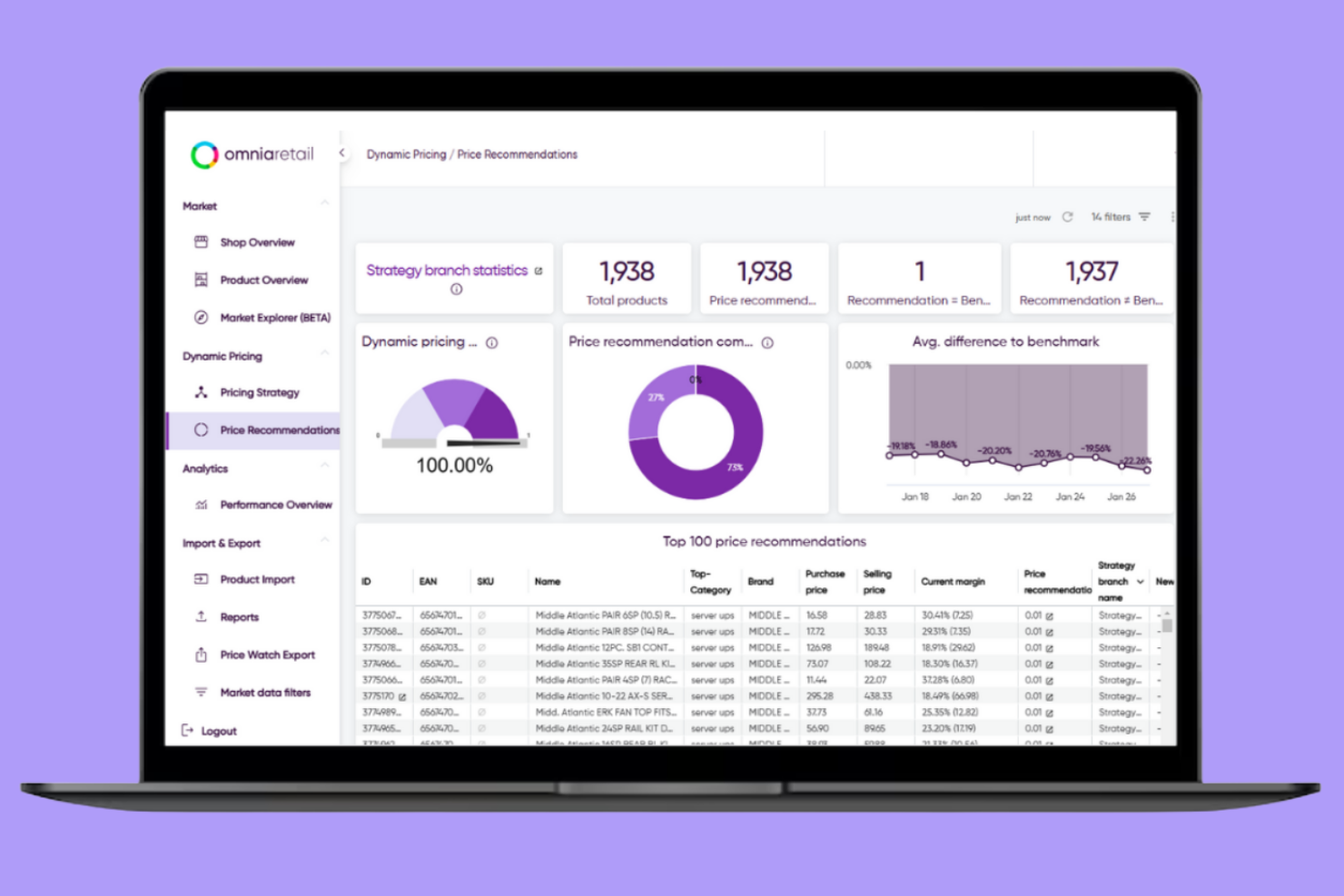
If your team needs to automate pricing across both online and offline channels, Omnia Retail offers a unified platform built for omnichannel retailers. The software is designed for businesses managing complex assortments and frequent price changes. Omnia Retail helps you keep pricing consistent and competitive by automating updates based on real-time market data and your own pricing rules.
Why I Picked Omnia Retail
I chose Omnia Retail because it specializes in dynamic price automation for retailers managing both online and offline channels. The platform’s rule-based pricing engine lets you set custom strategies that automatically adjust prices in response to market changes, inventory levels, and competitor moves. I like that Omnia Retail streamlines omnichannel consistency, so your pricing stays aligned across every sales channel. Its real-time data feeds and automation tools help retailers react quickly without manual intervention, which is essential for staying competitive in fast-moving markets.
Omnia Retail Key Features
Some other features in Omnia Retail that stand out for retail teams include:
- Assortment Management: Manage and segment your product assortment to apply different pricing strategies to specific categories or brands.
- Competitor Price Monitoring: Track competitor prices in real time to inform your own pricing decisions and stay market-relevant.
- Promotional Pricing Engine: Set up and automate temporary price changes for sales, promotions, or seasonal events.
- Reporting and Analytics Dashboard: Access detailed reports and visualizations to review pricing performance and identify trends.
Omnia Retail Integrations
Integrations include Shopware, Plentymarkets, JTL, Google Shopping, Amazon, eBay, Bol.com, Kaufland, idealo, and Tweakers.
Pros and Cons
Pros:
- Real-time competitor tracking for faster decisions
- Rule-based engine for flexible pricing control
- Dynamic pricing automation across multiple channels
Cons:
- Advanced features may require onboarding support
- Initial setup for pricing rules can be complex

Best for real-time price benchmarking across markets
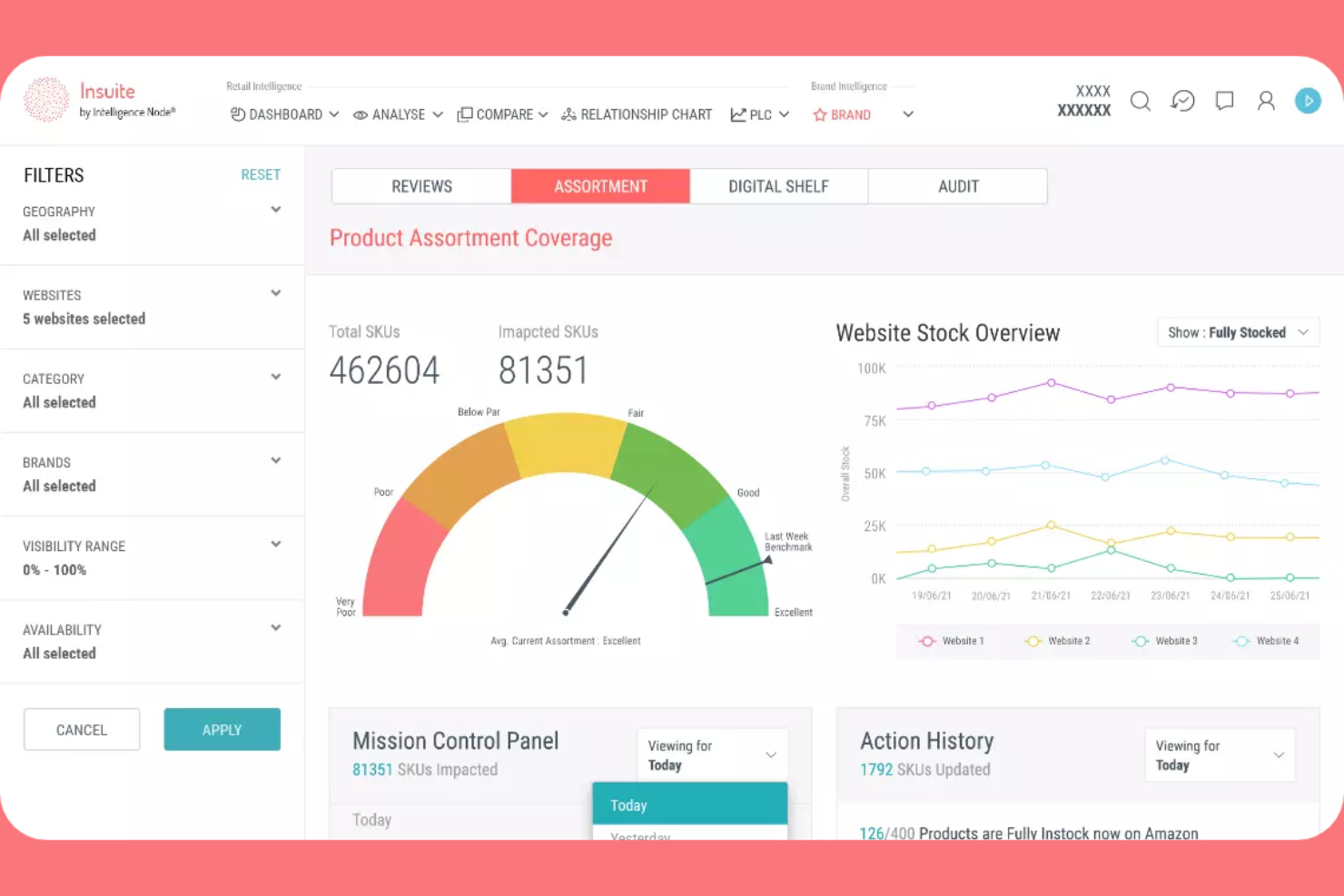
Intelligence Node is a retail analytics and market intelligence platform that includes pricing software capabilities for benchmarking and tracking competitor prices across markets. If you need to monitor and benchmark prices across multiple markets in real time, Intelligence Node is worth a look. This platform is designed for retailers and brands who want granular visibility into competitor pricing and assortment changes as they happen. Intelligence Node stands out for its ability to deliver up-to-the-minute pricing intelligence, helping teams react quickly to market shifts and protect margins.
Why I Picked Intelligence Node
For retailers who need to benchmark prices across multiple markets in real time, Intelligence Node offers a unique advantage. The platform’s AI-driven price monitoring engine tracks millions of SKUs and competitor prices globally, updating data as market conditions change. I like that Intelligence Node provides granular, SKU-level insights and customizable dashboards, so your team can quickly spot pricing gaps and opportunities. Its focus on real-time data makes it a strong fit for businesses that need to react fast to market shifts and maintain a competitive edge.
Intelligence Node Key Features
Some other features that make Intelligence Node useful for pricing teams include:
- MAP Monitoring: Track minimum advertised price violations across channels and markets.
- Automated Alerts: Receive instant notifications about significant competitor price changes.
- Category-Level Analytics: Analyze pricing trends and assortment at the category level.
- Data Export Tools: Export pricing and assortment data for further analysis or reporting.
Intelligence Node Integrations
Native integrations are not currently listed. API access is available for custom integrations.
Pros and Cons
Pros:
- Category-level analytics for assortment insights
- MAP monitoring for brand protection
- Real-time competitor price tracking across markets
Cons:
- No self-serve onboarding or setup tools
- Customization options may require vendor support

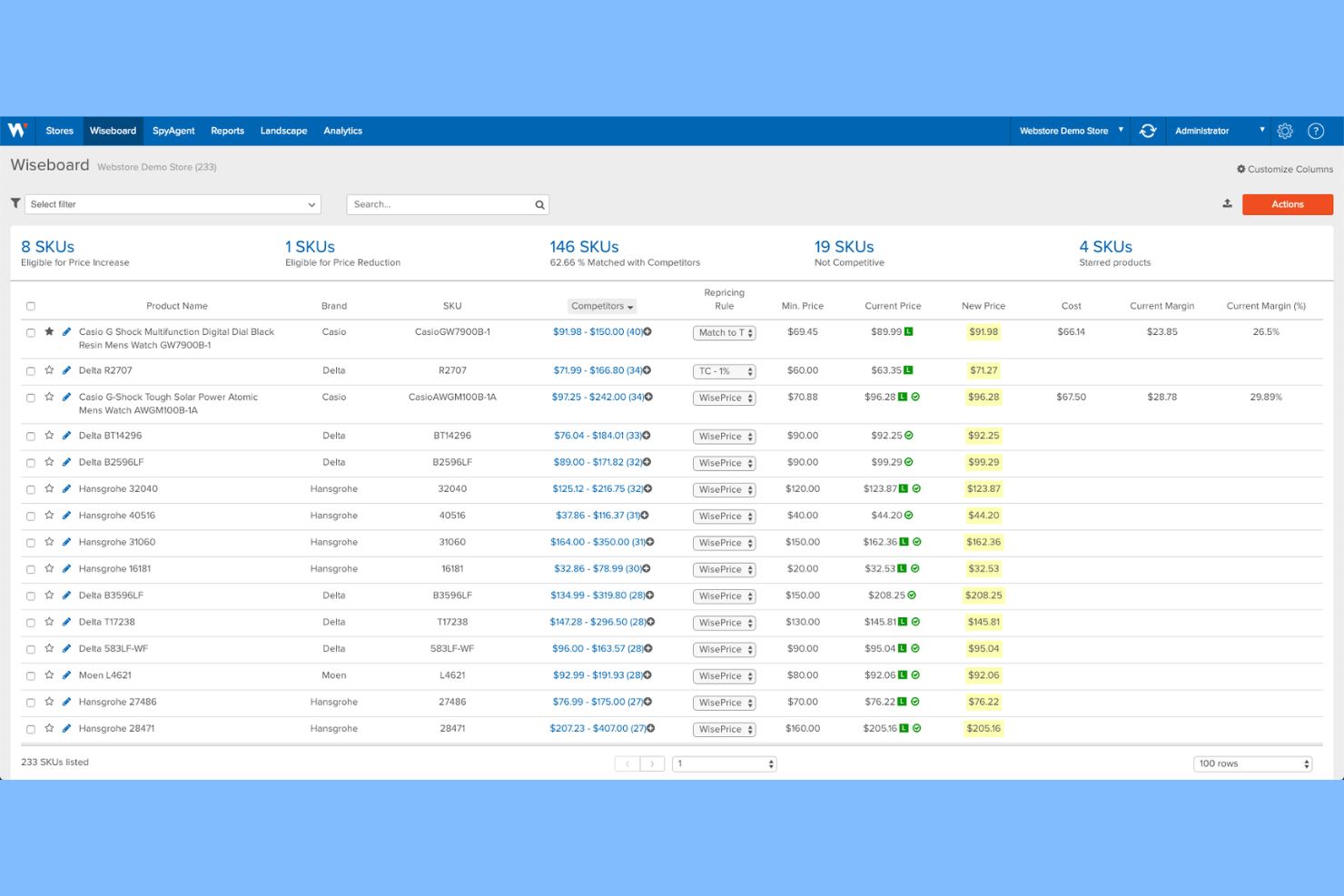
Wiser Solutions is a retail intelligence and execution platform that offers pricing software features to help teams monitor and optimize prices across in-store and online channels. This platform is especially useful for teams that need to monitor, compare, and optimize pricing across both physical shelves and ecommerce sites. Wiser Solutions stands out for its ability to unify data from multiple channels, helping you spot pricing gaps and align strategies in real time.
Why I Picked Wiser Solutions
What sets Wiser Solutions apart is its ability to deliver price intelligence for both in-store and online channels, which is essential for retailers managing omnichannel pricing strategies. The platform collects and analyzes pricing data from physical stores and ecommerce sites, giving you a unified view of your competitive landscape. I appreciate that Wiser Solutions offers shelf-level data collection and digital shelf analytics, so you can identify pricing discrepancies and optimize across all sales channels. This makes it a strong choice for businesses that need to coordinate pricing decisions between brick-and-mortar and online environments.
Wiser Solutions Key Features
Some other features that make Wiser Solutions valuable for pricing teams include:
- Promotion Tracking: Monitor competitor promotions and discounts across channels.
- Dynamic Pricing Engine: Adjust prices automatically based on real-time market data.
- Price Optimization Recommendations: Receive data-driven suggestions for optimal pricing strategies.
- Customizable Reporting: Build and schedule tailored reports for different teams or stakeholders.
Wiser Solutions Integrations
Native integrations are not currently listed.
Pros and Cons
Pros:
- Promotion tracking across multiple channels
- Shelf-level analytics for physical retail locations
- In-store and online price data collection
Cons:
- Onboarding process may require vendor assistance
- No public list of native integrations

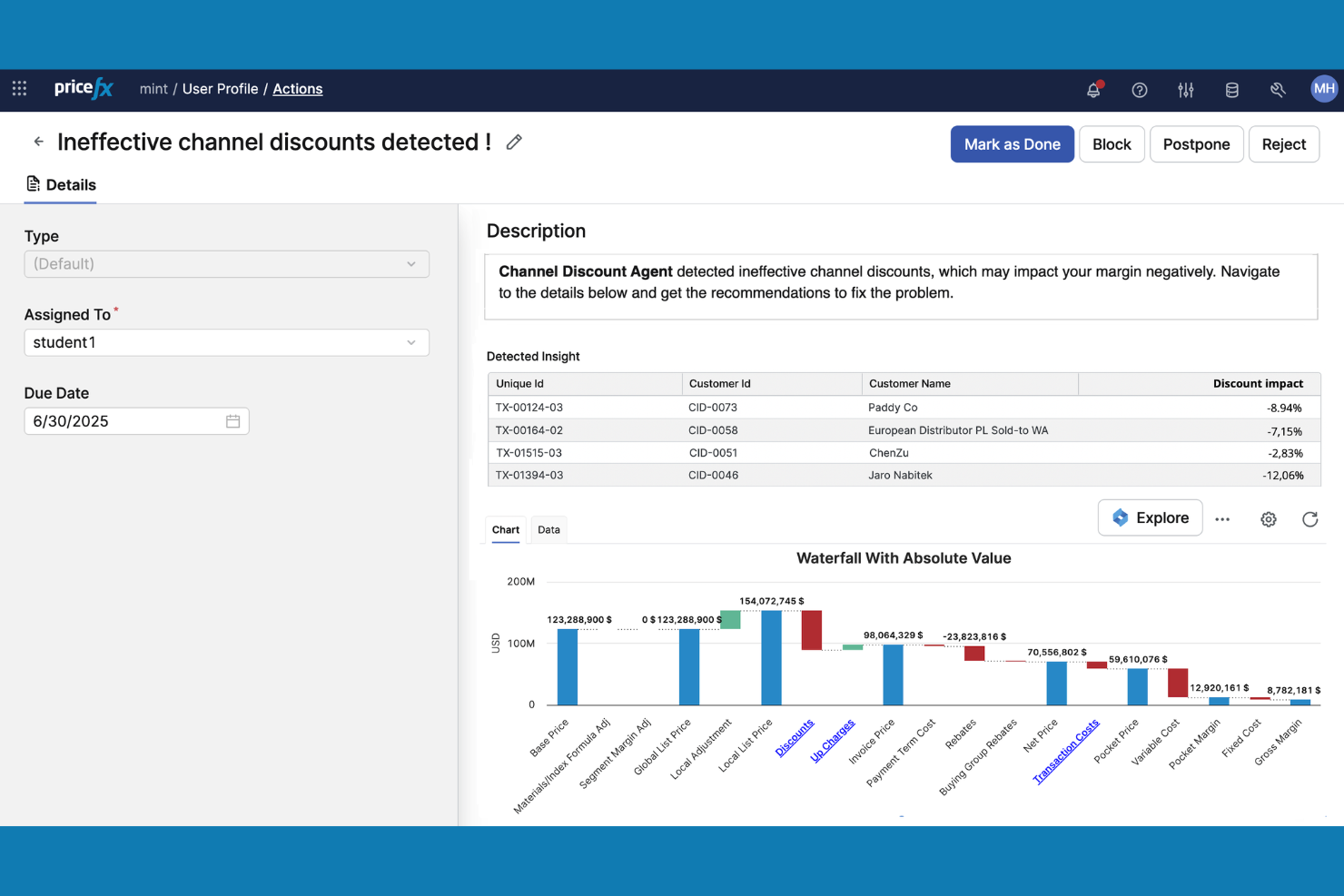
Pricefx offers a highly configurable pricing analytics platform designed for large enterprises with complex pricing needs. This tool is a strong fit for pricing, finance, and commercial teams that need to model, analyze, and optimize pricing strategies at scale. Pricefx stands out for its flexible analytics engine, which lets you tailor pricing models and dashboards to your business’s unique requirements.
Why I Picked Pricefx
For teams that need deep control over pricing analytics, Pricefx stands out for its high level of configurability. The platform lets you build custom pricing models and dashboards, so you can analyze data in ways that match your business’s unique needs. I like that Pricefx supports advanced scenario modeling, which helps you forecast the impact of pricing changes before you roll them out. This makes it a strong choice for enterprises that want to tailor their pricing analytics and strategies at scale.
Pricefx Key Features
Some other features that make Pricefx appealing for enterprise pricing teams include:
- Rebate and Discount Management: Set up, track, and analyze complex rebate and discount programs.
- Quote Configuration Tools: Generate and manage quotes with configurable pricing rules.
- Price List Management: Create, update, and distribute multiple price lists across regions or channels.
- Automated Price Optimization: Use built-in algorithms to recommend optimal prices based on real-time data.
Pricefx Integrations
Integrations include SAP, Salesforce, Oracle, Microsoft Dynamics 365, PROS, Accenture, Deloitte, PwC, Wipro, and Capgemini.
Pros and Cons
Pros:
- Automated price optimization with built-in algorithms
- Scenario modeling for forecasting pricing impacts
- Highly configurable analytics for complex pricing models
Cons:
- Limited out-of-the-box retail-specific templates
- Implementation projects can require significant resources

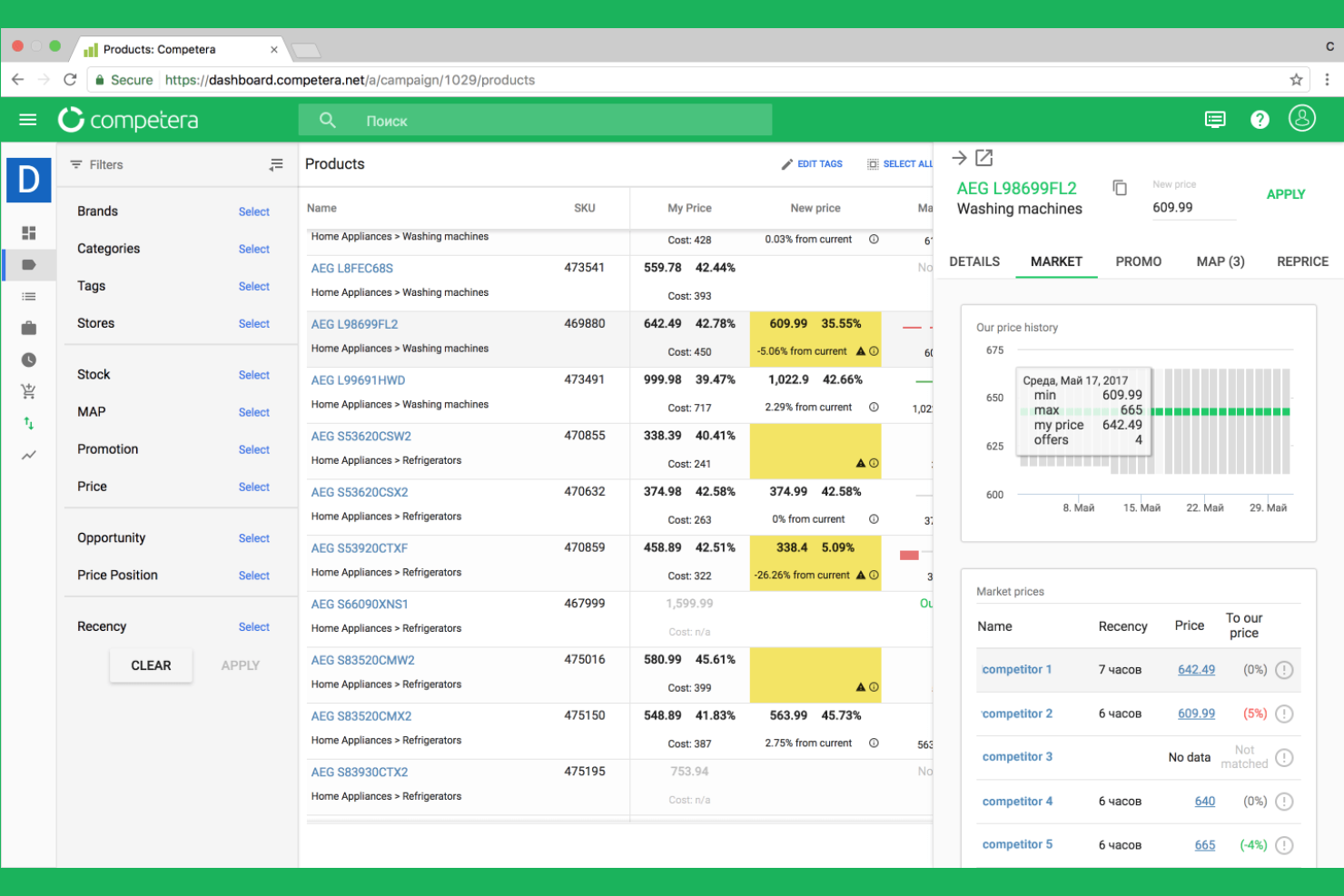
Large retailers looking to use AI for smarter pricing decisions may want to consider Competera. This platform uses machine learning to optimize prices across entire product portfolios, factoring in demand, competition, and business goals. Competera is especially useful for teams managing complex assortments who need to balance margin, revenue, and competitiveness at scale.
Why I Picked Competera
What sets Competera apart is its focus on AI-driven price optimization for large, complex retail operations. The platform uses machine learning algorithms to recommend optimal prices based on real-time market data, demand elasticity, and business constraints. I appreciate that Competera can simulate different pricing scenarios, helping teams understand the impact of price changes before making decisions. Its ability to automate pricing for thousands of SKUs makes it a strong fit for retailers who need to manage dynamic pricing at scale.
Competera Key Features
Some other features that make Competera valuable for pricing teams include:
- Competitive Data Collection: Gather real-time competitor pricing and assortment data from multiple sources.
- Rule-Based Pricing Engine: Set custom pricing rules to align with your business strategy.
- Promo Effect Measurement: Analyze the impact of past promotions on sales and margin.
- Role-Based Access Controls: Assign permissions and access levels for different team members.
Competera Integrations
Native integrations are not currently listed. API access is available for custom integrations.
Pros and Cons
Pros:
- Handles large assortments efficiently
- Scenario simulation for better decision planning
- AI-driven pricing recommendations based on demand signals
Cons:
- Limited transparency into pricing logic
- Requires significant data for accurate outputs

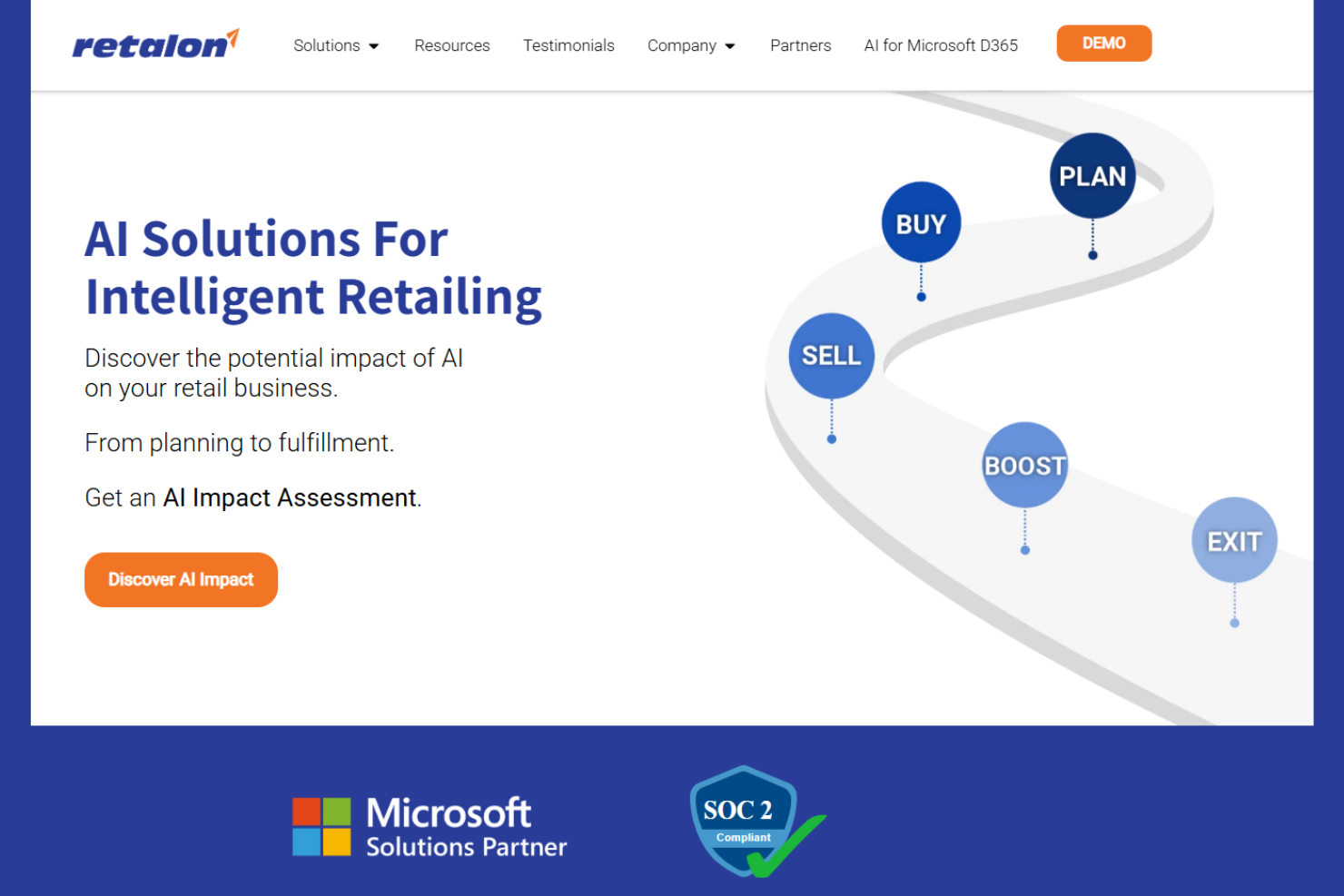
Retailers looking for predictive pricing that adapts to real-time demand shifts may find Retalon especially relevant. This platform is built for merchandising, pricing, and planning teams that want to use demand forecasting to drive pricing decisions. Retalon helps you anticipate market changes and optimize prices with AI-powered analytics tailored for retail environments.
Why I Picked Retalon
What sets Retalon apart is its focus on predictive pricing powered by demand forecasting, which is especially valuable for retailers managing volatile markets. The platform uses AI-driven analytics to forecast demand at the SKU and store level, allowing you to adjust prices proactively rather than reactively. I appreciate that Retalon combines pricing optimization with inventory and promotion planning, so you can align pricing strategies with broader business goals. This makes it a strong fit for teams that want to use data-driven insights to stay ahead of market trends and maximize profitability.
Retalon Key Features
Some other features that make Retalon useful for retail pricing teams include:
- Automated Promotion Optimization: Set up and manage promotional pricing campaigns with AI-driven recommendations.
- Markdown Management: Plan and execute markdown strategies to clear inventory while protecting margins.
- Exception-Based Alerts: Receive notifications when pricing or inventory anomalies are detected.
- Omnichannel Price Consistency: Maintain synchronized pricing across online and offline sales channels.
Retalon Integrations
Native integrations are not currently listed.
Pros and Cons
Pros:
- Exception-based alerts for pricing anomalies
- Automated promotion and markdown management
- AI-driven demand forecasting for pricing decisions
Cons:
- Pricing details not disclosed on website
- No public list of native integrations
Other Retail Pricing Software
Here are some additional retail pricing software options that didn’t make it onto my shortlist, but are still worth checking out:
- Price2Spy
For multichannel price monitoring at scale
- BlackCurve
For automated pricing rules for SMBs
- Zilliant
For price optimization in B2B industries
- Vendavo
For margin management in manufacturing


How I Evaluate Retail Pricing Software
I split my evaluation into baseline criteria—like a functioning repricing engine and competitor monitoring—and differentiators that separate the best tools from the rest.
Core Functionality (Table Stakes For This List)
When I'm selecting tools for my list, I rank each one on a scale from 0 (does not offer the functionality) to 5 (excels in this area) for each core functionality listed below. Then, I calculate the tool's total score into a percentage. Each tool needs to achieve a minimum total score of 65% to be considered for inclusion.
- Price Optimization Engine: I evaluate whether the tool goes beyond basic cost-plus math to offer demand-based or AI-driven price recommendations that factor in elasticity and business goals.
- Competitor Price Monitoring: Tracking competitor prices matters most when it's automated, SKU-matched, and refreshed frequently enough to act on across marketplaces and web sources.
- Repricing Rules & Automation: I look for configurable rule builders that let pricing teams set margin floors, competitor-relative targets, and MAP guardrails that execute at scale.
- Promotion & Markdown Management: Seasonal clearance cycles and flash sales need scheduling, depth planning, and post-event analysis—I check how each tool handles the full promo lifecycle.
- Multi-Channel & Store Pricing: Retailers selling across physical locations, their own webstore, and third-party marketplaces need zone or channel-level price differentiation from one hub.
- Pricing Analytics & Reporting: I look for dashboards that connect price moves to margin and revenue outcomes, giving pricing managers clear visibility into what's working.
Once I have a list of tools that meet the criteria, I consider what sets each platform apart.
Differentiating Factors (What Sets Vendors Apart)
Here's how I compare and contrast different vendors:
Standout Features
Scenario simulation is a big one for me—I want to see how a proposed price change ripples through margin and volume before it goes live. Price image management is equally valuable, especially for retailers tracking KVI perception while quietly optimizing margin on long-tail SKUs. I also evaluate assortment-aware pricing, where the tool accounts for cannibalization between private label and branded alternatives or flags halo effects across related products.
Beyond Features
Integrations matter a lot here. A pricing tool that can't pull live inventory from your ERP or push updated prices to your POS and ecommerce storefront creates manual work that defeats the purpose. I also check whether the platform fits your specific retail vertical—grocery pricing logic is very different from fashion markdown cycles. Finally, implementation timelines deserve attention. Pricing tools with pre-built rule templates and guided onboarding get teams to value faster than platforms requiring months of custom configuration.
How to Choose Retail Pricing Software
It’s easy to get bogged down in long feature lists and complex pricing structures. To help you stay focused as you work through your unique software selection process, here’s a checklist of factors to keep in mind:
| Factor | What to Consider |
| Scalability | Will the software handle your current and future product volume, store count, and sales channels? |
| Integrations | Does it connect natively to your ecommerce, POS, ERP, and analytics tools without custom workarounds? |
| Customizability | Can you tailor pricing rules, workflows, and reporting to match your business model and categories? |
| Ease of use | Will your merchandising and pricing teams be able to use the tool daily without extensive training? |
| Implementation and onboarding | How long will it take to get up and running, and what resources or support will you need internally? |
| Cost | Are pricing tiers clear, and do they align with your budget and expected ROI as your business grows? |
| Security safeguards | Does the vendor offer data encryption, user access controls, and compliance with relevant standards? |
| Support availability | Can you access live support during your business hours, and is there a clear escalation path for urgent issues? |
What Is Retail Pricing Software?
Retail pricing software is a pricing platform that helps retail businesses set, manage, and adjust product prices across sales channels. These pricing solutions use historical data, artificial intelligence, and market trends to support lifecycle pricing processes and improve decision-making. By using advanced pricing tools, teams can respond to changes in demand, protect market share, and apply consistent pricing strategies across customer segments.
Features of Retail Pricing Software
When selecting retail pricing software, keep an eye out for the following key features:
- Centralized price management: Manage and update product prices for all channels from a single dashboard, reducing manual work and errors.
- Automated pricing rules: Set rules that automatically adjust prices based on inventory, sales velocity, or time-based triggers.
- Promotion and markdown scheduling: Plan, schedule, and execute promotional pricing or markdowns in advance, ensuring timely and consistent rollouts.
- Competitor price monitoring: Track competitor prices to inform your own pricing strategies and stay competitive in the market.
- Bulk price updates: Apply price changes to multiple products or categories at once, saving time during large-scale adjustments.
- Audit trails and change logs: Maintain a record of all pricing changes, including who made them and when, for accountability and compliance.
- Multi-currency support: Set and manage prices in different currencies to support international sales and localized pricing strategies.
- Reporting and analytics: Access dashboards and reports that provide insights into pricing performance, margin impact, and sales trends.
- User access controls: Assign permissions and roles to team members, ensuring only authorized users can make pricing changes.
- Integration with sales channels: Connect directly to ecommerce platforms, POS systems, and ERPs to sync pricing data across your business.
Common Retail Pricing Software AI Features
Beyond the standard retail pricing software features listed above, many of these solutions are incorporating AI with features like:
- Demand forecasting: AI analyzes historical sales, seasonality, and external factors to predict future demand, helping teams set optimal prices and avoid stockouts or overstock.
- Dynamic price optimization: AI continuously adjusts prices in real time based on market trends, competitor activity, and customer behavior to maximize revenue and margin.
- Automated promotion recommendations: AI suggests the best timing, products, and discount levels for promotions by analyzing past campaign performance and current market conditions.
- Price elasticity analysis: AI models how changes in price impact sales volume, allowing teams to understand the sensitivity of demand and set prices that balance volume and profit.
- Anomaly detection: AI monitors pricing and sales data to flag unusual patterns or errors, such as sudden price drops or spikes, so teams can quickly investigate and respond.
Benefits of Retail Pricing Software
Implementing retail pricing software provides several benefits for your team and your business. Here are a few you can look forward to:
- Consistent pricing across channels: Centralized price management ensures your product prices stay aligned in-store, online, and across marketplaces.
- Faster response to market changes: Automated pricing rules and AI-driven insights help your team adjust prices quickly as demand, inventory, or competitor activity shifts.
- Improved margin control: Real-time analytics and dynamic price optimization allow you to monitor and protect profit margins on every product.
- Reduced manual workload: Bulk updates, scheduling tools, and automation features minimize repetitive tasks and free up your team’s time.
- Data-driven decision making: Reporting, analytics, and AI-powered forecasting provide actionable insights for smarter pricing strategies.
- Greater pricing transparency and compliance: Audit trails and user access controls help you track changes and maintain accountability across your organization.
- Enhanced promotional effectiveness: Automated promotion recommendations and scheduling tools help you plan, execute, and measure campaigns with greater precision.
Costs and Pricing of Retail Pricing Software
Selecting retail pricing software requires an understanding of the various pricing models and plans available. Costs vary based on features, team size, add-ons, and more. The table below summarizes common plans, their average prices, and typical features included in retail pricing software solutions:
Plan Comparison Table for Retail Pricing Software
| Plan Type | Average Price | Common Features |
| Free Plan | $0 | Basic price management, limited product listings, single-user access, and basic reporting. |
| Personal Plan | $30-$75/user/month | Centralized price management, bulk updates, basic integrations, and standard support. |
| Business Plan | $100-$250/ user/month | Automated pricing rules, promotion scheduling, advanced analytics, multi-user access, and API access. |
| Enterprise Plan | $400-$1,000+/month | Custom integrations, AI-powered features, dedicated account management, advanced security, and priority support. |
Retail Pricing Software FAQs
Here are some answers to common questions about retail pricing software:
How does retail pricing software help with omnichannel pricing?
Retail pricing software lets you manage and update prices across all your sales channels from one place. This ensures customers see consistent pricing whether they shop online, in-store, or through marketplaces, and helps your team avoid manual errors or mismatches.
Can retail pricing software integrate with my existing POS and ecommerce systems?
Yes, most retail pricing software solutions offer integrations with popular POS, ecommerce, and ERP platforms. Before choosing a tool, check for native integrations or available APIs to ensure smooth data flow and avoid manual uploads.
What data security measures should I look for in retail pricing software?
Look for features like data encryption, user access controls, and audit logs. These safeguards help protect sensitive pricing information and ensure only authorized team members can make changes or view confidential data.
How long does it take to implement retail pricing software?
Implementation timelines vary, but most cloud-based solutions can be set up in a few days to a few weeks. Factors like data migration, integration complexity, and team training can affect how quickly you’re fully up and running.
Is retail pricing software suitable for small businesses?
Yes, many retail pricing software platforms offer plans designed for small businesses with fewer products and users. Look for solutions with flexible pricing, easy onboarding, and essential features that match your current needs.
What’s Next:
If you're in the process of researching retail pricing software, connect with a SoftwareSelect advisor for free recommendations.
You fill out a form and have a quick chat where they get into the specifics of your needs. Then you'll get a shortlist of software to review. They'll even support you through the entire buying process, including price negotiations.