

ADA compliance software helps make your website accessible and legally compliant for customers with disabilities. If you’re leading retail or ecommerce and want to avoid lawsuits, protect your brand reputation, and open your doors to every shopper, the right software is essential.
I’ve worked hands-on with tools that range from deep-dive accessibility audits to simple fixes you can launch fast. This list will help you compare and choose ADA compliance software that actually fits your team, tech stack, and business goals.
Why Trust Our Software Recommendations
6,700+
Reviews
20
Industry experts
16+
Evaluation factors
14
Years
Our team has been testing and reviewing software since 2012. As retail leaders ourselves, we know how difficult—and important—it is to choose the right software.
For this guide, we evaluated tools using hands-on testing and independent research, scoring tools using our selection criteria.
Our reviews reflect our independent judgment—not a sales pitch.
ADA Compliance Software Comparison Table
This comparison table summarizes pricing details for my top ADA compliance software selections:
| Tool | Best For | Trial Info | Price | ||
|---|---|---|---|---|---|
| 1 | Best for automated code remediation | Free plan + free demo + 7-day free trial available | From $490/year | Website | |
| 2 | Best for screen reader–verified ADA monitoring | Free demo available | Pricing upon request | Website | |
| 3 | Best for expert-led ADA audits | Free demo + 7-day free trial available | From $390/year | Website | |
| 4 | Best for web and document compliance | Not available | Pricing upon request | Website | |
| 5 | Best for integrating accessibility checks into Figma | Free plan + free demo available | From $198/user/year | Website | |
| 6 | Best for AI optimization of screen readers | Free demo + 7-day free trial available | From $490/year | Website | |
| 7 | Best for combining web accessibility audits with SEO | Free demo available | Pricing upon request | Website | |
| 8 | Best for enterprise-level governance and compliance | Free demo available | Pricing upon request | Website | |
| 9 | Best for multi-regulation end-to-end compliance | Free demo available | Pricing upon request | Website | |
| 10 | Best for automated code fixes for SMBs | Free demo + 7-day free trial available | From $99/year | Website |


ADA Compliance Software Reviews
Below are my detailed summaries of the best ADA compliance software that made it onto my shortlist. My reviews offer a detailed look at the features, best use cases, and integrations of each software to help you find the best one for you.
 Best for automated code remediation
- Free plan + free demo + 7-day free trial available
- From $490/year
Visit WebsiteCustomer Rating:4.8/5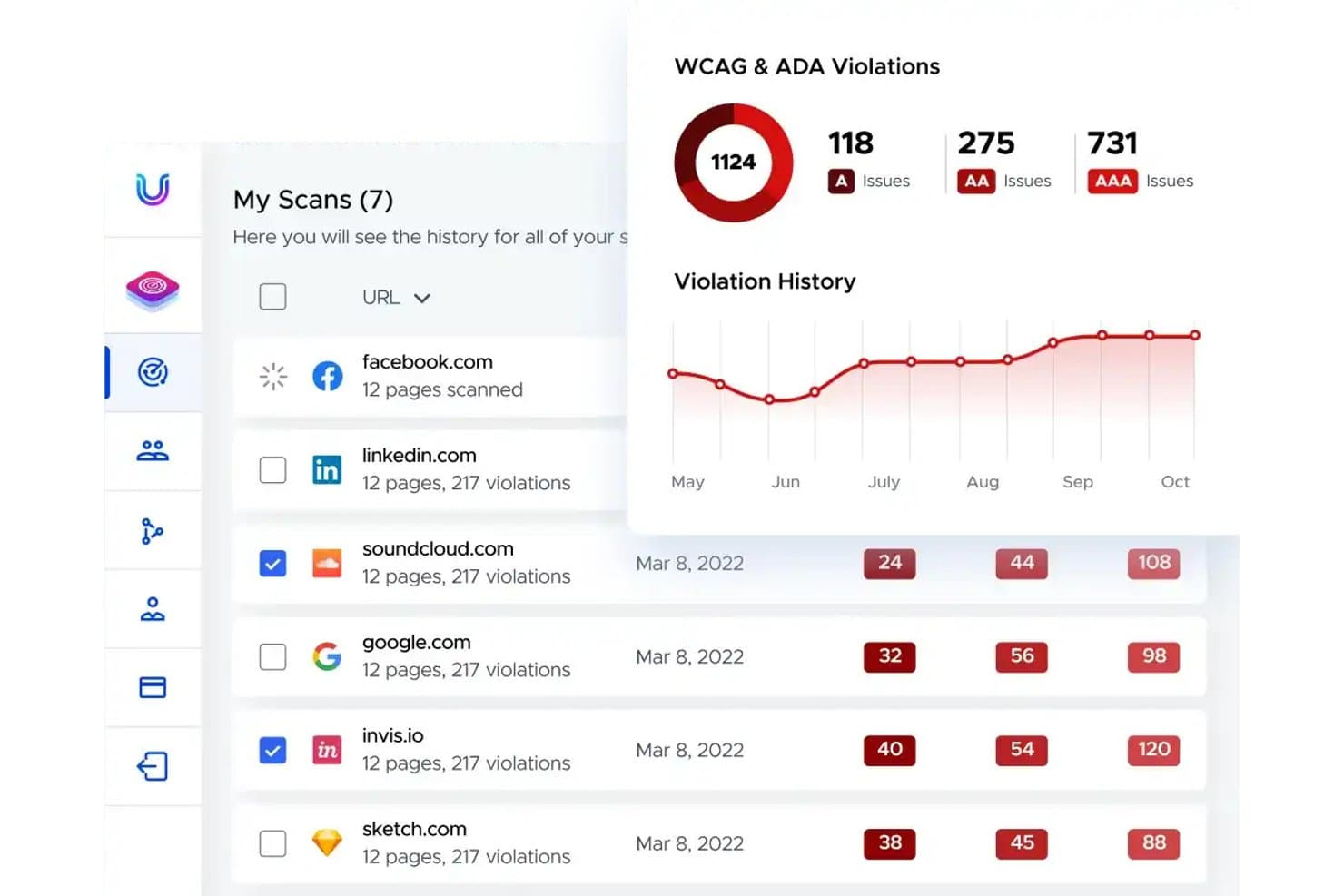
UserWay tracks WCAG and ADA violations across scanned websites over time. UserWay is an AI-powered web accessibility solution that combines an automated remediation widget, site scanning and monitoring, manual IAAP-certified audits, VPAT generation, and a litigation support program.
Who Is UserWay Best For?
UserWay is a strong fit for SMB and mid-market ecommerce teams that need a fast-to-deploy accessibility solution with broad platform support across Shopify, BigCommerce, and Adobe Commerce.
Why I Picked UserWay
I picked UserWay as one of the best because its Automated Remediation Technology (ART) applies AI-driven fixes, like missing alt text, broken form labels, and heading structure, directly at the DOM layer on every page load. I love that the Accessibility Monitor can crawl up to 30,000 pages per hour and export flagged issues straight to Jira or GitHub, so developers get actionable tickets without manual triage.
UserWay Key Features
- Litigation support program: Included with all annual paid plans, this program helps you respond to ADA demand letters with remediation documentation and attorney access.
- VPAT generation: UserWay produces Rapid VPATs (delivered in ~5 weeks) and Validated VPATs (delivered within 3 months) covering WCAG, Section 508, and EN 301-549.
- Accessibility statement generator: A template-based tool that creates a publicly publishable accessibility statement for your website.
- Developer workflow exports: The Accessibility Monitor pushes flagged issues directly to Jira, GitHub, Asana, Trello, and Bugzilla as actionable tickets.
UserWay Integrations
UserWay supports 20+ CMS and ecommerce integrations, including Shopify, BigCommerce, and Squarespace. An API is also available for custom integrations.
Pros and Cons
Pros:
- Covers multi-regulation accessibility and VPAT needs
- Includes litigation support program for demand letters
- Track export problems directly in developer tools
Cons:
- Conflicts with native screen reader software
- Overlays do not modify underlying source code
Learn more about UserWay: Best for screen reader–verified ADA monitoring
- Free demo available
- Pricing upon request
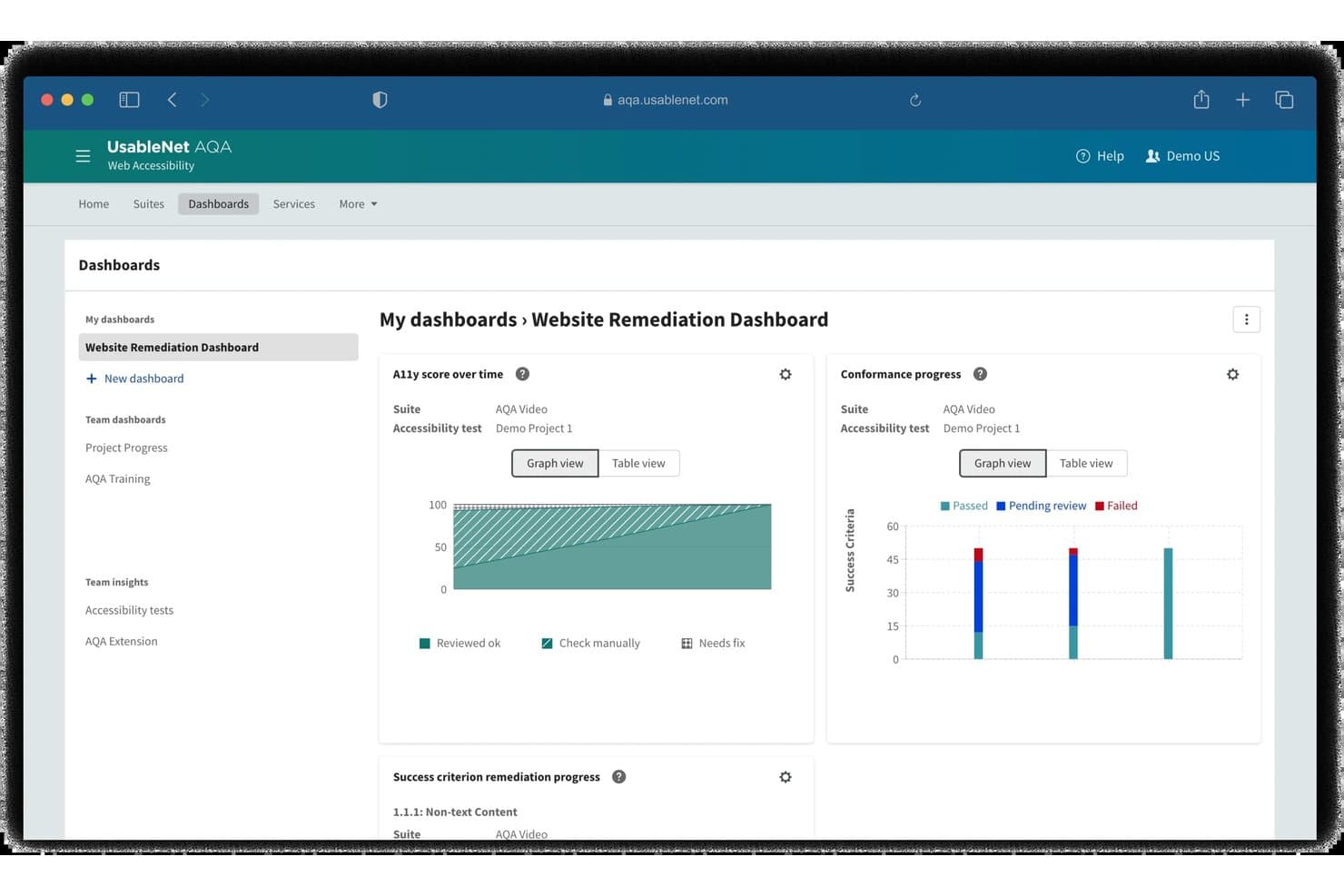
UsableNet tracks accessibility remediation progress via visual dashboards. UsableNet is an ADA compliance platform that combines automated WCAG scanning, screen reader verification, continuous monitoring, and developer-integrated issue tracking across WCAG 2.1/2.2, ADA, Section 508, and EAA standards.
Who Is UsableNet Best For?
UsableNet is a strong fit for enterprise digital teams that need screen reader–verified testing and multi-regulation compliance coverage across ADA, Section 508, and the EAA.
Why I Picked UsableNet
UsableNet earns its spot on my shortlist because its Screen Reader Verification and Monitoring module goes beyond automated flagging to record and play back the actual screen reader experience on your pages. I picked it specifically because that module lets testers script and run screen reader checks without owning a screen reader license or having prior assistive technology expertise. Paired with scheduled recurring scans mapped to WCAG 2.2, ADA, Section 508, and EAA, it's the most complete screen reader–verified monitoring setup I've found.
UsableNet Key Features
- Multi-regulation scanning: Audits digital assets against WCAG 2.1/2.2 AA, ADA Title II/III, Section 508, EN 301 549, and EAA standards.
- CI/CD pipeline integration: Connects with tools like Jenkins and Azure DevOps to trigger accessibility scans during release builds.
- Jira issue tracking: Pushes flagged accessibility defects directly into Jira backlogs to improve developer remediation workflows.
- Chrome extension: Enables developers to execute real-time, browser-based accessibility checks directly during local development.
UsableNet Integrations
UsableNet natively integrates with Jira and Azure. It also offers an API for AQA, enabling custom testing integrations and release lifecycle automation.
Pros and Cons
Pros:
- Automated recurring scan scheduling available
- Supports multi-regulation accessibility standards
- Screen reader verification module included
Cons:
- Platform interface is complex for non-specialists
- Issue remediation requires technical accessibility knowledge
Learn more about UsableNet: Best for expert-led ADA audits
- Free demo + 7-day free trial available
- From $390/year
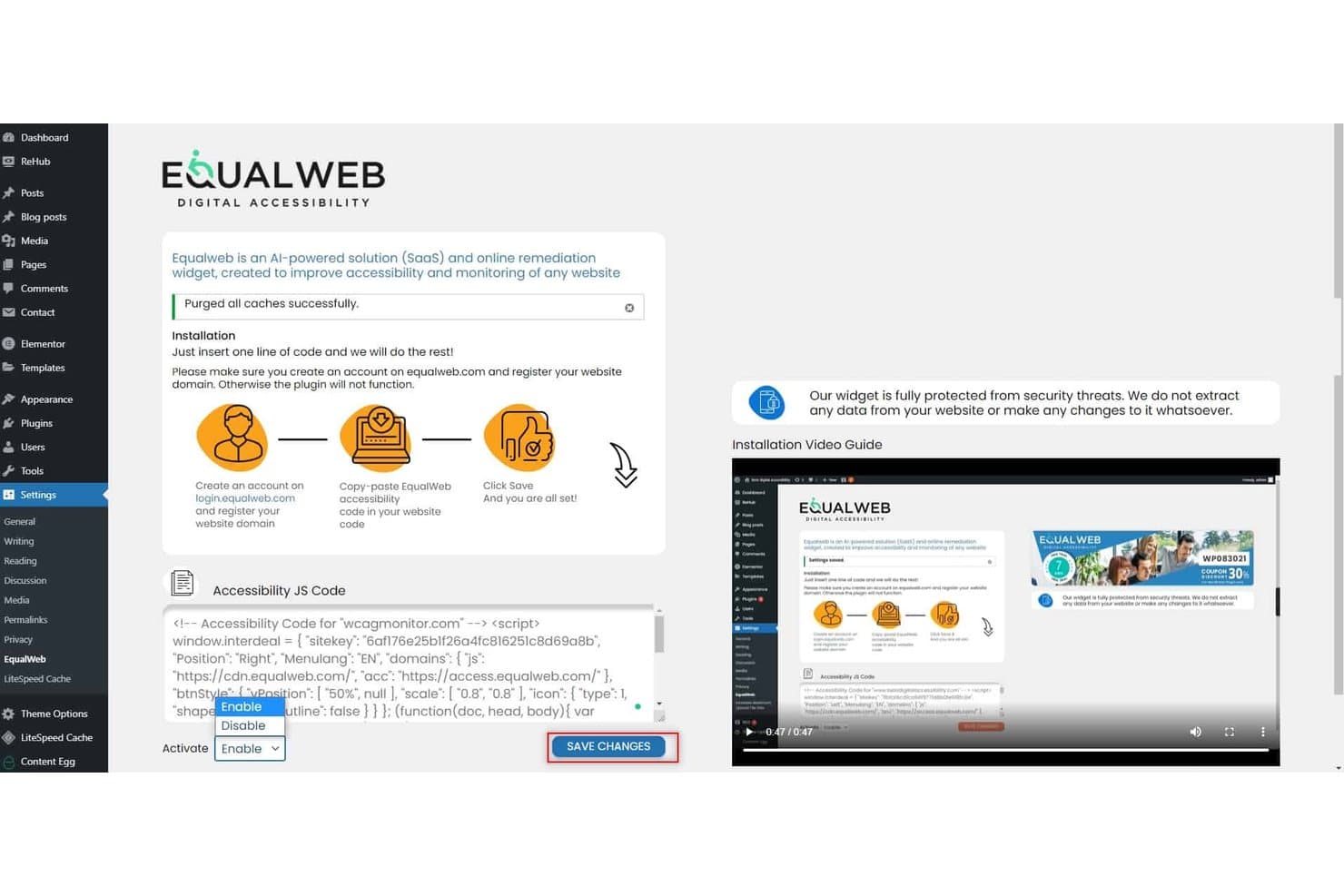
Equal Web lets users enable accessibility widgets via WordPress plugin. EqualWeb is an ADA compliance platform that pairs an AI-powered accessibility widget with CPWA-certified expert auditing, automated WCAG 2.2 scanning, continuous monitoring, and compliance documentation tools like VPATs and signed compliance certificates.
Who Is EqualWeb Best For?
EqualWeb is a strong fit for compliance officers and legal teams who need certified human auditing, litigation-ready documentation, and multi-regulation coverage across global sites.
Why I Picked EqualWeb
EqualWeb earns its spot on my shortlist because of its CPWA-certified human auditing, which goes well beyond what automated scanners alone can catch. I picked it specifically for teams that need litigation-ready documentation: the Managed Compliance plan produces a signed compliance certificate, a full VPAT 2.2, and an expert conformance opinion that your legal team can actually use if an ADA demand letter lands. The re-remediation guarantee, where EqualWeb fixes flagged issues at no extra cost if a covered item is later found non-conformant, is the kind of accountability I rarely see from overlay-first vendors.
EqualWeb Key Features
- Accessibility Monitor: Tracks compliance scores over time through scheduled scans against WCAG 2.2 and Section 508, sending email alerts when scores drop.
- PDF accessibility remediation: Auto-tags PDFs using AI to fix reading orders, alt text, and contrast errors to meet WCAG and PDF/UA standards.
- Multi-regulation coverage: Validates digital assets against global accessibility rules including ADA, EAA, Section 508, AODA, and EN 301 549.
- Jira issue export: Exports flagged accessibility defects directly into Jira with attached screenshots, issue locations, and remediation guides.
EqualWeb Integrations
EqualWeb offers 40+ integrations, including WordPress, Shopify, Adobe Commerce, and Webflow. It also supports Google Tag Manager and Jira issue exports.
Pros and Cons
Pros:
- Supports WCAG, ADA, EAA, and more
- Produces legally defensible compliance documentation
- Combines AI automation with human expert audits
Cons:
- No public API or CI/CD integration available
- Remediation applies only on the client side
Learn more about Equal Web:
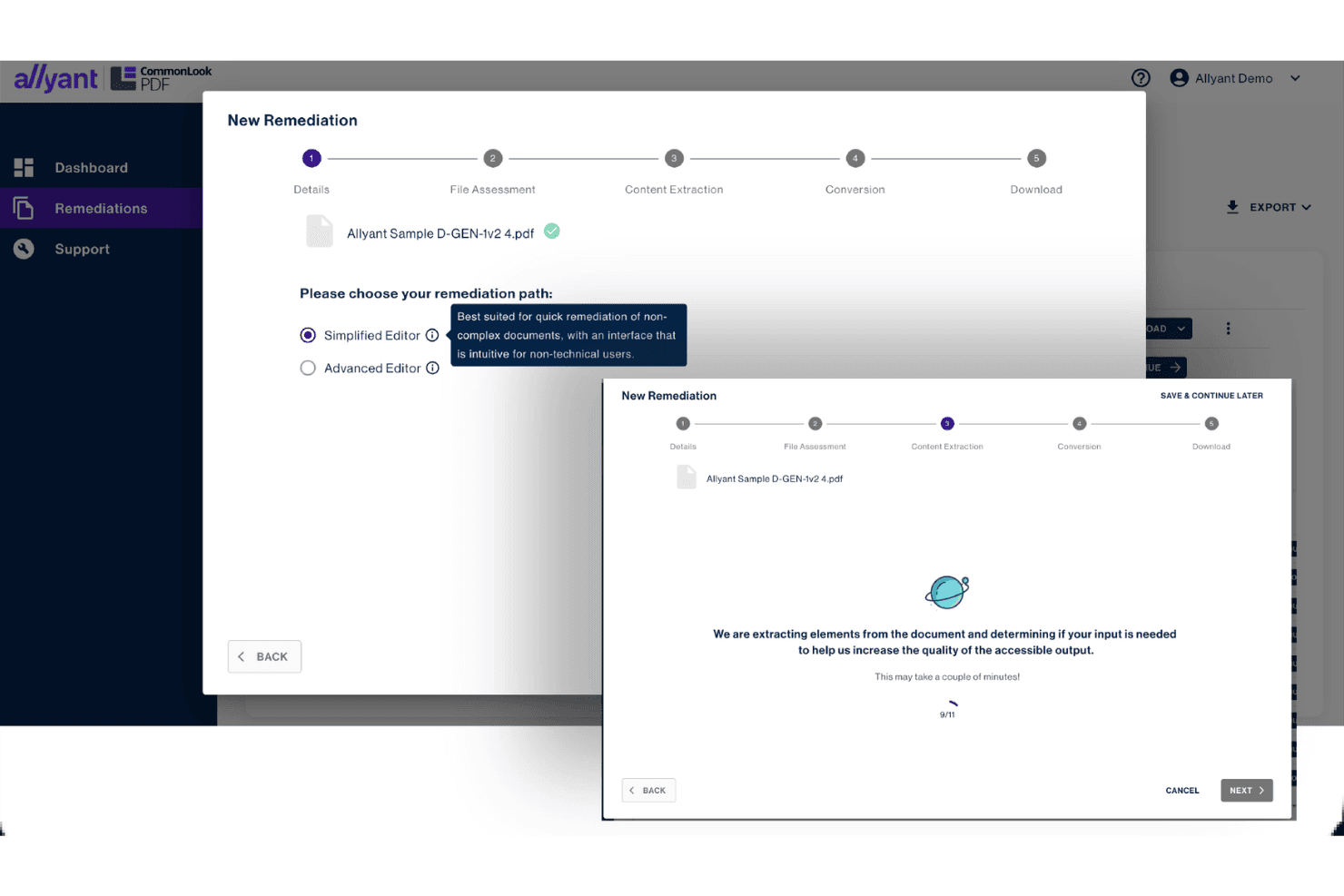
Allyant guides users through PDF remediation with step-by-step workflows. Allyant is an ADA compliance platform that combines automated web scanning, manual auditing by IAAP-certified engineers, AI-powered PDF remediation, VPAT/ACR generation, and litigation support into a unified accessibility management suite.
Who Is Allyant Best For?
Allyant is a strong fit for compliance officers and accessibility program managers who need to govern both web and document accessibility under a single platform.
Why I Picked Allyant
Allyant earns its spot on my shortlist because it scans web pages and embedded PDFs together, surfacing everything in one dashboard. I also love the CommonLook PDF suite, which uses AI-driven tagging to remediate high-volume templated documents like tax forms and bank statements at scale. On top of that, Allyant's VPAT/ACR generation paired with its dedicated litigation support team means you're building legally defensible documentation from day one.
Allyant Key Features
- Litigation rebuttal reports: Generates signed legal declarations and user demo videos to counter ADA demand letters.
- ProcureEnsure third-party VPAT validation: Tests vendor software with screen readers and scanners to verify compliance before purchase.
- Jira two-way sync: Syncs accessibility issues directly into Jira to manage developer fixes.
- CommonLook Office plugin: Scans Microsoft Word and PowerPoint to fix compliance errors before exporting to PDF.
Allyant Integrations
Allyant integrates with CivicPlus and provides two-way Jira sync, CI/CD pipeline tools, and APIs for custom connections.
Pros and Cons
Pros:
- Supports litigation with signed rebuttal reports
- Provides expert-led audits with native AT users
- Combines web and PDF scanning in one dashboard
Cons:
- No legal indemnification for ADA lawsuits
- Lacks direct ecommerce platform connectors
Learn more about Allyant: Best for integrating accessibility checks into Figma
- Free plan + free demo available
- From $198/user/year
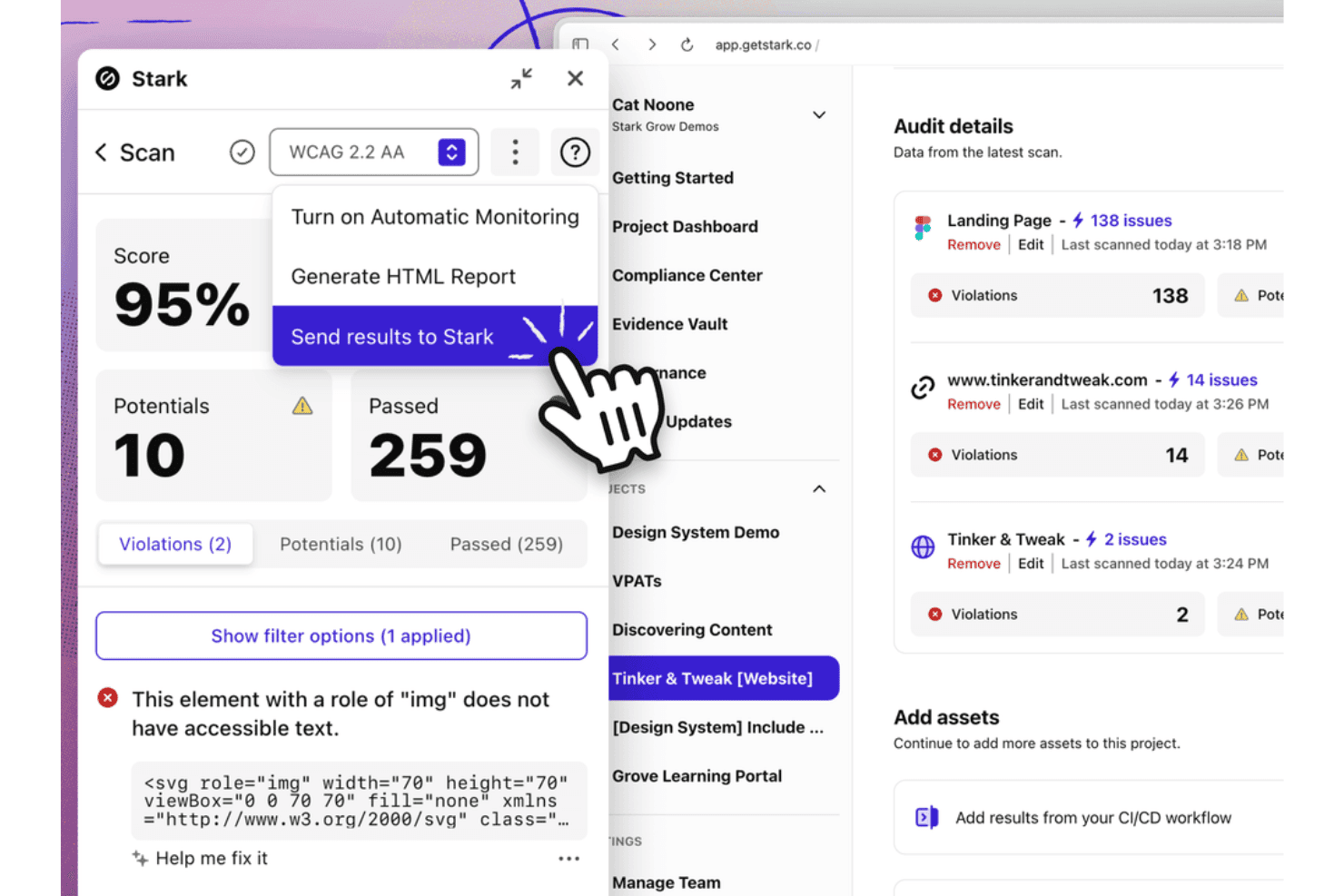
Stark shows accessibility scan results in the dashboard. Stark is an accessibility compliance platform that combines automated WCAG scanning across design files, source code, live URLs, and mobile apps with AI-assisted remediation tools, a VPAT report generator, and a centralized Compliance Center for tracking conformance across WCAG, Section 508, and the EAA.
Who Is Stark Best For?
Stark is a strong fit for product and engineering teams that want to catch accessibility issues at the design and code level before they ship.
Why I Picked Stark
I picked Stark as one of the best because it catches accessibility issues before a single line of code ships. Its Sidekick AI scans Figma files automatically and flags contrast failures, missing alt-text annotations, and touch target gaps with fix suggestions applied directly in the design tool. On the code side, the ESLint plugin surfaces WCAG violations inline in VS Code as developers write, so your team isn't discovering ADA compliance problems during a final audit.
Stark Key Features
- Compliance Center: Tracks organizational accessibility controls and maturity levels across WCAG, Section 508, and EAA frameworks.
- VPAT report generator: Exports pre-filled VPAT documents based on automated scan findings.
- CI/CD pipeline integration: Runs automated accessibility checks directly within build pipelines to update the central dashboard.
- Mobile app scanning: Scans native iOS and Android codebases to surface mobile accessibility issues alongside web assets.
Stark Integrations
Stark integrates with Figma, Sketch, GitHub, GitLab, Bitbucket, and Azure DevOps. It supports browser developer tools, CI/CD code repo workflows, and native mobile testing.
Pros and Cons
Pros:
- Covers accessibility for both web and mobile
- Source code remediation favored by legal guidance
- Design-phase AI catches accessibility issues early
Cons:
- Lacks ecommerce and CMS platform connectors
- No user-facing accessibility widget or overlay
Learn more about Stark: Best for AI optimization of screen readers
- Free demo + 7-day free trial available
- From $490/year
Visit WebsiteCustomer Rating:4.8/5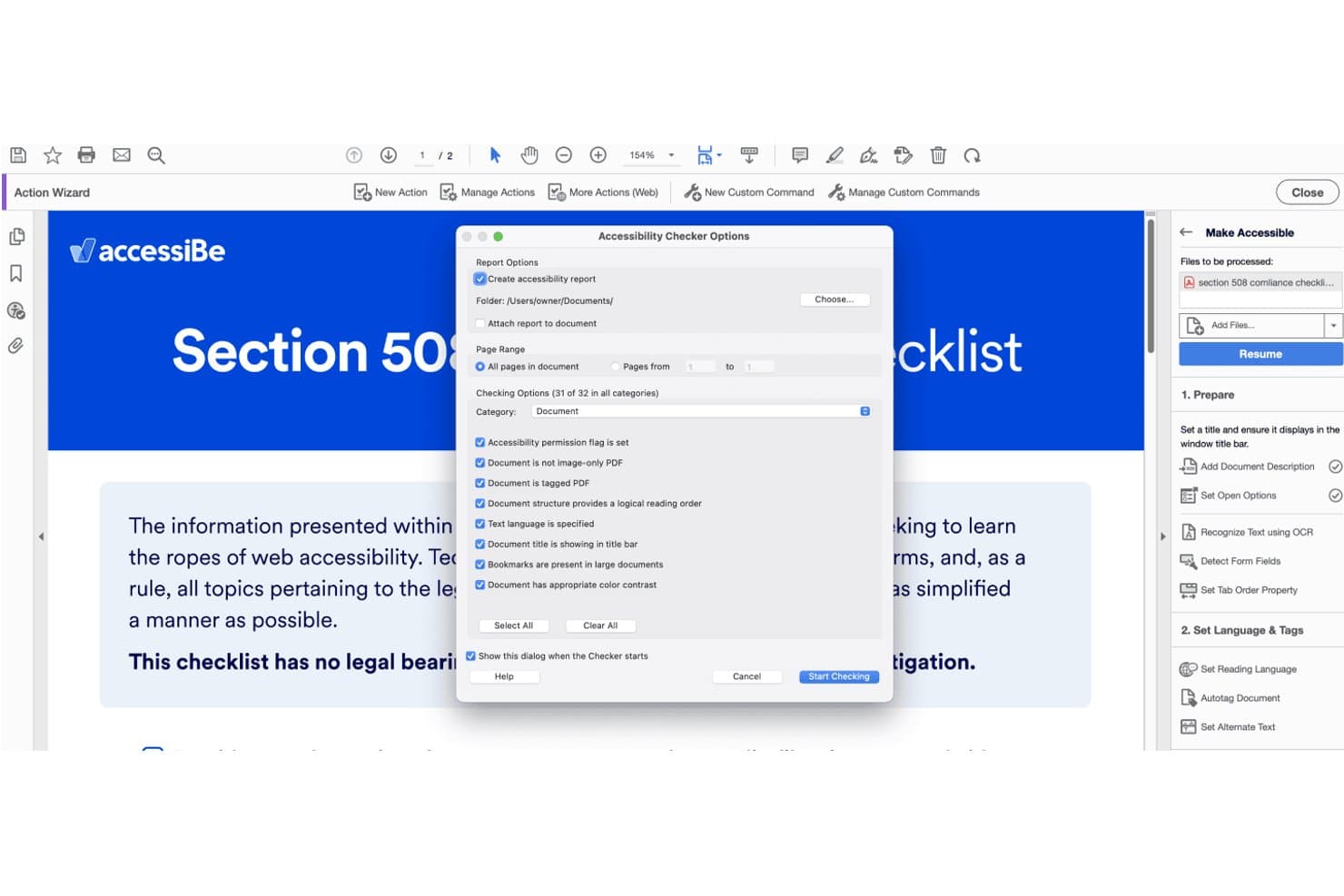
accessiBe's PDF checker scans documents for accessibility compliance issues. accessiBe is an AI-driven ADA compliance platform that combines an automated overlay, a developer-native scanning and remediation toolchain, and expert-delivered manual accessibility services.
Who Is accessiBe Best For?
accessiBe is a strong fit for ecommerce businesses and digital teams that need a no-code path to ADA compliance with the option to layer in developer tools.
Why I Picked accessiBe
I picked accessiBe as one of the best because its AI-driven screen reader optimization goes deeper than a generic overlay. The Blind Users Profile specifically tunes page behavior for JAWS, NVDA, VoiceOver, and TalkBack, and accessiBe's accessLabs program has real users with disabilities testing these fixes continuously. I also like that accessWidget rescans and updates screen reader compatibility every 24 hours, so new product pages or content updates don't break assistive technology support.
accessiBe Key Features
- Multi-regulation compliance scanning: Audits digital assets against WCAG 2.1/2.2 AA, ADA, Section 508, EAA, AODA, and ACA standards.
- CI/CD pipeline integration: Integrates accessFlow with CI tools like Jenkins, CircleCI, and GitLab to block accessibility regressions.
- Litigation support package: Provides legal support documentation, case manager support, ADA attorney hours, and monetary pledges for covered plans.
- Disability-specific user profiles: Customizes UI layouts instantly with preset modes for epilepsy, visual impairments, ADHD, and keyboard reliance.
accessiBe Integrations
accessiBe integrates with WordPress, Wix, Shopify, BigCommerce, Jira, CircleCI, GitLab, and tools like Playwright, Cypress, Selenium, VS Code, Cursor, and Claude Code via MCP.
Pros and Cons
Pros:
- Screen reader optimization profiles for real users
- Includes litigation support with financial pledge
- Offers manual, AI, and code remediation tracks
Cons:
- Certain issues require separate manual remediation
- Overlay does not guarantee legal compliance
Learn more about accessiBe: Best for combining web accessibility audits with SEO
- Free demo available
- Pricing upon request
Visit WebsiteCustomer Rating:4.6/5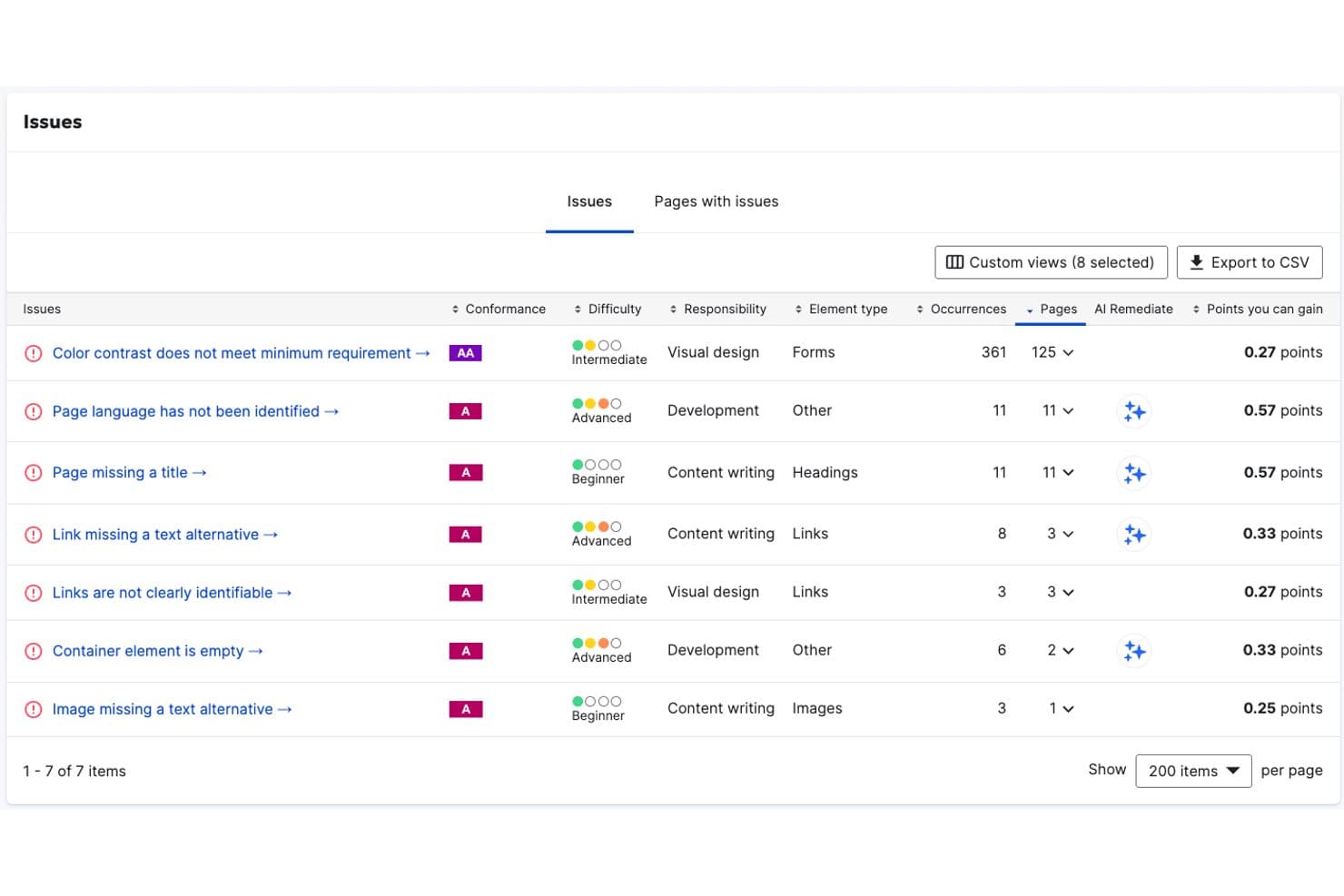
Siteimprove tracks accessibility issues by difficulty, responsibility, and affected pages. Siteimprove is a digital accessibility platform that combines automated WCAG scanning, AI-powered source-code remediation, PDF accessibility fixes, continuous monitoring, and compliance documentation across web, mobile, and document content.
Who Is Siteimprove Best For?
Siteimprove is a strong fit for enterprise digital teams that need to manage web accessibility and SEO compliance together in a single platform.
Why I Picked Siteimprove
Siteimprove earns its spot on my shortlist because it's the only ADA compliance platform I've seen that natively bundles WCAG scanning with SEO auditing in a single dashboard, so you aren't context-switching between tools to manage compliance and search performance. I also like its Website Remediation Agent, which writes actual source-code fixes rather than layering a JavaScript overlay on top of existing issues. On top of that, the PDF Remediation Agent automatically re-tags document structure and generates alt text at scale, which is a real differentiator if your site hosts large document libraries.
Siteimprove Key Features
- Multi-regulation compliance filtering: Filters issues by accessibility standards including ADA Title II, Section 508, EN 301 549, and WCAG versions.
- Republish check: Scans content inside CMS environments to block new accessibility issues before publication.
- VPAT authoring service: Delivers expert-written Accessibility Conformance Reports through manual evaluation services.
- Browser extensions: Scans public, staging, and password-protected pages directly inside standard web browsers.
Siteimprove Integrations
Siteimprove offers 25+ native CMS integrations, including WordPress, Drupal, Adobe Experience Manager, and Sitecore. It also supports Zapier and an MCP Server for VS Code and Claude Code.
Pros and Cons
Pros:
- Bundles accessibility with SEO and analytics
- Fixes issues at the source-code level
- Covers WCAG, ADA, Section 508, and EAA
Cons:
- User interface is not intuitive
- Often fails to evaluate context-dependent WCAG elements
Learn more about Siteimprove: Best for enterprise-level governance and compliance
- Free demo available
- Pricing upon request
Visit WebsiteCustomer Rating:4.5/5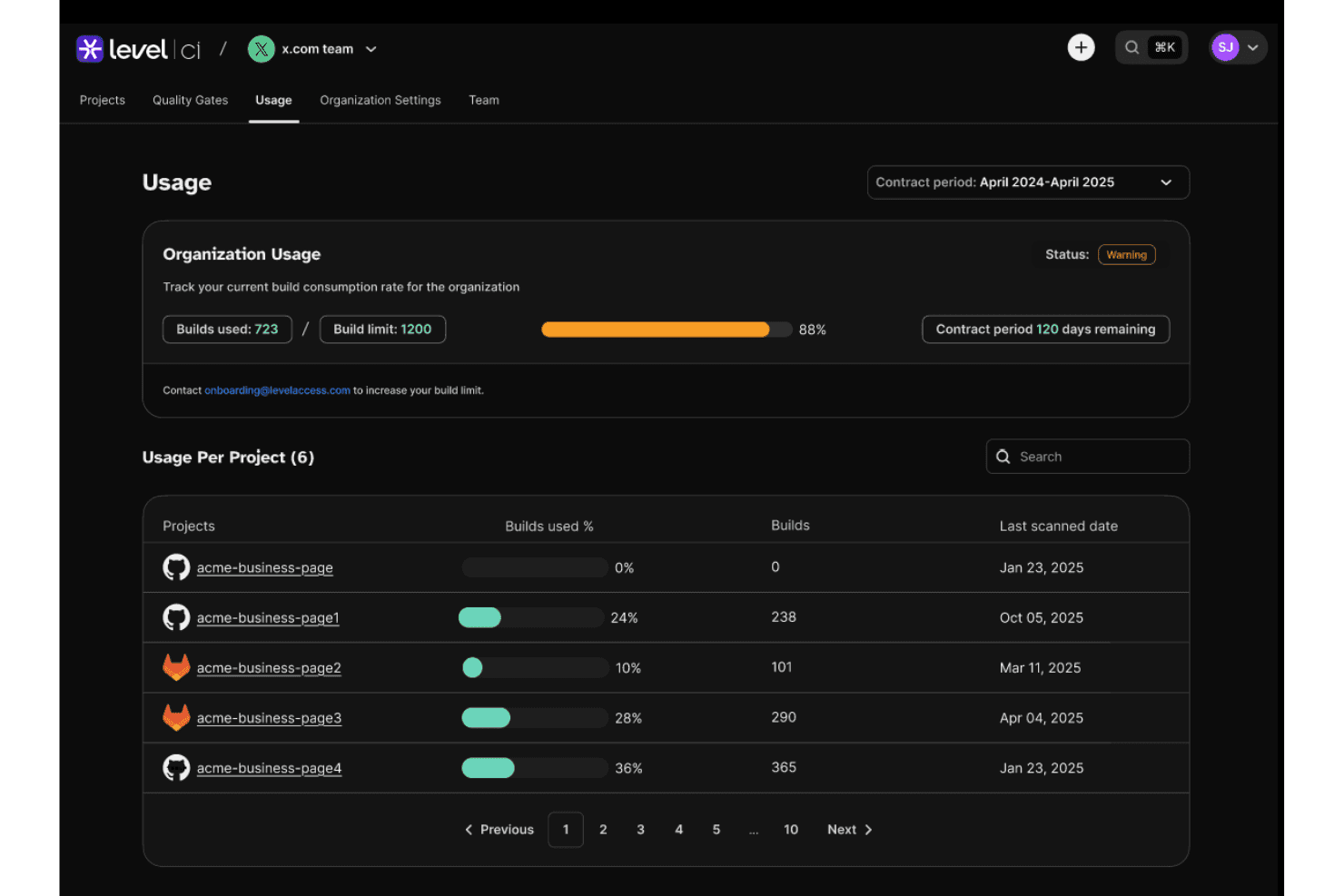
Level Access tracks build usage and consumption per project over time. Level Access is an ADA compliance platform that combines automated scanning, expert-led manual audits, AI-powered remediation, legal support, and governance reporting across websites, mobile apps, and digital documents.
Who Is Level Access Best For?
Level Access is built for enterprise organizations that need to manage accessibility compliance across multiple digital properties, teams, and regulatory frameworks simultaneously.
Why I Picked Level Access
Level Access earns its spot on my shortlist because no other platform I've used matches its depth of enterprise-level governance, from VPAT/ACR generation backed by certified experts to a timestamped audit trail that functions as a legal system of record. I find the demand letter validation and expert testimony support particularly valuable when organizations face ADA litigation. The Digital Accessibility Maturity Model (DAMM) also gives compliance teams a structured benchmark to track program progress across complex, multi-property environments.
Level Access Key Features
- Level CI pull request scanning: Triggers automated accessibility scans in pull requests to suggest AI code fixes before merging.
- Digital Accessibility Maturity Model (DAMM): Benchmarks organizational accessibility program maturity across teams, assets, and compliance frameworks.
- Level Access Academy: Provides role-based live and on-demand accessibility training courses for developers, designers, and QA teams.
- LevelDocs: Scans and remediates documents directly inside Microsoft Office to export compliant PDFs.
Level Access Integrations
Level Access integrates with GitHub, Jira, Azure DevOps, Asana, and Figma. It also provides SDKs and an API for custom workflows.
Pros and Cons
Pros:
- Supports benchmarking with Digital Accessibility Maturity Model
- Role-specific training with unlimited validation testing
- Industry-leading legal defensibility for ADA compliance
Cons:
- User interface can be complex for new users
- No direct Shopify or BigCommerce connector
Learn more about Level Access: Best for multi-regulation end-to-end compliance
- Free demo available
- Pricing upon request
Visit WebsiteCustomer Rating:4.5/5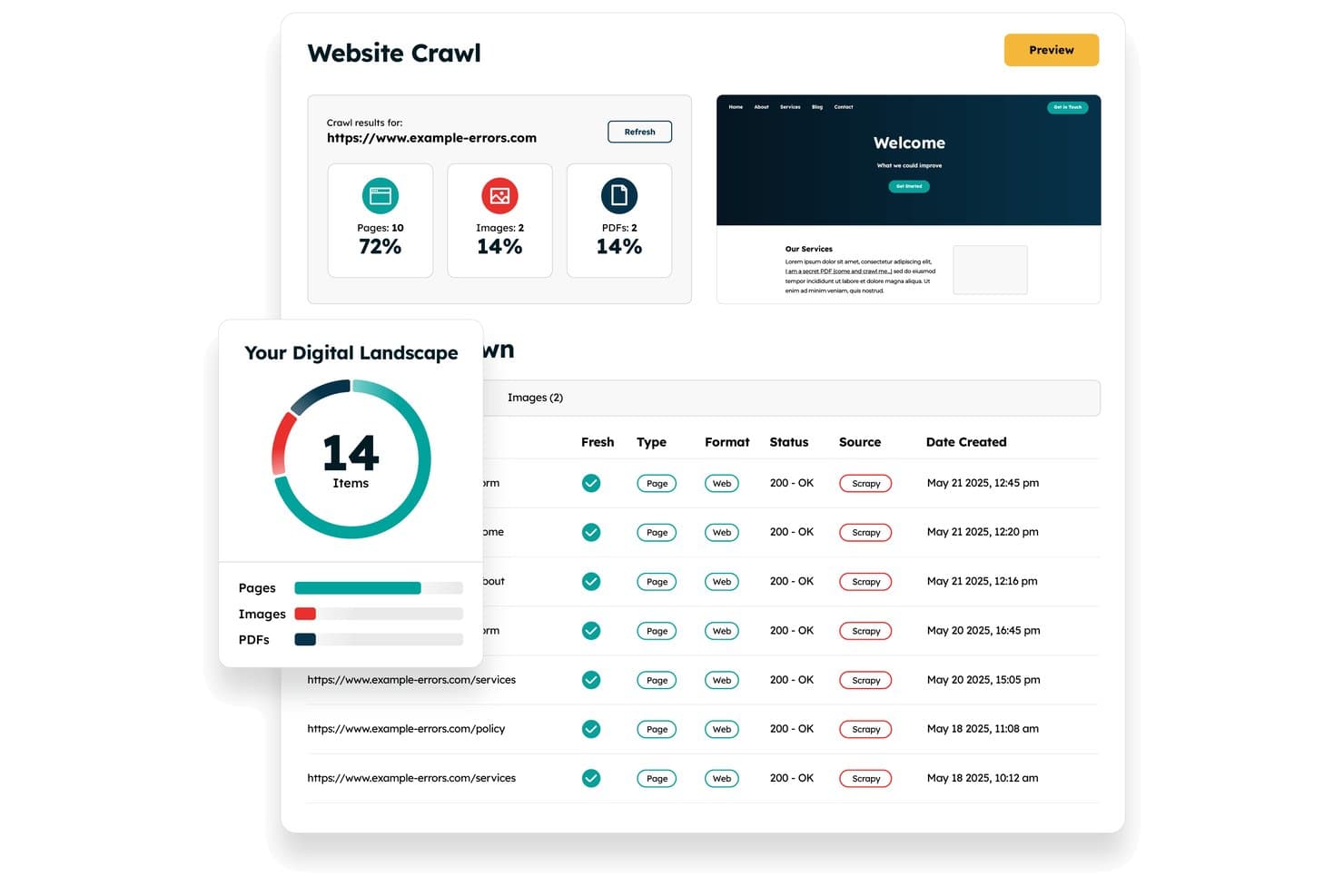
Recite Me crawls websites to audit pages, images, and PDFs for accessibility. Recite Me is an ADA compliance platform that combines an assistive toolbar, automated WCAG scanning, PDF remediation, manual auditing, and VPAT documentation into a single end-to-end solution.
Who Is Recite Me Best For?
Recite Me is a strong fit for digital compliance officers and accessibility program managers who need to cover multiple regulatory frameworks—ADA, WCAG 2.2, Section 508, and the EAA—from a single vendor.
Why I Picked Recite Me
I've included Recite Me in my top picks because no other tool on this list covers as many regulatory frameworks from a single platform. Where most tools focus on WCAG or ADA alone, Recite Me runs scans against WCAG 2.2, Section 508, the EAA, AODA, and several other standards simultaneously. I also like that it pairs automated scanning with a Complete VPAT Service, where their experts produce a finished ACR your team can hand directly to procurement or legal.
Recite Me Key Features
- Assistive toolbar: Provides on-site controls for text-to-speech, translation, and custom visual styling.
- PDF accessibility checker: Scans site-linked PDFs to fix tags, reading order, and contrast errors.
- Chrome extension for pre-launch scanning: Tests local pages and single-page applications directly inside DevTools before release.
- Accessibility statement generator: Produces a standardized disclosure statement detailing conformance status and compliance contacts.
Recite Me Integrations
Recite Me integrates with Jira and Azure DevOps, and offers JS connections to WordPress, Wix, Squarespace, Drupal, Umbraco, Shopify, and SharePoint. No public API is documented.
Pros and Cons
Pros:
- Translates page text into over 100 languages
- Built-in screen mask, ruler, and dictionary
- Lets users tweak fonts, colors, and contrast
Cons:
- Full real-time content monitoring in beta
- No legal indemnification for ADA lawsuits
Learn more about Recite Me: Best for automated code fixes for SMBs
- Free demo + 7-day free trial available
- From $99/year
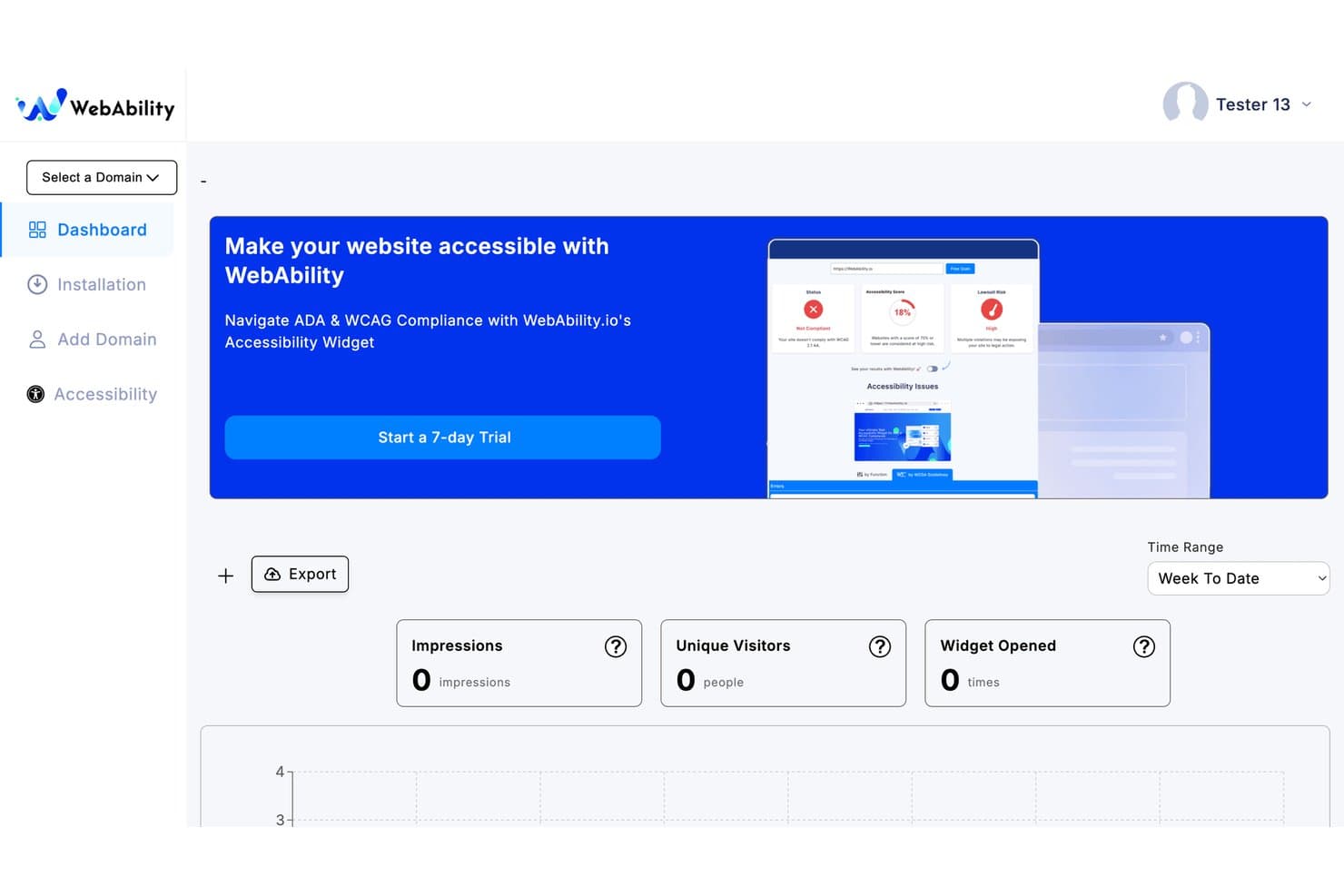
WebAbility tracks impressions, visitors, and widget opens on its dashboard. WebAbility is an ADA compliance platform that combines automated accessibility scanning, AI-driven code fix suggestions, and continuous monitoring to help websites meet WCAG 2.2, ADA, and related standards.
Who Is WebAbility Best For?
WebAbility works well for small and mid-sized businesses that need automated accessibility scanning and AI-driven code fix suggestions without managing a large compliance team.
Why I Picked WebAbility
WebAbility earns its spot on my shortlist because of how well it handles automated code fixes without requiring a dedicated accessibility team. I particularly like SmartFix, which surfaces AI-generated, reviewer-approved code corrections in the platform, so developers can act on specific issues rather than interpret raw audit data. Cross-page pattern detection groups recurring component-level violations, which cuts remediation volume significantly for SMBs working with leaner dev resources.
WebAbility Key Features
- Compliance Vault: Stores scan history, audit reports, remediation records, and timestamped conformance certificates in one place.
- Multi-standard scanning: Evaluates your site against WCAG 2.2, ADA, Section 508, EAA, and EN 301 549 in a single automated scan.
- LiveStatement: An auto-updating accessibility statement that syncs in real time with your latest scan results across all plans.
- Audit & reporting dashboards: Show reports highlighting compliance scores, broken links, color contrast errors, and unresolved page structure barriers.
WebAbility Integrations
WebAbility works with Shopify, WordPress, Wix, Squarespace, and BigCommerce. It can be added to custom sites with JS or managed via Google Tag Manager and developer tools.
Pros and Cons
Pros:
- Legal audit trails with Compliance Vault
- AI-driven code fix suggestions for developers
- Multi-standard scanning in a single workflow
Cons:
- Limited third-party review validation online
- No native ecommerce platform plugins
Learn more about WebAbility:
Other ADA Compliance Software
Here are some additional ADA compliance software options that didn’t make it onto my shortlist, but are still worth checking out:
- 11AllyableBest for developer-centric modular APIs
- 12AudioEyeBest for hybrid legal-backed remediation
- 13All in One AccessibilityBest for cross-departmental ADA management
- 14Pope TechBest for higher-ed ADA auditing
- 15RAMPBest for issue tracking and managing remediation tasks
- 16Acquia Web GovernanceBest for enterprise ADA and WCAG governance
- 17Accessibility CloudBest for website crawling across multiple sites
- 18SilktideBest for non-technical teams managing WCAG scores
- 19Axe DevToolsBest for embedding WCAG scans into dev pipelines
- 20EvincedBest for agentic CI/CD accessibility remediation
How I Evaluate ADA Compliance Software
I split my evaluation into two layers: the baseline functionality a tool must cover to make the list, and the differentiators that separate a solid pick from the right one for your retail operation.
Core Functionality (Table Stakes For This List)
When I'm selecting tools for my list, I rank each one on a scale from 0 (does not offer the functionality) to 5 (excels in this area) for each core functionality listed below. I then calculate the tool's total score into a percentage, using 65% as a benchmark to help assess its overall fit for the list.
- Automated accessibility scanning: I evaluate how thoroughly a tool crawls pages against WCAG 2.1/2.2 and ADA criteria, including whether it prioritizes issues by severity so your team can fix what matters first.
- Issue remediation tools: The mix of automated fixes and actionable developer guidance matters here, from overlay-based corrections to source-code suggestions that help your engineers resolve barriers at the root.
- Continuous monitoring and alerts: Sites change constantly as you add products, update banners, or swap landing pages. I look for recurring scans, real-time dashboards, and proactive alerts that flag new issues as content shifts.
- Compliance reporting and documentation: Generating exportable audit reports, accessibility statements, and VPAT-style artifacts is key for legal defensibility. Tools like Level Access and Siteimprove handle this differently, so I check the depth and format options each offers.
- Assistive technology support: I check whether the tool ensures compatibility with screen readers, keyboard navigation, and user-facing accessibility profiles that let shoppers adjust their experience on your site.
- Developer and CMS integration: Retail teams run on platforms like Shopify, WordPress, and Adobe Commerce. I evaluate how well each tool connects with your CMS, ecommerce system, and developer workflows through APIs, browser extensions, or CI/CD pipelines.
Once I have a list of tools that meet the criteria, I consider what sets each platform apart.
Differentiating Factors (What Sets Vendors Apart)
Here's how I compare and contrast different vendors:
Standout Features
I look for legal assurance programs—some vendors offer indemnification or litigation defense funds that cover your costs if you receive an ADA demand letter while actively using their tool. That matters because retail sites face the bulk of digital accessibility lawsuits. I also evaluate AI-powered source code remediation, where the tool generates permanent code-level fixes rather than JavaScript overlays that courts increasingly reject. Beyond that, I check for ecommerce platform depth: purpose-built connectors for Shopify, Adobe Commerce, or BigCommerce that target high-risk templates like PDPs, checkout flows, and faceted search.
Beyond Features
I evaluate each vendor's remediation methodology—whether it relies on overlays, source-code fixes, or a hybrid model—because overlay-only approaches have faced legal challenges. Retail tech stack fit matters just as much; I check for native apps in Shopify, Adobe Commerce, or BigCommerce app stores and compatibility with headless setups, third-party review widgets, and chat tools that often break accessibility. I also look at total cost of ownership, since pricing models range from per-domain to per-page-view and can scale fast for high-traffic stores.
How to Choose ADA Compliance Software
Here's how to pick ADA compliance software that actually protects your brand and keeps your site accessible, without slowing down ecommerce updates or locking you into a rigid solution.
| If your priority is... | Look for... |
|---|---|
| If your priority is...Lawsuit defense and risk mitigation | Look for...Legal assurance programs or written indemnification |
| If your priority is...Deep ecommerce platform compatibility | Look for...Shopify, Adobe Commerce, or BigCommerce-specific integrations |
| If your priority is...Catching new issues as your site changes | Look for...Automated, frequent scanning and update-triggered alerts |
| If your priority is...Dev team involvement in permanent fixes | Look for...Source-code remediation tools with API access |
| If your priority is...Non-technical team self-sufficiency | Look for...No-code overlays or accessibility widgets |
How to Vet Your Shortlist
- Request legal proof: Get a sample indemnification agreement or litigation defense clause in writing from the vendor.
- Test ecommerce integration: Deploy the platform’s app, plugin, or script on a staging environment for your actual CMS or ecommerce stack.
- Simulate a site update: Add or change a product page, then review whether the tool flags new accessibility issues within 24 hours.
- Ask for developer workflow artifacts: Request API docs or a remediation report that shows real source-code suggestions for a resolved issue.
- Weigh overlays vs. code fixes: Decide between rapid widget additions and true code-level remediations, based on your team’s technical capabilities and legal risk tolerance.
What Is ADA Compliance Software?
ADA compliance software helps you make your website perceivable and accessible to people with disabilities and meet legal requirements under the Americans with Disabilities Act. These platforms scan for accessibility issues, offer guidance or tools for remediation, and generate reports to support compliance. Teams use ADA compliance software to identify barriers, implement fixes, and document ongoing accessibility efforts.
Features of ADA Compliance Software
When selecting ADA compliance software, keep an eye out for the following key features:
- Automated accessibility scanning: Runs regular scans against WCAG 2.1 and ADA standards, highlighting issues and prioritizing them by severity.
- Issue remediation tools: Offers quick fixes, actionable guidance, and step-by-step instructions to resolve violations at the root or through overlays.
- Continuous monitoring and alerts: Rescreens pages as content changes and sends proactive alerts for new or recurring accessibility issues.
- Compliance reporting and documentation: Generates audit reports, activity logs, and accessibility statements for legal, procurement, and internal audits.
- Assistive technology support: Verifies full compatibility with screen readers, keyboard navigation, and other adaptive devices.
- Developer and CMS integration: Integrates easily with platforms like Shopify, Adobe Commerce, and WordPress via APIs, plugins, or extensions.
- User accessibility profiles: Enables site visitors to adjust contrast, text size, and navigation settings on the spot for better usability.
- Role-based access controls: Assigns specific permissions to team members to delegate scanning, remediation, and reporting safely.
- Exportable reports: Generates summaries and data exports to share with legal teams, auditors, or external partners.
Common ADA Compliance Software AI Features
Beyond the standard ADA compliance software features listed above, many of these solutions are incorporating AI with features like:
- AI-driven issue detection: Uses machine learning to identify complex accessibility barriers that traditional rule-based scanners might miss, such as dynamic content or context-specific errors. This helps your team catch subtle issues that impact real users.
- Automated code remediation: Applies AI to suggest or implement code-level fixes for accessibility violations, reducing manual effort for developers and speeding up the remediation process. These fixes often adapt to your site’s unique structure and content.
- Natural language accessibility audits: Leverages AI to analyze written content for clarity, readability, and compliance with accessibility guidelines. This feature flags jargon, complex sentences, or missing alt text, helping you create more accessible copy.
- Personalized user experience adjustments: Uses AI to learn from user interactions and automatically adjust accessibility settings, such as contrast or font size, based on individual preferences and behaviors. This creates a more tailored browsing experience for people with disabilities.
- Predictive compliance risk analysis: Employs AI to forecast potential legal risks by analyzing your site’s accessibility trends, historical issues, and industry benchmarks. This helps you prioritize fixes that are most likely to reduce exposure to lawsuits or complaints.
Benefits of ADA Compliance Software
Implementing ADA compliance software provides several benefits for your team and your business. Here are a few you can look forward to:
- Reducing legal risk: Automated scanning, compliance reporting, and legal assurance programs help you minimize exposure to ADA lawsuits and digital accessibility claims.
- Catching accessibility issues early: Continuous monitoring and proactive alerts flag new website barriers whenever you update content, launch products, or change layouts.
- Supporting diverse user needs: Built-in assistive technology support and user accessibility profiles let visitors adjust their experience and ensure your site works for everyone.
- Simplifying remediation for teams: Issue remediation tools, code suggestions, and integrations with developer and CMS workflows help your team resolve problems right at the source.
- Delivering clear documentation: Exportable reports and accessibility statements make it easy to share your compliance progress with auditors, partners, or leadership.
- Adapting to ecommerce platforms: Native plugins, app integrations, and purpose-built connectors ensure the software fits into Shopify, Adobe Commerce, and other retail platforms without disrupting your stack.
- Incorporating AI for smarter fixes: AI-driven detection and automated remediation go beyond surface-level scans to catch complex issues and speed up code-level corrections.
Costs and Pricing of ADA Compliance Software
Selecting ADA compliance software requires an understanding of the various pricing models and plans available. Costs vary based on features, team size, add-ons, and more. The table below summarizes common plans, their average prices, and typical features included in ADA compliance software:
Plan Comparison Table for ADA Compliance Software
| Plan Type | Average Price | Common Features |
|---|---|---|
| Plan TypeFree Plan | Average Price$0 | Common FeaturesBasic automated scanning, limited reporting, single-user support, and access to basic remediation suggestions. |
| Plan TypePersonal Plan | Average Price$40-$80/month | Common FeaturesAutomated scanning, issue remediation tools, basic compliance reporting, email alerts, and one website or domain. |
| Plan TypeBusiness Plan | Average Price$200-$600/month | Common FeaturesMulti-user access, scheduled scans, advanced compliance reporting, integrations with CMS platforms, and priority support. |
| Plan TypeEnterprise Plan | Average Price$900-$2,000/month | Common FeaturesCustom integrations, continuous monitoring, exportable reports, legal assurance programs, dedicated account management, and onboarding support. |
ADA Compliance Software FAQs
Here are some answers to common questions about ADA compliance software:
Do ADA compliance software guarantee legal protection?
No, ADA compliance software can’t guarantee legal protection on its own. Some vendors do offer legal assurance programs or indemnification, but you need to review these closely—check for written, enforceable terms and make sure your use of the software matches the requirements. Cover your bases by pairing software with ongoing human review and legal counsel.
How do ADA compliance software work with ecommerce platforms like Shopify or Adobe Commerce?
Most ADA compliance software offers plugins, apps, or direct integrations for popular ecommerce platforms. These integrations usually automate scanning, issue detection, and remediation within your storefront’s workflow. You’ll get the smoothest experience when a tool is purpose-built for your platforms and supports templates, checkout flows, product pages, and third-party widgets.
Can ADA compliance software fully automate website accessibility fixes?
No, ADA compliance software can handle some fixes automatically—like alt text or color contrast adjustments—but manual developer work is still needed for complex issues or structural changes. AI features can speed up source-code remediation, but there’s no substitute for hands-on review, especially for content, media, and interactive elements.
What’s the difference between code-level remediation and overlays in ADA compliance software?
Overlays apply a layer of JavaScript to tweak accessibility on the front end, while code-level remediation changes your website’s actual source code. I suggest using true source-code fixes when possible. Overlays are easier for non-technical teams but have faced legal and usability challenges. The best-fit solution for your business depends on technical resources, legal risk, and site complexity.
What are some signs my team needs ADA compliance software?
If you’re seeing customer complaints about accessibility, managing frequent product or content changes, or handling high order volume on multiple platforms, ADA compliance software helps spot and fix issues before they escalate. It’s also crucial if your business operates in regions where digital accessibility lawsuits are common, or if you supply public sector clients needing compliance documentation.