

Software-ul de marketing WiFi transformă accesul oaspeților la internet într-un canal pentru colectarea datelor despre clienți cu consimțământul acestora, derularea campaniilor și măsurarea vizitelor. Cele mai bune opțiuni ajută echipele din retail și comerț electronic să conecteze activitatea din magazin cu profilurile clienților, gestionând în același timp confidențialitatea, mai multe locații și infrastructura de rețea existentă.
Această listă compară platformele principale în funcție de instrumentele pentru portaluri captive, analize, integrări, controale privind consimțământul, cerințe de implementare și structura prețurilor, astfel încât să poți alege o soluție potrivită pentru locațiile, fluxurile de lucru de marketing și capacitatea operațională ale organizației tale.
Why Trust Our Software Recommendations
6,700+
Reviews
20
Industry experts
16+
Evaluation factors
14
Years
Our team has been testing and reviewing software since 2012. As retail leaders ourselves, we know how difficult—and important—it is to choose the right software.
For this guide, we evaluated tools using hands-on testing and independent research, scoring tools using our selection criteria.
Our reviews reflect our independent judgment—not a sales pitch.
Tabel comparativ: software de marketing WiFi
Compară prețurile și specificațiile software-urilor care au ajuns pe lista mea scurtă, alăturat.
Score legend (out of 5)
- Excellent4.5–5
- Good4–4.4
- Average3–3.9
- Below average2–2.9
- Poor1–1.9
Sorted by: Default
| Tool | Starting Price | Website | |||||||
|---|---|---|---|---|---|---|---|---|---|
Best for multi-site guest data capture and analytics | 3.8 out of 5 | 4 | 4 | 4 | 3 | 4 | 4 | Pricing upon request Free plan + free demo + 30-day free trial available | Website |
Best for built-in video analytics | 3.8 out of 5 | 4 | 4 | 4 | 3 | 4 | 4 | Pricing upon request Free demo available | Website |
Best for Cisco-network guest portal control | 3.8 out of 5 | 4 | 3 | 5 | 4 | 3 | 4 | Pricing upon request Free demo + 60-day free trial available | Website |
Best for restaurant guest data and retention | 3.8 out of 5 | 5 | 3 | 4 | 3 | 4 | 4 | $105/location/month Free demo available | Website |
Best for hospitality data capture | 3.8 out of 5 | 4 | 3 | 4 | 4 | 4 | 4 | Pricing upon request Free demo available | Website |
Best for agencies reselling white-label data | 4.2 out of 5 | 4 | 4 | 4 | 5 | 4 | 4 | $199/month 14-day free trial and free demo available | Website |
Best for guests data and CRM sync | 4.2 out of 5 | 4 | 4 | 4 | 5 | 4 | 4 | Pricing upon request 30-day free trial | Website |
Best for enterprise venue and footfall analytics | 4.2 out of 5 | 4 | 3 | 5 | 4 | 4 | 5 | Pricing upon request Free demo available | Website |
Best for marketing automation on a budget | 4.0 out of 5 | 4 | 4 | 4 | 3 | 5 | 4 | $34.99/month Free demo + 30-day free trial available | Website |
Best for ISO-compliant venue analytics | 3.5 out of 5 | 4 | 2 | 4 | 4 | 3 | 4 | Pricing upon request Free demo available | Website |


Recenzii ale software-ului de marketing WiFi
Mai jos sunt rezumatele mele despre cele mai bune instrumente de marketing WiFi de pe lista mea scurtă. Aceste recenzii acoperă funcțiile, integrările și prețurile fiecărei platforme, pentru a te ajuta să alegi opțiunea potrivită.
 Best for multi-site guest data capture and analytics
- Free plan + free demo + 30-day free trial available
- Pricing upon request
Visit WebsiteCustomer Rating:3.1/5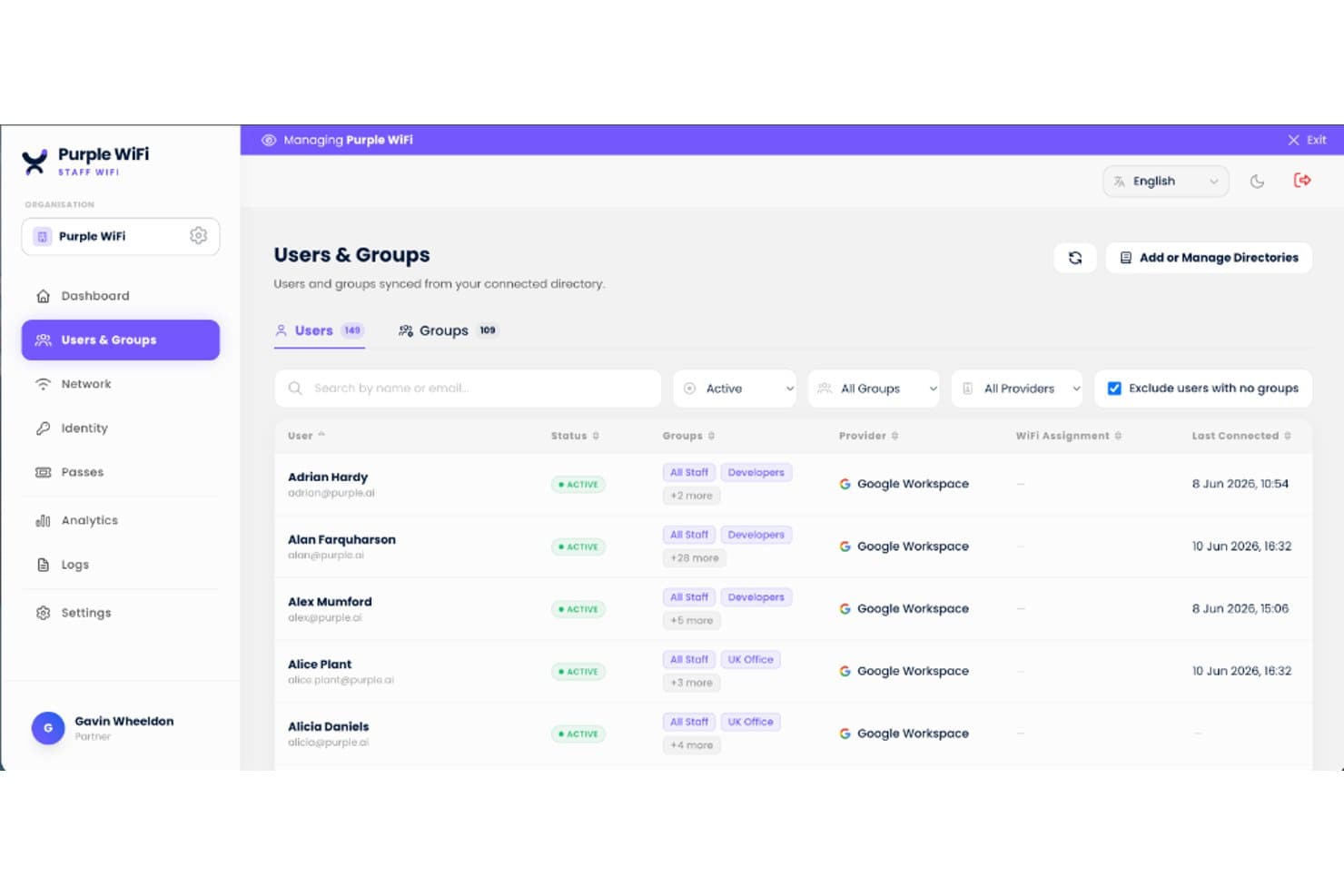
Purple centralizes staff WiFi user and group management in one dashboard. Purple is a guest WiFi marketing platform that combines captive portal management, first-party data capture, visitor analytics, and automated SMS and email campaigns across single and multi-site venues.
Who Is Purple Best For?
Purple is a strong fit for multi-location brands like hospitality groups, restaurant chains, and airport operators that need centralized guest data capture and analytics.
Why I Picked Purple
Purple earns its spot on my shortlist because of how it handles guest data across dozens or hundreds of venues from a single dashboard. I'm particularly impressed by the cross-venue guest recognition, which stitches together one profile per visitor across every location automatically, tracking visit frequency and dwell time without any manual effort. Pair that with location-level heatmaps and footfall analytics, and you get a clear picture of how guests move through each site.
Purple Key Features
- Branded splash page editor: Build captive portal pages, supporting interstitial videos, redirects, ads, and custom fields in 25+ languages.
- Post-visit review request automation: Send Google or TripAdvisor review links by email or SMS after a WiFi session, with configurable timing and wording.
- In-venue space analytics: View visitor density heatmaps and dwell time broken down by day, meal period, and table zone across individual or multiple sites.
- ISO 27001 compliance and consent logging: Capture and store GDPR, CCPA, and CPRA consent at sign-in, with automatic data retention management and EU/UK/US data residency options.
Purple Integrations
Purple integrates with HubSpot, Salesforce, Mailchimp, ActiveCampaign, ADP, Basecamp, and Microsoft Dynamics 365. It also offers webhooks and REST APIs for custom connections.
Pros and Cons
Pros:
- Heatmaps and dwell-time analytics
- Hardware-agnostic deployment
- Cross-venue guest recognition
Cons:
- Splash editor may require HTML knowledge
- Advanced automation requires top-tier access
Learn more about Purple : Best for built-in video analytics
- Free demo available
- Pricing upon request
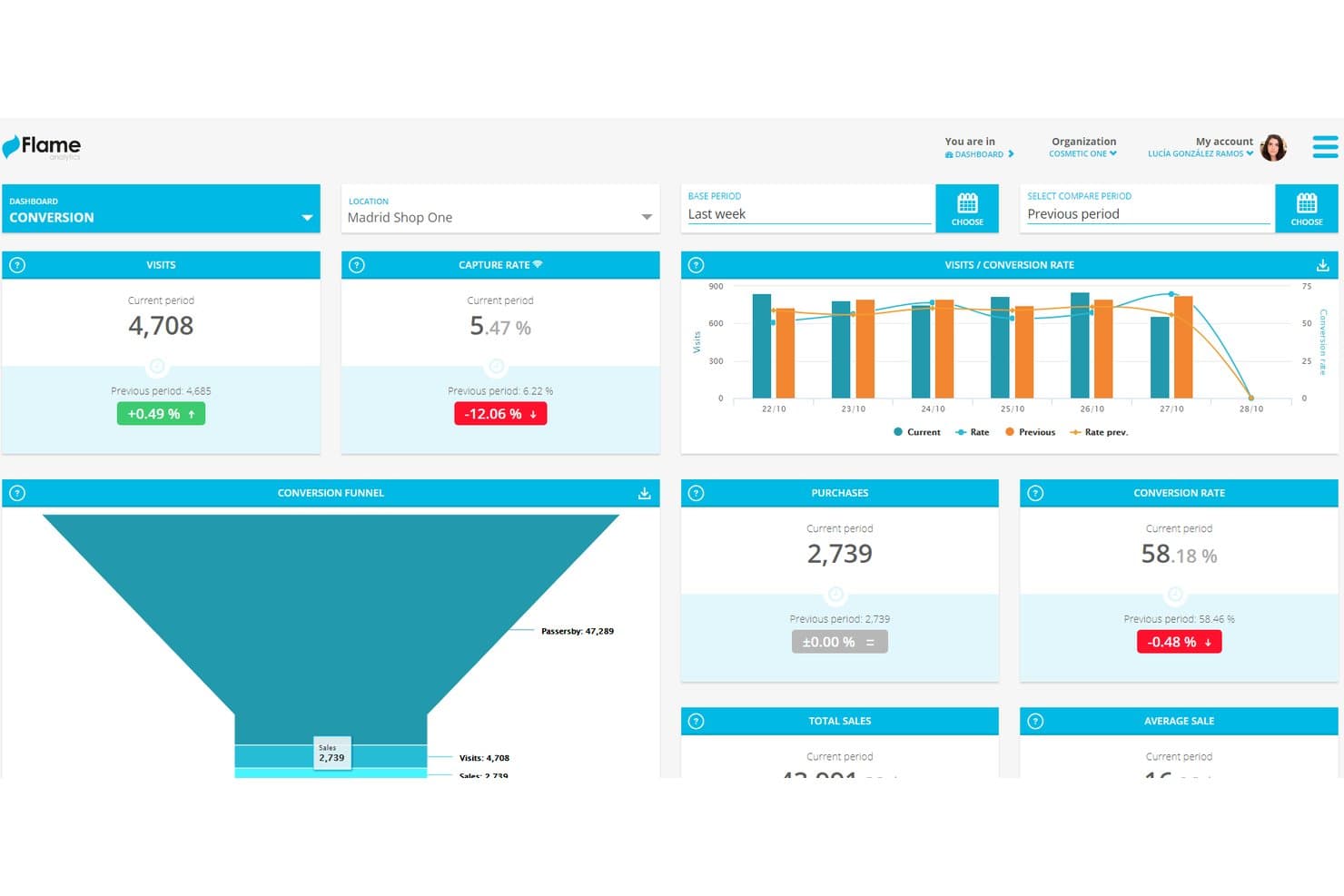
Flame Analytics tracks store visits, purchases, and conversion rates in real time. Flame Analytics is a guest WiFi marketing software that combines a customizable captive portal, customer data capture, behavior-triggered campaigns, and video-based visitor analytics.
Who Is Flame Analytics Best For?
Flame Analytics is a strong fit for multi-location retailers and commercial real estate operators who want guest WiFi marketing and video-based visitor analytics in one platform.
Why I Picked Flame Analytics
I picked Flame Analytics as one of the best because it's the only WiFi marketing platform I've found that pairs a full guest WiFi capture portal with built-in video-based visitor analytics. While the captive portal collects emails, phone numbers, and demographic data at login, the video analytics layer adds people counting, occupancy tracking, and customer journey mapping across physical spaces. That means you can correlate WiFi sign-up data with actual in-store traffic patterns, something most standalone WiFi marketing tools can't do.
Flame Analytics Key Features
- Branded captive portal builder: Design custom login pages with tailored login flows, landing pages, and location-based content for each venue.
- Social login: Let visitors sign in with a social media account and invite them to follow your brand after authentication.
- Granular consent controls: Give visitors control over what data they share, with optional double opt-in and automatic deletion on request.
- Compatible with major WiFi hardware: Connect supports Cisco, Aruba, Ruckus, Cambium, and Ubiquiti via standard protocols including RADIUS and WPA Enterprise.
Flame Analytics Integrations
Flame Analytics integrates with HubSpot, Salesforce, Brevo, Power BI, and Looker. It also offers a REST API for custom integrations.
Pros and Cons
Pros:
- Captive portal captures demographic visitor data
- Behavior-triggered email, SMS, and portal campaigns
- Built-in video analytics maps physical visits
Cons:
- No heatmaps for location analysis
- WiFi marketing is secondary to video analytics
Learn more about Flame Analytics: Best for Cisco-network guest portal control
- Free demo + 60-day free trial available
- Pricing upon request
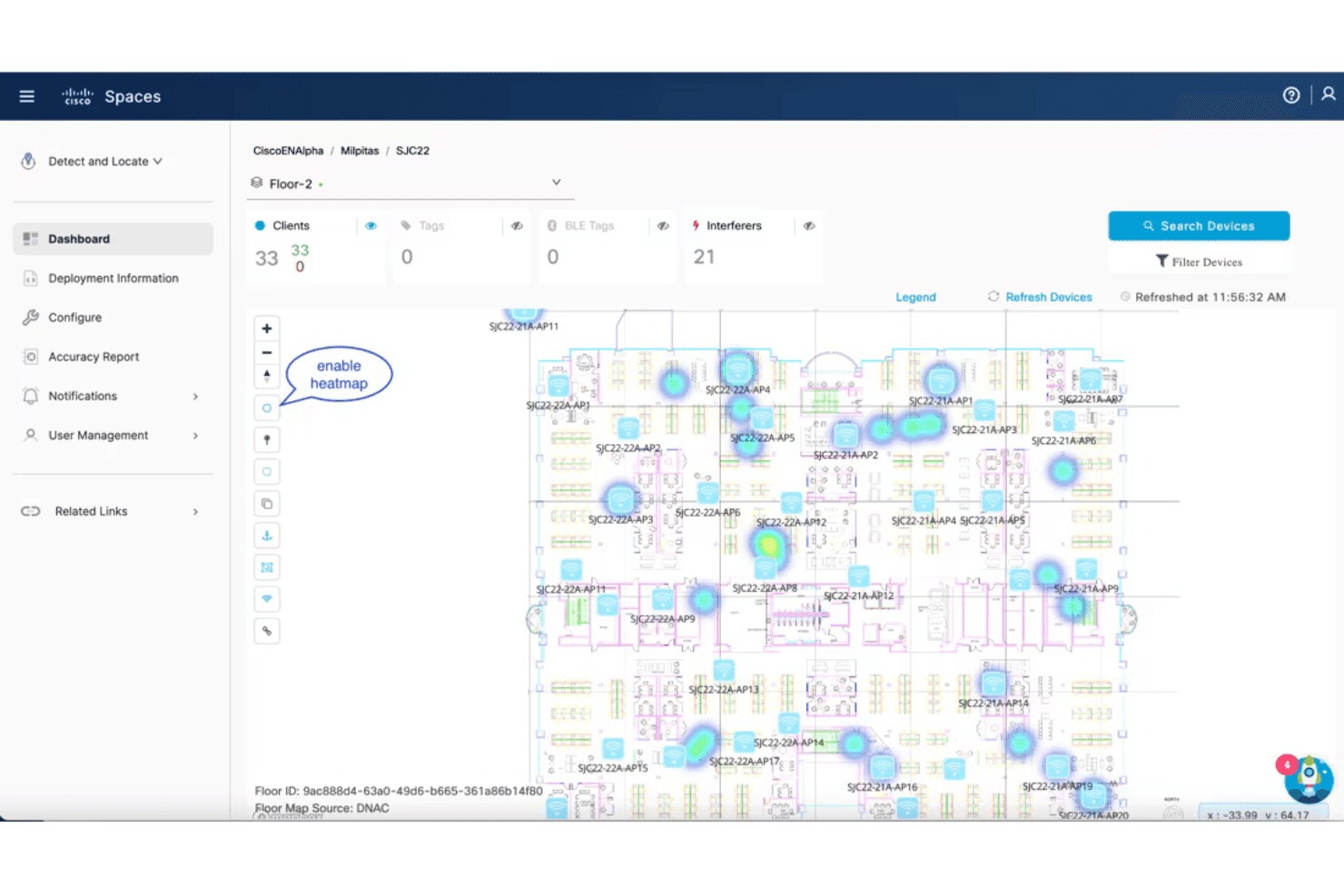
Cisco Spaces visualizes client locations with a live heatmap on floor plans. Cisco Spaces is a smart buildings platform with a dedicated guest Wi-Fi onboarding suite that covers captive portal design, multi-method data capture, visitor analytics, location-based personas, and rule-based engagement messaging across Cisco and Meraki network infrastructure.
Who Is Cisco Spaces Best For?
Cisco Spaces is the right fit for IT teams managing guest Wi-Fi across large, multi-location enterprises already running Cisco or Meraki network infrastructure.
Why I Picked Cisco Spaces
Cisco Spaces earns its spot on my shortlist because it gives IT teams running Cisco or Meraki networks a level of captive portal control I haven't seen matched elsewhere. I like that portals can serve different content based on SSID, visit frequency, customer tags, and time of day, so a returning loyalty member sees something different from a first-time visitor. The CSS editor, module-based builder, and contextual rule engine make portal customization genuinely deep, not just cosmetic.
Cisco Spaces Key Features
- Location Personas: Tags visitors by behavior, so you can segment and target distinct audience groups.
- Rule-based engagement messaging: Triggers SMS, email, or push notifications based on customer identity, location, visit duration, or loyalty status.
- Multi-location hierarchy: Organizes locations by organization, city, building, floor, and zone, letting you apply portal rules and content to specific groups or all locations at once.
- Scheduled data export: Sends raw visitor and engagement data to SFTP, Amazon S3, Azure Blob, Google Cloud Storage, or Box on hourly, daily, or weekly schedules.
Cisco Spaces Integrations
Cisco Spaces offers 55+ marketplace partner apps, including IPERA, VergeSense, AT&T, and T-Mobile. It also provides APIs and SDKs for custom connections.
Pros and Cons
Pros:
- Cross-location behavior reporting supports venue comparisons
- Contextual visitor segmentation supports targeted messaging
- Deep captive portal rule control
Cons:
- Network setup demands RADIUS expertise
- Cisco or Meraki hardware required
Learn more about Cisco Spaces: Best for restaurant guest data and retention
- Free demo available
- From $105/location/month (billed annually)
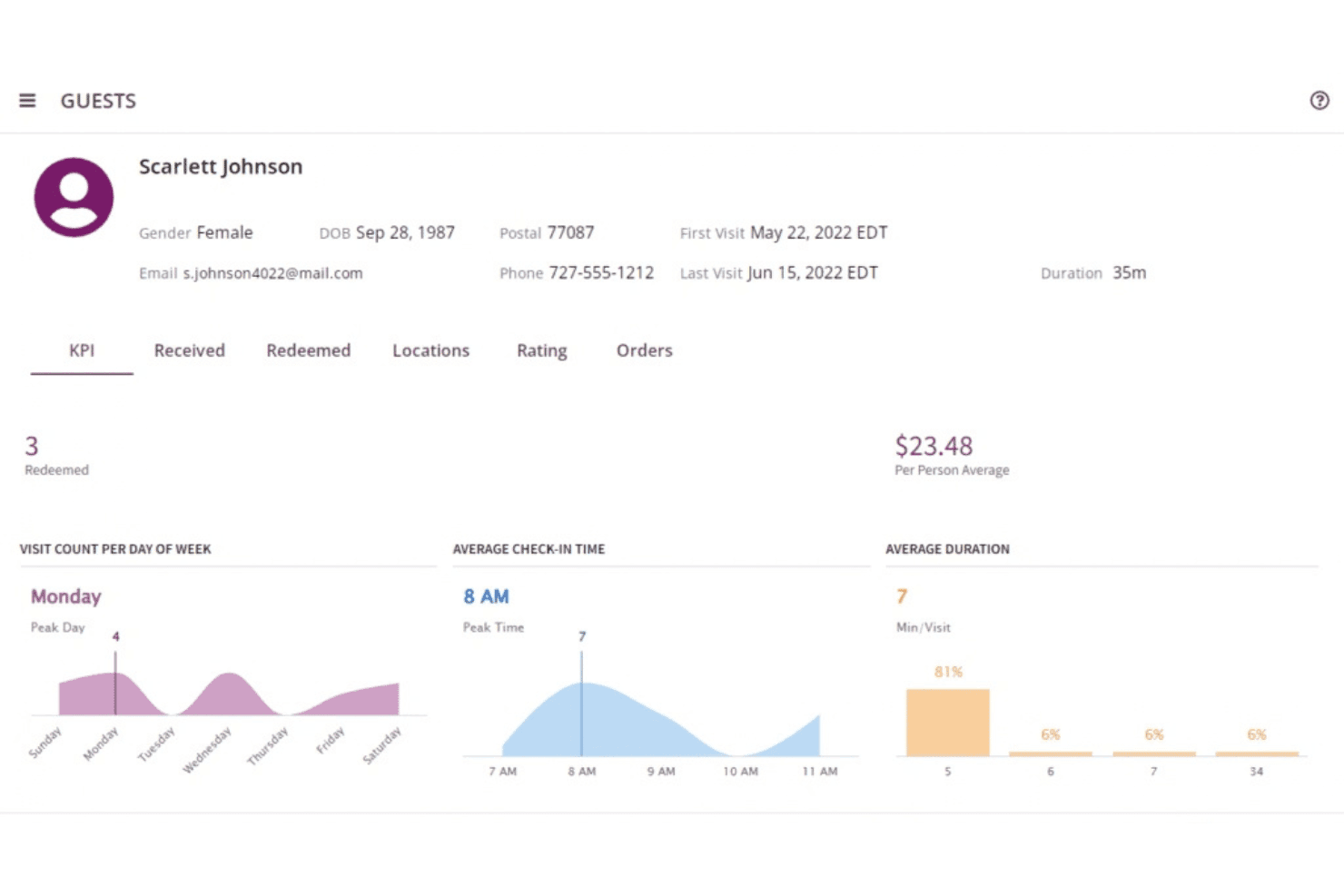
Bloom Intelligence surfaces guest behavior insights like visit trends and spend averages. Bloom Intelligence is a restaurant-centric WiFi marketing platform that collects guest data via branded captive portals and integrates it with POS, online ordering, and reservation systems for targeted campaigns.
Who Is Bloom Intelligence Best For?
Bloom Intelligence is built for restaurant groups with two or more locations that want to turn guest WiFi logins into email and SMS campaigns.
Why I Picked Bloom Intelligence
I picked Bloom Intelligence as one of the best because of how it ties guest WiFi logins directly to POS transaction data, giving restaurant groups a level of guest insight that generic WiFi tools can't match. I love that it uses anonymous device detection to track foot traffic before a guest even logs in, then builds a full profile once they do, capturing email, phone, birthday, and ZIP with real-time validation. Automated campaigns then trigger off actual visit behavior, like churn risk scores or loyalty milestones, rather than just open rates.
Bloom Intelligence Key Features
- Branded captive portal: Bloom's team builds a fully branded splash page with data-entry fields, social follow buttons, promotional content, and a post-login redirect to a URL of your choice.
- Progressive guest profiling: Guest records fill in across repeat visits and merge data from WiFi, POS, online orders, and reservations into a single profile.
- Command Center dashboard: Shows multi-location benchmarks, trends, dwell time, and cross-location visit comparisons.
- Post-visit survey tool: Automated surveys with 1–5 star scales trigger after a visit or online order, with results fed into a survey analytics dashboard.
Bloom Intelligence Integrations
Bloom offers integrations with Constant Contact, Datto, iContact, Mailchimp, Olo, OpenTable, Zapier, Yelp, and Revel Systems. A public API isn't documented.
Pros and Cons
Pros:
- Restaurant-specific portals support promotional campaigns
- Anonymous device detection reveals unlogged visits
- POS-linked guest profiles support targeted retention
Cons:
- No documented splash-page A/B testing
- Portal edits depend on Bloom staff
Learn more about Bloom Intelligence:
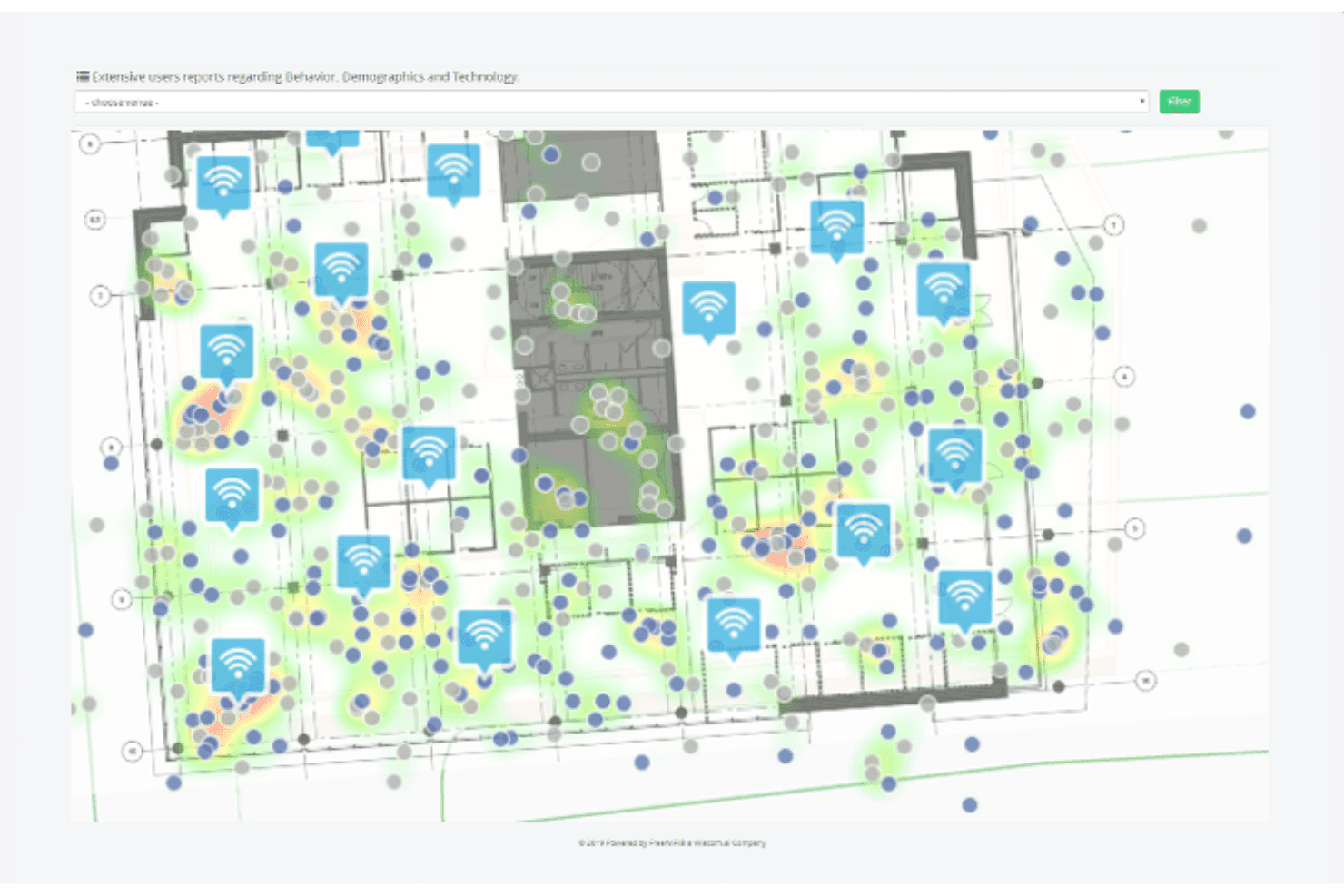
Wiacom maps Wi-Fi access points and visitor heat zones on a floor plan. Wiacom combines branded captive portal login, verified contact data capture, visitor wifi analytics, and multi-channel marketing automation.
Who Is Wiacom Best For?
Wiacom is a strong fit for hospitality and multi-location venue operators who need verified guest data capture from WiFi, with built-in email, SMS, and WhatsApp marketing tools.
Why I Picked Wiacom
I picked Wiacom as one of the best because it's built specifically around the hospitality data capture problem: getting verified guest contact details from WiFi without compromising GDPR consent. I love that it separates marketing opt-in from WiFi access entirely, so guests get online regardless, and you still build a clean, confirmed contact list. Its pre-arrival Guest Connect feature lets hotels capture guest profiles via QR code or URL before check-in, which I find genuinely useful for a hotel running pre-stay campaigns through OPERA.
Wiacom Key Features
- Multi-channel campaign triggers: Set automated messages across email, SMS, WhatsApp, and RCS based on first login, return visits, zone entry, or birthdays.
- Venue heatmaps and floor-plan zones: Map visitor presence, dwell time, and queue length against floor plans using sensors and access point data.
- Hardware-agnostic deployment: Connect Wiacom to your existing access points from Cisco Meraki, Aruba, Ruckus, UniFi, and a dozen other vendors without replacing hardware.
- Multi-tenant MSP management: Manage separate portals, branding, policies, and reporting for multiple clients or locations from a single centralized dashboard.
Wiacom Integrations
Wiacom integrates with Salesforce, HubSpot, Placewise, Dotdigital, CleverTap, Oracle Hospitality OPERA, Microsoft, and Google. It also provides REST APIs and webhooks for custom integrations.
Pros and Cons
Pros:
- Hospitality workflows cover pre-arrival customer engagement
- Consent remains separate from WiFi access
- Verified contact capture supports cleaner audiences
Cons:
- Capabilities vary by hardware and licensing
- Independent user reviews remain unavailable
Learn more about Wiacom: Best for agencies reselling white-label data
- 14-day free trial and free demo available
- From $199/month
Visit WebsiteCustomer Rating:4.3/5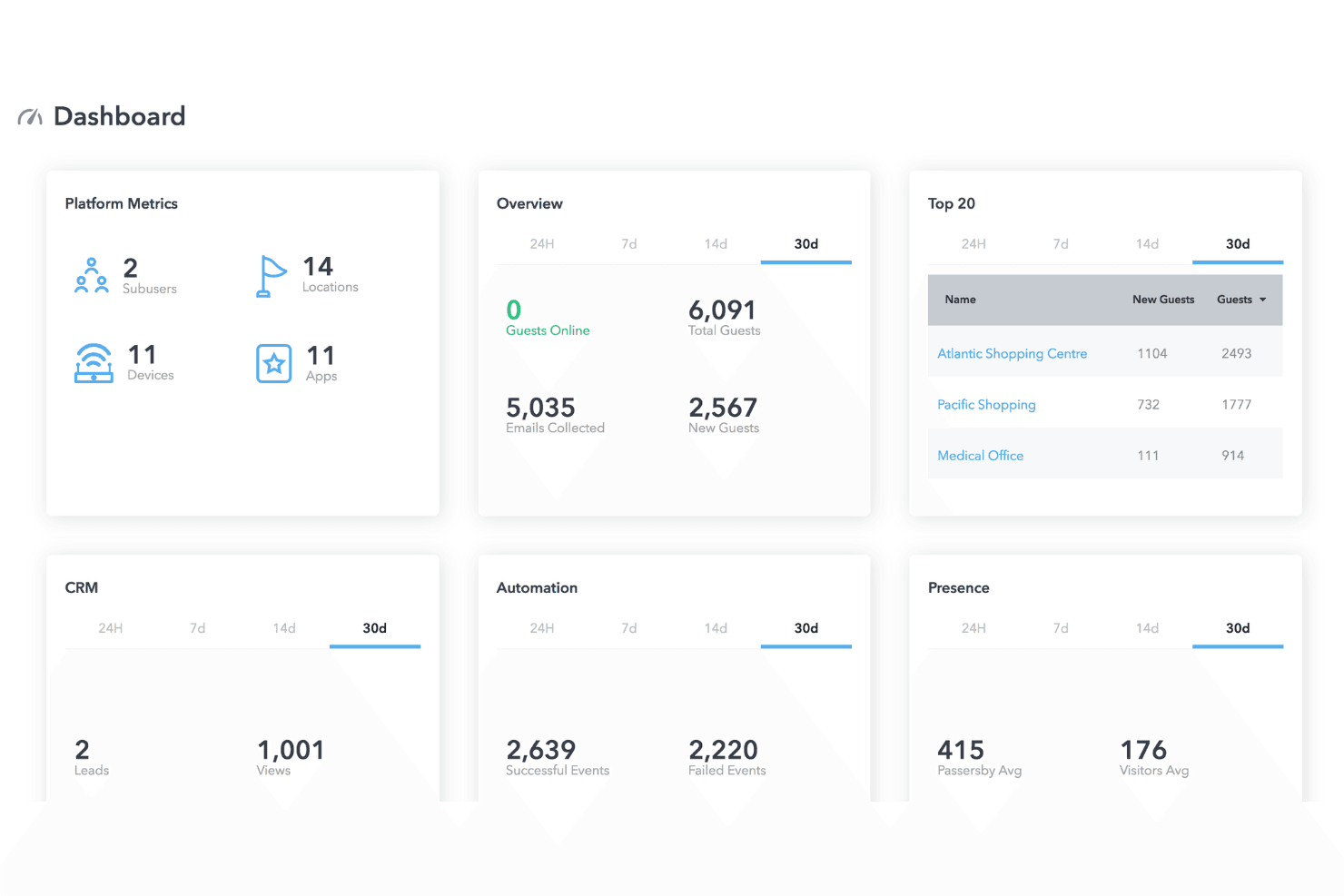
MyWiFi Networks centralizes guest WiFi analytics across all locations in one dashboard. MyWiFi Networks is a white-label WiFi marketing platform that offers captive portal design, guest data capture, visitor analytics, and multi-channel marketing automation.
Who Is MyWiFi Networks Best For?
MyWiFi Networks is built for agencies and MSPs that manage guest WiFi across multiple client locations and want to resell a fully white-labeled platform under their own brand.
Why I Picked MyWiFi Networks
MyWiFi Networks earns its spot on my shortlist because the entire platform is architected for resellers who want to sell white-label WiFi marketing under their own brand. I love that agencies get a fully unbranded dashboard on a custom domain, with no MyWiFi watermark on client portals, and the ability to set their own prices at a 3–5× markup. The multi-tenant setup keeps each client's data fully separated, and the bulk location management scales from 5 to 500+ locations without requiring individual configuration for each site.
MyWiFi Networks Key Features
- Scheduled white-label reports: Automatically send branded monthly analytics reports to clients, covering connections, demographics, and campaign performance.
- Built-in ad server: Sell ad space on guest portals through pre-roll video, HTML5 interstitials, and banners, with targeting by region, venue type, and time of day.
- Presence analytics: Track heatmaps, visit funnels, dwell time, and multi-visit guest journeys across locations.
- Cloud RADIUS authentication: Authenticate guests through a cloud-managed RADIUS server without requiring on-premises infrastructure changes.
MyWiFi Networks Integrations
MyWiFi offers integration with HubSpot, Shopify, Toast, Square, Clover, Google Analytics, Stripe, and Zapier. It also offers a REST API and webhooks for custom integrations.
Pros and Cons
Pros:
- Supports GDPR erasure and data residency controls
- Presence analytics include heatmaps and dwell time
- Captures profiles through seven login methods
Cons:
- Hardware support claims vary across pages
- Occasional connection failures
Learn more about MyWiFi Networks:
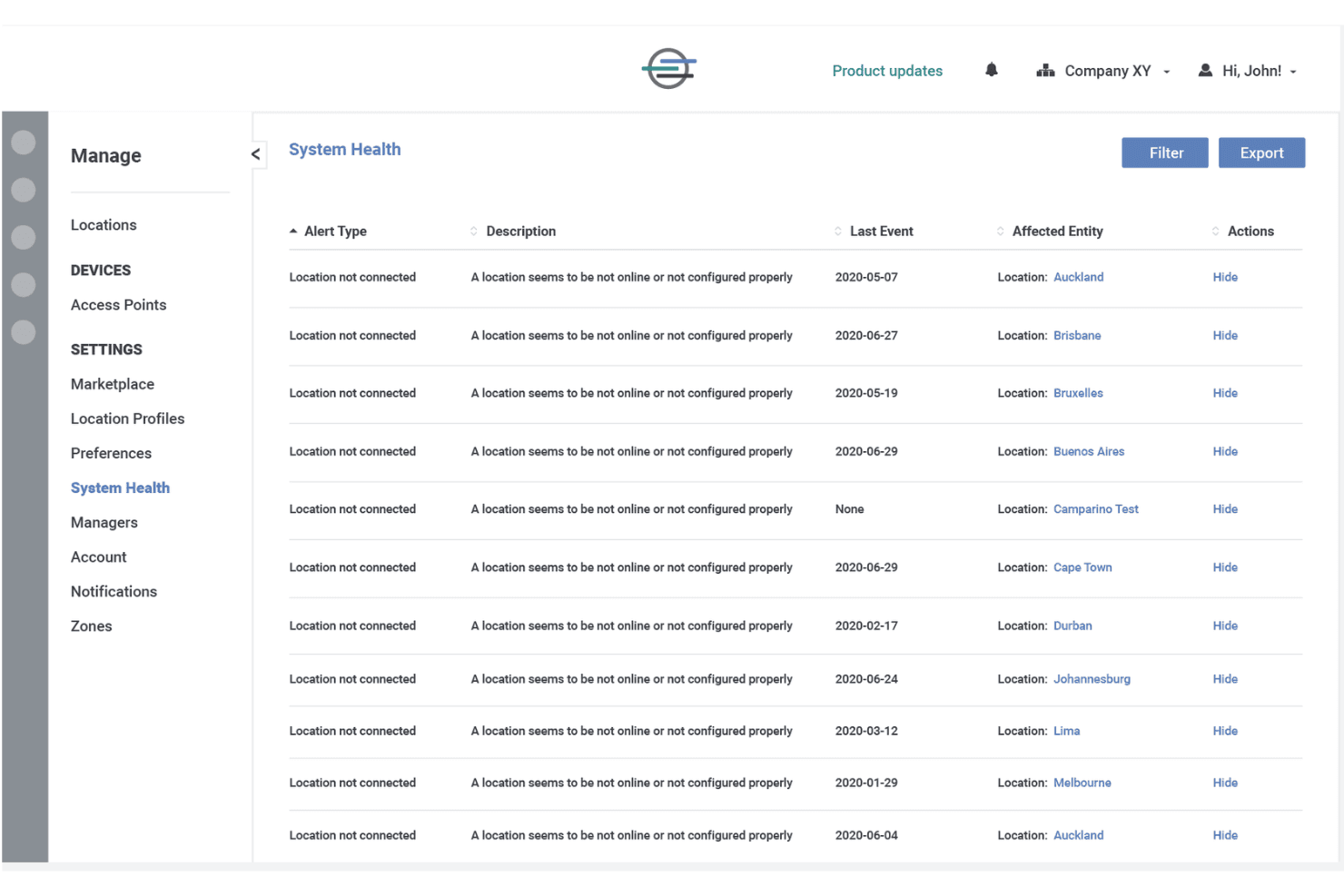
Cloud4Wi surfaces location connectivity issues in a system health dashboard. Cloud4Wi is a guest WiFi marketing platform that combines branded captive portal management, customer data capture, visitor analytics, and segmentation.
Who Is Cloud4Wi Best For?
Cloud4Wi is a strong fit for retail and hospitality brands that need enterprise-grade WiFi management paired with CRM-connected guest data collection.
Why I Picked Cloud4Wi
I picked Cloud4Wi as one of the best because of how well it closes the loop between WiFi sign-ins and your CRM. When a guest connects at any of your locations, Cloud4Wi captures their profile and pushes it directly to platforms like Salesforce, HubSpot, or Dynamics 365 through certified connectors. I especially like the Segment Builder, which lets you build dynamic audiences from visit behavior and demographics, so your CRM isn't just receiving raw contacts but properly segmented ones.
Cloud4Wi Key Features
- No-code captive portal editor: Build branded, multilingual login pages with multi-step forms, surveys, coupons, and calls to action.
- Real-time event triggers: Automatically send emails or SMS marketing messages when a guest arrives, dwells, or leaves a location using behavioral triggers.
- Passpoint and OpenRoaming support: Guests who connect once download a profile that reconnects them automatically at any location, no login screen required on return visits.
- Role-based multi-organization access: Assign permissions across locations, manage multiple client accounts from one dashboard, and apply bulk configuration changes using location tags.
Cloud4Wi Integrations
Cloud4Wi integrates with HubSpot, Salesforce, Microsoft Dynamics 365, Mapp Cloud, Mailchimp, and Constant Contact. It also supports APIs, and webhooks for custom connections.
Pros and Cons
Pros:
- Manages permissions across multi-location deployments
- Connects visitor behavior with segmented marketing campaigns
- Captures rich guest profiles through customizable portals
Cons:
- Email campaigns have monthly contact limits
- Network configuration requires technical implementation
Learn more about Cloud4Wi: Best for enterprise venue and footfall analytics
- Free demo available
- Pricing upon request
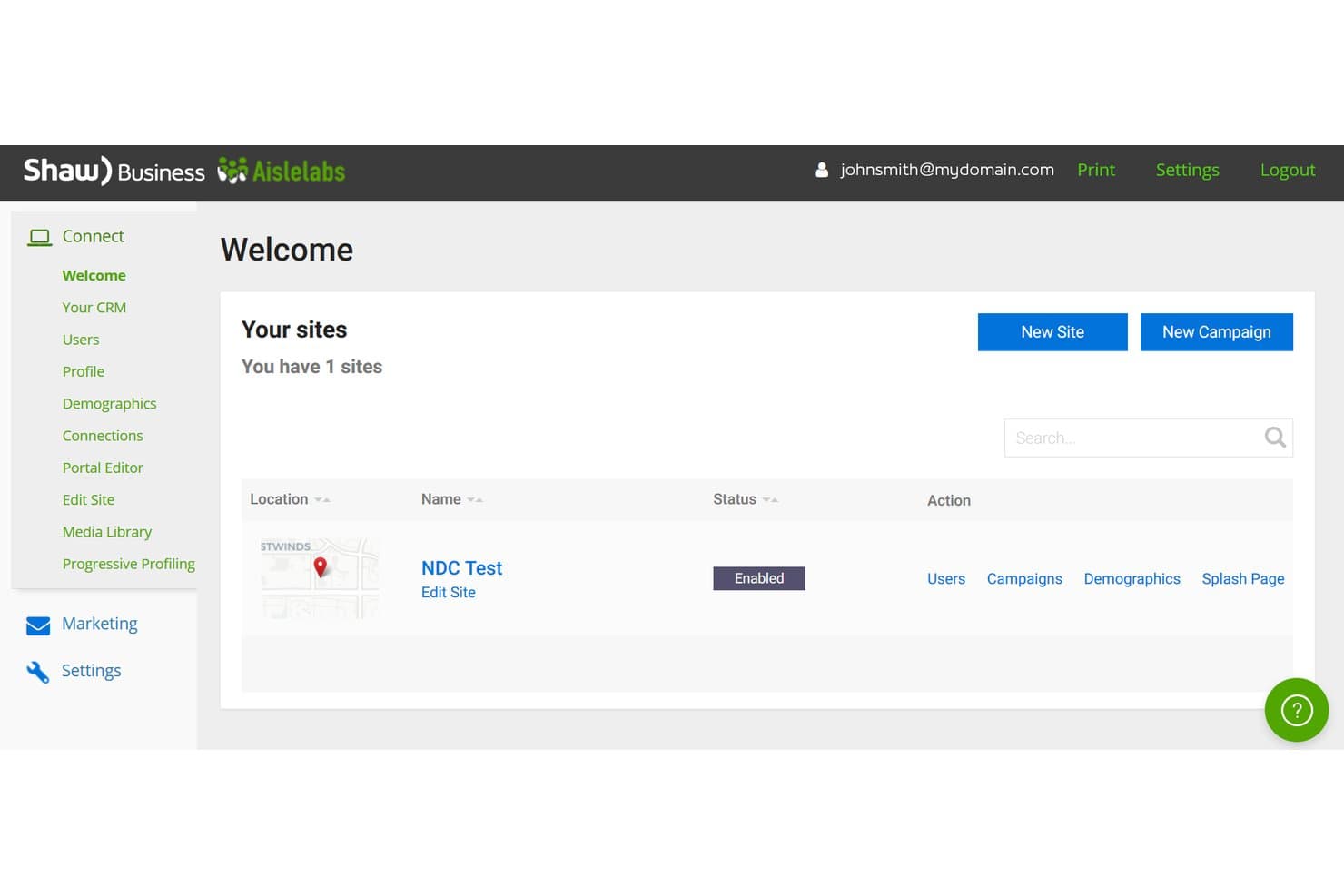
Aislelabs lets users manage multiple Wi-Fi sites from one dashboard. Aislelabs combines guest captive portal management, visit-triggered email and SMS marketing campaigns, and passive foot traffic analytics with zone-level heatmapping across multiple locations.
Who Is Aislelabs Best For?
Aislelabs is a strong fit for multi-location venue operators—malls, airports, stadiums, and hotels—that need both guest WiFi data capture and passive foot traffic analytics in one platform.
Why I Picked Aislelabs
I picked Aislelabs as one of the best because its passive foot traffic analytics go well beyond what typical WiFi marketing platforms offer. Flow AI counts every device in a venue, not just guests who log in, and breaks that data down by zone, dwell time, and shopper journey across multiple sites simultaneously. I also love how heatmapping and multi-site benchmarking work together, so a mall operator can compare zone performance across ten locations from a single portfolio dashboard.
Aislelabs Key Features
- Social login and progressive profiling: Let guests authenticate via Google or Facebook, then collect additional profile data incrementally across return visits.
- Visit-triggered campaign journeys: Build decision-tree email and SMS sequences that branch based on visit frequency, lapsed time, or guest profile data.
- Smart coupons: Issue trackable coupons through campaigns and monitor redemptions back to individual guest visits.
- Review generation workflows: Route satisfied guests directly to online review platforms like Google or Yelp, while flagging negative feedback internally before it goes public.
Aislelabs Integrations
Aislelabs integrates with Axper, Beefree, Cursor, Google Analytics, Mailchimp, Stripe, and Capillary. It also provides an API and MCP server for custom connections.
Pros and Cons
Pros:
- Visit-triggered campaigns connect coupons to returns
- Zone heatmaps reveal dwell time and movement
- Passive footfall counts include non-login visitors
Cons:
- Initial setup feels complex for smaller teams
- Dashboard customization remains limited for some users
Learn more about Aislelabs: Best for marketing automation on a budget
- Free demo + 30-day free trial available
- From CAD $34.99/month (billed annually)
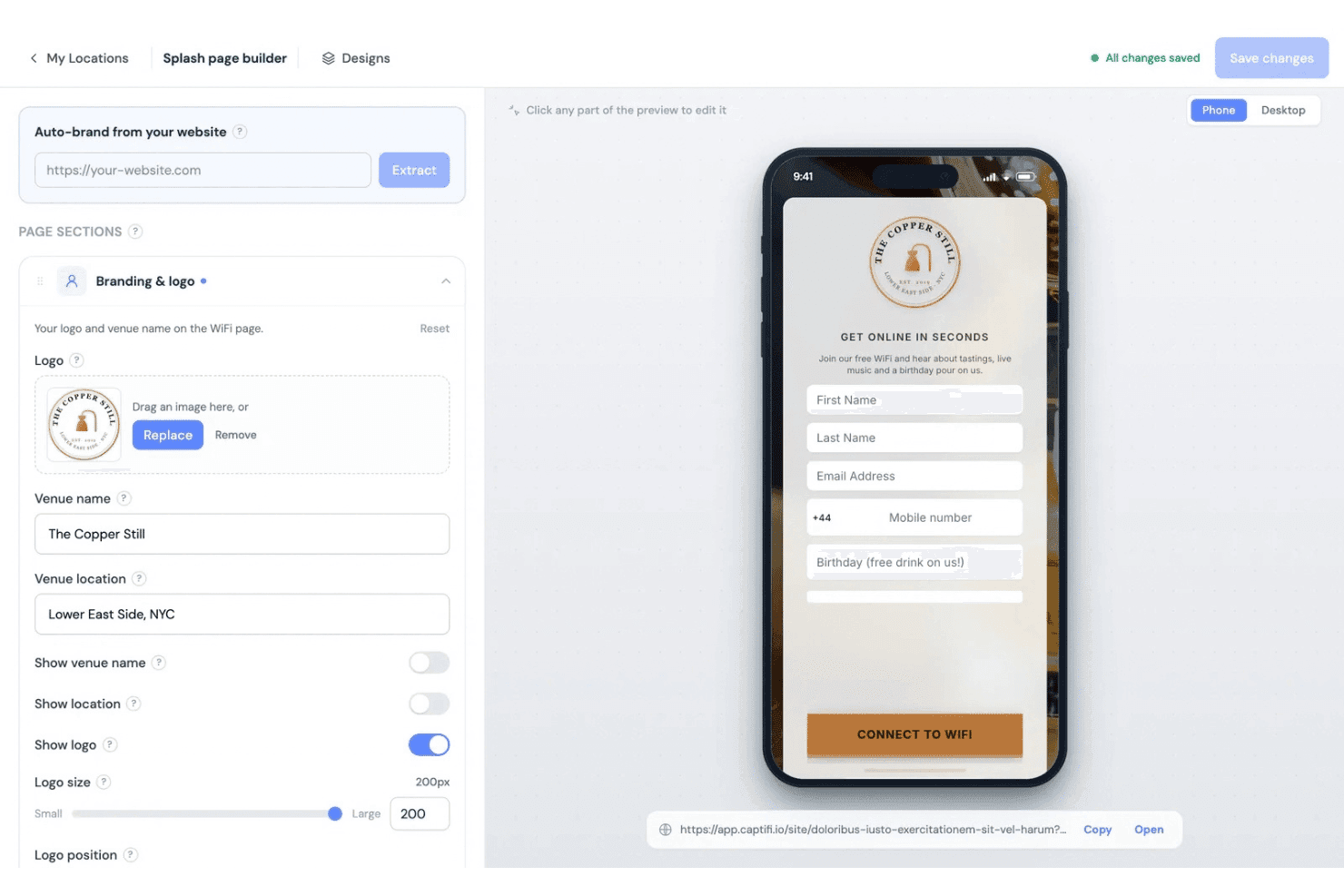
CaptiFi lets users customize branded WiFi splash pages for guests. CaptiFi is a guest WiFi marketing platform with a no-code branded captive portal, automated email and SMS campaigns, review generation, visitor analytics, and native POS integrations for hospitality and small venues.
Who Is CaptiFi Best For?
CaptiFi is a strong fit for small hospitality venues and independent restaurant operators who need guest WiFi marketing without a big budget.
Why I Picked CaptiFi
I picked CaptiFi as one of the best because it packs a surprisingly deep automation engine into a price point that most small venues can actually afford. The Pro-tier workflow builder gives you around 30 trigger types, branching logic, and A/B split steps, so you can build multi-step post-visit sequences that rival what larger platforms charge far more for. I also find the built-in review routing genuinely useful: guests who rate four stars or above get sent straight to Google or Tripadvisor, while lower ratings go to a private form first.
CaptiFi Key Features
- No-code splash page builder: Design branded WiFi login pages with drag-and-drop tools, custom CSS support, and automatic language detection across English, French, and Spanish.
- POS spend integration: Connect Toast or Square to match guest purchase data to WiFi profiles, giving you a spend timeline for each visitor.
- Multi-location management: Manage all venues from one login with a shared guest database, per-venue customization, and staff access controls scoped to individual locations.
- Footfall analytics dashboard: Track busiest hours, dwell time, visit-length bands, and device mix, with a floor-plan map showing live guest counts by access-point zone.
CaptiFi Integrations
CaptiFi integrates with Toast, Square, HubSpot, Klaviyo, Zapier, Salesforce, and Mailchimp. A REST API and webhooks are available for custom connections.
Pros and Cons
Pros:
- Consent records support privacy-focused data collection
- Multi-step workflows support branching and testing
- Automated review requests route positive ratings publicly
Cons:
- Heatmaps show access points, not room locations
- Guest social login remains unavailable
Learn more about CaptiFi:
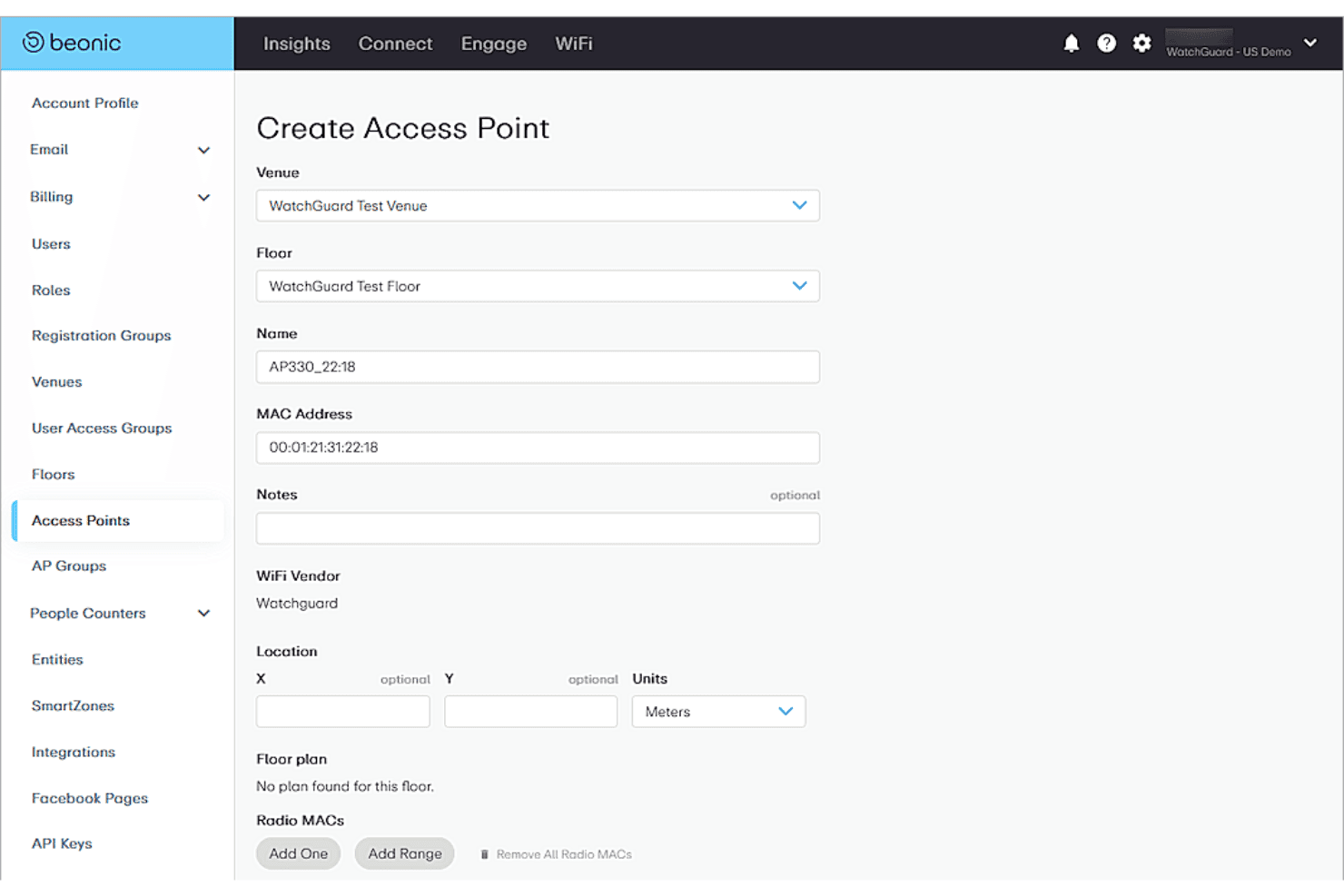
Beonic lets users register and configure WiFi access points by venue. Beonic is an AI-powered wifi marketing platform that combines captive portal management, customer data capture, visitor analytics, and multichannel campaign tools across large-scale venue networks.
Who Is Beonic Best For?
Beonic suits multi-location operations directors and IT administrators at large venues—airports, retail chains, and stadiums—that need enterprise-grade visitor analytics with built-in ISO 27001 compliance.
Why I Picked Beonic
Beonic earns its spot on my shortlist because its ISO 27001 certification and in-region data hosting make it one of the few wifi marketing platforms I'd confidently recommend to large venue operators where compliance isn't optional. I'm particularly impressed by how the platform combines captive portal data capture with multi-sensor analytics, pulling together WiFi, LiDAR, and people counters into unified foot traffic heatmaps across hundreds of locations. The progressive profiling feature is also useful: returning visitors see one new question per login, so you build richer customer profiles over time without friction at sign-in.
Beonic Key Features
- Drag-and-drop portal builder: Build branded captive portal screens for new users, returning users, and landing pages using a widget-based editor with templates, multi-language support, and age gating.
- AI audience segmentation: Segment visitors by behaviour, demographics, psychographics, geography, and socioeconomics to target campaigns across email and SMS channels.
- Multi-sensor foot traffic analytics: Combine WiFi, LiDAR, camera, and people counter data into unified dashboards that track dwell time, visitor flow, and venue benchmarking across locations.
- Triggered campaign automation: Set up automated campaigns that fire based on user actions or location signals, including re-engagement sequences, entry and exit surveys, and proximity offers.
Beonic Integrations
Beonic has marketplace integrations with Cisco and WatchGuard Cloud, plus API connectivity for CRM integrations. It claims 200+ integrations, but doesn't publish a directory or name specific CRM, email, or POS connectors.
Pros and Cons
Pros:
- Progressive profiling expands visitor records gradually
- Multi-sensor heatmaps connect visits with locations
- Flexible portal configuration earned user praise
Cons:
- Limited independent reviews inform buyer confidence
- Guest WiFi connection takes several steps
Learn more about Beonic:
Alte software-uri de marketing WiFi
Iată câteva opțiuni suplimentare care nu au ajuns pe lista mea principală, dar merită totuși verificate:
- 11GoZoneBest for venues turning guest WiFi into repeat visits
- 12SpotipoBest for hardware-agnostic guest capture
- 13SpectrioBest for WiFi marketing tied to in-store media
- 14WaverBest for on-premise guest capture
- 15SendSquaredBest for lodging operators linking WiFi to PMS data
- 16AdentroBest for walk-in proof via paid ads
- 17StayFiBest for STR guest data capture and email automation
- 18MyPlaceBest for automating review requests
- 19BeamboxBest for automating post-visit review requests
Related Reviews
How I Evaluate WiFi Marketing Software
I split my evaluation into three parts. First, core functionality: the tool must serve a branded login portal and capture consented visitor profiles—this carries the most weight. Second, standout features like social login capture. Third, I consider pricing value and onboarding support.
Core Functionality (Table Stakes for This List)
When I'm selecting tools for my list, I score each one on a scale from 0 (does not offer the functionality) to 5 (excels in this area) for each core functionality listed below. I then convert the total into a percentage to help assess each tool's overall fit, with extra weight on any functionalities I've deemed essential.
- Guest WiFi Captive Portal (Essential): I evaluate the splash page builder for branding depth, layout flexibility, and whether it supports dynamic content like rotating promotions or localized messaging.
- Customer Data Capture (Essential): Each tool needs to collect more than just an email. I look for social login options, custom form fields, and profile enrichment across repeat visits and locations.
- Visitor Analytics and Reporting: Dashboards should break down new versus returning visitors, dwell time, and visit frequency. I check whether you can filter by location and export data for deeper analysis.
- Marketing Automation Tools: I look for triggered campaigns tied to WiFi activity, like a welcome email after a first visit or a win-back message after a period of absence, with audience segmentation built in.
- Multi-Location Management: Retail and hospitality teams often run dozens of sites. I check for centralized campaign deployment, location-level customization, and role-based access controls for regional managers.
- Third-Party Integrations: The captured data needs to flow somewhere useful. I evaluate native connections to CRM, email, POS, and loyalty platforms, plus whether an open API is available for custom workflows.
Once I have a list of tools that meet the criteria, I consider what sets each platform apart.
Differentiating Factors (What Sets Vendors Apart)
Here's how I compare and contrast different vendors:
Standout Features
Social login capture is a big one. When a guest signs in through Facebook or Google, the platform pulls in profile details that a basic email form never would—giving your CRM richer segments from day one. I also look at whether a tool can trigger review requests after a visit, since platforms like GoZone and Bloom Intelligence tie post-visit prompts directly to Google or Yelp. For multi-location brands, white-label reseller mode matters; agencies need full rebranding control across client accounts. Finally, hardware-agnostic deployment saves real budget when you're rolling out across sites with mixed access point vendors.
Beyond Features
I check whether each platform supports GDPR and CCPA consent flows out of the box, including audit trails and lawful-basis documentation. A franchise rolling out across dozens of locations also needs per-site licensing that scales without ballooning costs, so I evaluate pricing models and bulk-deployment tools. Finally, I look at how well reporting ties WiFi sign-ins to revenue signals like repeat visits or redeemed promotions, since vanity metrics won't justify the spend.
Cum să alegi un software de marketing WiFi
Alege platforma care oferă echipei tale un control verificabil asupra consimțământului, datelor despre clienți, implementării și administrării la nivel de locație.
| Dacă prioritatea ta este… | Caută… |
|---|---|
| Dacă prioritatea ta este…Consimțământul și proprietatea asupra datelor | Caută…Un exemplu de înregistrare a consimțământului, o politică de păstrare și un proces de export |
| Dacă prioritatea ta este…Transferul către CRM sau programul de fidelizare | Caută…O documentație privind maparea câmpurilor și un transfer de date de test |
| Dacă prioritatea ta este…Implementarea în mai multe locații | Caută…Permisiuni pentru locații, controale centralizate și o listă de verificare pentru implementare |
| Dacă prioritatea ta este…Guvernanța campaniilor | Caută…Fluxuri de aprobare, reguli pentru audiențe și un jurnal de activitate |
Cum să îți evaluezi lista scurtă
- Solicită documentația privind confidențialitatea: Cere acordul privind prelucrarea datelor, capturi de ecran ale fluxului de consimțământ, calendarul de păstrare și procedura de ștergere în termen de cinci zile lucrătoare.
- Testează portabilitatea datelor: Efectuează un test cu cinci profiluri de test, apoi solicită un export într-un format care poate fi citit automat și care conține starea consimțământului, marcajele temporale și identificatorii locațiilor.
- Verifică transferurile între sisteme: Oferă furnizorului trei câmpuri de exemplu și solicită confirmarea scrisă a destinației fiecărui câmp, inclusiv a eventualelor limite ale API-ului sau conectorului.
- Testează controalele pentru locații: În timpul unei perioade de testare de 14 zile, creează două locații, atribuie permisiuni separate, publică o campanie aprobată și verifică jurnalul de audit.
- Alege compromisul operațional: Decide dacă preferi o platformă specializată, cu fluxuri de lucru WiFi mai complexe, sau un sistem mai amplu de gestionare a datelor despre clienți, cu mai puține controale specifice locațiilor.
Ce este software-ul de marketing WiFi?
Software-ul de marketing prin WiFi transformă accesul oaspeților la internet într-un canal pentru colectarea datelor despre clienți cu consimțământul acestora, marketing și analize de localizare. De obicei, acesta oferă un portal captiv personalizat cu brandul, formulare de autentificare personalizate, rapoarte despre vizitatori, segmentarea publicului și campanii automatizate. Echipele din retail și ospitalitate îl folosesc pentru a asocia vizitele în locație cu profilurile clienților, promoțiile, programele de loialitate și interacțiunile repetate, gestionând în același timp consimțământul și confidențialitatea datelor.
Funcții
Iată principalele funcții pe care le caut la orice software excelent de marketing prin WiFi:
- Portal captiv: Creează o pagină de autentificare personalizată cu brandul, pe care oaspeții o văd înainte de a accesa internetul. Puteți adăuga sigle, culori, promoții, termeni și solicitări de consimțământ în procesul de conectare.
- Colectarea datelor despre clienți: Colectează detalii de profil aprobate, precum adrese de e-mail, nume, preferințe și informații despre vizite. Câmpurile personalizate și opțiunile de autentificare prin rețele sociale pot oferi înregistrări mai utile despre clienți decât un formular simplu de e-mail.
- Gestionarea consimțământului: Înregistrează permisiunile de marketing, notificările de confidențialitate, marcajele temporale și detaliile acceptării în timpul autentificării. Acest lucru vă ajută echipa să gestioneze datele clienților în conformitate cu cerințele aplicabile privind confidențialitatea.
- Analiza vizitatorilor: Oferă rapoarte despre vizitatorii noi și cei care revin, frecvența vizitelor, durata șederii și activitatea de conectare. Filtrele de localizare și exporturile vă ajută să comparați locațiile și să asociați vizitele cu performanța campaniilor.
- Automatizarea marketingului: Trimite e-mailuri sau mesaje declanșate de activitatea WiFi, cum ar fi un mesaj de întâmpinare după prima vizită sau o campanie de recâștigare după o perioadă de absență.
- Segmentarea publicului: Grupează vizitatorii folosind detalii precum locația, istoricul vizitelor, atributele profilului și interacțiunea cu campaniile. Echipa dumneavoastră poate astfel să direcționeze ofertele către grupuri specifice de clienți, în loc să trimită fiecare mesaj tuturor.
- Gestionarea mai multor locații: Permite echipelor centrale să gestioneze mai multe locații dintr-un singur cont, păstrând în același timp setările la nivel de locație. Printre comenzile utile se numără permisiunile separate, personalizarea locală a brandului și publicarea centralizată a campaniilor.
- Integrări cu terți: Conectează datele WiFi cu sistemele de gestionare a relațiilor cu clienții, marketing prin e-mail, puncte de vânzare, loialitate și analiză. Asocierea câmpurilor, webhook-urile sau un API pot trimite datele despre clienți și vizite în fluxurile de lucru existente.
- Instrumente pentru campanii și promoții: Adaugă oferte, sondaje, concursuri sau mesaje promoționale în experiența de autentificare. Regulile pot afișa conținut diferit în funcție de locație, public sau comportamentul vizitatorilor.
Avantaje
Iată câteva avantaje comune pe care le puteți aștepta de la utilizarea software-ului de marketing prin WiFi:
- Date despre clienți colectate cu consimțământ: Portalurile captive personalizate cu brandul colectează detalii aprobate, precum adrese de e-mail, preferințe, istoricul vizitelor și permisiuni de marketing.
- Campanii mai relevante: Segmentarea publicului și declanșatoarele bazate pe activitate vă permit să trimiteți oferte în funcție de locație, frecvența vizitelor sau comportamentul clienților.
- Informații mai clare despre clienți: Tablourile de bord analitice afișează vizitatorii noi și cei care revin, durata șederii, activitatea de conectare și frecvența vizitelor în diferite locații.
- Fluxuri de lucru de marketing conectate: Integrările cu platformele de gestionare a relațiilor cu clienții, e-mail, puncte de vânzare, loialitate și analiză transferă datele WiFi în fluxurile de lucru existente pentru clienți.
- Gestionare consecventă a mai multor locații: Comenzile centralizate permit utilizarea campaniilor comune, personalizarea locală a brandului, gestionarea permisiunilor pentru locații și administrarea pe bază de roluri în toate locațiile.
- Experiențe personalizate pentru clienți: Paginile de întâmpinare personalizate pot afișa sigle, culori, promoții, sondaje, termeni și solicitări de consimțământ înainte de accesul la internet.
- Supraveghere mai bună a confidențialității: Înregistrările consimțământului, marcajele temporale, notificările de confidențialitate, exporturile și procesele de ștergere oferă echipei dumneavoastră un control mai clar asupra datelor clienților.
Costuri și prețuri
Costurile variază în funcție de funcții, numărul de locații, dimensiunea echipei, suplimente și alți factori. Iată intervalele de prețuri la care vă puteți aștepta de obicei de la platformele de marketing prin WiFi:
Tabel comparativ al planurilor pentru software-ul de marketing prin WiFi
| Tipul planului | Preț mediu | Funcții comune |
|---|---|---|
| Tipul planuluiPlan gratuit | Preț mediu$0/lună | Funcții comunePortal captiv de bază, analize limitate ale vizitatorilor, asistență prin e-mail și o singură locație. |
| Tipul planuluiPlan personal | Preț mediu$10–$30/locație/lună | Funcții comunePortal captiv personalizat cu brandul, colectarea datelor despre clienți, raportare de bază, integrări de e-mail și una până la trei locații. |
| Tipul planuluiPlan pentru companii | Preț mediu$50–$150/locație/lună | Funcții comuneFluxuri de autentificare personalizate, automatizarea marketingului, segmentarea publicului, gestionarea mai multor locații și integrări cu sisteme de gestionare a relațiilor cu clienții sau puncte de vânzare. |
| Tipul planuluiPlan pentru întreprinderi | Preț mediu$200–$1,000+/locație/lună | Funcții comuneGestionarea avansată a consimțământului, integrări personalizate, acces pe bază de roluri, asistență dedicată și locații nelimitate sau cu volum mare. |
Întrebări frecvente
Câteva răspunsuri la întrebările frecvente despre instrumentele de marketing prin WiFi:
Funcționează software-ul de marketing prin WiFi cu hardware-ul de rețea existent?
Da, multe platforme acceptă punctele de acces existente, însă compatibilitatea diferă în funcție de furnizor. Verificați dacă software-ul acceptă controlerul de rețea, punctele de acces gestionate în cloud și metoda de autentificare. Implementarea independentă de hardware poate reduce costurile de înlocuire în mai multe locații. Cereți furnizorilor o listă de compatibilitate înainte de a vă înscrie. De asemenea, confirmați cine se ocupă de configurarea rețelei, problemele de firmware și depanarea accesului pentru oaspeți. Testați mai întâi o singură locație, mai ales dacă magazinele dumneavoastră folosesc hardware diferit de restaurante, birouri sau alte spații.
Cum colectez date despre clienți fără să încalc regulile de confidențialitate?
Utilizați un flux de consimțământ care separă clar accesul la internet de permisiunile opționale pentru marketing. Portalul dumneavoastră ar trebui să explice ce date colectați, de ce le colectați și cum își pot retrage clienții consimțământul. Păstrați înregistrări ale notificării afișate, permisiunii selectate, datei și orei și locației. Înainte de lansare, analizați acordul de prelucrare a datelor al furnizorului, politica de păstrare, procesul de ștergere și formatul de export. Echipa juridică sau de confidențialitate ar trebui să aprobe formularea pentru fiecare piață în care operați.
Poate software-ul de marketing prin WiFi să trimită date către CRM-ul sau platforma mea de e-mail?
Da, multe platforme se conectează la sisteme CRM, de marketing prin e-mail, de fidelizare, POS și de analiză. Confirmați conectorul exact, câmpurile disponibile, direcția sincronizării și frecvența actualizărilor. Un furnizor poate accepta o integrare fără să accepte fiecare atribut de profil de care aveți nevoie. Solicitați un document de mapare a câmpurilor înainte de achiziție. Apoi testați mai multe înregistrări, inclusiv starea consimțământului, locația, data vizitei și modificările opțiunii de retragere. Acest test poate evidenția înregistrări duplicate sau permisiuni lipsă înainte ca acestea să ajungă în baza de date de producție.
Cum ar trebui să testez software-ul de marketing prin WiFi înainte de a-l implementa în mai multe locații?
Începeți cu o perioadă de testare într-una sau două locații reprezentative. Creați permisiuni separate pentru utilizatori, publicați un portal de testare și conectați cinci profiluri de testare. Verificați fluxul de autentificare pe telefoane, tablete și în diferite condiții de rețea. Analizați rapoartele despre vizitatori, înregistrările consimțământului, exporturile, declanșatoarele campaniilor și actualizările integrărilor. Cereți managerilor locațiilor să îndeplinească sarcinile obișnuite fără sprijin central. Păstrați o listă de verificare a implementării care să acopere configurarea rețelei, aprobarea portalului, instruirea personalului, notificările privind confidențialitatea și pașii de revenire.