

Programul pentru reconcilierea plăților din comerțul electronic potrivește automat tranzacțiile din Shopify, Stripe și contul bancar — astfel încât nu mai trebuie să cauți prin foi de calcul plăți care lipsesc.
Aliniază în timp real mai multe canale de vânzări, monede și gateway-uri, semnalează orice neconcordanțe și îți economisește ore întregi de stres cauzat de întrebarea „S-a decontat într-adevăr?”
Am experiență directă în domeniu — am gestionat operațiuni de retail, depozite și expedieri internaționale — așa că știu că nu este doar muncă de rutină, ci un risc.
În acest ghid, îți voi prezenta cele mai bune platforme pentru fluxuri de lucru automatizate, raportare precisă și închideri de lună fără efort. Ia-ți cafeaua — hai să-ți punem fluxul de numerar în ordine.
Why Trust Our Software Recommendations
6,700+
Reviews
20
Industry experts
16+
Evaluation factors
14
Years
Our team has been testing and reviewing software since 2012. As retail leaders ourselves, we know how difficult—and important—it is to choose the right software.
For this guide, we evaluated tools using hands-on testing and independent research, scoring tools using our selection criteria.
Our reviews reflect our independent judgment—not a sales pitch.
Tabel comparativ pentru programele de reconciliere a plăților din comerțul electronic
Tabelul de mai jos compară prețurile și cazurile de utilizare ideale pentru selecțiile mele de top de programe pentru reconcilierea plăților din comerțul electronic.
Score legend (out of 5)
- Excellent4.5–5
- Good4–4.4
- Average3–3.9
- Below average2–2.9
- Poor1–1.9
Sorted by: Default
| Tool | Starting Price | Website | |||||||
|---|---|---|---|---|---|---|---|---|---|
Best for accounting integrations | 4.5 out of 5 | 5 | 5 | 5 | 4 | 5 | 3 | $52/month 15-day free trial | Website |
Best for financial teams | Not rated | 5 | 1 | Not rated | 5 | Not rated | 4 | Pricing upon request Free demo available | Website |
Best for global payments | Not rated | 5 | 1 | Not rated | 3 | 1 | 3 | $99/month Free demo available | Website |
Best for retail solutions | Not rated | 2 | Not rated | 3 | 4 | 3 | 4 | $100/month Free demo available | Website |
Best for budget-friendly options | Not rated | 1 | Not rated | 2 | 3 | 3 | 2 | ₹36,000/360 days Free demo available | Website |
Best for data accuracy | 4.5 out of 5 | 5 | 5 | 5 | 4 | 5 | 3 | $19/month 14-day free trial | Website |
Best for automation features | 3.7 out of 5 | 4 | 3 | 1 | 5 | 4 | 5 | Pricing upon request Free demo available | Website |
Best for compliance tracking | 3.7 out of 5 | 2 | 2 | 4 | 5 | 5 | 4 | Pricing upon request 7-day free trial | Website |
Best for scalability | 4.5 out of 5 | 5 | 5 | 2 | 5 | 5 | 5 | Pricing upon request Free trial available | Website |
Best for small businesses | 4.0 out of 5 | 3 | 4 | 2 | 5 | 5 | 5 | Pricing upon request Not available | Website |


Cele mai bune 10 programe pentru reconcilierea plăților din comerțul electronic, analizate
Ai acum imaginea de ansamblu — să analizăm în detaliu. Aceste recenzii detaliate explică la ce se pricepe cu adevărat fiecare platformă de reconciliere, unde are limite și pentru ce tip de afacere de comerț electronic este potrivită.
Indiferent dacă te extinzi rapid sau pur și simplu te-ai săturat să urmărești manual rambursările, aici vei găsi ceva care îți va salva sănătatea mintală.
 Best for accounting integrations
- 15-day free trial
- From $52/month (billed annually)
Visit WebsiteCustomer Rating:4.7/5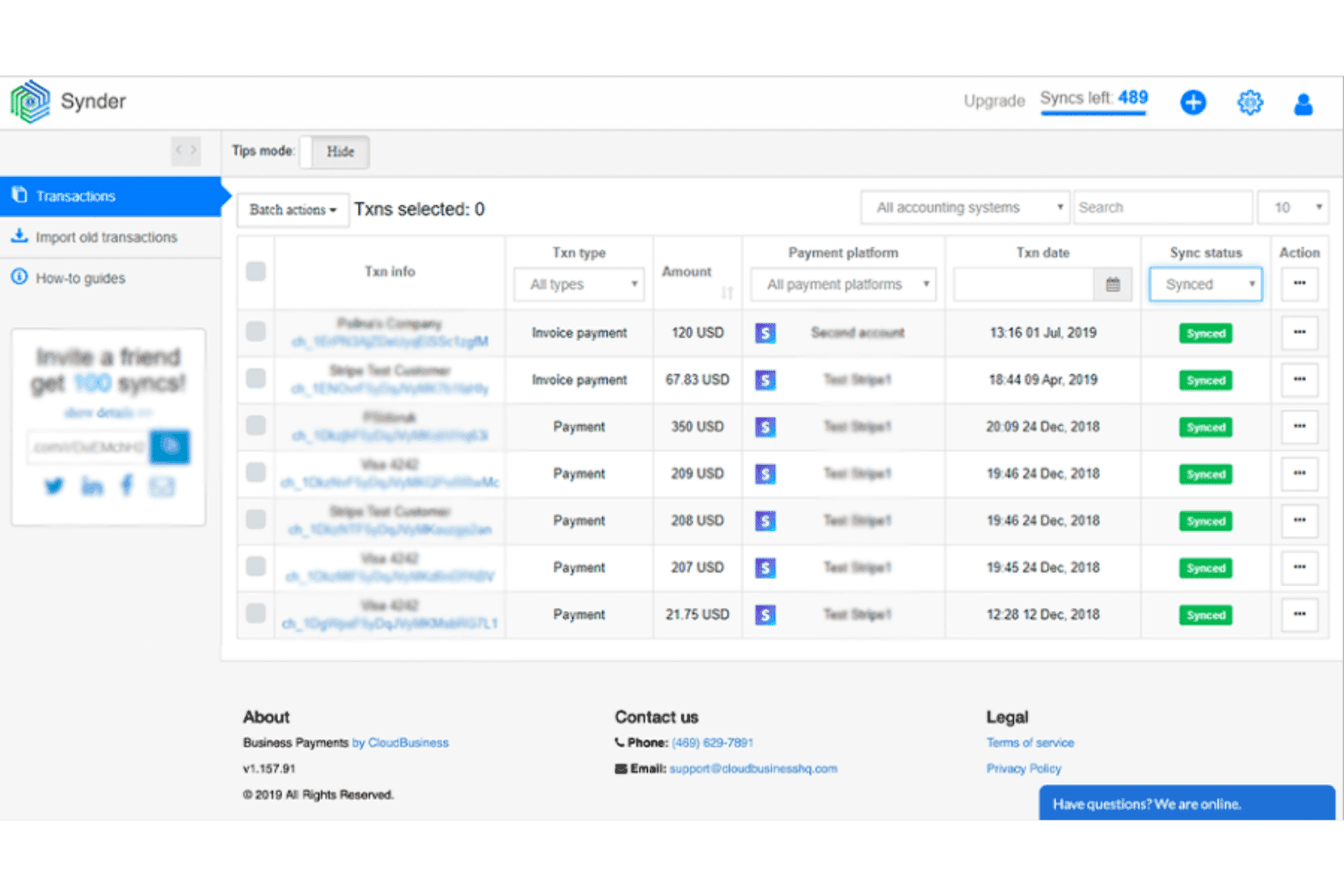
Synder displays synced payment transactions with status and platform details. Synder is an ecommerce payment reconciliation tool that syncs transactions across 30+ payment gateways, marketplaces, and sales channels—automatically matching payouts, fees, refunds, and chargebacks to your accounting or ERP system.
Who Is Synder Best For?
Synder is a strong fit for ecommerce businesses and accounting teams that need to sync transaction data across multiple sales channels into QuickBooks, Xero, or an ERP like NetSuite or Sage Intacct.
Why I Picked Synder
Synder earns its spot on my shortlist because no other tool in this category matches its depth of accounting and ERP connectivity. I love that it covers the full spectrum, from QuickBooks Online and Xero for smaller operations to Sage Intacct, Oracle NetSuite, and Intuit Enterprise Suite for enterprise teams, all with automated journal entries and per-channel clearing accounts. Its Summary Sync mode groups payout data into clean journal entries that post directly to your books, which I've found makes month-end close dramatically faster across multi-channel setups.
Synder Key Features
- Smart Rules engine: Configurable if-then automation rules that categorize transactions by amount, vendor, description, or location without any coding.
- Multi-currency reconciliation: Syncs transactions using actual exchange rates from the payment processor at the time of each transaction, with automated journal entries for currency conversion.
- Per Transaction vs. Summary Sync modes: Lets you choose between granular order-level records or grouped payout journal entries, depending on your reporting needs.
- ASC 606 revenue recognition module: A dedicated RevRec feature for GAAP-compliant revenue recognition, supporting subscription upgrades, cancellations, and prorations across connected ERPs.
Synder Integrations
Synder offers 30+ native integrations, including Stripe, PayPal, Square, Shopify, Amazon, eBay, QuickBooks Online, Xero, Sage Intacct, and NetSuite. Pro Max and Premium plans support custom ERP connectivity, with Excel import and export for manual workflows.
Pros and Cons
Pros:
- Offers both detailed and summary sync options
- Revenue recognition module supports GAAP compliance
- Handles multi-currency reconciliation using actual FX rates
Cons:
- Premium features require higher-priced plan tiers
- Exception management lacks assignment and comments
Learn more about Synder:
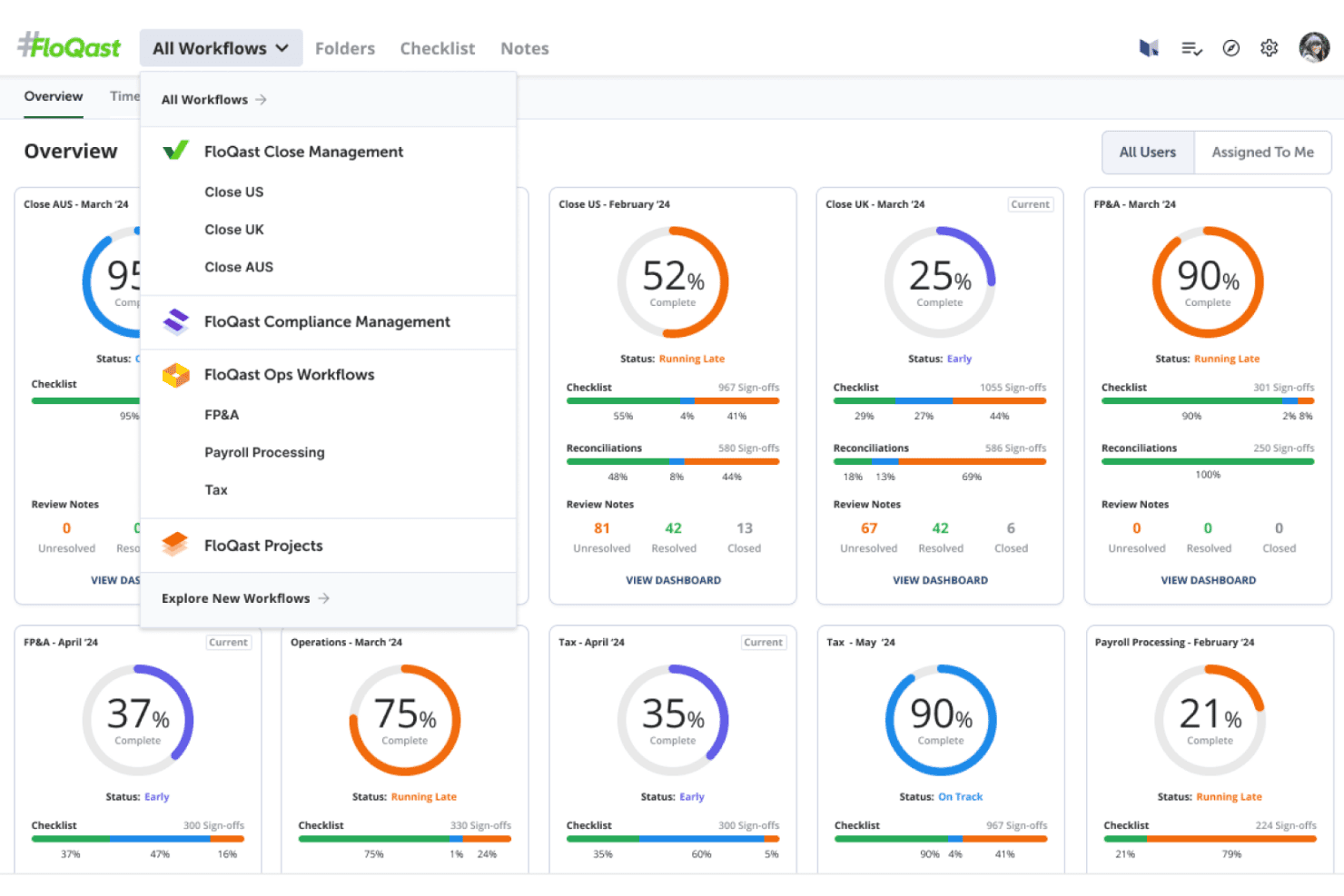
FloQast centralizes workflow progress across close, tax, and FP&A cycles. FloQast is a financial close and reconciliation platform that automates transaction matching, exception management, account reconciliation, and journal entry workflows across connected ERP and banking systems.
Who Is FloQast Best For?
FloQast suits mid-market and enterprise finance teams that need to accelerate month-end close and automate high-volume account reconciliations across complex ERP environments.
Why I Picked FloQast
I picked FloQast as one of the best because it's the tool I'd trust most when a finance team needs to compress month-end close without sacrificing accuracy. Its AI-powered AutoRec matching hits 80–85% auto-match rates on bank reconciliations, and the exception workflow automatically flags unmatched transactions and routes them to the right person for resolution. Native ERP connections to NetSuite, SAP, Workday, and Sage Intacct mean reconciled data lands directly in your books.
FloQast Key Features
- Bank connector: Automatically syncs transactions from hundreds of global banks into FloQast daily, eliminating manual statement uploads.
- Automated sign-off rules: Flags accounts for automatic sign-off when balances tie out within preset thresholds, focusing review effort on higher-risk items.
- Journal entry automation: Drafts and pushes journal entries to connected ERPs continuously, with required human approval before any entry posts.
- Audit trail logging: Captures a full, exportable record of all matching activity and AI decisions to support compliance and governance requirements.
FloQast Integrations
FloQast lists nine native ERP integrations, including NetSuite, SAP, Workday, Microsoft Dynamics, Sage Intacct, Xero, Oracle, Yardi, and QuickBooks, plus a Trovata-powered Bank Connector for hundreds of banks. It has no native ecommerce or marketplace integrations; Stripe is listed as coming soon, with SFTP and open API access for custom connections.
Pros and Cons
Pros:
- ERP sync streamlines monthly close activities
- Exception workflow with audit trail is included
- AI matching automates high-volume reconciliations
Cons:
- Transaction-level detail is not fully accessible
- Not purpose-built for ecommerce reconciliation
Learn more about FloQast:
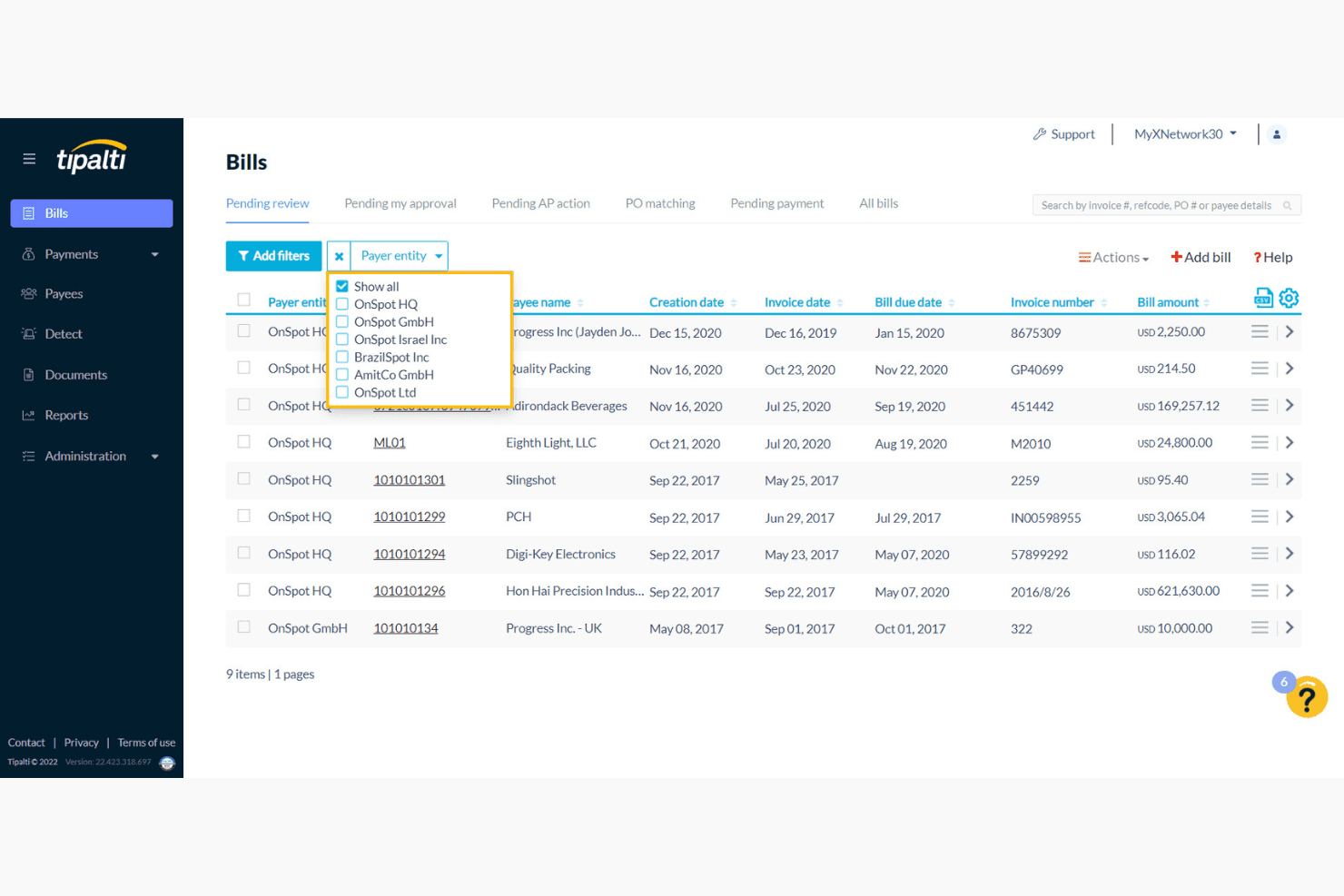
Tipalti lets users filter and review bills by payer entity in one view. Tipalti is an AP automation platform that handles supplier payments, invoice matching, and multi-currency reconciliation across 200+ countries and 50+ payment methods.
Who Is Tipalti Best For?
Tipalti is a strong fit for finance teams at scaling ecommerce businesses that manage high volumes of cross-border supplier payments and need automated AP reconciliation across multiple entities and currencies.
Why I Picked Tipalti
I picked Tipalti as one of the best because no other AP automation tool comes close to its global payment reach, covering 200+ countries, 120+ currencies, and 50+ payment methods in one platform. For ecommerce businesses managing cross-border supplier payouts, that breadth matters: Tipalti handles multi-currency reconciliation with built-in FX rate tracking, so every international payment is matched and accounted for without manual conversion work. Its Mass Payments module also automates bulk disbursements to affiliate and creator networks with real-time payment status tracking.
Tipalti Key Features
- 2-way and 3-way PO matching: Automatically matches purchase orders, receipts, and invoices within a single AP workflow.
- AI-assisted exception management: Flags unmatched or partially matched transactions and routes them for manual review with full audit trails.
- Multi-entity payment consolidation: Rolls up payables across subsidiaries, currencies, and geographies into a single real-time reporting dashboard.
- ERP auto-sync: Pushes reconciled payment data, journal entries, and custom fields to 15+ accounting platforms including NetSuite, Xero, and QuickBooks.
Tipalti Integrations
Tipalti offers 15+ documented ERP and accounting integrations, including NetSuite, QuickBooks, Xero, Sage, Microsoft Dynamics, SAP, Acumatica, Workday, Oracle Fusion, and Odoo. It lacks documented native Shopify, Amazon, or marketplace payout connectors but provides a REST API for custom integrations.
Pros and Cons
Pros:
- Mass payouts module for supplier and creator payments
- Automates AP exceptions with audit trails
- Global multi-currency reconciliation for payables workflows
Cons:
- Lacks native Shopify or Amazon marketplace connectors
- Does not reconcile inbound ecommerce payouts
Learn more about Tipalti:
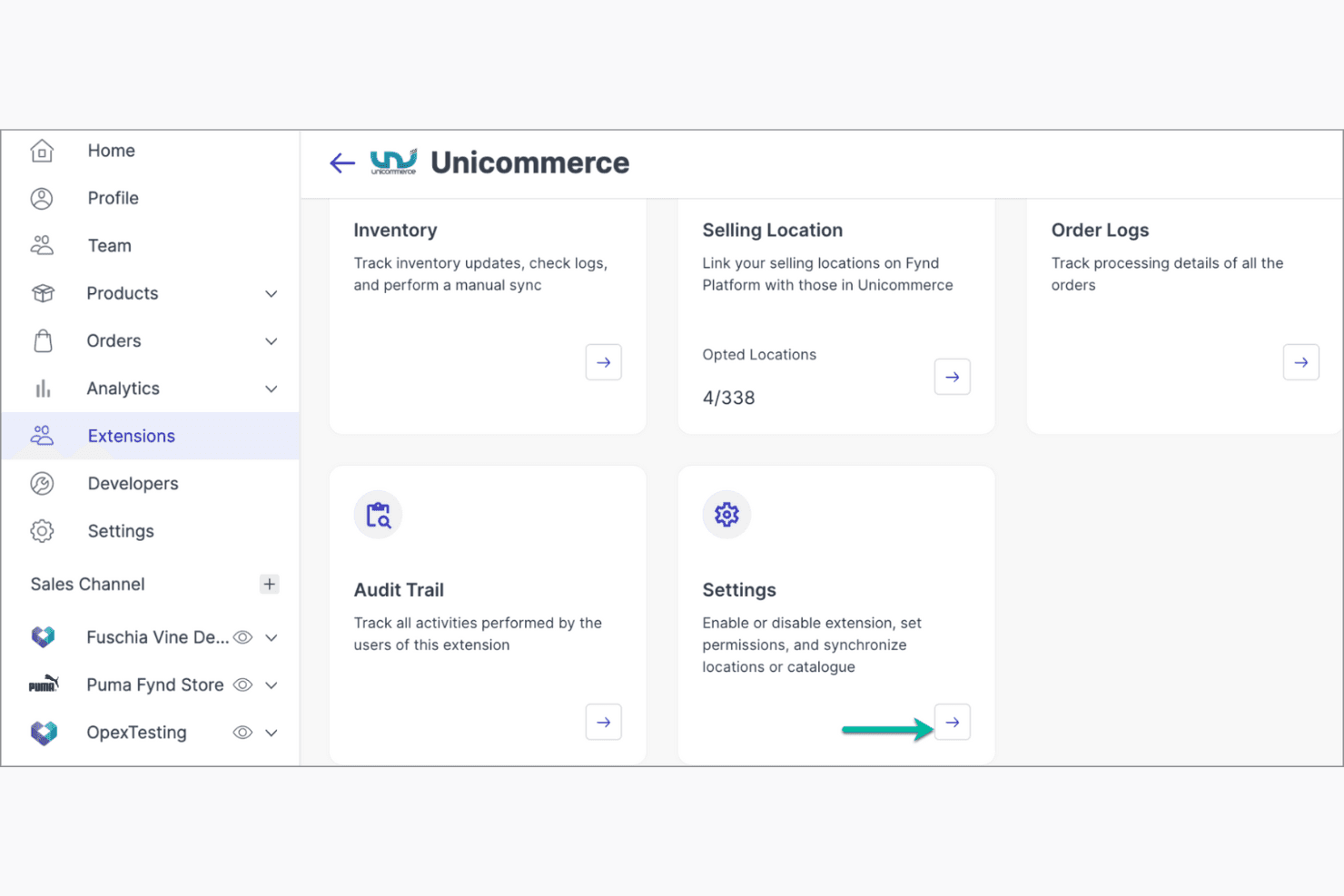
Unicommerce centralizes inventory, locations, and order tracking in one dashboard. Unicommerce is a marketplace-focused payment reconciliation platform that automates settlement matching, detects operational leakages, tracks returns, and manages fee reconciliation at the SKU level across multiple sales channels.
Who Is Unicommerce Best For?
Unicommerce is a strong fit for Indian marketplace sellers on Amazon India, Flipkart, Myntra, or Meesho who need automated fee and returns reconciliation at scale.
Why I Picked Unicommerce
Unicommerce earns its spot on my shortlist because of how purpose-built it is for retail sellers operating across Indian marketplaces. I particularly like the Channel Rate Card system, which reconciles commissions, shipping, pick-pack, and refund fees at the SKU level across Amazon India, Flipkart, Myntra, and Meesho. The operational leakage detection also catches things like shipping overcharges and unreimbursed carrier damages that most sellers never notice until margins erode.
Unicommerce Key Features
- UTR-level audit trail: Tracks a Unique Transaction Reference for every order, giving you a transaction-wise record ready for financial audits.
- Negative cash flow alerts: Sends proactive alerts when the system detects a negative cash position across your marketplace settlements.
- Reconciliation status categorization: Assigns each transaction one of eight status categories—including Partial Payment, Payment Overdue, and Reconciled by Delta—so you can triage issues fast.
- Returns reconciliation tracking: Matches physical returned inventory against system records to flag discrepancies from fraud, theft, or processing errors.
Unicommerce Integrations
UniReco has documented marketplace integrations with Amazon India, Flipkart, Myntra, and Meesho. The broader Unicommerce platform supports 290+ integrations, including Shopify, WooCommerce, SAP, Oracle, TallyPrime, and Xero on Enterprise plans.
Pros and Cons
Pros:
- Reconciles returns with physical inventory checks
- Audit-ready UTR transaction tracking for every order
- Tracks operational leakages at SKU level
Cons:
- Accounting sync restricted to enterprise plan only
- No support for global payment gateways
Learn more about Unicommerce: Best for budget-friendly options
- Free demo available
- From ₹36,000/360 days
Visit WebsiteCustomer Rating:1/5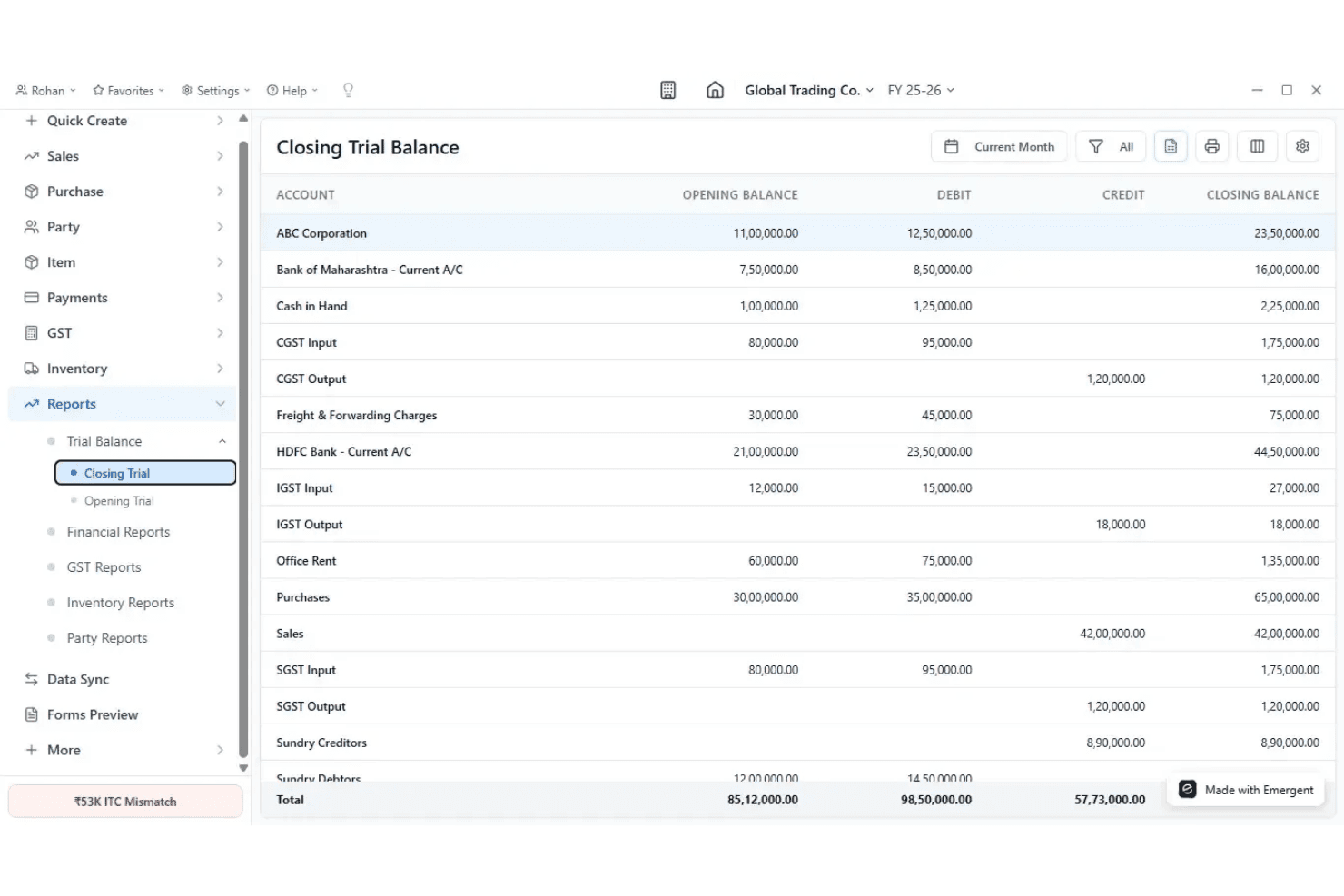
Busy Accounting Software displays a detailed Closing Trial Balance report. BUSY Accounting Software is an accounting and ecommerce reconciliation platform that combines marketplace settlement tracking, automated transaction matching, fee and refund reconciliation, and GST compliance tools for sellers on Amazon, Flipkart, and Shopify.
Who Is BUSY Accounting Software Best For?
BUSY Accounting Software is a strong fit for small and mid-sized Indian marketplace sellers on Amazon, Flipkart, or Shopify who need affordable, GST-compliant reconciliation built into their accounting workflow.
Why I Picked BUSY Accounting Software
BUSY Accounting Software earns its spot on my shortlist because it's the most affordable path to structured marketplace reconciliation for Indian sellers on Amazon, Flipkart, or Shopify. I like that its BUSY Recom add-on automatically downloads settlement data and posts it directly to the accounting ledger with one click, eliminating the manual Excel work that bogs down small teams. It also tracks commissions, courier fees, and GST-compliant credit notes at the order and SKU level, so you can see exactly where margin is slipping across individual products.
BUSY Accounting Software Key Features
- SKU-wise profitability reports: Calculates net profit per SKU after deducting COGS, GST, commissions, and marketplace fees.
- Pending settlement tracking: Maintains a dedicated report showing which orders have payments held by Amazon or Flipkart.
- GST-compliant credit note generation: Automatically creates credit notes for returned orders in line with Indian GST requirements.
- Multi-account management: Manages multiple seller accounts across Amazon and Flipkart within a single BUSY company file.
BUSY Accounting Software Integrations
BUSY Accounting Software has 3 documented native marketplace integrations: Amazon, Flipkart, and Shopify. It doesn’t have native integrations with payment gateways or external accounting platforms such as Stripe, PayPal, QuickBooks, or Xero; reconciled data posts to BUSY’s own ledger.
Pros and Cons
Pros:
- Calculates per-SKU profitability automatically
- Tracks GST-compliant returns and credit notes
- 1-click reconciliation for Amazon and Flipkart sellers
Cons:
- Cannot sync data to other accounting systems
- No support for global marketplaces or payment processors
Learn more about Busy Accounting Software:
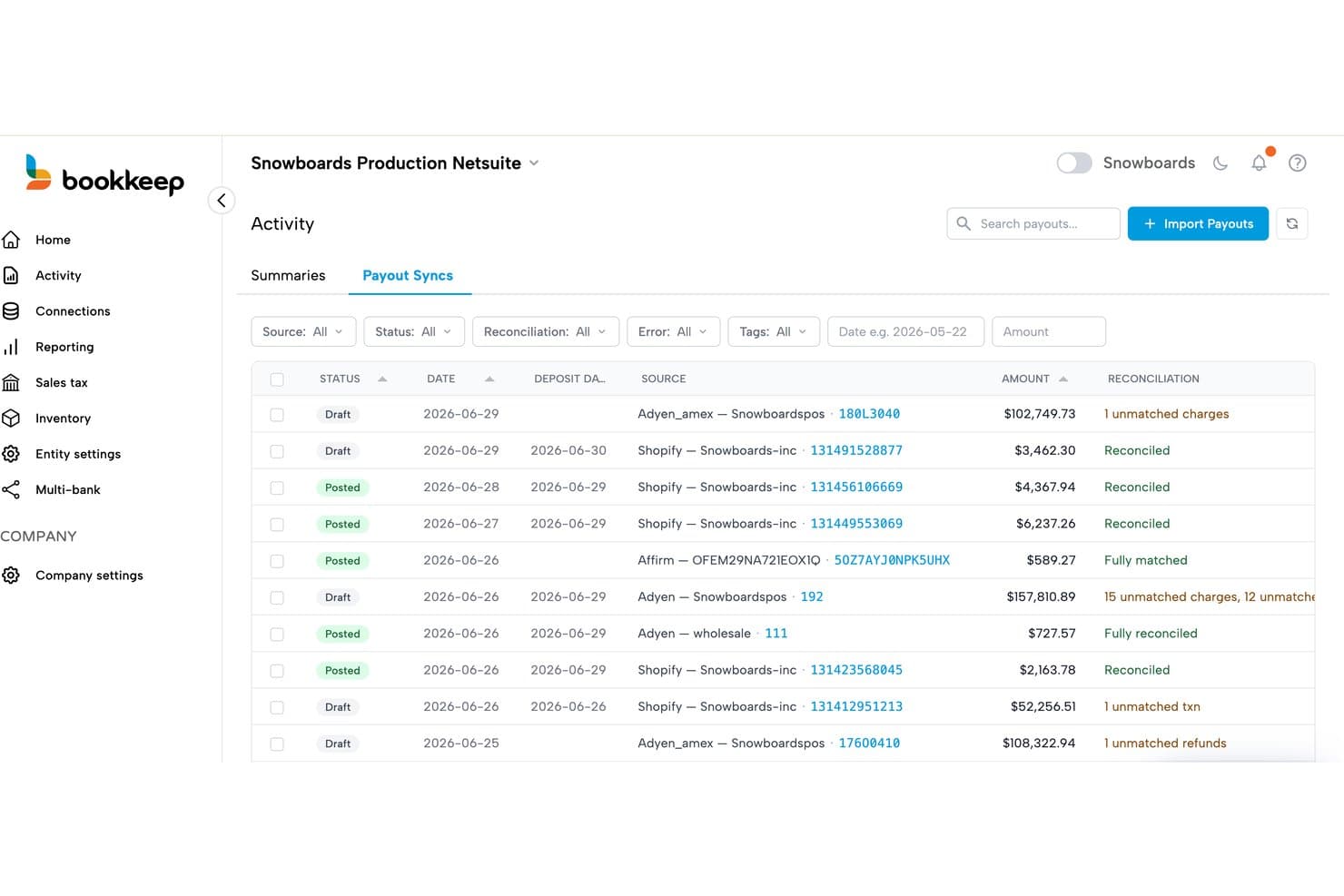
Bookkeep tracks payout sync reconciliation status across multiple payment sources. Bookkeep is an ecommerce accounting automation tool that handles payment reconciliation, journal entry posting, fee and chargeback tracking, and multi-channel payout matching across 20+ sales channels and six accounting systems.
Who Is Bookkeep Best For?
Bookkeep is a strong fit for Shopify-based ecommerce brands and multi-channel retailers whose accounting teams need clean, accrual-based books without manual journal entry work.
Why I Picked Bookkeep
Bookkeep earns its spot on my shortlist because its three-step reconciliation methodology (sales, clearing, then bank deposit matching) is the most methodologically rigorous approach I've seen for ecommerce payout complexity. I particularly like how it recognizes revenue based on fulfillment status rather than payment date, which keeps accrual books accurate without manual adjustments. It also automatically separates chargebacks, loan repayments, and marketplace tax withholding as distinct line items, so your reconciliation reflects what actually happened at the payout level.
Bookkeep Key Features
- Multi-channel payout splitting: Automatically distributes Shopify payouts across multiple bank accounts by store, location, or franchisee.
- Fulfillment-based revenue recognition: Records revenue when an order is fulfilled, not when payment is collected, keeping accrual books accurate.
- Weighted average cost (WAC) COGS tracking: Calculates cost of goods sold using WAC methodology across your Shopify inventory.
- Managed sales tax filing service: A dedicated tax team handles multi-state registrations, calculations, and filings across all connected sales channels.
Bookkeep Integrations
Bookkeep offers 20+ native integrations, including Shopify, Amazon, eBay, Walmart, Stripe, PayPal, QuickBooks Online, NetSuite, Sage Intacct, and Xero. An open API supports custom integrations.
Pros and Cons
Pros:
- Multi-bank payout splitting covers franchise needs
- Fulfillment-based revenue recognition boosts accrual accuracy
- Three-step reconciliation ensures accurate payouts
Cons:
- Deepest features focused on Shopify merchants
- No dedicated exceptions management dashboard
Learn more about Bookkeep:
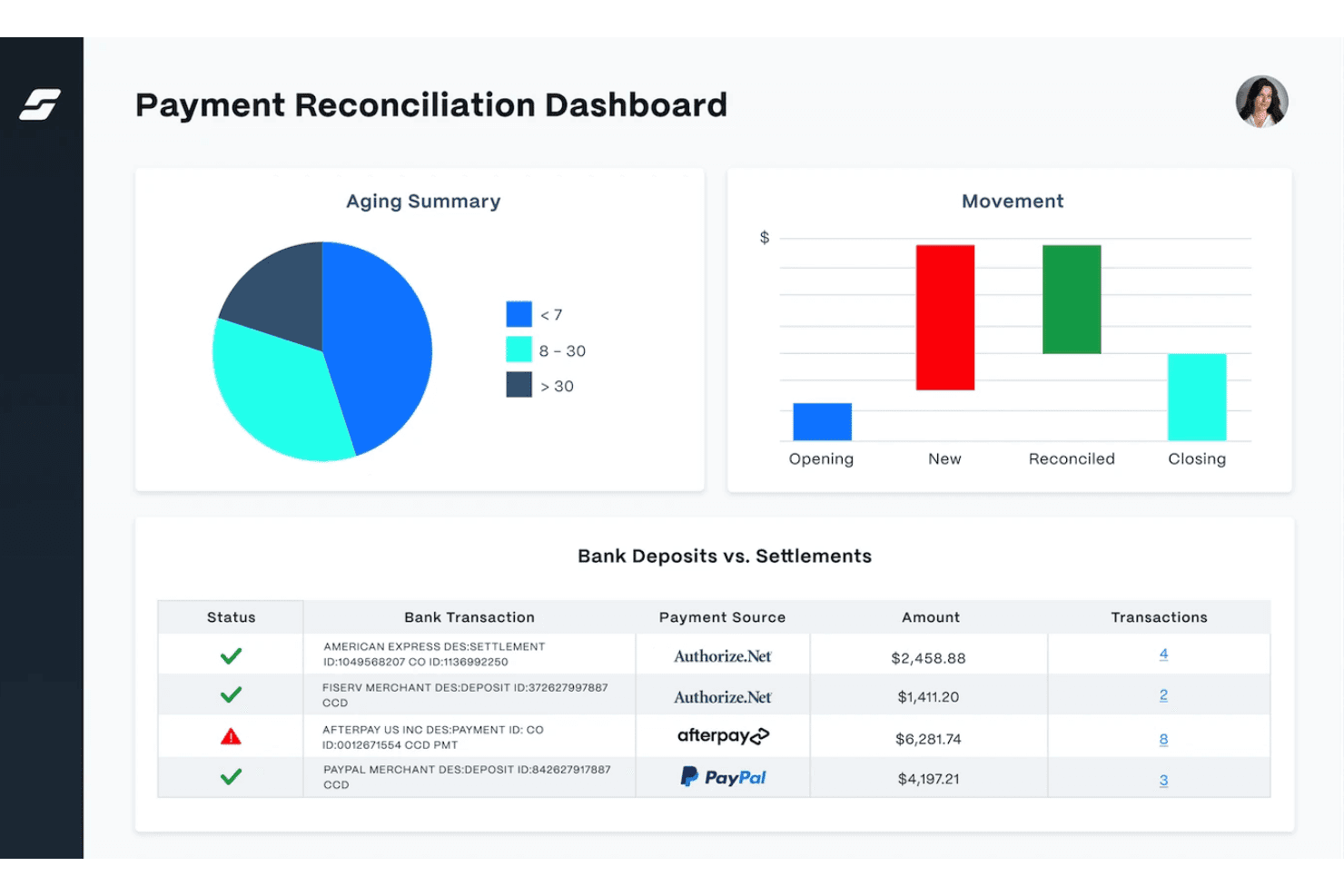
SolveXia automates payment reconciliation with deposits vs. settlements tracking. SolveXia is a no-code reconciliation automation platform that handles multi-PSP payment matching, exception management, and ERP sync across high transaction volumes.
Who Is SolveXia Best For?
SolveXia is a strong fit for enterprise finance teams at large-scale retailers managing high transaction volumes across many PSPs.
Why I Picked SolveXia
SolveXia earns its spot on my shortlist because its AI-powered matching engine is genuinely best-in-class for high-volume payment reconciliation. I love how it handles one-to-many and many-to-many matching scenarios, netting fees, chargebacks, and refunds automatically across 30+ PSPs, as the Emma Sleep case study shows with 100,000 transactions per day. Its exception management auto-clears minor variances based on configurable tolerance thresholds, surfacing only real mismatches for review.
SolveXia Key Features
- Multi-level payment matching: Reconciles gross transactions against PSP settlement batches and then against net bank deposits in a single automated workflow.
- Configurable tolerance thresholds: Lets finance teams set variance limits so minor differences auto-clear without manual review.
- No-code workflow builder: A drag-and-drop visual designer lets finance teams build and deploy reconciliation processes without IT support.
- ERP and accounting sync: Pushes reconciled data to SAP, Oracle, NetSuite, QuickBooks, and Xero via native connectors, REST API, or automation tools like Zapier.
SolveXia Integrations
Native connectors are documented for SAP and Oracle; other integrations include NetSuite, QuickBooks, Xero, Stripe, PayPal, Adyen, Klarna, and Square. SolveXia also supports REST API, ODBC, FTP, Zapier, and Workato.
Pros and Cons
Pros:
- No-code workflow builder empowers finance teams
- Exception management reduces manual investigation
- Handles high-volume multi-PSP reconciliation
Cons:
- Custom setup needed for channel-level data
- No pre-built ecommerce marketplace connectors
Learn more about SolveXia:
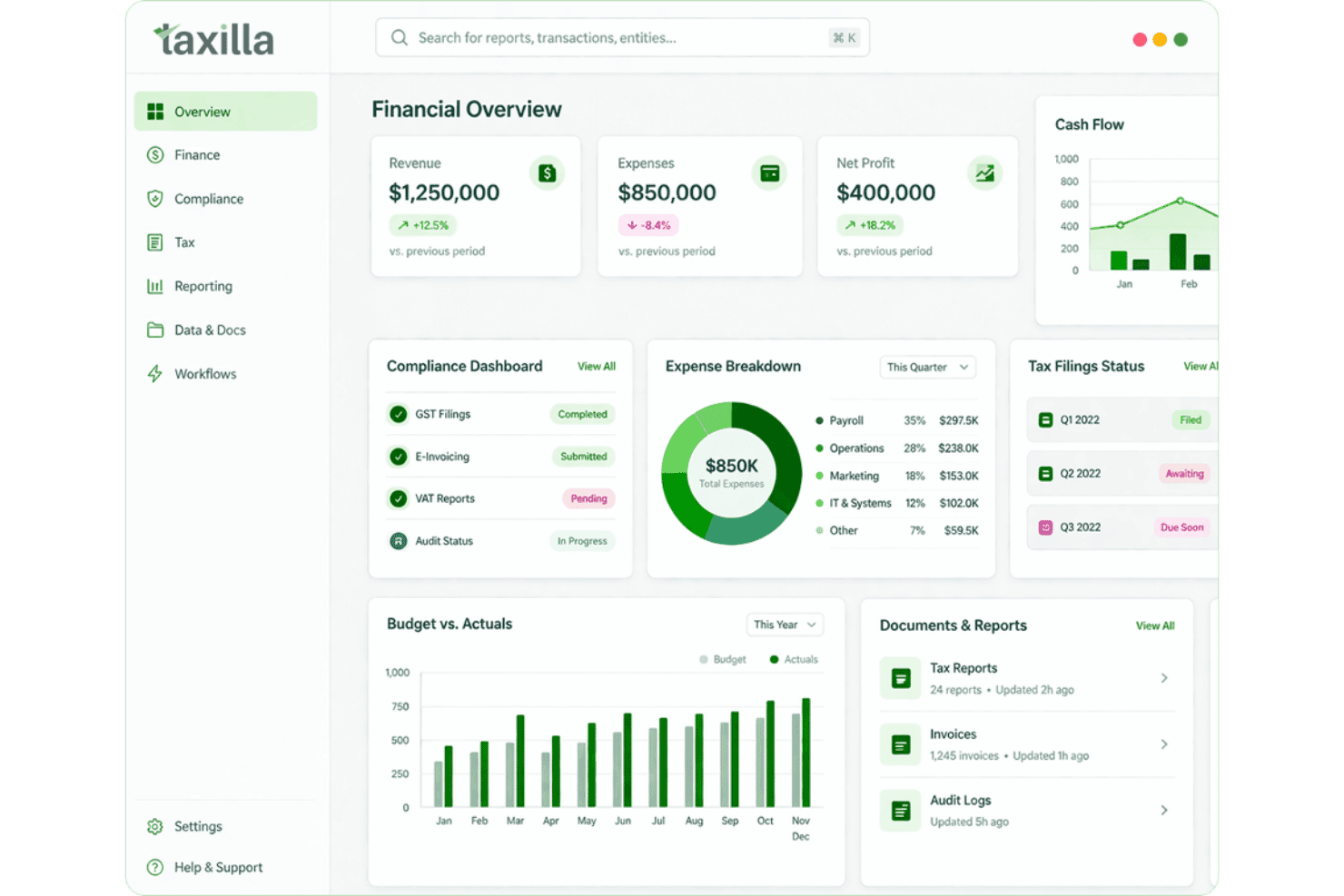
Taxilla centralizes financial, compliance, and tax data in one dashboard. Taxilla is an enterprise ecommerce reconciliation platform that automates order-to-cash matching across marketplaces, settlement reports, and bank deposits, with built-in compliance tracking, rate card validation, and direct ERP GL posting.
Who Is Taxilla Best For?
Taxilla is a strong fit for enterprise finance teams that sell across multiple marketplaces and need audit-ready compliance documentation alongside automated reconciliation.
Why I Picked Taxilla
I picked Taxilla as one of the best because its compliance tracking depth is genuinely hard to replicate: every reconciliation action is logged to an immutable audit trail, producing reports that hold up to tax authority and financial auditor scrutiny without any manual assembly. I also love its rate card validation feature, which compares actual marketplace-charged fees against your contracted rates to surface overcharges automatically. That, combined with full order-to-cash matching across settlements, returns, and bank deposits, makes it a credible pick for enterprise finance teams with real compliance obligations.
Taxilla Key Features
- AI-powered transaction matching: An automated engine matches orders, invoices, settlements, and bank deposits across channels with a claimed 95%+ accuracy rate.
- Multi-currency reconciliation: Tracks cross-border payouts and FX rates across international marketplaces within a single reconciliation workflow.
- Shipment reconciliation: Compares shipping data against orders in real time and flags discrepancies in logistics fees automatically.
- CFO-level dashboards: Configurable dashboards display real-time payout status, fee breakdowns, and channel-level financial visibility for finance leadership.
Taxilla Integrations
Taxilla lists six marketplace integrations: Amazon (FBA and FBM), Flipkart, Shopify, Myntra, Meesho, and Jiomart. It also supports API connectors, SFTP, and file uploads for custom data connections.
Pros and Cons
Pros:
- Audit-ready reports simplify tax preparation
- AI-driven matching handles massive transaction volumes
- Compliance features exceed most alternatives
Cons:
- No user reviews available on major platforms
- Western marketplaces and gateways less supported
Learn more about Taxilla:
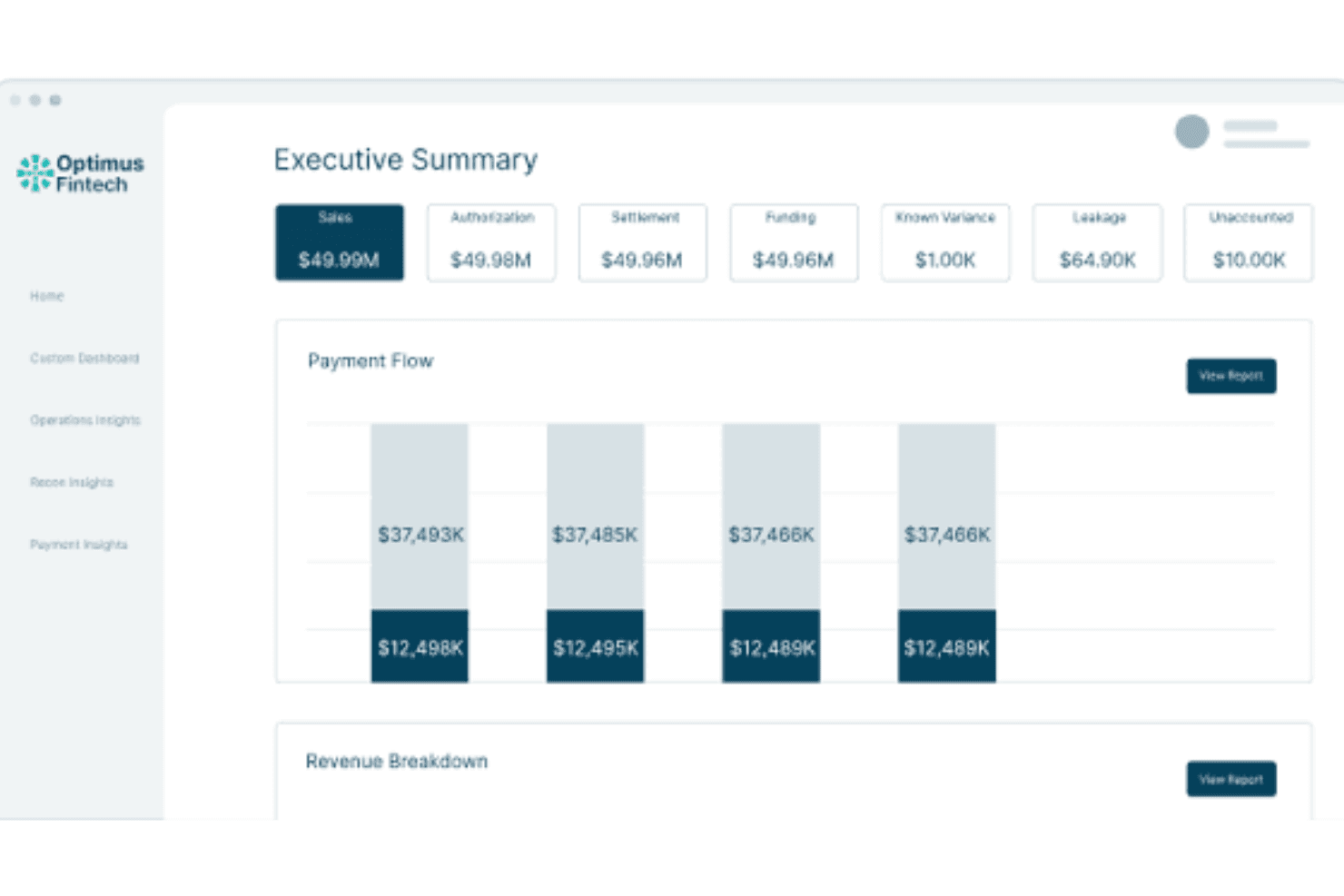
Optimus Fintech centralizes payment flow and revenue data in one executive dashboard. Optimus Fintech is an AI-driven payment reconciliation platform that automates transaction matching, exception management, fee validation, chargeback tracking, and financial close across payment gateways, ERPs, and accounting systems.
Who Is Optimus Fintech Best For?
Optimus Fintech is a strong fit for enterprise finance teams managing high transaction volumes across multiple payment processors and ERP systems.
Why I Picked Optimus Fintech
Optimus Fintech earns its spot on my shortlist because no other tool I've evaluated handles transaction volume at this scale without buckling. I'm talking about 576 million transactions per day with a 99.98% auto-match rate, which matters when you're running high-volume ecommerce across multiple payment processors. The N-way fuzzy matching handles one-to-many and many-to-many scenarios that would bury a manual team, and the NLP Fee Validator catches processor overcharges at the transaction level before they compound.
Optimus Fintech Key Features
- AI CoPilot: A natural-language interface that lets finance teams query payment data, settlement status, and fee breakdowns without writing reports manually.
- NLP Fee Validator: Automatically benchmarks processor fees against contracted rates at the transaction level and flags overcharges for review.
- No-code workflow builder: A drag-and-drop canvas for building custom data ingestion, normalization, and reconciliation workflows without IT involvement.
- Financial close module: Tracks close readiness, unreconciled balances, and account certification with full transaction-to-GL lineage for audit evidence.
Optimus Fintech Integrations
Optimus Fintech lists 150+ pre-built connectors, including Stripe, Adyen, PayPal, Braintree, NetSuite, SAP, Oracle, QuickBooks, and Xero. It also supports REST APIs, SFTP, secure file uploads, and custom sources through its no-code Data Preparation canvas.
Pros and Cons
Pros:
- No-code workflow builder for custom automation
- Exception management surfaces only high-priority issues
- Processes up to 576 million transactions daily
Cons:
- Feature depth best suited to enterprise-scale teams
- No native marketplace platform connectors confirmed
Learn more about Optimus Fintech:
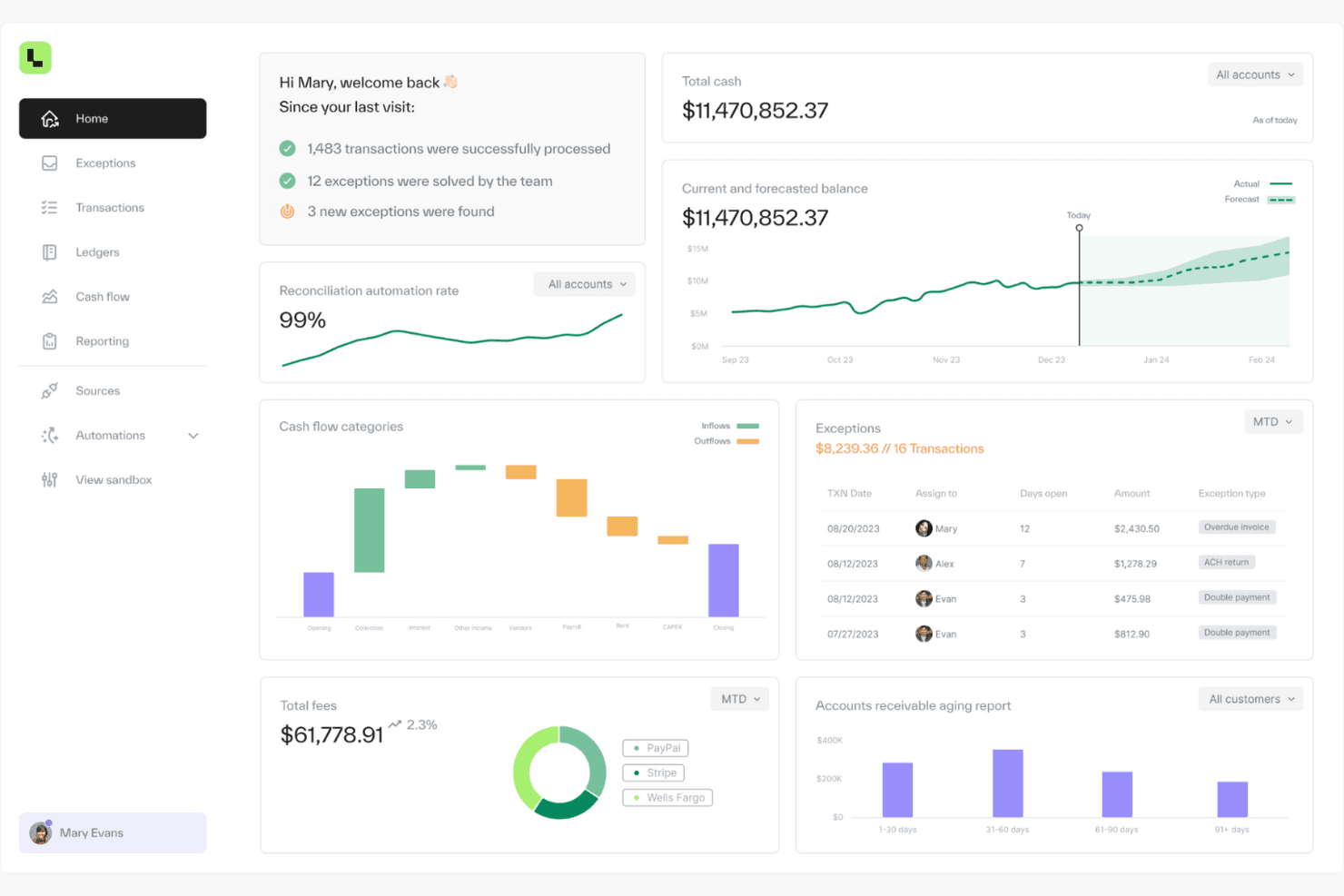
Ledge centralizes cash flow, exceptions, and reconciliation in one dashboard. Ledge is an AI-native ecommerce payment reconciliation platform that automates transaction matching, exception management, fee and chargeback tracking, and journal entry preparation across payment processors, banks, and ERP systems.
Who Is Ledge Best For?
Ledge fits finance teams at growing ecommerce brands that run on Shopify and NetSuite and need AI-driven reconciliation without leaning on IT.
Why I Picked Ledge
I picked Ledge as one of the best because its AI reconciliation engine handles the kind of matching complexity that trips up smaller finance teams: one-to-many, many-to-many, partial payments, chargebacks, and multi-currency settlements, all resolved automatically. I especially like how its Shopify integration pulls order-level payout data and maps it directly to GL accounts, so a small finance team isn't manually untangling gross sales from refunds and processing fees each month-end.
Ledge Key Features
- Multi-currency reconciliation: Automatically accounts for exchange rate differences, processor fees, and settlement timing across currencies so your team only reviews true exceptions.
- AI-drafted journal entries: AI agents prepare journal entries and hold them for human approval before posting to your connected ERP.
- Real-time close visibility dashboard: A live dashboard tracks reconciliation progress by account, entity, and owner, surfacing at-risk transactions before close.
- Immutable audit trail: Every transaction is logged and retained in a tamper-proof record, supporting SOC 1 and SOC 2 compliance across all plans.
Ledge Integrations
Ledge offers 150+ native integrations, including Shopify, Stripe, Adyen, PayPal, NetSuite, and 11,000+ banks. It also supports API connections, CSV uploads, Excel, Google Sheets, SFTP, Snowflake, Google Cloud, and AWS.
Pros and Cons
Pros:
- Immutable audit trails support strict compliance
- Transaction-level breakdown captures every fee and refund
- AI reconciliation saves significant monthly time
Cons:
- Marketplace support limited outside Shopify
- No free trial or instant signup
Learn more about Ledge:
Alte programe pentru reconcilierea plăților din comerțul electronic
Iată câteva opțiuni suplimentare de programe pentru reconcilierea plăților din comerțul electronic care nu au ajuns pe lista mea scurtă, dar merită totuși analizate:
- 11ReconcifyBest for direct-to-consumer
- 12WebgilityBest for inventory management
- 13StripeBest for subscription billing
- 14EasyEcom Best for multichannel sellers
- 15QuickBooksBest for small retail businesses
- 16FinaloopBest for real-time bookkeeping
- 17Link My BooksBest for Amazon sellers
- 18VinculumBest for omnichannel retail
- 19MyWorksBest for WooCommerce users
- 20eShopboxBest for inventory reconciliation
- 21eVanikBest for Indian marketplaces
- 22SpringbordBest for data management services
How I Evaluate ecommerce Payment Reconciliation Software
I look at these tools in two layers: core requirements—things like multi-channel payout ingestion, automated matching, and GL sync—and the differentiators that separate a good fit from a poor one.
Core Functionality (Table Stakes For This List)
When I'm selecting tools for my list, I rank each one on a scale from 0 (does not offer the functionality) to 5 (excels in this area) for each core functionality listed below. Then, I calculate the tool's total score into a percentage. Each tool needs to achieve a minimum total score of 65% to be considered for inclusion.
- Multi-Channel Transaction Ingestion: I check how many ecommerce platforms, processors, and marketplaces each tool connects to natively—think Shopify, Amazon, Stripe, and PayPal pulling in automatically.
- Automated Payout Matching: Matching aggregated Stripe or Adyen payouts back to individual orders is where these tools earn their keep, so I evaluate matching logic and exception handling.
- Fee & Discrepancy Detection: I look for the tool's ability to flag processor fees, FX charges, and settlement shortfalls—especially mismatches between expected and actual deposit amounts.
- Refund & Chargeback Reconciliation: Every return and dispute needs to trace back to the original order, so I evaluate how each tool links refunds and chargebacks to source transactions.
- Accounting System Integration: I look at native integrations with systems like QuickBooks, Xero, NetSuite, and Sage, and whether reconciled data flows into the GL without manual journal entries.
- Reporting & Audit Trail: Clean reconciliation reports and a transaction-level audit trail matter at month-end close and during audits, so I evaluate export options and drill-down capability.
Once I have a list of tools that meet this criteria, I consider what sets each platform apart.
Differentiating Factors (What Sets Vendors Apart)
Here's how I compare and contrast different vendors:
Standout Features
Marketplace fee auditing is a big one—I look for tools that validate commission and referral fee deductions from Amazon, eBay, and Walmart against your contracted rates, since overcharges happen more often than most sellers expect. Custom reconciliation rules also matter when your DTC storefront and marketplace channels have completely different payout structures and fee logic. I evaluate whether a platform offers anomaly detection AI that flags unusual settlement delays or fee spikes before they become month-end surprises.
Beyond Features
Transaction volume scalability is something I evaluate closely—if your brand runs flash sales or handles holiday surges, you need a platform that won't choke on millions of orders during peak periods. I also check how pricing scales, since volume-based tiers make more sense for high-growth ecommerce than per-seat models. Implementation and time-to-value matter too; I look for guided onboarding that includes historical data backfills so your team isn't reconciling months of catch-up manually. Compliance certifications like SOC 2 Type II and PCI DSS round out the picture for handling sensitive payment data.
Cum alegi un program pentru reconcilierea plăților din comerțul electronic
Alegerea unui program pentru reconcilierea tranzacțiilor din comerțul electronic înseamnă să identifici ce se potrivește fluxurilor tale de lucru, nu doar listei tale de dorințe. Indiferent dacă reconciliezi tranzacții prin două sau douăzeci de gateway-uri de plată, aceștia sunt factorii care fac diferența între un instrument util și o adevărată bătaie de cap.
| Factor | Ce trebuie să iei în considerare |
|---|---|
| FactorScalabilitate | Ce trebuie să iei în considerarePoate gestiona volumul tău de tranzacții în sezonul de vârf, nu doar într-o zi de marți din iulie? Caută planuri flexibile și o infrastructură care nu va ceda sub presiunea creșterii pe mai multe canale. |
| FactorIntegrări | Ce trebuie să iei în considerareSe conectează la ecosistemul tău de comerț electronic — Shopify, Amazon, ERP-ul și sistemul tău de contabilitate? Primești puncte bonus dacă acoperă piețe de nișă fără lucrări de dezvoltare personalizate. |
| FactorPosibilitate de personalizare | Ce trebuie să iei în considerarePoți adapta rapoartele, tablourile de bord și fluxurile de lucru? Vei dori flexibilitate fără să ai nevoie de un consultant de fiecare dată când se schimbă politica ta de rambursare. |
| FactorUșurință în utilizare | Ce trebuie să iei în considerareÎl va folosi efectiv echipa ta? Acordă prioritate interfețelor clare, setărilor implicite inteligente și instrumentelor care nu ascund funcțiile de bază la cinci clicuri distanță. |
| FactorImplementare și integrare inițială | Ce trebuie să iei în considerareCât timp durează să fie pus în funcțiune? Caută șabloane predefinite, configurare ghidată și o echipă de asistență care nu dispare după achitarea facturii. |
| FactorCost | Ce trebuie să iei în considerareCare este costul total de deținere — inclusiv integrările, nivelurile de utilizare și „suplimentele” surpriză? Asigură-te că prețurile sunt aliniate la realitatea marjei tale. |
| FactorMăsuri de securitate | Ce trebuie să iei în considerareRespectă standardele industriei — criptare, jurnale de audit, controale de acces? Reconciliezi bani, nu administrezi o conversație de grup. |
| FactorDisponibilitatea asistenței | Ce trebuie să iei în considerareCând apar probleme (și vor apărea), pe cine poți contacta? Verifică dacă există chat live, timpi rapizi de răspuns prin e-mail și documentație utilă, care să nu semene cu niște clauze juridice. |
Ce este un program pentru reconcilierea plăților din comerțul electronic?
Programul pentru reconcilierea plăților din comerțul electronic este un instrument care aliniază automat fiecare vânzare, rambursare, comision și cost valutar de pe platformele tale cu depunerile în contul bancar.
Preia datele din Shopify, Stripe, PayPal și alte gateway-uri într-un singur tablou de bord — astfel încât să identifici plățile împărțite, comisioanele neașteptate ale platformelor și diferențele valutare înainte să îți încetinească închiderea contabilă.
Conceput pentru operatorii care gestionează mai multe piețe și monede, semnalează neconcordanțele în timp real, consolidează comisioanele pentru situații mai clare de profit și pierdere și oferă o pistă de audit pregătită pentru verificare, fără încă un schimb de e-mailuri.
Privește-l ca pe echipa ta financiară din culise — verifică problemele, ca tu să te poți concentra asupra creșterii.
Caracteristicile programelor pentru reconcilierea plăților din comerțul electronic
Privește dincolo de cuvintele la modă. Cele mai bune platforme de reconciliere rezolvă probleme reale din retail — neconcordanțe, întârzieri și muncă manuală obositoare. Iată caracteristicile care contează atunci când încerci să potrivești un volum mare de tranzacții fără să-ți pierzi mințile (sau marjele):
- Potrivirea automată a tranzacțiilor. Corelează plățile, comenzile și comisioanele din toate canalele de vânzare și procesoarele de plăți, fără efort manual. Adio, purgatoriul foilor de calcul.
- Tablouri de bord în timp real. Vezi performanța financiară, fluxul de numerar și neconcordanțele pe măsură ce apar — nu după trei zile.
- Suport pentru mai multe monede și canale. Gestionează plăți în monede diferite de pe platforme precum Amazon, eBay și Shopify, toate într-o singură vizualizare.
- Jurnale de audit și situații financiare. Urmărește fiecare modificare pentru conformitate și generează situații pregătite pentru export, care rezistă unei verificări riguroase.
- Sincronizarea stocurilor și comenzilor. Se integrează cu platforma ta de comerț electronic sau cu sistemul ERP pentru a preveni vânzarea peste stoc și pentru a urmări retururile, rambursările și starea comenzilor.
- Fluxuri de lucru personalizabile. Ajustează regulile de reconciliere pentru a corespunde proceselor tale contabile reale — nu invers.
- Defalcarea taxelor de vânzare și a comisioanelor. Automatizează calculele pentru conformitatea fiscală și oferă vizibilitate clară asupra refuzurilor la plată, suprataxărilor și comisioanelor de procesare.
- Integrări cu conturi bancare și gateway-uri de plăți. Preia datele tranzacțiilor direct de la procesatori precum Stripe, PayPal și software-ul tău de contabilitate (QuickBooks, Xero etc.).
- Detectarea anomaliilor și erorilor. Semnalează neconcordanțele, plățile lipsă și alte nereguli financiare înainte ca acestea să devină solicitări de asistență.
- Arhitectură scalabilă. Concepută pentru a ține pasul cu dezvoltarea afacerii și cu numărul în creștere de SKU-uri, rambursări și surse de plată.
Beneficiile software-ului de reconciliere a plăților pentru comerț electronic
Majoritatea instrumentelor de contabilitate nu au fost concepute pentru haosul comerțului electronic modern — platforme, procesoare de plăți, monede și tipuri de rambursări multiple. Software-ul de reconciliere continuă acolo unde sistemul ERP sau cel de contabilitate nu mai face față. Iată ce obții atunci când procesul este configurat corect:
- Mai puține erori, evidențe mai bune. Reconcilierea automatizată înseamnă că nu mai există plăți omise, rambursări încadrate greșit sau introduceri de date afectate de erori de tastare.
- Timp economisit peste tot. Elimină orele de muncă manuală din săptămâna echipei tale financiare — mai ales în perioadele aglomerate de închidere a lunii sau la finalul sezonului de vârf.
- Vizibilitate financiară în timp real. Tablouri de bord și informații despre fluxul de numerar care îți permit să vezi problemele (și oportunitățile) înainte să ajungă în contul de profit și pierdere.
- Conformitate mai strictă. Automatizează calculele fiscale și jurnalele de audit, astfel încât raportarea financiară să fie clară, consecventă și pregătită pentru verificare.
- Claritate privind stocurile și comenzile. Se sincronizează cu platforma ta de comerț electronic și cu sistemul ERP, astfel încât datele financiare să corespundă vânzărilor, retururilor și mișcărilor reale ale stocurilor.
- Decizii mai bune. Datele curate înseamnă că nu trebuie să ghicești unde se pierd veniturile sau unde se ascund marjele.
- Mai puține fricțiuni cu ecosistemul tău de contabilitate. Se integrează cu QuickBooks, Xero și alte instrumente esențiale pentru a simplifica reconcilierea și raportarea.
- Scalabil pentru dezvoltare. Indiferent dacă adaugi canale de vânzare, gateway-uri de plăți sau SKU-uri, procesul de reconciliere nu se va prăbuși sub această încărcare.
Costurile și prețurile software-ului de reconciliere a plăților pentru comerț electronic
Prețurile software-ului de reconciliere variază foarte mult — unii furnizori taxează per utilizator, alții în funcție de volumul tranzacțiilor, iar câțiva te obligă să discuți cu echipa de vânzări doar pentru a afla un preț.
Iată la ce să te aștepți de la fiecare nivel de preț, precum și ce este inclus de obicei.
Nu uita: unele platforme adaugă și taxe pentru integrări, configurarea inițială sau surse de plată suplimentare. Dacă ai mai multe magazine sau canale, întreabă despre prețurile per entitate înainte de a semna.
| Tipul planului | Preț mediu | Funcții comune | Potrivit pentru |
|---|---|---|---|
| Tipul planuluiPlan gratuit | Preț mediu$0 | Funcții comunePotrivirea de bază a tranzacțiilor, raportare de nivel introductiv, integrări limitate | Potrivit pentruMagazine mici cu volum redus |
| Tipul planuluiPlan personal | Preț mediu$5–$25/utilizator/lună | Funcții comuneReconciliere automatizată, raportare în timp real, suport parțial pentru mai multe monede | Potrivit pentruAntreprenori individuali și echipe aflate la început |
| Tipul planuluiPlan pentru companii | Preț mediu$30–$75/utilizator/lună | Funcții comuneAnalize avansate, integrări aprofundate, fluxuri de lucru personalizate, suport pentru mai multe canale | Potrivit pentruCompanii de comerț electronic în creștere |
| Tipul planuluiPlan pentru întreprinderi | Preț mediu$100+/utilizator/lună | Funcții comuneFuncții complete de conformitate, suport pentru mai multe entități, configurare inițială și asistență dedicate | Potrivit pentruOperațiuni cu volum mare și în mai multe regiuni |
Notă: Unele platforme percep o taxă per locație sau per canal. Dacă gestionezi mai multe magazine online sau marketplace-uri, include acest aspect în estimările de cost.
Întrebări frecvente despre software-ul de reconciliere a plăților din comerțul electronic
Iată câteva răspunsuri la întrebările frecvente despre software-ul de reconciliere a plăților din comerțul electronic:
Poate înlocui software-ul meu de contabilitate, precum QuickBooks sau Xero?
Nu — și nici nu ar trebui să încerce. Software-ul de reconciliere funcționează împreună cu sistemul de contabilitate, nu în locul acestuia. Introduce în contabilitate date despre tranzacții curate și corelate, astfel încât contabilul să nu fie nevoit să ghicească de ce plata Stripe a fost cu 58 USD mai mică.
Cum gestionează aceste instrumente vânzările de pe marketplace-uri precum Amazon sau eBay?
Cele bune preiau direct de pe marketplace-uri datele despre comenzi, comisioane și plăți și le corelează cu extrasele bancare. Caută platforme cu integrări native, nu soluții improvizate — vrei mai puține fișiere CSV și mai puțină bătaie de cap.
Ce se întâmplă dacă vând în mai multe monede?
Suportul pentru mai multe monede este esențial pentru comercianții globali. Aceste instrumente pot normaliza plățile în diferite monede și le pot corela cu datele de vânzări originale — astfel încât să nu fii nevoit să reconstruiești ratele de schimb valutar la sfârșitul lunii.
Este o soluție prea complexă dacă vând doar pe Shopify și Stripe?
Dacă gestionezi un volum mare de tranzacții, rambursări sau refuzuri la plată — chiar și pe o singură platformă — merită. Reconcilierea manuală nu poate ține pasul, iar acele neconcordanțe de 2 USD se adună rapid.
Pot urmări separat comisioanele, taxele și refuzurile la plată?
Da, și ar trebui să o faci. Majoritatea instrumentelor separă comisioanele procesatorului de plăți, impozitul pe vânzări colectat și refuzurile la plată, astfel încât să nu grupezi totul într-o singură linie neclară de „ajustare”.
Cât de des sunt actualizate datele — pot vedea tranzacțiile în timp real?
Majoritatea platformelor oferă sincronizare în timp real sau aproape în timp real cu platformele de vânzări și de plăți. Dacă tabloul de bord al fluxului de numerar se bazează încă pe exporturi zilnice, este timpul pentru un upgrade.