

Se o WooCommerce está a dificultar as coisas, não há problema em mudar. Este guia apresenta alternativas práticas que reduzem a manutenção, aceleram a finalização da compra e mantêm a sua loja estável à medida que cresce.
Os motivos mais comuns: atualizações que afetam os temas, conflitos entre plugins, custos inesperados de alojamento e cópias de segurança, taxas acumuladas pelos complementos, métodos de pagamento limitados ou depósitos lentos, sincronização de inventário pouco fiável e um apoio ao cliente que o encaminha para fóruns em vez de apresentar soluções.
As plataformas que selecionámos destinam-se a todos os tipos de marcas. Abrangem produtos digitais, subscrições e produtos físicos, com preços previsíveis, pagamentos e impostos integrados, modelos sólidos e apoio responsivo—incluindo Stripe, PayPal e as principais plataformas de pagamento.
Trabalho há muitos anos nos ecossistemas do WooCommerce, Magento e Shopify. As recomendações refletem o que mantém uma operação de comércio eletrónico rápida, fiável e rentável—para que possa voltar a vender.
Why Trust Our Software Recommendations
6,700+
Reviews
20
Industry experts
16+
Evaluation factors
14
Years
Our team has been testing and reviewing software since 2012. As retail leaders ourselves, we know how difficult—and important—it is to choose the right software.
For this guide, we evaluated tools using hands-on testing and independent research, scoring tools using our selection criteria.
Our reviews reflect our independent judgment—not a sales pitch.
Tabela comparativa das alternativas ao WooCommerce
Esta tabela comparativa resume os detalhes de preços das minhas principais alternativas ao WooCommerce:
| Tool | Best For | Trial Info | Price | ||
|---|---|---|---|---|---|
| 1 | Best for open-source customization | Free plan + 14-day trial available | From $99/month | Website | |
| 2 | Best for design-focused stores | Free plan + free trial + free demo available | From $15/month (billed annually) | Website | |
| 3 | Best for integrated Square transactions | Free plan available | From $16/month | Website | |
| 4 | Best for design flexibility | Free plan + free demo available | From $17.77/month (billed annually) | Website | |
| 5 | Best for digital product creators | 14-day free trial | From $29/month | Website | |
| 6 | Best for built-in fraud protection | Not available | From $41/month | Website | |
| 7 | Best for warehouse stock without plugin upkeep | 14-day free trial available | From $35/month | Website | |
| 8 | Best for artists and small businesses | Free plan + 7-day trial available | From $15/month | Website | |
| 9 | Best for integrating with existing sites | Free plan available | Pricing upon request | Website | |
| 10 | Best for digital products and subscriptions | Free plan + demo available | 5% + $0.50 per transaction | Website |


As 10 melhores alternativas ao WooCommerce, analisadas
Aqui está o essencial. Cada análise explica para quem se destina, onde se destaca, quanto custa e quais são os compromissos envolvidos—taxas, velocidade de finalização da compra, plataformas de pagamento, SEO, inventário e apoio ao cliente.
 Best for open-source customization
- Free plan + 14-day trial available
- From $99/month
Visit WebsiteCustomer Rating:4.3/5
OpenCart displays its responsive design across desktop, mobile, and tablet. OpenCart is a free, open-source ecommerce platform built for merchants who want full control over their store's code, design, and functionality without being tied to WordPress.
Who Is OpenCart Best For?
OpenCart suits small to mid-sized merchants who want full control over their store's code and configuration without paying monthly platform fees.
Why I Picked OpenCart
I picked OpenCart as one of the best because it gives you direct access to the source code, so your store isn't boxed in by platform restrictions. I especially appreciate the OCMOD system, which lets you layer customizations on top of core files without overwriting them, making updates far less risky. With 13,000+ marketplace extensions, you can build out payment, shipping, and storefront functionality on your own terms.
OpenCart Key Features
- Multi-store management: Run multiple storefronts from a single admin interface, each with its own products, pricing, themes, and settings.
- 36 built-in payment methods: Integrates natively with PayPal, Klarna, Authorize.Net, Skrill, and dozens more without requiring a third-party plugin.
- B2B customer groups: Segments buyers into groups with tiered pricing, approval-gated registration, and group-specific checkout terms.
- SEO URL and metadata controls: Configures custom SEO URLs and metadata for individual products, categories, and multi-store setups directly in the admin panel.
OpenCart Integrations
OpenCart offers 36 native payment methods, including PayPal, Klarna, Skrill, and Authorize.Net, plus native shipping integrations such as FedEx, UPS, and Royal Mail. Its API supports custom integrations with configurable IP restrictions and usage history.
Pros and Cons
Pros:
- Multi-store controls separate storefront settings centrally
- Migration guide keeps WooCommerce live during preparation
- OCMOD layers changes without overwriting core files
Cons:
- Upgrades can modify core files and databases
- Users report slow performance as stores grow
Learn more about OpenCart: Best for design-focused stores
- Free plan + free trial + free demo available
- From $15/month (billed annually)
Visit WebsiteCustomer Rating:4.4/5
Webflow lets users visually design and style web pages with precision controls. Webflow is a no-code website and ecommerce builder that lets design-focused brands create fully customized storefronts, product pages, and checkout flows without relying on WordPress or a plugin-heavy setup.
Who Is Webflow Best For?
Webflow is a strong fit for brand-driven store owners who want pixel-level control over their storefront design without touching WordPress or managing plugins.
Why I Picked Webflow
I picked Webflow as one of the best WooCommerce alternatives because it gives design-focused store owners something most ecommerce platforms don't: pixel-level control over every part of the storefront, from product gallery layouts to the cart and checkout flow. I love that you can design each product page almost like a standalone branded experience, with custom animations and interactions built right in. There's no WordPress dependency, no plugin stack to maintain, and hosting is fully managed.
Webflow Key Features
- Custom transactional email design: Customize order confirmation and shipping update emails with your store's logo, colors, and copy directly within Webflow.
- Product catalog sync for ads: Connect your product catalog to Facebook, Instagram, and Google to run advertising campaigns and enable shoppable social posts.
- Flexible shipping zone configuration: Define shipping regions by country, continent, or custom group and apply rate rules based on price, weight, quantity, or flat rate.
- Automatic tax calculation: Calculate sales tax and VAT at checkout for customers in the United States, Canada, the European Union, and Australia without third-party tools.
Webflow Integrations
Webflow has documented native integrations with Stripe, PayPal, Apple Pay, Google Pay, Google Shopping, Facebook and Instagram, Google Analytics, Mailchimp, Printful, and Shippo. It also supports REST APIs, webhooks, OAuth, SDKs, and Zapier.
Pros and Cons
Pros:
- Teams can update site content after launch
- Product pages connect with editorial content
- Distinctive, highly tailored storefront design
Cons:
- No native POS or store synchronization
- Inventory lacks low-stock and warehouse controls
Learn more about Webflow: Best for integrated Square transactions
- Free plan available
- From $16/month
Visit WebsiteCustomer Rating:4.3/5
Weebly lets users build and customize restaurant websites visually. Weebly is a drag-and-drop website and store builder, owned by Square, that lets small business owners launch an online store without coding knowledge and manage products, orders, and payments in one place.
Who Is Weebly Best For?
Weebly is a strong fit for small business owners who already use Square for in-person sales and want to extend into online selling without rebuilding their payment setup.
Why I Picked Weebly
I picked Weebly as one of the best WooCommerce alternatives because it's built directly into the Square ecosystem, meaning your in-person and online inventory stay in sync without any manual reconciliation. If you already run a Square POS for your brick-and-mortar, Weebly pulls your products over automatically and reflects stock changes in both directions. I also appreciate that abandoned-cart emails and store analytics are baked in, so you're not cobbling together separate tools just to recover lost sales.
Weebly Key Features
- Drag-and-drop store builder: Create and edit storefront pages by dragging text, images, and product elements into place without writing code.
- CSV product import and export: Bulk-upload or update product data, including SKUs, pricing, inventory tracking, and option combinations, via CSV file.
- Weebly Promote email campaigns: Build and schedule email marketing campaigns using templates or a drag-and-drop editor, with contact segmentation and open/click analytics.
- Configurable in-store pickup: Set store locations, pickup schedules, prep times, restricted dates, and per-order item limits for click-and-collect fulfillment.
Weebly Integrations
Weebly offers native integrations with Square, Stripe, PayPal, and Google Analytics, plus a marketplace listing 355 apps, including Printful, Shippo, Instagram, and McAfee. Its OAuth2, webhooks, and REST APIs support custom integrations.
Pros and Cons
Pros:
- Built-in abandoned-cart emails support sales recovery
- CSV tools update product options and stock
- Drag-and-drop setup gets stores live quickly
Cons:
- WooCommerce migration omits customer and order imports
- Marketplace selling has limited direct channel coverage
Learn more about Weebly: 4Best for design flexibility
Wix
- Free plan + free demo available
- From $17.77/month (billed annually)
Visit WebsiteCustomer Rating:4.2/5
Wix lets users add and preview pre-built sections via drag-and-drop. Wix is a hosted website builder with built-in ecommerce tools that lets store owners launch, manage, and market an online store without touching WordPress, a server, or a plugin dashboard.
Who Is Wix Best For?
Wix is a strong fit for small business owners and solo entrepreneurs who want to launch an online store quickly without managing hosting, plugins, or a WordPress installation.
Why I Picked Wix
I picked Wix as one of the best WooCommerce alternatives because the design flexibility is genuinely unmatched for store owners who want full visual control without touching code. The drag-and-drop editor lets you freely position elements on a freeform canvas, and the AI website builder can generate a store from a plain-language prompt. I also like that you get 2,000+ templates built for ecommerce, so you're not starting from scratch or locked into a rigid layout.
Wix Key Features
- Abandoned-cart email recovery: Automatically sends a recovery email to customers who left items in their cart, with a second reminder automation available.
- Multichannel sales management: Connects your store to marketplaces and social channels including Amazon, eBay, Etsy, Instagram, and TikTok from a single dashboard.
- Multi-location inventory tracking: Syncs and manages stock across separate online and physical store locations within the Wix Stores product.
- Built-in SEO tools: Provides configurable SEO settings, an SEO assistant with recommendations, and AI-generated meta titles and descriptions.
Wix Integrations
Wix offers documented integrations with Stripe, PayPal, Square, Google Analytics, Facebook Pixel, Google Search Console, Semrush, Amazon, eBay, and Etsy. It also supports marketplace integrations through Wix App Market, plus REST APIs, webhooks, SDKs, and a CLI for custom connections.
Pros and Cons
Pros:
- Online and in-store inventory can sync
- Store, orders, and marketing share one dashboard
- Drag-and-drop layouts offer visual control
Cons:
- Changing templates may require rebuilding pages
- Detailed layout adjustments can take time
Learn more about Wix:

Sellfy offers print-on-demand product categories for custom merchandise. Sellfy is a hosted ecommerce platform built for creators and independent sellers who want to sell digital downloads, subscriptions, and print-on-demand merchandise without touching WordPress or managing plugins.
Who Is Sellfy Best For?
Sellfy suits independent creators and solo sellers who want to launch a digital or print-on-demand storefront fast, without managing hosting, plugins, or a WordPress backend.
Why I Picked Sellfy
I picked Sellfy as one of the best because it's purpose-built for digital product creators who want a storefront without the plugin overhead of WooCommerce. I love that it handles automated digital delivery natively: once a customer pays, Sellfy sends the download link instantly, with built-in PDF stamping to discourage unauthorized sharing. The print-on-demand catalog (120+ products) lets creators sell branded merch without touching inventory.
Sellfy Key Features
- Email marketing: Send product updates and promotional campaigns to customers directly from your Sellfy dashboard, with plan-based monthly email credits.
- Cart abandonment emails: Automatically follow up with customers who leave items in their cart without completing checkout, available on Business and Premium plans.
- Affiliate program: Let affiliates promote your products with trackable links and earn commission on sales, available on Business and Premium plans.
- Subscription selling: Offer recurring digital products with weekly, monthly, or yearly billing cycles built into your storefront.
Sellfy Integrations
Sellfy has native integrations with PayPal and Stripe, plus integrations with Google Analytics and Facebook Pixel. It also supports Zapier, webhooks, and a license-key API for custom workflows.
Pros and Cons
Pros:
- Print-on-demand adds merchandise without inventory
- Built-in email and upsell tools support promotions
- Automatic digital delivery simplifies fulfillment
Cons:
- Manual stock updates hinder larger catalogs
- Rolling sales caps pressure growing stores
Learn more about Sellfy:
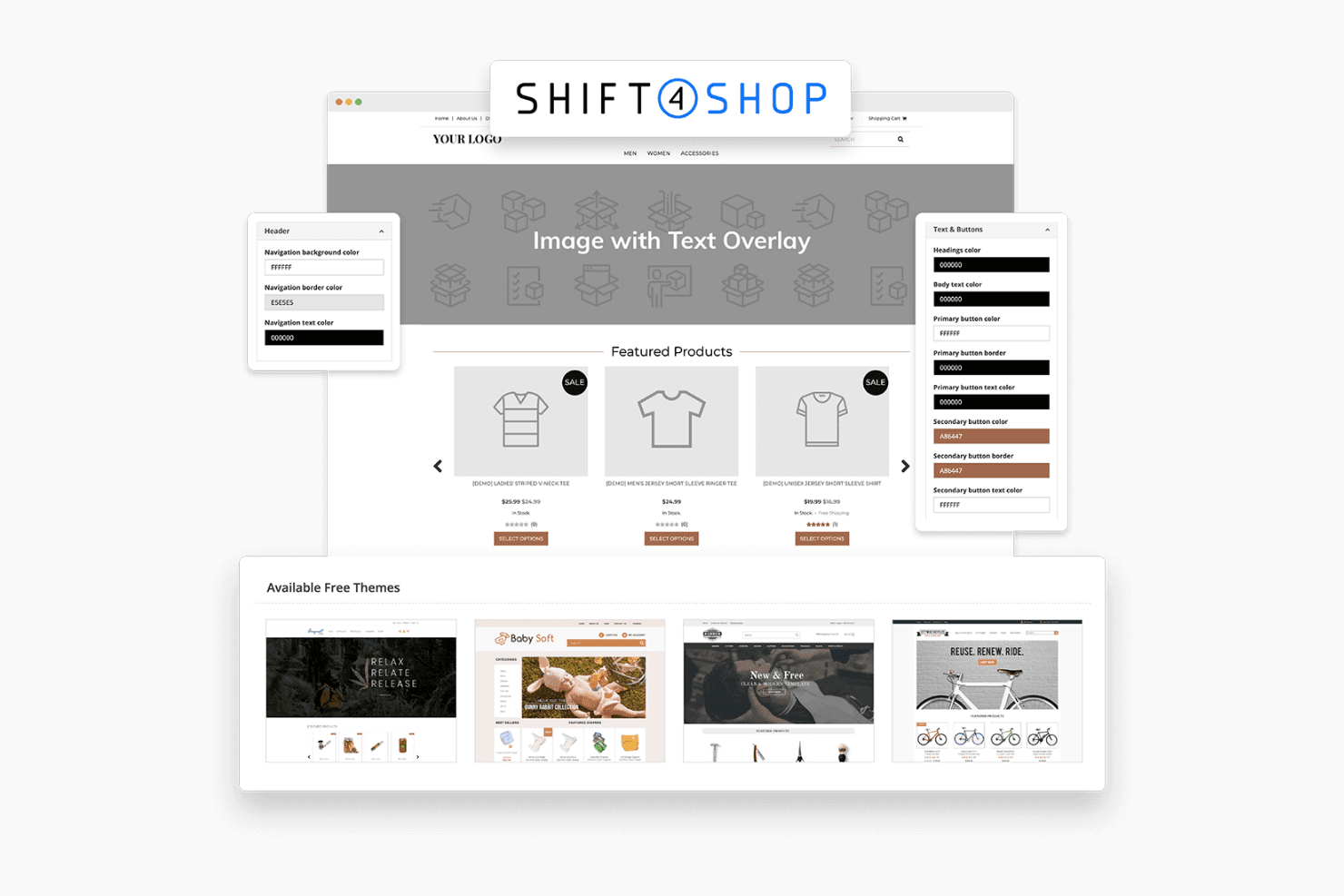
Shift4Shop lets users customize themes, colors, and buttons visually. Shift4Shop is a hosted ecommerce platform built for store owners who want an all-in-one solution with native inventory management, B2B selling tools, and built-in fraud protection—without relying on a WordPress stack or third-party plugins for core functionality.
Who Is Shift4Shop Best For?
Shift4Shop is a strong fit for small to mid-sized store owners who want a hosted, all-in-one ecommerce platform with native B2B tools, inventory management, and built-in fraud protection—without piecing together plugins.
Why I Picked Shift4Shop
I picked Shift4Shop as one of the best because its built-in Kount fraud protection is baked directly into the End-to-End plan, so every order gets an AI-driven Omniscore and risk analysis you can review right in the store manager. That means you can catch suspicious transactions before fulfillment, without paying for a separate fraud tool. I also appreciate the native B2B toolkit, which includes a Quick Order Pad, customer-specific price lists, and a PunchOut catalog connector for procurement software integrations.
Shift4Shop Key Features
- Abandoned-cart recovery: Automatically sends follow-up emails to shoppers who leave before completing a purchase.
- Customer groups: Segments shoppers into groups with distinct pricing, payment methods, shipping options, and promotions.
- Real-time shipping rates: Displays live carrier rates from USPS, UPS, FedEx, and others directly at checkout.
- Built-in affiliate program: Lets you recruit and manage affiliates to drive traffic and sales without a third-party tool.
Shift4Shop Integrations
Shift4Shop claims hundreds of integrations, including native PayPal, Shift4, Kount, Facebook, Amazon, eBay, Google Merchant Center, Square, and QuickBooks integrations. It also supports 160+ payment providers and offers REST, front-end, and AJAX APIs for custom connections.
Pros and Cons
Pros:
- Native B2B tools reduce plugin dependence
- Kount risk scores help flag suspicious orders
- Reviewers praise built-in inventory controls
Cons:
- Outages and glitches threaten order continuity
- Payment failures reported at launch
Learn more about Shift4Shop: Best for warehouse stock without plugin upkeep
- 14-day free trial available
- From $35/month
Visit WebsiteCustomer Rating:3.5/5
Volusion offers multiple storefront themes, including free and paid options. Volusion is an all-in-one hosted ecommerce platform that lets store owners build, manage, and grow an online store without relying on WordPress, third-party hosting, or a large plugin stack.
Who Is Volusion Best For?
Volusion suits small to mid-sized online store owners who want an all-in-one hosted platform with built-in security, inventory tools, and accessible support—without managing plugins or hosting separately.
Why I Picked Volusion
I picked Volusion as one of the best because it gets you from sign-up to a live, functioning store faster than almost any hosted platform I've tested. Site Designer's prebuilt blocks let you rearrange layouts and publish staged previews without touching code, and built-in tools like abandoned-cart reminders and SEO metadata controls mean you're not hunting for plugins to cover the basics. Support via live chat is available on every plan, so you're never troubleshooting alone during those first critical days.
Volusion Key Features
- Inventory tracking: Monitors product status, reorder quantities, and stock levels across warehouse locations from a single admin view.
- Premium Checkout: Offers a mobile-first, linear checkout flow with one-step returning-customer checkout, address validation, and promo code support.
- Built-in SEO controls: Lets you manage metadata, edit robots.txt, and configure sitemap indexing for pages, products, and categories without a plugin.
- Abandoned-cart reporting: Displays live and abandoned cart data and lets you send follow-up reminder messages directly from the admin.
Volusion Integrations
Volusion Marketplace lists 84 integrations, including ShipStation, while native integrations include Volusion Payments Powered by Stripe, PayPal Checkout, and Avalara AvaTax. Its XML API supports custom integrations on Business and Prime plans.
Pros and Cons
Pros:
- Built-in checkout handles guest and returning buyers
- Support reviewers praise patient, helpful representatives
- Inventory tools suit physical-product catalogs
Cons:
- Bulk exports and scaling constrain growth
- Storefront templates can feel dated
Learn more about Volusion: Best for artists and small businesses
- Free plan + 7-day trial available
- From $15/month

Big Cartel offers multiple storefront themes to customize your shop's look. Big Cartel is a hosted ecommerce platform built for independent creators, artists, and small brands who want to sell physical, digital, or membership products without dealing with WordPress plugins or complex self-hosted setups.
Who Is Big Cartel Best For?
Big Cartel is a natural fit for independent creators, artists, and small makers who want a no-fuss online shop without the overhead of WordPress or plugin management.
Why I Picked Big Cartel
I picked Big Cartel as one of the best because it's purpose-built for independent artists and small brands who want a real online store without the complexity of WordPress. I love that you can sell physical products, digital downloads, and memberships from one shop, and sync your catalog directly to Instagram, Facebook, and Google Shopping from a single dashboard. For creators selling at markets or craft fairs, the app's in-person Tap to Pay checkout automatically syncs orders and inventory back to your online store.
Big Cartel Key Features
- Sales tax autopilot: Automatically calculates and applies sales tax to orders so you don't have to manage it manually.
- Scheduled product drops: Set a future date and time for products to go live, letting you plan launches in advance.
- Custom code and CSS editor: Add your own HTML, CSS, or JavaScript directly to your storefront for deeper design control.
- Zapier integration: Connect your shop to 7,000+ third-party apps to automate workflows across your business tools.
Big Cartel Integrations
Big Cartel offers native integrations with Stripe, PayPal, Etsy, Squarespace, Shopify, Instagram, Facebook, and Google Shopping. It also supports marketplace integrations, a REST API with OAuth 2.0 and webhooks, and 7,000+ apps through Zapier.
Pros and Cons
Pros:
- Predictable costs praised by reviewers
- Market checkout records sales in shop admin
- Quick storefront setup without WordPress upkeep
Cons:
- WooCommerce imports omit orders and customers
- Catalog capped at 500 products
Learn more about BigCartel:
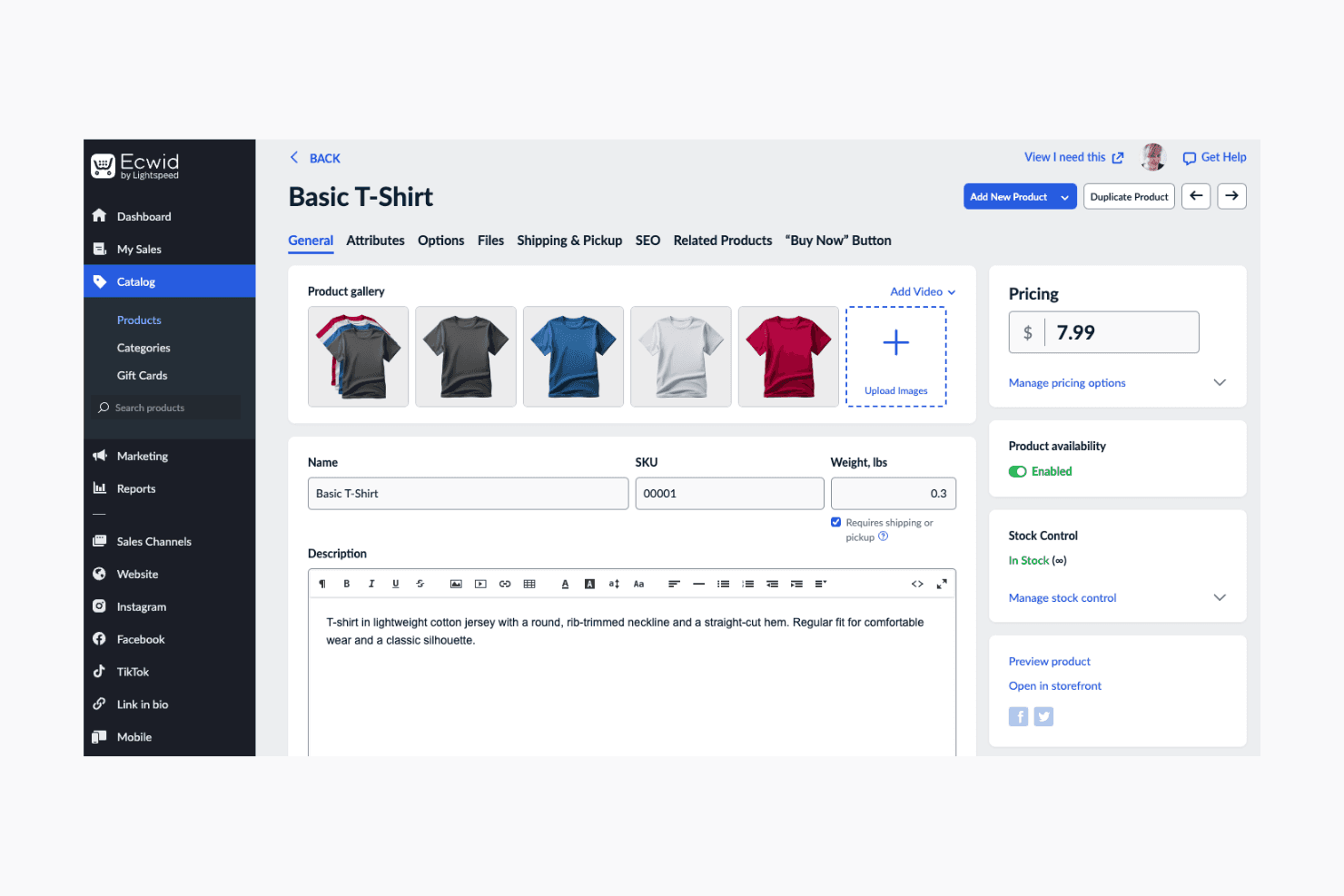
Ecwid lets users manage product details, pricing, and stock in one place. Ecwid is a hosted ecommerce platform that lets merchants add a fully functional store to an existing website—whether it's built on WordPress, Wix, Squarespace, or another CMS—without rebuilding their site or managing separate hosting and security updates.
Who Is Ecwid Best For?
Ecwid suits merchants who already have a website and want to add ecommerce without rebuilding or migrating to a new platform.
Why I Picked Ecwid
I picked Ecwid as one of the best because it's the only tool on this list built specifically around the idea that you shouldn't have to rebuild your site to sell online. I love that you can drop a fully functional store into an existing WordPress, Wix, or Squarespace site by embedding a single snippet, keeping your existing design intact. Ecwid also hosts the store separately on AWS, so your site's performance and security aren't tied to your ecommerce setup.
Ecwid Key Features
- Multichannel selling: Manage sales across your website, Facebook, Instagram, Amazon, eBay, and in-person channels from a single Ecwid control panel.
- Automated marketing emails: Set up triggered emails for abandoned carts, repeat purchase prompts, inactivity reminders, and purchase anniversaries.
- Customer groups and wholesale pricing: Create customer groups and assign storewide discounts for wholesale buyers or loyalty segments.
- App Market and API access: Connect third-party apps for shipping, accounting, and marketing, or build custom integrations using Ecwid's REST API, webhooks, and JavaScript API.
Ecwid Integrations
Ecwid offers native integrations with WordPress, Wix, Squarespace, Facebook, Instagram, Lightspeed Retail POS, PayPal, and Stripe. Its App Market provides marketplace integrations with Amazon, eBay, Walmart, Mailchimp, and Salesforce, while its API, webhooks, and JavaScript API support custom integrations.
Pros and Cons
Pros:
- Bulk catalog editing supports faster stock updates
- Order management receives positive user ratings
- Existing-site store embedding earns reviewer praise
Cons:
- Storefront styling offers limited layout control
- Historical order migration requires manual work
Learn more about Ecwid: Best for digital products and subscriptions
- Free plan + demo available
- 5% + $0.50 per transaction

Lemon Squeezy lets users customize their storefront design and layout. Lemon Squeezy is an all-in-one ecommerce platform built for creators and software businesses that want to sell digital products, SaaS subscriptions, and software licenses without managing payment infrastructure or international tax compliance.
Who Is Lemon Squeezy Best For?
Lemon Squeezy is a strong fit for indie creators, SaaS founders, and software developers who sell digital products or subscriptions and want tax and payment compliance handled for them.
Why I Picked Lemon Squeezy
I've included Lemon Squeezy in my top picks because it's the only platform here that acts as your merchant of record, meaning it handles VAT, sales tax collection, and tax remittance across 135+ countries so you never touch a tax filing. I love how it pairs that with native subscription billing, including usage-based pricing, upgrade and downgrade proration, and dunning for failed payments. If you're selling SaaS, software licenses, or digital downloads and want to ditch WooCommerce without rebuilding your entire payment and tax stack, Lemon Squeezy does the heavy lifting.
Lemon Squeezy Key Features
- Email marketing: Send broadcast emails and automated messages to customer segments directly from your Lemon Squeezy dashboard, without a separate email tool.
- Affiliate program management: Create unlimited affiliate links, configure commission rates and payout thresholds, and manage partner approvals from one place.
- Checkout embeds and overlays: Add a hosted checkout overlay to any existing website or app using checkout.js, with support for frameworks like React and Vue.
- Software license key delivery: Automatically generate and issue license keys to customers at purchase, with built-in deactivation and re-issuance management.
Lemon Squeezy Integrations
Documented native integrations include ConvertKit, Mailchimp, and PayPal, with additional integrations for Framer and Fernand. Lemon Squeezy also offers a REST API, JavaScript and Laravel SDKs, and Zapier.
Pros and Cons
Pros:
- Clear API documentation supports software licensing workflows
- Reviewers report quick setup for digital sales
- Handles digital-product tax compliance as merchant of record
Cons:
- Reviewers report opaque approvals and delayed payouts
- Physical goods are prohibited
Learn more about Lemon Squeezy:
Outras alternativas ao WooCommerce
Eis algumas alternativas adicionais ao WooCommerce que não entraram na minha lista de selecionadas, mas que vale a pena conhecer:
- 11MivaBest for complex product catalogs
- 12GoDaddy Online StoreBest for quick setup and support
- 13ShopifyBest for easy setup and scalability
- 14SquarespaceBest for in-person and online sales
- 15Adobe CommerceBest for enterprise-level customization
- 16Zoho CommerceBest for CRM integration
- 17CloverBest for retail POS integration
- 18Hostinger ReachBest for budget-friendly hosting
- 19NetSuite SuiteCommerceBest for ERP integration
- 20OdooBest for integrated business apps
- 21BigCommerceBest for large product catalogs
- 22Square OnlineBest for in-person and online sales
- 23PrestaShopBest for open-source flexibility.
- 24ikasBest for local market adaptation
How I Evaluate WooCommerce Alternatives
I split my evaluation into two layers: the baseline capabilities every platform must have, and the differentiators that determine which tool actually fits your storefront, catalog, and channel setup.
Core Functionality (Table Stakes For This List)
When I'm selecting tools for my list, I rank each one on a scale from 0 (does not offer the functionality) to 5 (excels in this area) for each core functionality listed below. Then, I calculate the tool's total score into a percentage. Each tool needs to achieve a minimum total score of 75% to be considered for inclusion.
- Online Storefront Builder: I evaluate the theme library, visual editor, and design flexibility—whether you can launch a polished storefront without hiring a developer to write custom code.
- Product & Inventory Management: Every platform should handle variants, categories, and real-time stock tracking, so I check how well each one manages catalogs with hundreds of SKUs across sizes, colors, and materials.
- Integrated Payment Processing: I look at gateway options, digital wallet support, and PCI compliance so your customers can check out with their preferred method, from credit cards to buy-now-pay-later services.
- Order & Fulfillment Management: From shipping label generation to returns handling, I evaluate how each platform moves an order from checkout to the customer's door with minimal manual steps.
- Multi-Channel Selling: Selling on your website alone rarely cuts it, so I check whether a platform connects to marketplaces like Amazon and eBay, social channels like Instagram and TikTok, and in-store POS systems.
- Extensibility & App Ecosystem: I look at the breadth of the app marketplace, API access, and native integrations with tools like QuickBooks, Klaviyo, and ShipStation that retailers rely on daily.
Once I have a list of tools that meet this criteria, I consider what sets each platform apart.
Differentiating Factors (What Sets Vendors Apart)
Here's how I compare and contrast different vendors:
Standout Features
Built-in POS is a major factor for retailers running physical locations alongside their online store—I check whether a platform offers its own hardware and unified sales reporting. Headless commerce support matters for brands that want custom storefronts on mobile apps or in-store kiosks. I also evaluate B2B and wholesale modules, since many DTC brands eventually expand into wholesale and need tiered pricing and net payment terms without bolting on a separate system.
Beyond Features
Migration support is a big deal when you're moving off WooCommerce—I check whether a platform offers import tools for products, customers, and order history, or if you'll need a third-party migration app. Total cost of ownership also gets close attention, since WooCommerce feels free until you add up hosting, plugins, and security costs. I evaluate how each alternative's subscription pricing scales as your catalog and order volume grow, including transaction fees and required paid add-ons.
O que é o WooCommerce?
O WooCommerce é um plugin de comércio eletrónico de código aberto para WordPress que transforma um site WordPress numa loja online completa—produtos, carrinho, finalização da compra e encomendas.
É flexível e fácil de utilizar para os programadores, com temas, modelos e plugins WooCommerce para pagamentos (Stripe, PayPal), envio, impostos, SEO e subscrições ou produtos digitais.
Controla o alojamento, os preços dos complementos e as opções de personalização no seu próprio painel de administração.
É uma solução muito poderosa—mas implica manutenção, atualizações e otimização do desempenho, especialmente à medida que o seu site de comércio eletrónico cresce.
Por que motivo procurar uma alternativa ao WooCommerce?
As equipas mudam quando o controlo começa a prejudicar a velocidade, a estabilidade e os custos. Eis o que impulsiona essa mudança:
- Custo total mais baixo. Preços previsíveis nos planos pagos, sem custos inesperados de alojamento web, complementos ou transações.
- Finalização da compra mais rápida. Processos integrados numa só página, carteiras digitais e gateways de pagamento otimizados para aumentar a conversão.
- Simplicidade do alojamento. As plataformas SaaS completas (Shopify, BigCommerce, Wix, Squarespace, Ecwid) tratam da disponibilidade, segurança e atualizações.
- Facilidade de utilização para principiantes. Editores de arrastar e largar, modelos intuitivos e tutoriais para que os proprietários de empresas avancem mais rapidamente.
- Pagamentos mais completos. Mais métodos de pagamento—cartões de crédito, PayPal, Stripe, opções locais—e prazos de pagamento mais claros.
- Escalabilidade. Desempenho estável com catálogos extensos, automatização e gestão de inventário que sincroniza de facto.
- Funcionalidades integradas. Ferramentas de marketing, SEO, marketing por correio eletrónico e vendas nas redes sociais/mercados online (Instagram, Amazon), sem soluções improvisadas.
- Melhor suporte. Apoio ao cliente real, com SLA, em vez de procurar respostas em fóruns e enfrentar uma curva de aprendizagem acentuada.
- Adequado para produtos digitais. Subscrições, licenças e adesões nativas (uma alternativa ao Easy Digital Downloads/MemberPress).
- Processos de trabalho mais simples. Menos plugins, menos falhas e um percurso mais simples entre as páginas de produtos e o processamento de pagamentos para a sua empresa de comércio eletrónico.
Principais funcionalidades do WooCommerce
Eis o que as melhores alternativas ao WooCommerce oferecem de origem—quer continue a utilizar um plugin do WordPress, quer opte por uma plataforma SaaS de comércio eletrónico alojada.
Terá uma finalização da compra mais rápida, gateways de pagamento modernos (Stripe, PayPal, carteiras digitais), modelos de arrastar e largar e SEO integrado que não se desmorona no dia das atualizações.
Conte com uma gestão de inventário mais simples, preços e custos de transação mais claros e um suporte que responde—para que a sua loja online cresça sem uma pilha de complementos.
- Alojamento e segurança completos. SSL, conformidade PCI, atualizações, cópias de segurança e CDN tratados pela plataforma.
- Finalização da compra mais rápida e opções de pagamento. Processos numa só página, Apple Pay/Google Pay e métodos locais para aumentar a conversão.
- Modelos modernos e design de arrastar e largar. Temas responsivos e editores de secções—sem necessidade de código para controlar a marca.
- SEO e desempenho integrados. URLs limpos, dados estruturados, mapas do site e otimização de imagens para uma velocidade real.
- Gestão robusta de catálogos e inventário. Variantes, conjuntos de produtos, encomendas pendentes e sincronização em tempo real entre canais.
- Produtos digitais e subscrições. Transferências seguras, licenças, adesões, repartição proporcional e gestão de cobranças em atraso.
- Ferramentas de marketing integradas. Marketing por correio eletrónico, descontos, recuperação de carrinhos abandonados e integrações com redes sociais.
- Vários canais e POS. Ligações nativas ao Instagram, Amazon e eBay, além de POS em loja para uma verdadeira operação multicanal.
- Portabilidade de dados e APIs. Exportações CSV/XLSX, APIs REST/GraphQL e webhooks para automatizar processos de trabalho.
- Migração compatível com WordPress. Importadores para dados do WooCommerce, suporte para redirecionamentos 301 e transições de domínio orientadas.
- Análises acionáveis. Coortes, relatórios de produtos e da finalização da compra, integrações com o GA4 e atribuição consistente.
- Impostos e conformidade tratados. Imposto sobre vendas/IVA/GST automatizado, ferramentas de consentimento e registos prontos para auditorias.
- Escalabilidade e SLA de disponibilidade. Escalabilidade automática, sítios de preparação e ambientes de testes para alterações seguras.
- Preços transparentes. Planos pagos claros, custos de transação calculados e um nível de plano gratuito para pequenas empresas.
- Suporte ao cliente real. Conversação online ou telefone 24/7, tutoriais e uma rede de parceiros para quando ultrapassar a configuração autónoma.
- Escolha do tipo de plataforma. Permaneça no WordPress (por exemplo, Easy Digital Downloads, MemberPress) ou opte por uma solução alojada (Shopify, BigCommerce, Wix, Squarespace, Ecwid, Adobe Commerce/Magento), com base nas necessidades da empresa e nos conhecimentos técnicos.