

Gerir a faturação recorrente e as subscrições não deveria ser como tentar organizar folhas de cálculo à meia-noite. O software de gestão de subscrições de código aberto existe para lhe proporcionar flexibilidade, transparência e controlo—sem pagar demasiado por funcionalidades excessivas de SaaS ou modelos de preços rígidos.
Depois de mais de uma década no retalho e no comércio eletrónico, vi a rapidez com que os erros de faturação, as falhas de integração e as análises insuficientes podem destruir as receitas recorrentes.
Quer esteja a gerir uma startup pequena ou uma operação complexa multicanal, precisa de ferramentas que automatizem fluxos de trabalho, suportem relatórios em tempo real e funcionem bem com a sua atual pilha tecnológica.
Este guia faz precisamente isso. Selecionei e analisei as melhores plataformas de gestão de subscrições de código aberto—testadas quanto à automatização da faturação, ao processamento de pagamentos, à flexibilidade da API e a tudo o que importa quando precisa de reduzir a perda de clientes e crescer rapidamente.
Sem conteúdo desnecessário. Sem discurso de vendas. Apenas conhecimentos práticos, ao nível de quem gere a operação, para o ajudar a encontrar um sistema de faturação que se adapte realmente às necessidades da sua empresa—sem as dores de cabeça habituais.
Why Trust Our Software Recommendations
6,700+
Reviews
20
Industry experts
16+
Evaluation factors
14
Years
Our team has been testing and reviewing software since 2012. As retail leaders ourselves, we know how difficult—and important—it is to choose the right software.
For this guide, we evaluated tools using hands-on testing and independent research, scoring tools using our selection criteria.
Our reviews reflect our independent judgment—not a sales pitch.
Tabela comparativa de software de gestão de subscrições de código aberto
Esta tabela comparativa apresenta os preços, os detalhes dos períodos de teste e os casos de utilização ideais para as minhas principais escolhas de software de gestão de subscrições de código aberto.
| Tool | Best For | Trial Info | Price | ||
|---|---|---|---|---|---|
| 1 | Best for self-hosted recurring billing with ERP | Free plan available | Pricing upon request | Website | |
| 2 | Best for CRM-embedded subscription billing | 15-day free trial | From $19/user/month | Website | |
| 3 | Best for no-fee multi-model billing via self-hosting | Free plan + free trial + free demo available | From $99/month | Website | |
| 4 | Best for Ruby-built subscription storefronts | Free demo available | Pricing upon request | Website | |
| 5 | Best for content-driven subscription storefronts | Free demo available | Pricing upon request | Website | |
| 6 | Best for headless subscription commerce | 30-day free trial | From $4/user/month | Website | |
| 7 | Best for API-first billing integrations | Free demo available | Pricing upon request | Website | |
| 8 | Best for billing automation | Free plan available | Pricing upon request | Website | |
| 9 | Best for metered API and AI token billing | Free plan available | From $249/month | Website | |
| 10 | Best for telecom-scale subscription billing | Free demo available | Pricing upon request | Website |



Os 10 melhores softwares de gestão de subscrições de código aberto, analisados
Leia as minhas análises diretas abaixo para conhecer melhor as funcionalidades de destaque, as vantagens e desvantagens e o tipo de empresa a que cada ferramenta serve melhor—com base numa década de experiência no retalho e no comércio eletrónico.
 Best for self-hosted recurring billing with ERP
- Free plan available
- Pricing upon request
Visit WebsiteCustomer Rating:4.2/5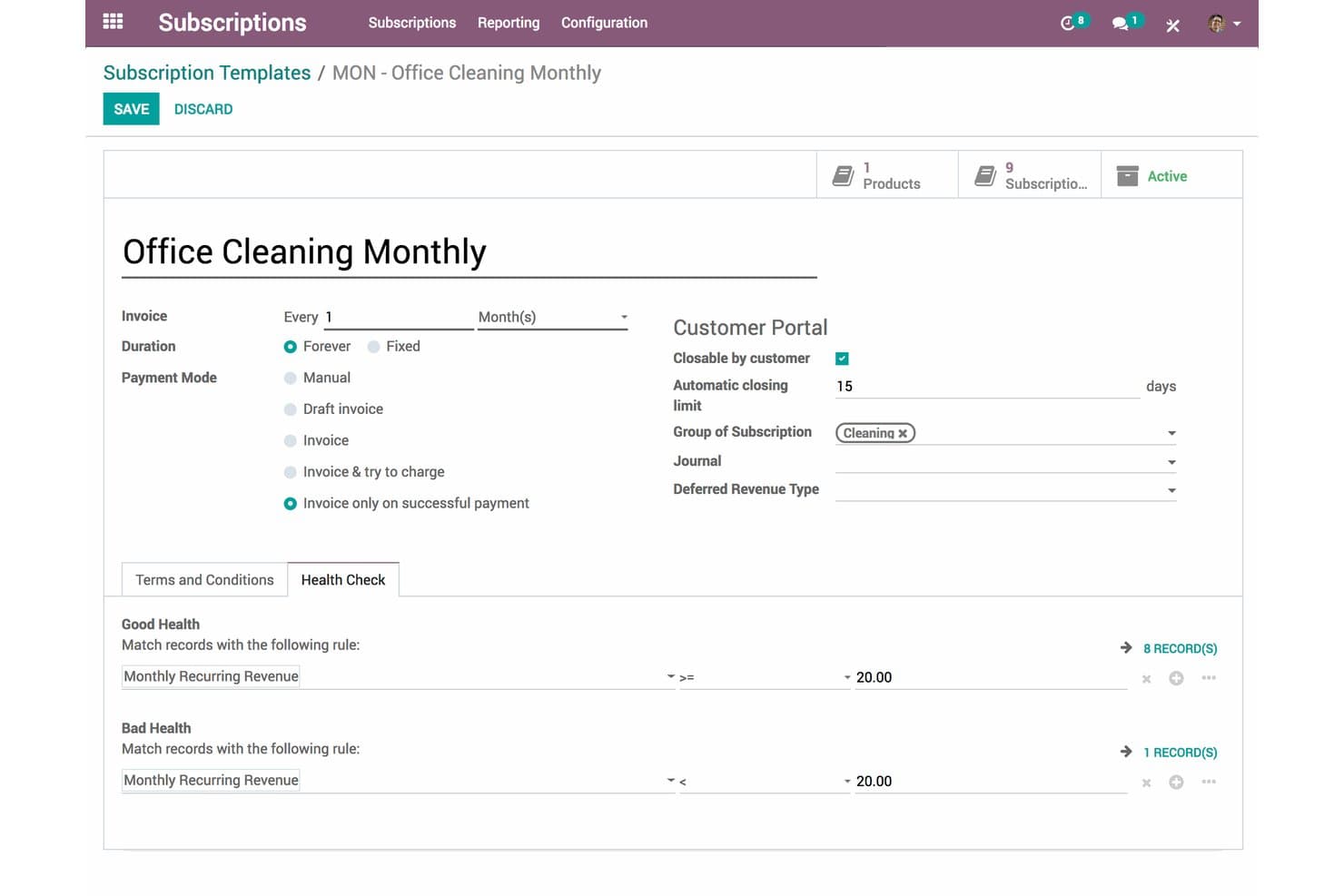
Odoo Subscriptions lets users configure billing cycles and health checks. Odoo Subscriptions is an open-core recurring billing and subscription lifecycle platform that combines automated invoicing, dunning, MRR/ARR analytics, a self-service customer portal, and 20+ payment provider integrations within a broader ERP suite.
Who Is Odoo Subscriptions Best For?
Odoo Subscriptions is a strong fit for retail and ecommerce businesses with in-house DevOps capacity that want to self-host their recurring billing and manage it within a single ERP environment.
Why I Picked Odoo Subscriptions
Odoo Subscriptions earns its spot on my shortlist because it's the only open-source-rooted platform that bundles subscription lifecycle management directly inside a full ERP, letting retail teams run billing, inventory, and POS from one system without middleware. I particularly like that self-hosted deployments on Docker or Kubernetes carry zero per-transaction fees, and that deferred revenue recognition is handled natively for GAAP/IFRS 15 compliance, which is rare at this price point.
Odoo Subscriptions Key Features
- MRR/ARR analytics dashboard: Tracks new, expansion, contraction, and churned MRR automatically from active subscription records, with ARR forecasting and cohort retention curves.
- Multi-level dunning workflows: Configurable payment follow-up sequences with custom email templates and escalation actions, from reminders to service suspension to write-off.
- 100+ country tax localization packages: Applies regional tax rules, including VAT, GST, and multi-state nexus, automatically across subscription invoices.
- Subscription health scores: Flags at-risk subscribers based on calculated health scores and triggers CRM-based retention workflows for account manager follow-up.
Odoo Subscriptions Integrations
Odoo Subscriptions offers native integrations across Odoo CRM, Accounting, Sales, eCommerce, POS, Inventory, and Helpdesk, plus 20+ payment providers including Stripe, Adyen, PayPal, and Mollie. Custom integrations use XML-RPC, JSON-RPC, or REST APIs, with external API access on the Custom plan.
Pros and Cons
Pros:
- Built-in GAAP/IFRS 15 revenue compliance
- No per-transaction SaaS fees if self-hosted
- Native ERP and POS integration for retail
Cons:
- Usage-based billing automation needs custom code
- Full subscriptions features require enterprise license
Learn more about Odoo Subscriptions: Best for CRM-embedded subscription billing
- 15-day free trial
- From $19/user/month
Visit WebsiteCustomer Rating:5/5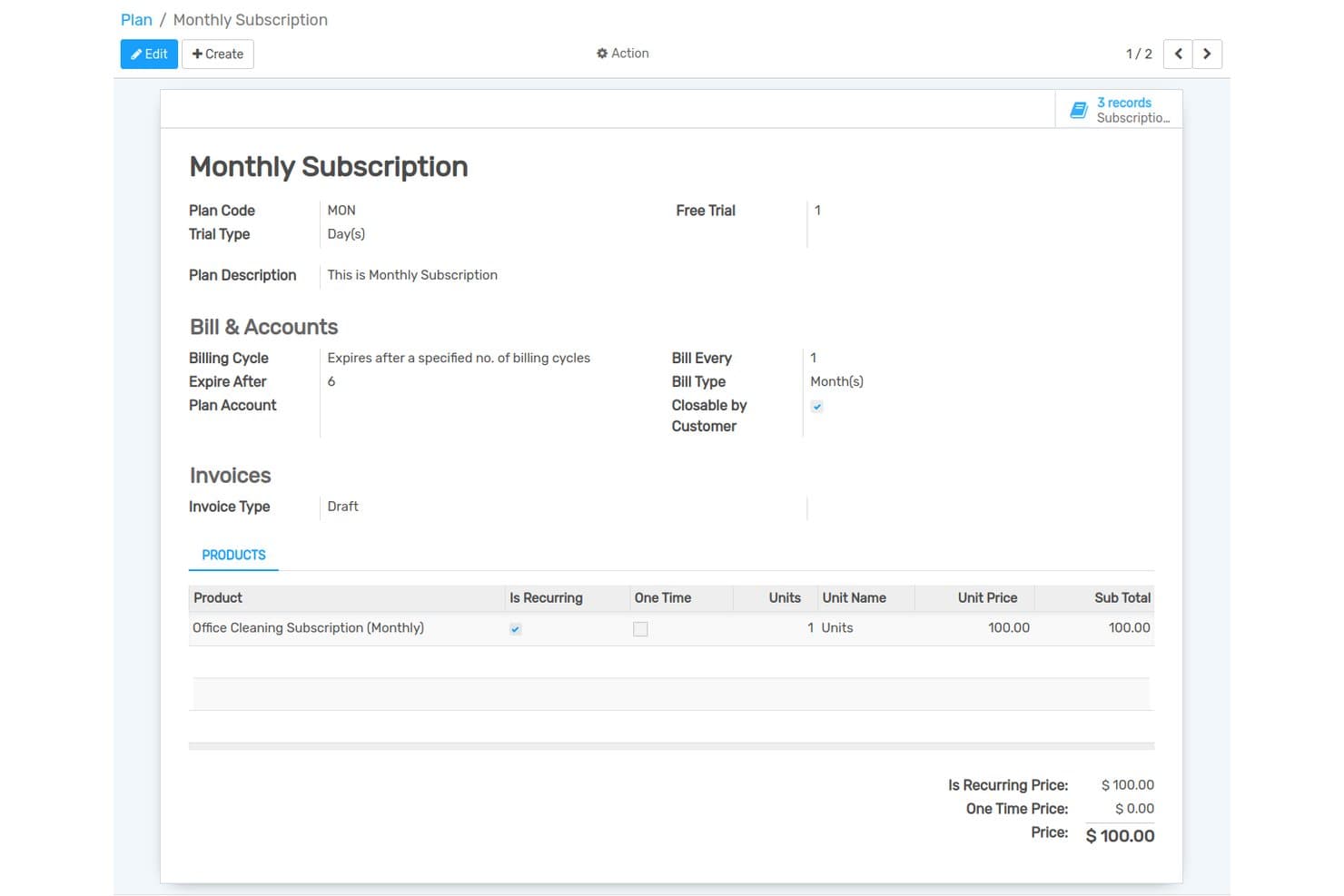
Flectra lets users configure billing cycles and pricing for subscription plans. Flectra is an open-source ERP platform with a built-in subscription management module that handles recurring billing, automated invoicing, dunning, plan management, and a self-service customer portal—all natively connected to its CRM, accounting, and ecommerce modules.
Who Is Flectra Best For?
Flectra is a strong fit for businesses that already run—or plan to run—their operations on a unified ERP stack and want subscription billing natively connected to CRM and invoicing without stitching together separate tools.
Why I Picked Flectra
Flectra earns its spot on my shortlist because subscription billing and CRM live in the same platform natively, with no connectors required. I like that when a subscriber upgrades a plan, that change surfaces immediately in the CRM pipeline alongside their full contact history and invoicing record. The self-service billing portal and automated invoicing with dunning management round out a billing engine that handles the full subscriber lifecycle without stitching together separate tools.
Flectra Key Features
- Multi-period recurring billing: Supports flexible billing cycles and frequencies with automated invoice generation and delivery to subscribers.
- 12 payment gateway integrations: Connects natively with Stripe, PayPal, Adyen, Authorize.Net, Razorpay, and eight additional providers, plus Google Pay and Apple Pay.
- Subscription plan management: Lets you create and manage multiple plan tiers with discount management and GST-compliant tax invoicing built in.
- No-Code Studio: A visual customization module that lets non-developers build and modify apps, forms, and workflows without writing code.
Flectra Integrations
Flectra offers 12 native payment integrations, including Stripe, PayPal, Adyen, Authorize.Net, Razorpay, and Mollie. Its XML-RPC external API and REST API references support custom connections.
Pros and Cons
Pros:
- Self-service portal for subscriber account management
- Offers 12 payment gateways with global coverage
- CRM and subscription billing are natively unified
Cons:
- API uses XML-RPC, not modern REST standards
- Does not connect natively to Shopify or WooCommerce
Learn more about Flectra: Best for no-fee multi-model billing via self-hosting
- Free plan + free trial + free demo available
- From $99/month
Visit WebsiteCustomer Rating:5/5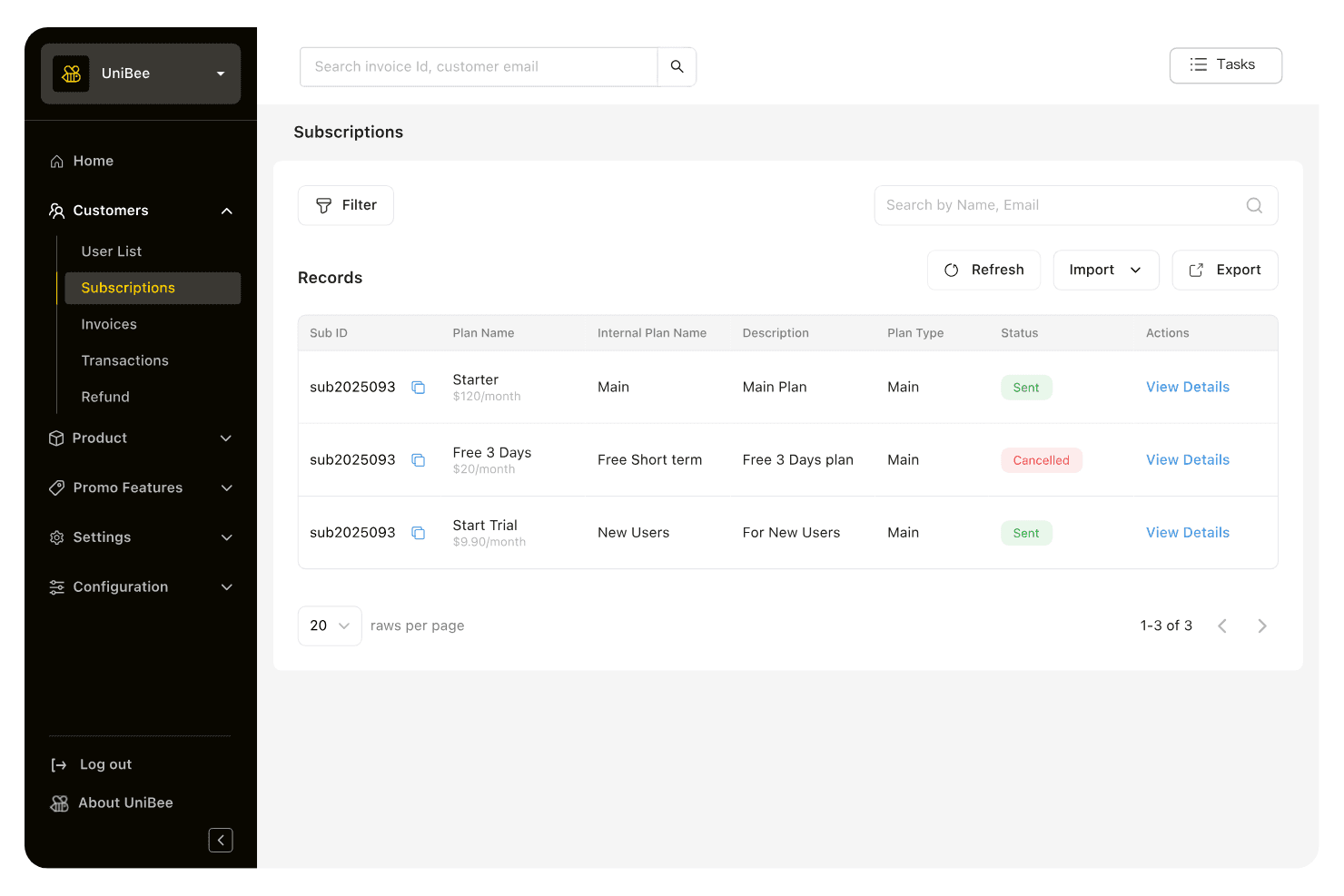
UniBee lets users track and manage customer subscriptions in one place. UniBee is an AGPLv3 open-source subscription management platform that supports recurring, usage-based, tiered, per-seat, and hybrid billing models alongside multi-gateway payment routing, smart dunning, and a developer-facing REST API.
Who Is UniBee Best For?
UniBee is a strong fit for technical teams and DevOps engineers who want full billing infrastructure control without paying per-transaction SaaS fees.
Why I Picked UniBee
I picked UniBee as one of the best because it's the only tool on my list where self-hosting completely eliminates transaction fees across every billing model. I love that you can run recurring, usage-based, tiered, and per-seat billing simultaneously under one AGPLv3 codebase, with smart dunning and multi-gateway routing built in. In practice, that means my team can recover failed payments automatically while routing transactions across Stripe, PayPal, and Alipay without paying a percentage of revenue to anyone.
UniBee Key Features
- Multi-currency pricing: Set and display prices in multiple currencies natively, supporting global subscriber bases without third-party workarounds.
- VATSense tax integration: Automates VAT and GST calculation on initial and recurring charges, with country tax rates refreshed weekly.
- Coupon and discount engine: Create percentage or fixed discounts with configurable cycle limits, expiration dates, usage caps, and plan-specific rules.
- OpenTelemetry observability hooks: Connect UniBee billing events to your existing monitoring stack for real-time infrastructure and performance visibility.
UniBee Integrations
UniBee lists 25+ native integrations, including Stripe, PayPal, QuickBooks, Xero, TaxJar, VATSense, Mixpanel, and HubSpot. Its REST API supports custom integrations, while Zapier is also available.
Pros and Cons
Pros:
- Advanced billing models supported natively
- Full control over billing infrastructure
- No per-transaction fees with self-hosting
Cons:
- AGPLv3 license may limit proprietary use
- No retail or eCommerce connectors included
Learn more about UniBee: Best for Ruby-built subscription storefronts
- Free demo available
- Pricing upon request
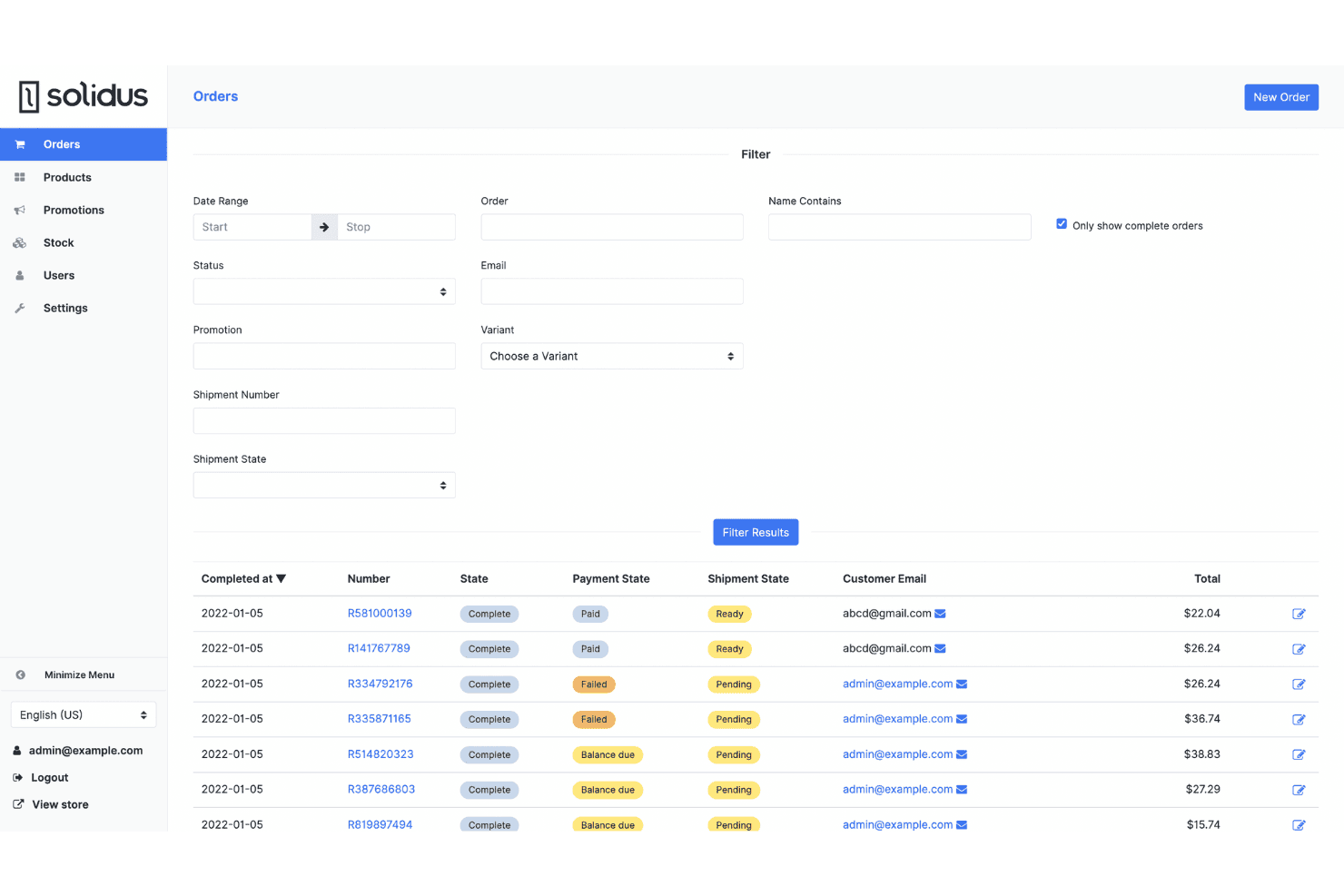
Solidus lets users filter and manage orders by status, payment, and shipment state. Solidus is a BSD-3-licensed open-source ecommerce platform built on Ruby on Rails that includes a native subscription engine supporting recurring billing, curated boxes, Build Your Own Box, and digital memberships.
Who Is Solidus Best For?
Solidus is a strong fit for DTC brands with in-house Ruby on Rails developers who want a fully self-hosted subscription storefront with no licensing fees or per-transaction costs.
Why I Picked Solidus
Solidus earns its spot on my list because it's one of the only open-source ecommerce platforms with a native subscription engine built directly into the codebase. I love that the
solidus_subscriptionsextension supports curated boxes, Build Your Own Box, and digital memberships out of the box, so Ruby on Rails teams aren't stitching together separate billing tools. Recurring billing intervals are configurable at the line-item level, meaning a store can run monthly replenishment and bimonthly curated boxes from a single checkout flow.Solidus Key Features
- BSD-3-Clause open source license: Solidus is freely self-hostable and redistributable under a permissive OSI-approved license with no per-transaction fees on any plan.
- PSP-agnostic payment gateway support: Native integrations with Stripe, Braintree, PayPal, Square, Razorpay, Affirm, Afterpay, and Klarna give merchants broad payment flexibility.
- REST and GraphQL APIs: Dual API access lets developer teams connect Solidus to headless frontends, ERPs, CRMs, and other retail tech stack components.
- Configurable dunning and retry logic: Failed subscription installments are automatically retried on each processor run, with optional Churn Buster integration for advanced payment recovery workflows.
Solidus Integrations
Solidus documents 10+ native payment gateway integrations, including Stripe, Braintree, PayPal Commerce Platform, Square, Razorpay, Klarna, and Afterpay. It also connects with Avalara, Klaviyo, EasyPost, ShipStation, Segment, and Churn Buster, with REST and GraphQL APIs for custom integrations.
Pros and Cons
Pros:
- Dual REST and GraphQL APIs available
- Native subscription engine supports curated boxes
- Truly free and open source model
Cons:
- Ruby on Rails expertise required for deployment
- No pre-built customer subscription portal
Learn more about Solidus: Best for content-driven subscription storefronts
- Free demo available
- Pricing upon request
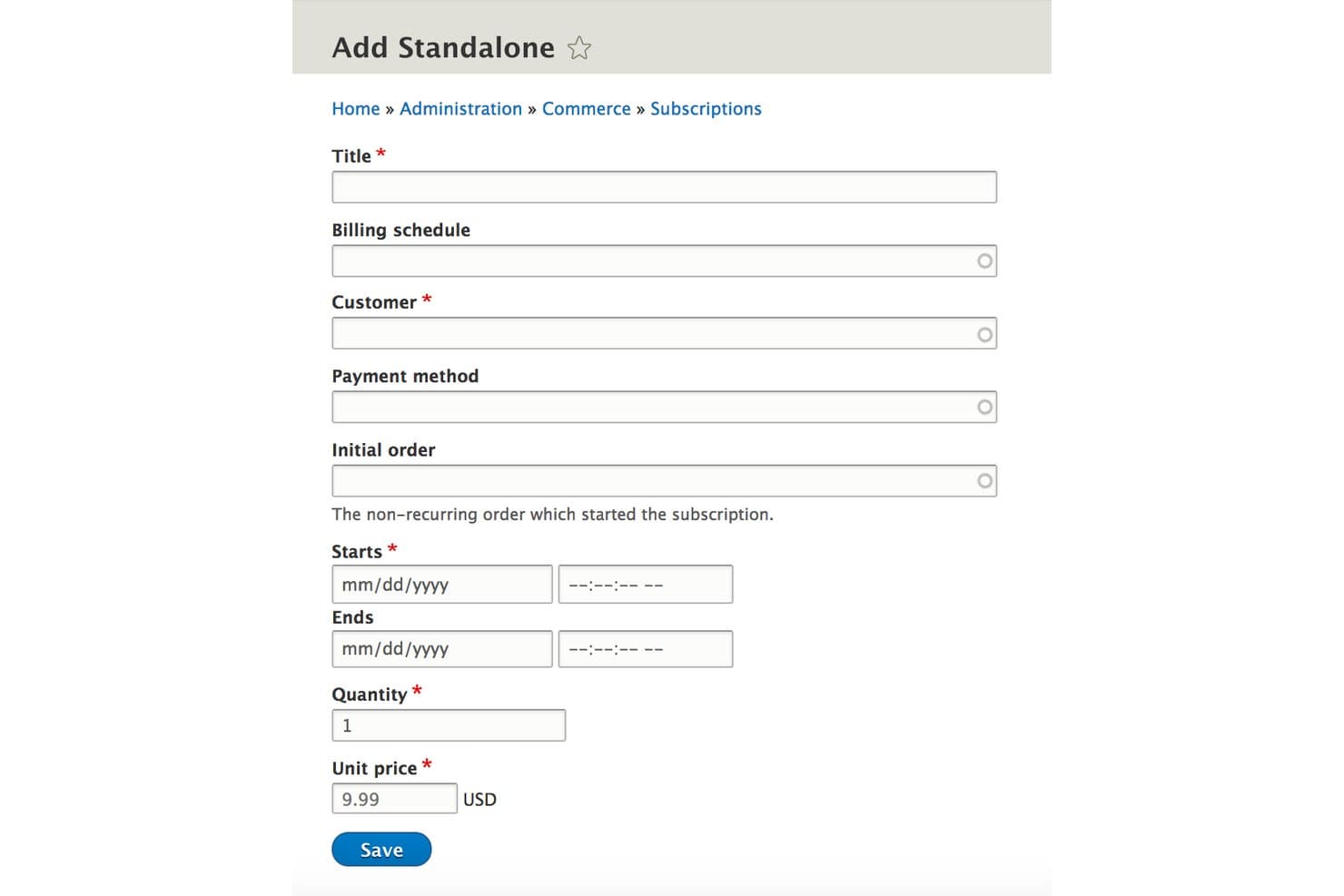
Drupal Commerce lets users manually create standalone subscriptions. Drupal Commerce is a GPL-licensed, self-hostable open-source e-commerce platform built on Drupal CMS that combines content management with recurring billing, configurable subscription types, and a 142-module payment gateway ecosystem.
Who Is Drupal Commerce Best For?
Drupal Commerce is a strong fit for development teams building content-heavy subscription storefronts where CMS and ecommerce need to live on the same platform.
Why I Picked Drupal Commerce
Drupal Commerce earns its spot on my shortlist because it's the only open-source subscription platform where content management and recurring billing share the same codebase. I love how fieldable subscription entities let you attach custom metadata directly to each subscriber record, which is genuinely useful when building content-gated membership tiers or curated box programs. The 142 contributed payment gateway modules, including GoCardless for direct debit and Stripe with Connect built in, cover recurring billing scenarios most platforms can't match without expensive add-ons.
Drupal Commerce Key Features
- Fieldable subscription entities: Attach custom fields and metadata directly to individual subscription records to support complex data models.
- Advanced Queue-powered renewal processing: Automates billing period closures and renewal jobs via Drupal Cron for reliable background processing.
- Multi-store and multi-currency support: Run multiple store entities with per-currency static pricing and CLDR-standard localization from a single installation.
- B2B customer groups: Assign shared addresses, payment methods, order history, and account-level price lists to business customer accounts.
Drupal Commerce Integrations
Drupal Commerce has a wide range of payment gateway integrations, including Stripe, PayPal, Braintree, GoCardless, Adyen, and Checkout.com, plus Avalara and ShipStation integrations. JSON:API and REST endpoints support custom connections.
Pros and Cons
Pros:
- Massive global payment gateway coverage
- Supports complex content-driven subscription storefronts
- Controls all subscription and ecommerce data
Cons:
- Subscription lifecycle upgrades require custom development
- No built-in subscriber self-service portal
Learn more about Drupal Commerce:
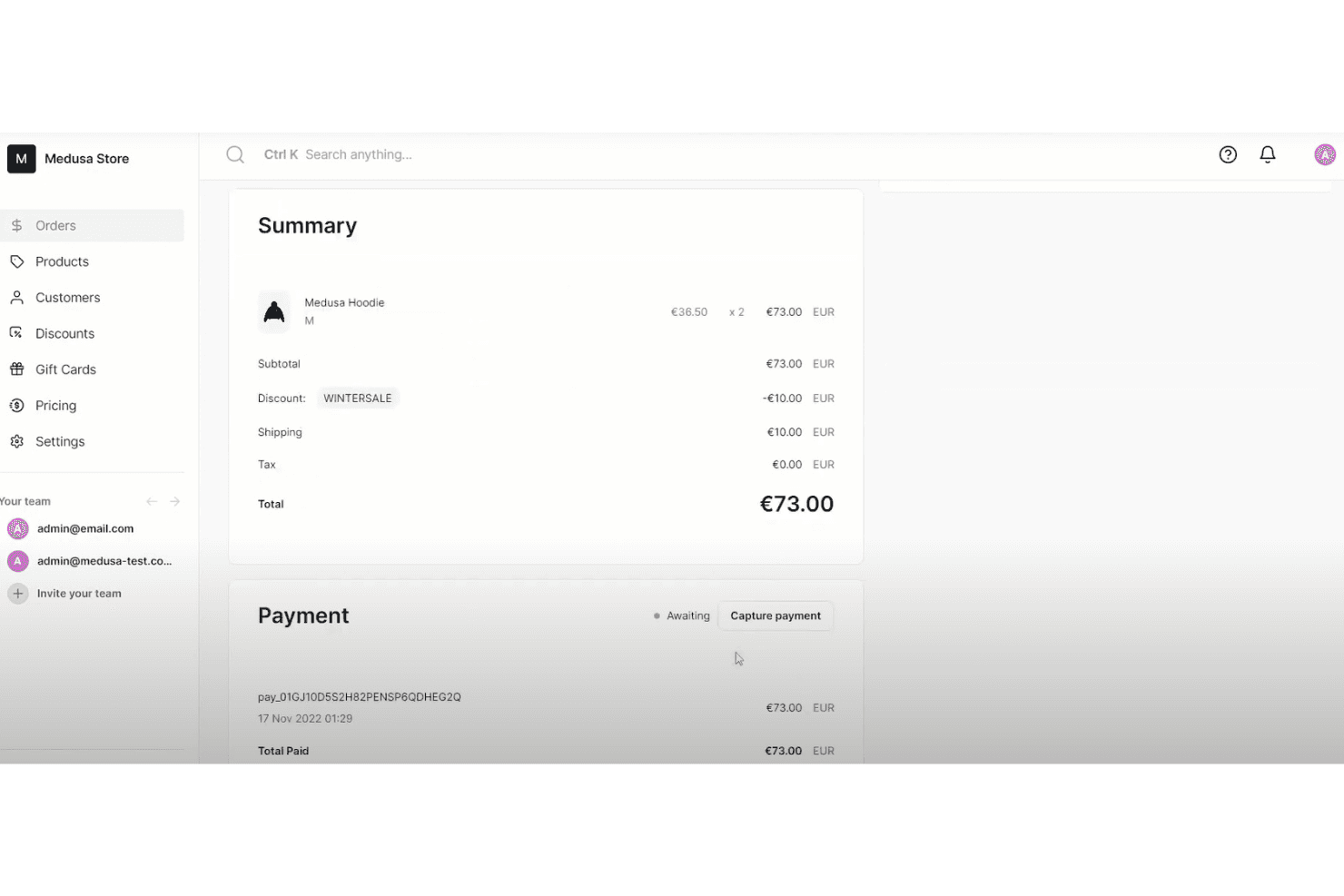
Medusa tracks order summaries, discounts, and payment capture in one view. Medusa is an open-source, headless commerce platform built on Node.js and TypeScript that covers product catalog management, multi-currency pricing, tax, payment processing, and subscription lifecycle management via its modular architecture and the MIT-licensed Reorder plugin.
Who Is Medusa Best For?
Medusa is a strong fit for engineering-led DTC brands and retail teams that want full control over their subscription stack without paying per-transaction SaaS fees.
Why I Picked Medusa
I picked Medusa as one of the best because it's the only open-source platform that lets you run a fully headless subscription commerce stack without paying per-transaction SaaS fees. The MIT-licensed Reorder plugin adds production-ready recurring billing, dunning with configurable retry intervals, and MRR/churn/LTV analytics directly inside the Medusa Admin. I also love that multi-currency pricing and tax are baked into the core, so cross-border subscription programs don't require bolted-on workarounds.
Medusa Key Features
- Self-service subscription API routes: Store-facing REST endpoints let customers skip deliveries, swap plans, and update payment methods without contacting support.
- Modular commerce architecture: Medusa's 17 independent modules let you adopt only the components you need—tax, inventory, pricing—without deploying a full monolith.
- Multi-region pricing engine: Define currency-specific prices, local tax rates, and region-scoped shipping rules natively within the open-source core.
- Scheduled workflow engine: Built-in scheduler triggers recurring jobs for renewal execution, retry logic, and subscription state transitions on configurable intervals.
Medusa Integrations
Medusa lists 100+ integrations, including Stripe, PayPal, Braintree, Authorize.net, Mollie, Odoo, ShipStation, Klaviyo, Algolia, and PostHog. Its Store and Admin REST APIs, webhooks, and Payment Module Provider SDK support custom integrations.
Pros and Cons
Pros:
- Modular architecture supports bespoke subscription logic
- Fully self-hosted with open-source license
- No GMV or per-transaction SaaS fees
Cons:
- No native GraphQL or POS integrations
- Subscription management requires plugin or custom build
Learn more about Medusa:
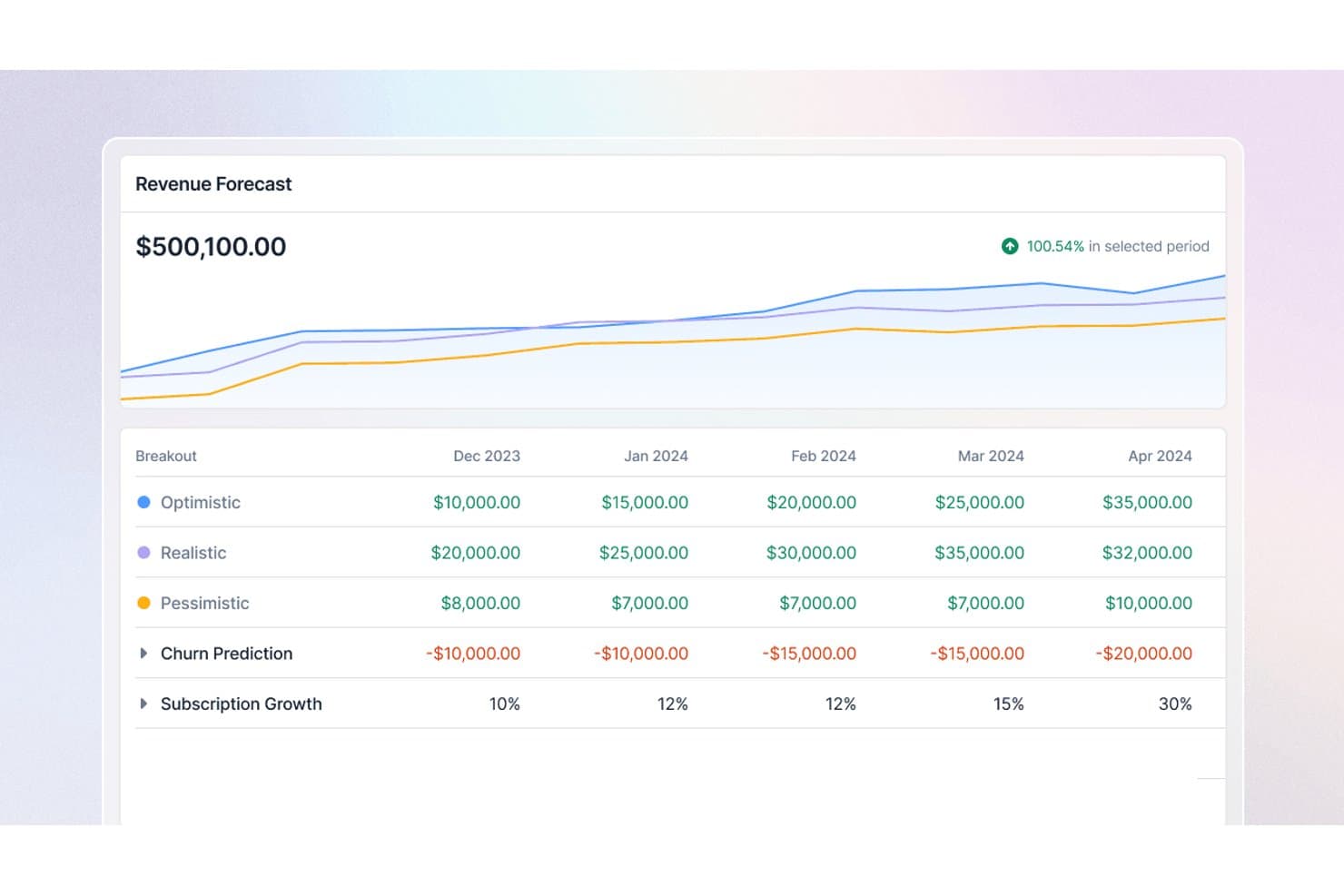
Lago forecasts subscription revenue across optimistic, realistic, and pessimistic scenarios. Lago is an open-source subscription management platform built on an API-first architecture, offering recurring billing, usage-based metering, hybrid pricing models, dunning automation, and native integrations with accounting, CRM, and payment providers.
Who Is Lago Best For?
Lago is a strong fit for engineering-led teams that need to build custom billing workflows on top of a flexible, API-first foundation they can self-host and fully control.
Why I Picked Lago
Lago earns its spot as one of the best on my shortlist because its API-first architecture is genuinely built for engineering teams that need to own their billing logic end to end. I love that it ships a full REST API with an OpenAPI spec, SDKs in four languages, signed webhooks across every billing event, and an MCP server for AI agent workflows. In practice, that means my team can pipe usage events at scale, trigger subscription changes programmatically, and wire Lago into any stack without waiting on a vendor's integration roadmap.
Lago Key Features
- Hybrid pricing model support: Lago lets you combine flat subscription fees and usage-based charges on a single invoice, across billing intervals from daily to yearly.
- Prepaid credit wallets: Customers can hold prepaid credit balances that Lago draws down automatically as usage accrues, with support for automatic top-ups.
- Multi-currency invoicing: Lago generates invoices in the customer's billed currency, supporting global billing without manual currency conversion workflows.
- Built-in revenue analytics: Lago includes dashboards covering MRR, subscription trends, cash collection, credit ledgers, and forecasted usage, all exportable via API or CSV.
Lago Integrations
Lago offers native integrations with Stripe, Adyen, GoCardless, NetSuite, Xero, QuickBooks, Salesforce, Anrok, and Avalara. Its REST API, SDKs, signed webhooks, and Zapier support custom connectivity.
Pros and Cons
Pros:
- Hybrid pricing and prepaid wallet support
- API-first with signed webhooks and SDKs
- Scales to one million events per second
Cons:
- Customer portal lacks plan management tools
- No ready-made ecommerce platform connectors
Learn more about Lago:
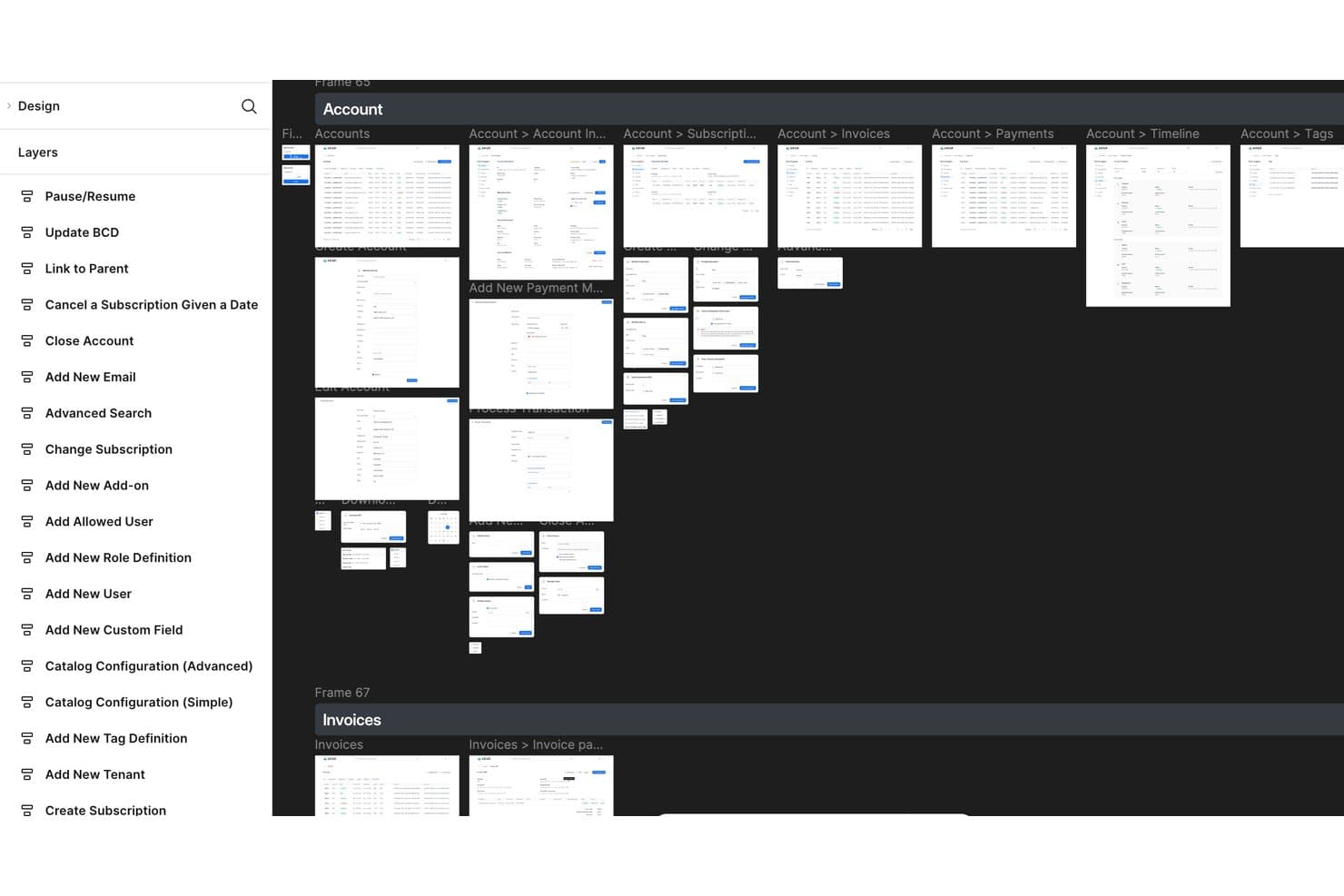
Kill Bill organizes subscription workflows across accounts, invoices, and payments. Kill Bill is an open-source subscription management and recurring billing platform built on a Java-based, API-first architecture that handles subscription lifecycle management, payment gateway integrations, dunning automation, usage-based billing, and multi-tenant catalog management.
Who Is Kill Bill Best For?
Kill Bill is best suited for engineering-led teams that need full control over their billing infrastructure without paying per-transaction SaaS fees.
Why I Picked Kill Bill
Kill Bill earns its spot on my shortlist because of how it handles billing automation at the infrastructure level. I love its dual dunning system: a configurable payment retry schedule runs alongside a separate overdue state machine that moves accounts through warning, blocked, and cancellation stages automatically. I've also used its evergreen plan configuration to handle automatic renewals without any manual intervention, which keeps revenue flowing even across complex multi-tenant deployments.
Kill Bill Key Features
- Multi-tenant catalog management: Manage separate product catalogs, pricing, and billing schedules for thousands of isolated tenants from a single deployment.
- OSGi plugin framework: Deploy, update, and roll back payment gateway or custom logic plugins independently without restarting the core billing engine.
- Usage-based billing: Ingest and rate usage events natively to support metered and consumption-based subscription models.
- Kaui admin UI: A web-based back-office interface that lets finance and operations teams manage accounts, invoices, and billing configurations without writing code.
Kill Bill Integrations
Kill Bill integrations include Stripe, Adyen, Braintree, PayPal, Authorize.Net, Qualpay, Avalara, NetSuite, SAP, QuickBooks, Salesforce, and HubSpot. The REST API supports custom Shopify, WooCommerce, POS, and ERP integrations.
Pros and Cons
Pros:
- Open source license with full data control
- Supports multi-tenant catalog management
- Offers dual dunning and overdue automation
Cons:
- Requires Java engineering for advanced customization
- No built-in customer self-service portal
Learn more about Kill Bill:
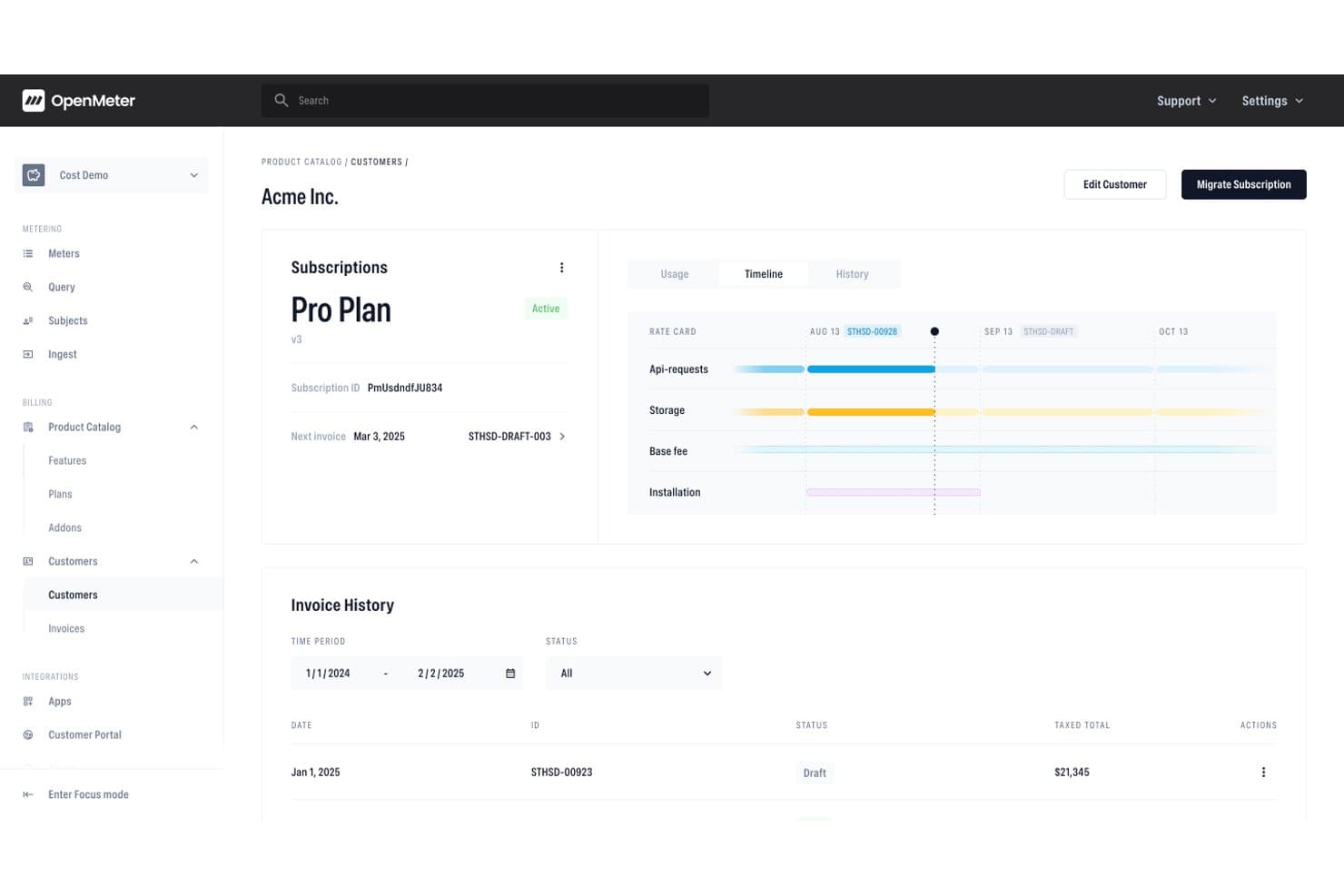
OpenMeter tracks subscription timelines, usage, and invoice history per customer. OpenMeter is an Apache 2.0 open source metering and billing platform built for usage-based pricing, offering a real-time event metering engine, a flexible product catalog, subscription lifecycle management, and entitlement tracking.
Who Is OpenMeter Best For?
OpenMeter is a strong fit for technical teams building AI or API products that need precise, high-volume usage metering and flexible billing without paying a cut of their revenue.
Why I Picked OpenMeter
I picked OpenMeter as one of the best because it's purpose-built for metered API and AI token billing in a way I haven't seen matched by other open source options. Its real-time metering engine, built on Kafka and ClickHouse, handles billions of events and supports per-unit pricing models like $0.01 per AI token, tiered graduated rates, and dynamic cost-plus pricing. I also like that it tracks entitlement and credit balances live, so teams billing for API access always know exactly where customers stand.
OpenMeter Key Features
- Apache 2.0 open source licensing: The full codebase is publicly available on GitHub with no feature-gating by license tier, so you can self-host without paying per-transaction fees.
- No-code product catalog: Business and finance teams can create and iterate on pricing plans or provision custom enterprise deals without writing any code.
- Subscription lifecycle API: Manages upgrades, downgrades, add-ons, prorations, and cancellations via API, with timing controls for immediate or next-billing-cycle changes.
- Svix-powered webhook delivery: Billing and usage events trigger webhooks through Svix, giving your team reliable, real-time event notifications for downstream workflow automation.
OpenMeter Integrations
OpenMeter offers marketplace integrations for Stripe and HubSpot, plus external invoicing support. It provides a REST API, Svix webhooks, CloudEvents, and Node.js, Python, and Go SDKs for custom integrations.
Pros and Cons
Pros:
- API-first design supports custom integrations
- No-code product catalog for pricing plans
- Real-time metering for usage-based billing
Cons:
- No built-in customer self-service portal
- Lacks native retail and ecommerce workflows
Learn more about OpenMeter: 10Best for telecom-scale subscription billing
Opencell
- Free demo available
- Pricing upon request
Visit WebsiteCustomer Rating:4.5/5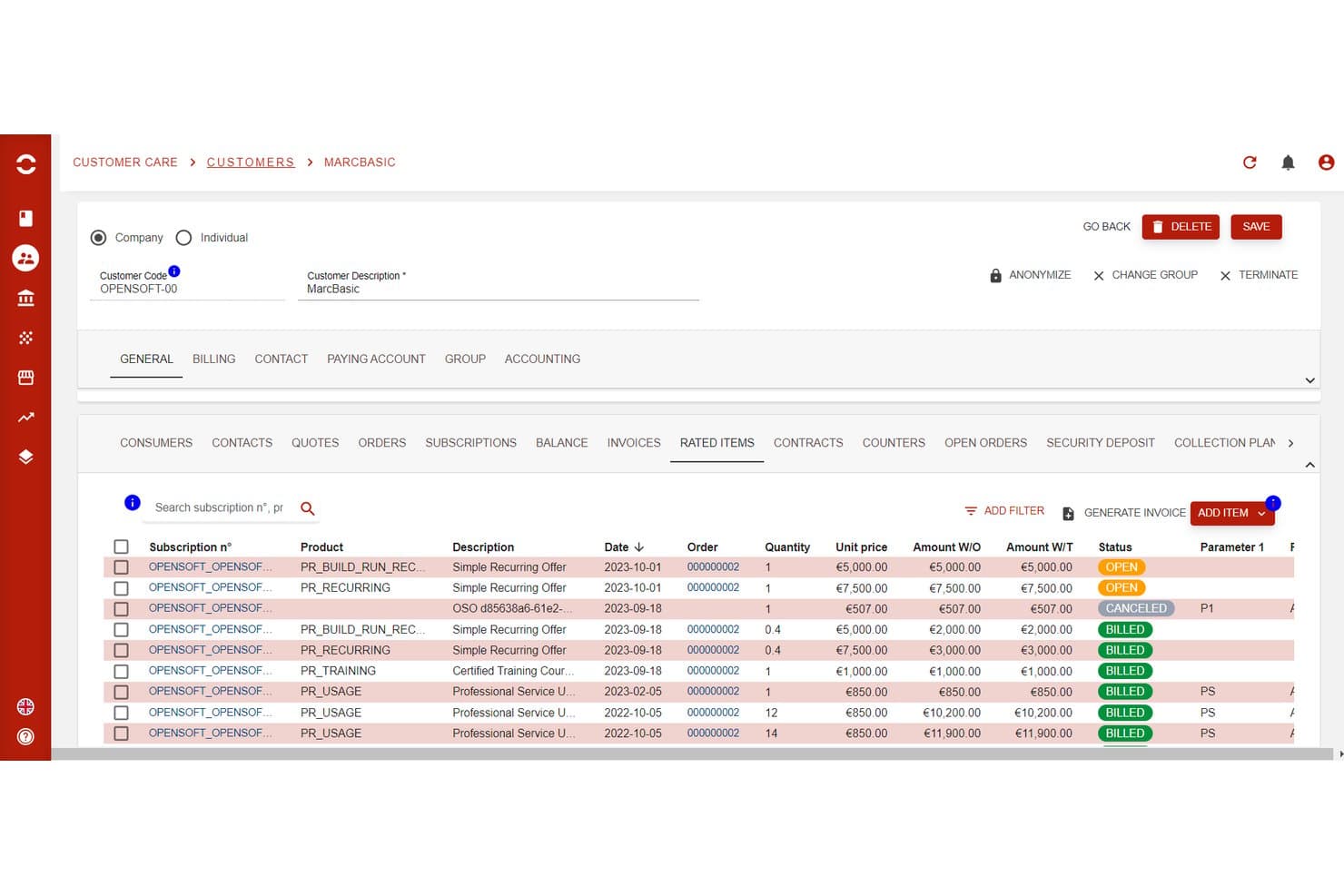
Opencell tracks rated items with billing status per subscription. Opencell is an open-source subscription billing platform built on an AGPLv3-licensed core that handles recurring billing, usage-based rating, subscription lifecycle management, dunning automation, and multi-currency invoicing across complex, high-volume environments.
Who Is Opencell Best For?
Opencell suits engineering-led teams at large enterprises that need to manage high-volume, complex subscription billing across multiple entities, currencies, or markets.
Why I Picked Opencell
Opencell earns its spot on my shortlist because its billing engine handles the kind of complexity that breaks lighter open-source tools, specifically real-time usage mediation, multi-seller environments, and granular customer hierarchies down to individual access points. I picked it for telecom-scale subscription billing because those same capabilities translate directly to high-volume, multi-entity retail deployments, like Fnac/Darty's DartyMax service with over one million subscribers. Its AGPLv3 core and 200+ REST APIs give engineering teams full code access and a complete quote-to-cash integration surface.
Opencell Key Features
- Self-care portal SDK: A React JS-based SDK lets customers manage their own subscriptions, view bills, and make payments directly from your website.
- Dynamic payment routing: Automatically selects the best payment provider based on customer location or payment method to reduce processing costs.
- Multi-seller billing environment: Supports marketplace and billing-as-a-service scenarios across multiple sellers within a single platform instance.
- Revenue analytics dashboard: Surfaces pre-calculated KPIs including MRR, ARR, churn rate, and LTV with connectors to BI tools like Microsoft Power BI.
Opencell Integrations
Native integrations include Stripe, Slimpay, Ingenico, Mangopay, PayPal, Avalara, Salesforce, Jaspersoft, and Microsoft Power BI. Opencell also provides 200+ REST APIs, webhooks, and TM Forum APIs for custom connections.
Pros and Cons
Pros:
- Supports granular automated dunning workflows
- Offers 200+ documented REST API endpoints
- Handles complex multi-entity subscription billing
Cons:
- No prebuilt Shopify or Magento connectors
- Admin portal UI not open source
Learn more about Opencell:
Outro software de gestão de subscrições de código aberto
Eis algumas opções adicionais de software de gestão de subscrições de código aberto que não entraram na minha lista, mas que vale a pena conhecer:
- 11BoxBillingBest for AI and SaaS usage-based billing
- 12OpenCartBest for small retailers selling subscription products
- 13Invoice NinjaBest for self-hosted invoicing with subscription plans
- 14SyliusBest for MIT-licensed custom storefront subscriptions
- 15jBillingBest for telecom-grade usage billing on-premise
- 16FlexpriceBest for credit-based open-source billing
- 17MeteroidBest for open-source usage-based billing
How I Evaluate Open Source Subscription Management Software
I look for two things: baseline capabilities like self-hosted recurring billing and dunning, and differentiators that actually matter to DTC ops leads running box or replenishment programs.
Core Functionality (Table Stakes For This List)
When I'm selecting tools for my list, I rank each one on a scale from 0 (does not offer the functionality) to 5 (excels in this area) for each core functionality listed below. Then, I calculate the tool's total score into a percentage. Each tool needs to achieve a minimum total score of 55% to be considered for inclusion.
- Open Source Licensing: I check the license type (MIT, Apache 2.0, AGPL, etc.), confirm the source code is publicly accessible, and look at whether the repo is actively maintained with recent commits.
- Recurring Billing Engine: The billing engine needs to handle varied pricing models, from flat-rate replenishment plans to tiered membership pricing with mid-cycle proration on upgrades.
- Subscription Lifecycle Management: I evaluate how each tool handles real retail scenarios like a subscriber pausing a monthly snack box, downgrading a membership tier, or reactivating a lapsed account.
- Payment Gateway Integrations: Multiple gateway options matter here. I look for tokenized support across processors like Stripe, Braintree, and PayPal so teams aren't locked into a single provider.
- Dunning & Failed-Payment Recovery: Retail subscriptions live and die by recovery rates. I evaluate retry scheduling, customer notification options, and whether the tool surfaces churn data from failed payments.
- Retail & eCommerce Extensibility: I look at the API surface, webhook coverage, and prebuilt connectors for platforms like WooCommerce, Magento, or Shopify, plus any ERP or POS integration paths.
Once I have a list of tools that meet this criteria, I consider what sets each platform apart.
Differentiating Factors (What Sets Vendors Apart)
Here's how I compare and contrast different vendors:
Standout Features
A self-service customer portal is a big differentiator. I look for portals that let subscribers swap products, skip shipments, or update payment details on their own—reducing support volume for teams managing thousands of active accounts. Headless, API-first architecture also matters when your engineering team needs to embed billing logic into a custom storefront or mobile app. I evaluate multi-currency and tax engine integrations too, since cross-border retail subscriptions add compliance complexity fast.
Beyond Features
Deployment flexibility is one of the first things I check. Some teams have DevOps resources for Docker or Kubernetes self-hosting, while others need a managed cloud option—so I look at whether vendors offer both paths. Community health tells you a lot, too. An active GitHub repo with frequent commits and a responsive forum signals long-term viability. Total cost of ownership rounds out my evaluation, especially whether a platform can handle peak traffic spikes like major sale events without requiring expensive infrastructure upgrades.
O que é o software de gestão de subscrições de código aberto?
O software de gestão de subscrições de código aberto é um conjunto de ferramentas que ajuda as empresas a automatizar a faturação recorrente, a emissão de faturas e a gestão de subscritores—tudo baseado em código disponibilizado livremente e que pode personalizar.
Estas plataformas permitem-lhe controlar tudo, desde os modelos de preços até ao processamento de pagamentos em tempo real, com a flexibilidade necessária para se adaptar a quaisquer necessidades ou fluxos de trabalho empresariais.
A maioria das equipas utiliza soluções de código aberto para reduzir custos, melhorar a escalabilidade e evitar a dependência de um fornecedor. Obtém acesso direto à API, a possibilidade de criar integrações personalizadas e um painel adaptado à faturação baseada na utilização ou às receitas recorrentes.
Quer esteja a gerir subscrições de SaaS, produtos digitais ou operações multicanal complexas, as opções de código aberto proporcionam-lhe mais controlo sobre os seus dados e processos—sem comprometer a segurança ou o crescimento.
Como escolher um software de gestão de subscrições de código aberto
Escolher um software de gestão de subscrições de código aberto implica analisar de forma realista as necessidades da sua empresa, os problemas de integração e as especificidades da faturação recorrente. Eis um guia passo a passo para se manter focado e evitar erros de principiante:
| Passo | O que considerar | Dica profissional |
|---|---|---|
| Passo1. Defina os seus casos de utilização | O que considerarEstá a faturar SaaS, produtos físicos, serviços ou os três? Considere a faturação recorrente, os pagamentos únicos e os períodos de teste gratuitos. | Dica profissionalQuanto mais específicas forem as suas necessidades, mais rapidamente poderá excluir opções incompatíveis. |
| Passo2. Mapeie as integrações necessárias | O que considerarFaça uma lista das ligações indispensáveis: gateways de pagamento (Stripe, PayPal), CRMs, ferramentas de contabilidade, APIs e plataformas de comércio eletrónico. | Dica profissionalTeste as integrações numa fase inicial — os problemas com APIs são comuns nos projetos de código aberto. |
| Passo3. Avalie a escalabilidade e a fiabilidade | O que considerarO sistema consegue lidar com o volume atual — e futuro — de subscritores, transações e produtos? | Dica profissionalProcure estudos de casos reais ou atividade no GitHub. A escalabilidade não é apenas uma palavra da moda. |
| Passo4. Avalie a experiência do utilizador | O que considerarVerifique a interface do utilizador, os painéis em tempo real e os relatórios. Com que rapidez pode a sua equipa começar a utilizar o sistema e resolver problemas? | Dica profissionalFaça uma demonstração com fluxos de trabalho reais. Um painel confuso irá tornar a faturação mais lenta e frustrar a equipa. |
| Passo5. Analise o custo total de propriedade | O que considerarTenha em conta as despesas de alojamento próprio, os complementos, as opções de nuvem, os níveis de suporte e as futuras atualizações. | Dica profissionalO “gratuito” de código aberto pode tornar-se dispendioso. Atribua um valor monetário ao tempo da sua equipa e a qualquer ajuda externa de que necessite. |
| Passo6. Analise o suporte e a força da comunidade | O que considerarO software dispõe de fóruns ativos, documentação fiável e correções rápidas de erros? | Dica profissionalDê prioridade a projetos com repositórios GitHub ativos, atualizações frequentes e responsáveis que respondam prontamente. |
| Passo7. Verifique a segurança e a conformidade | O que considerarOs seus dados estão encriptados? O software ajuda-o a manter a conformidade com o RGPD ou o PCI? | Dica profissionalNão trate da segurança por sua conta — utilize plataformas com protocolos claros de proteção de dados e atualizações regulares. |
Funcionalidades
Não está apenas à procura de uma lista de palavras da moda.
As melhores plataformas de gestão de subscrições de código aberto fornecem os elementos fundamentais para automatizar a faturação, gerir preços complexos e manter todas as subscrições a funcionar como um relógio — independentemente da rapidez com que a sua empresa cresce.
Eis o que é importante:
- Faturação recorrente automatizada para subscrições, associações e preços baseados na utilização.
- Acesso a API para criar integrações personalizadas com o seu comércio eletrónico, CRM ou conjunto de ferramentas financeiras.
- Modelos de faturação flexíveis — suporte para estruturas de pagamento únicas, recorrentes, medidas ou híbridas.
- Integrações com gateways de pagamento como Stripe, PayPal, Braintree e outros.
- Planos de subscrição personalizáveis para corresponder às suas necessidades específicas de produto, preços ou contratos.
- Análises e painéis em tempo real para acompanhar as receitas, a perda de clientes e os subscritores ativos.
- Faturação automatizada e fluxos de trabalho de cobrança para acompanhar pagamentos em atraso e reduzir a perda de clientes.
- Suporte para várias moedas e localização para vendas globais e empresas com atividade em várias regiões.
- Gestão de utilizadores para equipas e funções, com controlos granulares de permissões.
- Opções de implementação em alojamento próprio e na nuvem para responder aos seus requisitos de TI e conformidade.
- Mercado de plug-ins e complementos de código aberto para funcionalidades adicionais e expansão rápida.
- Relatórios robustos e exportações financeiras para impostos, auditorias e planeamento financeiro.
- Gestão segura de dados — encriptação, suporte à conformidade e atualizações regulares.
Vantagens
A gestão de subscrições de código aberto consiste em recuperar o controlo. Com o sistema certo, automatizará mais processos, crescerá mais rapidamente e nunca ficará limitado pelas restrições de um fornecedor.
Eis o que a sua empresa tem a ganhar:
- Custos mais baixos e sem dependência de um fornecedor—evite licenças dispendiosas e mantenha o controlo sobre o seu sistema.
- Flexibilidade máxima—personalize o sistema de faturação, os painéis e os fluxos de trabalho para se adaptarem às necessidades da sua empresa.
- Escalabilidade desde o primeiro dia—cresça de um punhado para milhares de subscritores sem mudar de plataforma.
- Automatização mais rápida e menos erros—automatize tudo, desde a faturação até às tentativas repetidas de pagamento.
- Melhores integrações—ligue-se diretamente às suas ferramentas, APIs e gateways de pagamento existentes.
- Informações acionáveis em tempo real—utilize a análise integrada para otimizar as receitas recorrentes e reduzir a perda de clientes.
- Melhor experiência do cliente—ofereça várias opções de pagamento, faturas claras e portais de autosserviço.
- Preparação para o futuro—aceda a novos complementos, integrações e inovações de código aberto à medida que a sua empresa evolui.
- Segurança e conformidade reforçadas—seja proprietário dos seus dados, gira as atualizações e mantenha-se na vanguarda dos regulamentos de privacidade.
Custos e preços
As ferramentas de gestão de subscrições de código aberto são geralmente mais baratas inicialmente, mas os custos reais dependem do tamanho da sua equipa, das funcionalidades necessárias e do grau de personalização de que precisa.
Conte com custos de complementos, suporte premium ou alojamento na nuvem se quiser reduzir a manutenção. Eis como a maioria dos planos se divide:
| Tipo de plano | Preço médio | Funcionalidades comuns | Ideal para |
|---|---|---|---|
| Tipo de planoPlano gratuito | Preço médio$0/utilizador/mês | Funcionalidades comunsFaturação básica, integrações essenciais, suporte da comunidade, relatórios limitados | Ideal paraOperadores individuais, testes, utilização em desenvolvimento |
| Tipo de planoPlano pessoal | Preço médio$5–$25/utilizador/mês | Funcionalidades comunsPlanos personalizáveis, várias moedas, suporte prioritário, análise | Ideal paraTrabalhadores independentes, startups em fase inicial |
| Tipo de planoPlano empresarial | Preço médio$30–$75/utilizador/mês | Funcionalidades comunsRelatórios avançados, API completa, vários gateways de pagamento, funções de utilizador | Ideal paraSMBs, equipas em fase de crescimento |
| Tipo de planoPlano para grandes empresas | Preço médio$100+/utilizador/mês | Funcionalidades comunsPersonalização completa, suporte dedicado, SLAs, segurança avançada | Ideal paraGrandes organizações, faturação complexa |
Alguns aspetos a ter em conta:
- As ferramentas de código aberto parecem frequentemente gratuitas, mas podem acumular custos de alojamento na nuvem, plug-ins ou complementos de terceiros.
- Nem todas as funcionalidades (como a análise em tempo real ou a cobrança avançada) estão incluídas em todos os níveis—confirme a lista de funcionalidades antes de se comprometer.
- O suporte dedicado e as funcionalidades de conformidade podem ter um preço separado.
Related Reviews
Perguntas frequentes sobre software de gestão de subscrições de código aberto
Eis algumas respostas a perguntas comuns sobre software de gestão de subscrições de código aberto:
Qual é a principal vantagem de utilizar software de gestão de subscrições de código aberto?
A maior vantagem é a flexibilidade e o controlo. Os seus dados, fluxos de trabalho e integrações pertencem-lhe — já não fica preso a uma dispendiosa plataforma SaaS nem tem de esperar meses por uma funcionalidade solicitada.
Pode automatizar a faturação, adaptar-se a novos métodos de pagamento e aumentar ou reduzir a escala sem pagar por funcionalidades excessivas que nunca irá utilizar. Além disso, obtém transparência relativamente à segurança e às atualizações do código.
As ferramentas de gestão de subscrições de código aberto conseguem lidar com faturação recorrente para diferentes modelos de negócio?
Sem dúvida. A maioria das principais plataformas de código aberto suporta modelos de faturação pontual, recorrente, baseada na utilização e híbrida.
Quer esteja a gerir uma empresa SaaS, subscrições, produtos digitais ou até um negócio de bens físicos, pode personalizar os fluxos de trabalho, os escalões de preços e os calendários de faturação de acordo com as suas necessidades exatas — especialmente se precisar de integrar vários gateways de pagamento ou de suportar faturação em várias moedas.
É difícil integrar soluções de código aberto com a minha atual infraestrutura tecnológica?
Se tiver alguns conhecimentos técnicos (ou um programador disponível), a integração é simples com a maioria das principais ferramentas de código aberto. As APIs estão normalmente bem documentadas e os plugins da comunidade abrangem CRMs, plataformas de comércio eletrónico e gateways de pagamento populares, como o Stripe e o PayPal.
O verdadeiro segredo é planear os fluxos de trabalho antes de começar — para não ter de improvisar soluções de última hora depois do lançamento.
As plataformas de faturação de código aberto são suficientemente seguras para processar pagamentos e dados de clientes?
Sim — desde que as mantenha atualizadas e siga as melhores práticas. O software de código aberto dá-lhe controlo sobre os protocolos de segurança, a encriptação e a conformidade com normas como o RGPD ou o PCI.
Mantenha-se envolvido na comunidade, corrija rapidamente as vulnerabilidades e não implemente uma solução de faturação sem uma revisão de segurança. \u003cstrong\u003eEm resumo:\u003c/strong\u003e a sua segurança é apenas tão forte quanto os processos da sua equipa.
De que nível de conhecimentos técnicos preciso para executar e manter software de gestão de subscrições de código aberto?
Precisará de alguém familiarizado com configurações de servidores, gestão de bases de dados e resolução básica de problemas — especialmente no caso de soluções autoalojadas ou amplamente personalizadas.
As opções de código aberto baseadas na nuvem podem ser mais simples, mas não espere uma solução do tipo “configure e esqueça”. Reserve um orçamento para manutenção contínua, atualizações e assistência ocasional de um programador, especialmente à medida que as suas receitas recorrentes aumentam.
Que opções de suporte estão disponíveis para ferramentas de faturação de subscrições de código aberto?
O suporte varia. Os melhores projetos têm fóruns ativos, grupos de conversação em tempo real e documentação detalhada — além de atualizações frequentes do código no GitHub.
Alguns oferecem suporte pago ou consultoria para necessidades avançadas. Antes de se comprometer, verifique o nível de resposta da comunidade e confirme se existe uma opção para escalar problemas quando o seu sistema de faturação precisar de atenção urgente.