

Uma alternativa sólida ao Freshdesk disponibiliza ferramentas de atendimento ao cliente com tecnologia de IA, gestão flexível de pedidos de suporte e integrações adaptadas ao fluxo de trabalho da sua equipa. Se está à procura de alternativas ao Freshdesk, é provável que esteja a ponderar opções capazes de igualar ou superar a sua automatização, o suporte omnicanal e os relatórios — sem comprometer a facilidade de utilização ou o valor. Esta lista ajudá-lo-á a comparar lado a lado as principais plataformas, para que possa escolher com confiança a solução de atendimento ao cliente certa para a sua empresa em 2026.
O Que É o Freshdesk?
O Freshdesk é uma plataforma de atendimento ao cliente com tecnologia de IA que ajuda as empresas a gerir pedidos de suporte, automatizar fluxos de trabalho e interagir com os clientes através de vários canais. Disponibiliza funcionalidades como encaminhamento de pedidos, gestão de bases de conhecimento e suporte por chatbot para simplificar as interações com os clientes. As equipas utilizam o Freshdesk para centralizar a comunicação com os clientes, acompanhar o desempenho e integrar outras ferramentas empresariais, o que o torna uma escolha popular para empresas que pretendem melhorar as suas operações de apoio ao cliente.
Tabela de comparação das alternativas ao Freshdesk
Esta tabela de comparação destaca os detalhes de preços das minhas principais alternativas ao Freshdesk.
Sorted by: Default
| Tool | Starting Price | Website | |
|---|---|---|---|
Best for AI agent deployment without coding | 4.4 out of 5 | $32/month 7-day free trial + demo available | Website |
Best for Slack-based support operations | 4.6 out of 5 | $16/agent/month Free plan + 14-day trial + free demo available | Website |
Best with proactive messaging tools | 4.4 out of 5 | $19/user/month 14-day free trial + free demo available | Website |
Best for knowledge base creation | 4.7 out of 5 | $29.99/user/month Free plan + Free trial + Free demo available | Website |
Best for unified customer timelines | 4.5 out of 5 | Pricing upon request Free demo available | Website |
Best for CRM integration | 4.4 out of 5 | $20/user/month 14-day free trial | Website |
Best for collaborative team inboxes | 4.6 out of 5 | $25/user/month 14-day free trial | Website |
Best for omnichannel ticket management | Not rated | $19/agent/month Free trial + free demo available | Website |
Best for customizable workflow automation | Not rated | ₹420/user/month Free plan + 15-day trial + demo available | Website |
Best with advanced analytics capabilities | Not rated | $25/user/month 30-day free trial | Website |


Why Trust Our Software Recommendations
6,700+
Reviews
20
Industry experts
16+
Evaluation factors
14
Years
Our team has been testing and reviewing software since 2012. As retail leaders ourselves, we know how difficult—and important—it is to choose the right software.
For this guide, we evaluated tools using hands-on testing and independent research, scoring tools using our selection criteria.
Our reviews reflect our independent judgment—not a sales pitch.
Análise das melhores alternativas ao Freshdesk
Abaixo encontram-se os meus resumos detalhados das melhores alternativas ao Freshdesk que entraram na minha lista restrita. As minhas análises apresentam uma visão detalhada das funcionalidades, capacidades e integrações de cada plataforma, para o ajudar a encontrar a melhor opção para a sua equipa.
 Best for AI agent deployment without coding
- 7-day free trial + demo available
- From $32/month (billed annually)
Visit WebsiteCustomer Rating:4.4/5
Chatbase enables teams to build and deploy AI support agents without coding, using custom data to automate customer conversations. Chatbase is an AI chatbot platform designed for businesses that want to automate customer support and engagement without a heavy technical lift. If you’re looking for a Freshdesk alternative that brings conversational AI and flexible deployment to your support channels, Chatbase is worth a look.
Who Is Chatbase Best For?
Customer support teams and e-commerce businesses that want to deploy AI chat agents without coding or technical expertise.
Why Chatbase Is a Good Freshdesk Alternative
I picked Chatbase as a Freshdesk alternative because my team can launch AI chat agents without writing a single line of code. The drag-and-drop builder lets us quickly design and deploy bots for our website and messaging apps. I appreciate that we can customize responses and workflows to match our brand. In practice, that means we’re able to automate support and scale conversations fast, even with limited technical resources.
Chatbase Key Features
- Multi-channel deployment: Deploy chatbots across web, WhatsApp, Facebook Messenger, and more from a single dashboard.
- Real-time analytics: Monitor chatbot interactions and performance with built-in analytics tools.
- Custom data source integration: Connect bots to your own data sources for dynamic, up-to-date responses.
- Role-based access controls: Manage permissions and access for different team members within the platform.
Chatbase Integrations
Chatbase offers native integrations with Slack, WhatsApp, Facebook Messenger, Telegram, and Google Sheets, and connects with Zapier. An API is available for custom integrations, making it easy to connect Chatbase to your existing business systems.
Pros and Cons
Pros:
- Provides analytics for chatbot performance tracking
- Supports multi-channel messaging platforms
- Offers enterprise-grade security and compliance
Cons:
- Customization options for workflows are basic
- Limited ticketing and case management features
Learn more about Chatbase: Best for Slack-based support operations
- Free plan + 14-day trial + free demo available
- From $16/agent/month (billed annually)
Visit WebsiteCustomer Rating:4.6/5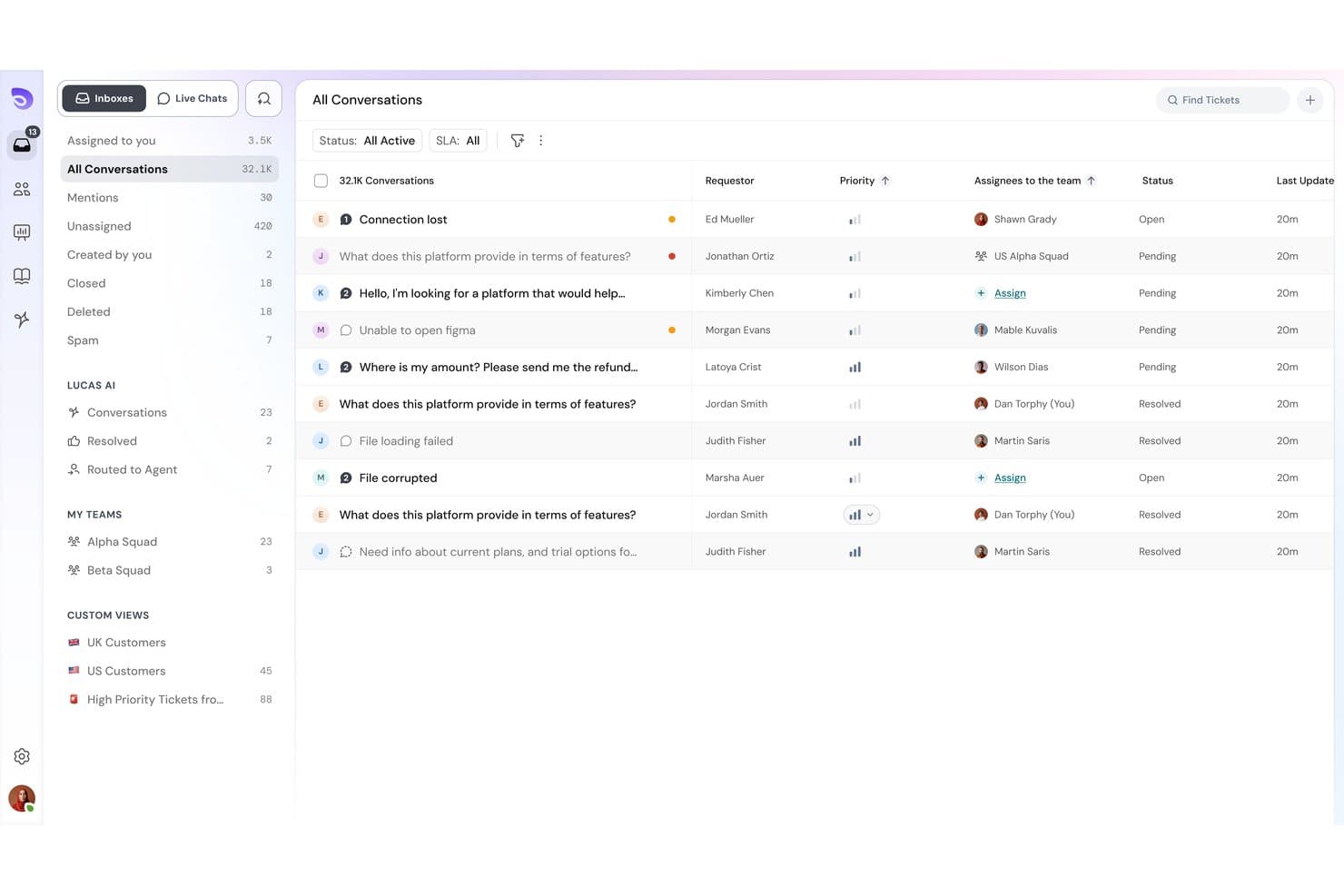
SparrowDesk offers an omnichannel inbox with all conversations, priority levels, assignees, and status tracking in one unified view. SparrowDesk is an AI-first help desk platform built for SMBs and e-commerce teams that need to automate high-volume support without the complexity or cost of enterprise tools like Freshdesk.
Who Is SparrowDesk Best For?
It's a strong fit for startups and small support teams that run day-to-day operations inside Slack and want AI to handle routine tickets without a lengthy setup process.
Why SparrowDesk Is a Good Freshdesk Alternative
I picked SparrowDesk as one of the best because of how it turns Slack into a genuine support operations hub. My team can triage incoming tickets by adding an emoji to a Slack message and draft AI-assisted replies without leaving the channel. On top of that, the Zoona AI Agent handles over 60% of routine queries automatically, so agents only step in when a conversation genuinely needs a human touch.
SparrowDesk Key Features
- No-code workflow builder: Automate ticket routing, notifications, and repetitive support tasks without engineering resources.
- Granular SLA management: Set complex SLAs with automatic timer pauses based on ticket status or customer input.
- Multi-brand help centers: Create and manage separate public help centers for each brand or storefront from a single SparrowDesk instance.
- Interactive analytics dashboard: Track agent productivity, SLA adherence, and ticket trends with customizable reports and real-time metrics.
SparrowDesk Integrations
SparrowDesk offers native integrations with Slack, Shopify, and WhatsApp, and provides an API for custom integrations.
Pros and Cons
Pros:
- Lightweight setup suits lean support teams
- Zoona AI resolves most tickets automatically
- Slack-native ticketing requires no tab switching
Cons:
- Fewer reporting options for enterprise teams
- Limited omnichannel coverage
Learn more about SparrowDesk: Best with proactive messaging tools
- 14-day free trial + free demo available
- From $19/user/month (billed annually)
Visit WebsiteCustomer Rating:4.4/5
Intercom enhances customer engagement through chat and automation. Retail and e-commerce teams looking to engage customers before issues arise may find Intercom especially useful. The platform specializes in proactive messaging, allowing you to trigger targeted in-app, email, and chat messages based on user behavior. Intercom’s AI-powered automation and customizable bots help you reach customers at the right moment, reducing repetitive questions and improving satisfaction.
Why Intercom Is a Good Freshdesk Alternative
If you want to reach customers before they even ask for help, Intercom is worth considering as a Freshdesk alternative. I picked Intercom because its proactive messaging tools let you send targeted messages based on user actions, browsing history, or lifecycle stage. The platform’s AI-powered bots can start conversations, answer common questions, and route complex issues to your team automatically. This approach helps you reduce repetitive tickets and create a more personalized customer experience.
Intercom Key Features
Some other Intercom features that stand out include:
- Unified Inbox: Manage all customer conversations from chat, email, and social channels in a single view.
- Customizable Help Center: Build a branded self-service portal with articles and FAQs for customers.
- Product Tours: Guide users through onboarding or new features with interactive, in-app walkthroughs.
- Conversation Ratings: Collect customer feedback on individual support interactions directly within the user-friendly interface.
Intercom Integrations
Integrations include Salesforce, HubSpot, Slack, Shopify, Jira, Stripe, Google Analytics, Mailchimp, and more.
Pros and Cons
Pros:
- In-app product tours for onboarding new users
- AI bots handle repetitive questions
- Chat triggers based on user behavior
Cons:
- Restrictive conversation assignment rules
- Pricing increases sharply with user volume
Learn more about Intercom: Best for knowledge base creation
- Free plan + Free trial + Free demo available
- From $29.99/user/month
Visit WebsiteCustomer Rating:4.7/5
ProProfs Help Desk routes inquiries for customer service. Retailers and e-commerce teams looking to build a self-service knowledge base alongside their helpdesk may want to consider ProProfs Help Desk. This platform stands out for its integrated knowledge base tools, making it easier to create, organize, and update FAQs and support articles. It’s a strong fit for businesses that want to reduce repetitive tickets by empowering customers and agents with searchable, up-to-date information.
Why ProProfs Help Desk Is a Good Freshdesk Alternative
If your team wants to prioritize self-service and knowledge sharing, ProProfs Help Desk offers a distinct advantage over Freshdesk. I picked it because its built-in knowledge base editor lets you create, update, and publish support articles directly from the helpdesk. You can organize content into categories, add multimedia, and make articles searchable for both customers and agents. This focus on knowledge management helps reduce repetitive tickets and empowers users to find answers on their own.
ProProfs Help Desk Key Features
Some other features that make ProProfs Help Desk useful include:
- Shared Inbox: Manage all customer emails and tickets from a single, collaborative inbox.
- Canned Responses: Set up pre-written replies for common customer questions to save time.
- Automated Ticket Assignment: Route incoming tickets to the right team member based on rules you define.
- Customer Satisfaction Surveys: Collect feedback directly from customers after ticket resolution.
ProProfs Help Desk Integrations
Integrations include ProProfs Live Chat, ProProfs Knowledge Base, Qualaroo, BIGContacts, Salesforce, and more.
Pros and Cons
Pros:
- Customer satisfaction surveys after ticket closure
- Canned responses for repetitive ticket replies
- Built-in knowledge base with article templates
Cons:
- No built-in chatbot or AI ticket triage
- Limited third-party integrations
Learn more about ProProfs Help Desk: Best for unified customer timelines
- Free demo available
- Pricing upon request
Visit WebsiteCustomer Rating:4.5/5
Kustomer delivers personalized support and customer interactions. Kustomer is designed for retail and e-commerce teams that need a complete view of every customer interaction. By organizing conversations, orders, and support history into unified timelines, it helps agents deliver more personalized service. This approach is especially useful for businesses managing complex, multi-channel customer relationships and looking to move beyond siloed ticketing.
Why Kustomer Is a Good Freshdesk Alternative
Unlike traditional ticketing systems, Kustomer gives you a unified timeline for every customer, so agents see the full context of each relationship. I picked it because this timeline view brings together conversations, orders, and activities from all channels in one place. AI-powered tools help surface relevant details and automate repetitive tasks, making it easier to deliver personalized support. For teams that want to move beyond fragmented tickets, Kustomer’s approach offers a more holistic way to manage customer service.
Kustomer Key Features
Some other features that make Kustomer appealing include:
- AI-Powered Chatbots: Automate responses and handle common customer questions using built-in AI agents.
- Omnichannel Routing: Direct conversations from email, chat, SMS, and social to the right agent automatically.
- Custom Workflows: Build automated workflows for repetitive tasks and escalations without coding.
- Knowledge Base Management: Create and organize self-service articles for customers and agents.
Kustomer Integrations
Integrations include Shopify, Amazon Connect, Aircall, 8x8, Ada, Acuity Scheduling, Amazon Redshift, Flip CX, and more.
Pros and Cons
Pros:
- Native integration with Shopify
- Custom workflows automate repetitive agent tasks
- Unified timeline shows all customer interactions
Cons:
- Bulk ticket actions are not always available
- No built-in customer satisfaction survey tool
Learn more about Kustomer:

HubSpot Service Hub optimizes customer support and communication. If you want a customer support software that’s tightly connected to your sales and marketing data, HubSpot Service Hub is worth a look. The platform brings AI-powered support tools directly into the HubSpot CRM, making it easy for retail and e-commerce teams to manage customer conversations with full context. This integration helps you personalize support, track every interaction, and coordinate service with the rest of your business.
Why HubSpot Service Hub Is a Good Freshdesk Alternative
For teams that want customer service and CRM data in one place, HubSpot Service Hub offers a clear advantage over Freshdesk. I picked it because you can view every customer’s history, purchases, and previous conversations right alongside support tickets. The platform’s AI-powered ticket routing and knowledge base tools work directly within the CRM, so your team always has the full customer context. This setup helps you deliver more personalized and coordinated support across your business.
HubSpot Service Hub Key Features
Some other features that make HubSpot Service Hub appealing include:
- Customer Feedback Surveys: Collect and analyze customer satisfaction and NPS data directly within the platform.
- Live Chat Widget: Add real-time chat to your website for instant customer support.
- Automated Workflows: Set up rules to automate ticket assignments, follow-ups, and escalations.
- Reporting Dashboard: Track team performance and support metrics with customizable reports.
HubSpot Service Hub Integrations
Integrations include Salesforce, Slack, Gmail, Outlook, Zoom, Microsoft Teams, Google Calendar, Shopify, and more.
Pros and Cons
Pros:
- Built-in customer feedback and survey tools
- AI-powered ticket routing for faster response
- CRM and service data unified in one platform
Cons:
- Limited omnichannel support
- Live chat widget lacks advanced targeting options
Learn more about HubSpot Service Hub: Best for collaborative team inboxes
- 14-day free trial
- From $25/user/month (billed annually)
Visit WebsiteCustomer Rating:4.6/5
Front directs customer tickets to the right team. Front is designed for teams that want to manage customer conversations together in a shared inbox. It’s a strong fit for e-commerce, retail, and operations teams that need to collaborate on email, chat, and SMS without losing track of who owns each message. Unlike Freshdesk, Front lets you assign, comment, and automate workflows directly inside the inbox, so your team can resolve issues faster and avoid duplicate replies.
Why Front Is a Good Freshdesk Alternative
For teams that need to work together on customer messages, Front offers a collaborative inbox experience that Freshdesk doesn’t match. I picked Front because it lets you assign conversations, leave internal comments, and loop in teammates without switching tools. The platform’s AI features help categorize, prioritize, and even draft responses, so your team can focus on high-value interactions. This makes Front especially useful for businesses where multiple people need visibility and input on every customer conversation.
Front Key Features
Some other features that make Front appealing include:
- Omnichannel Messaging: Manage email, SMS, live chat, and social media messages in one shared inbox.
- Analytics Dashboard: Track team performance and conversation metrics with built-in reporting tools.
- Rules-Based Automation: Set up custom rules to route, tag, or escalate messages automatically.
- Knowledge Base Integration: Connect your help center or FAQ content to provide quick answers within conversations.
Front Integrations
Integrations include HubSpot, Salesforce, Asana, Aircall, Microsoft Teams, Slack, Shopify, Jira, WhatsApp, and more.
Pros and Cons
Pros:
- Analytics dashboard tracks resolution times
- Conversation assignment prevents duplicate replies
- Internal comments keep customer context visible
Cons:
- AI features require higher-tier plans
- No built-in customer portal for ticket tracking
Learn more about Front: Best for omnichannel ticket management
- Free trial + free demo available
- From $19/agent/month (billed annually)

Zendesk simplifies support workflows and boosts customer satisfaction. Zendesk offers a unified platform for businesses that need to manage customer conversations across email, chat, social, and voice channels. Retail and e-commerce teams looking for advanced ticket routing and AI-driven automation will find Zendesk’s omnichannel capabilities especially useful. If your business handles high volumes of support requests from multiple sources, Zendesk helps you keep every interaction organized and actionable in one place.
Why Zendesk Is a Good Freshdesk Alternative
Zendesk stands out for its strong omnichannel ticket management, making it a solid choice if you need to unify customer conversations from multiple channels. I picked Zendesk because it lets you route, prioritize, and track tickets from email, chat, social media, and voice in a single dashboard. Its AI-powered tools help categorize and assign tickets automatically, so your team can respond faster and more accurately. For businesses juggling high volumes of support requests across platforms, Zendesk’s centralized approach keeps everything organized and actionable.
Zendesk Key Features
Some other Zendesk features worth noting for customer support teams include:
- AI-Powered Chatbots: Automate responses to common questions and guide customers to solutions without agent intervention.
- Customizable Help Center: Build and manage a branded self-service portal where customers can find answers and submit requests.
- SLA Management: Set, monitor, and enforce service level agreements to ensure timely responses and resolutions.
- Customer Satisfaction Surveys: Collect feedback directly after support interactions to measure and improve service quality.
Zendesk Integrations
Integrations include Salesforce, Jira, Slack, Shopify, Mailchimp, HubSpot, GitHub, Asana, Trello, and more.
Pros and Cons
Pros:
- Includes multilingual and global support features
- Supports extensive third-party integrations
- Handles high ticket volumes efficiently
Cons:
- Limited customization on lower-tier plans
- Higher cost for advanced features
Learn more about Zendesk: Best for customizable workflow automation
- Free plan + 15-day trial + demo available
- From ₹420/user/month (billed annually)

Zoho Desk automates ticket handling and optimizes customer support. If your team needs flexible automation for customer service, Zoho Desk offers a highly customizable platform for managing support workflows. It’s a strong fit for retail and e-commerce businesses that want to tailor ticket routing, escalation, and response processes to match unique operational needs. Zoho Desk stands out for its rule-based automations and AI tools that help you adapt support to your business, not the other way around.
Why Zoho Desk Is a Good Freshdesk Alternative
Zoho Desk is a strong Freshdesk alternative if you want deep control over how your support workflows operate. I picked Zoho Desk because its Blueprint feature lets you design custom ticket processes, automate escalations, and set up multi-stage approvals that fit your business rules. The platform’s AI-powered Zia assistant also helps you automate ticket tagging, sentiment analysis, and response suggestions. For teams that need to adapt support processes to unique requirements, Zoho Desk’s workflow automation stands out.
Zoho Desk Key Features
Some other Zoho Desk features that caught my attention include:
- Multi-Channel Ticketing: Manage customer queries from email, chat, social media, and web forms in one place.
- Customizable Dashboards: Create personalized dashboards to track metrics and monitor team performance.
- Knowledge Base Management: Build and organize a self-service portal with articles and FAQs for customers.
- Time Tracking: Log and monitor the time agents spend on each ticket for better resource planning.
Zoho Desk Integrations
Integrations include Zoho CRM, Zoho Books, Zoho Analytics, Slack, Jira, HubSpot, Microsoft Teams, Mailchimp, and more.
Pros and Cons
Pros:
- Multi-brand support for managing separate portals
- Suggests ticket responses automatically
- Blueprint feature enables detailed workflow mapping
Cons:
- Limited social media integration
- SLA management options are less flexible
Learn more about Zoho Desk: Best with advanced analytics capabilities
- 30-day free trial
- From $25/user/month

Salesforce Service Cloud manages customer interactions efficiently. Salesforce Service Cloud stands out for retail and e-commerce teams that need deep analytics and real-time insights across every support channel. With advanced AI-driven reporting and customizable dashboards, it helps service leaders spot trends and optimize agent performance. This makes it a strong fit for businesses that want to turn customer data into actionable improvements.
Why Salesforce Service Cloud Is a Good Freshdesk Alternative
For teams that need more than basic reporting, Salesforce Service Cloud offers advanced analytics capabilities that go far beyond what Freshdesk provides. I picked it because its AI-powered dashboards and real-time analytics let you track agent performance, customer satisfaction, and case trends in granular detail. Predictive insights and customizable reports help you identify bottlenecks and make data-driven decisions quickly. If you want to turn every customer interaction into actionable intelligence, Service Cloud’s analytics tools are a strong fit.
Salesforce Service Cloud Key Features
Some other features that make Salesforce Service Cloud appealing include:
- Case Management: Organize, assign, and track customer cases from multiple channels in one place.
- Omnichannel Routing: Automatically direct cases and conversations to the right agent based on skill and availability.
- Knowledge Base: Build and maintain a searchable library of articles for agents and customers.
- Service Console: Give agents a unified workspace with customer details, interaction history, and productivity tools.
Salesforce Service Cloud Integrations
Integrations include Slack, Amazon Connect, Genesys, NICE, Tableau, MuleSoft, and more.
Pros and Cons
Pros:
- Supports multilingual content management
- Supports workflow automation for agent tasks
- Provides AI-driven analytics
Cons:
- Reporting exports have row and field limits
- User interface can feel cluttered for agents
Learn more about Salesforce Service Cloud:
Outras alternativas ao Freshdesk
Eis algumas opções adicionais de alternativas ao Freshdesk que não entraram na minha lista restrita, mas que ainda vale a pena conhecer:
- 11LiveAgent Best for multichannel live chat support
- 12ServiceNow Customer Service ManagementBest for enterprise process automation
- 13Jira Service ManagementBest for IT service request handling
- 14Gorgias HelpdeskBest for e-commerce platform integration
- 15HappyFoxBest for multilingual support options
- 16KayakoBest for real-time conversation tracking
- 17NextivaBest with integrated voice support
- 18BoldDeskBest for customizable ticket forms
How I Evaluate Freshdesk Alternatives
I split my evaluation into baseline criteria—like omnichannel ticketing and Shopify integrations—and differentiators that separate the tools worth switching to from the rest.
Core Functionality (Table Stakes For This List)
When I'm selecting tools for my list, I rank each one on a scale from 0 (does not offer the functionality) to 5 (excels in this area) for each core functionality listed below. Then, I calculate the tool's total score into a percentage. Each tool needs to achieve a minimum total score of 65% to be considered for inclusion.
- Omnichannel Ticketing: I check whether email, chat, social, phone, and SMS conversations funnel into one queue—so an agent handling a DM about a missing package can see the customer's earlier email thread.
- Retail & Ecommerce Integrations: Native connections to platforms like Shopify and BigCommerce matter here, especially the ability to pull live order data directly into a ticket.
- Knowledge Base & Self-Service: I look for a public-facing help center where shoppers can find return policies, sizing guides, or order tracking answers before they ever open a ticket.
- Automation & Workflow Rules: Routing rules, SLA timers, and macros for repetitive scenarios like "where is my order" or return requests show me how well a tool handles high-volume retail queues.
- AI & Chatbot Support: I evaluate whether a platform offers AI-driven responses or chatbots that can resolve common shopper questions—like checking delivery status—without agent involvement.
- Reporting & Analytics: Dashboards covering ticket volume, resolution time, and CSAT scores are table stakes, but I also look for the ability to build custom reports around seasonal spikes or channel-specific performance.
Once I have a list of tools that meet this criteria, I consider what sets each platform apart.
Differentiating Factors (What Sets Vendors Apart)
Here's how I compare and contrast different vendors:
Standout Features
A unified customer profile is one of the first things I look for. Agents need order history, loyalty status, and past interactions in a single view so they aren't asking a repeat buyer to re-explain their issue. I also evaluate how well a platform handles returns and RMA workflows natively, since retail teams process exchanges and refunds constantly. Proactive messaging is another differentiator; tools that send automated shipping updates or back-in-stock alerts can cut inbound ticket volume before it spikes.
Beyond Features
Pricing and scalability matter a lot in retail, where teams often add seasonal agents during holiday rushes. I check whether a platform offers flexible seat models that accommodate temporary staff without locking you into annual commitments. Multi-brand and multi-location support is another key factor—retailers running several storefronts need segmented reporting and separate SLAs per brand. I also evaluate PCI DSS compliance and data redaction capabilities, since agents regularly handle payment-related inquiries and sensitive customer information.
Por Que Procurar Uma Alternativa ao Freshdesk?
Embora o Freshdesk seja uma boa escolha como solução de atendimento ao cliente com tecnologia de IA, existem vários motivos pelos quais alguns utilizadores procuram soluções alternativas. Poderá estar à procura de uma alternativa ao Freshdesk porque…
- Precisa de funcionalidades mais avançadas de colaboração em equipa
- Pretende uma automatização e análise com IA mais aprofundadas
- Necessita de suporte nativo para mais canais de comunicação
- Precisa de uma melhor integração com as ferramentas que já utiliza
- Pretende opções mais flexíveis de personalização do fluxo de trabalho
- Procura uma interface mais simples ou moderna
Se alguma destas situações lhe é familiar, veio ao lugar certo. A minha lista inclui várias opções de soluções de atendimento ao cliente com tecnologia de IA, mais adequadas para equipas que enfrentam estes desafios com o Freshdesk e procuram soluções alternativas.
Principais Funcionalidades do Freshdesk
Eis algumas das principais funcionalidades do Freshdesk, para o ajudar a contrastar e comparar aquilo que as soluções alternativas de software de assistência técnica oferecem:
- Atribuição de pedidos de suporte e sugestões de resposta com tecnologia de IA
- Suporte omnicanal para e-mail, chat, telefone e redes sociais
- Gestão automatizada de fluxos de trabalho e acordos de nível de serviço
- Base de conhecimento integrada e opções de autoatendimento
- Campos e formulários de pedidos de suporte personalizáveis
- Painéis integrados de relatórios e análise
- Suporte para vários idiomas e fusos horários
- Inquéritos de satisfação do cliente e ferramentas de recolha de opiniões
- Mercado com integrações de aplicações nativas
- Deteção de colisões para evitar respostas duplicadas