


Acumatica versus QuickBooks: Gedetailleerde vergelijking en beoordelingen door experts voor 2026

We review tools independently, and commissions help fund our testing. See our transparency policy, our methodology, or suggest a tool.
De keuze tussen Acumatica en QuickBooks Enterprise betekent dat je een flexibele, cloudgebaseerde ERP afweegt tegen een vertrouwd, gebruiksvriendelijk platform—beide sterke kandidaten op het gebied van boekhoud- en voorraadbeheersoftware. Als je moeite hebt om te bepalen welke oplossing je financiën nauwkeurig houdt en je voorraad onder controle houdt, ben je niet de enige.
In dit artikel wordt uiteengezet hoe elk platform omgaat met boekhouding, voorraad en dagelijkse activiteiten, zodat je vol vertrouwen de juiste oplossing voor de groei en complexiteit van je bedrijf kunt kiezen.
Acumatica
4.4/5
- Free demo available
- Pricing upon request
QuickBooks Desktop Enterprise
4.2/5
- Free product tour
- From $140.84/month
Waarom u onze softwareaanbevelingen kunt vertrouwen
6,700+
Reviews
20
Industry experts
16+
Evaluation factors
14
Years
Ons team test en beoordeelt software sinds 2012. Als retailleiders weten we zelf hoe moeilijk — en belangrijk — het is om de juiste software te kiezen.
Voor deze gids hebben we tools geëvalueerd met behulp van praktijktests en onafhankelijk onderzoek, waarbij we tools beoordeelden aan de hand van onze selectiecriteria.
Onze reviews weerspiegelen ons onafhankelijke oordeel — geen verkooppraatje.
| Acumatica | QuickBooks Desktop Enterprise | |
|---|---|---|
| Free Trial | Free demo available | Free product tour |
| Pricing | Pricing upon request | From $140.84/month |
Acumatica versus QuickBooks: prijzen en verborgen kosten
Voor exacte prijzen van Acumatica moet je contact opnemen met hun team. De prijs is over het algemeen gebaseerd op het aantal applicaties dat je hebt, de benodigde resourceniveaus en gegevensopslag, en de implementatieoptie. De prijzen van QuickBooks Enterprise zijn afhankelijk van het aantal gebruikers dat je nodig hebt, geavanceerde voorraad- en prijsmodule en of je hosting nodig hebt.
Om de juiste leverancier te kiezen, moet je verder kijken dan de vermelde prijs en je huidige en toekomstige behoeften in kaart brengen. Maak een lijst van de functies en integraties die je daadwerkelijk zult gebruiken, schat in hoe je aantal gebruikers of transactievolume kan groeien en vraag elke leverancier om een gedetailleerd overzicht van alle mogelijke kosten, waaronder ondersteuning, upgrades en uitbreidingen. Met deze aanpak voorkom je verrassingen en zorg je ervoor dat je investering aansluit bij de langetermijnplannen van je bedrijf.
Voor exacte prijzen van Acumatica moet je contact opnemen met hun team. De prijs is over het algemeen gebaseerd op het aantal applicaties dat je hebt, de benodigde resourceniveaus en gegevensopslag, en de implementatieoptie. De prijzen van QuickBooks Enterprise zijn afhankelijk van het aantal gebruikers dat je nodig hebt, geavanceerde voorraad- en prijsmodule en of je hosting nodig hebt.
Om de juiste leverancier te kiezen, moet je verder kijken dan de vermelde prijs en je huidige en toekomstige behoeften in kaart brengen. Maak een lijst van de functies en integraties die je daadwerkelijk zult gebruiken, schat in hoe je aantal gebruikers of transactievolume kan groeien en vraag elke leverancier om een gedetailleerd overzicht van alle mogelijke kosten, waaronder ondersteuning, upgrades en uitbreidingen. Met deze aanpak voorkom je verrassingen en zorg je ervoor dat je investering aansluit bij de langetermijnplannen van je bedrijf.
| Acumatica | QuickBooks Desktop Enterprise | |
|---|---|---|
| Accounts Payable | Yes | Yes |
| Accounts Receivable | Yes | Yes |
| API | Yes | No |
| Budgeting | Yes | Yes |
| Calendar Management | Yes | No |
| Customer Management | Yes | Yes |
| Dashboard | Yes | Yes |
| Data Export | Yes | Yes |
| Data Import | Yes | Yes |
| Data Visualization | Yes | Yes |
| Expense Tracking | Yes | Yes |
| External Integrations | Yes | Yes |
| Forecasting | Yes | Yes |
| Inventory Tracking | Yes | Yes |
| Multi-Currency | Yes | Yes |
| Multi-User | Yes | Yes |
| Notifications | Yes | Yes |
| Payroll | Yes | Yes |
| Supplier Management | Yes | Yes |
| Integratie | Acumatica | QuickBooks |
| Shopify | ✅ | ✅ |
| Salesforce | ✅ | ✅ |
| Avalara | ✅ | ✅ |
| Magento (Adobe Commerce) | ✅ | ❌ |
| Microsoft Dynamics 365 | ✅ | ❌ |
| Bill.com | ✅ | ✅ |
| Expensify | ✅ | ✅ |
| Square | ❌ | ✅ |
| PayPal | ✅ | ✅ |
| API | ✅ | ✅ |
| Zapier | ✅ | ✅ |
Acumatica en QuickBooks bieden beide ondersteuning voor populaire integraties zoals Shopify, Salesforce en Bill.com, maar Acumatica maakt verbinding met meer ERP- en handelsplatforms, terwijl QuickBooks sterkere ondersteuning biedt voor winkelbetaaltools zoals Square. Beide bieden toegang via API en Zapier, dus de meeste bedrijven zullen de flexibiliteit vinden die ze nodig hebben, maar je keuze kan afhangen van enkele belangrijke integraties die specifiek zijn voor je werkproces.
| Factor | Acumatica | QuickBooks |
| Gegevensversleuteling | Gebruikt end-to-endversleuteling voor gegevens tijdens overdracht en in rust. | Versleutelt gegevens met behulp van industriestandaardprotocollen, zowel tijdens overdracht als in rust. |
| Naleving van regelgeving | Ondersteunt naleving van normen zoals GDPR en SOC 1/2. | Voldoet aan de vereisten voor SOC 2-, PCI DSS- en GDPR-naleving. |
| Toegangsbeheer voor gebruikers | Biedt fijnmazige, op rollen gebaseerde machtigingen en audittrails. | Biedt aanpasbare gebruikersmachtigingen en gedetailleerde activiteitenlogboeken. |
| Uptime & back-ups | Garandeert een hoge uptime met geautomatiseerde dagelijkse back-ups en noodherstel. | Levert een betrouwbare uptime met continue back-ups en herstelopties. |
| Meervoudige authenticatie | Ondersteunt MFA voor alle gebruikers om de accountbeveiliging te verbeteren. | Biedt MFA voor accounttoegang en gevoelige handelingen. |
Zowel Acumatica als QuickBooks bieden sterke beveiliging en naleving, maar de fijnmazige toegangscontroles en opties voor noodherstel van Acumatica geven het een voorsprong voor complexe organisaties. QuickBooks onderscheidt zich door de eenvoudige nalevingsfuncties en betrouwbare uptime, waardoor het een solide keuze is voor bedrijven die betrouwbare, eenvoudig te beheren beveiliging willen.
| Factor | Acumatica | QuickBooks |
| Gebruikersinterface | Aanpasbare dashboards en menu's, maar kan complex aanvoelen voor nieuwe gebruikers. | Overzichtelijke, intuïtieve indeling, ontworpen voor snelle navigatie en dagelijkse taken. |
| Introductieproces | Begeleide installatie met trainingsmateriaal, maar een steilere leercurve. | Stapsgewijze introductie en tips in de app maken het eenvoudig om aan de slag te gaan. |
| Workflowautomatisering | Geavanceerde automatiseringsopties, hoewel voor de installatie mogelijk IT-ondersteuning nodig is. | Ingebouwde automatisering voor facturering, afstemming en voorraadupdates met minimale configuratie. |
| Klantenondersteuning | Biedt livechat, telefonische ondersteuning en een kennisbank, maar de responstijden variëren. | Biedt 24/7 ondersteuning en een grote onlinecommunity voor snelle antwoorden. |
| Mobiele ervaring | De mobiele app bevat de belangrijkste functies, maar is minder verfijnd dan de desktopversie. | Hoog gewaardeerde mobiele app met volledige toegang tot de meeste functies. |
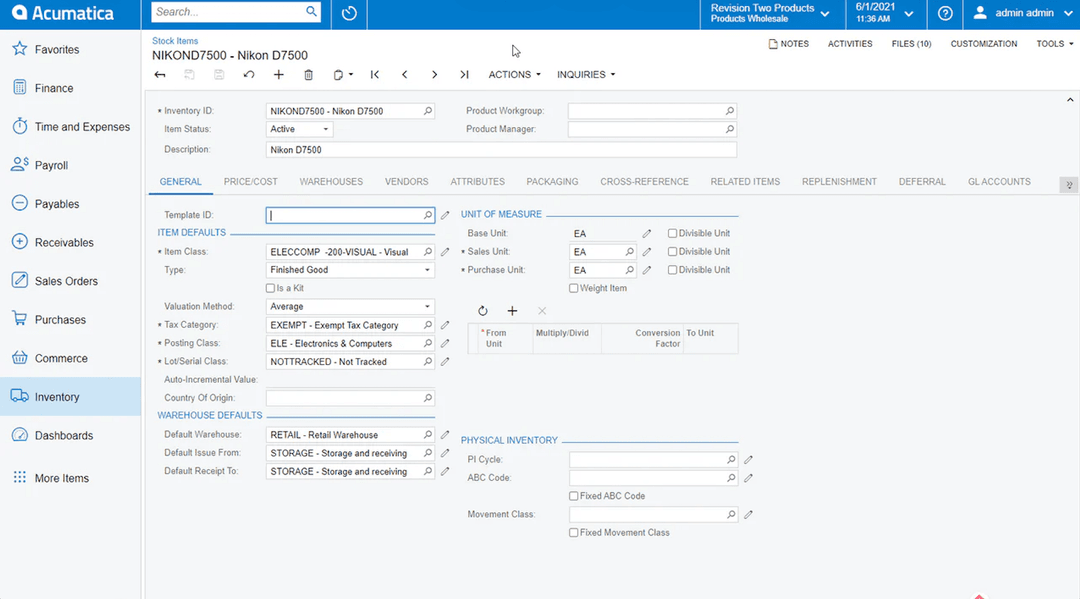
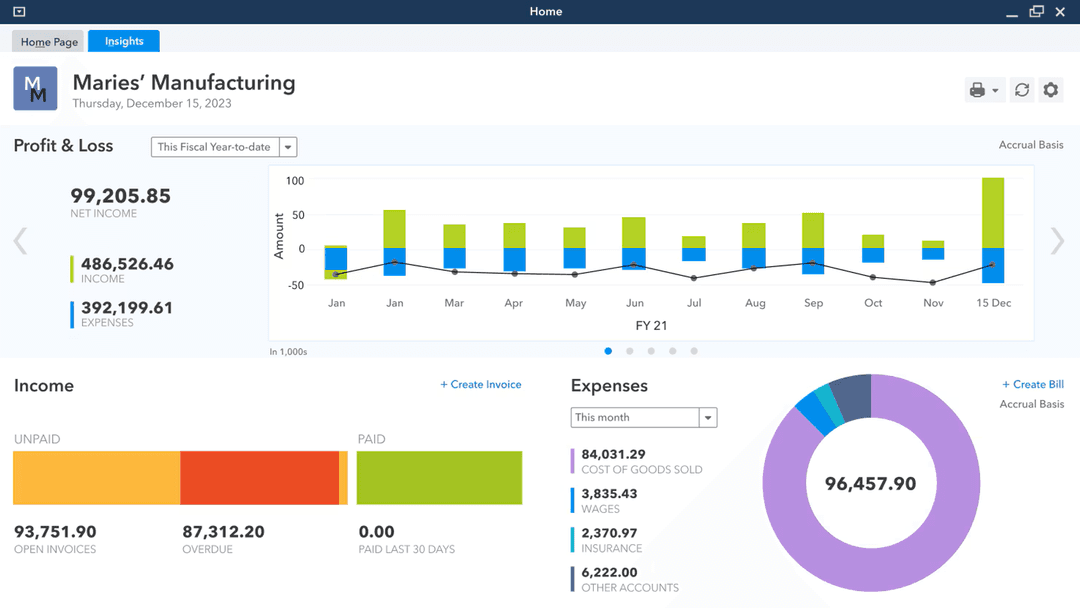
De meeste gebruikers kunnen QuickBooks gemakkelijker leren en dagelijks gebruiken, terwijl de flexibiliteit van Acumatica gepaard gaat met een steilere leercurve. Met dat in gedachten werkt Acumatica over het algemeen goed voor teams die behoefte hebben aan uitgebreide aanpassingsmogelijkheden en geavanceerde workflows, terwijl QuickBooks geschikt is voor eenvoudige, gebruiksvriendelijke boekhouding en voorraadbeheer.
Acumatica
- Customization is actually possible. You can shape the system to fit your business, not the other way around.
- Unlimited user access, no gotchas. Add as many people as you want without getting dinged for every login.
- Support that answers the phone. When you hit a wall, you’re not left yelling into the void.
- Interface isn’t exactly intuitive. Some screens feel designed by accountants, for accountants.
- Expect a real learning curve. Onboarding isn’t “set it and forget it”—you’ll need to invest time.
- Occasional performance hiccups. Especially if you push the system hard or over-customize.
QuickBooks Desktop Enterprise
- Serious financial reporting: Get in-depth, customizable reports built for real oversight.
- Robust inventory management: Advanced inventory tools handle complex tracking, not just basics.
- Customizable workflows: Tailor the system to your specific operations and reporting needs.
- Outdated user interface: Feels clunky compared to modern small business accounting solutions.
- Steep learning curve: Initial setup and training take real time and effort.
- Limited mobile access: Desktop-first design holds back teams that need flexibility.
Acumatica
- Manufacturing companiesHandles complex production processes and inventory management without missing a beat.
- Distribution businessesAdvanced supply chain features keep your operation running smoothly.
- Retail operationsReal-time data insights let you actually track sales and inventory.
- Finance departmentsRobust financial reporting tools streamline your day-to-day.
- Growing enterprisesScalability and unlimited users mean you’re set for expansion.
- Inventory managersDetailed tracking keeps you out of trouble with overstock or shortages.
QuickBooks Desktop Enterprise
- Retail chainsManage large inventories and multiple locations with advanced tracking tools.
- Manufacturing companiesUse detailed financial and job costing features to keep projects profitable.
- Accounting departmentsSimplify complex workflows with in-depth reporting and multi-user support.
- Wholesale distributorsTrack inventory levels and streamline order management efficiently.
- Finance teamsGet customizable reports and deep insight into cash flow, receivables, and forecasting.
- Large enterprisesHandle multi-company accounting and scale up without sacrificing control.
Wie moet Acumatica gebruiken en wie QuickBooks?
Acumatica is het meest geschikt voor middelgrote tot grote bedrijven met complexe voorraden, activiteiten met meerdere entiteiten of branchespecifieke behoeften—vooral bedrijven met IT-middelen om aanpassingen en integraties te ondersteunen. QuickBooks Enterprise is beter geschikt voor groeiende bedrijven, winkels en dienstverleners die een snelle installatie, eenvoudige navigatie, betrouwbare boekhouding en basaal voorraadbeheer willen zonder een steile leercurve. Als je bedrijf snel groeit of geavanceerde workflowautomatisering nodig heeft, past Acumatica beter. Voor eenvoudige boekhouding en voorraadbeheer met een beperkt budget is QuickBooks moeilijk te overtreffen.
| Acumatica | QuickBooks Desktop Enterprise | |
|---|---|---|
| Automation Features | Acumatica Advanced automation for inventory, approvals, and processes. | QuickBooks Desktop Enterprise Automation mainly for invoicing, payments, inventory, and reconciliation. |
| Core Focus | Acumatica Covers tons of ERP functions for powering your entire business, from inventory and accounting to order and warehouse management. | QuickBooks Desktop Enterprise Less robust all-around ERP features, mostly focusing on accounting and inventory management. |
| Customization | Acumatica Highly customizable workflows, dashboards, and reports. | QuickBooks Desktop Enterprise Some customization, but is more focused on out-of-the-box simplicity |
| Multichannel Support | Acumatica Built-in support for multi-entity and multi-currency operations. | QuickBooks Desktop Enterprise Basic multi-entity support, often requires workarounds. |
| User Interface | Acumatica Feature-rich but complex, designed for power users. | QuickBooks Desktop Enterprise Streamlined and intuitive, designed for everyday users. |
| Cloud-Based Access | Both offer secure, cloud-based platforms for anytime, anywhere access. |
|---|---|
| Discovery and Inventory | Each solution includes inventory management features like stock tracking, reorder points, and reporting, though Acumatica supports more advanced scenarios. |
| Financial Reporting | Both generate standard financial reports (P&L, balance sheet, cash flow), with customizable templates and export options. |
| Integration Options | Both connect with popular business tools such as Shopify, Salesforce, and Bill.com, and support API and Zapier for custom integrations. |
| User Permissions | Each platform allows admins to set user roles and permissions, helping control access to sensitive financial and inventory data. |