

Programvare for ADA-samsvar bidrar til å gjøre nettstedet ditt tilgjengelig og juridisk i samsvar med kravene for kunder med funksjonsnedsettelser. Hvis du leder en detaljhandels- eller netthandelsvirksomhet og ønsker å unngå søksmål, beskytte merkevarens omdømme og åpne dørene for alle kunder, er riktig programvare avgjørende.
Jeg har jobbet praktisk med verktøy som spenner fra grundige tilgjengelighetsrevisjoner til enkle løsninger du kan lansere raskt. Denne listen hjelper deg med å sammenligne og velge programvare for ADA-samsvar som faktisk passer til teamet ditt, teknologistakken din og forretningsmålene dine.
Why Trust Our Software Recommendations
6,700+
Reviews
20
Industry experts
16+
Evaluation factors
14
Years
Our team has been testing and reviewing software since 2012. As retail leaders ourselves, we know how difficult—and important—it is to choose the right software.
For this guide, we evaluated tools using hands-on testing and independent research, scoring tools using our selection criteria.
Our reviews reflect our independent judgment—not a sales pitch.
Sammenligningstabell for programvare for ADA-samsvar
Denne sammenligningstabellen oppsummerer prisopplysningene for mine beste utvalgte programmer for ADA-samsvar:
| Tool | Best For | Trial Info | Price | ||
|---|---|---|---|---|---|
| 1 | Best for automated code remediation | Free plan + free demo + 7-day free trial available | From $490/year | Website | |
| 2 | Best for screen reader–verified ADA monitoring | Free demo available | Pricing upon request | Website | |
| 3 | Best for expert-led ADA audits | Free demo + 7-day free trial available | From $390/year | Website | |
| 4 | Best for web and document compliance | Not available | Pricing upon request | Website | |
| 5 | Best for integrating accessibility checks into Figma | Free plan + free demo available | From $198/user/year | Website | |
| 6 | Best for AI optimization of screen readers | Free demo + 7-day free trial available | From $490/year | Website | |
| 7 | Best for combining web accessibility audits with SEO | Free demo available | Pricing upon request | Website | |
| 8 | Best for enterprise-level governance and compliance | Free demo available | Pricing upon request | Website | |
| 9 | Best for multi-regulation end-to-end compliance | Free demo available | Pricing upon request | Website | |
| 10 | Best for automated code fixes for SMBs | Free demo + 7-day free trial available | From $99/year | Website |


Anmeldelser av programvare for ADA-samsvar
Nedenfor finner du mine detaljerte sammendrag av den beste programvaren for ADA-samsvar som kom med på kortlisten min. Anmeldelsene mine gir en detaljert gjennomgang av funksjonene, de beste bruksområdene og integrasjonene for hvert program, slik at du kan finne det som passer best for deg.
 Best for automated code remediation
- Free plan + free demo + 7-day free trial available
- From $490/year
Visit WebsiteCustomer Rating:4.8/5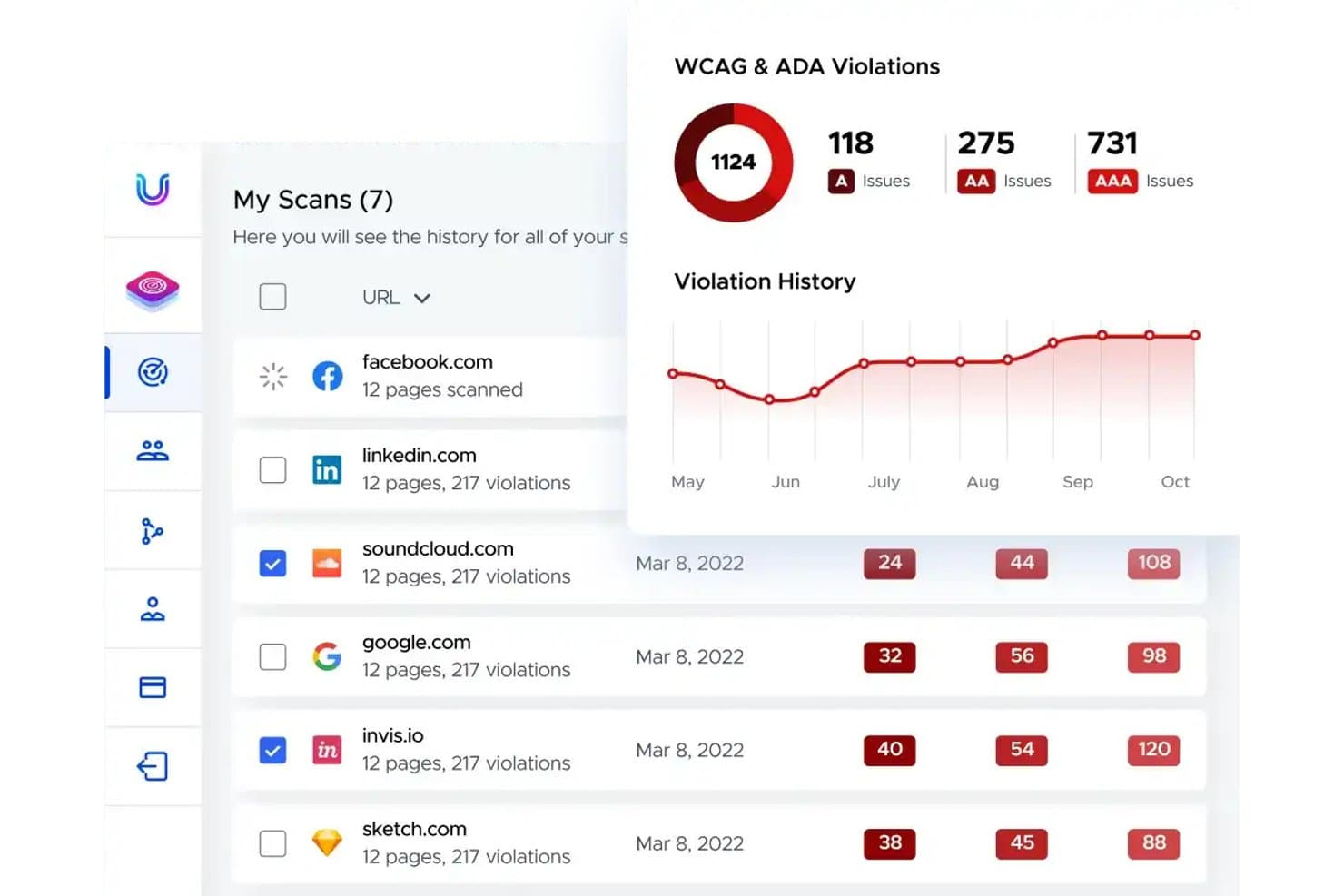
UserWay tracks WCAG and ADA violations across scanned websites over time. UserWay is an AI-powered web accessibility solution that combines an automated remediation widget, site scanning and monitoring, manual IAAP-certified audits, VPAT generation, and a litigation support program.
Who Is UserWay Best For?
UserWay is a strong fit for SMB and mid-market ecommerce teams that need a fast-to-deploy accessibility solution with broad platform support across Shopify, BigCommerce, and Adobe Commerce.
Why I Picked UserWay
I picked UserWay as one of the best because its Automated Remediation Technology (ART) applies AI-driven fixes, like missing alt text, broken form labels, and heading structure, directly at the DOM layer on every page load. I love that the Accessibility Monitor can crawl up to 30,000 pages per hour and export flagged issues straight to Jira or GitHub, so developers get actionable tickets without manual triage.
UserWay Key Features
- Litigation support program: Included with all annual paid plans, this program helps you respond to ADA demand letters with remediation documentation and attorney access.
- VPAT generation: UserWay produces Rapid VPATs (delivered in ~5 weeks) and Validated VPATs (delivered within 3 months) covering WCAG, Section 508, and EN 301-549.
- Accessibility statement generator: A template-based tool that creates a publicly publishable accessibility statement for your website.
- Developer workflow exports: The Accessibility Monitor pushes flagged issues directly to Jira, GitHub, Asana, Trello, and Bugzilla as actionable tickets.
UserWay Integrations
UserWay supports 20+ CMS and ecommerce integrations, including Shopify, BigCommerce, and Squarespace. An API is also available for custom integrations.
Pros and Cons
Pros:
- Covers multi-regulation accessibility and VPAT needs
- Includes litigation support program for demand letters
- Track export problems directly in developer tools
Cons:
- Conflicts with native screen reader software
- Overlays do not modify underlying source code
Learn more about UserWay: Best for screen reader–verified ADA monitoring
- Free demo available
- Pricing upon request
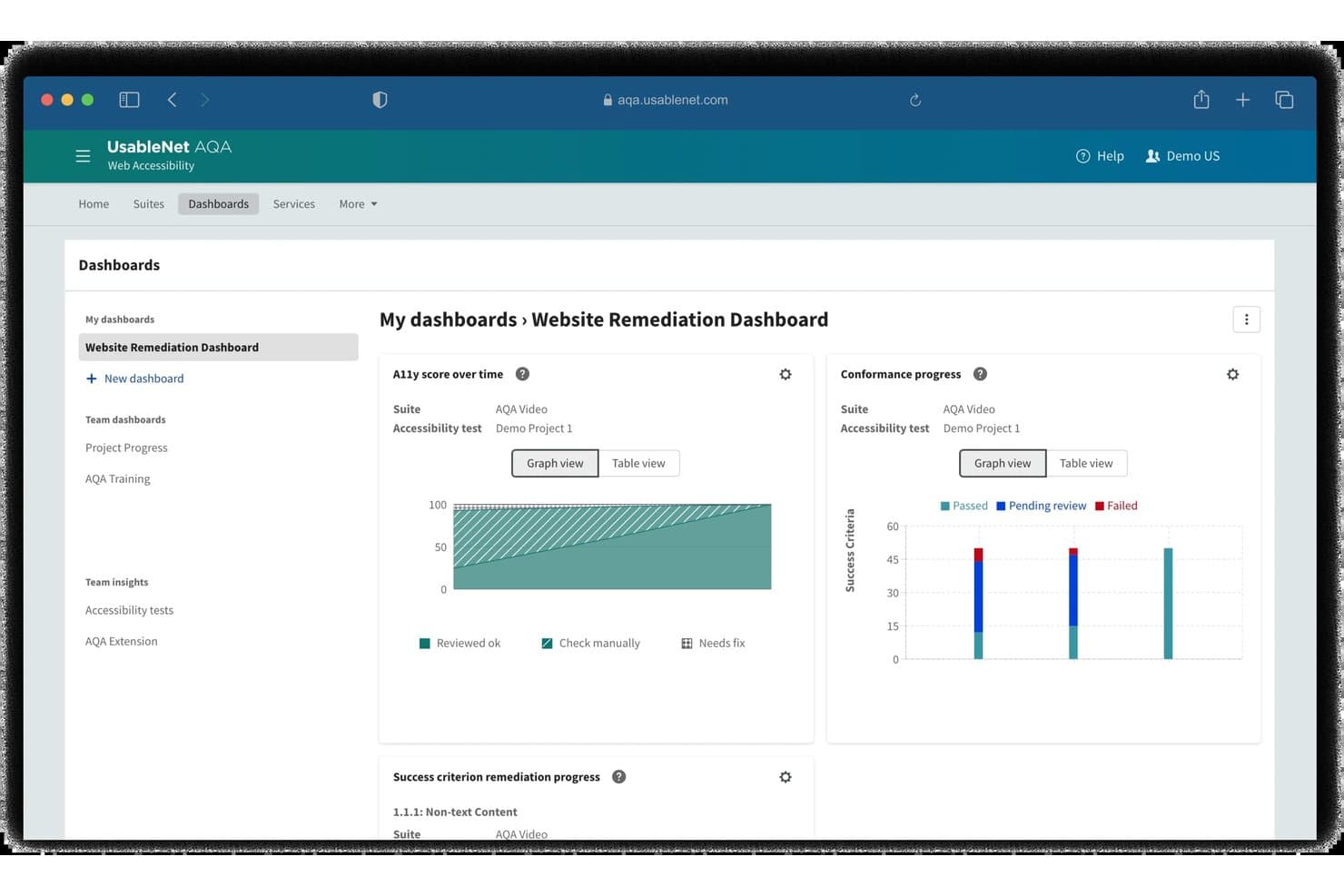
UsableNet tracks accessibility remediation progress via visual dashboards. UsableNet is an ADA compliance platform that combines automated WCAG scanning, screen reader verification, continuous monitoring, and developer-integrated issue tracking across WCAG 2.1/2.2, ADA, Section 508, and EAA standards.
Who Is UsableNet Best For?
UsableNet is a strong fit for enterprise digital teams that need screen reader–verified testing and multi-regulation compliance coverage across ADA, Section 508, and the EAA.
Why I Picked UsableNet
UsableNet earns its spot on my shortlist because its Screen Reader Verification and Monitoring module goes beyond automated flagging to record and play back the actual screen reader experience on your pages. I picked it specifically because that module lets testers script and run screen reader checks without owning a screen reader license or having prior assistive technology expertise. Paired with scheduled recurring scans mapped to WCAG 2.2, ADA, Section 508, and EAA, it's the most complete screen reader–verified monitoring setup I've found.
UsableNet Key Features
- Multi-regulation scanning: Audits digital assets against WCAG 2.1/2.2 AA, ADA Title II/III, Section 508, EN 301 549, and EAA standards.
- CI/CD pipeline integration: Connects with tools like Jenkins and Azure DevOps to trigger accessibility scans during release builds.
- Jira issue tracking: Pushes flagged accessibility defects directly into Jira backlogs to improve developer remediation workflows.
- Chrome extension: Enables developers to execute real-time, browser-based accessibility checks directly during local development.
UsableNet Integrations
UsableNet natively integrates with Jira and Azure. It also offers an API for AQA, enabling custom testing integrations and release lifecycle automation.
Pros and Cons
Pros:
- Automated recurring scan scheduling available
- Supports multi-regulation accessibility standards
- Screen reader verification module included
Cons:
- Platform interface is complex for non-specialists
- Issue remediation requires technical accessibility knowledge
Learn more about UsableNet: Best for expert-led ADA audits
- Free demo + 7-day free trial available
- From $390/year
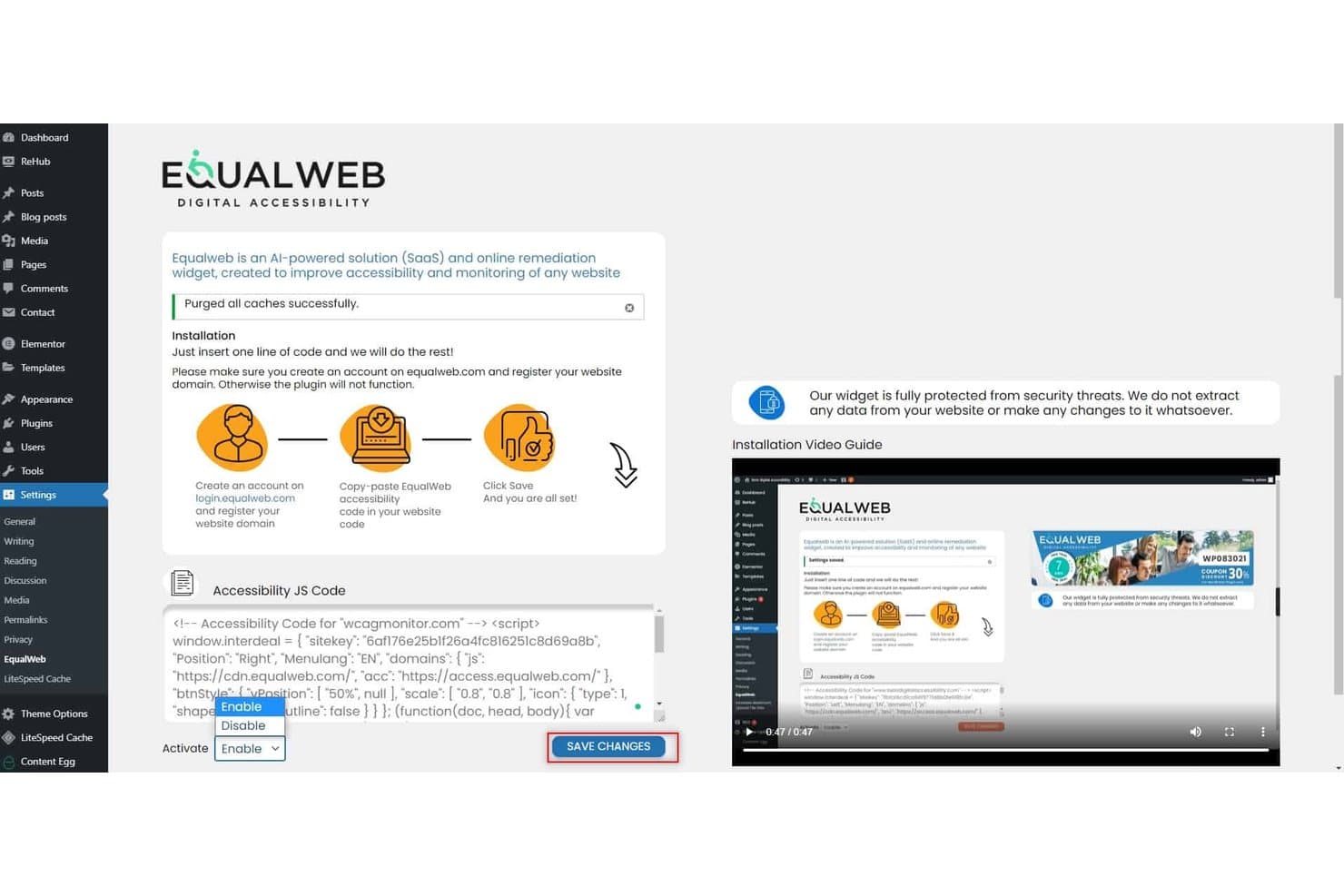
Equal Web lets users enable accessibility widgets via WordPress plugin. EqualWeb is an ADA compliance platform that pairs an AI-powered accessibility widget with CPWA-certified expert auditing, automated WCAG 2.2 scanning, continuous monitoring, and compliance documentation tools like VPATs and signed compliance certificates.
Who Is EqualWeb Best For?
EqualWeb is a strong fit for compliance officers and legal teams who need certified human auditing, litigation-ready documentation, and multi-regulation coverage across global sites.
Why I Picked EqualWeb
EqualWeb earns its spot on my shortlist because of its CPWA-certified human auditing, which goes well beyond what automated scanners alone can catch. I picked it specifically for teams that need litigation-ready documentation: the Managed Compliance plan produces a signed compliance certificate, a full VPAT 2.2, and an expert conformance opinion that your legal team can actually use if an ADA demand letter lands. The re-remediation guarantee, where EqualWeb fixes flagged issues at no extra cost if a covered item is later found non-conformant, is the kind of accountability I rarely see from overlay-first vendors.
EqualWeb Key Features
- Accessibility Monitor: Tracks compliance scores over time through scheduled scans against WCAG 2.2 and Section 508, sending email alerts when scores drop.
- PDF accessibility remediation: Auto-tags PDFs using AI to fix reading orders, alt text, and contrast errors to meet WCAG and PDF/UA standards.
- Multi-regulation coverage: Validates digital assets against global accessibility rules including ADA, EAA, Section 508, AODA, and EN 301 549.
- Jira issue export: Exports flagged accessibility defects directly into Jira with attached screenshots, issue locations, and remediation guides.
EqualWeb Integrations
EqualWeb offers 40+ integrations, including WordPress, Shopify, Adobe Commerce, and Webflow. It also supports Google Tag Manager and Jira issue exports.
Pros and Cons
Pros:
- Supports WCAG, ADA, EAA, and more
- Produces legally defensible compliance documentation
- Combines AI automation with human expert audits
Cons:
- No public API or CI/CD integration available
- Remediation applies only on the client side
Learn more about Equal Web:
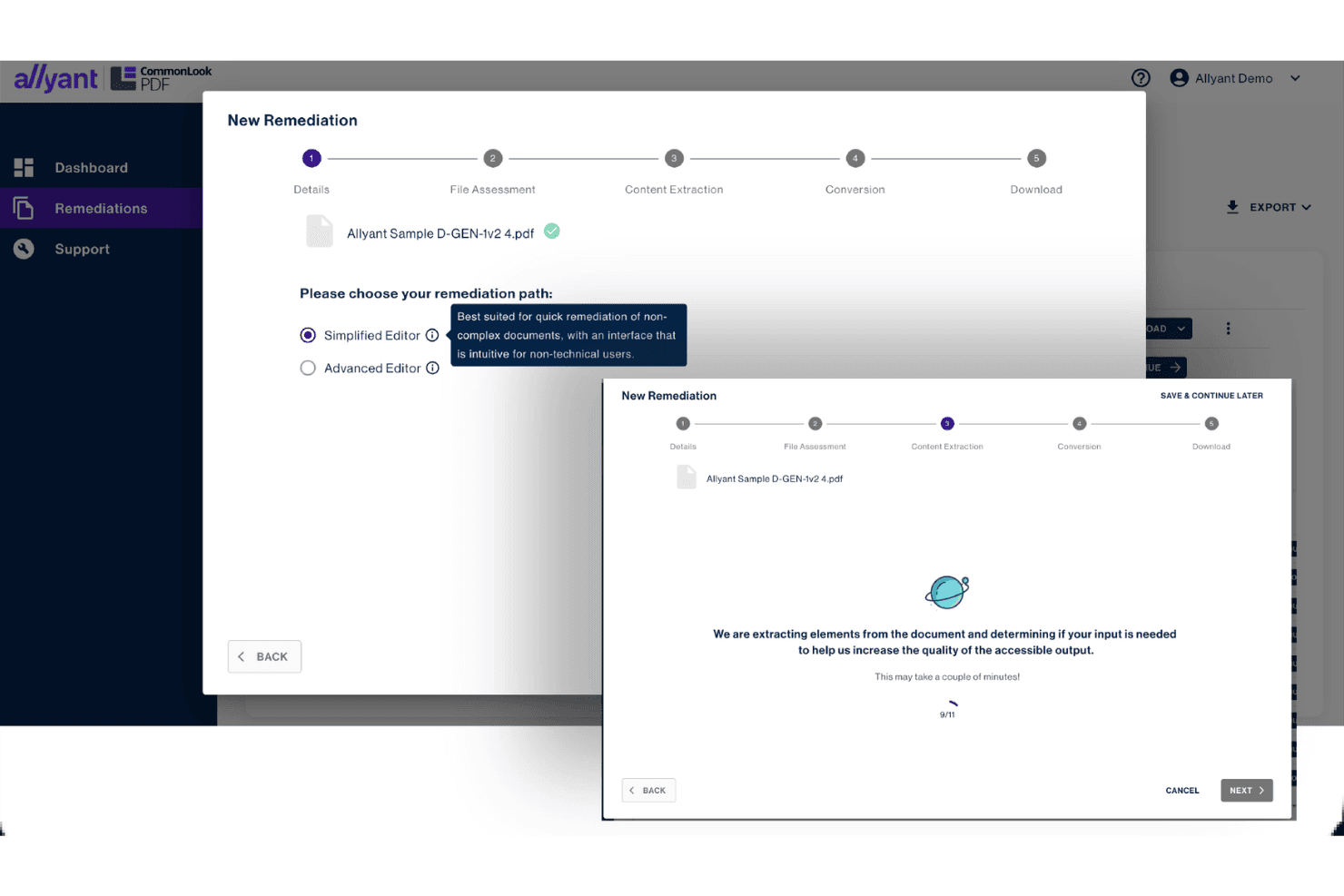
Allyant guides users through PDF remediation with step-by-step workflows. Allyant is an ADA compliance platform that combines automated web scanning, manual auditing by IAAP-certified engineers, AI-powered PDF remediation, VPAT/ACR generation, and litigation support into a unified accessibility management suite.
Who Is Allyant Best For?
Allyant is a strong fit for compliance officers and accessibility program managers who need to govern both web and document accessibility under a single platform.
Why I Picked Allyant
Allyant earns its spot on my shortlist because it scans web pages and embedded PDFs together, surfacing everything in one dashboard. I also love the CommonLook PDF suite, which uses AI-driven tagging to remediate high-volume templated documents like tax forms and bank statements at scale. On top of that, Allyant's VPAT/ACR generation paired with its dedicated litigation support team means you're building legally defensible documentation from day one.
Allyant Key Features
- Litigation rebuttal reports: Generates signed legal declarations and user demo videos to counter ADA demand letters.
- ProcureEnsure third-party VPAT validation: Tests vendor software with screen readers and scanners to verify compliance before purchase.
- Jira two-way sync: Syncs accessibility issues directly into Jira to manage developer fixes.
- CommonLook Office plugin: Scans Microsoft Word and PowerPoint to fix compliance errors before exporting to PDF.
Allyant Integrations
Allyant integrates with CivicPlus and provides two-way Jira sync, CI/CD pipeline tools, and APIs for custom connections.
Pros and Cons
Pros:
- Supports litigation with signed rebuttal reports
- Provides expert-led audits with native AT users
- Combines web and PDF scanning in one dashboard
Cons:
- No legal indemnification for ADA lawsuits
- Lacks direct ecommerce platform connectors
Learn more about Allyant: Best for integrating accessibility checks into Figma
- Free plan + free demo available
- From $198/user/year
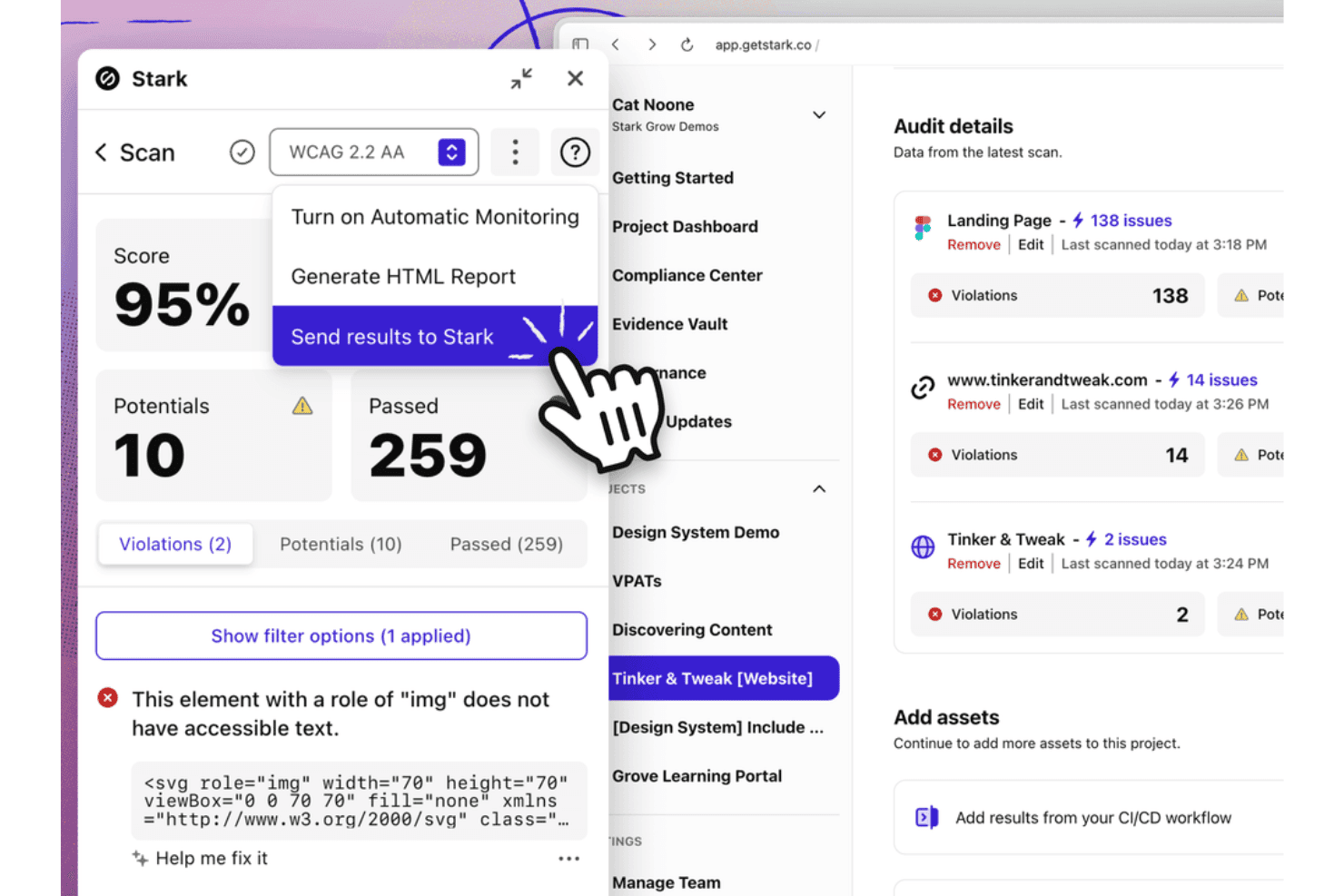
Stark shows accessibility scan results in the dashboard. Stark is an accessibility compliance platform that combines automated WCAG scanning across design files, source code, live URLs, and mobile apps with AI-assisted remediation tools, a VPAT report generator, and a centralized Compliance Center for tracking conformance across WCAG, Section 508, and the EAA.
Who Is Stark Best For?
Stark is a strong fit for product and engineering teams that want to catch accessibility issues at the design and code level before they ship.
Why I Picked Stark
I picked Stark as one of the best because it catches accessibility issues before a single line of code ships. Its Sidekick AI scans Figma files automatically and flags contrast failures, missing alt-text annotations, and touch target gaps with fix suggestions applied directly in the design tool. On the code side, the ESLint plugin surfaces WCAG violations inline in VS Code as developers write, so your team isn't discovering ADA compliance problems during a final audit.
Stark Key Features
- Compliance Center: Tracks organizational accessibility controls and maturity levels across WCAG, Section 508, and EAA frameworks.
- VPAT report generator: Exports pre-filled VPAT documents based on automated scan findings.
- CI/CD pipeline integration: Runs automated accessibility checks directly within build pipelines to update the central dashboard.
- Mobile app scanning: Scans native iOS and Android codebases to surface mobile accessibility issues alongside web assets.
Stark Integrations
Stark integrates with Figma, Sketch, GitHub, GitLab, Bitbucket, and Azure DevOps. It supports browser developer tools, CI/CD code repo workflows, and native mobile testing.
Pros and Cons
Pros:
- Covers accessibility for both web and mobile
- Source code remediation favored by legal guidance
- Design-phase AI catches accessibility issues early
Cons:
- Lacks ecommerce and CMS platform connectors
- No user-facing accessibility widget or overlay
Learn more about Stark: Best for AI optimization of screen readers
- Free demo + 7-day free trial available
- From $490/year
Visit WebsiteCustomer Rating:4.8/5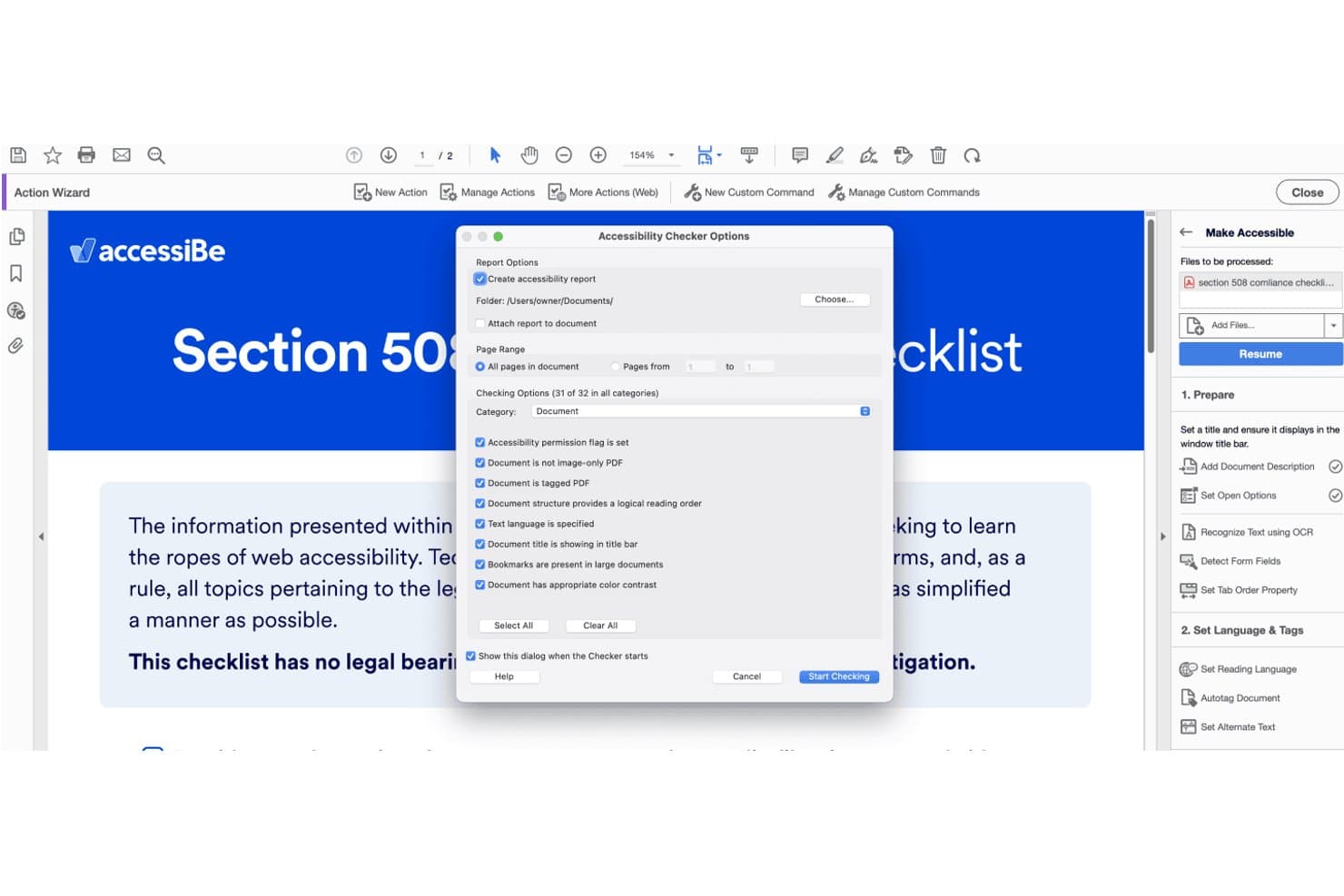
accessiBe's PDF checker scans documents for accessibility compliance issues. accessiBe is an AI-driven ADA compliance platform that combines an automated overlay, a developer-native scanning and remediation toolchain, and expert-delivered manual accessibility services.
Who Is accessiBe Best For?
accessiBe is a strong fit for ecommerce businesses and digital teams that need a no-code path to ADA compliance with the option to layer in developer tools.
Why I Picked accessiBe
I picked accessiBe as one of the best because its AI-driven screen reader optimization goes deeper than a generic overlay. The Blind Users Profile specifically tunes page behavior for JAWS, NVDA, VoiceOver, and TalkBack, and accessiBe's accessLabs program has real users with disabilities testing these fixes continuously. I also like that accessWidget rescans and updates screen reader compatibility every 24 hours, so new product pages or content updates don't break assistive technology support.
accessiBe Key Features
- Multi-regulation compliance scanning: Audits digital assets against WCAG 2.1/2.2 AA, ADA, Section 508, EAA, AODA, and ACA standards.
- CI/CD pipeline integration: Integrates accessFlow with CI tools like Jenkins, CircleCI, and GitLab to block accessibility regressions.
- Litigation support package: Provides legal support documentation, case manager support, ADA attorney hours, and monetary pledges for covered plans.
- Disability-specific user profiles: Customizes UI layouts instantly with preset modes for epilepsy, visual impairments, ADHD, and keyboard reliance.
accessiBe Integrations
accessiBe integrates with WordPress, Wix, Shopify, BigCommerce, Jira, CircleCI, GitLab, and tools like Playwright, Cypress, Selenium, VS Code, Cursor, and Claude Code via MCP.
Pros and Cons
Pros:
- Screen reader optimization profiles for real users
- Includes litigation support with financial pledge
- Offers manual, AI, and code remediation tracks
Cons:
- Certain issues require separate manual remediation
- Overlay does not guarantee legal compliance
Learn more about accessiBe: Best for combining web accessibility audits with SEO
- Free demo available
- Pricing upon request
Visit WebsiteCustomer Rating:4.6/5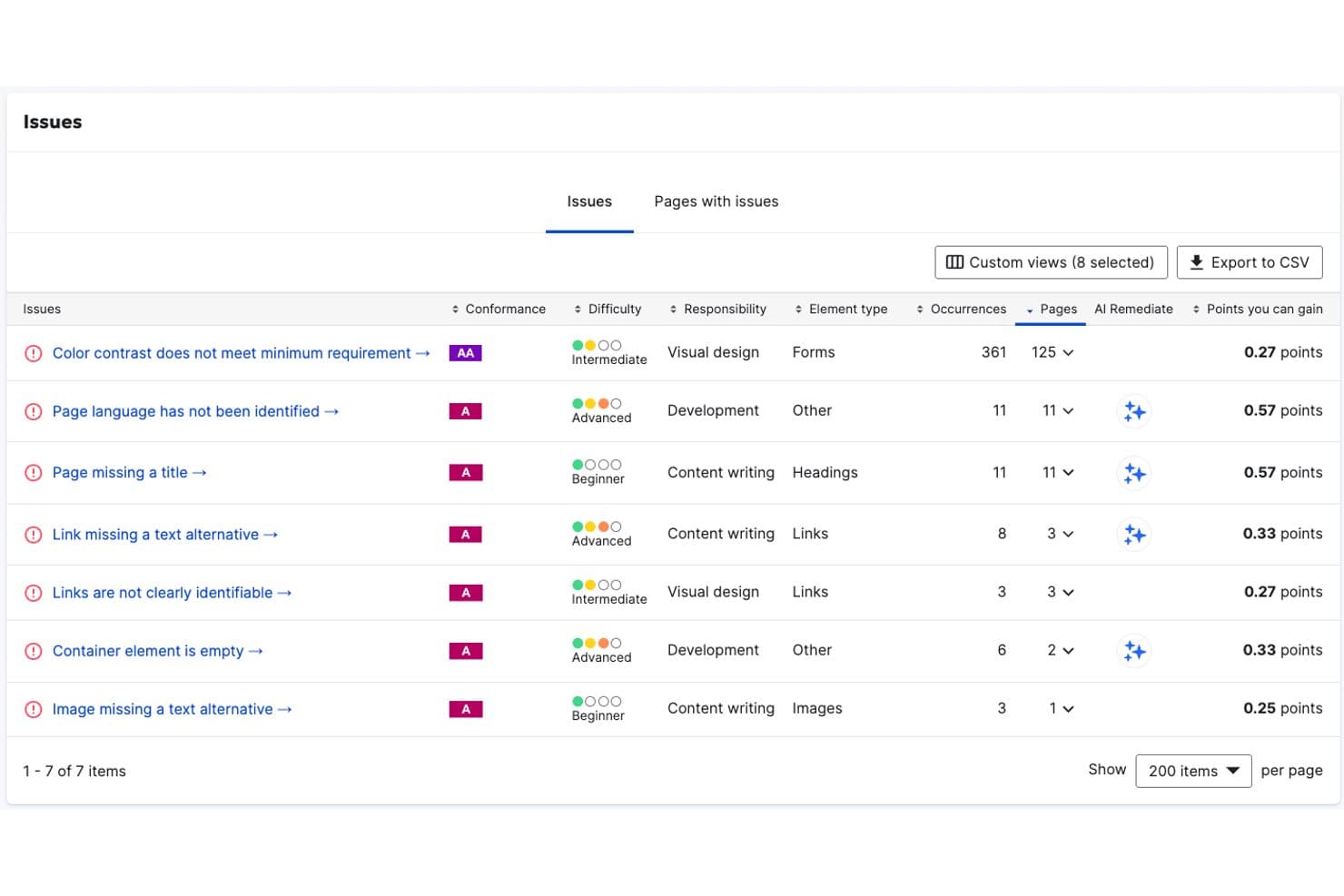
Siteimprove tracks accessibility issues by difficulty, responsibility, and affected pages. Siteimprove is a digital accessibility platform that combines automated WCAG scanning, AI-powered source-code remediation, PDF accessibility fixes, continuous monitoring, and compliance documentation across web, mobile, and document content.
Who Is Siteimprove Best For?
Siteimprove is a strong fit for enterprise digital teams that need to manage web accessibility and SEO compliance together in a single platform.
Why I Picked Siteimprove
Siteimprove earns its spot on my shortlist because it's the only ADA compliance platform I've seen that natively bundles WCAG scanning with SEO auditing in a single dashboard, so you aren't context-switching between tools to manage compliance and search performance. I also like its Website Remediation Agent, which writes actual source-code fixes rather than layering a JavaScript overlay on top of existing issues. On top of that, the PDF Remediation Agent automatically re-tags document structure and generates alt text at scale, which is a real differentiator if your site hosts large document libraries.
Siteimprove Key Features
- Multi-regulation compliance filtering: Filters issues by accessibility standards including ADA Title II, Section 508, EN 301 549, and WCAG versions.
- Republish check: Scans content inside CMS environments to block new accessibility issues before publication.
- VPAT authoring service: Delivers expert-written Accessibility Conformance Reports through manual evaluation services.
- Browser extensions: Scans public, staging, and password-protected pages directly inside standard web browsers.
Siteimprove Integrations
Siteimprove offers 25+ native CMS integrations, including WordPress, Drupal, Adobe Experience Manager, and Sitecore. It also supports Zapier and an MCP Server for VS Code and Claude Code.
Pros and Cons
Pros:
- Bundles accessibility with SEO and analytics
- Fixes issues at the source-code level
- Covers WCAG, ADA, Section 508, and EAA
Cons:
- User interface is not intuitive
- Often fails to evaluate context-dependent WCAG elements
Learn more about Siteimprove: Best for enterprise-level governance and compliance
- Free demo available
- Pricing upon request
Visit WebsiteCustomer Rating:4.5/5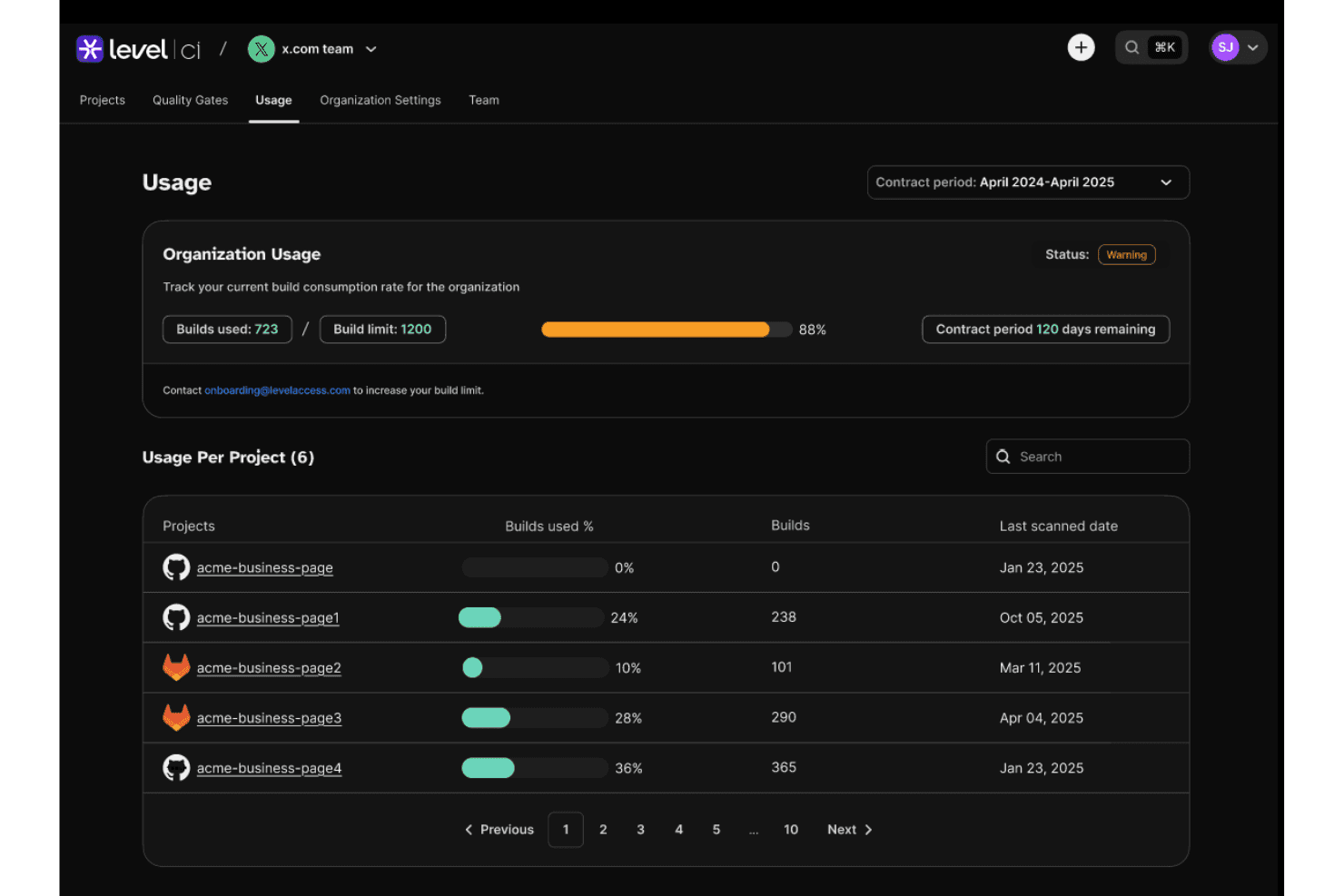
Level Access tracks build usage and consumption per project over time. Level Access is an ADA compliance platform that combines automated scanning, expert-led manual audits, AI-powered remediation, legal support, and governance reporting across websites, mobile apps, and digital documents.
Who Is Level Access Best For?
Level Access is built for enterprise organizations that need to manage accessibility compliance across multiple digital properties, teams, and regulatory frameworks simultaneously.
Why I Picked Level Access
Level Access earns its spot on my shortlist because no other platform I've used matches its depth of enterprise-level governance, from VPAT/ACR generation backed by certified experts to a timestamped audit trail that functions as a legal system of record. I find the demand letter validation and expert testimony support particularly valuable when organizations face ADA litigation. The Digital Accessibility Maturity Model (DAMM) also gives compliance teams a structured benchmark to track program progress across complex, multi-property environments.
Level Access Key Features
- Level CI pull request scanning: Triggers automated accessibility scans in pull requests to suggest AI code fixes before merging.
- Digital Accessibility Maturity Model (DAMM): Benchmarks organizational accessibility program maturity across teams, assets, and compliance frameworks.
- Level Access Academy: Provides role-based live and on-demand accessibility training courses for developers, designers, and QA teams.
- LevelDocs: Scans and remediates documents directly inside Microsoft Office to export compliant PDFs.
Level Access Integrations
Level Access integrates with GitHub, Jira, Azure DevOps, Asana, and Figma. It also provides SDKs and an API for custom workflows.
Pros and Cons
Pros:
- Supports benchmarking with Digital Accessibility Maturity Model
- Role-specific training with unlimited validation testing
- Industry-leading legal defensibility for ADA compliance
Cons:
- User interface can be complex for new users
- No direct Shopify or BigCommerce connector
Learn more about Level Access: Best for multi-regulation end-to-end compliance
- Free demo available
- Pricing upon request
Visit WebsiteCustomer Rating:4.5/5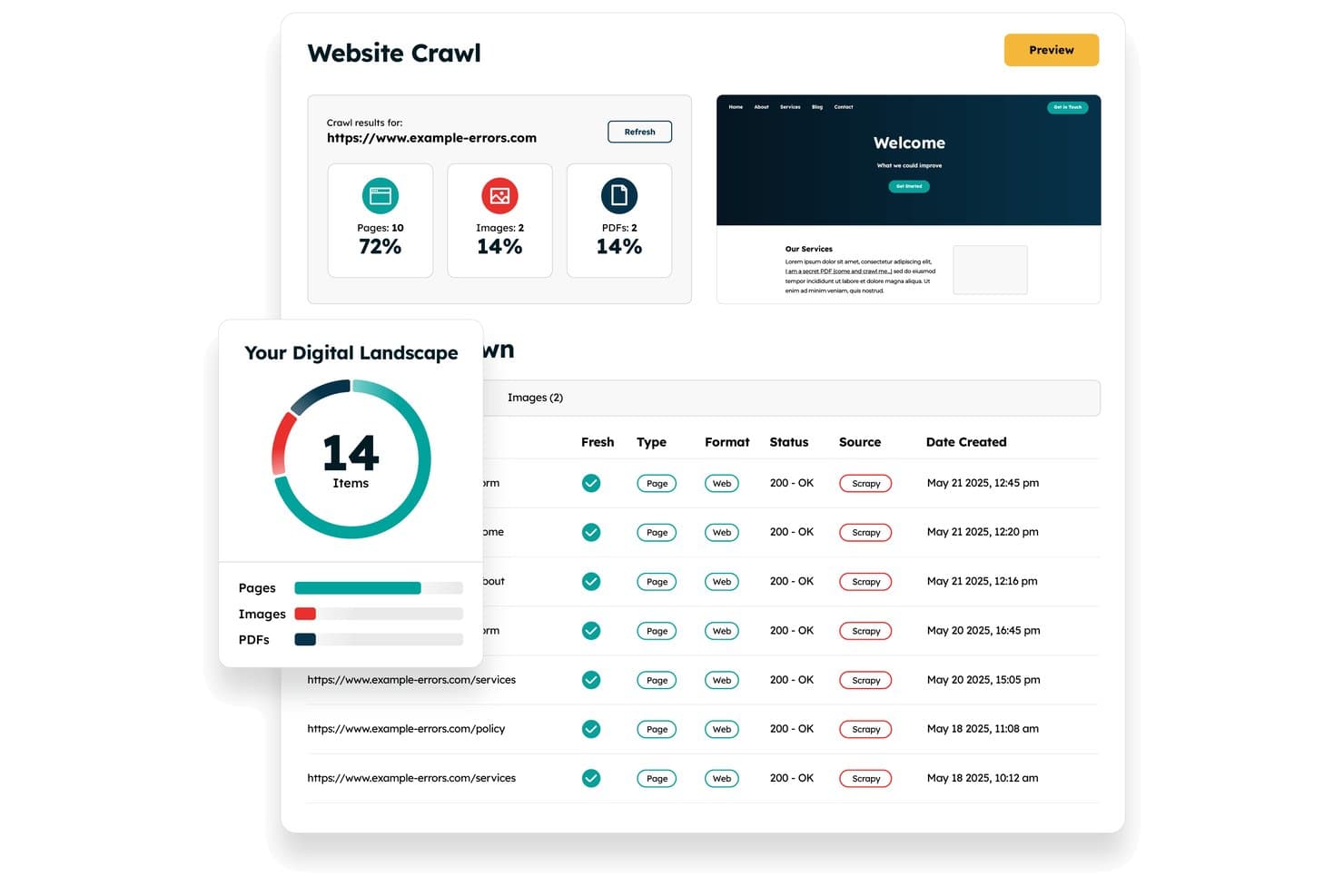
Recite Me crawls websites to audit pages, images, and PDFs for accessibility. Recite Me is an ADA compliance platform that combines an assistive toolbar, automated WCAG scanning, PDF remediation, manual auditing, and VPAT documentation into a single end-to-end solution.
Who Is Recite Me Best For?
Recite Me is a strong fit for digital compliance officers and accessibility program managers who need to cover multiple regulatory frameworks—ADA, WCAG 2.2, Section 508, and the EAA—from a single vendor.
Why I Picked Recite Me
I've included Recite Me in my top picks because no other tool on this list covers as many regulatory frameworks from a single platform. Where most tools focus on WCAG or ADA alone, Recite Me runs scans against WCAG 2.2, Section 508, the EAA, AODA, and several other standards simultaneously. I also like that it pairs automated scanning with a Complete VPAT Service, where their experts produce a finished ACR your team can hand directly to procurement or legal.
Recite Me Key Features
- Assistive toolbar: Provides on-site controls for text-to-speech, translation, and custom visual styling.
- PDF accessibility checker: Scans site-linked PDFs to fix tags, reading order, and contrast errors.
- Chrome extension for pre-launch scanning: Tests local pages and single-page applications directly inside DevTools before release.
- Accessibility statement generator: Produces a standardized disclosure statement detailing conformance status and compliance contacts.
Recite Me Integrations
Recite Me integrates with Jira and Azure DevOps, and offers JS connections to WordPress, Wix, Squarespace, Drupal, Umbraco, Shopify, and SharePoint. No public API is documented.
Pros and Cons
Pros:
- Translates page text into over 100 languages
- Built-in screen mask, ruler, and dictionary
- Lets users tweak fonts, colors, and contrast
Cons:
- Full real-time content monitoring in beta
- No legal indemnification for ADA lawsuits
Learn more about Recite Me: Best for automated code fixes for SMBs
- Free demo + 7-day free trial available
- From $99/year
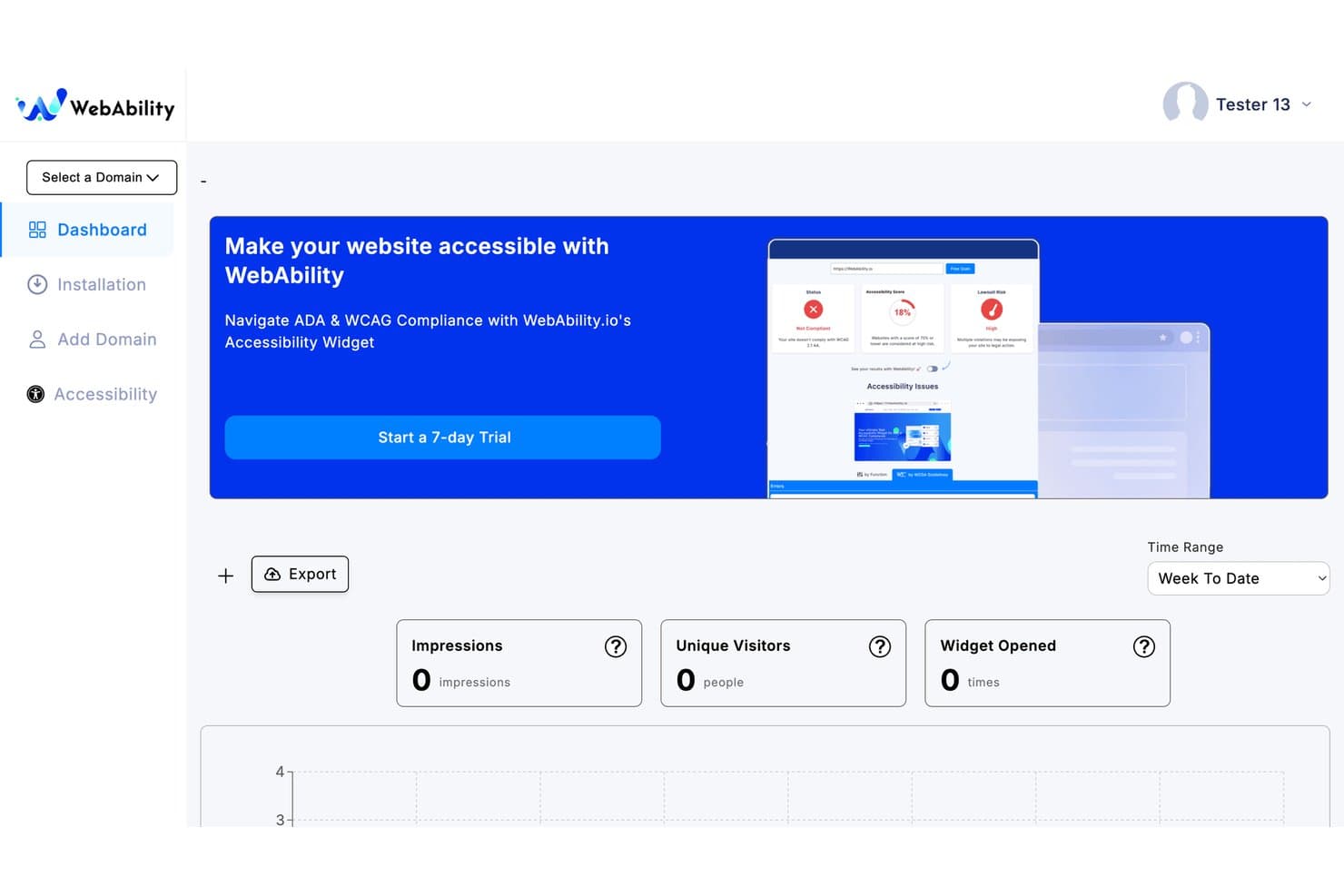
WebAbility tracks impressions, visitors, and widget opens on its dashboard. WebAbility is an ADA compliance platform that combines automated accessibility scanning, AI-driven code fix suggestions, and continuous monitoring to help websites meet WCAG 2.2, ADA, and related standards.
Who Is WebAbility Best For?
WebAbility works well for small and mid-sized businesses that need automated accessibility scanning and AI-driven code fix suggestions without managing a large compliance team.
Why I Picked WebAbility
WebAbility earns its spot on my shortlist because of how well it handles automated code fixes without requiring a dedicated accessibility team. I particularly like SmartFix, which surfaces AI-generated, reviewer-approved code corrections in the platform, so developers can act on specific issues rather than interpret raw audit data. Cross-page pattern detection groups recurring component-level violations, which cuts remediation volume significantly for SMBs working with leaner dev resources.
WebAbility Key Features
- Compliance Vault: Stores scan history, audit reports, remediation records, and timestamped conformance certificates in one place.
- Multi-standard scanning: Evaluates your site against WCAG 2.2, ADA, Section 508, EAA, and EN 301 549 in a single automated scan.
- LiveStatement: An auto-updating accessibility statement that syncs in real time with your latest scan results across all plans.
- Audit & reporting dashboards: Show reports highlighting compliance scores, broken links, color contrast errors, and unresolved page structure barriers.
WebAbility Integrations
WebAbility works with Shopify, WordPress, Wix, Squarespace, and BigCommerce. It can be added to custom sites with JS or managed via Google Tag Manager and developer tools.
Pros and Cons
Pros:
- Legal audit trails with Compliance Vault
- AI-driven code fix suggestions for developers
- Multi-standard scanning in a single workflow
Cons:
- Limited third-party review validation online
- No native ecommerce platform plugins
Learn more about WebAbility:
Annen programvare for ADA-samsvar
Her er noen flere alternativer for programvare for ADA-samsvar som ikke kom med på kortlisten min, men som likevel er verdt å se nærmere på:
- 11AllyableBest for developer-centric modular APIs
- 12AudioEyeBest for hybrid legal-backed remediation
- 13All in One AccessibilityBest for cross-departmental ADA management
- 14Pope TechBest for higher-ed ADA auditing
- 15RAMPBest for issue tracking and managing remediation tasks
- 16Acquia Web GovernanceBest for enterprise ADA and WCAG governance
- 17Accessibility CloudBest for website crawling across multiple sites
- 18SilktideBest for non-technical teams managing WCAG scores
- 19Axe DevToolsBest for embedding WCAG scans into dev pipelines
- 20EvincedBest for agentic CI/CD accessibility remediation
How I Evaluate ADA Compliance Software
I split my evaluation into two layers: the baseline functionality a tool must cover to make the list, and the differentiators that separate a solid pick from the right one for your retail operation.
Core Functionality (Table Stakes For This List)
When I'm selecting tools for my list, I rank each one on a scale from 0 (does not offer the functionality) to 5 (excels in this area) for each core functionality listed below. I then calculate the tool's total score into a percentage, using 65% as a benchmark to help assess its overall fit for the list.
- Automated accessibility scanning: I evaluate how thoroughly a tool crawls pages against WCAG 2.1/2.2 and ADA criteria, including whether it prioritizes issues by severity so your team can fix what matters first.
- Issue remediation tools: The mix of automated fixes and actionable developer guidance matters here, from overlay-based corrections to source-code suggestions that help your engineers resolve barriers at the root.
- Continuous monitoring and alerts: Sites change constantly as you add products, update banners, or swap landing pages. I look for recurring scans, real-time dashboards, and proactive alerts that flag new issues as content shifts.
- Compliance reporting and documentation: Generating exportable audit reports, accessibility statements, and VPAT-style artifacts is key for legal defensibility. Tools like Level Access and Siteimprove handle this differently, so I check the depth and format options each offers.
- Assistive technology support: I check whether the tool ensures compatibility with screen readers, keyboard navigation, and user-facing accessibility profiles that let shoppers adjust their experience on your site.
- Developer and CMS integration: Retail teams run on platforms like Shopify, WordPress, and Adobe Commerce. I evaluate how well each tool connects with your CMS, ecommerce system, and developer workflows through APIs, browser extensions, or CI/CD pipelines.
Once I have a list of tools that meet the criteria, I consider what sets each platform apart.
Differentiating Factors (What Sets Vendors Apart)
Here's how I compare and contrast different vendors:
Standout Features
I look for legal assurance programs—some vendors offer indemnification or litigation defense funds that cover your costs if you receive an ADA demand letter while actively using their tool. That matters because retail sites face the bulk of digital accessibility lawsuits. I also evaluate AI-powered source code remediation, where the tool generates permanent code-level fixes rather than JavaScript overlays that courts increasingly reject. Beyond that, I check for ecommerce platform depth: purpose-built connectors for Shopify, Adobe Commerce, or BigCommerce that target high-risk templates like PDPs, checkout flows, and faceted search.
Beyond Features
I evaluate each vendor's remediation methodology—whether it relies on overlays, source-code fixes, or a hybrid model—because overlay-only approaches have faced legal challenges. Retail tech stack fit matters just as much; I check for native apps in Shopify, Adobe Commerce, or BigCommerce app stores and compatibility with headless setups, third-party review widgets, and chat tools that often break accessibility. I also look at total cost of ownership, since pricing models range from per-domain to per-page-view and can scale fast for high-traffic stores.
Slik velger du programvare for ADA-samsvar
Slik velger du programvare for ADA-samsvar som faktisk beskytter merkevaren din og holder nettstedet ditt tilgjengelig, uten å forsinke oppdateringer av nettbutikken eller låse deg til en rigid løsning.
| Hvis prioriteten din er … | Se etter … |
|---|---|
| Hvis prioriteten din er …Forsvar mot søksmål og risikoreduksjon | Se etter …Juridiske trygghetsprogrammer eller skriftlig skadesløsholdelse |
| Hvis prioriteten din er …Grundig kompatibilitet med netthandelsplattformer | Se etter …Integrasjoner som er spesifikke for Shopify, Adobe Commerce eller BigCommerce |
| Hvis prioriteten din er …Å oppdage nye problemer når nettstedet endres | Se etter …Automatisert og hyppig skanning samt varsler som utløses av oppdateringer |
| Hvis prioriteten din er …At utviklingsteamet involveres i permanente løsninger | Se etter …Verktøy for utbedring av kildekode med API-tilgang |
| Hvis prioriteten din er …At ikke-tekniske team kan jobbe selvstendig | Se etter …Overlegg uten kode eller tilgjengelighetsmoduler |
Slik vurderer du kortlisten din
- Be om juridisk dokumentasjon: Be leverandøren skriftlig om et eksempel på en skadesløsholdelsesavtale eller en klausul om forsvar mot søksmål.
- Test netthandelsintegrasjonen: Installer plattformens app, utvidelse eller skript i et testmiljø for det faktiske CMS-et eller netthandelsoppsettet ditt.
- Simuler en nettstedsoppdatering: Legg til eller endre en produktside, og kontroller deretter om verktøyet markerer nye tilgjengelighetsproblemer innen 24 timer.
- Be om dokumentasjon av utviklerarbeidsflyten: Be om API-dokumentasjon eller en utbedringsrapport som viser konkrete forslag til kildekode for et løst problem.
- Vurder overlegg mot kodeendringer: Velg mellom rask implementering av moduler og reelle endringer på kodenivå, basert på teamets tekniske ferdigheter og hvor stor juridisk risiko dere er villige til å akseptere.
Hva er programvare for ADA-samsvar?
Programvare for ADA-samsvar hjelper deg med å gjøre nettstedet ditt oppfattbart og tilgjengelig for personer med funksjonsnedsettelser, samt oppfylle juridiske krav i henhold til Americans with Disabilities Act. Disse plattformene skanner etter tilgjengelighetsproblemer, tilbyr veiledning eller verktøy for utbedring og genererer rapporter som støtter samsvar. Team bruker programvare for ADA-samsvar til å identifisere hindringer, gjennomføre rettinger og dokumentere pågående arbeid med tilgjengelighet.
Funksjoner i programvare for ADA-samsvar
Når du velger programvare for ADA-samsvar, bør du se etter følgende viktige funksjoner:
- Automatisert tilgjengelighetsskanning: Gjennomfører regelmessige skanninger opp mot WCAG 2.1- og ADA-standarder, fremhever problemer og prioriterer dem etter alvorlighetsgrad.
- Verktøy for utbedring av problemer: Tilbyr raske rettinger, handlingsrettet veiledning og trinnvise instruksjoner for å løse brudd ved kilden eller gjennom overlegg.
- Kontinuerlig overvåking og varsler: Skanner sider på nytt når innholdet endres, og sender proaktive varsler om nye eller tilbakevendende tilgjengelighetsproblemer.
- Samsvarsrapportering og dokumentasjon: Genererer revisjonsrapporter, aktivitetslogger og tilgjengelighetserklæringer for juridiske formål, innkjøp og interne revisjoner.
- Støtte for hjelpemiddelteknologi: Verifiserer full kompatibilitet med skjermlesere, tastaturnavigasjon og andre adaptive enheter.
- Integrasjon med utviklerverktøy og CMS: Integreres enkelt med plattformer som Shopify, Adobe Commerce og WordPress via API-er, utvidelser eller programtillegg.
- Tilgjengelighetsprofiler for brukere: Gjør det mulig for besøkende å justere kontrast, tekststørrelse og navigasjonsinnstillinger på stedet for bedre brukervennlighet.
- Rollebaserte tilgangskontroller: Tildeler bestemte tillatelser til teammedlemmer, slik at skanning, utbedring og rapportering kan delegeres på en trygg måte.
- Eksporterbare rapporter: Genererer sammendrag og dataeksporter som kan deles med juridiske team, revisorer eller eksterne partnere.
Vanlige AI-funksjoner i programvare for ADA-samsvar
I tillegg til standardfunksjonene i programvare for ADA-samsvar som er nevnt ovenfor, tar mange av disse løsningene i bruk AI med funksjoner som:
- AI-drevet problemdeteksjon: Bruker maskinlæring til å identifisere komplekse tilgjengelighetshindringer som tradisjonelle regelbaserte skannere kanskje ikke oppdager, for eksempel dynamisk innhold eller kontekstavhengige feil. Dette hjelper teamet ditt med å oppdage mindre tydelige problemer som påvirker virkelige brukere.
- Automatisert kodeutbedring: Bruker AI til å foreslå eller implementere rettinger på kodenivå for tilgjengelighetsbrudd, noe som reduserer det manuelle arbeidet for utviklere og fremskynder utbedringsprosessen. Disse rettingene tilpasses ofte nettstedets unike struktur og innhold.
- Tilgjengelighetsrevisjoner med naturlig språk: Bruker AI til å analysere skriftlig innhold for tydelighet, lesbarhet og samsvar med retningslinjer for tilgjengelighet. Denne funksjonen markerer faguttrykk, komplekse setninger eller manglende alternativ tekst og hjelper deg med å lage mer tilgjengelig tekst.
- Personlig tilpassede justeringer av brukeropplevelsen: Bruker AI til å lære av brukerinteraksjoner og automatisk justere tilgjengelighetsinnstillinger, for eksempel kontrast eller skriftstørrelse, basert på individuelle preferanser og atferd. Dette skaper en mer skreddersydd surfeopplevelse for personer med funksjonsnedsettelser.
- Prediktiv analyse av samsvarsrisiko: Bruker AI til å forutsi potensielle juridiske risikoer ved å analysere nettstedets tilgjengelighetstrender, historiske problemer og bransjestandarder. Dette hjelper deg med å prioritere rettinger som mest sannsynlig reduserer eksponeringen for søksmål eller klager.
Fordeler med programvare for ADA-samsvar
Implementering av programvare for ADA-samsvar gir flere fordeler for teamet og virksomheten din. Her er noen av fordelene du kan se frem til:
- Redusere juridisk risiko: Automatisert skanning, samsvarsrapportering og juridiske trygghetsprogrammer hjelper deg med å minimere eksponeringen for ADA-søksmål og krav knyttet til digital tilgjengelighet.
- Oppdage tilgjengelighetsproblemer tidlig: Kontinuerlig overvåking og proaktive varsler identifiserer nye hindringer på nettstedet hver gang du oppdaterer innhold, lanserer produkter eller endrer oppsett.
- Støtte ulike brukerbehov: Innebygd støtte for hjelpemiddelteknologi og tilgjengelighetsprofiler for brukere lar besøkende tilpasse opplevelsen sin og sikrer at nettstedet fungerer for alle.
- Forenkle utbedring for team: Verktøy for utbedring av problemer, kodeforslag og integrasjoner med arbeidsflyter for utviklere og CMS hjelper teamet med å løse problemer direkte ved kilden.
- Levere tydelig dokumentasjon: Eksporterbare rapporter og tilgjengelighetserklæringer gjør det enkelt å dele fremdriften i samsvarsarbeidet med revisorer, partnere eller ledelsen.
- Tilpasse seg netthandelsplattformer: Opprinnelige programtillegg, appintegrasjoner og spesialutviklede koblinger sikrer at programvaren passer inn i Shopify, Adobe Commerce og andre detaljhandelsplattformer uten å forstyrre systemoppsettet.
- Integrere AI for smartere utbedringer: AI-drevet deteksjon og automatisert utbedring går lenger enn overfladiske skanninger for å oppdage komplekse problemer og fremskynde korrigeringer på kodenivå.
Kostnader og priser for ADA-samsvarsprogramvare
Ved valg av ADA-samsvarsprogramvare er det nødvendig å forstå de ulike prismodellene og abonnementene som er tilgjengelige. Kostnadene varierer basert på funksjoner, teamstørrelse, tillegg og mer. Tabellen nedenfor oppsummerer vanlige abonnementer, gjennomsnittsprisene deres og typiske funksjoner som er inkludert i ADA-samsvarsprogramvare:
Sammenligningstabell for abonnementer for ADA-samsvarsprogramvare
| Abonnementstype | Gjennomsnittspris | Vanlige funksjoner |
|---|---|---|
| AbonnementstypeGratisabonnement | Gjennomsnittspris$0 | Vanlige funksjonerGrunnleggende automatisert skanning, begrenset rapportering, støtte for én bruker og tilgang til grunnleggende forslag til utbedring. |
| AbonnementstypePersonlig abonnement | Gjennomsnittspris$40-$80/måned | Vanlige funksjonerAutomatisert skanning, verktøy for utbedring av problemer, grunnleggende samsvarsrapportering, e-postvarsler og ett nettsted eller domene. |
| AbonnementstypeBedriftsabonnement | Gjennomsnittspris$200-$600/måned | Vanlige funksjonerTilgang for flere brukere, planlagte skanninger, avansert samsvarsrapportering, integrasjoner med CMS-plattformer og prioritert brukerstøtte. |
| AbonnementstypeAbonnement for store virksomheter | Gjennomsnittspris$900-$2,000/måned | Vanlige funksjonerTilpassede integrasjoner, kontinuerlig overvåking, eksporterbare rapporter, juridiske trygghetsprogrammer, dedikert kontoadministrasjon og støtte ved oppstart. |
Vanlige spørsmål om programvare for ADA-samsvar
Her er noen svar på vanlige spørsmål om programvare for ADA-samsvar:
Garanterer programvare for ADA-samsvar juridisk beskyttelse?
Nei, programvare for ADA-samsvar kan ikke garantere juridisk beskyttelse på egen hånd. Noen leverandører tilbyr juridiske garantiordninger eller skadesløsholdelse, men du må gå nøye gjennom disse – se etter skriftlige, håndhevbare vilkår og sørg for at bruken av programvaren oppfyller kravene. Dekk alle behov ved å kombinere programvare med løpende menneskelig gjennomgang og juridisk rådgivning.
Hvordan fungerer programvare for ADA-samsvar med netthandelsplattformer som Shopify eller Adobe Commerce?
De fleste programmer for ADA-samsvar tilbyr programtillegg, apper eller direkte integrasjoner for populære netthandelsplattformer. Disse integrasjonene automatiserer vanligvis skanning, oppdagelse av problemer og utbedring i arbeidsflyten for nettbutikken. Du får den beste opplevelsen når et verktøy er spesialutviklet for plattformene dine og støtter maler, betalingsflyter, produktsider og tredjepartsmoduler.
Kan programvare for ADA-samsvar automatisere tilgjengelighetsutbedringer på nettsteder fullt ut?
Nei, programvare for ADA-samsvar kan håndtere enkelte utbedringer automatisk – for eksempel alternativ tekst eller justeringer av fargekontrast – men manuelt utviklerarbeid er fortsatt nødvendig for komplekse problemer eller strukturelle endringer. KI-funksjoner kan gjøre utbedring av kildekode raskere, men det finnes ingen erstatning for praktisk gjennomgang, særlig når det gjelder innhold, medier og interaktive elementer.
Hva er forskjellen mellom utbedring på kodenivå og overlegg i programvare for ADA-samsvar?
Overlegg legger et lag med JavaScript oppå nettstedet for å justere tilgjengeligheten i brukergrensesnittet, mens utbedring på kodenivå endrer nettstedets faktiske kildekode. Jeg anbefaler å bruke reelle kildekodeutbedringer når det er mulig. Overlegg er enklere for ikke-tekniske team, men har møtt juridiske og bruksmessige utfordringer. Hvilken løsning som passer best for virksomheten din, avhenger av tekniske ressurser, juridisk risiko og hvor komplekst nettstedet er.
Hva er noen tegn på at teamet mitt trenger programvare for ADA-samsvar?
Hvis du opplever kundeklager på tilgjengelighet, håndterer hyppige produkt- eller innholdsendringer eller behandler store ordrevolumer på flere plattformer, hjelper programvare for ADA-samsvar deg med å oppdage og løse problemer før de eskalerer. Det er også avgjørende hvis virksomheten din opererer i regioner der søksmål om digital tilgjengelighet er vanlige, eller hvis du leverer til offentlige kunder som trenger samsvarsdokumentasjon.