

Programvare for lagerstyring i Amazon hjelper virksomheten din med å spore, organisere og fylle på produkter som selges gjennom Amazon og andre kanaler. Et pålitelig lagerstyringssystem sørger for nøyaktige lagernivåer, enklere påfylling og bedre oversikt på tvers av lagre og markedsplasser.
Hvis du leter etter de beste verktøyene for å holde lagerbeholdningen nøyaktig, unngå utsolgte varer og håndtere salg i flere kanaler, vet du hvor raskt manuelle prosesser eller regneark kan føre til tapt salg eller for stort lager.
Denne listen hjelper deg med å sammenligne ledende løsninger for lagerstyring i Amazon, slik at du kan velge det som passer best for teamets arbeidsflyter, salgsvolum, integrasjonsbehov og viktige lagermålinger. Få en tydelig oversikt over alternativene dine og ta en trygg beslutning for 2026.
Why Trust Our Software Recommendations
6,700+
Reviews
20
Industry experts
16+
Evaluation factors
14
Years
Our team has been testing and reviewing software since 2012. As retail leaders ourselves, we know how difficult—and important—it is to choose the right software.
For this guide, we evaluated tools using hands-on testing and independent research, scoring tools using our selection criteria.
Our reviews reflect our independent judgment—not a sales pitch.
Sammenligningstabell for programvare for lagerstyring i Amazon
Denne sammenligningstabellen oppsummerer prisdetaljene for mine beste utvalgte programmer for lagerstyring i Amazon:
| Tool | Best For | Trial Info | Price | ||
|---|---|---|---|---|---|
| 1 | Best for omnichannel inventory synchronization | Free demo available | From $100/month | Website | |
| 2 | Best for easy multi-marketplace listing management | Free plan + free demo available | From $24/month(billed annually) | Website | |
| 3 | Best for real-time, event-driven Amazon sync | Free demo available | Pricing upon request | Website | |
| 4 | Best for direct integration with eBay and Walmart | 30-day free trial | From $49/month | Website | |
| 5 | Best for advanced warehouse and fulfillment workflows | Not available | Pricing upon request | Website | |
| 6 | Best for profit analytics with inventory tracking | 30-day free trial + free demo available | From $15/month (billed annually) | Website | |
| 7 | Best for managing multiple storefronts in one dashboard | 14-day free trial + free demo available | From £1,150/month | Website | |
| 8 | Best for centralized order and inventory control | Free demo available | Pricing upon request | Website | |
| 9 | Best for integrated FBA restock suggestions | Free demo available | From $129/month | Website | |
| 10 | Best for customizable forecasting workflows | Free trial + free demo available | From $175/month | Website |


Anmeldelser av programvare for lagerstyring i Amazon
Nedenfor finner du mine detaljerte sammendrag av programmene for lagerstyring i Amazon som kom med på kortlisten. Anmeldelsene mine gir en detaljert oversikt over funksjonene, de beste bruksområdene og integrasjonene til hvert program, slik at du kan finne det beste alternativet for virksomheten din.
 Best for omnichannel inventory synchronization
- Free demo available
- From $100/month
Visit WebsiteCustomer Rating:4.3/5
Unicommerce lets users monitor Amazon FBA channel inventory by SKU. Unicommerce is a multi-channel inventory management platform that centralizes stock, orders, warehousing, and returns across 290+ marketplace, cart, and quick commerce integrations—including Amazon across 12+ global regions.
Who Is Unicommerce Best For?
Unicommerce is a strong fit for multi-channel retailers and ecommerce operations teams selling across Amazon alongside Shopify, eBay, and regional marketplaces who need centralized inventory control at scale.
Why I Picked Unicommerce
I've included Unicommerce in my top picks because its Kafka-powered real-time delta sync across 290+ marketplace, cart, and quick commerce integrations is genuinely best-in-class for sellers managing stock across Amazon alongside Shopify, Flipkart, Myntra, and quick commerce channels simultaneously. I particularly like how virtual inventory pools let you allocate stock separately across B2B and D2C channels without risking overselling. Unicommerce also covers Amazon across 12+ global marketplaces from a single dashboard, which makes cross-border selling far more manageable.
Unicommerce Key Features
- Automated low-stock alerts: Sends notifications via email, SMS, and in-app when stock falls below your defined thresholds across any connected channel.
- Purchase order generation: Creates POs tied to demand signals and reorder points, with inbound shipment tracking through the vendor management module.
- Bundle and kit management: Automatically deducts constituent SKU stock when a bundled or combo product sells across any connected marketplace.
- UniCapture video-verified packaging: Records video proof of order packaging for every shipment, supporting dispute resolution and refund settlement.
Unicommerce Integrations
Unicommerce documents 290+ integrations, including Amazon, Shopify, WooCommerce, eBay, Flipkart, Magento, Shiprocket, Delhivery, SAP, and Tally. Custom/API integrations are available on the Enterprise plan.
Pros and Cons
Pros:
- Automated bundle and kit stock deduction
- Supports multi-warehouse and cross-border Amazon sales
- Real-time inventory sync across 290+ channels
Cons:
- No Amazon ASIN-level profitability reporting
- FBA inventory data updates only once daily
Learn more about Unicommerce: Best for easy multi-marketplace listing management
- Free plan + free demo available
- From $24/month(billed annually)
Visit WebsiteCustomer Rating:4.8/5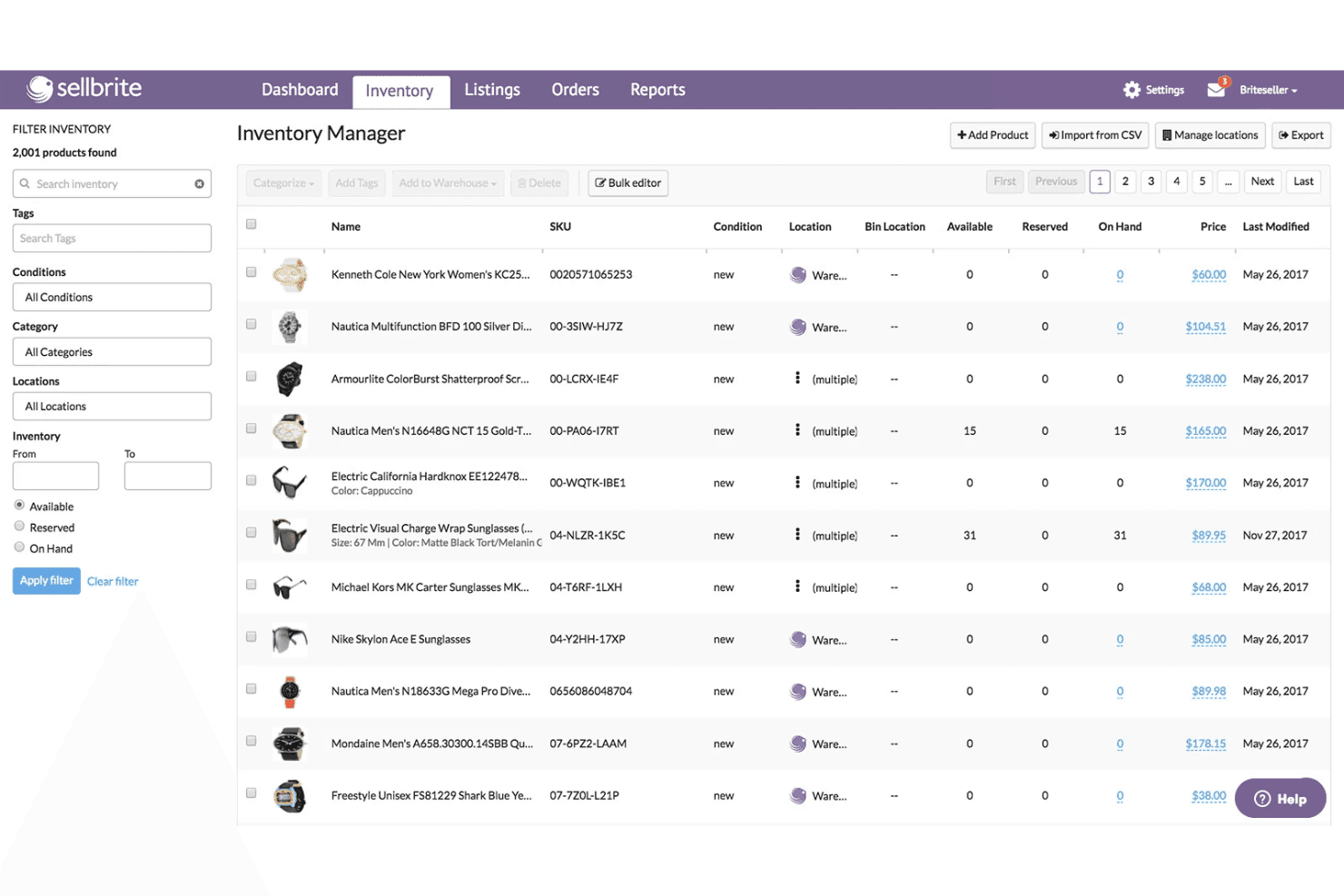
Sellbrite coordinates inventory across multiple locations and product listings. Sellbrite is a multi-channel listing and inventory sync tool that connects Amazon, eBay, Walmart, Etsy, and major shopping carts into a single dashboard for centralized order management, SKU tracking, and cross-channel inventory updates.
Who Is Sellbrite Best For?
Sellbrite is a strong fit for small to mid-sized sellers who need to manage listings and inventory across Amazon, eBay, Etsy, and Walmart from a single, easy-to-navigate dashboard.
Why I Picked Sellbrite
I've included Sellbrite in my top picks because it's the most accessible option for sellers who need to manage Amazon listings alongside eBay, Etsy, Walmart, and a Shopify or WooCommerce storefront from one place. Its 15-minute inventory sync across all connected channels means a sale on Etsy immediately adjusts your Amazon stock, keeping overselling in check without any manual reconciliation. I also like that you can allocate inventory selectively per channel, so you're not exposing your full stock count everywhere at once.
Sellbrite Key Features
- Multi-warehouse inventory allocation: Assign and track stock across multiple physical warehouse locations, with control over how much inventory is pushed to each connected sales channel.
- Amazon FBA multi-channel fulfillment: Route orders from eBay, Etsy, or Shopify to your FBA warehouse for fulfillment via a $19/month add-on.
- Bulk listing management via CSV: Import, update, and export product listings and inventory data in bulk using CSV files across all connected channels.
- Channel-level sales reporting: View revenue and top-seller performance broken down by individual marketplace to compare sales across channels.
Sellbrite Integrations
Sellbrite offers native integrations with Amazon Seller Central, eBay, Walmart, Etsy, Shopify, BigCommerce, WooCommerce, Fulfillment by Amazon, and ShipStation.
Pros and Cons
Pros:
- Broad Amazon, eBay, Etsy, Walmart coverage
- Unlimited SKUs and user seats on all plans
- Multi-channel inventory syncing updates every 15 minutes
Cons:
- No demand forecasting or automated reordering
- Cannot publish new ASINs to Amazon
Learn more about Sellbrite: Best for real-time, event-driven Amazon sync
- Free demo available
- Pricing upon request
Visit WebsiteCustomer Rating:4.1/5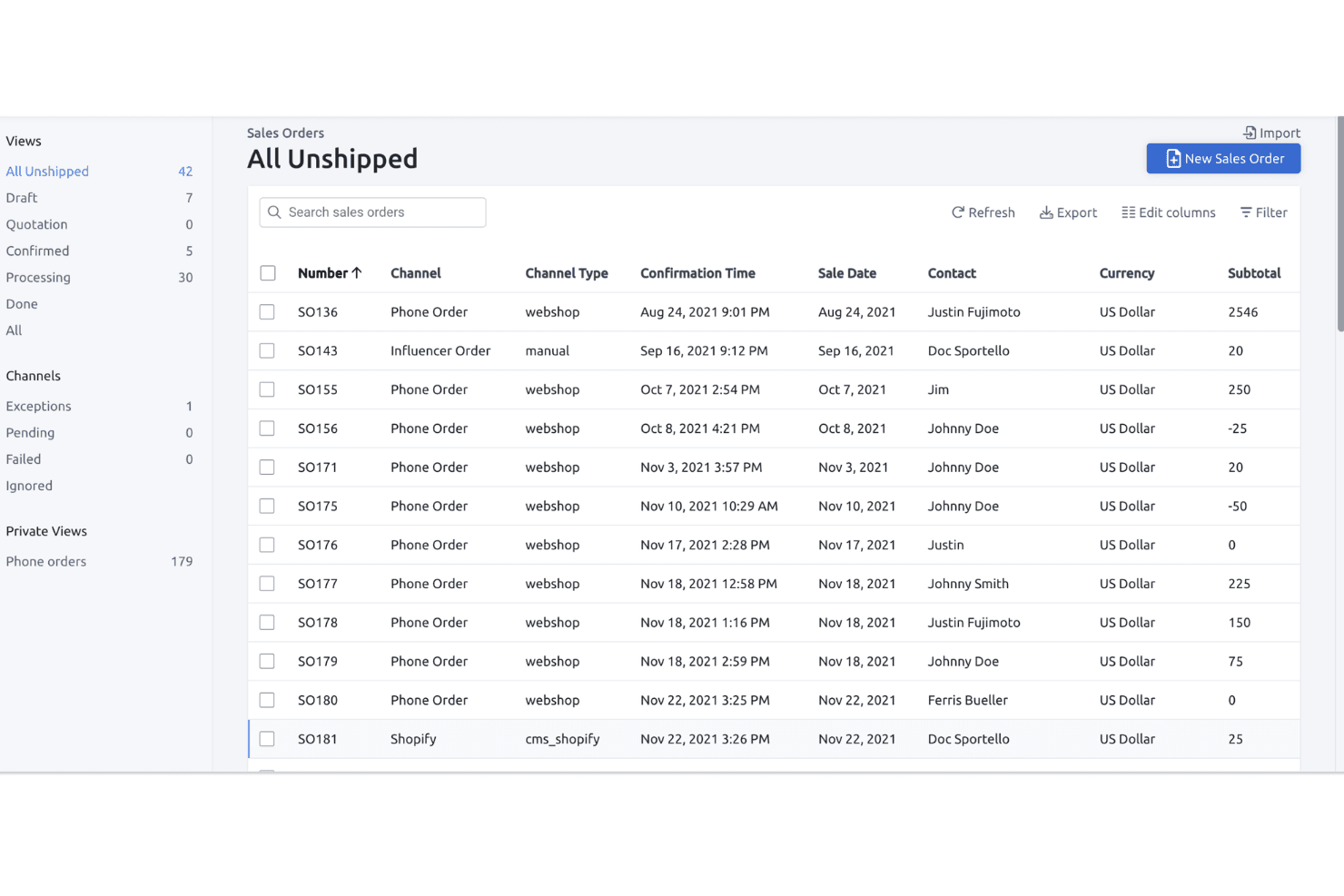
Fulfil lets users track and manage all unshipped sales orders in one view. Fulfil is a multi-channel ERP that unifies Amazon inventory management, order management, warehouse operations, purchasing, and financials across FBA, FBM, and Vendor Central in a single platform.
Who Is Fulfil Best For?
Fulfil is built for multi-channel DTC brands doing $15M or more in annual revenue that need a single ERP to manage Amazon alongside Shopify, warehouse operations, and financials.
Why I Picked Fulfil
Fulfil earns its spot on my shortlist because its Amazon sync is genuinely event-driven, not batch-scheduled. That distinction matters in practice: when a sale closes or a warehouse receives stock, Fulfil updates Amazon's available inventory in real time rather than overnight. I also love its inventory visibility controls, which let you define exactly what Amazon "sees," including safety buffers and inbound stock, so you're never at risk of overselling across all 23 global marketplaces.
Fulfil Key Features
- Amazon settlement auto-reconciliation: Fulfil automatically imports bi-weekly Amazon settlement reports and posts fees, refunds, and payments directly to the native general ledger.
- Multi-warehouse allocation rules: You can assign stock from specific warehouses to specific channels, with per-channel safety buffers and inbound PO inclusion in available-to-sell quantities.
- Amazon Multi-Channel Fulfillment (MCF) routing: Orders from Shopify and other channels can be routed to FBA inventory for fulfillment, with delivery speed options and automatic tracking sync back to each channel.
- AI-powered purchase order generation: Fulfil generates draft purchase orders automatically based on demand forecasts, incorporating MOQ constraints, case pack sizes, and supplier lead times.
Fulfil Integrations
Fulfil supports 25+ native sales channels, including Amazon’s 23 marketplaces, Shopify, Walmart, eBay, and TikTok Shop. It also connects with Amazon MCF, 400+ 3PL locations, 500+ EDI retail partners, and Google BigQuery for reporting.
Pros and Cons
Pros:
- Automatic Amazon settlement and fee reconciliation
- Unified FBA, FBM, and Vendor management
- Real-time, event-driven Amazon inventory synchronization
Cons:
- Setup requires significant time and resources
- No dynamic Amazon repricing feature
Learn more about Fulfil: Best for direct integration with eBay and Walmart
- 30-day free trial
- From $49/month
Visit WebsiteCustomer Rating:4.8/5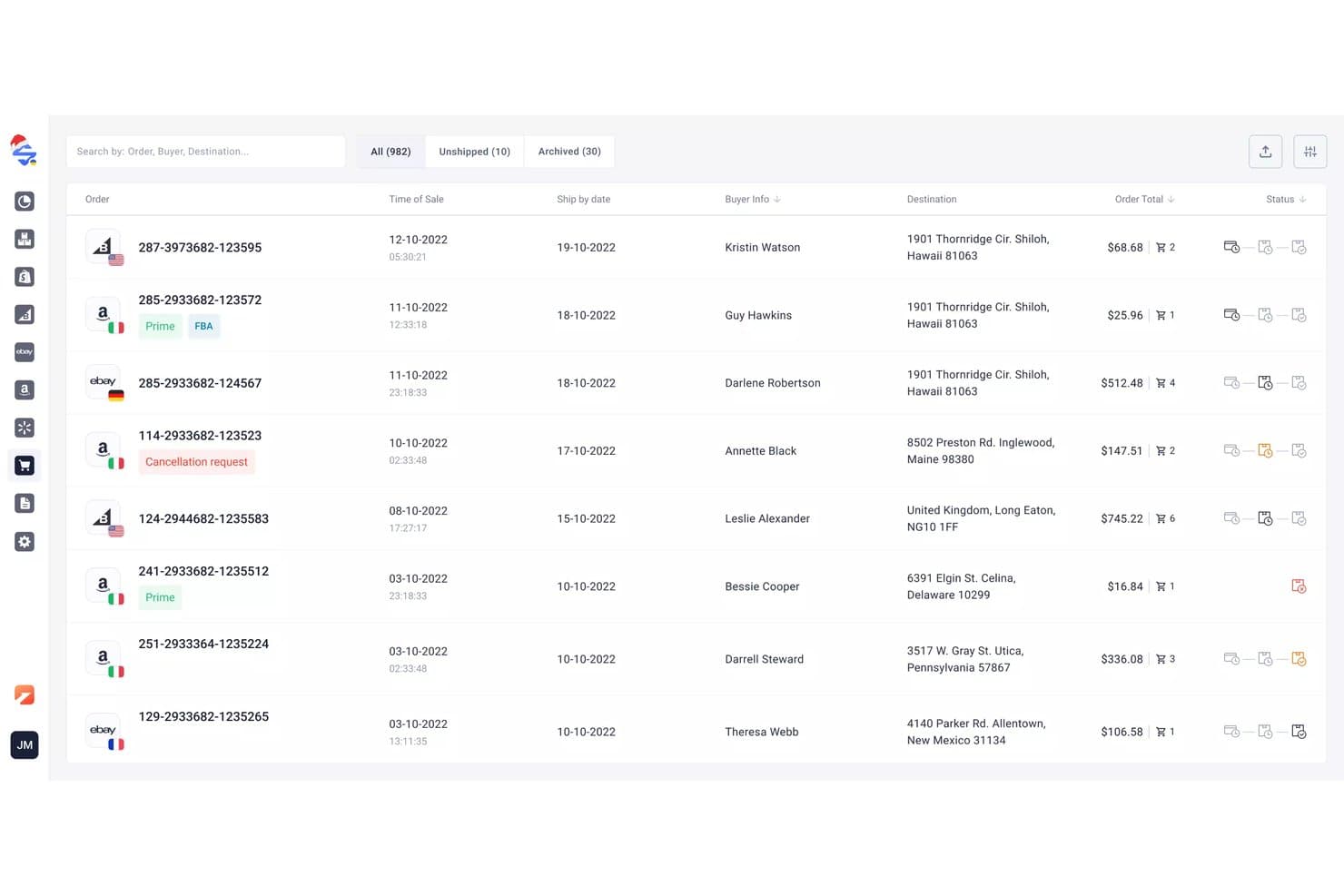
M2E Cloud syncs multi-channel orders across connected marketplaces. M2E Cloud is a multi-channel listing and inventory sync platform that connects Amazon Seller Central across 19+ global marketplaces with eBay, Walmart, TikTok Shop, and 600+ other channels, alongside a built-in repricer and sales analytics dashboard.
Who Is M2E Cloud Best For?
M2E Cloud is a strong fit for multi-channel sellers who need to keep inventory in sync across eBay, Walmart, and Amazon simultaneously.
Why I Picked M2E Cloud
I've included M2E Cloud in my top picks because its native eBay and Walmart integrations are genuinely tight, not bolted on. When a sale closes on Walmart, stock levels update across Amazon and eBay in real time, which is the kind of two-way sync that prevents costly oversells on multiple fronts simultaneously. I also like that the built-in Amazon Repricer, which tracks competitor pricing and targets the Buy Box 24/7, comes included at no extra cost.
M2E Cloud Key Features
- Amazon Multi-Channel Fulfillment (MCF) integration: Automatically routes orders from eBay, Shopify, Walmart, and other connected channels through your Amazon FBA inventory for fulfillment.
- M2E Policies: Lets you set channel-specific rules for pricing, quantity buffers, and shipping templates per marketplace from a single interface.
- M2E Analytics dashboard: Tracks sales volumes, order fees, cancellation rates, top sellers, and geographic customer data across all connected channels at no extra cost.
- Amazon Repricer: Monitors competitor pricing 24/7 and adjusts your Amazon prices within set min/max limits to target the Buy Box automatically.
M2E Cloud Integrations
M2E Cloud connects with Amazon Seller Central, Amazon FBA and MCF, eBay, Walmart, TikTok Shop, Temu, Shopify, BigCommerce, WooCommerce, and Magento. It also supports 600+ marketplace integrations overall and provides an API for custom integrations.
Pros and Cons
Pros:
- Supports FBA and MCF order management
- Built-in Amazon repricer included for free
- Real-time inventory sync across all channels
Cons:
- Lacks ASIN-level profitability analytics
- No automated replenishment or forecasting tools
Learn more about M2E Cloud: Best for advanced warehouse and fulfillment workflows
- Not available
- Pricing upon request
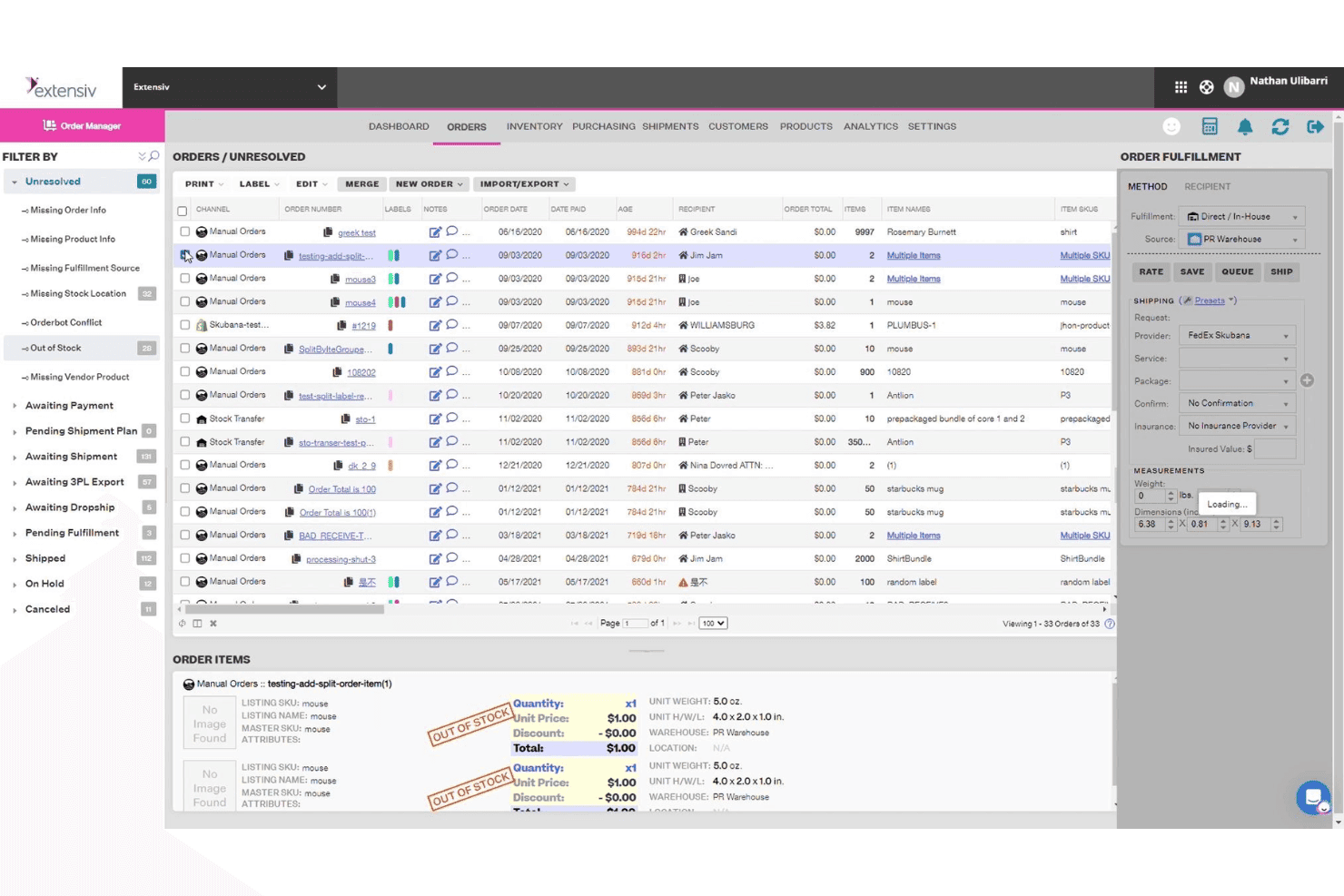
Extensiv groups unresolved orders with key fulfillment details in one view. Extensiv is an order and warehouse management platform that handles FBA, FBM, and Multi-Channel Fulfillment alongside multi-channel inventory sync, automated purchase orders, demand forecasting, and bundle management across 110+ ecommerce integrations.
Who Is Extensiv Best For?
Extensiv is a strong fit for operations teams managing complex fulfillment across multiple warehouses, 3PLs, and sales channels simultaneously.
Why I Picked Extensiv
Extensiv earns its spot on my shortlist because of how well it handles fulfillment complexity that simpler tools can't touch. I picked it specifically for operations running FBA, FBM, and Multi-Channel Fulfillment side by side, since Extensiv manages all three from one place without requiring workarounds. I also like its channel-level inventory allocation, which lets you assign a percentage of available stock per sales channel to prevent overselling across Amazon, Walmart, and Shopify simultaneously. Auto-PO generation tied to supplier lead times and sales velocity makes replenishment genuinely hands-off.
Extensiv Key Features
- FNSKU-to-master SKU mapping: Links multiple FNSKUs to a single master SKU, with preferred FNSKU selection configurable per warehouse location.
- SmartScan barcode scanning: Mobile barcode scanning add-on supports pick, restock, and inventory audit workflows across warehouse locations.
- FIFO cost tracking: Tracks inventory costs using First In, First Out methodology, with COGS history linked to individual purchase orders.
- FBA inbound shipment sync: Automatically syncs inbound FBA shipments created in Seller Central into Extensiv Order Management for unified visibility.
Extensiv Integrations
Extensiv offers 110+ ecommerce integrations, including Amazon Seller Central, Shopify, Walmart, eBay, Etsy, Wayfair, BigCommerce, WooCommerce, and Magento, plus 1,000+ 3PL connections. Integration Manager connects to 60+ order destinations, with custom ERP and NetSuite connections available through developer services.
Pros and Cons
Pros:
- Channel-level stock allocation to prevent overselling
- Automated purchase orders with real-time demand data
- Unified management for FBA, FBM, and MCF
Cons:
- Lacks dedicated in-platform IPI Score dashboard
- No native Amazon repricing automation
Learn more about Extensiv: Best for profit analytics with inventory tracking
- 30-day free trial + free demo available
- From $15/month (billed annually)
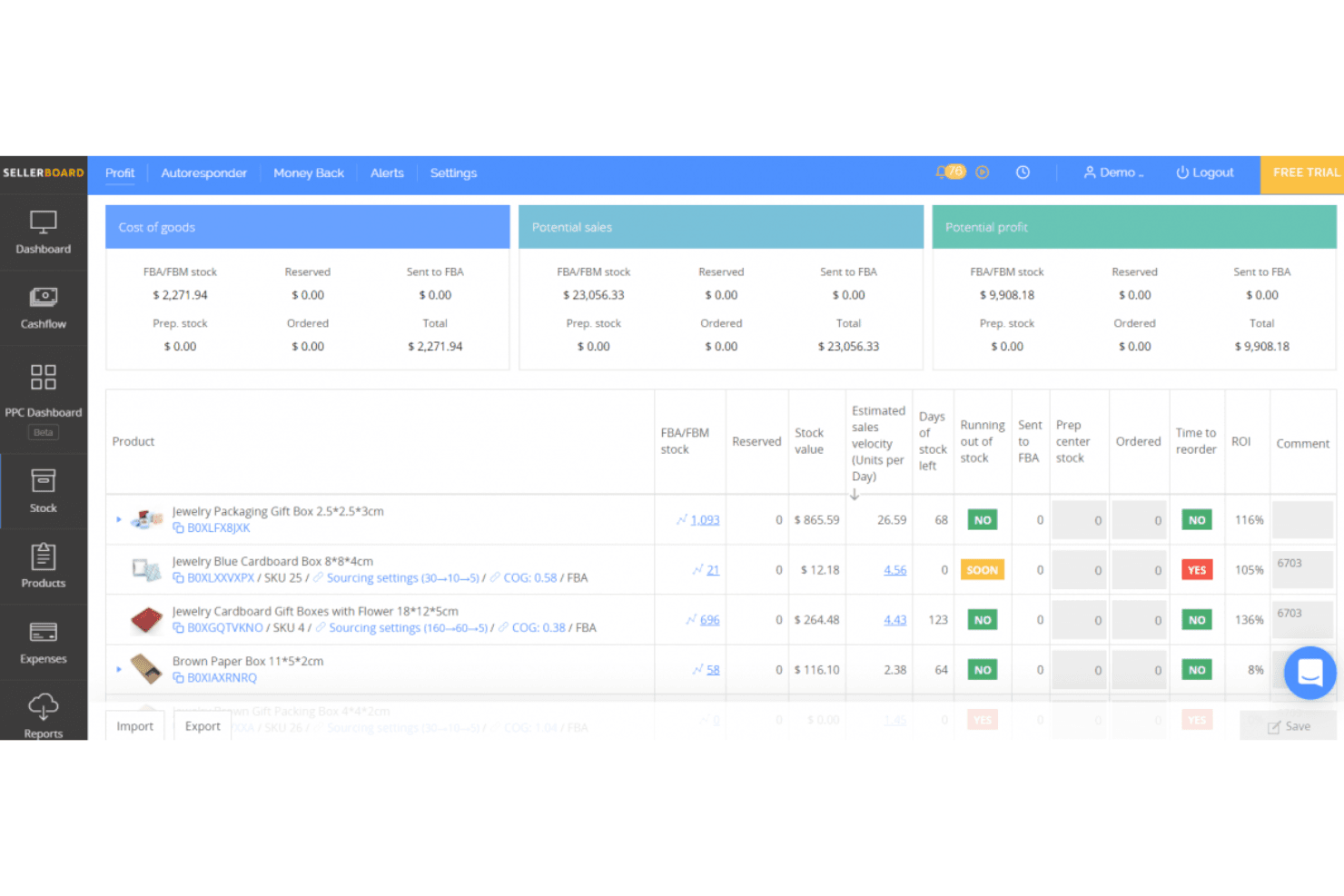
sellerboard assesses Amazon store performance. sellerboard is an Amazon-focused profit analytics and inventory management tool that tracks ASIN-level profitability, FBA fees, demand forecasting, purchase orders, and PPC performance across all 24 global Amazon marketplaces.
Who Is sellerboard Best For?
sellerboard is a strong fit for Amazon FBA sellers who want a clear picture of per-product profitability alongside their inventory planning.
Why I Picked sellerboard
sellerboard earns its spot on my shortlist because no other tool at this price point gives you this level of per-ASIN profit visibility alongside inventory planning. I love that it tracks 100+ Amazon fee types, including AWD storage and inbound placement fees, all attributed at the SKU level. The Low Inventory Fee alerts are particularly useful: sellerboard monitors your stock weekly and flags exactly which ASINs Amazon will penalize, along with the recommended ship-in quantity and date.
sellerboard Key Features
- COGS tracking methods: Supports FIFO, batch, period-based, and marketplace-specific COGS calculation methods to keep profitability data accurate.
- PPC bid automation: Offers manual and autopilot bid optimization modes, with automated keyword harvesting and low-performing keyword negation.
- FBA inbound shipment management: Create and track inbound FBA shipments end-to-end, with inventory counts updated dynamically as shipments progress.
- Multi-marketplace summary dashboard: Aggregates key performance metrics across Amazon, Walmart, and eBay accounts into a single unified view.
sellerboard Integrations
sellerboard offers native marketplace integrations with Amazon Seller Central, Walmart Seller Center, and eBay, plus Amazon Advertising API and Amazon Warehousing & Distribution connectivity. Shopify is supported through the separate sellerboard.io platform.
Pros and Cons
Pros:
- Handles FBA, prep center, and AWD inventory flows
- Automated low inventory fee compliance alerts
- Granular per-ASIN profitability with full fee tracking
Cons:
- Reports of discrepancies in profit calculations
- No real-time cross-channel inventory sync
Learn more about sellerboard: Best for managing multiple storefronts in one dashboard
- 14-day free trial + free demo available
- From £1,150/month
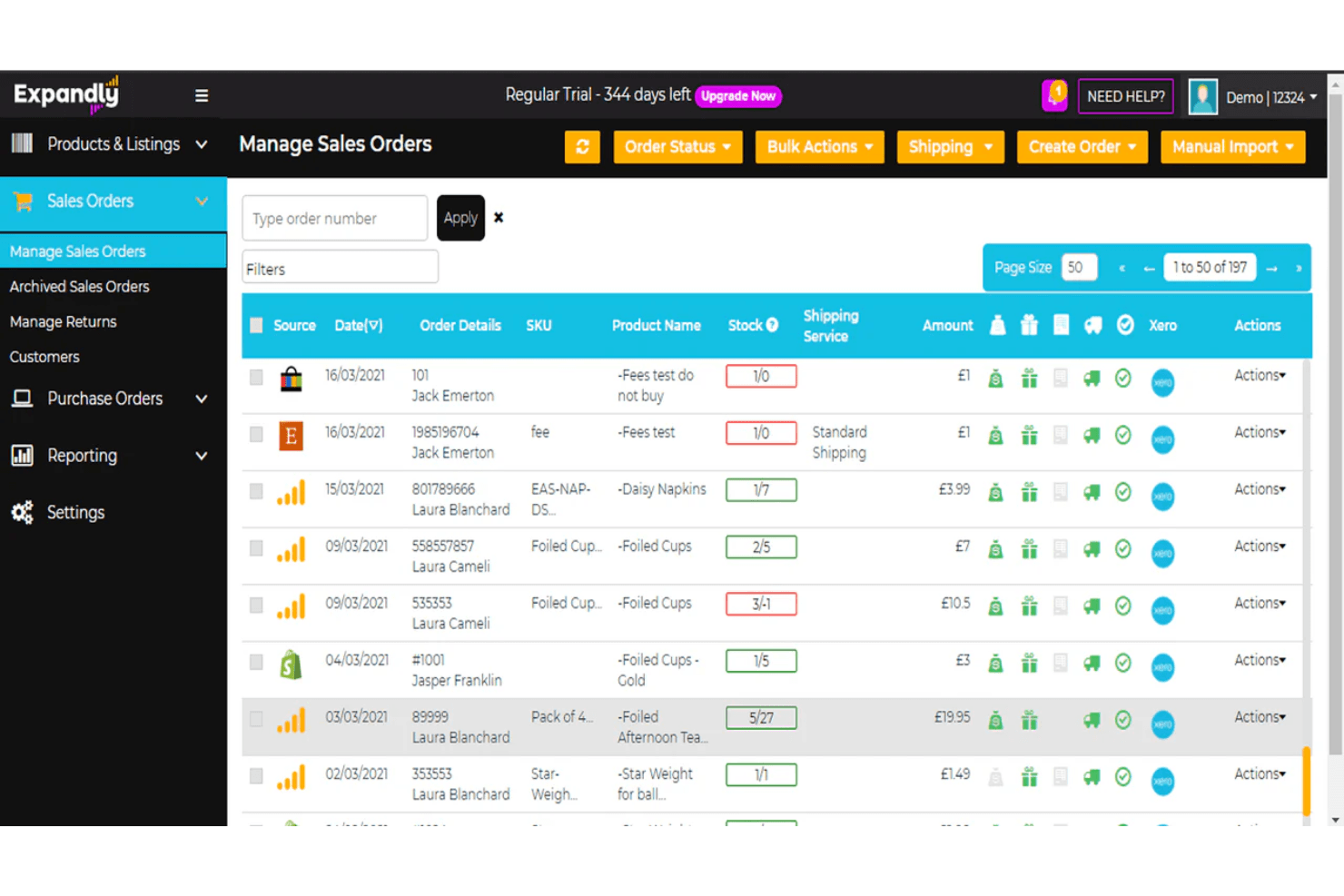
Expandly lets users manage and track all sales orders across channels in one place. Expandly is a multi-channel inventory and order management platform that syncs stock, listings, and orders across Amazon, eBay, Etsy, and 25+ shopping carts from a single dashboard.
Who Is Expandly Best For?
Expandly is a strong fit for multi-channel sellers who run storefronts across Amazon, eBay, Etsy, and multiple shopping carts and need a single place to keep stock levels in sync.
Why I Picked Expandly
I've included Expandly in my top picks because it's genuinely one of the best tools for keeping stock levels accurate across a large mix of storefronts simultaneously. When a sale closes on eBay, Amazon, and Etsy at nearly the same moment, Expandly's automatic sync pushes updated quantities across all 25+ connected channels before an oversell can happen. I also like its kit and bundle handling, where selling a bundled product triggers component-level stock deductions across every channel automatically.
Expandly Key Features
- Purchase order management: Raise POs, log received goods, and sync purchase order data directly to Xero from within the platform.
- Re-order level alerts: Set custom low-stock thresholds that trigger notifications to prompt restocking before you run out.
- Cross-channel FBA fulfillment routing: Route orders from non-Amazon storefronts to Amazon FBA for fulfillment directly through the platform.
- Bulk listing upload: Create and publish product listings to multiple sales channels simultaneously using batch upload tools.
Expandly Integrations
Expandly offers integrations with Amazon Seller Central, eBay, Etsy, Wish, Shopify, WooCommerce, Magento, BigCommerce, Xero, DHL, and FedEx, plus 25+ shopping carts and multiple carriers. API access is available on higher-tier plans for custom integrations.
Pros and Cons
Pros:
- Includes expert UK/EU compliance support
- Handles kits and bundles natively
- Syncs stock across 25+ sales channels
Cons:
- No demand forecasting or auto-replenishment
- No FBA inbound shipment management
Learn more about Expandly: Best for centralized order and inventory control
- Free demo available
- Pricing upon request
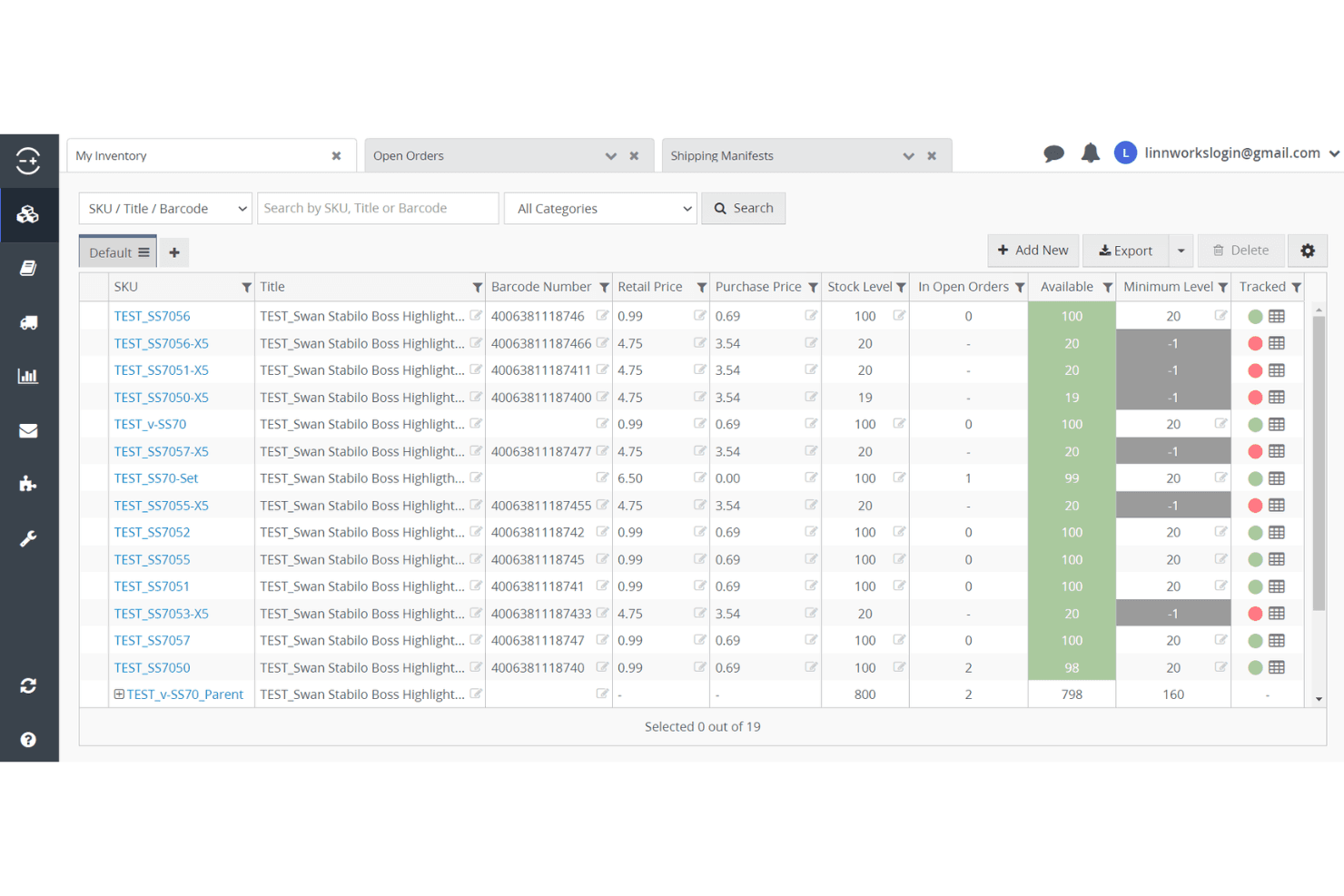
Linnworks lets users track stock levels and orders across all inventory items. Linnworks is a multi-channel inventory and order management platform that centralizes stock control, FBA workflows, inbound shipment management, and order routing across 100+ sales channels, including all global Amazon marketplaces.
Who Is Linnworks Best For?
Linnworks is a strong fit for multi-channel retailers and Amazon sellers who need to manage orders, inventory, and fulfillment across many sales channels from one place.
Why I Picked Linnworks
Linnworks earns its spot on my shortlist because no other platform I've tested matches its depth for centralized order and inventory control across this many channels. I'm particularly impressed by its dual Seller Central and Vendor Central SP-API coverage, which means sellers operating in both modes can manage FBA inbound shipments, hybrid FBA/FBM routing, and Vendor Central purchase orders from a single dashboard. The Rules Engine alone saves serious time by automating fulfillment routing across warehouses, 3PLs, and Amazon fulfillment centers without manual intervention.
Linnworks Key Features
- Amazon Multi-Channel Fulfillment (MCF) integration: Automatically submits non-Amazon orders to Amazon fulfillment centers, syncing inventory quantities and tracking information back to all connected sales channels.
- Rules Engine: Automates order routing across FBA, FBM, 3PL, and warehouse locations using unlimited configurable rules, without manual intervention.
- Kits and bundles management: Natively tracks component-level inventory deductions when a bundled product or kit is sold across any connected channel.
- SkuVault Core WMS: Adds barcode scanning, digital pick lists, cycle counting, and quality control workflows for warehouse operations that feed into FBA replenishment.
Linnworks Integrations
Linnworks advertises 200+ integrations, including Amazon, eBay, Walmart, Shopify, BigCommerce, TikTok Shop, Amazon MCF, QuickBooks Online, Conjura, and Inventory Planner. An open API supports custom integrations.
Pros and Cons
Pros:
- Central dashboard for all FBA workflows
- Real-time sync across 100+ sales channels
- Dual Amazon Seller and Vendor Central support
Cons:
- Cross-channel SKU mapping can be clunky
- ASIN profitability reporting requires add-ons
Learn more about Linnworks: Best for integrated FBA restock suggestions
- Free demo available
- From $129/month
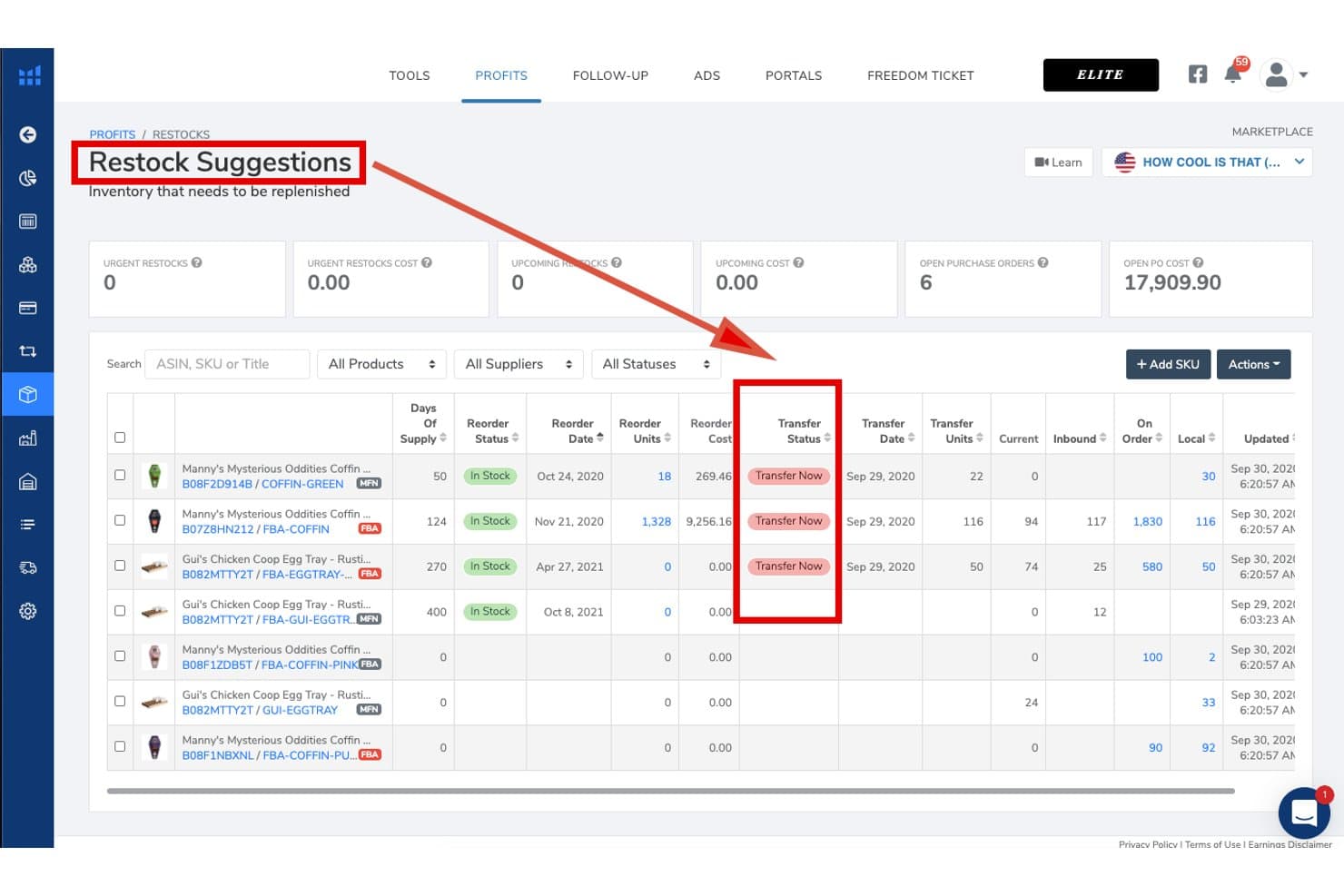
Helium 10 tracks restock needs and transfer status for Amazon inventory. Helium 10 is an Amazon seller platform that combines inventory management, demand forecasting, FBA restock suggestions, supplier and purchase order tracking, listing optimization, keyword research, and ASIN-level profit analytics in one suite.
Who Is Helium 10 Best For?
Helium 10 is a strong fit for Amazon FBA sellers who want restock suggestions, demand forecasting, and supplier management in the same platform they use for product research and listing optimization.
Why I Picked Helium 10
I picked Helium 10 as one of the best because its Restock Suggestions dashboard does something I genuinely find rare: it pulls Amazon sales velocity, lead times, seasonality, and growth curves into a single view, then lets you generate a purchase order in one click. The demand forecasting even handles stockout periods and low-data ASINs, so new product launches don't get skipped over. I also like that supplier details, inbound shipment tracking, and FBA restock signals all live in the same platform you're already using for listing optimization and keyword research.
Helium 10 Key Features
- Profits tool: Tracks real-time revenue, FBA fees, referral fees, ad spend, COGS, and returns at the ASIN level to surface per-product profitability.
- Managed Refund Service: Audits 18 months of FBA transactions to identify and recover reimbursements for lost, damaged, or miscredited inventory.
- Local Warehouse tab: Tracks off-Amazon stock held in your own facility and flags when transferring existing inventory to FBA is cheaper than placing a new supplier order.
- TikTok Shop inventory sync: Maps TikTok products to Amazon SKUs and uses a configurable safety stock threshold to prevent TikTok orders from depleting your FBA inventory.
Helium 10 Integrations
Helium 10 has native Amazon Seller Central integration and an indirect TikTok Shop connection through Amazon Multi-Channel Fulfillment (MCF). Walmart supports research and ads, but no native Shopify, eBay, WooCommerce, accounting, ERP, or 3PL integrations are documented.
Pros and Cons
Pros:
- Handles seasonality and stockout impacts in forecasting
- ASIN-level profit analytics with fee breakdowns
- Advanced Amazon FBA restock suggestions dashboard
Cons:
- No built-in dynamic Amazon repricing tool
- Inventory management is limited on lower plans
Learn more about Helium 10: Best for customizable forecasting workflows
- Free trial + free demo available
- From $175/month
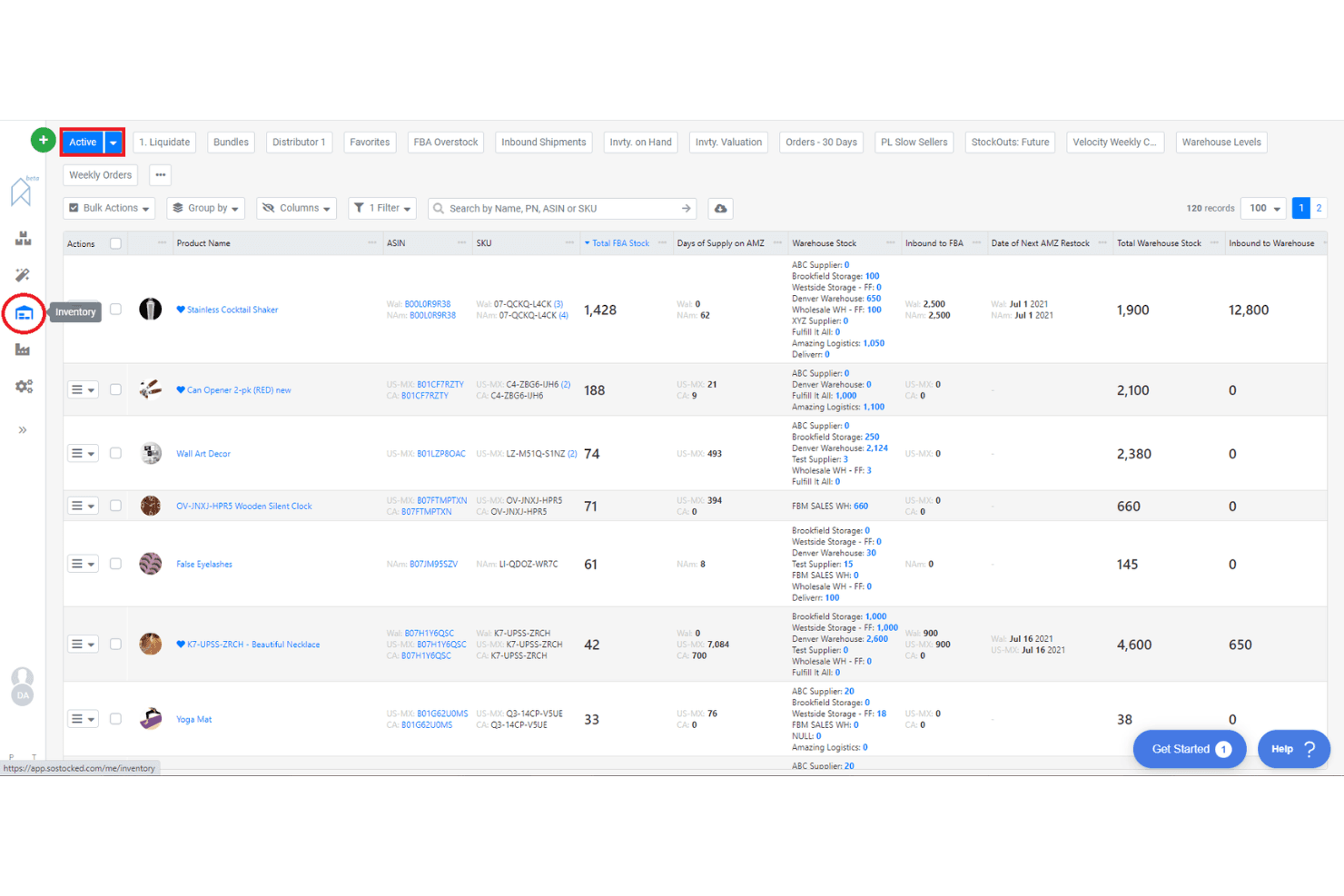
SoStocked lets users monitor inventory levels across multiple warehouses. SoStocked is an Amazon-native inventory management and forecasting platform that combines demand forecasting, purchase order tracking, replenishment alerts, FBA inventory monitoring, and ASIN-level profit analysis.
Who Is SoStocked Best For?
SoStocked is a strong fit for Amazon FBA private label sellers and wholesale brands that need transparent, editable forecasting logic across multiple global marketplaces.
Why I Picked SoStocked
SoStocked earns its spot on my shortlist because no other Amazon inventory tool gives you this level of control over your forecast math. I love that you can edit the underlying velocity calculations line by line, which matters when your sales history includes stockout periods that would otherwise skew your reorder points. The Combo Forecasting feature lets you layer Prime Day or BFCM demand spikes over a seasonal baseline and reuse those models year over year.
SoStocked Key Features
- Adjusted velocity calculation: Removes stockout-affected days from your sales history so your demand data reflects true velocity, not distorted dips.
- IPI restock limits integration: Pulls Amazon Inventory Performance Index restock limits daily and factors them directly into your replenishment and transfer schedules.
- ProfitFlow ASIN-level profit analysis: Forecasts sales, FBA fees, and costs at the individual ASIN level to surface margin leaks and underperforming listings.
- FBA size tier optimizer: Analyzes your product dimensions and packaging to flag resizing opportunities that reduce FBA fulfillment fees.
SoStocked Integrations
SoStocked integrates with Amazon Seller Central through SP-API across global marketplaces, plus Amazon AWD and MCF. It has no native Shopify, Walmart, eBay, WooCommerce, or 3PL integrations, but supports custom data workflows through its Marketplace Sales Conversion Tool.
Pros and Cons
Pros:
- IPI restock limits automatically factored in
- Combo Forecasting for seasonality and events
- Editable forecast formulas for precise control
Cons:
- Manual tracking required for 3PL inventory
- No built-in shipment creation workflow
Learn more about SoStocked:
Annen programvare for lagerstyring i Amazon
Her er noen flere alternativer for programvare for lagerstyring i Amazon som ikke kom med på kortlisten, men som likevel er verdt å undersøke:
- 11RestockProBest for FBA restocking and purchase order automation
- 12Jungle ScoutBest for sales-driven inventory planning
- 13VeeqoBest for high-volume multichannel sellers
- 14BrightpearlBest for integrated accounting workflows
- 15Zoho InventoryBest for automated reorder point management
- 16OrdoroBest for bundled product kitting features
- 17Cin7 CoreBest for built-in B2B portal integration
- 18Finale InventoryBest for barcode-based stock control
- 19LitCommerceBest for quick channel setup and migration
How I Evaluate Amazon Inventory Management Software
I split my evaluation into two layers: the baseline FBA and Seller Central capabilities a tool must have to qualify, and the differentiators that determine the right fit for your operation.
Core Functionality (Table Stakes For This List)
When I'm selecting tools for my list, I rank each one on a scale from 0 (does not offer the functionality) to 5 (excels in this area) for each core functionality listed below. Then, I calculate the tool's total score into a percentage. Each tool needs to achieve a minimum total score of 65% to be considered for inclusion.
- Amazon Seller Central Integration: I check whether a tool connects to Seller Central through a native API or relies on a third-party bridge, and whether it syncs orders, inventory, and listings across multiple Amazon marketplaces.
- FBA Inventory Tracking: A tool should show more than just on-hand quantity. I look for visibility into inbound, reserved, unfulfillable, and stranded units so sellers can catch issues before storage fees pile up.
- Demand Forecasting & Reorder Alerts: I evaluate whether reorder suggestions factor in real Amazon sales velocity, supplier lead times, and seasonal trends rather than relying on static thresholds you have to set manually.
- Multi-Channel Inventory Sync: For sellers listing on Shopify, Walmart, or eBay alongside Amazon, I look at how many channels sync in real time and whether the tool supports buffer stock or channel-specific allocation rules.
- SKU-Level Profitability & Cost Tracking: The best tools in this space break down margin per ASIN after referral fees, FBA fees, COGS, and returns. I evaluate how granular the cost inputs are and whether landed costs are supported.
- Purchase Order & Supplier Management: I look for PO creation tied to demand data, a supplier database, and tracking for inbound shipments to FBA or 3PL warehouses rather than standalone spreadsheet-style logging.
Once I have a list of tools that meet this criteria, I consider what sets each platform apart.
Differentiating Factors (What Sets Vendors Apart)
Here's how I compare and contrast different vendors:
Standout Features
IPI monitoring and restock limit tracking matter because a single rejected shipment can stall sales for weeks. I look for tools that flag when you're approaching capacity thresholds so you can adjust inbound plans. Bundle and kit management is another key area—sellers offering multipacks need component-level deductions that fire automatically at the point of sale. PPC integration adds real value here too, connecting ad spend to stock levels so you can pause campaigns on low-inventory ASINs rather than waste budget.
Beyond Features
Pricing transparency matters a lot in this space. I check whether plans scale by order volume or SKU count, and whether features like forecasting or PPC analytics are locked behind premium tiers. Ecosystem integrations also weigh heavily—your inventory tool needs to sync with QuickBooks or Xero for COGS reconciliation and connect to your 3PLs for inbound workflows. I also evaluate how a tool fits different seller types, since a solo FBA seller running a few hundred SKUs has very different needs than an aggregator managing dozens of brands across multiple fulfillment models.
Slik velger du programvare for lagerstyring i Amazon
Det er lett å gå seg vill i lange funksjonslister og komplekse prismodeller. For å hjelpe deg med å holde fokus mens du går gjennom den unike prosessen med å velge programvare, har vi laget en sjekkliste over faktorer du bør ha i bakhodet:
| Faktor | Hva du bør vurdere |
|---|---|
| FaktorSkalerbarhet | Hva du bør vurdereVil programvaren håndtere dagens og forventede ordrevolumer, SKU-er og nye Amazon-kanaler? |
| FaktorIntegrasjoner | Hva du bør vurdereKobler den seg direkte til e-handelsplattformene, fraktselskapene og regnskapsverktøyene dine? |
| FaktorTilpasningsmuligheter | Hva du bør vurdereKan du tilpasse arbeidsflyter, brukertillatelser og rapportering slik at de samsvarer med virksomhetens prosesser? |
| FaktorBrukervennlighet | Hva du bør vurdereVil teamet ditt kunne lære seg og bruke systemet raskt uten omfattende opplæring? |
| FaktorImplementering og oppstart | Hva du bør vurdereHvor lang tid vil oppsettet ta, og hvilke ressurser eller hvilken støtte trenger du for å komme i gang? |
| FaktorKostnad | Hva du bør vurdereEr prisnivåene tydelige, og samsvarer de med virksomhetens størrelse, ordrevolum og funksjonsbehov? |
| FaktorSikkerhetstiltak | Hva du bør vurdereTilbyr leverandøren datakryptering, tilgangskontroller for brukere og regelmessige sikkerhetsoppdateringer? |
| FaktorTilgjengelig kundestøtte | Hva du bør vurdereKan du nå kundestøtten i virksomhetens åpningstid, og finnes det SLA-er for hastesaker? |
Hva er programvare for lagerstyring i Amazon?
Programvare for lagerstyring på Amazon er et digitalt verktøy som hjelper bedrifter med å spore, organisere og kontrollere produktbeholdningen sin på tvers av én eller flere Amazon-butikker. Disse systemene automatiserer lageroppdateringer, administrerer bestillinger og synkroniserer produktdata for å forhindre oversalg eller utsolgte varer. De er avgjørende for å opprettholde nøyaktige lagernivåer, støtte salg i flere kanaler og effektivisere oppfyllelsesprosesser for Amazon-selgere.
Funksjoner
Når du velger programvare for lagerstyring på Amazon, bør du se etter følgende viktige funksjoner:
- Synkronisering av lagerbeholdning: Oppdaterer automatisk lagernivåene på tvers av alle Amazon-kanaler for å forhindre oversalg og utsolgte varer.
- Ordrebehandling: Sentraliserer behandling, sporing og oppfyllelse av alle Amazon-bestillinger i ett kontrollpanel.
- Masseopplasting av produktoppføringer: Gjør det mulig å laste opp, redigere og administrere flere produktoppføringer samtidig, slik at du sparer tid på katalogoppdateringer.
- Håndtering av innkjøpsordrer: Sporer leverandørbestillinger, leveranser og påfyll for å opprettholde optimale lagernivåer.
- Støtte for flere salgskanaler: Administrerer lagerbeholdning og bestillinger på Amazon og andre salgskanaler fra én enkelt plattform.
- Lagervarsler: Varsler deg når lagerbeholdningen faller under angitte terskler, slik at du kan bestille mer før varene tar slutt.
- Generering av fraktetiketter: Oppretter fraktetiketter for ulike transportører direkte i programvaren for å fremskynde oppfyllelsen.
- Rapportering og analyse: Gir detaljerte rapporter om lagerbeholdning, salg og ordretrender for å støtte datadrevne beslutninger.
- Brukertillatelser: Lar deg kontrollere tilgangsnivåene for ulike teammedlemmer, slik at driften blir sikker og organisert.
- Revisjonsspor: Opprettholder logger over alle endringer i lagerbeholdningen og brukerhandlinger for å sikre åpenhet og etterlevelse.
Fordeler
Implementering av programvare for lagerstyring på Amazon gir flere fordeler for teamet og virksomheten din. Her er noen av fordelene du kan se frem til:
- Nøyaktig lagersporing: Synkronisering av lagerbeholdningen i sanntid på tvers av Amazon-kanaler bidrar til å forhindre oversalg og utsolgte varer.
- Sentralisert ordrebehandling: Når alle Amazon-bestillinger håndteres i ett kontrollpanel, reduseres manuelt arbeid og antall feil.
- Raskere oppfyllelse: Innebygd generering av fraktetiketter og dirigering av bestillinger gjør fraktprosessen raskere.
- Forbedret rapportering: Detaljert analyse og revisjonsspor støtter bedre prognoser og etterlevelse.
- Effektiv drift på tvers av kanaler: Når lagerbeholdningen for Amazon og andre salgskanaler administreres fra én plattform, sparer du tid og reduserer kompleksiteten.
- Proaktiv lagerstyring: Automatiserte lagervarsler og håndtering av innkjøpsordrer hjelper deg med å bestille mer før varene tar slutt.
- Bedre samarbeid i teamet: Brukertillatelser og aktivitetslogger holder driften organisert og sikker for team av alle størrelser.
Kostnader og priser
Valg av programvare for lagerstyring på Amazon krever en forståelse av de ulike prismodellene og abonnementene som er tilgjengelige. Kostnadene varierer basert på funksjoner, teamstørrelse, tillegg og mer. Tabellen nedenfor oppsummerer vanlige abonnementer, gjennomsnittsprisene deres og typiske funksjoner som er inkludert i programvareløsninger for lagerstyring på Amazon:
Sammenligningstabell for abonnementer på programvare for lagerstyring på Amazon
| Abonnementstype | Gjennomsnittspris | Vanlige funksjoner |
|---|---|---|
| AbonnementstypeGratisabonnement | Gjennomsnittspris$0 | Vanlige funksjonerGrunnleggende lagersporing, begrenset ordrebehandling, støtte for én kanal og grunnleggende rapportering. |
| AbonnementstypePersonlig abonnement | Gjennomsnittspris$30-$60/måned | Vanlige funksjonerSynkronisering av lagerbeholdning på tvers av flere kanaler, ordrebehandling, varsler om lav lagerbeholdning og grunnleggende fraktverktøy. |
| AbonnementstypeBedriftsabonnement | Gjennomsnittspris$100-$300/måned | Vanlige funksjonerMasseopplasting av produktoppføringer, håndtering av innkjøpsordrer, avansert rapportering, brukertillatelser og integrasjoner. |
| AbonnementstypeVirksomhetsabonnement | Gjennomsnittspris$500-$2000/måned | Vanlige funksjonerTilpassede arbeidsflyter, API-tilgang, dedikert støtte, avansert analyse og administrasjon av flere lokasjoner. |
Vanlige spørsmål om programvare for lagerstyring på Amazon
Her er noen svar på vanlige spørsmål om programvare for lagerstyring på Amazon:
Kan programvare for lagerstyring på Amazon håndtere både FBA- og FBM-bestillinger?
Ja, det meste av programvaren for lagerstyring på Amazon kan håndtere både Fulfillment by Amazon (FBA)- og Fulfillment by Merchant (FBM)-bestillinger. Dette lar deg spore lagerbeholdningen, behandle bestillinger og synkronisere lagernivåer på tvers av begge oppfyllelsesmetodene fra ett enkelt kontrollpanel.
Hvordan fungerer lagersynkronisering med flere Amazon-markedsplasser?
Lagersynkronisering oppdaterer automatisk lagernivåene på tvers av alle tilkoblede Amazon-markedsplasser når et salg skjer. Dette forhindrer oversalg og sikrer nøyaktige lagerbeholdninger, selv om du selger på Amazon USA, Storbritannia eller andre regionale nettsteder samtidig.
Hvilke integrasjoner bør jeg se etter i programvare for lagerstyring på Amazon?
Se etter integrasjoner med e-handelsplattformene dine, fraktselskaper, regnskapsverktøy og tredjepartslogistikkleverandører. Disse tilkoblingene bidrar til å automatisere arbeidsflyter, redusere manuell dataregistrering og holde forretningssystemene dine synkroniserte.
Er det vanskelig å bytte til ny programvare for lagerstyring på Amazon?
Migreringen kan være enkel hvis programvaren tilbyr importverktøy, oppsettsveivisere og støtte ved oppstart. Undersøk hvilke opplæringsressurser, alternativer for dataimport og hvilken kundestøtte som er tilgjengelig, slik at teamet ditt får en smidig overgang.
Hvordan fungerer lagerbeholdningsvarsler i programvare for lagerstyring på Amazon?
Lagerbeholdningsvarsler gir deg beskjed når lagernivåene faller under en angitt terskel. Du kan angi egendefinerte varslingspunkter for hvert produkt, slik at du vet når det er på tide å bestille på nytt og unngå å gå tom for varer.