

Programvare for prissetting i detaljhandelen hjelper teamet ditt med å fastsette, administrere og optimalisere produktpriser på tvers av kanaler ved hjelp av automatisering, analyse og sanntidsdata. Hvis du leter etter den beste programvaren for prissetting i detaljhandelen, ønsker du sannsynligvis å holde tritt med skiftende markedsforhold, ligge foran konkurrentene og beskytte marginene dine – uten å tilføre manuelt arbeid eller risikere prisfeil. I denne veiledningen finner du en kuratert liste over de beste løsningene for 2026, med tydelig informasjon om hva hvert verktøy er best på, slik at du trygt kan velge det som passer best for virksomheten din.
Why Trust Our Software Recommendations
6,700+
Reviews
20
Industry experts
16+
Evaluation factors
14
Years
Our team has been testing and reviewing software since 2012. As retail leaders ourselves, we know how difficult—and important—it is to choose the right software.
For this guide, we evaluated tools using hands-on testing and independent research, scoring tools using our selection criteria.
Our reviews reflect our independent judgment—not a sales pitch.
Sammenligningstabell for programvare for prissetting i detaljhandelen
Denne sammenligningstabellen oppsummerer prisdetaljene for mine beste utvalg av programvare for prissetting i detaljhandelen:
| Tool | Best For | Trial Info | Price | ||
|---|---|---|---|---|---|
| 1 | Best for real-time omnichannel price adjustments | No free trial available | Pricing upon request | Website | |
| 2 | Best for advanced price modeling for grocery chains | Free demo available | Pricing upon request | Website | |
| 3 | Best for spreadsheet-style pricing with AI | Free plan + free demo | From €349/month | Website | |
| 4 | Best for competitor price tracking for ecommerce | 14-day free trial | From $99/month | Website | |
| 5 | Best for dynamic price automation in omnichannel | Free demo available | From €399/month | Website | |
| 6 | Best for real-time price benchmarking across markets | Free demo available | Pricing upon request | Website | |
| 7 | Best for in-store and online price intelligence | Free demo available | Pricing upon request | Website | |
| 8 | Best for configurable pricing analytics for enterprises | Free demo available | Pricing upon request | Website | |
| 9 | Best for AI-driven price optimization for large retailers | Free demo available | Pricing upon request | Website | |
| 10 | Best for predictive pricing powered by demand forecasting | Free demo available | Pricing upon request | Website |


Anmeldelser av den beste programvaren for prissetting i detaljhandelen
Nedenfor finner du mine detaljerte sammendrag av den beste programvaren for prissetting i detaljhandelen som kom med på kortlisten min. Anmeldelsene mine gir en detaljert gjennomgang av funksjonene, prisene og integrasjonene til hver programvare, slik at du kan finne den beste løsningen for deg.
 Best for real-time omnichannel price adjustments
- No free trial available
- Pricing upon request
Visit WebsiteCustomer Rating:4.7/5
Quicklizard uses AI to optimize retail pricing with real-time data. Quicklizard is built for retailers and brands that need to adjust prices instantly across online and offline channels. The platform appeals to pricing and ecommerce teams looking to automate real-time price changes based on market data, inventory, and demand. Quicklizard’s omnichannel engine helps you keep pricing consistent and competitive, no matter where your customers shop.
Why I Picked Quicklizard
What sets Quicklizard apart is its ability to deliver real-time price adjustments across both digital and physical retail channels. The platform’s dynamic pricing engine lets you automate pricing decisions based on live market trends, competitor activity, and inventory levels. I appreciate how Quicklizard supports omnichannel consistency, so your customers see aligned prices whether they’re shopping online or in-store. This makes it a strong fit for retailers who need to react quickly to market changes and keep pricing strategies unified across every channel.
Quicklizard Key Features
Some other features that make Quicklizard useful for retail pricing teams include:
- Rule-Based Pricing Engine: Set custom pricing rules to automate decision-making based on your business logic.
- Competitor Price Monitoring: Track competitor prices in real time to inform your own pricing strategies.
- A/B Price Testing: Run experiments with different price points to measure impact on sales and margin.
- Analytics Dashboard: Access visual reports and dashboards to monitor pricing performance and trends.
Quicklizard Integrations
Integrations include SAP, Oracle, Adobe Commerce, Salesforce Commerce Cloud, Shopify, Kafka, Delavo, DataWeave, TGN, and Bright Data.
Pros and Cons
Pros:
- Competitor price monitoring with automated alerts
- Supports A/B testing for pricing strategies
- Real-time price updates across all channels
Cons:
- Integration setup can require vendor assistance
- Fewer retail-specific templates than some competitors
Learn more about Quicklizard: Best for advanced price modeling for grocery chains
- Free demo available
- Pricing upon request
Visit WebsiteCustomer Rating:4.6/5
Yieldigo optimizes retail pricing with demand forecasting analytics. Yieldigo is designed for grocery chains and supermarkets that need advanced price modeling to manage complex assortments. The platform appeals to pricing managers and category teams looking to optimize prices using predictive analytics and demand forecasting. Yieldigo helps you balance margin, volume, and competitiveness in a fast-moving grocery environment.
Why I Picked Yieldigo
Yieldigo stands out for its advanced price modeling capabilities tailored specifically for grocery chains. The platform uses predictive analytics to simulate the impact of price changes across thousands of SKUs, helping you understand how adjustments affect both margin and sales volume. I like that Yieldigo incorporates demand forecasting and elasticity modeling, which are essential for managing the fast-moving and highly competitive grocery sector. This makes it a strong choice for pricing teams that need to balance profitability with customer price perception in a complex retail environment.
Yieldigo Key Features
Some other features that make Yieldigo valuable for grocery pricing teams include:
- Scenario Planning Tools: Model multiple pricing scenarios to compare outcomes before making changes.
- Competitor Price Tracking: Monitor competitor prices to inform your own pricing decisions.
- Automated Price Recommendations: Receive system-generated price suggestions based on your business rules.
- Centralized Price Management Dashboard: Manage and review all pricing activities from a single interface.
Yieldigo Integrations
Integrations include Colruyt, Metro, Makro, SuperPharm, Newpharma, Bonami, Ahold, Erocash, Admenta, Lékárna CZ, Delia, Healthspan, and more.
Pros and Cons
Pros:
- Automated price recommendations based on rules
- Scenario planning for multiple pricing strategies
- Advanced price modeling for grocery assortments
Cons:
- No self-service onboarding documentation available
- Limited retail verticals
Learn more about Yieldigo: Best for spreadsheet-style pricing with AI
- Free plan + free demo
- From €349/month
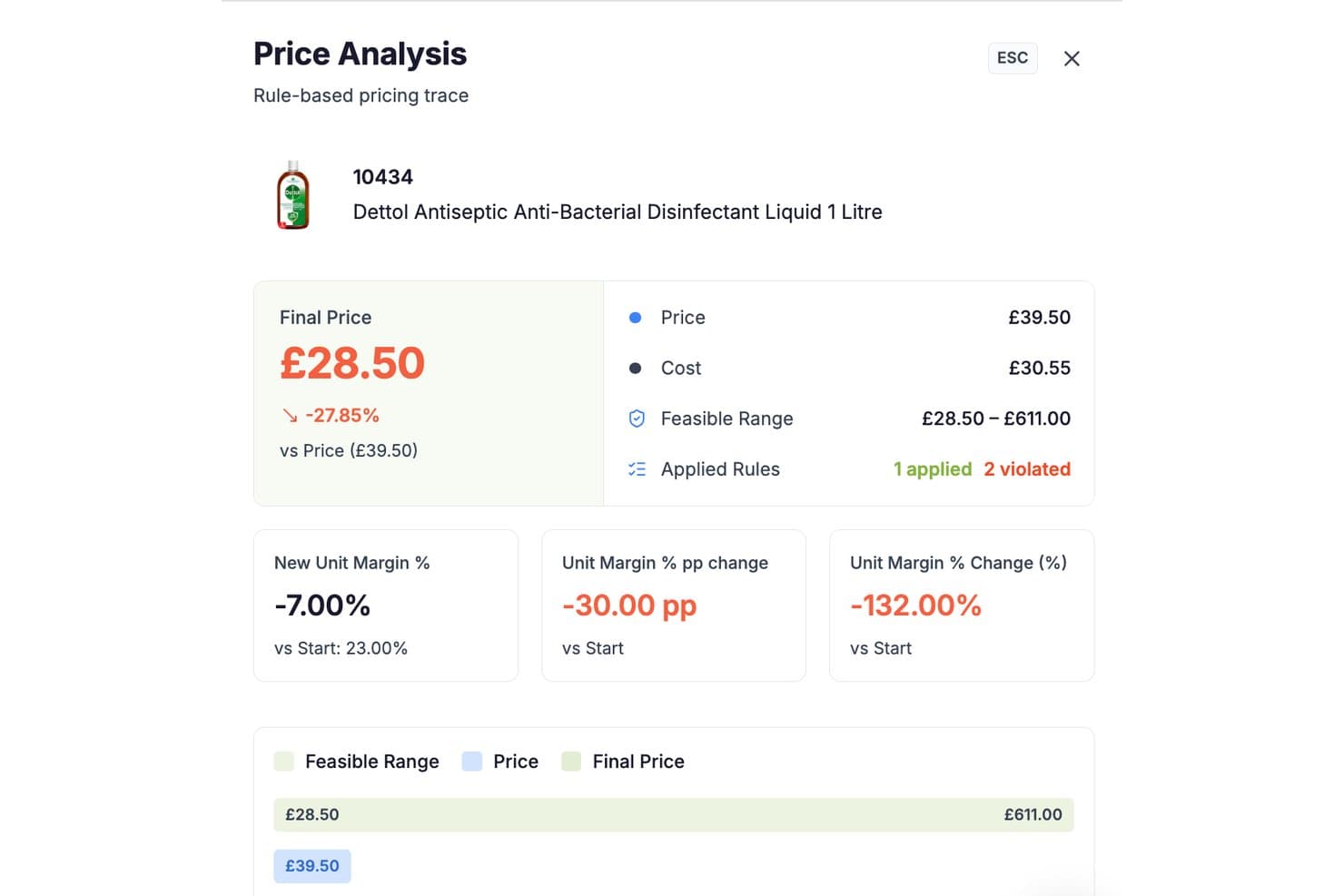
RetailGrid offers a Price Analysis panel that displays final price, feasible range, applied rules, and unit margin metrics for individual retail products. RetailGrid is a retail pricing platform that combines a spreadsheet-style AI workspace with agentic price optimization, competitor monitoring, elasticity analysis, and rules-based pricing across your catalog.
Who Is RetailGrid Best For?
RetailGrid is built for mid-market retailers with catalogs of thousands of SKUs who need pricing intelligence without a months-long enterprise implementation.
Why I Picked RetailGrid
RetailGrid earns its spot on my shortlist because of how it handles AI transparency in a way most pricing tools don't. Every recommendation the AI agents make shows its full reasoning, including which rules fired, which were violated, and the exact margin impact before you apply a change. That per-SKU audit trail means I can walk into a category review with a clear answer for every price move, not just a black-box output.
RetailGrid Key Features
- AI workspace: A spreadsheet-inspired pricing grid with live sales, competitor, and inventory data.
- Rules-based pricing engine: Apply and manage custom pricing rules across your entire product catalog.
- Competitor price monitoring: Automated collection of prices from direct competitors, Google Shopping, and Amazon.
- Elasticity analysis: Quantifies and visualizes each SKU’s price sensitivity using historical sales and market data.
RetailGrid Integrations
RetailGrid offers native integrations with Shopify, Magento, BigCommerce, WooCommerce, Wix, and SAP Commerce Cloud. An API is available for custom integrations.
Pros and Cons
Pros:
- Real-time elasticity and competitor data built in
- Spreadsheet-like interface familiar to retail teams
- Transparent AI decision audit for every SKU
Cons:
- Requires clean product data for full functionality
- Limited support for brick-and-mortar store pricing
Learn more about RetailGrid: Best for competitor price tracking for ecommerce
- 14-day free trial
- From $99/month
Visit WebsiteCustomer Rating:4.7/5
Prisync helps small retailers track competitor prices and adjust pricing. Prisync is built for ecommerce businesses that need to monitor and respond to competitor pricing in real time. The platform appeals to online retailers and brands looking to automate price tracking across multiple competitors and channels. Prisync helps you keep your pricing competitive and data-driven by collecting, comparing, and reporting on market prices automatically.
Why I Picked Prisync
For ecommerce teams focused on staying ahead of competitors, Prisync offers specialized tools for automated price tracking and market analysis. The platform collects competitor pricing data from multiple sources and updates it several times a day, so you always have current information. I appreciate that Prisync includes dynamic pricing rules, letting you set automated price adjustments based on competitor movements. Its detailed price comparison reports make it easier to spot trends and react quickly in fast-changing ecommerce markets.
Prisync Key Features
Some other features in Prisync that are useful for ecommerce teams include:
- Batch Product Import: Upload large product lists using CSV files for quick onboarding and updates.
- MAP Monitoring: Track minimum advertised price violations to protect brand value and compliance.
- Stock Availability Tracking: Monitor competitor stock levels alongside pricing data for a fuller market view.
- Customizable Alerts: Set up notifications for specific price changes or competitor actions that matter to your business.
Prisync Integrations
Integrations include Shopify, Amazon, Google Shopping, and other platforms via API.
Pros and Cons
Pros:
- Custom alerts for important price changes
- Dynamic pricing rules for automated adjustments
- Frequent competitor price updates for accurate tracking
Cons:
- Manual product matching can take time
- Limited analytics for deeper trend insights
Learn more about Prisync: Best for dynamic price automation in omnichannel
- Free demo available
- From €399/month
Visit WebsiteCustomer Rating:4.4/5
Omnia Retail automates dynamic pricing with real-time market data. If your team needs to automate pricing across both online and offline channels, Omnia Retail offers a unified platform built for omnichannel retailers. The software is designed for businesses managing complex assortments and frequent price changes. Omnia Retail helps you keep pricing consistent and competitive by automating updates based on real-time market data and your own pricing rules.
Why I Picked Omnia Retail
I chose Omnia Retail because it specializes in dynamic price automation for retailers managing both online and offline channels. The platform’s rule-based pricing engine lets you set custom strategies that automatically adjust prices in response to market changes, inventory levels, and competitor moves. I like that Omnia Retail streamlines omnichannel consistency, so your pricing stays aligned across every sales channel. Its real-time data feeds and automation tools help retailers react quickly without manual intervention, which is essential for staying competitive in fast-moving markets.
Omnia Retail Key Features
Some other features in Omnia Retail that stand out for retail teams include:
- Assortment Management: Manage and segment your product assortment to apply different pricing strategies to specific categories or brands.
- Competitor Price Monitoring: Track competitor prices in real time to inform your own pricing decisions and stay market-relevant.
- Promotional Pricing Engine: Set up and automate temporary price changes for sales, promotions, or seasonal events.
- Reporting and Analytics Dashboard: Access detailed reports and visualizations to review pricing performance and identify trends.
Omnia Retail Integrations
Integrations include Shopware, Plentymarkets, JTL, Google Shopping, Amazon, eBay, Bol.com, Kaufland, idealo, and Tweakers.
Pros and Cons
Pros:
- Real-time competitor tracking for faster decisions
- Rule-based engine for flexible pricing control
- Dynamic pricing automation across multiple channels
Cons:
- Advanced features may require onboarding support
- Initial setup for pricing rules can be complex
Learn more about Omnia Retail: Best for real-time price benchmarking across markets
- Free demo available
- Pricing upon request
Visit WebsiteCustomer Rating:4.5/5
Intelligence Node delivers real-time retail pricing and market insights. Intelligence Node is a retail analytics and market intelligence platform that includes pricing software capabilities for benchmarking and tracking competitor prices across markets. If you need to monitor and benchmark prices across multiple markets in real time, Intelligence Node is worth a look. This platform is designed for retailers and brands who want granular visibility into competitor pricing and assortment changes as they happen. Intelligence Node stands out for its ability to deliver up-to-the-minute pricing intelligence, helping teams react quickly to market shifts and protect margins.
Why I Picked Intelligence Node
For retailers who need to benchmark prices across multiple markets in real time, Intelligence Node offers a unique advantage. The platform’s AI-driven price monitoring engine tracks millions of SKUs and competitor prices globally, updating data as market conditions change. I like that Intelligence Node provides granular, SKU-level insights and customizable dashboards, so your team can quickly spot pricing gaps and opportunities. Its focus on real-time data makes it a strong fit for businesses that need to react fast to market shifts and maintain a competitive edge.
Intelligence Node Key Features
Some other features that make Intelligence Node useful for pricing teams include:
- MAP Monitoring: Track minimum advertised price violations across channels and markets.
- Automated Alerts: Receive instant notifications about significant competitor price changes.
- Category-Level Analytics: Analyze pricing trends and assortment at the category level.
- Data Export Tools: Export pricing and assortment data for further analysis or reporting.
Intelligence Node Integrations
Native integrations are not currently listed. API access is available for custom integrations.
Pros and Cons
Pros:
- Category-level analytics for assortment insights
- MAP monitoring for brand protection
- Real-time competitor price tracking across markets
Cons:
- No self-serve onboarding or setup tools
- Customization options may require vendor support
Learn more about Intelligence Node: Best for in-store and online price intelligence
- Free demo available
- Pricing upon request

Wiser Solutions provides retail analytics and competitor pricing insights. Wiser Solutions is a retail intelligence and execution platform that offers pricing software features to help teams monitor and optimize prices across in-store and online channels. This platform is especially useful for teams that need to monitor, compare, and optimize pricing across both physical shelves and ecommerce sites. Wiser Solutions stands out for its ability to unify data from multiple channels, helping you spot pricing gaps and align strategies in real time.
Why I Picked Wiser Solutions
What sets Wiser Solutions apart is its ability to deliver price intelligence for both in-store and online channels, which is essential for retailers managing omnichannel pricing strategies. The platform collects and analyzes pricing data from physical stores and ecommerce sites, giving you a unified view of your competitive landscape. I appreciate that Wiser Solutions offers shelf-level data collection and digital shelf analytics, so you can identify pricing discrepancies and optimize across all sales channels. This makes it a strong choice for businesses that need to coordinate pricing decisions between brick-and-mortar and online environments.
Wiser Solutions Key Features
Some other features that make Wiser Solutions valuable for pricing teams include:
- Promotion Tracking: Monitor competitor promotions and discounts across channels.
- Dynamic Pricing Engine: Adjust prices automatically based on real-time market data.
- Price Optimization Recommendations: Receive data-driven suggestions for optimal pricing strategies.
- Customizable Reporting: Build and schedule tailored reports for different teams or stakeholders.
Wiser Solutions Integrations
Native integrations are not currently listed.
Pros and Cons
Pros:
- Promotion tracking across multiple channels
- Shelf-level analytics for physical retail locations
- In-store and online price data collection
Cons:
- Onboarding process may require vendor assistance
- No public list of native integrations
Learn more about Wiser Solutions: Best for configurable pricing analytics for enterprises
- Free demo available
- Pricing upon request

Pricefx delivers cloud-based pricing optimization for enterprise businesses. Pricefx offers a highly configurable pricing analytics platform designed for large enterprises with complex pricing needs. This tool is a strong fit for pricing, finance, and commercial teams that need to model, analyze, and optimize pricing strategies at scale. Pricefx stands out for its flexible analytics engine, which lets you tailor pricing models and dashboards to your business’s unique requirements.
Why I Picked Pricefx
For teams that need deep control over pricing analytics, Pricefx stands out for its high level of configurability. The platform lets you build custom pricing models and dashboards, so you can analyze data in ways that match your business’s unique needs. I like that Pricefx supports advanced scenario modeling, which helps you forecast the impact of pricing changes before you roll them out. This makes it a strong choice for enterprises that want to tailor their pricing analytics and strategies at scale.
Pricefx Key Features
Some other features that make Pricefx appealing for enterprise pricing teams include:
- Rebate and Discount Management: Set up, track, and analyze complex rebate and discount programs.
- Quote Configuration Tools: Generate and manage quotes with configurable pricing rules.
- Price List Management: Create, update, and distribute multiple price lists across regions or channels.
- Automated Price Optimization: Use built-in algorithms to recommend optimal prices based on real-time data.
Pricefx Integrations
Integrations include SAP, Salesforce, Oracle, Microsoft Dynamics 365, PROS, Accenture, Deloitte, PwC, Wipro, and Capgemini.
Pros and Cons
Pros:
- Automated price optimization with built-in algorithms
- Scenario modeling for forecasting pricing impacts
- Highly configurable analytics for complex pricing models
Cons:
- Limited out-of-the-box retail-specific templates
- Implementation projects can require significant resources
Learn more about Pricefx: Best for AI-driven price optimization for large retailers
- Free demo available
- Pricing upon request

Competera provides enterprise retail pricing analytics and optimization tools. Large retailers looking to use AI for smarter pricing decisions may want to consider Competera. This platform uses machine learning to optimize prices across entire product portfolios, factoring in demand, competition, and business goals. Competera is especially useful for teams managing complex assortments who need to balance margin, revenue, and competitiveness at scale.
Why I Picked Competera
What sets Competera apart is its focus on AI-driven price optimization for large, complex retail operations. The platform uses machine learning algorithms to recommend optimal prices based on real-time market data, demand elasticity, and business constraints. I appreciate that Competera can simulate different pricing scenarios, helping teams understand the impact of price changes before making decisions. Its ability to automate pricing for thousands of SKUs makes it a strong fit for retailers who need to manage dynamic pricing at scale.
Competera Key Features
Some other features that make Competera valuable for pricing teams include:
- Competitive Data Collection: Gather real-time competitor pricing and assortment data from multiple sources.
- Rule-Based Pricing Engine: Set custom pricing rules to align with your business strategy.
- Promo Effect Measurement: Analyze the impact of past promotions on sales and margin.
- Role-Based Access Controls: Assign permissions and access levels for different team members.
Competera Integrations
Native integrations are not currently listed. API access is available for custom integrations.
Pros and Cons
Pros:
- Handles large assortments efficiently
- Scenario simulation for better decision planning
- AI-driven pricing recommendations based on demand signals
Cons:
- Limited transparency into pricing logic
- Requires significant data for accurate outputs
Learn more about Competera: 10Best for predictive pricing powered by demand forecasting
Retalon
- Free demo available
- Pricing upon request

Retalon uses predictive analytics to optimize retail pricing and inventory. Retailers looking for predictive pricing that adapts to real-time demand shifts may find Retalon especially relevant. This platform is built for merchandising, pricing, and planning teams that want to use demand forecasting to drive pricing decisions. Retalon helps you anticipate market changes and optimize prices with AI-powered analytics tailored for retail environments.
Why I Picked Retalon
What sets Retalon apart is its focus on predictive pricing powered by demand forecasting, which is especially valuable for retailers managing volatile markets. The platform uses AI-driven analytics to forecast demand at the SKU and store level, allowing you to adjust prices proactively rather than reactively. I appreciate that Retalon combines pricing optimization with inventory and promotion planning, so you can align pricing strategies with broader business goals. This makes it a strong fit for teams that want to use data-driven insights to stay ahead of market trends and maximize profitability.
Retalon Key Features
Some other features that make Retalon useful for retail pricing teams include:
- Automated Promotion Optimization: Set up and manage promotional pricing campaigns with AI-driven recommendations.
- Markdown Management: Plan and execute markdown strategies to clear inventory while protecting margins.
- Exception-Based Alerts: Receive notifications when pricing or inventory anomalies are detected.
- Omnichannel Price Consistency: Maintain synchronized pricing across online and offline sales channels.
Retalon Integrations
Native integrations are not currently listed.
Pros and Cons
Pros:
- Exception-based alerts for pricing anomalies
- Automated promotion and markdown management
- AI-driven demand forecasting for pricing decisions
Cons:
- Pricing details not disclosed on website
- No public list of native integrations
Learn more about Retalon:
Annen programvare for prissetting i detaljhandelen
Her er noen flere alternativer for programvare for prissetting i detaljhandelen som ikke kom med på kortlisten min, men som likevel er verdt å se nærmere på:
- 11Price2SpyBest for multichannel price monitoring at scale
- 12BlackCurveBest for automated pricing rules for SMBs
- 13ZilliantBest for price optimization in B2B industries
- 14VendavoBest for margin management in manufacturing
How I Evaluate Retail Pricing Software
I split my evaluation into baseline criteria—like a functioning repricing engine and competitor monitoring—and differentiators that separate the best tools from the rest.
Core Functionality (Table Stakes For This List)
When I'm selecting tools for my list, I rank each one on a scale from 0 (does not offer the functionality) to 5 (excels in this area) for each core functionality listed below. Then, I calculate the tool's total score into a percentage. Each tool needs to achieve a minimum total score of 65% to be considered for inclusion.
- Price Optimization Engine: I evaluate whether the tool goes beyond basic cost-plus math to offer demand-based or AI-driven price recommendations that factor in elasticity and business goals.
- Competitor Price Monitoring: Tracking competitor prices matters most when it's automated, SKU-matched, and refreshed frequently enough to act on across marketplaces and web sources.
- Repricing Rules & Automation: I look for configurable rule builders that let pricing teams set margin floors, competitor-relative targets, and MAP guardrails that execute at scale.
- Promotion & Markdown Management: Seasonal clearance cycles and flash sales need scheduling, depth planning, and post-event analysis—I check how each tool handles the full promo lifecycle.
- Multi-Channel & Store Pricing: Retailers selling across physical locations, their own webstore, and third-party marketplaces need zone or channel-level price differentiation from one hub.
- Pricing Analytics & Reporting: I look for dashboards that connect price moves to margin and revenue outcomes, giving pricing managers clear visibility into what's working.
Once I have a list of tools that meet the criteria, I consider what sets each platform apart.
Differentiating Factors (What Sets Vendors Apart)
Here's how I compare and contrast different vendors:
Standout Features
Scenario simulation is a big one for me—I want to see how a proposed price change ripples through margin and volume before it goes live. Price image management is equally valuable, especially for retailers tracking KVI perception while quietly optimizing margin on long-tail SKUs. I also evaluate assortment-aware pricing, where the tool accounts for cannibalization between private label and branded alternatives or flags halo effects across related products.
Beyond Features
Integrations matter a lot here. A pricing tool that can't pull live inventory from your ERP or push updated prices to your POS and ecommerce storefront creates manual work that defeats the purpose. I also check whether the platform fits your specific retail vertical—grocery pricing logic is very different from fashion markdown cycles. Finally, implementation timelines deserve attention. Pricing tools with pre-built rule templates and guided onboarding get teams to value faster than platforms requiring months of custom configuration.
Slik velger du programvare for prissetting i detaljhandelen
Det er lett å gå seg vill i lange funksjonslister og komplekse prisstrukturer. For å hjelpe deg med å holde fokus mens du arbeider deg gjennom den unike prosessen med å velge programvare, får du her en sjekkliste over faktorer du bør ha i bakhodet:
| Faktor | Hva du bør vurdere |
| Skalerbarhet | Vil programvaren håndtere dagens og fremtidens produktvolum, antall butikker og salgskanaler? |
| Integrasjoner | Kan den kobles direkte til verktøyene dine for netthandel, POS, ERP og analyse uten spesialtilpassede omveier? |
| Tilpasningsmuligheter | Kan du tilpasse prisregler, arbeidsflyter og rapportering slik at de passer til forretningsmodellen og kategoriene dine? |
| Brukervennlighet | Vil salgsvare- og prissettingsteamene dine kunne bruke verktøyet daglig uten omfattende opplæring? |
| Implementering og innføring | Hvor lang tid vil det ta å komme i gang, og hvilke ressurser eller hvilken støtte trenger du internt? |
| Kostnad | Er prisnivåene tydelige, og samsvarer de med budsjettet og forventet avkastning på investeringen etter hvert som virksomheten vokser? |
| Sikkerhetstiltak | Tilbyr leverandøren datakryptering, tilgangskontroller for brukere og samsvar med relevante standarder? |
| Tilgjengelig kundestøtte | Har du tilgang til direkte kundestøtte i arbeidstiden, og finnes det en tydelig eskaleringsprosess for hastesaker? |
Hva er programvare for prissetting i detaljhandelen?
Programvare for prissetting i detaljhandelen er en prisplattform som hjelper detaljhandelsvirksomheter med å fastsette, administrere og justere produktpriser på tvers av salgskanaler. Disse prisløsningene bruker historiske data, kunstig intelligens og markedstrender for å støtte prisprosesser gjennom hele produktets livssyklus og forbedre beslutningstakingen. Ved å bruke avanserte prisverktøy kan team reagere på endringer i etterspørselen, beskytte markedsandeler og bruke konsekvente prisstrategier på tvers av kundesegmenter.
Funksjoner i programvare for prissetting i detaljhandelen
Når du velger programvare for prissetting i detaljhandelen, bør du se etter følgende viktige funksjoner:
- Sentralisert prishåndtering: Administrer og oppdater produktpriser for alle kanaler fra ett enkelt kontrollpanel, slik at manuelt arbeid og feil reduseres.
- Automatiserte prisregler: Angi regler som automatisk justerer priser basert på lagerbeholdning, salgshastighet eller tidsbaserte utløsere.
- Planlegging av kampanjer og prisreduksjoner: Planlegg, tidsinnstill og gjennomfør kampanjepriser eller prisreduksjoner på forhånd, slik at lanseringene skjer til rett tid og på en konsekvent måte.
- Overvåking av konkurrentenes priser: Følg med på konkurrentenes priser for å informere egne prisstrategier og holde deg konkurransedyktig i markedet.
- Samlede prisoppdateringer: Bruk prisendringer på flere produkter eller kategorier samtidig, slik at du sparer tid ved omfattende justeringer.
- Revisjonsspor og endringslogger: Oppretthold en oversikt over alle prisendringer, inkludert hvem som utførte dem og når, for å sikre ansvarlighet og etterlevelse.
- Støtte for flere valutaer: Angi og administrer priser i ulike valutaer for å støtte internasjonalt salg og lokale prisstrategier.
- Rapportering og analyse: Få tilgang til kontrollpaneler og rapporter som gir innsikt i prisytelse, marginpåvirkning og salgstrender.
- Tilgangskontroller for brukere: Tildel tillatelser og roller til teammedlemmer, slik at bare autoriserte brukere kan gjøre prisendringer.
- Integrasjon med salgskanaler: Koble direkte til netthandelsplattformer, POS-systemer og ERP-systemer for å synkronisere prisdata på tvers av virksomheten.
Vanlige AI-funksjoner i programvare for prissetting i detaljhandelen
I tillegg til standardfunksjonene i programvare for prissetting i detaljhandelen som er nevnt ovenfor, tar mange av disse løsningene i bruk AI-funksjoner som:
- Etterspørselsprognoser: AI analyserer historisk salg, sesongvariasjoner og eksterne faktorer for å forutsi fremtidig etterspørsel, slik at team kan fastsette optimale priser og unngå utsolgte varer eller overfylte lagre.
- Dynamisk prisoptimalisering: AI justerer kontinuerlig prisene i sanntid basert på markedstrender, konkurrentaktivitet og kundeatferd for å maksimere inntekter og marginer.
- Automatiserte kampanjeanbefalinger: AI foreslår riktig tidspunkt, produkter og rabattnivåer for kampanjer ved å analysere tidligere kampanjeytelse og gjeldende markedsforhold.
- Analyse av priselastisitet: AI-modeller viser hvordan prisendringer påvirker salgsvolumet, slik at team kan forstå etterspørselens følsomhet og fastsette priser som balanserer volum og fortjeneste.
- Avviksdeteksjon: AI overvåker pris- og salgsdata for å flagge uvanlige mønstre eller feil, som plutselige prisfall eller pristopper, slik at team raskt kan undersøke og reagere.
Fordeler med programvare for prissetting i detaljhandelen
Implementering av programvare for prissetting i detaljhandelen gir flere fordeler for teamet og virksomheten din. Her er noen av fordelene du kan se frem til:
- Konsekvente priser på tvers av kanaler: Sentralisert prishåndtering sørger for at produktprisene dine er samordnet i butikk, på nettet og på tvers av markedsplasser.
- Raskere respons på markedsendringer: Automatiserte prisregler og AI-drevet innsikt hjelper teamet med å justere prisene raskt når etterspørsel, lagerbeholdning eller konkurrentaktivitet endrer seg.
- Bedre kontroll over marginene: Sanntidsanalyse og dynamisk prisoptimalisering gjør det mulig å overvåke og beskytte fortjenestemarginene for hvert produkt.
- Mindre manuelt arbeid: Samlede oppdateringer, planleggingsverktøy og automatiseringsfunksjoner minimerer repetitive oppgaver og frigjør tid for teamet.
- Datadrevet beslutningstaking: Rapportering, analyse og AI-drevne prognoser gir handlingsrettet innsikt for smartere prisstrategier.
- Større prisgjennomsiktighet og etterlevelse: Revisjonsspor og tilgangskontroller for brukere hjelper deg med å spore endringer og opprettholde ansvarlighet i hele organisasjonen.
- Mer effektive kampanjer: Automatiserte kampanjeanbefalinger og planleggingsverktøy hjelper deg med å planlegge, gjennomføre og måle kampanjer mer presist.
Kostnader og priser for programvare for prissetting i detaljhandelen
Valg av programvare for prissetting i detaljhandelen krever en forståelse av de ulike prismodellene og abonnementene som er tilgjengelige. Kostnadene varierer basert på funksjoner, teamstørrelse, tillegg og mer. Tabellen nedenfor oppsummerer vanlige abonnementer, gjennomsnittsprisene deres og typiske funksjoner som er inkludert i løsninger for programvare for prissetting i detaljhandelen:
Sammenligningstabell for abonnementer for programvare for prissetting i detaljhandelen
| Plantype | Gjennomsnittspris | Vanlige funksjoner |
| Gratisabonnement | $0 | Grunnleggende prisstyring, begrensede produktoppføringer, tilgang for én bruker og grunnleggende rapportering. |
| Personlig abonnement | $30-$75/bruker/måned | Sentralisert prisstyring, masseoppdateringer, grunnleggende integrasjoner og standardstøtte. |
| Bedriftsabonnement | $100-$250/bruker/måned | Automatiserte prisregler, planlegging av kampanjer, avansert analyse, tilgang for flere brukere og API-tilgang. |
| Foretaksabonnement | $400-$1,000+/måned | Tilpassede integrasjoner, AI-drevne funksjoner, dedikert kontoadministrasjon, avansert sikkerhet og prioritert støtte. |
Vanlige spørsmål om programvare for prisstyring i varehandelen
Her er noen svar på vanlige spørsmål om programvare for prisstyring i varehandelen:
Hvordan hjelper programvare for prisstyring i varehandelen med omnikanalprising?
Programvare for prisstyring i varehandelen lar deg administrere og oppdatere priser på tvers av alle salgskanalene dine fra ett sted. Dette sikrer at kundene ser konsekvente priser enten de handler på nettet, i butikk eller via markedsplasser, og hjelper teamet ditt med å unngå manuelle feil eller avvik.
Kan programvare for prisstyring i varehandelen integreres med mine eksisterende POS- og netthandelssystemer?
Ja, de fleste løsninger for prisstyring i varehandelen tilbyr integrasjoner med populære POS-, netthandels- og ERP-plattformer. Før du velger et verktøy, bør du undersøke om det har innebygde integrasjoner eller tilgjengelige API-er, slik at dataflyten blir smidig og manuelle opplastinger unngås.
Hvilke datasikkerhetstiltak bør jeg se etter i programvare for prisstyring i varehandelen?
Se etter funksjoner som datakryptering, tilgangskontroller for brukere og revisjonslogger. Disse sikkerhetstiltakene bidrar til å beskytte sensitiv prisinformasjon og sikrer at bare autoriserte teammedlemmer kan gjøre endringer eller se konfidensielle data.
Hvor lang tid tar det å implementere programvare for prisstyring i varehandelen?
Implementeringstiden varierer, men de fleste skybaserte løsninger kan settes opp på noen dager til noen uker. Faktorer som datamigrering, kompleksiteten i integrasjonene og opplæring av teamet kan påvirke hvor raskt dere er fullt operative.
Passer programvare for prisstyring i varehandelen for små bedrifter?
Ja, mange plattformer for prisstyring i varehandelen tilbyr abonnementer som er utviklet for små bedrifter med færre produkter og brukere. Se etter løsninger med fleksibel prising, enkel oppstart og viktige funksjoner som dekker de nåværende behovene dine.