

Avis sur Xero : avantages, inconvénients, fonctionnalités et tarifs
Xero se distingue par ses intégrations conviviales et ses tarifs évolutifs, ce qui en fait un choix de premier plan pour les entreprises de commerce électronique à la recherche de solutions comptables efficaces.

Nous évaluons les outils de façon indépendante, et les commissions contribuent à financer nos tests. Consultez notre politique de transparence, notre méthodologie, ou suggérez un outil.
Xero is an ecommerce accounting software built for small to mid-sized businesses that need to track sales, reconcile transactions, and manage cash flow across online channels. I'd consider it over QuickBooks if your business leans heavily on ecommerce platform integrations—Xero connects more cleanly with tools like Shopify and handles multicurrency transactions with less manual configuration, which matters if you're selling across multiple regions or storefronts.
Xero Evaluation Summary
4.4/5
- From $25/month
- 30-day free trial
Pourquoi faire confiance à nos recommandations de logiciels
6,700+
Reviews
20
Industry experts
16+
Evaluation factors
14
Years
Notre équipe teste et évalue des logiciels depuis 2012. En tant que dirigeants du commerce de détail nous-mêmes, nous savons à quel point il est difficile — et important — de choisir le bon logiciel.
Pour ce guide, nous avons évalué les outils grâce à des tests pratiques et une recherche indépendante, en notant les outils selon nos critères de sélection.
Nos avis reflètent notre jugement indépendant — et non un argumentaire de vente.
Xero Overview
In my opinion, Xero is a solid choice for e-commerce accounting, offering a user-friendly interface and excellent integration options. While its onboarding could be smoother, its core and standout features make it a reliable tool for small to medium-sized retailers. However, it may not suit larger enterprises seeking more advanced customization options. If your team values ease of use, competitive pricing, and helpful customer support, Xero is worth considering.
Pros
- Xero's dashboard is intuitive and easy to navigate.
- You can access detailed financial reports to aid decision-making.
- The software’s automation features save you time on repetitive accounting tasks.
Cons
- You might find the initial setup a bit complex without prior experience.
- Customer support response times can sometimes be slow for urgent issues.
- Using some advanced features may require additional training.
Is Xero Right For Your Needs?
Who Would be a Good Fit for Xero?
Xero is a great fit for small to medium-sized retail businesses and accounting teams looking for straightforward financial management without the hassle. If your team values simple navigation and automated financial reporting, Xero delivers with its user-friendly dashboard and time-saving features. The software’s intuitive interface facilitates accounting tasks and doesn’t require extensive training to use it.
- Small RetailersXero is perfect for small retailers that need an easy-to-use accounting tool that offers extensive financial reports.
- E-commerce StartupsE-commerce startups benefit from Xero's automation features, which simplify financial tasks and help manage growth.
- Freelance AccountantsFreelance accountants find Xero's intuitive dashboard handy for managing client accounts and quickly generating detailed reports.
- NonprofitsNonprofits can track donations and expenses with Xero's reporting tools, helping them remain transparent with stakeholders.
- Hospitality BusinessesHospitality businesses use Xero’s transaction tracking features to manage transactions and payroll efficiently.
- Consulting FirmsXero's financial reporting helps consulting firms track billable hours and manage client invoicing.
Who Would be a Bad Fit for Xero?
Xero might not be ideal for large enterprises or businesses requiring highly customized financial solutions and extensive reporting capabilities. The software’s functionalities may be too basic for complex financial structures, lacking the depth needed for intricate accounting tasks. Additionally, if quick customer support is vital to your operations, you might be disappointed with the company’s response times.
- Large CorporationsLarge corporations might find that Xero lacks the advanced customization and broad reporting they need to address complex financial tasks.
- Manufacturing FirmsManufacturing firms seeking detailed inventory management may find Xero's offerings too simplistic for their requirements.
- Financial InstitutionsFinancial institutions often need more complex features than what Xero offers, making it unsuitable for their accounting needs.
- Custom Software DevelopersXero’s limited integration options may not address the operational flexibility that custom software developers are looking for.
- Real Estate CompaniesReal estate companies requiring specialized property management features may find that Xero's general accounting tools are insufficient.
Notre méthodologie d'évaluation
Comment nous testons et notons les outils
Nous avons passé des années à construire, affiner et améliorer notre système de test et de notation des logiciels. Notre grille d’évaluation est conçue pour prendre en compte toutes les subtilités du choix d’un logiciel et identifier ce qui rend un outil efficace, en se concentrant sur les aspects essentiels du processus de décision. Vous pouvez voir ci-dessous comment fonctionne notre système de test et de notation selon sept critères. Il nous permet de fournir une évaluation impartiale des logiciels selon leur fonctionnalité principale, leurs caractéristiques remarquables, la facilité d’utilisation, l’intégration, l’onboarding, le service client, les avis clients et le rapport qualité-prix.
Fonctionnalité principale (25% de la note finale)
Le point de départ de notre évaluation est toujours la fonctionnalité de base de l’outil. Possède-t-il les fonctions et caractéristiques attendues par un utilisateur ? Certaines de ces fonctionnalités essentielles sont-elles réservées à des plans tarifaires supérieurs ? Nous attendons d’un outil qu’il se mesure aux capacités minimales proposées par ses concurrents.
Caractéristiques remarquables (25% de la note finale)
Ensuite, nous évaluons les caractéristiques remarquables et uniques qui vont au-delà des fonctionnalités de base normalement attendues d’un outil similaire. Une note élevée reflète des fonctionnalités spécialisées qui rendent le produit plus rapide, plus efficace, ou apportent une valeur ajoutée pour l’utilisateur. Nous évaluons également la facilité d’intégration avec d’autres outils généralement présents dans l’écosystème technique afin d’étendre la fonctionnalité et l’utilité du logiciel. Les outils qui proposent de nombreuses intégrations natives, des connexions avec des solutions tierces, et un accès API pour des intégrations personnalisées obtiennent la meilleure note.
Facilité d’utilisation (10% de la note finale)
Nous analysons la rapidité et la simplicité d’exécution des tâches affectées aux fonctionnalités principales via l’outil. Les logiciels les mieux notés sont bien conçus, intuitifs, offrent des applications mobiles, incluent des modèles prêts à l’emploi et simplifient les opérations complexes.
Onboarding (10% de la note finale)
Nous savons à quel point l’adoption rapide d’une nouvelle plateforme est cruciale pour une équipe. Nous évaluons donc la facilité d’apprentissage et de prise en main d’un outil avec un minimum de formation. Nous examinons la rapidité à laquelle un membre d’équipe peut s’installer et commencer à utiliser l’outil sans expérience préalable. Les solutions les mieux notées montrent qu’elles nécessitent peu ou pas d’assistance.
Service client (10% de la note finale)
Nous évaluons la vitesse et la simplicité pour obtenir de l’aide ou se débloquer par téléphone, chat en direct, ou base de connaissances. Les outils et sociétés qui offrent une assistance en temps réel obtiennent la meilleure note, tandis que les chatbots sont moins bien évalués.
Avis clients (10% de la note finale)
Au-delà de nos propres tests et évaluations, nous tenons compte du score de recommandation (NPS) des clients actuels et passés. Nous examinons leur probabilité de choisir à nouveau l’outil pour sa fonctionnalité principale. Un logiciel bien noté reflète un NPS élevé de la part des clients actuels ou passés.
Rapport qualité-prix (10% de la note finale)
Enfin, au regard de tous les autres critères, nous évaluons le prix moyen des offres de départ au regard des fonctionnalités clés, et tenons compte de la valeur ajoutée selon les autres critères. Les logiciels qui offrent plus pour moins obtiennent une meilleure note.
Core Features
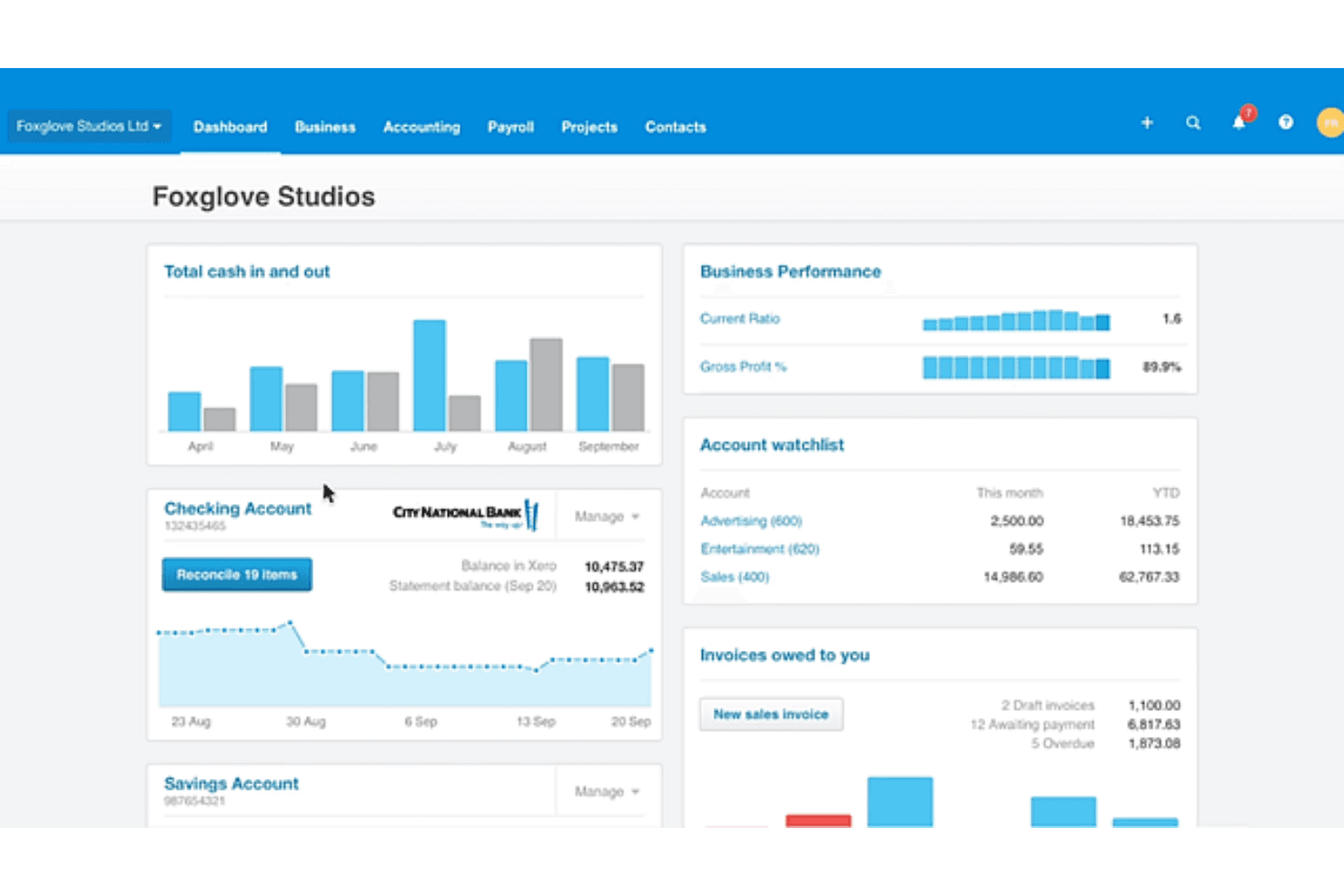
Invoicing: Xero lets your team create and send professional invoices, customize templates, and set up recurring invoices, saving time.
Expense Tracking: The software facilitates expense tracking and categorization for better financial insights so you can manage your cash flow and budget more effectively.
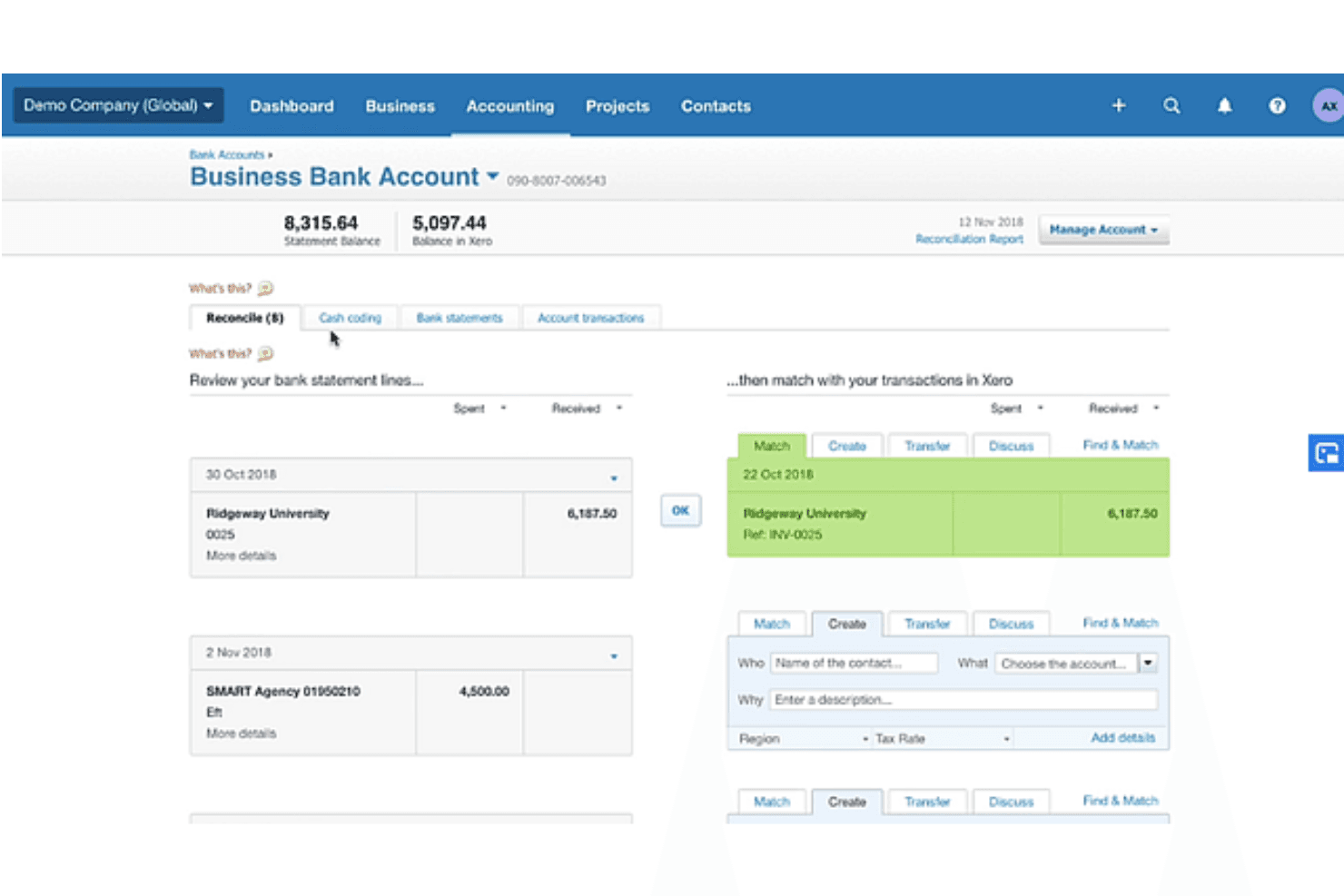
Bank Reconciliation: Xero automatically matches your bank transactions with your records, reducing. errors and keeping your accounts accurate and up to date.
Financial Reporting: Xero’s reporting tools allow you to generate detailed financial reports so you can make informed business decisions.
Inventory Management: Xero's inventory management tracks stock levels and values in real time, enabling your business to meet customer demand without overstocking.
Business Accounting: Xero accounting helps businesses carry out day-to-day business accounting, allowing them to send invoices, manage accounts payable and receivable and bank feeds, and generate balance sheets.
Ease of Use
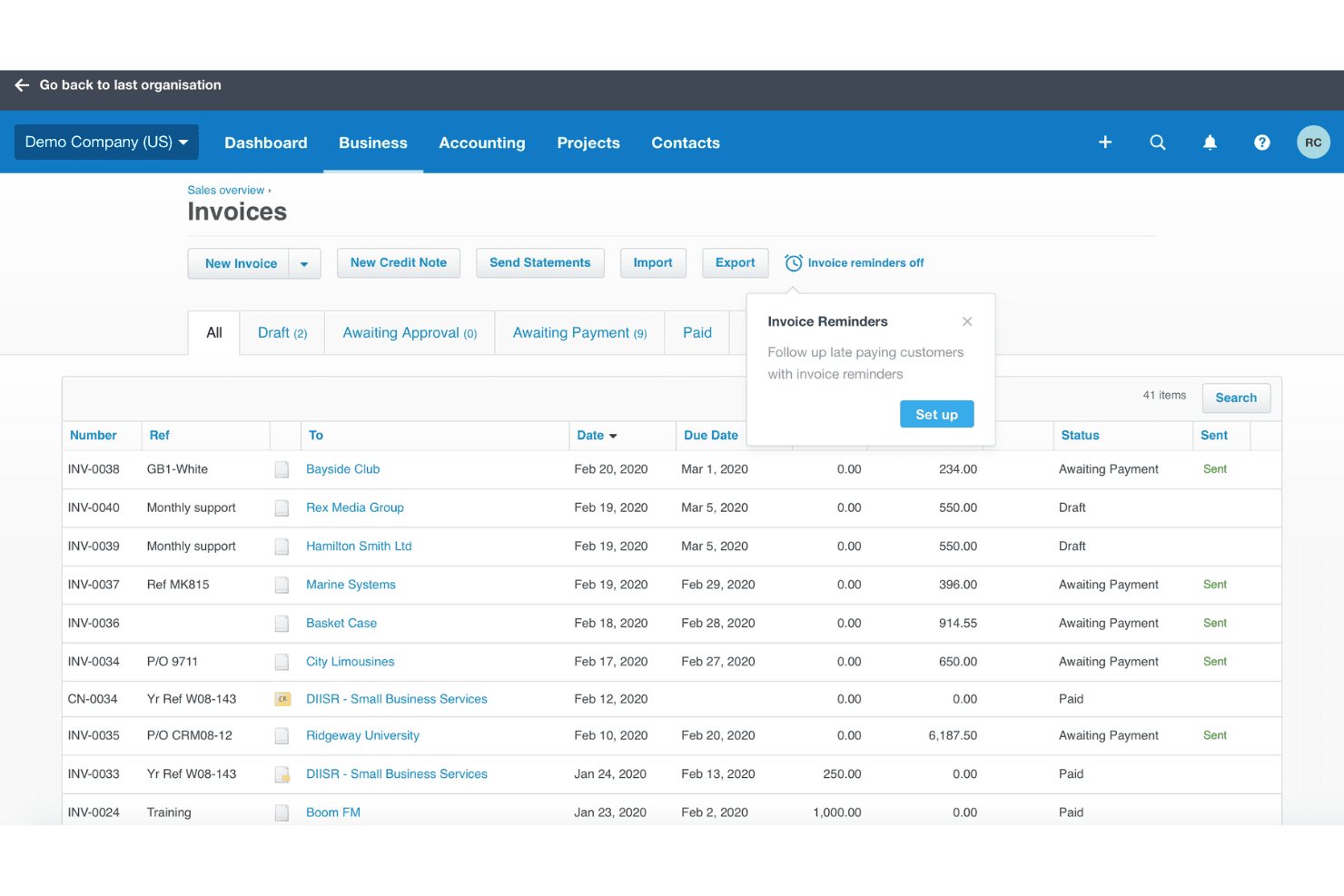
Xero’s interface is accessible, enabling straightforward navigation so you can find what you need without the hassle. Automation features such as transaction matching simplify your work by reducing manual entry. Users often praise Xero’s clean layout, which helps them manage finances without feeling overwhelmed.
Integrations
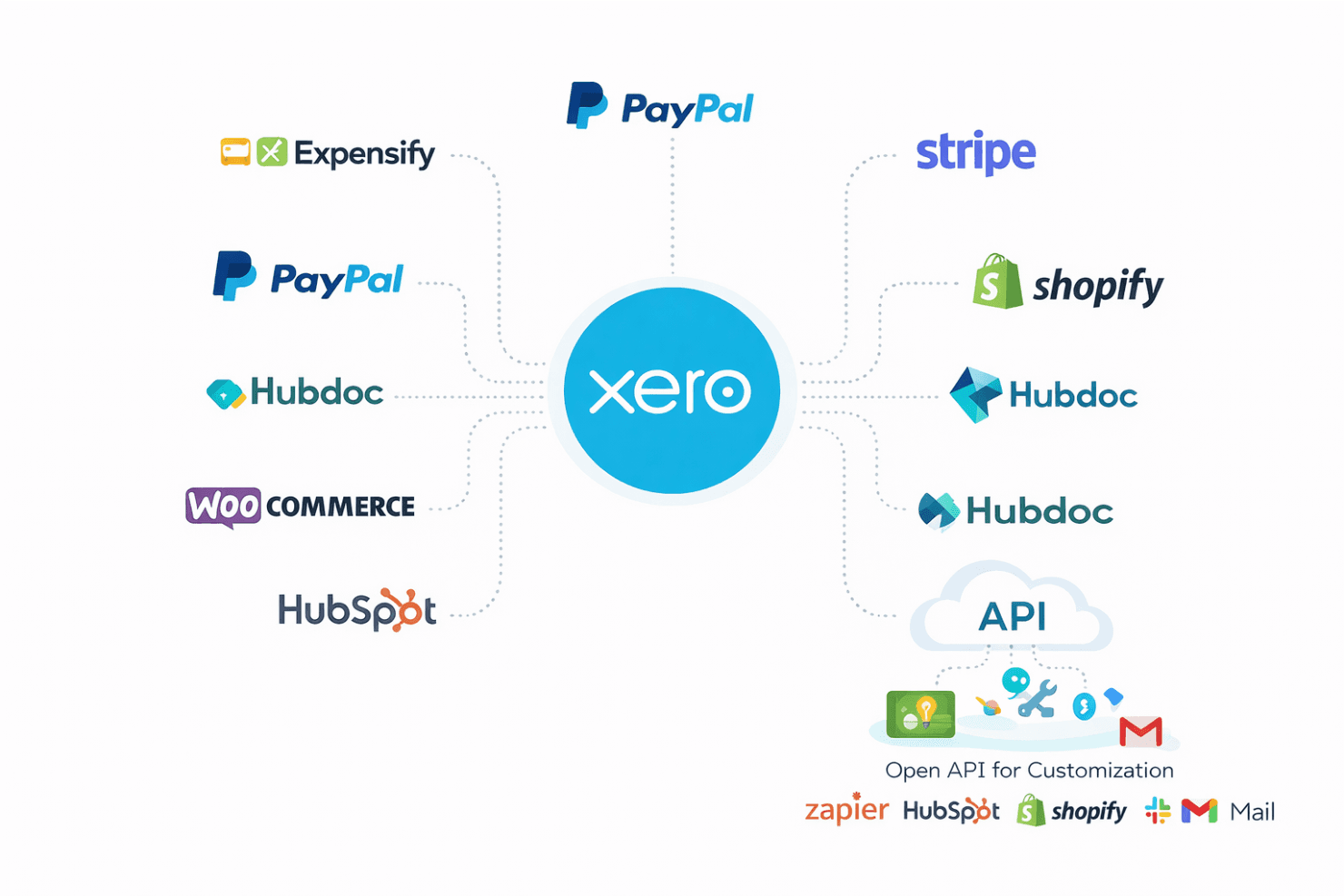
Xero supports a wide range of add-on integrations, including CRM systems, enabling businesses to customize their accounting workflows. It integrates with popular tools such as PayPal, Stripe, Shopify, Hubdoc, HubSpot, WooCommerce, and Expensify.
Xero also has an open API, allowing businesses to create custom apps and connect with third-party apps.
New Product Updates from Xero
Xero Adds Supplier Days to Pay Detail Report
Xero adds a Supplier Days to Pay Detail report that shows how long each supplier bill took to pay across a selected period. Users can review payment-time categories and export the underlying data for further analysis or Fair Payment Code applications. Highlights include:
- Supplier Payment Tracking: View payment times for every supplier bill within a selected period.
- Payment Categories: Group bills into 0–30, 31–60, 61–90, and over 90-day ranges.
- Exportable Data: Export supplier payment details for reporting and further analysis.
- Fair Payment Code Support: Use report data as evidence when preparing a Fair Payment Code application.
Visit Xero’s official site for more details.
Xero Expands Claude Workflows and Adds ChatGPT Integration
Xero connects live financial data with Claude for Small Business and ChatGPT, supporting financial questions, reporting, and workflow preparation. Users can work with current Xero data without relying on manual exports. Highlights include:
- ChatGPT Integration: Brings live Xero data into ChatGPT for financial questions and workflows.
- Claude Workflows: Supports tasks such as cash flow snapshots, month-end preparation, and recurring reports.
- Live Financial Data: Uses current Xero information instead of exported data.
- Financial Insights: Supports data across profit and loss, balance sheets, invoices, bills, and more.
- Advisor Access: Lets accountants and bookkeepers work with client data through supported AI workflows.
- Review Controls: Keeps final review and decisions with the business owner or advisor.
Visit Xero’s official site for more details.
 Opens new window
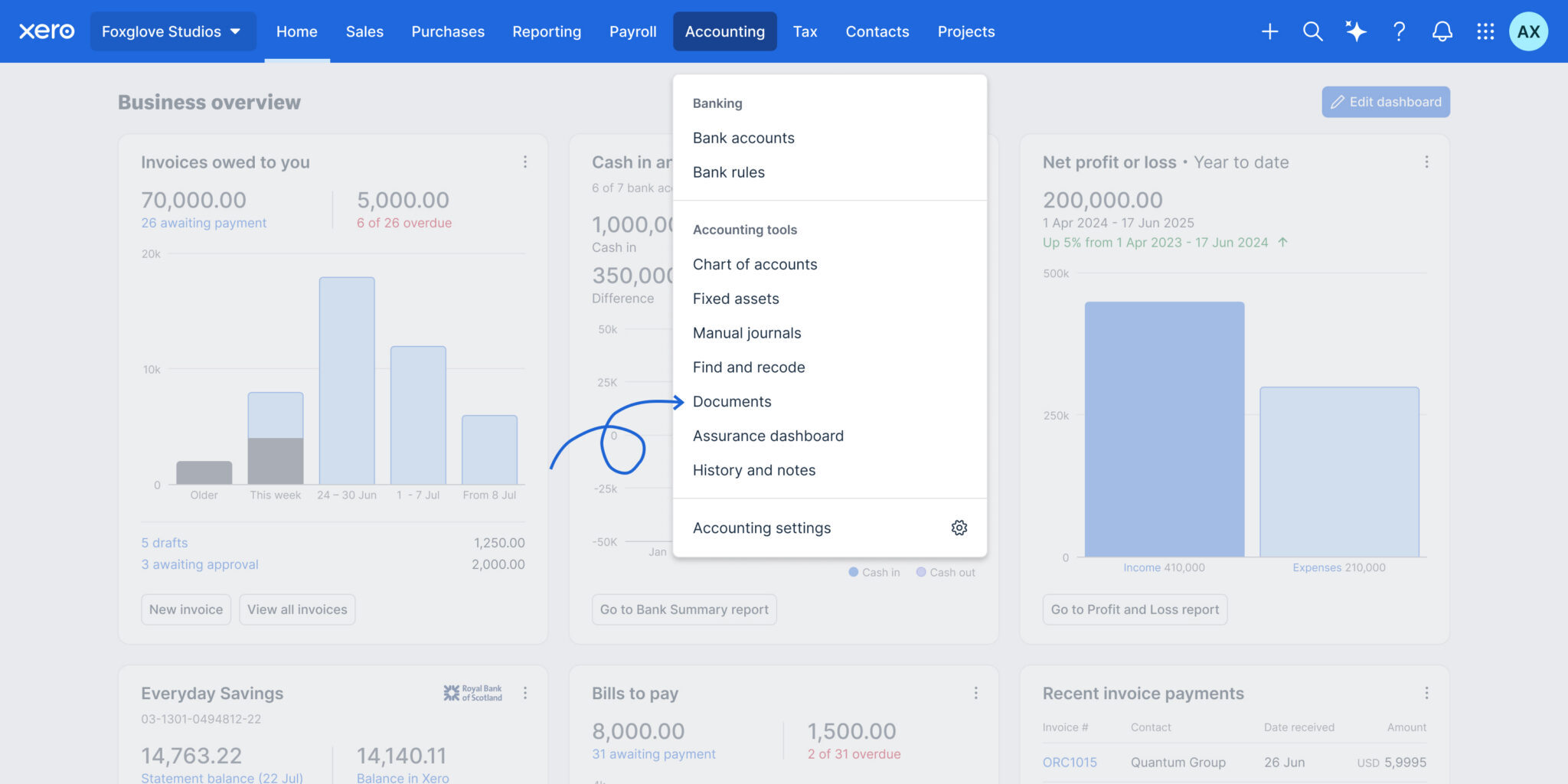
Files is now Documents in Xero
Xero has renamed Files to Documents and relocated it to the Accounting menu, making it easier to find where Smart Document Capture lives. The update also adds smarter automation and controls to improve accuracy, reduce manual work, and strengthen oversight. Highlights include:
- Automatic Tax Extraction: Pulls local tax rates from uploaded documents.
- Credit Note Support: Extracts credit note data and prepares draft transactions.
- Auto-Matching: Matches uploaded documents to existing transactions automatically.
- Document Permissions: Lets teams control upload and view-only access.
- Deletion Alerts: Warns users before removing documents linked to transactions.
- Accounting Menu Access: Moves Documents closer to other accounting workflows.
Visit Xero’s official site for more details.
 Opens new window
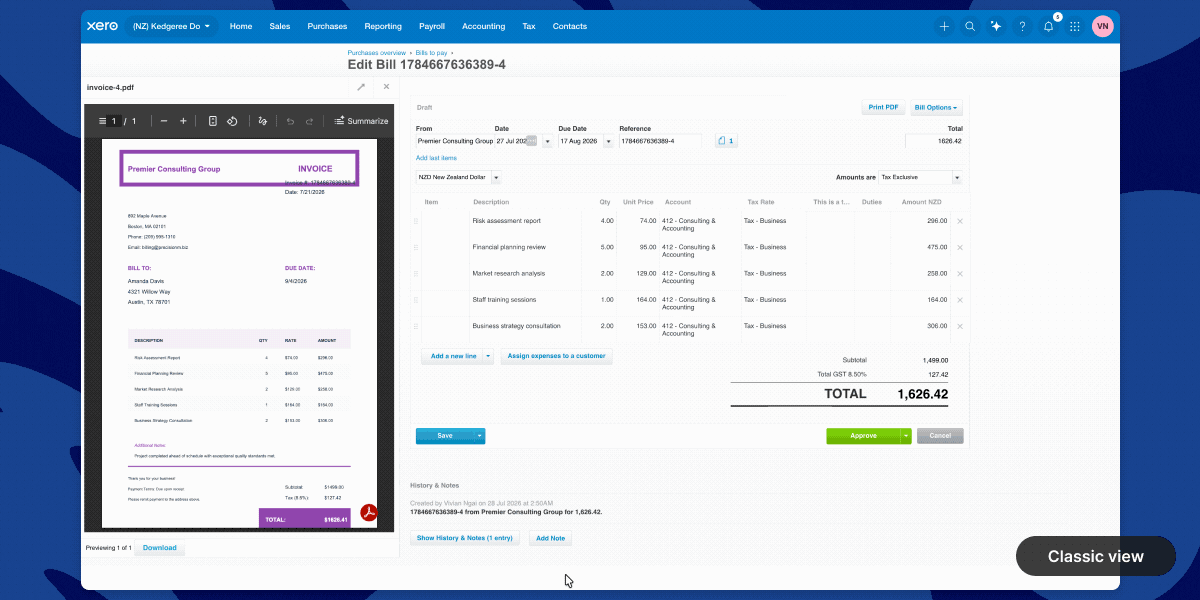
Xero Introduces a New Full-Page Bills Experience
Xero adds a modernized bills page with direct supplier editing, payment planning, billable expense assignment, customizable columns, and Approve & next navigation. These updates reduce back-and-forth between screens and help users review, update, and process bills faster. Highlights include:
- Direct Contact Editing: Updates supplier information without leaving the bill page.
- Planned Payment Dates: Adds payment scheduling directly within each bill to support cash flow planning.
- Custom Layouts: Lets users show or hide columns and resize the attached file preview.
- Billable Expense Assignment: Assigns customers or projects directly from the line item table.
- Approve & Next: Approves the current bill and moves directly to the next bill for faster processing.
- Instant Bill Payments: Lets eligible users in the UK and US pay bills from the bill detail page.
Visit Xero’s official site for more details.
Xero Launches Ultra in Australia With Multi-Entity Reporting
Xero launches Xero Ultra in Australia with multi-entity consolidated reporting, advanced forecasting, AI-powered insights, and enhanced support for growing businesses. The plan gives finance teams greater visibility and control while allowing them to keep working within the Xero platform. Highlights include:
- Multi-Entity Consolidated Reporting: View financial performance across multiple entities in one consolidated report.
- Advanced Forecasting: Use scenario modelling and four-way cash flow forecasting through Syft Advanced reporting.
- AI-Powered Insights: Access JAX for financial insights and support with routine finance workflows.
- Enhanced Support: Get priority access to Xero specialists, personalised onboarding, migration support, and targeted data restore.
- Governance Controls: Use flexible permissions to support stronger financial oversight and separation of duties when available.
Visit Xero’s official site for more details.
 Opens new window
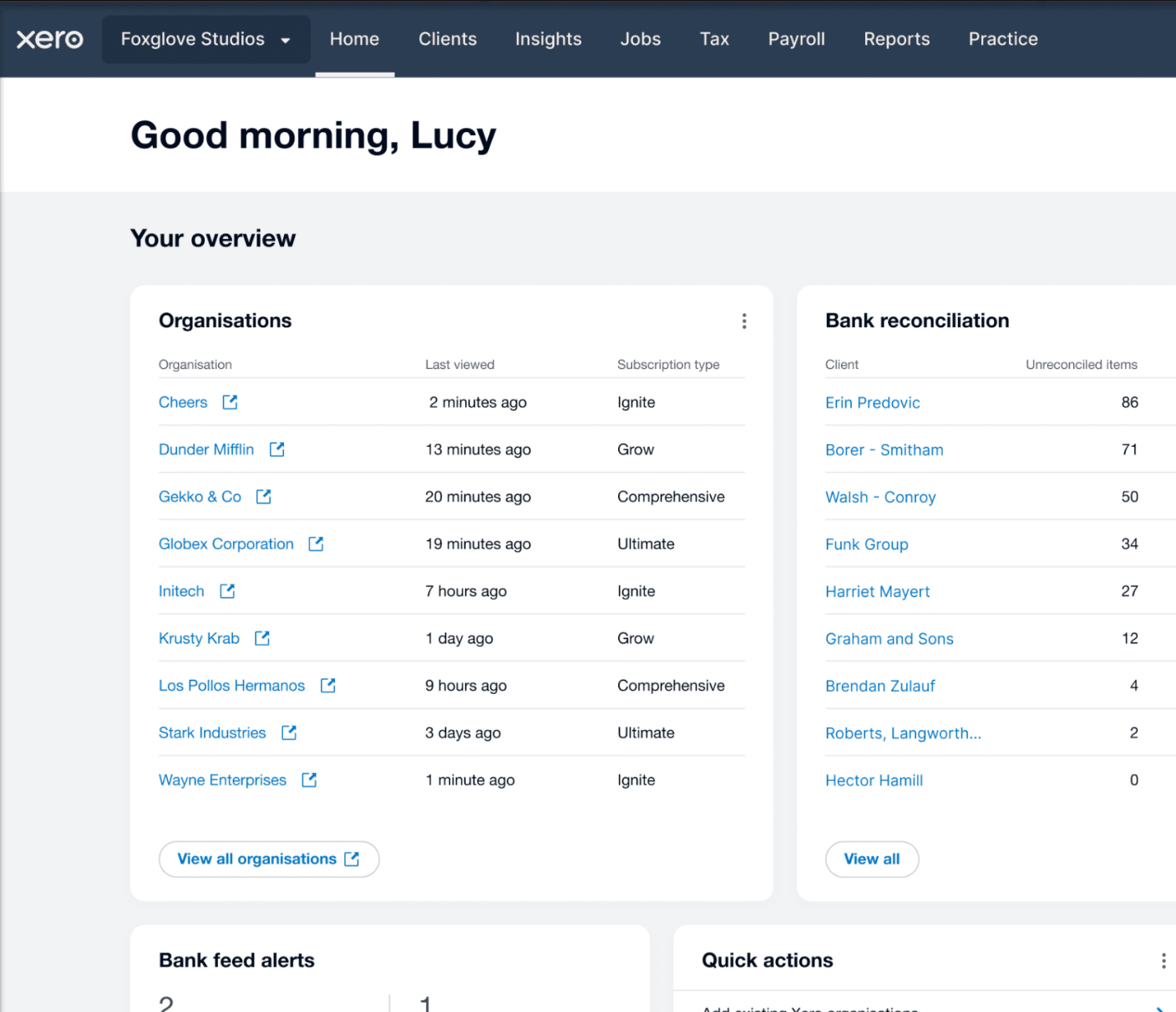
Xero Launches Partner Hub for UK Partners
Xero has launched Partner Hub for all UK partners, creating a single workspace to access key practice tools and information. The redesigned homepage and customizable widgets aim to make daily workflows faster and more personalized. Highlights include:
- Unified Workspace: Access practice tools, client information, and navigation from a single workspace.
- Customizable Homepage: Show, hide, and reorder widgets to personalize the homepage.
- Client and Practice Widgets: View organization watchlists, bank feed alerts, jobs, and productivity metrics at a glance.
- JAX Chat Integration: Use JAX to summarize client financials and generate insights directly from Partner Hub.
Visit Xero's official site for more details.
Xero Expands Wagepoint Integration for Canadian Payroll
Xero has enhanced its Wagepoint integration for Canadian small businesses, making it easier to run payroll while keeping accounting records accurate. With less manual re-entry and a more connected workflow, payroll and bookkeeping stay aligned. Highlights include:
- Single Sign-On: Access Wagepoint using existing Xero credentials without separate logins.
- Automatic Payroll Data Sync: Sync wages, taxes, deductions, and benefits from Wagepoint to Xero automatically.
- Connected Payroll and Accounting: Keep payroll and accounting records aligned through an integrated workflow.
Visit Xero's official site for more details.
Xero Specs
- 2-Factor Authentication: Yes
- Accounts Payable: Yes
- Accounts Receivable: Yes
- API: Yes
- Balance Sheet: Yes
- Billing/Invoicing: Yes
- BitCoin: Yes
- Budgeting: Yes
- Calendar Management: Yes
- Contact Management: Yes
- CRM Integration: Yes
- Customer Management: Yes
- Dashboard: Yes
- Data Export: Yes
- Data Import: Yes
- Data Visualization: Yes
- Expense Tracking: Yes
- External Integrations: Yes
- Forecasting: Yes
- General Account Ledger: Yes
- Inventory Tracking: Yes
- Multi-Currency: Yes
- Multi-User: Yes
- Notifications: Yes
- P&L: Yes
- PayPal: Yes
- Payroll: Yes
- SAP Integration: Yes
- Stripe: Yes
- Supplier Management: Yes
- Tax Management: Yes


