

QuickBooks Online Review: Pros, Cons, Features and Pricing Overview
I’ve put QuickBooks Online through its ecommerce paces—here’s what really matters if you want a powerful, automated accounting solution without getting lost in features you’ll never need.

We review tools independently, and commissions help fund our testing. See our transparency policy, our methodology, or suggest a tool.
Why Trust Our Software Recommendations
6,700+
Reviews
20
Industry experts
16+
Evaluation factors
14
Years
Our team has been testing and reviewing software since 2012. As retail leaders ourselves, we know how difficult—and important—it is to choose the right software.
For this guide, we evaluated tools using hands-on testing and independent research, scoring tools using our selection criteria.
Our reviews reflect our independent judgment—not a sales pitch.
Our Review Methodology
How We Test & Score Tools
We’ve spent years building, refining, and improving our software testing and scoring system. The rubric is designed to capture the nuances of software selection and what makes a tool effective, focusing on critical aspects of the decision-making process.
Below, you can see exactly how our testing and scoring works across seven criteria. It allows us to provide an unbiased evaluation of the software based on core functionality, standout features, ease of use, onboarding, customer support, integrations, customer reviews, and value for money.
Core Functionality (25% of final scoring)
The starting point of our evaluation is always the core functionality of the tool. Does it have the basic features and functions that a user would expect to see? Are any of those core features locked to higher-tiered pricing plans? At its core, we expect a tool to stand up against the baseline capabilities of its competitors.
Standout Features (25% of final scoring)
Next, we evaluate uncommon standout features that go above and beyond the core functionality typically found in tools of its kind. A high score reflects specialized or unique features that make the product faster, more efficient, or offer additional value to the user.
We also evaluate how easy it is to integrate with other tools typically found in the tech stack to expand the functionality and utility of the software. Tools offering plentiful native integrations, 3rd party connections, and API access to build custom integrations score best.
Ease of Use (10% of final scoring)
We consider how quick and easy it is to execute the tasks defined in the core functionality using the tool. High scoring software is well designed, intuitive to use, offers mobile apps, provides templates, and makes relatively complex tasks seem simple.
Onboarding (10% of final scoring)
We know how important rapid team adoption is for a new platform, so we evaluate how easy it is to learn and use a tool with minimal training. We evaluate how quickly a team member can get set up and start using the tool with no experience. High scoring solutions indicate little or no support is required.
Customer Support (10% of final scoring)
We review how quick and easy it is to get unstuck and find help by phone, live chat, or knowledge base. Tools and companies that provide real-time support score best, while chatbots score worst.
Customer Reviews (10% of final scoring)
Beyond our own testing and evaluation, we consider the net promoter score from current and past customers. We review their likelihood, given the option, to choose the tool again for the core functionality. A high scoring software reflects a high net promoter score from current or past customers.
Value for Money (10% of final scoring)
Lastly, in consideration of all the other criteria, we review the average price of entry level plans against the core features and consider the value of the other evaluation criteria. Software that delivers more, for less, will score higher.
New Product Updates from QuickBooks Online
QuickBooks Online Advanced Expands Job Costing and Desktop Workflows
QuickBooks Online Advanced adds construction workflows for estimating, job costing, progress billing, labor costs, and budget-versus-actual tracking alongside expanded inventory tools. It also brings more QuickBooks Desktop workflows online and provides guided migration with a dedicated Implementation Consultant. Highlights include:
- Construction Job Costing: Track budgets, actual costs, WIP, and project margins while jobs are active.
- Progress Billing: Connect project milestones with AIA-style progress invoices.
- Labor Cost Tracking: Bring workforce hours into project costs for real-time visibility.
- Inventory Management: Connect sales orders, purchase orders, item receipts, costing methods, and reorder alerts.
- Desktop Workflows: Access additional workflows previously associated with QuickBooks Desktop.
- Guided Migration: Get dedicated implementation support when moving from Desktop to Advanced.
Visit QuickBooks Online Advanced’s official site for more details.
 Opens new window
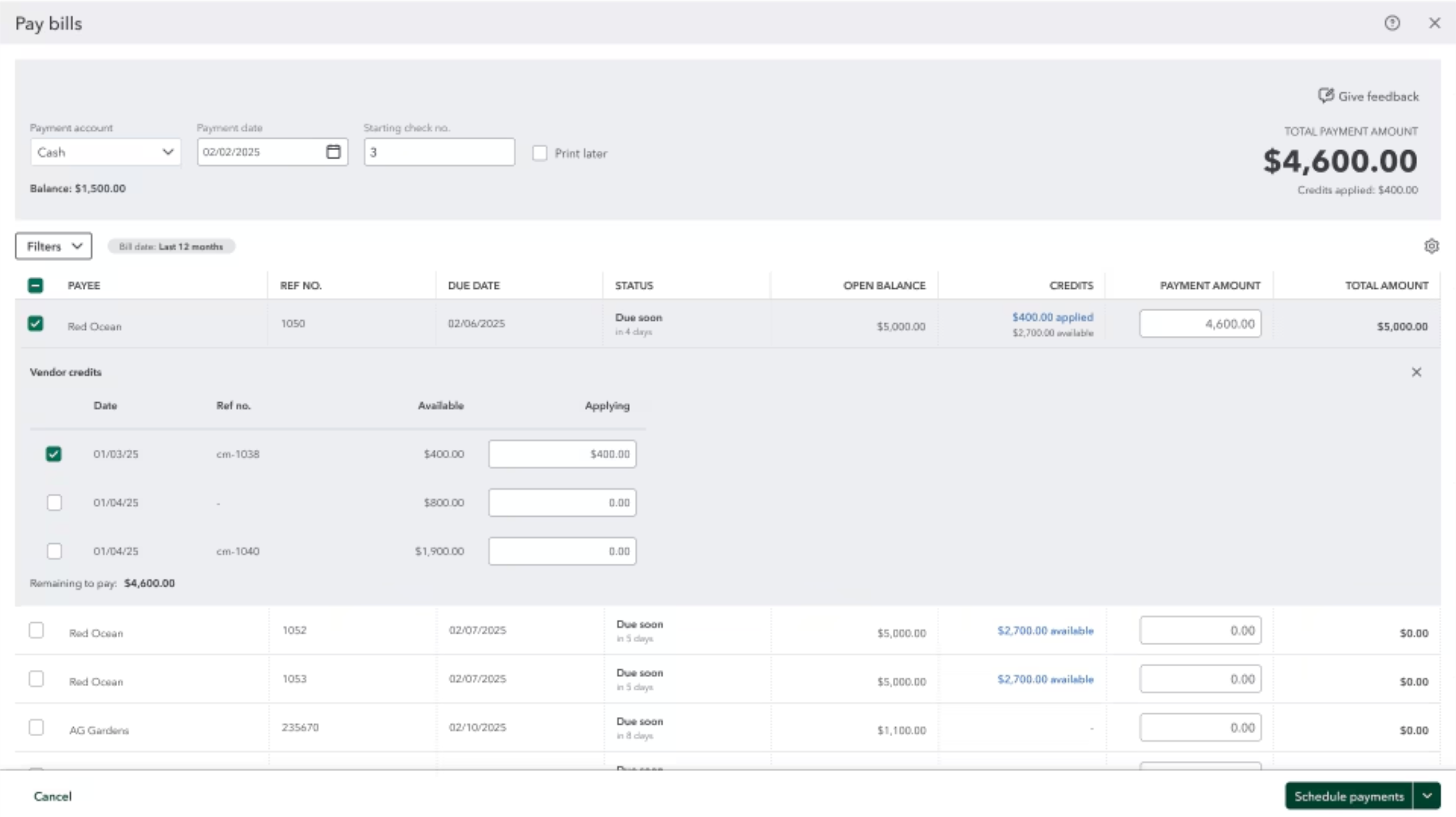
QuickBooks Adds Vendor Credits, Payroll Uploads, and Job Costing Controls
QuickBooks adds vendor credit application during Bill Pay, CSV and Excel payroll uploads through Intuit Intelligence, and service-item classification across employee hours and paychecks. These updates improve payment handling, payroll preparation, and job costing across customers, projects, and other dimensions. Highlights include:
- Vendor Credits in Bill Pay: Apply selected vendor credits while scheduling a payment and show applied credits on remittance advice.
- Spreadsheet Payroll Uploads: Upload CSV or Excel payroll data for Intuit Intelligence to extract, review, and add to payroll.
- Service Item Tracking: Classify employee hours by service item and carry those details into payroll and job costing reports.
- Split Paycheck Allocation: Divide a single paycheck across multiple service items when labor spans different work.
- Payroll Adjustments: Edit or reassign service items while running payroll or correcting a paycheck.
Visit QuickBooks Online’s official site for more details.
 Opens new window
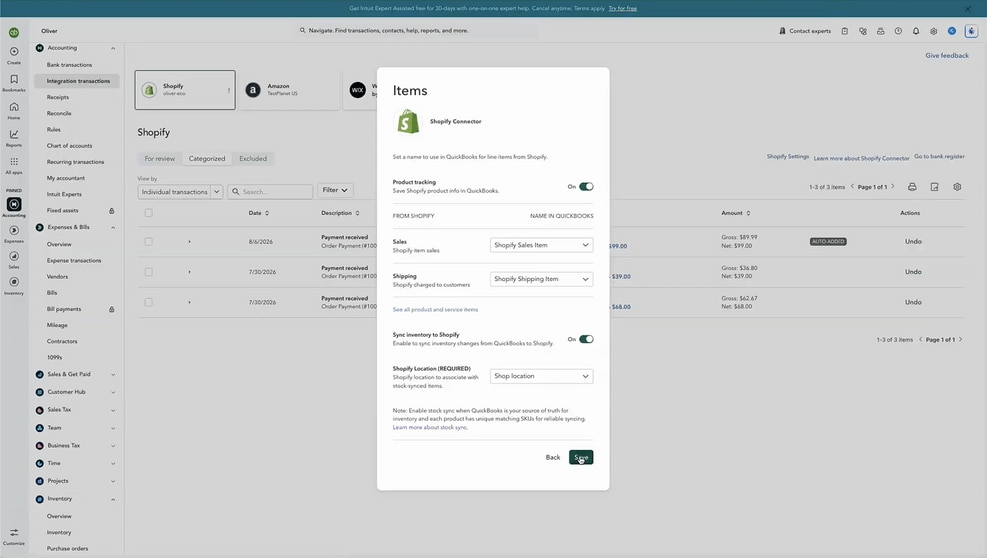
QuickBooks Online Adds Two-Way Shopify Inventory Sync
QuickBooks Online now syncs inventory changes between QuickBooks and Shopify as purchases and sales occur. Stock updates from purchase orders, sales receipts, and invoices flow across both systems with audit visibility in Shopify. Highlights include:
- Two-Way Inventory Sync: Keeps QuickBooks Online and Shopify inventory aligned automatically.
- Purchase Order Updates: Syncs received stock to Shopify, including partial shipments.
- Sales Order Sync: Imports Shopify orders into QuickBooks as sales receipts or invoices.
- Inventory Accounting: Updates on-hand quantities, cost of goods sold, and inventory asset values.
- Source of Truth: Keeps QuickBooks as the primary inventory record.
- Audit Trail: Records QuickBooks inventory adjustments in Shopify’s audit log.
Visit QuickBooks Online’s official site for more details.
 Opens new window
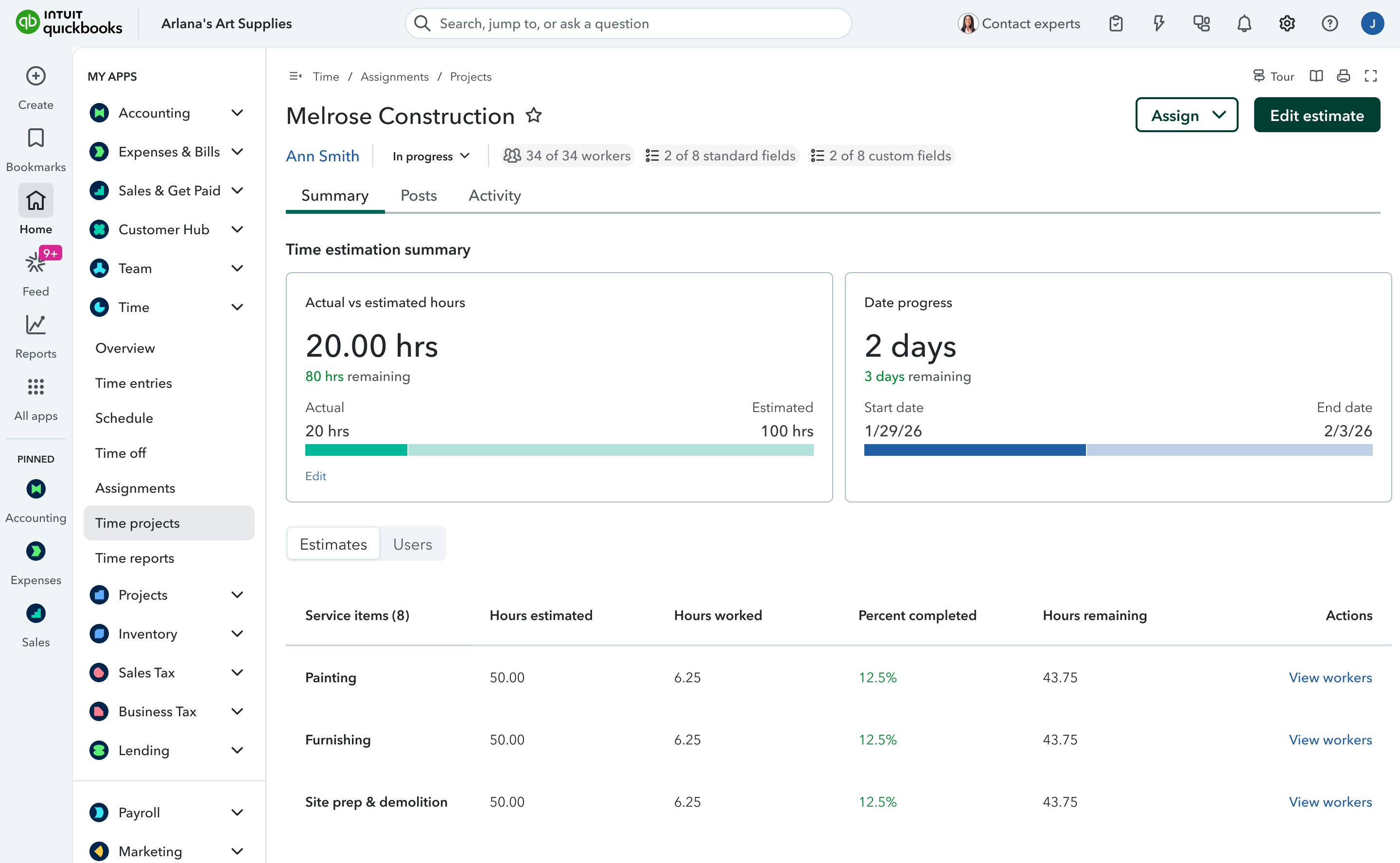
QuickBooks Time Now Built Into QuickBooks Online
QuickBooks Online now has QuickBooks Time rebuilt directly inside the product, delivering a more seamless way to track time and connect it to payroll and accounting. This reduces switching between tools and helps ensure time data flows through your books with fewer gaps and delays. Highlights include:
- Built-In Time Tracking: Brings QuickBooks Time functionality directly into QuickBooks Online for managing timekeeping and scheduling.
- Real-Time Data Connection: Keeps time, payroll, and accounting data connected without manual imports, exports, or syncing.
- Integrated Payroll Workflows: Automatically carries tracked hours into payroll and related QuickBooks workflows.
Visit QuickBooks Online's official site for more details.
 Opens new window
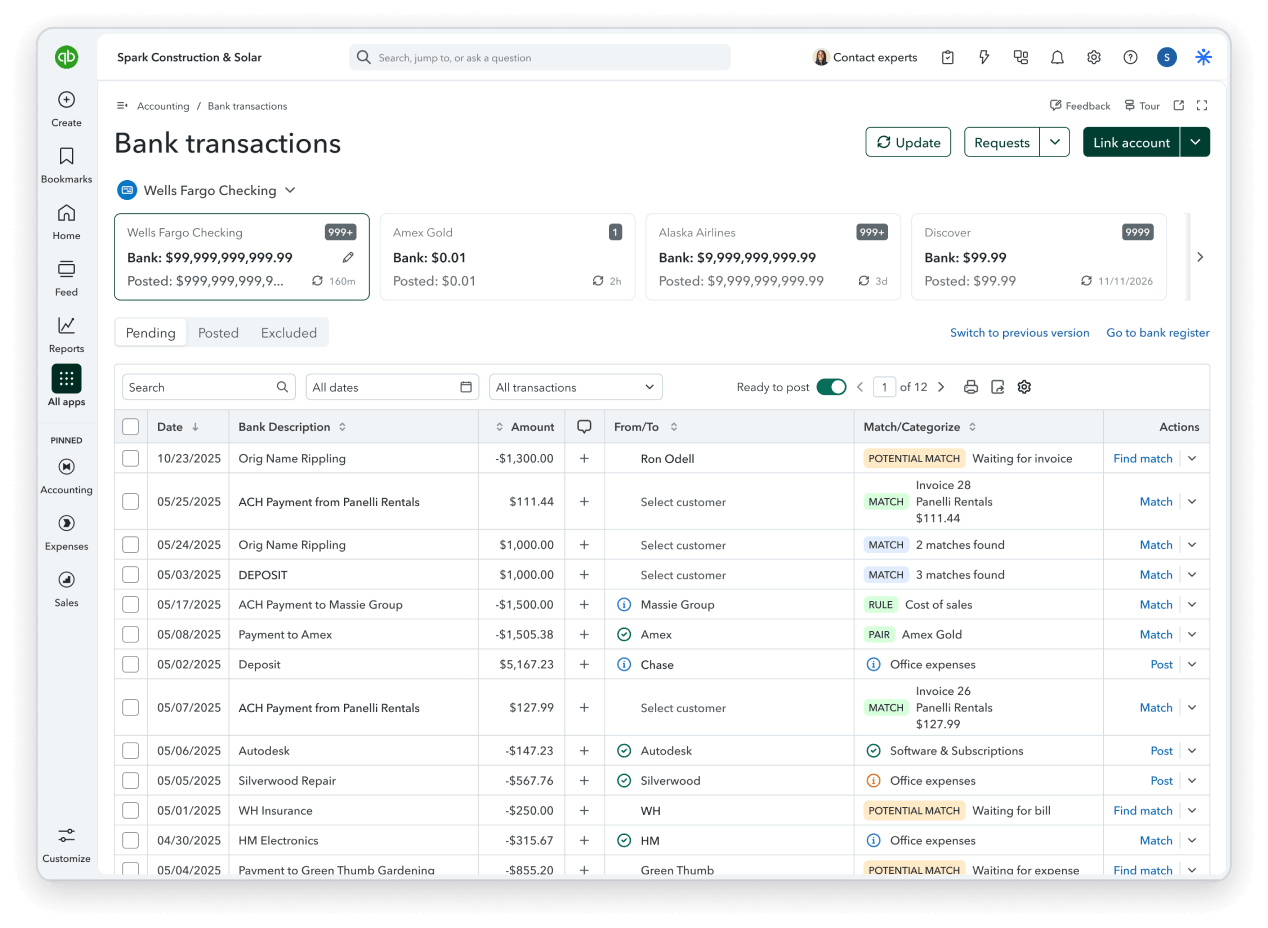
QuickBooks Online Adds Smarter Automation, Banking, and Bill Pay
QuickBooks Online now supports AI-powered invoice drafting and custom automations created through plain-language instructions, while banking updates improve transaction matching and reconciliation safeguards. Bill Pay also requires fewer steps, with additional improvements to reports, bank connections, and mobile workflows. Highlights include:
- Custom Automations: Lets users create scheduled workflows through Intuit Intelligence using plain-language instructions.
- Invoice Automation: Drafts invoices from saved documents and prepares reminders for review.
- Bank Matching: Surfaces likely transaction matches first and expands the search window for delayed or batched payments.
- Reconciliation Controls: Flags changes to reconciled transactions before they affect balances.
- Bill Pay Improvements: Reduces steps in the payment flow and removes check as the default payment method.
- Reporting and Reliability: Improves reports, bank connections, receipt capture, mileage tracking, and mobile stability.
Visit QuickBooks Online’s official site for more details.
QuickBooks Online Adds AI Payments and Affirm BNPL
QuickBooks Online adds Payments with AI, Affirm BNPL, and enhancements to Bill Pay Elite. Payments with AI introduces more intelligent support for payment workflows, while Affirm BNPL gives customers another way to pay over time. Bill Pay Elite also receives updates aimed at making bill management and payment processing more efficient. Highlights include:
- Payments with AI: Adds AI-powered capabilities to help businesses manage payment-related tasks more efficiently.
- Affirm BNPL: Gives eligible customers a buy now, pay later option when making payments.
- Bill Pay Elite: Adds enhancements to the premium bill payment experience.
Visit QuickBooks Online’s official site for more details.
 Opens new window
QuickBooks Adds Lending Overview With Real-Time Eligibility Insights
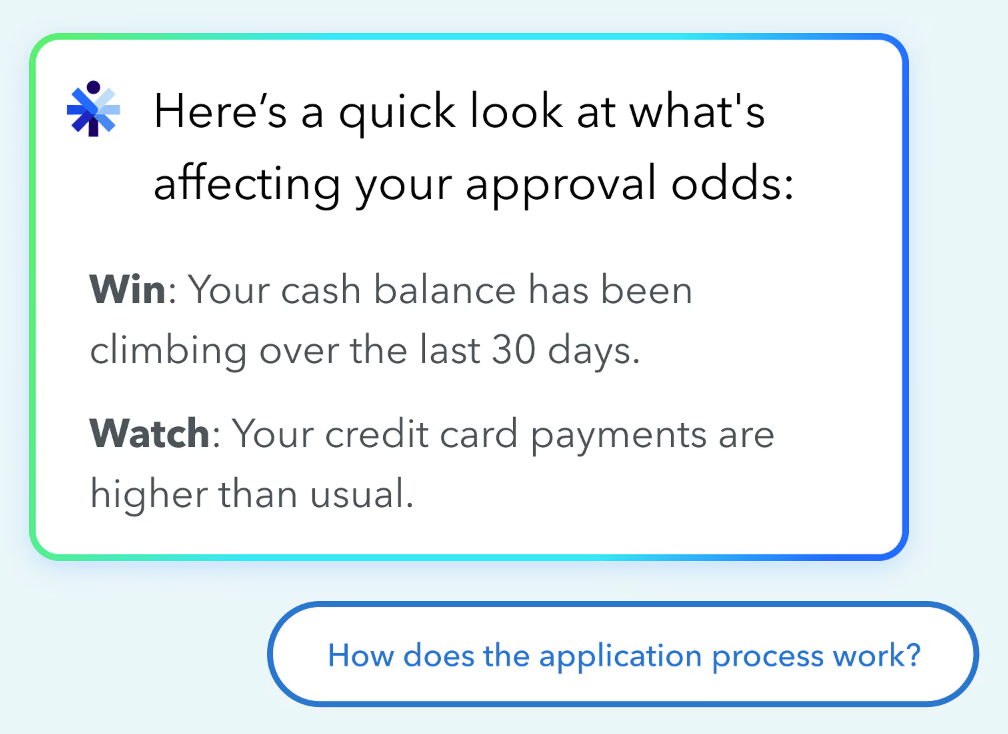
QuickBooks adds Lending Overview and real-time lending eligibility insights, giving businesses a clearer view of how lenders may assess their financial health. These updates help users identify approval factors, review potential funding options, and plan financing decisions earlier. Highlights include:
- Lending Overview: Shows real-time insights into business lending health, approval factors, and potential financing options.
- Intuit Intelligence: Explains which financial factors may help or hurt approval chances using QuickBooks data.
- Funding Options: Surfaces potential loans, credit lines, and other financing offers directly within QuickBooks for eligible users.
Visit QuickBooks Online’s official site for more details.
QuickBooks Online Advanced Adds AI Automation and Growth Tools
QuickBooks Online Advanced adds Bill Pay Elite, Construction Financials, Enhanced Project Financials, Books Upkeep, Conversational Forecasting, and Two-Way Spreadsheet Sync, bringing more accounting, project management, and reporting capabilities into a single platform. These updates reduce manual work, improve financial visibility, and help businesses manage operations more efficiently. Highlights include:
- Bill Pay Elite: Manage bill payments, approvals, 1099 filing, and vendor payments directly within QuickBooks Online Advanced.
- Construction Financials: Track job costs, budgets, change orders, and profitability in a unified workflow.
- Enhanced Project Financials: Monitor budgets, margins, and project performance with AI-assisted project management tools.
- Books Upkeep: Uses AI to automate bookkeeping tasks, surface exceptions, and keep books current throughout the month.
- Conversational Forecasting: Lets users ask natural-language questions to analyze scenarios and forecast business performance.
- Two-Way Spreadsheet Sync: Syncs transactions, budgets, and reports between QuickBooks and Excel to reduce manual data entry.
Visit QuickBooks Online's official site for more details.
 Opens new window
QuickBooks Adds AI Bank Feeds, Payroll Tools, and Built-In Time Tracking
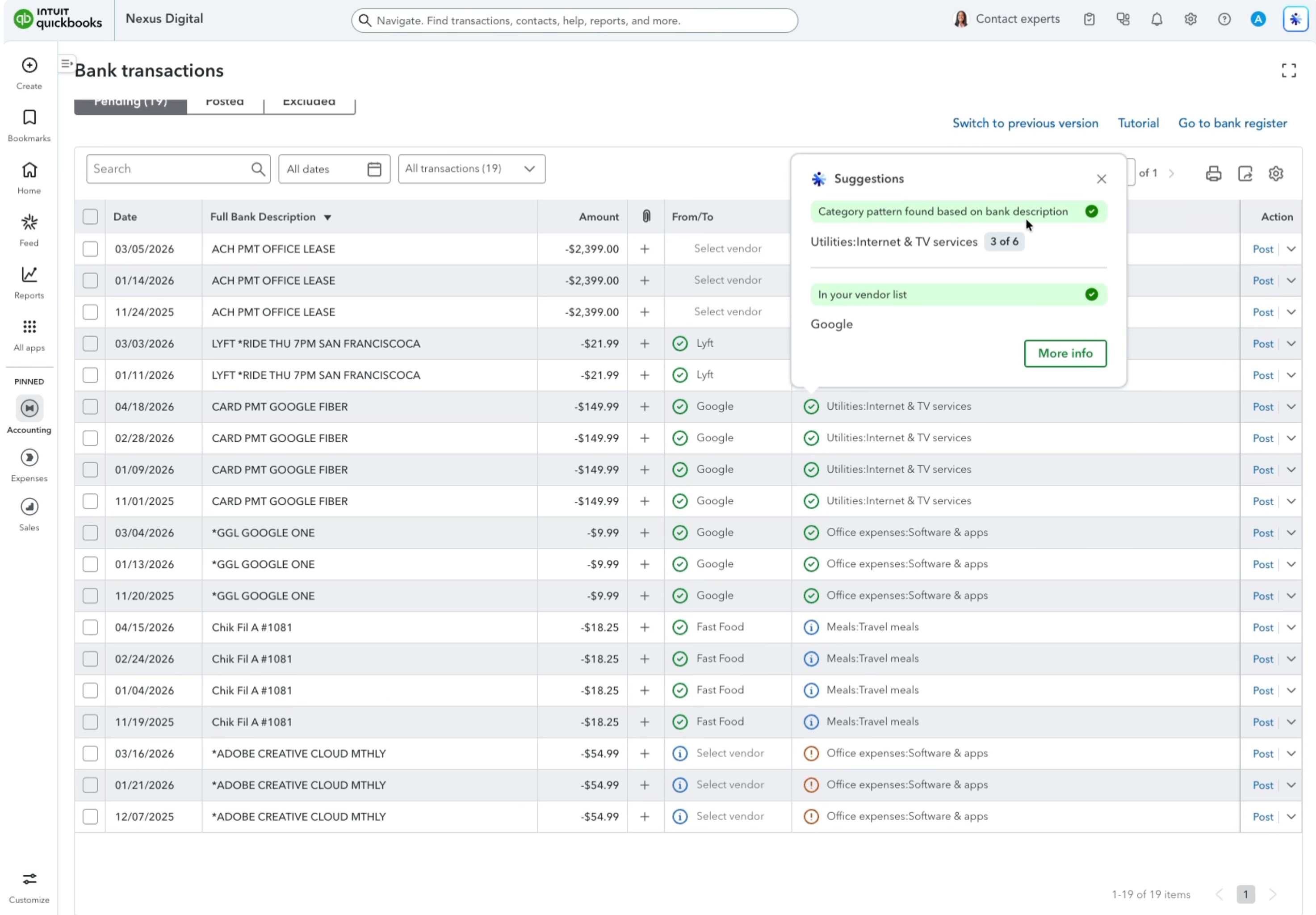
QuickBooks has added AI bank feed review signals, payroll updates, and QuickBooks Time integration to simplify financial and team management tasks. These updates help businesses improve transaction accuracy, streamline payroll processes, and reduce tool switching. Highlights include:
- AI Bank Feed Review Signals: Identify transactions that need attention with improved AI suggestions, review indicators, and inline editing.
- Payroll Management Updates: Create certified payroll reports and submit payroll tax amendments faster through QuickBooks Workforce.
- Built-In Time Tracking: Access QuickBooks Time features directly in QuickBooks Online for timekeeping, scheduling, and team management.
Visit QuickBooks’ official site for more details.
 Opens new window
QuickBooks Online Adds Smarter Automation and Payment Options
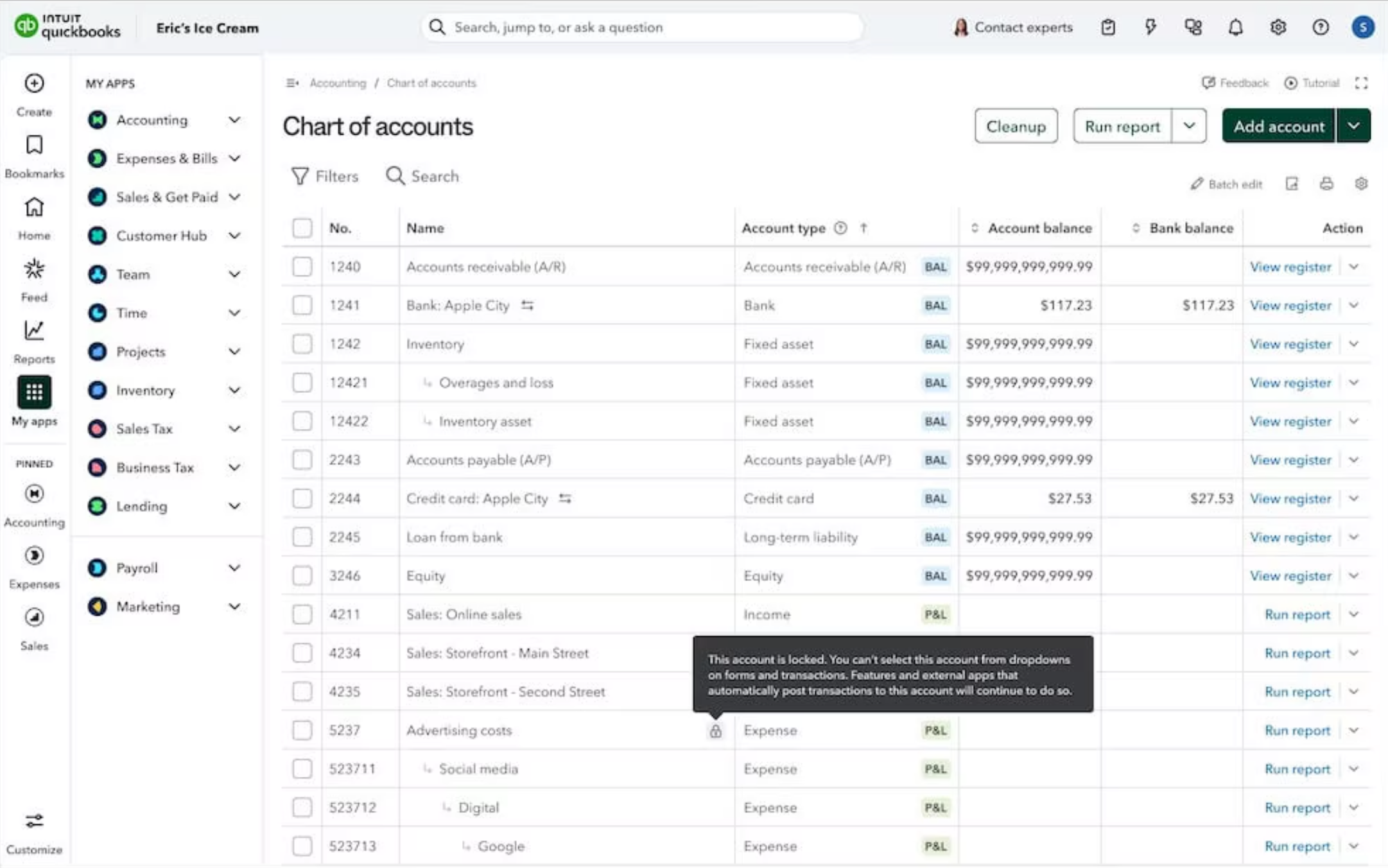
QuickBooks Online adds recurring bill autopay, Affirm buy now pay later for invoices, and account locking in the Chart of Accounts. These updates help businesses reduce manual work, improve payment workflows, and prevent accounting errors. Highlights include:
- Bill Pay Autopay: Users can automate recurring bill payments with customizable schedules and free standard ACH payments.
- Affirm Integration: Businesses can offer buy now, pay later options for invoices while receiving payment upfront.
- Chart of Accounts Locking: Teams can lock parent accounts to prevent incorrect transaction postings and reduce manual corrections.
Visit QuickBooks Online’s official site for more details.
QuickBooks Online Specs
- 2-Factor Authentication: Yes
- Accounts Payable: Yes
- Accounts Receivable: Yes
- API: Yes
- Balance Sheet: Yes
- Billing/Invoicing: Yes
- BitCoin: Yes
- Budgeting: Yes
- Calendar Management: Yes
- Contact Management: Yes
- CRM Integration: Yes
- Customer Management: Yes
- Dashboard: Yes
- Data Export: Yes
- Data Import: Yes
- Data Visualization: Yes
- Expense Tracking: Yes
- External Integrations: Yes
- Forecasting: Yes
- General Account Ledger: Yes
- Inventory Tracking: Yes
- Multi-Currency: Yes
- Multi-User: Yes
- Notifications: Yes
- P&L: Yes
- PayPal: Yes
- Payroll: Yes
- SAP Integration: Yes
- Stripe: Yes
- Supplier Management: Yes
- Tax Management: Yes
Intuit QuickBooks Online Company Overview & History
QuickBooks Online is developed by Intuit Inc., a global financial software company headquartered in Mountain View, California. Intuit employs over 18,000 people worldwide and is publicly traded on the NASDAQ under the symbol INTU. In addition to QuickBooks, Intuit owns TurboTax, Mint, and Mailchimp, serving a wide range of clientele from freelancers and small business owners to mid-sized organizations. The company is widely recognized for its focus on financial technology innovation and has consistently been listed among leading employers in tech.
QuickBooks Online Major Milestones
- 1983: Intuit founded in Palo Alto, California
- 1992: The first version of Intuit’s QuickBooks Desktop was released for DOS
- 2003: Intuit QuickBooks Online officially launched as a cloud-based accounting platform
- 2010: QuickBooks Online passed 1 million global users
- 2021: Intuit acquired Mailchimp, expanding its marketing and commerce ecosystem