

Puuverstaan hallintaohjelmisto auttaa yhdistämään liiketoiminnan hallinnan, materiaalien hallinnan, kustannuslaskennan, aikataulutuksen ja tuotantoprosessit. Oikea ratkaisu riippuu siitä, miten työskentelet: jos pyörität pientä yritystä, saatat tarvita projektien seurantaa ja asiakkuudenhallintaa, kun taas kasvava valmistaja voi tarvita toiminnanohjausjärjestelmän, joka yhdistää varaston, hankinnan ja tuotantotilan. Tässä oppaassa vertailen puunjalostusteollisuudelle suunniteltuja työkaluja kattavista toiminnanohjausohjelmistoista erityisiin kaapistojen suunnittelu- ja CNC-sovelluksiin.
Miksi luottaa ohjelmistosuosituksiimme
6,700+
Reviews
20
Industry experts
16+
Evaluation factors
14
Years
Tiimimme on testannut ja arvioinut ohjelmistoja vuodesta 2012 lähtien. Julkaisijoina ja mediatoimijoina tiedämme itse, kuinka vaikeaa — ja tärkeää — oikean ohjelmiston valitseminen on.
Tätä opasta varten arvioimme työkaluja käytännön testauksen ja itsenäisen tutkimuksen avulla, pisteyttäen työkalut valintakriteeriemme perusteella.
Arvostelumme perustuvat inhimilliseen toimitukselliseen harkintaamme, eivät myyntipuheeseen.
Vertailutaulukko: puuverstaan hallintaohjelmistot
Vertaa tähän listaukseen päätyneiden puuverstaan hallintaohjelmistojen hintoja ja teknisiä tietoja rinnakkain.
| Tool | Best For | Trial Info | Price | ||
|---|---|---|---|---|---|
| 1 | Best for automatic cut lists and reports | 14-day free trial available | From $49.99/month (billed annually) | Website | |
| 2 | Best for customizable millwork workflows | Free demo available | Pricing upon request | Website | |
| 3 | Best for visual lead-to-install tracking | 14-day free trial available | From $199/month | Website | |
| 4 | Best for mobile cabinet shop operations | No free trial available | Pricing upon request | Website | |
| 5 | Best for browser-based CNC production | 7-day free trial available | From $110/month | Website | |
| 6 | Best for online custom-product ordering | Free demo available | Pricing upon request | Website | |
| 7 | Best for identifying workflow bottlenecks | Free demo available | Pricing upon request | Website | |
| 8 | Best for bid-to-billing job control | Free demo available | Pricing upon request | Website | |
| 9 | Best for multi-site factory operations | Free demo available | Pricing upon request | Website | |
| 10 | Best for modular design-to-manufacture | Free demo available | Pricing upon request | Website |


Parhaiden puuverstaan hallintaohjelmistojen arviot
Alla ovat yksityiskohtaiset yhteenvetoni parhaista puuverstaan hallintaohjelmistoista, jotka päätyivät tähän listaukseen. Arvioni tarjoavat yksityiskohtaisen katsauksen kunkin ohjelmiston ominaisuuksiin, parhaisiin käyttötarkoituksiin ja integraatioihin, jotta löydät itsellesi parhaiten sopivan vaihtoehdon.
 Best for automatic cut lists and reports
- 14-day free trial available
- From $49.99/month (billed annually)
Visit WebsiteCustomer Rating:4.3/5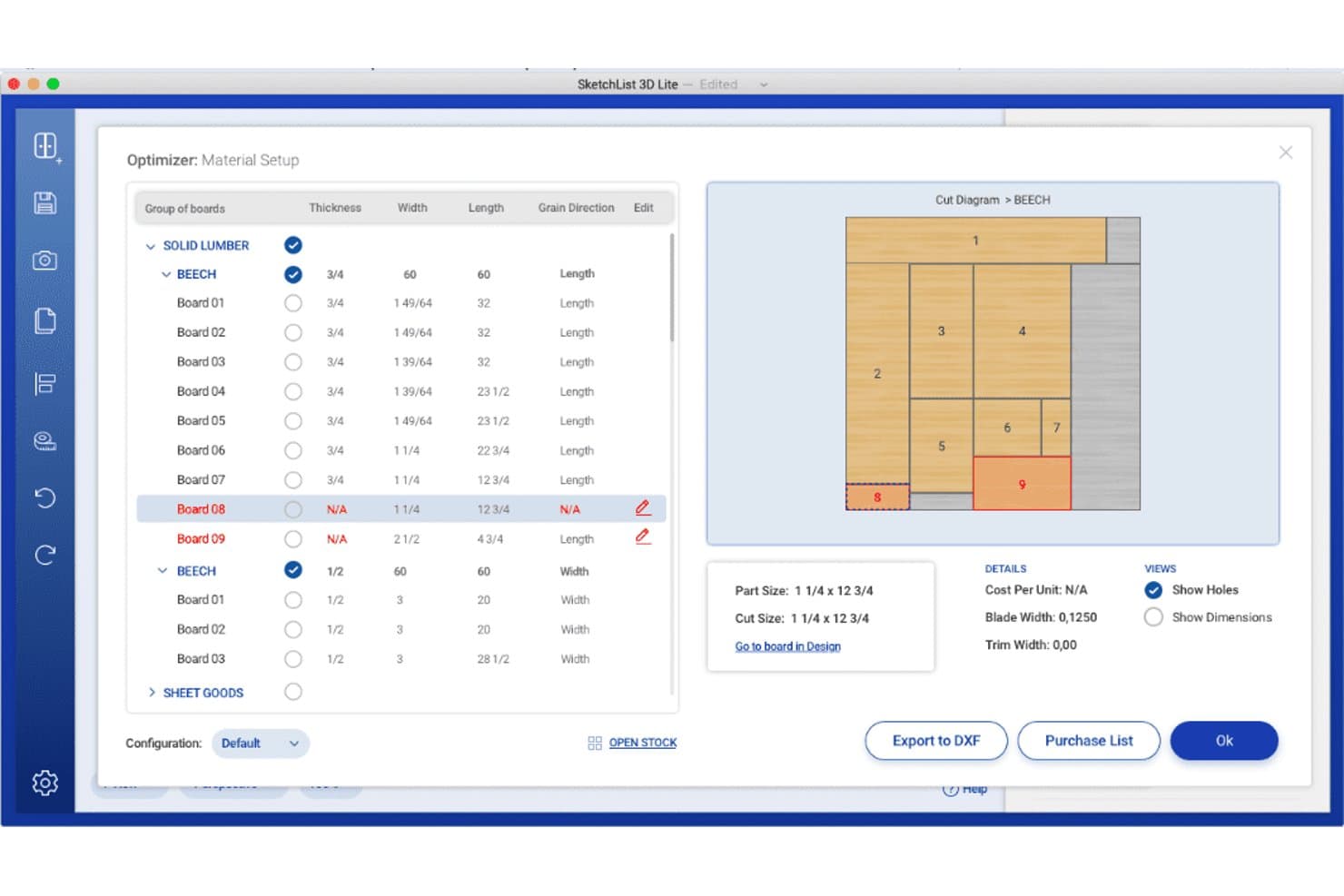
SketchList 3D offers a material optimizer with cut diagrams, board grouping, grain direction settings, and export options for wood shop planning. SketchList 3D is a woodworking design tool built for cabinet makers that combines 3D visualization, automatic cut list generation, bill of materials reporting, and job cost estimation.
Who Is SketchList 3D Best For?
SketchList 3D is a good fit for independent cabinet makers and small custom woodworking shops that need design-to-cut-list workflows without full CAD complexity.
Why I Picked SketchList 3D
I picked SketchList 3D because it keeps your cut lists, bills of materials, cost information, drawings, and material layouts aligned with design changes. You can export reports as PDF or CSV and hand DXF files off to separate CAM software for CNC programming. However, you’ll need another application to generate G-code because SketchList is a design and planning tool rather than a CAM system.
SketchList 3D Key Features
- Cabinet Wizard: Lets you adjust over 70 cabinet parameters including dimensions, joinery, door styles, and materials.
- Shop drawings and elevations: Auto-generates detailed shop drawings and 2D elevations from your design.
- Pre-built materials library: Includes reusable materials, hardware, and contour templates for fast configuration.
- Real-time 3D visualization: Displays project designs in realistic 3D with photo background import for client spaces.
SketchList 3D Integrations
SketchList 3D offers native integrations with CNC routers through DXF file export and supports CAD tool integration using the same DXF format. CSV and PDF exports are available for shop floor workflows. Native integrations with other software vendors are not clearly documented.
Pros and Cons
Pros:
- Outputs shop drawings and detailed elevation views
- Instant cut list and BOM updates from designs
- Cabinet Wizard with extensive customization options
Cons:
- Lacks customer order and job scheduling tools
- No lumber or hardware inventory management
Learn more about SketchList 3D: Best for customizable millwork workflows
- Free demo available
- Pricing upon request
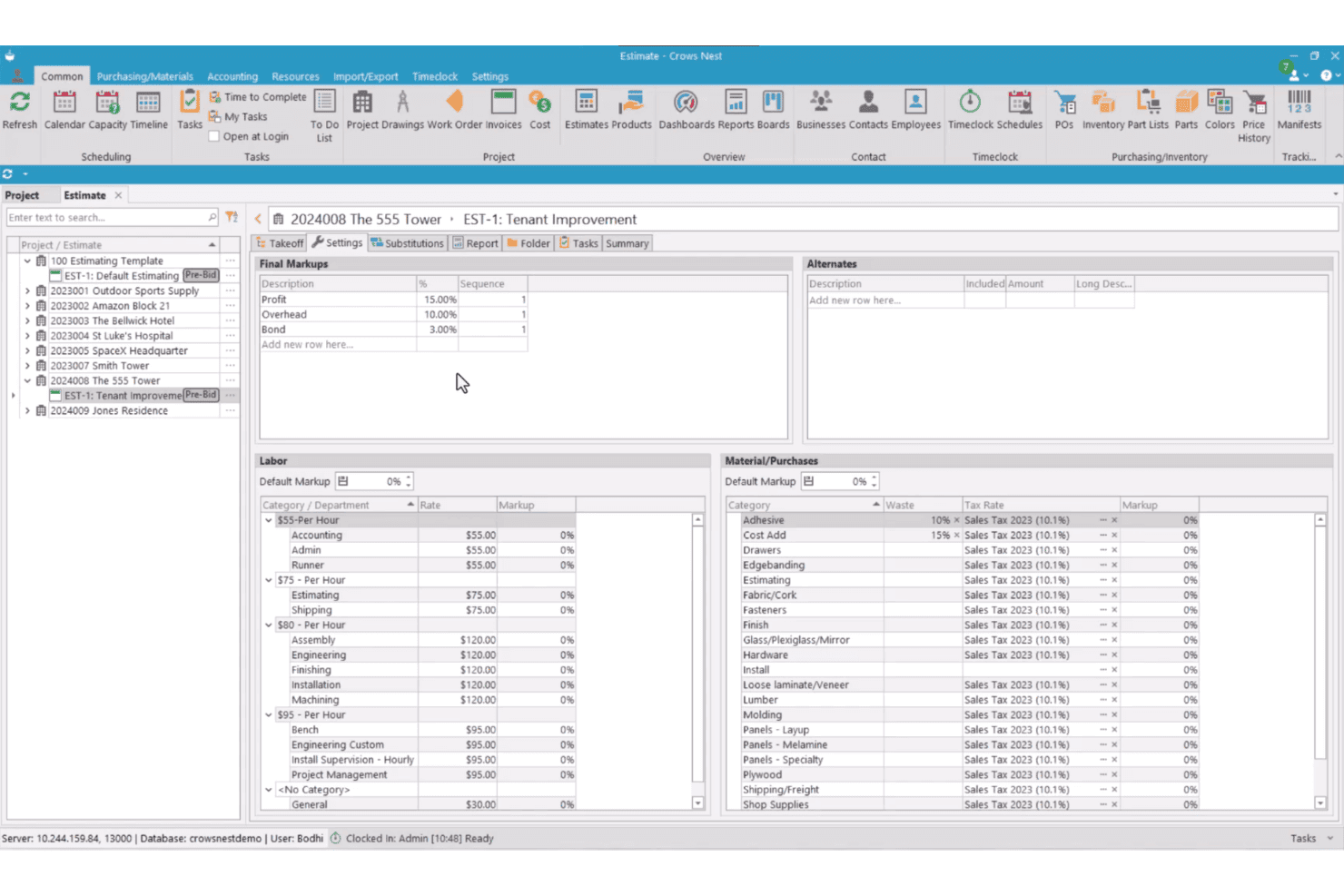
Crows Nest features an estimate settings screen with labor rates, material categories, tax rates, and final markups for a tenant improvement project. Crows Nest is a modular ERP and project management platform built for millwork and cabinet shops, covering estimating, job costing, production scheduling, purchasing, and inventory from a single system.
Who Is Crows Nest Best For?
Crows Nest suits project-based millwork and architectural woodworking shops that need a configurable ERP without being forced into a rigid, one-size-fits-all system.
Why I Picked Crows Nest
I picked Crows Nest because you can configure its workflows, dashboards, reports, and modules around your existing operations. Its Task Management engine can trigger and assign a task when a predecessor is completed, with due dates tied to project milestones. You also get more than 300 standard report layouts and tools for creating custom reports and dashboards.
Crows Nest Key Features
- Dynamic estimating module: Generate detailed takeoffs, apply vendor material pricing, and create alternate quotes for custom jobs.
- Integrated document management: Store, track, and share all project-related documents, drawings, and revisions in one place.
- Production work order management: Create and manage production work orders with scheduling and shop labor tracking.
- Mobile inventory management: Use mobile devices for real-time inventory updates, receiving purchase orders, and tracking manifests on the shop floor.
Crows Nest Integrations
Crows Nest offers native integrations with QuickBooks, Sage, Xero, Microvellum, and CabinetVision. An API is available for custom integrations.
Pros and Cons
Pros:
- Built-in document and drawing management system
- Comprehensive job costing and tracking tools
- Highly customizable workflow modules for unique shops
Cons:
- Reliance on third-party tools for cut lists
- No retail point of sale features
Learn more about Crows Nest: Best for visual lead-to-install tracking
- 14-day free trial available
- From $199/month
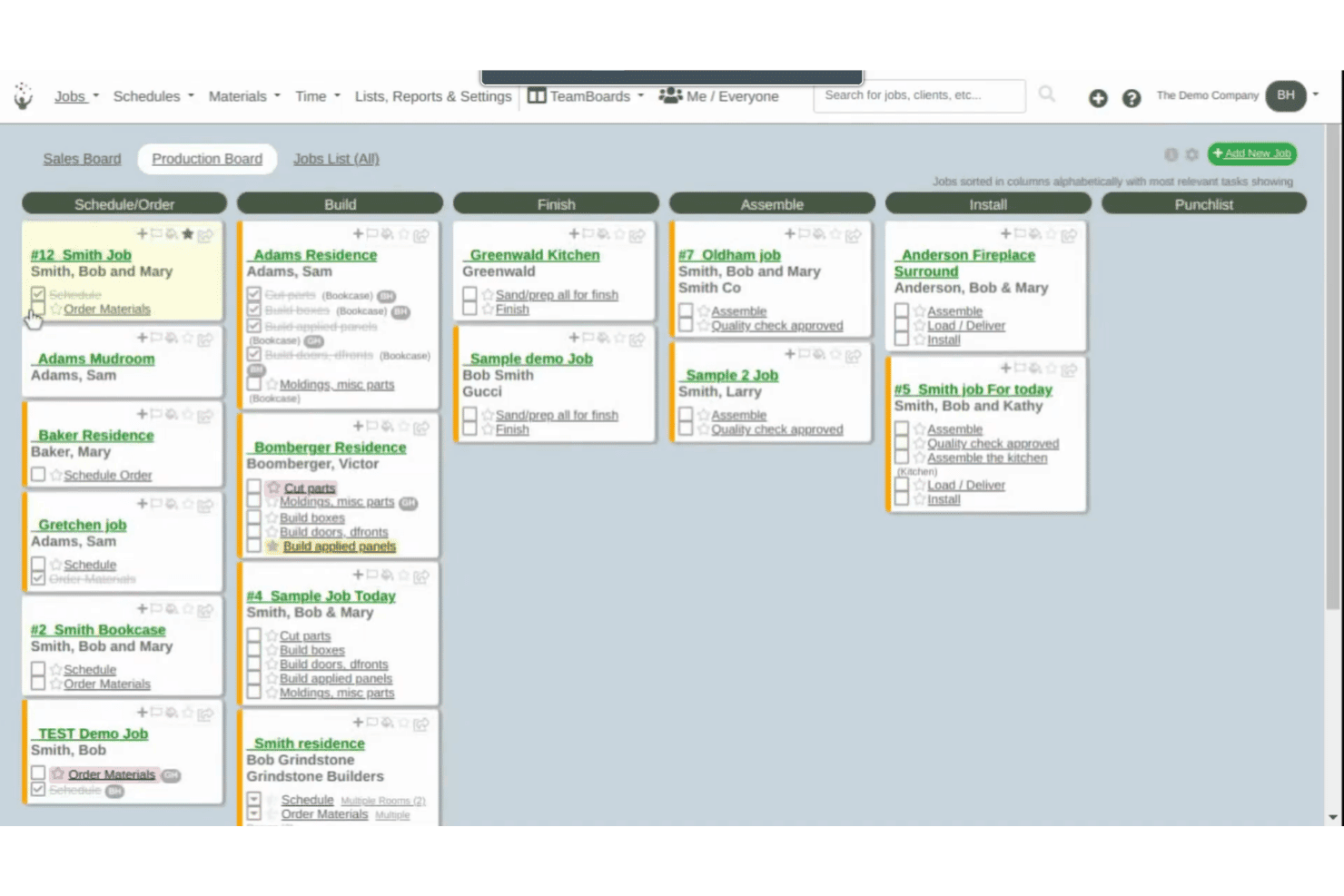
Cabinetshop Maestro offers a Kanban-style Production Board that organizes cabinet jobs across workflow stages including Build, Finish, Assemble, Install, and Punchlist. Cabinetshop Maestro is a project management tool built specifically for cabinet shops, covering job tracking, scheduling, proposals, invoicing, time tracking, and job costing across the full project lifecycle.
Who Is Cabinetshop Maestro Best For?
It's a strong fit for small to mid-sized custom cabinet shops that need a simple, shop-specific system to manage jobs from first contact through installation.
Why I Picked Cabinetshop Maestro
I picked Cabinetshop Maestro because its visual workflow boards show you where every active job sits from lead through installation. Each job also has a centralized folder for project details, files, notes, tasks, discussions, and scheduling information. This gives you a clearer operational view without requiring a full manufacturing ERP.
Cabinetshop Maestro Key Features
- Job scheduling and calendars: Plan jobs and assign due dates across the team’s calendar view.
- Proposals and invoicing: Build estimates and send invoices directly from within the platform.
- Labor time tracking: Log work hours by job and task for accurate cost records.
- Job costing reports: View real job costs against estimates using built-in reporting tools.
Cabinetshop Maestro Integrations
Native integrations are not clearly documented. Cabinetshop Maestro does not integrate directly with QuickBooks or design software like Cabinet Vision, Mozaik, or SketchUp, and it does not offer an API for custom integrations.
Pros and Cons
Pros:
- Built for cabinet shop project tracking
- Easy drag-and-drop job scheduling
- Visual workflow boards for job progress
Cons:
- No cut list or BOM generation
- No inventory management or material tracking
Learn more about Cabinetshop Maestro: Best for mobile cabinet shop operations
- No free trial available
- Pricing upon request
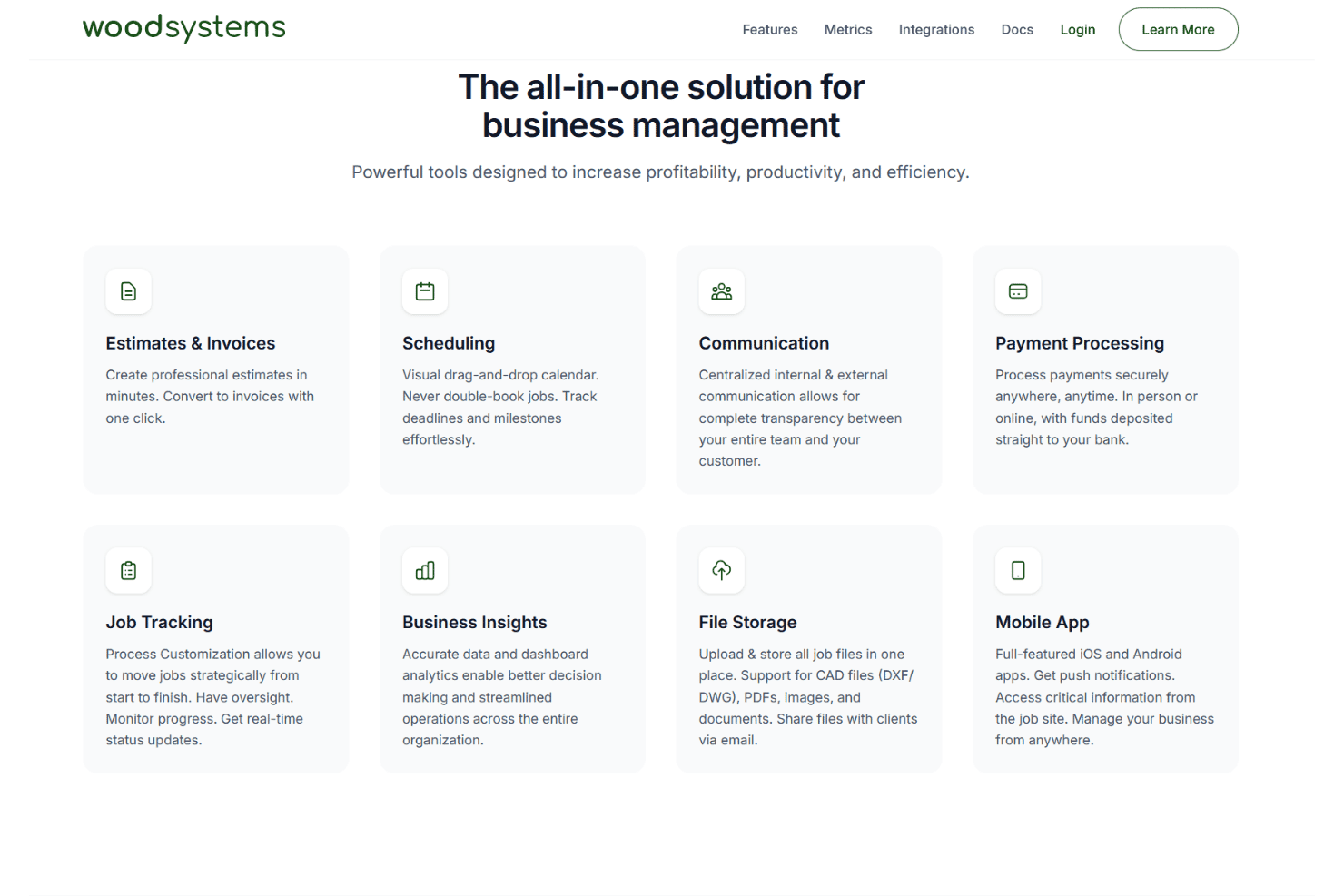
Woodsystems offers an all-in-one business management platform featuring estimates, scheduling, communication, payment processing, job tracking, business insights, file storage, and a mobile app. Woodsystems is a cloud-based ERP for custom cabinet and woodworking shops that combines estimating, job tracking, scheduling, payments, and client communication in a single platform with native mobile apps.
Who Is Woodsystems Best For?
Woodsystems is a good fit for custom cabinet shop owners who need to manage jobs, quotes, and client communication from a mobile device on the go.
Why I Picked Woodsystems
I picked Woodsystems because you can access estimates, invoices, scheduling, job tracking, files, payments, and customer communication through its web, iOS, and Android applications. Its mobile apps support push notifications and let you manage job information away from the office. You can also convert estimates to invoices without re-entering the project details.
Woodsystems Key Features
- Drag-and-drop scheduling calendar: Visually manage project timelines, shop deadlines, and installation appointments.
- QuickBooks integration: Sync job and financial data with your existing accounting system.
- CAD file storage and sharing: Attach DXF and DWG files directly to jobs and email them to clients.
- Centralized email integration: Send estimates and invoices from your Gmail, Outlook, or Microsoft 365 account.
Woodsystems Integrations
Woodsystems offers native integrations with Gmail, Outlook, Google Drive, OneDrive, Dropbox, QuickBooks, Microsoft 365, and Stripe.
Pros and Cons
Pros:
- Easy CAD file sharing with clients
- Visual scheduling for shop projects and installs
- Mobile apps allow on-site job management
Cons:
- Does not generate cut lists or BOMs
- No lumber or materials inventory tracking
Learn more about Woodsystems: Best for browser-based CNC production
- 7-day free trial available
- From $110/month
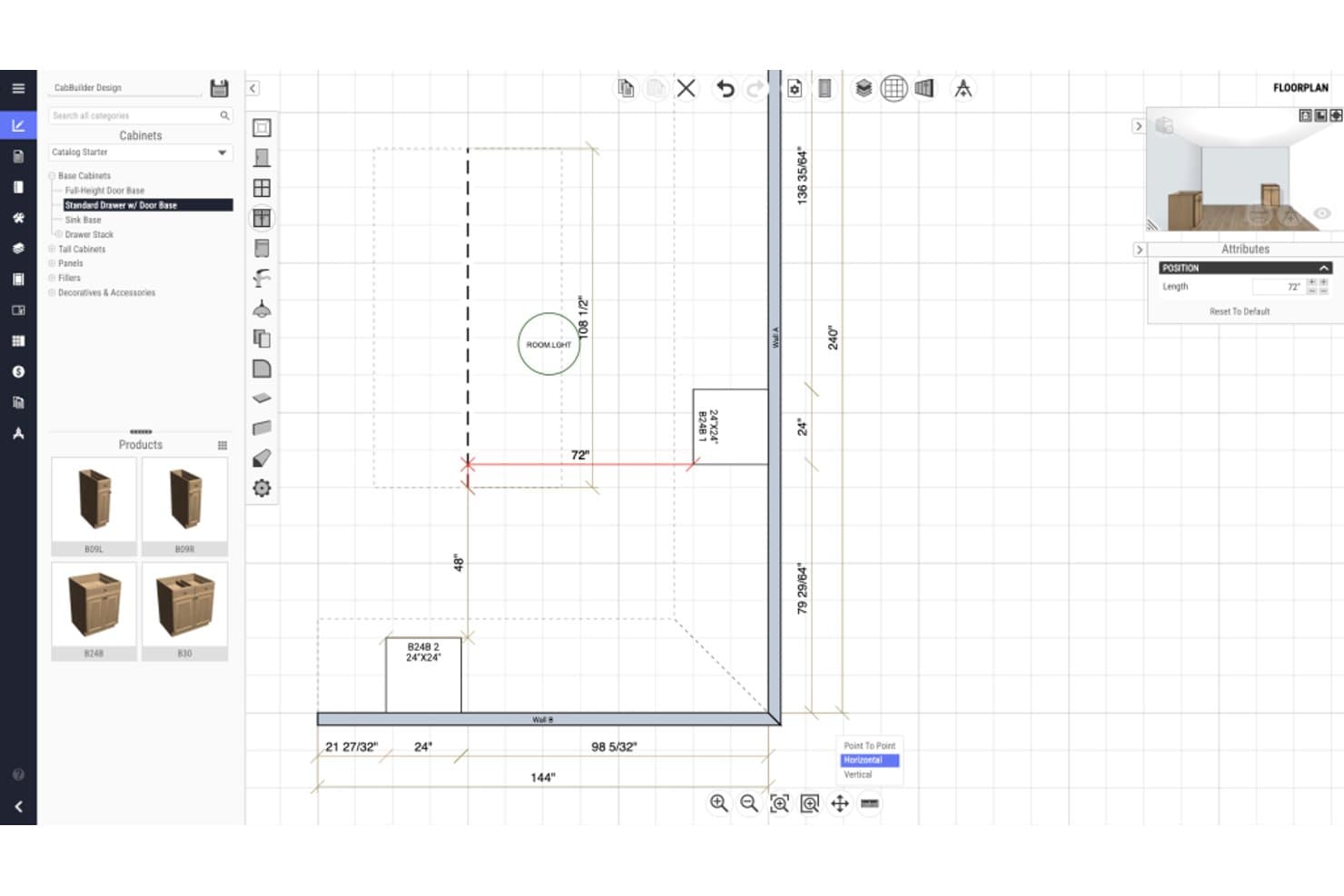
CabBuilder offers a floorplan design view where users can input and visualize cabinet dimensions with precise measurements in a 2D layout. CabBuilder is a browser-based cabinet design and CNC production tool that generates 3D designs, cutlists, optimized part nesting, and machine-ready CNC code for custom cabinet and woodworking manufacturers.
Who Is CabBuilder Best For?
CabBuilder suits small to mid-sized custom cabinet shops that need a direct path from design to CNC machine output without a full ERP system.
Why I Picked CabBuilder
I picked CabBuilder because it gives you cabinet design and production tools through a browser-compatible interface that works across Windows, macOS, iPad, and other tablets. With the CNC or Enterprise plan, you can nest cut-list parts, generate machine code through a CNC-specific post processor, and simulate toolpaths before cutting. The Pro plan focuses on cut lists and manual production rather than direct CNC output.
CabBuilder Key Features
- 3D design rendering: View and modify cabinet designs with instant updates in a real-time 3D workspace.
- Custom cabinet library: Access and build a library of framed and frameless cabinet templates for reuse across projects.
- Automated job reports: Generate detailed job and cost reports directly from your project specifications and design files.
- Door Builder module: Specify custom door profiles and produce cutlists and CNC code for doors and drawer fronts.
CabBuilder Integrations
CabBuilder offers native integrations with ProKitchen and supports CNC hardware through a free post processor. Native integrations with other business software are not clearly documented.
Pros and Cons
Pros:
- Custom cabinet and construction template library
- Strong 3D cabinet design and cutlist tools
- Browser-based direct CNC code generation
Cons:
- Lacks production scheduling and job tracking
- No lumber inventory management module
Learn more about CabBuilder:
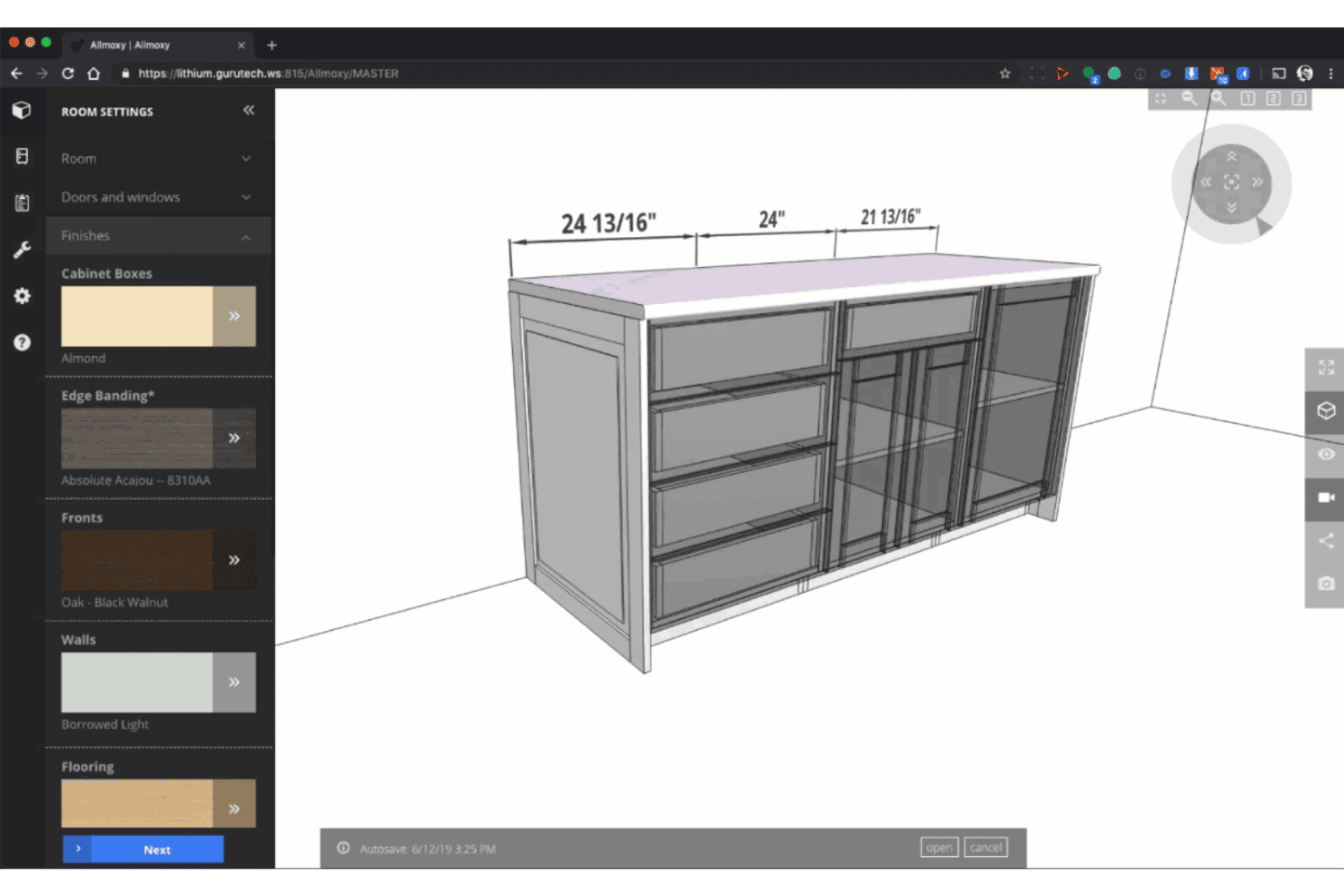
Allmoxy offers a 3D cabinet design tool with customizable finishes, edge banding, and material settings for furniture configuration. Allmoxy is a cloud-based ERP built for custom wood product manufacturers, combining online order configuration, cut list generation, production data automation, and supply and inventory management in one platform.
Who Is Allmoxy Best For?
Allmoxy is a strong fit for cabinet door, drawer, and component manufacturers that sell through wholesale dealer networks and need self-serve B2B ordering.
Why I Picked Allmoxy
I picked Allmoxy because it supports online configuration and ecommerce ordering for custom cabinetry and components. You can give customers or dealers access to catalogs, pricing, orders, invoices, and status updates through an online portal. Orders can then feed automated production data, including parts lists, cut lists, labels, and machine-data exports.
Allmoxy Key Features
- Workflow automation triggers: Automatically notify teams and customers when jobs move through specific workflow stages.
- Supply and inventory management: Manage materials, track stock levels, and control supplier relationships from the same system.
- Integrated invoice and accounting tools: Create invoices, process payments, and handle accounting activities within the platform.
- Customer portal access: Give customers real-time access to order statuses, invoices, and delivery updates through a secure online portal.
Allmoxy Integrations
Allmoxy offers native integrations with Microvellum, ClosetPro, TigerStop, Cabinet Vision, and CadCode. An API is also available for custom integrations.
Pros and Cons
Pros:
- Dealer portal supports repeat B2B ordering
- Auto-generates machine-ready cut lists
- Purpose-built for cabinet and component orders
Cons:
- No built-in shop floor production scheduling
- Limited job costing and profitability reporting
Learn more about Allmoxy: Best for identifying workflow bottlenecks
- Free demo available
- Pricing upon request
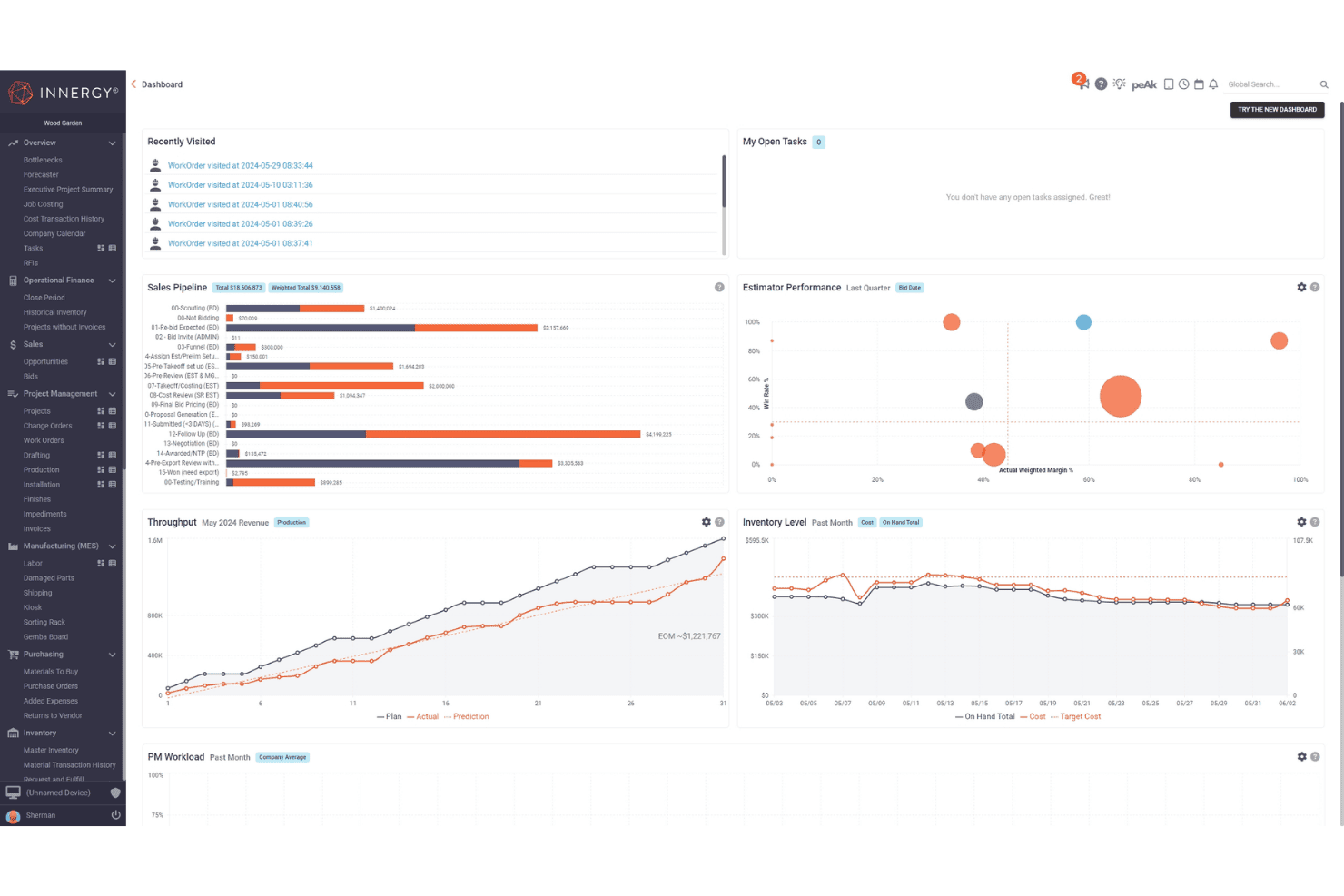
INNERGY offers a comprehensive project management dashboard featuring sales pipeline, throughput, inventory level, and estimator performance widgets. INNERGY is a cloud-based ERP built specifically for millwork and custom woodworking businesses, combining estimating, shop floor execution, job costing, project management, and production scheduling in one platform.
Who Is INNERGY Best For?
INNERGY is a strong fit for commercial millwork shops and custom cabinet producers that need end-to-end job tracking across sales, production, and installation.
Why I Picked INNERGY
I picked INNERGY because its Bottleneck Report helps you identify workflow constraints before they disrupt production. Its Throughput Widget uses that report to establish a monthly target and compare planned output with actual daily progress. This helps you spot slippage and decide where to adjust capacity.
INNERGY Key Features
- On-screen takeoff: Complete project takeoffs directly on digital blueprints with auto-calculating pricing.
- One-click bill of materials: Generate a detailed bill of materials from engineering design files with a single click.
- Integrated project management: Track project status, completion milestones, and invoicing in real time across teams.
- Job costing and payroll: Monitor actual and estimated job costs while running payroll and labor tracking from the same platform.
INNERGY Integrations
INNERGY offers native integrations with QuickBooks, Sage, NetSuite, and Microvellum, and provides an API for custom integrations.
Pros and Cons
Pros:
- Includes project estimating, costing, and scheduling
- Purpose-built for millwork and wood fabrication shops
- Bottleneck report pinpoints stalled production tasks
Cons:
- Limited lumber species inventory granularity
- No native CNC cut optimization tools
Learn more about INNERGY:
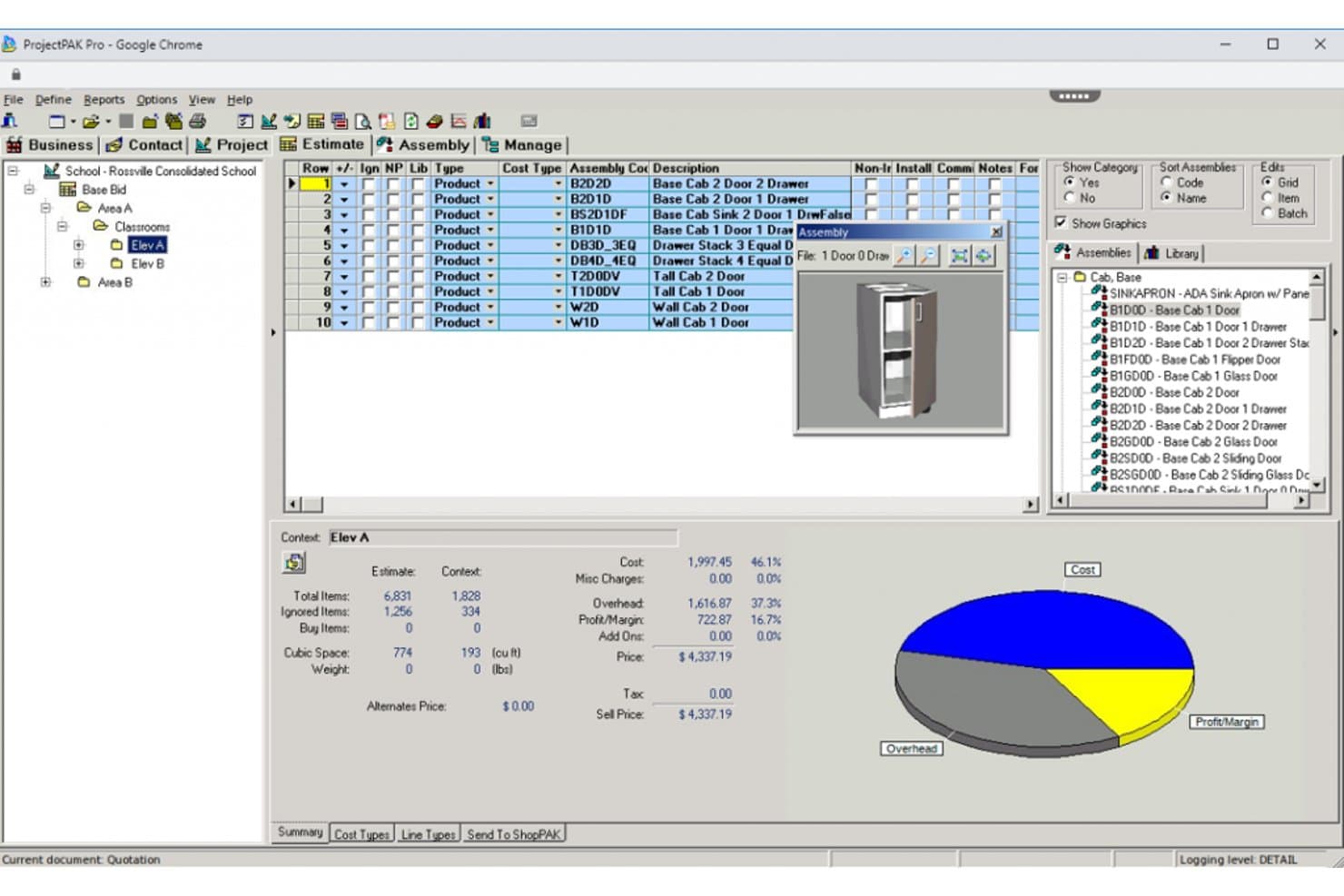
TradeSoft offers a wood shop management interface with assembly lists, 3D cabinet previews, cost breakdowns, and a pie chart showing overhead, cost, and profit margins. TradeSoft is a purpose-built estimating and job management platform for custom woodworking manufacturers, combining parametric estimating, shop floor job tracking, purchasing, inventory management, and progress billing in a single database.
Who Is TradeSoft Best For?
TradeSoft is a strong fit for architectural millwork shops and custom casework manufacturers that run complex, make-to-order production workflows.
Why I Picked TradeSoft
I picked TradeSoft because it connects ProjectPAK estimating with ShopPAK job management, helping you manage work from bidding through purchasing, production, shipping, and billing. You can build estimates from configurable job specifications and product libraries, then carry awarded work into job costing, inventory, work orders, and progress billing. Optional modules add scheduling, shop-floor data collection, and engineering links.
TradeSoft Key Features
- Pre-built casework and cabinetry databases: Access extensive libraries of parametric commercial casework and residential cabinetry items.
- Integrated purchasing and receiving: Manage purchase orders, receipt of goods, and material tracking in one connected workflow.
- Inventory management with multi-location support: Track inventory by location, audit all activity, and apply FIFO, LIFO, or weighted average costing.
- Shop floor data collection: Capture live labor inputs and production data directly from the shop floor using barcodes or handheld devices.
TradeSoft Integrations
TradeSoft offers native integrations with PlanSwift and provides engineering links for updating bills of materials from CAD and engineering software. It also has built-in interfaces to accounting packages, and an API is available for custom integrations.
Pros and Cons
Pros:
- Shop floor data collection by job section
- AIA-style progress billing and applications
- Cabinet and casework estimating templates included
Cons:
- Cut list generation requires third-party software
- No POS or retail sales workflows
Learn more about TradeSoft: Best for multi-site factory operations
- Free demo available
- Pricing upon request
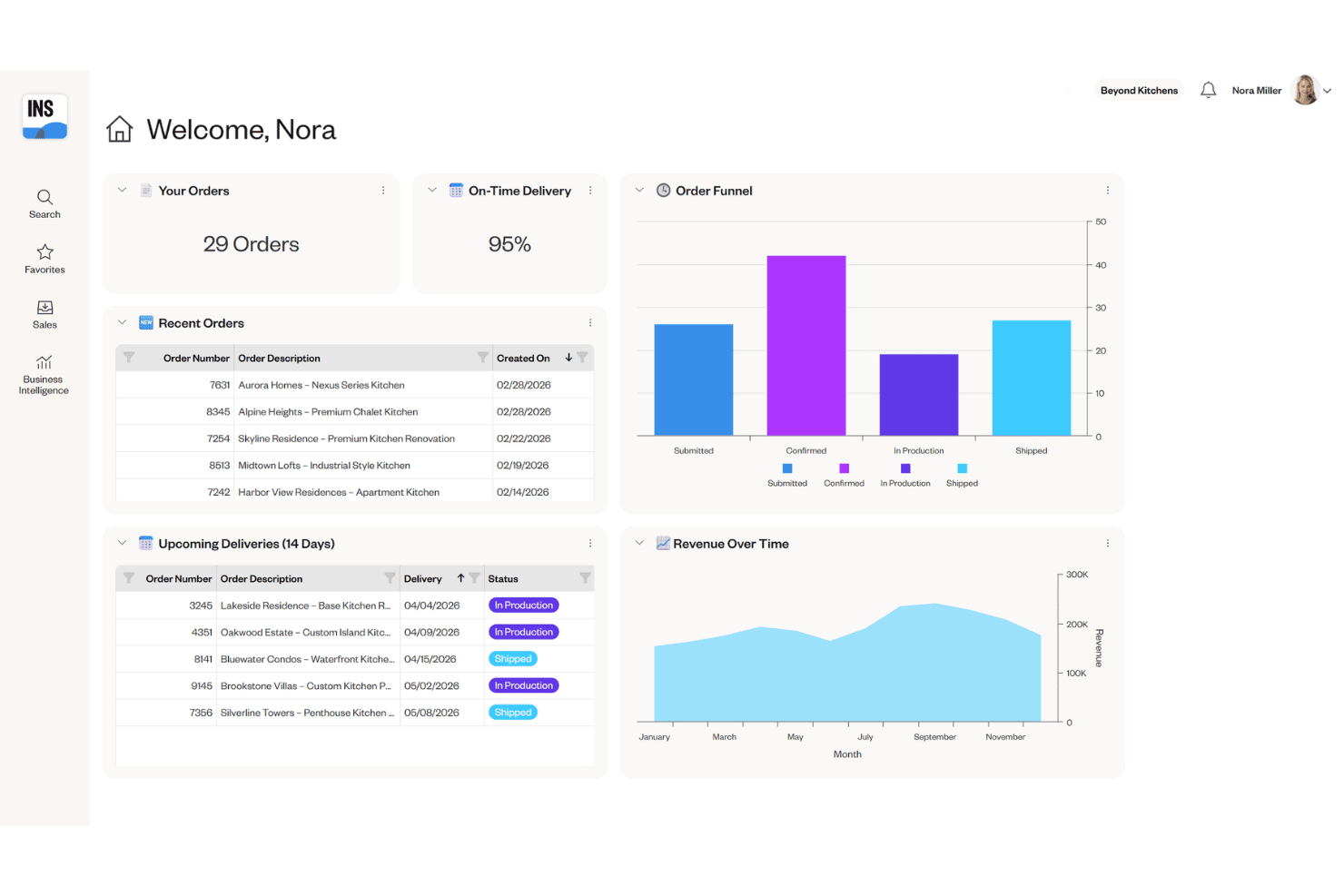
Cyncly Insight provides a dealer dashboard with order tracking, on-time delivery metrics, an order funnel chart, and revenue over time analytics. Cyncly Insight is an enterprise ERP and MES platform built for cabinet, furniture, and millwork manufacturers, combining production scheduling, order management, inventory tracking, and shop floor execution across multi-site factory operations.
Who Is Cyncly Insight Best For?
Cyncly Insight is a strong fit for mid-to-large cabinet and millwork manufacturers running multiple production facilities who need centralized scheduling and real-time shop floor visibility.
Why I Picked Cyncly Insight
I picked Cyncly Insight because it helps you coordinate planning and production across larger manufacturing operations. You can manage production and shift scheduling across multiple sites, automate work-order sequencing, and plan resources around available inventory. Its machine-data collection and SCADA capabilities can also give you real-time information from connected production equipment.
Cyncly Insight Key Features
- Visual order configuration: Let sales or design teams configure cabinet and furniture orders in real time using integrated 3D visualization.
- Machine data collection: Capture performance metrics directly from CNC machines and production equipment for accurate shop floor reporting.
- Integrated warehouse management (WMS): Track raw materials, finished goods, and inventory movement digitally across multiple warehouse locations.
- Role-based shop floor access: Assign permissions and workflows to operators, supervisors, and engineers for secure, modular process control.
Cyncly Insight Integrations
Cyncly Insight offers native integrations with 3CAD Visual CPQ, Design Flex, Winner Flex, Innoplus, Mozaik, Cyncly Payments, and supports direct connections to CNC machines and RFID hardware. An API for custom integrations is not clearly documented.
Pros and Cons
Pros:
- WMS supports complex, multi-location inventory
- Real-time equipment status from CNC machines
- Built for multi-factory scheduling and tracking
Cons:
- No built-in POS or retail workflows
- Not designed for small wood shops
Learn more about Cyncly Insight: Best for modular design-to-manufacture
- Free demo available
- Pricing upon request
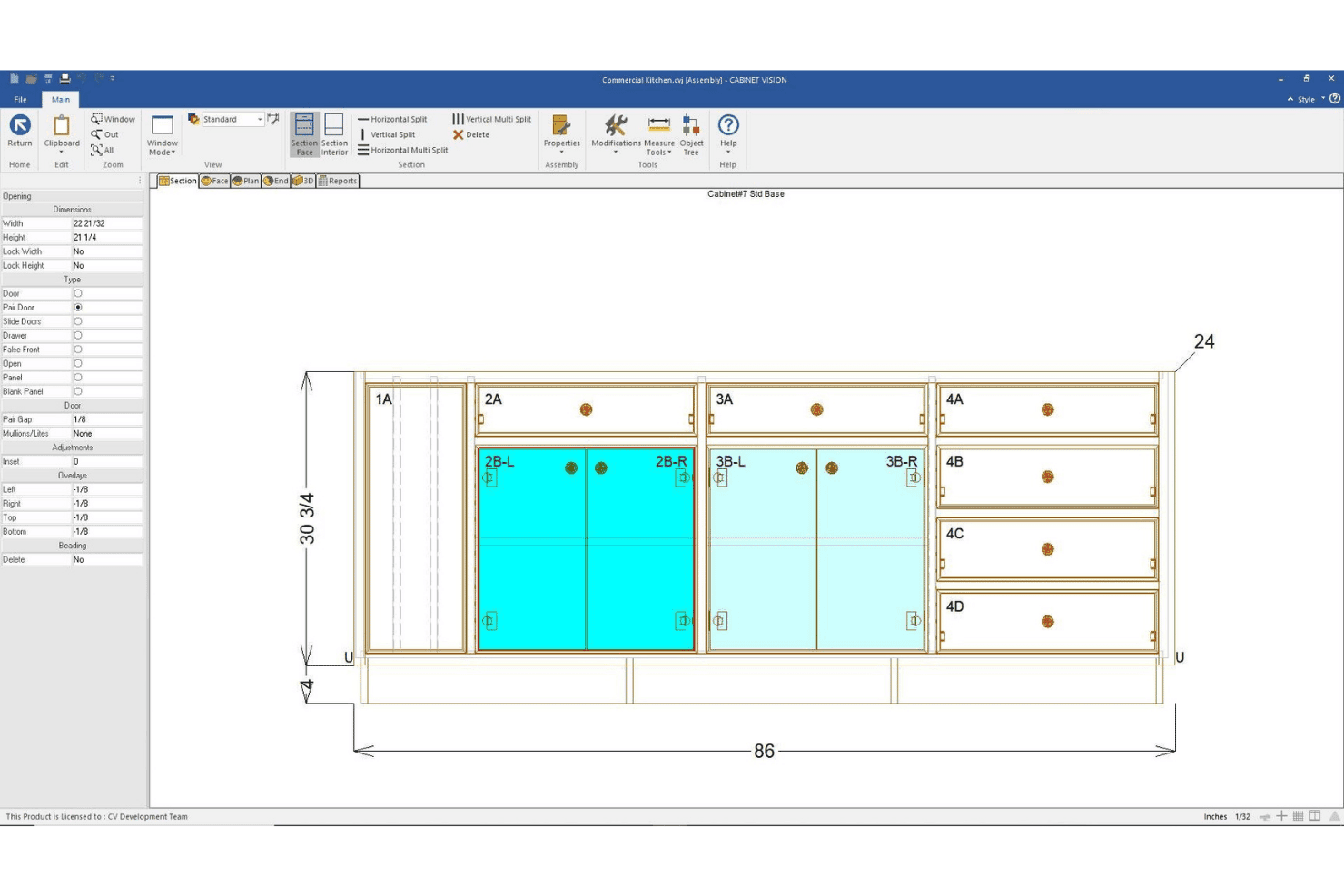
CABINET VISION by Hexagon offers a face section view of a commercial kitchen base cabinet assembly with labeled openings, pair doors, and precise measurements. CABINET VISION is a modular CAD/CAM design-to-manufacture platform for cabinet, closet, and furniture makers. It supports design, bidding, costing, material optimization, cut lists, and bills of materials. Machine-ready G-code requires Hexagon’s S2M CENTER and the appropriate machining modules rather than the base design product alone.
Who Is CABINET VISION by Hexagon Best For?
It's a strong fit for cabinet and closet manufacturers of any size that need to connect custom design directly to CNC production output.
Why I Picked CABINET VISION by Hexagon
I picked CABINET VISION because it gives you a modular path from cabinet design and costing to production output. Its bidding tools calculate materials, labor, and other costs from the engineered design, while xReporting provides more than 150 predefined reports. If you add S2M CENTER and the appropriate machining modules, you can use the same design data to generate machine-ready programs for supported CNC equipment.
CABINET VISION by Hexagon Key Features
- x2D CAD: Draft shop drawings and architectural submittals with built-in 2D CAD tools.
- xReporting: Access over 150 predefined reports or build custom reports for materials and jobs.
- Paperless Traveller: Digitize production tracking, nesting, and defect recut reporting on the shop floor.
- xCRM: Organize customer contacts, manage job records, and track job revisions in one place.
CABINET VISION by Hexagon Integrations
CABINET VISION offers native integrations with ALPHACAM and S2M CENTER for direct CNC machine output and supports hardware library integrations like Blum e-services. An API is available for custom integrations.
Pros and Cons
Pros:
- Built-in bidding and job revision tracking
- Modular licensing for targeted feature selection
- Generates CNC code for complex cabinet parts
Cons:
- No built-in project scheduling module
- No real-time lumber inventory visibility
Learn more about CABINET VISION by Hexagon:
Muita puuverstaan hallintaohjelmistoja
Tässä on joitakin muita puuverstaan hallintaohjelmistovaihtoehtoja, jotka eivät päätyneet tähän listaukseen, mutta joihin kannattaa silti tutustua:
- 11SeradexBest for CAD-to-ERP production flow
- 12MRPeasyBest for simplified small-shop MRP
- 13Joinery CoreBest for visual workshop scheduling
- 14JobmanBest for automated capacity planning
How I Evaluate Wood Shop Management Software
I evaluate wood shop management software across six operational areas, including estimating, inventory, bills of materials, production scheduling, customer orders, and job costing. I don’t expect every tool to perform every function because ERP, job-management, and CAD/CAM products support different parts of your workflow. Instead, I assess how well each product supports its intended shop-management use case and require a minimum overall score of 55% for inclusion.
Core Functionality (Table Stakes For This List)
When I'm selecting tools for my list, I rank each one on a scale from 0 (does not offer the functionality) to 5 (excels in this area) for each core functionality listed below. Then, I calculate the tool's total score into a percentage. Each tool needs to achieve a minimum total score of 55% to be considered for inclusion.
- Wood Job Estimating: I check whether the tool handles board feet, hardware, finishes, and labor in a single estimate—not just generic line-item quoting.
- Lumber Inventory Tracking: Tracking by species, dimensions, and board feet matters. I look for tools that also account for offcuts and reorder alerts.
- Cut List & BOM Generation: I evaluate whether the tool auto-generates cut lists from project specs and optimizes yield from sheet goods and stock lumber.
- Production Job Scheduling: Shops juggle multiple jobs across saws, CNC machines, and finishing stations. I look for multi-stage scheduling with resource assignment.
- Customer Order Management: I look for deposit tracking, change-order handling, and delivery updates tied to specific jobs—especially for custom cabinetry work.
- Shop Costing & Profitability: Each tool should compare actual material, labor, and overhead costs against the original estimate for real margin visibility.
Once I have a list of tools that meet the criteria, I consider what sets each platform apart.
Differentiating Factors (What Sets Vendors Apart)
Here's how I compare and contrast different vendors:
Standout Features
Cut list optimization is a big differentiator. I look for tools that generate nesting layouts from project designs to reduce waste on sheet goods and stock lumber. CAD/CAM integration also matters because shops that import SketchUp or AutoCAD files directly into their BOM save hours of manual re-entry on every project. Shop floor time tracking rounds things out; barcode or tablet-based clock-in at each workstation gives you the labor data you need to compare actual costs against your original estimates.
Beyond Features
Shop size and business model fit is one of the first things I consider. A solo woodworker building custom furniture has very different needs than a 20-person cabinet shop running production batches. I also evaluate integrations with adjacent systems—especially QuickBooks or Xero for accounting and design tools like SketchUp for BOM handoff. Licensing structure matters too. Some vendors charge per user, which adds up fast when you need shop floor employees on the system.
Kuinka valita puuverstaan hallintaohjelmisto
Laajoihin ominaisuusluetteloihin ja monimutkaisiin hinnoittelurakenteisiin on helppo juuttua. Jotta pysyt keskittyneenä käydessäsi läpi ainutlaatuista ohjelmistonvalintaprosessiasi, tässä on luettelo huomioon otettavista tekijöistä:
| Tekijä | Mitä kannattaa ottaa huomioon |
|---|---|
| TekijäSkaalautuvuus | Mitä kannattaa ottaa huomioonSopiiko tämä ohjelmisto edelleen verstaallesi, kun yrityksesi kasvaa tai avaat uusia toimipisteitä? Tarkista, pystyykö se käsittelemään ajan mittaan enemmän käyttäjiä, projekteja tai varastoa. |
| TekijäIntegraatiot | Mitä kannattaa ottaa huomioonMuodostaako työkalu sujuvan yhteyden kirjanpito-, CAD/CAM-, toimittaja- tai verkkokauppajärjestelmiisi? Selvitä, onko kukin yhteys natiivisti toteutettu, ohjelmointirajapintaan perustuva vai hoidetaanko se tiedostovienneillä tai kolmannen osapuolen palvelulla. |
| TekijäMukautettavuus | Mitä kannattaa ottaa huomioonVoitko mukauttaa työnkulkuja, lomakkeita ja raportteja ainutlaatuisiin toimintoihisi? Harkitse, tarvitsetko yrityksessäsi mukautettuja kenttiä tai käyttäjärooleja. |
| TekijäHelppokäyttöisyys | Mitä kannattaa ottaa huomioonKäyttääkö tiimisi sitä todella tuotantotilassa? Etsi selkeitä valikoita, helppoa navigointia sekä mobiili- ja tablettikäyttöä tuotannon työntekijöille ja toimistohenkilöstölle. |
| TekijäKäyttöönotto ja perehdytys | Mitä kannattaa ottaa huomioonKauanko käyttöönotto kestää, ja millaista koulutusta ja tukea toimittaja tarjoaa? Kysy vanhojen tietojen tuonnista ja siitä, mitä sinun on tehtävä itse. |
| TekijäKustannukset | Mitä kannattaa ottaa huomioonPerustuuko hinnoittelu käyttäjään, verstaaseen vai moduuliin? Tarkista käyttöönotto-, koulutus- ja lisäosakustannukset sekä se, edellyttääkö ilmainen kokeilu luottokorttia. |
| TekijäTietoturvan suojatoimet | Mitä kannattaa ottaa huomioonMiten työkalu suojaa arkaluonteisia asiakas- ja työtietoja? Tarkista salaus, tietojen varmuuskopiointikäytännöt ja käyttäjien käyttöoikeuksien hallinta. |
| TekijäSisäiset resurssitarpeet | Mitä kannattaa ottaa huomioonKuka tiimistäsi hallinnoi ja ylläpitää järjestelmää päivittäin? Ota huomioon jatkuva ylläpito, päivitykset ja henkilöstön mahdollisuudet ongelmien selvittämiseen. |
Mikä on puuverstaan hallintaohjelmisto?
Puutyöpajan hallintaohjelmisto on erikoistunut digitaalinen alusta, joka auttaa puualan yrityksiä järjestämään tarjousten laatimisen, varaston seurannan, työtehtävien aikataulutuksen ja tilausten hallinnan. Laajuudesta riippuen tuote voi olla keskittynyt työtehtävien hallintasovellus tai laajempi ERP-ohjelmisto, joka kattaa myös hankinnat, tuotannon ja taloushallinnon työnkulut. Nämä työkalut tukevat materiaalikohtaisia prosesseja, kuten kustannusarvioiden laatimista, sahauslistojen luomista ja asiakastilausten seurantaa.
Puutyöpajan hallintaohjelmiston ominaisuudet
Kun valitset puutyöpajan hallintaohjelmistoa, kiinnitä huomiota seuraaviin keskeisiin ominaisuuksiin:
- Puutöiden kustannusarvioiden laatiminen: Laatii yksityiskohtaiset tarjoukset sahajalkojen, sahauslistojen, materiaalien, pintakäsittelyjen ja työn perusteella, jotta voit hinnoitella räätälöidyt projektit tarkasti.
- Sahatavaran varaston seuranta: Seuraa raaka-ainevarastoa puulajin, mittojen ja sahajalkojen mukaan reaaliaikaisilla päivityksillä, joten tarvitsemasi materiaalit eivät lopu kesken työn.
- Sahauslistojen ja materiaaliluetteloiden luominen: Luo tarkat sahauslistat ja materiaaliluettelot projektin määrityksistä, mikä auttaa suunnittelemaan ja optimoimaan materiaalien käytön.
- Tuotantotöiden aikataulutus: Mahdollistaa tehtävien osoittamisen, resurssien kohdentamisen ja projektien seurannan työpajan työnkulun jokaisessa vaiheessa.
- Asiakastilausten hallinta: Hallitsee tarjoukset, ennakkomaksut, muutosmääräykset ja toimitusten seurannan yhdessä paikassa, joka on yhdistetty kuhunkin puutyöprojektiin.
- Työpajan kustannus- ja kannattavuusseuranta: Seuraa toteutuneita kustannuksia suhteessa arvioihin tarkastelemalla kunkin työn materiaali-, työ- ja yleiskustannuksia katteiden analysoinnin tueksi.
- Toimittajaluetteloiden integrointi: Yhdistää laitteistojen ja materiaalien reaaliaikaisia hintoja sisältäviin luetteloihin, mikä nopeuttaa hankintoja ja tarjousten laatimista.
- Työpisteiden työajan seuranta: Kirjaa työtunnit kullakin työpisteellä – usein viivakoodin tai tabletin avulla – tarjoten läpinäkyvyyttä työn edistymiseen ja tuottavuuteen.
- CAD/CAM-integrointi: Tuo suunnittelutiedostot CAD-työkaluista suoraan työnkulkuusi, mikä vähentää manuaalista tietojen syöttämistä ja minimoi virheet.
- Toimitusten ja logistiikan seuranta: Pitää sinut ajan tasalla lähetysten tilasta ja toimitusaikatauluista ja tukee toimituksia asiakkaille ajallaan.
Puutyöpajan hallintaohjelmiston hyödyt
Puutyöpajan hallintaohjelmiston käyttöönotto tarjoaa useita hyötyjä tiimillesi ja yrityksellesi. Tässä muutamia etuja, joita voit odottaa:
- Tarkat työkustannusarviot: Luotettavat materiaali-, laitteisto- ja työkustannuslaskelmat tarkoittavat, että voit tarjota projekteja luottavaisin mielin ja suojata katteesi.
- Reaaliaikainen varastonhallinta: Sahatavaran, laitteistojen ja hukkapalojen automaattinen seuranta auttaa ehkäisemään varaston loppumista ja liiallisia tilauksia.
- Sujuva aikataulutus: Tuotannon, tehtävien ja toimitusten koordinointi yhdestä järjestelmästä pitää jokaisen työn aikataulussa alusta loppuun.
- Parempi asiakashallinta: Hallitse tarjouksia, muutosmääräyksiä ja projektien tiloja keskitetysti selkeän viestinnän ja vähäisempien väärinkäsitysten saavuttamiseksi.
- Parempi näkyvyys kannattavuuteen: Vertaa töiden kustannusarvioita toteutuneisiin kustannuksiin koontiraporttien avulla ja tunnista, missä työpajasi tekee voittoa tai tappiota.
- Manuaalisen työn väheneminen: CAD/CAM-integroinnin ja toimittajaluetteloiden käytön kaltaiset ominaisuudet vähentävät tietojen syöttämiseen ja hallinnollisiin tehtäviin kuluvaa aikaa.
- Lyhyemmät toimitusajat: Yhtenäiset työnkulut, tuotannon seuranta ja toimitusten hallinta voivat auttaa saattamaan työt valmiiksi ja toimittamaan ne tehokkaammin.
Puutyöpajan hallintaohjelmiston kustannukset ja hinnoittelu
Puutyöpajan hallintaohjelmiston valinta edellyttää saatavilla olevien erilaisten hinnoittelumallien ja suunnitelmien ymmärtämistä. Kustannukset vaihtelevat ominaisuuksien, tiimin koon, lisäosien ja muiden tekijöiden perusteella. Alla oleva taulukko tiivistää puutyöpajan hallintaohjelmistoratkaisujen yleiset suunnitelmat, niiden keskimääräiset hinnat ja tyypilliset ominaisuudet:
Puutyöpajan hallintaohjelmiston suunnitelmien vertailutaulukko
| Suunnitelman tyyppi | Keskimääräinen hinta | Yleiset ominaisuudet |
|---|---|---|
| Suunnitelman tyyppiIlmainen suunnitelma | Keskimääräinen hinta$0 | Yleiset ominaisuudetPerustason työkustannusarviot, rajoitettu varaston seuranta ja vakiomuotoinen raportointi. |
| Suunnitelman tyyppiHenkilökohtainen suunnitelma | Keskimääräinen hinta$20-$40/käyttäjä/kuukausi | Yleiset ominaisuudetParannettu varastonhallinta, yksinkertainen aikataulutus, asiakashallinta ja sähköpostituki. |
| Suunnitelman tyyppiYrityssuunnitelma | Keskimääräinen hinta$50-$100/käyttäjä/kuukausi | Yleiset ominaisuudetEdistynyt työkustannuslaskenta, täydelliset sahauslistatyökalut, integraatiot, toimittajaluettelot, mukautetut työnkulut ja analytiikka. |
| Suunnitelman tyyppiYritysasiakkaan suunnitelma | Keskimääräinen hinta$120-$200/käyttäjä/kuukausi | Yleiset ominaisuudetUsean työpajan tuki, mukautetut integraatiot, edistyneet käyttöoikeudet, henkilökohtainen käyttöönotto ja etusijainen tuki. |
Puutyöverstaan hallintaohjelmiston usein kysytyt kysymykset
Tässä vastauksia yleisiin kysymyksiin puutyöverstaan hallintaohjelmistoista:
Voiko puutyöverstaan hallintaohjelmisto käsitellä sekä tilaustöitä että tuotantotöitä?
Kyllä, useimmat alustat tukevat tilaustöiden ja vakiotuotelinjojen yhdistelmää. Voit järjestää projektit asiakkaan vaatimusten tai toistuvien SKU:iden mukaan, määrittää materiaalit ja seurata työnkulkuja kummallekin työtyypille.
Miten integrointi taloushallinto- ja CAD-työkaluihin toimii?
Useimmat järjestelmät yhdistyvät QuickBooksiin tai Xeroon laskujen ja kulujen synkronoimiseksi, kun taas CAD-integraation avulla voit tuoda suunnitelmia SketchUpista tai vastaavista työkaluista leikkausluetteloiden ja BOM:eiden luomiseksi mahdollisimman vähäisellä manuaalisella syötöllä.
Millaista käyttöönottoa tai koulutusta voin odottaa?
Toimittajat tarjoavat yleensä käyttöönottotapaamisia, pääsyn ohjekeskukseen ja koulutusmateriaaleja, jotka on suunniteltu verstaan omistajille, toimistohenkilöstölle ja verstaan työntekijöille, jotta kaikki osaavat käyttää järjestelmää tehokkaasti.
Tarvitsenko ohjelmiston hallintaan erillisiä IT-resursseja?
Et, useimmat ratkaisut ovat pilvipohjaisia ja vaativat vain vähän IT-osallistumista. Jonkun henkilöstöstäsi tulisi kuitenkin osata käyttää uusia järjestelmiä, hallita käyttäjien käyttöoikeuksia ja ratkaista perusongelmia.
Voinko käyttää ohjelmistoa, jos internet-yhteyteni on epäluotettava?
Jotkin puutyöverstaan hallintatyökalut tarjoavat offline-käytön keskeisiin toimintoihin, kuten työajan seurantaan ja varastonhallintaan. Toiset saattavat edellyttää vakaata yhteyttä, joten tarkista kunkin ratkaisun offline-ominaisuudet ennen päätöksen tekemistä.