

Xero-Bewertung: Vor- und Nachteile, Funktionen und Preise
Xero überzeugt durch benutzerfreundliche Integrationen und skalierbare Preise und ist damit eine Top-Wahl für E-Commerce-Unternehmen, die effiziente Buchhaltungslösungen suchen.

Wir bewerten Tools unabhängig und Provisionen helfen, unsere Tests zu finanzieren. Siehe unsere transparente Richtlinie, unsere Methodik oder schlagen Sie ein Tool vor.
Xero is an ecommerce accounting software built for small to mid-sized businesses that need to track sales, reconcile transactions, and manage cash flow across online channels. I'd consider it over QuickBooks if your business leans heavily on ecommerce platform integrations—Xero connects more cleanly with tools like Shopify and handles multicurrency transactions with less manual configuration, which matters if you're selling across multiple regions or storefronts.
Xero Evaluation Summary
4.4/5
- From $25/month
- 30-day free trial
Warum Sie unseren Software-Empfehlungen vertrauen können
6,700+
Reviews
20
Industry experts
16+
Evaluation factors
14
Years
Unser Team testet und bewertet Software seit 2012. Als Führungskräfte im Einzelhandel selbst wissen wir, wie schwierig – und wichtig – es ist, die richtige Software auszuwählen.
Für diesen Leitfaden haben wir Tools mithilfe von praktischen Tests und unabhängiger Recherche bewertet und dabei die Tools anhand unserer Bewertungskriterien bewertet.
Unsere Bewertungen spiegeln unser unabhängiges Urteilsvermögen wider – keine Verkaufsstrategie.
Xero Overview
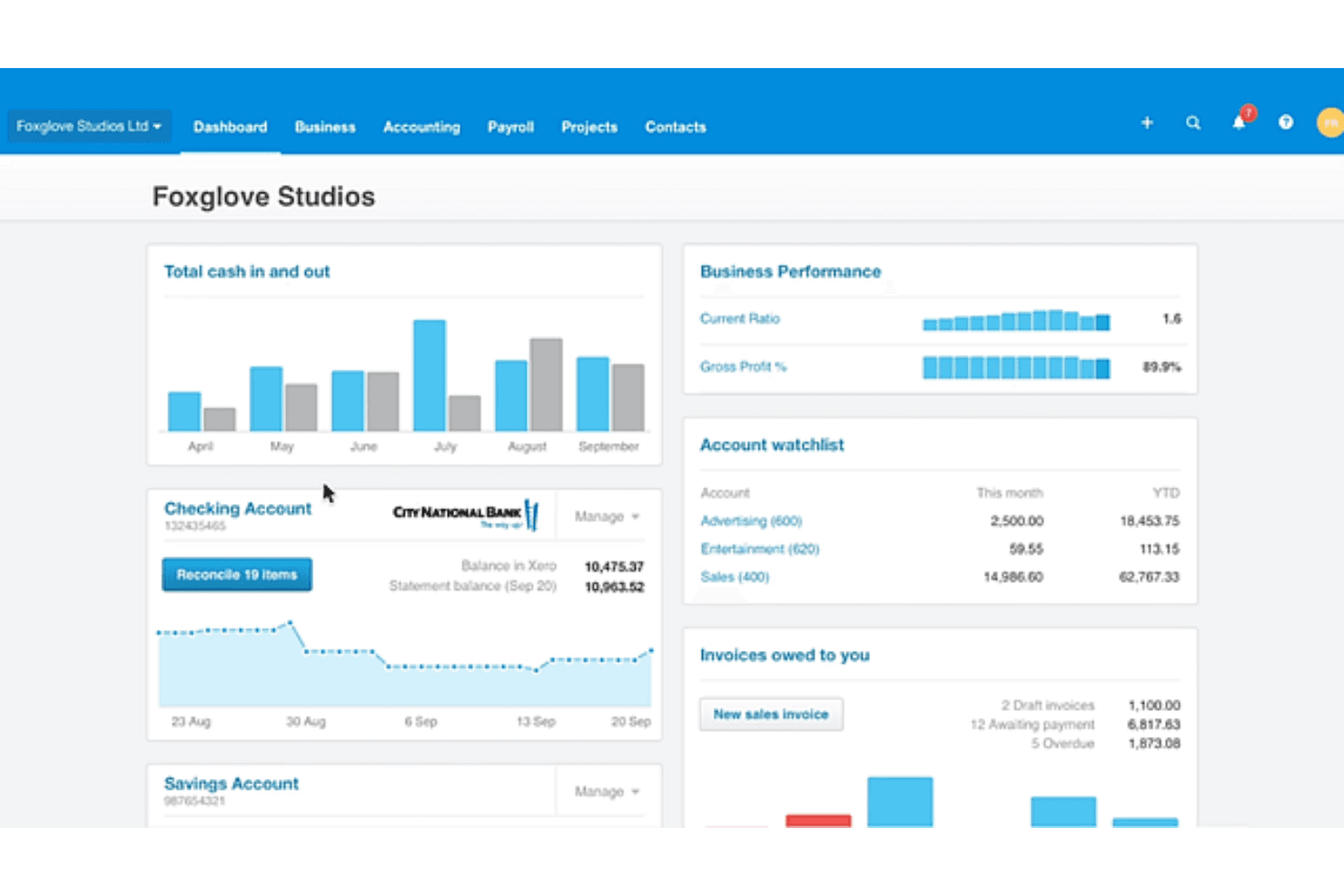
In my opinion, Xero is a solid choice for e-commerce accounting, offering a user-friendly interface and excellent integration options. While its onboarding could be smoother, its core and standout features make it a reliable tool for small to medium-sized retailers. However, it may not suit larger enterprises seeking more advanced customization options. If your team values ease of use, competitive pricing, and helpful customer support, Xero is worth considering.
Pros
- Xero's dashboard is intuitive and easy to navigate.
- You can access detailed financial reports to aid decision-making.
- The software’s automation features save you time on repetitive accounting tasks.
Cons
- You might find the initial setup a bit complex without prior experience.
- Customer support response times can sometimes be slow for urgent issues.
- Using some advanced features may require additional training.
Is Xero Right For Your Needs?
Who Would be a Good Fit for Xero?
Xero is a great fit for small to medium-sized retail businesses and accounting teams looking for straightforward financial management without the hassle. If your team values simple navigation and automated financial reporting, Xero delivers with its user-friendly dashboard and time-saving features. The software’s intuitive interface facilitates accounting tasks and doesn’t require extensive training to use it.
- Small RetailersXero is perfect for small retailers that need an easy-to-use accounting tool that offers extensive financial reports.
- E-commerce StartupsE-commerce startups benefit from Xero's automation features, which simplify financial tasks and help manage growth.
- Freelance AccountantsFreelance accountants find Xero's intuitive dashboard handy for managing client accounts and quickly generating detailed reports.
- NonprofitsNonprofits can track donations and expenses with Xero's reporting tools, helping them remain transparent with stakeholders.
- Hospitality BusinessesHospitality businesses use Xero’s transaction tracking features to manage transactions and payroll efficiently.
- Consulting FirmsXero's financial reporting helps consulting firms track billable hours and manage client invoicing.
Who Would be a Bad Fit for Xero?
Xero might not be ideal for large enterprises or businesses requiring highly customized financial solutions and extensive reporting capabilities. The software’s functionalities may be too basic for complex financial structures, lacking the depth needed for intricate accounting tasks. Additionally, if quick customer support is vital to your operations, you might be disappointed with the company’s response times.
- Large CorporationsLarge corporations might find that Xero lacks the advanced customization and broad reporting they need to address complex financial tasks.
- Manufacturing FirmsManufacturing firms seeking detailed inventory management may find Xero's offerings too simplistic for their requirements.
- Financial InstitutionsFinancial institutions often need more complex features than what Xero offers, making it unsuitable for their accounting needs.
- Custom Software DevelopersXero’s limited integration options may not address the operational flexibility that custom software developers are looking for.
- Real Estate CompaniesReal estate companies requiring specialized property management features may find that Xero's general accounting tools are insufficient.
Unsere Bewertungsmethodik
Wie Wir Tools Testen & Bewerten
Wir haben über Jahre hinweg unser System zur Softwarebewertung und -testung entwickelt, verfeinert und verbessert. Die Bewertungsmatrix ist darauf ausgelegt, die Feinheiten der Softwareauswahl und die Effektivität eines Tools einzufangen, wobei der Fokus auf entscheidende Aspekte des Auswahlprozesses liegt. Nachfolgend sehen Sie genau, wie unser Test- und Bewertungssystem anhand von sieben Kriterien funktioniert. Dies ermöglicht uns, eine unvoreingenommene Bewertung der Software basierend auf Kernfunktionen, besonderen Merkmalen, Benutzerfreundlichkeit, Einarbeitung, Kundensupport, Integrationen, Kundenrezensionen und Preis-Leistungs-Verhältnis anzubieten.
Kernfunktionen (25% der Gesamtnote)
Der Ausgangspunkt unserer Bewertung ist immer die Kernfunktionalität des Tools. Verfügt es über die grundlegenden Funktionen, die ein Nutzer erwarten würde? Sind wichtige Kernfunktionen eventuell nur in höherpreisigen Tarifen enthalten? Ein Tool sollte im Kern mindestens mit den Basisfunktionen der Wettbewerber mithalten können.
Besondere Funktionen (25% der Gesamtnote)
Anschließend bewerten wir außergewöhnliche Funktionen, die über die normalen Kernfunktionen vergleichbarer Tools hinausgehen. Ein hoher Score spiegelt spezialisierte oder einzigartige Funktionen wider, die das Produkt schneller, effizienter oder wertvoller für die Nutzer machen. Wir bewerten außerdem, wie einfach sich das Tool mit anderen Programmen, die typischerweise zum Technologie-Stack gehören, integrieren lässt, um dessen Funktionalität und Nutzwert zu erweitern. Tools mit zahlreichen nativen Integrationen, Drittanbieteranbindungen und API-Zugang für eigene Entwicklungen schneiden hier am besten ab.
Benutzerfreundlichkeit (10% der Gesamtnote)
Wir betrachten, wie schnell und einfach es ist, die Kernaufgaben mit dem Tool zu erledigen. Software, die gut gestaltet und intuitiv zu bedienen ist, mobile Apps bietet, Vorlagen zur Verfügung stellt und komplexe Aufgaben einfach erscheinen lässt, erzielt die besten Werte.
Einarbeitung (10% der Gesamtnote)
Wir wissen, wie wichtig die schnelle Einführung eines neuen Tools im Team ist. Daher evaluieren wir, wie einfach es mit minimalem Training ist, das Tool kennenzulernen. Wir ermitteln, wie schnell ein Teammitglied ohne Vorerfahrung startklar ist. Lösungen, die kaum oder gar keine Unterstützung benötigen, erhalten die höchste Punktzahl.
Kundensupport (10% der Gesamtnote)
Wir überprüfen, wie schnell und einfach man Hilfe per Telefon, Live-Chat oder Wissensdatenbank erhält. Tools und Anbieter, die Echtzeit-Support bieten, schneiden am besten ab; Chatbots liegen am unteren Ende.
Kundenrezensionen (10% der Gesamtnote)
Zusätzlich zu unseren eigenen Tests ziehen wir den Net-Promoter-Score bestehender und früherer Kunden heran. Wir überprüfen, wie wahrscheinlich sie das Tool erneut für die Kernfunktionen wählen würden. Ein hoher Score spiegelt einen hohen Net-Promoter-Score wider.
Preis-Leistungs-Verhältnis (10% der Gesamtnote)
Schließlich bewerten wir im Kontext aller anderen Kriterien den Durchschnittspreis von Einstiegsplänen im Verhältnis zu den Kernfunktionen und betrachten den Wert der übrigen Kriterien. Software, die mehr zu geringeren Kosten bietet, schneidet hier besser ab.
Core Features
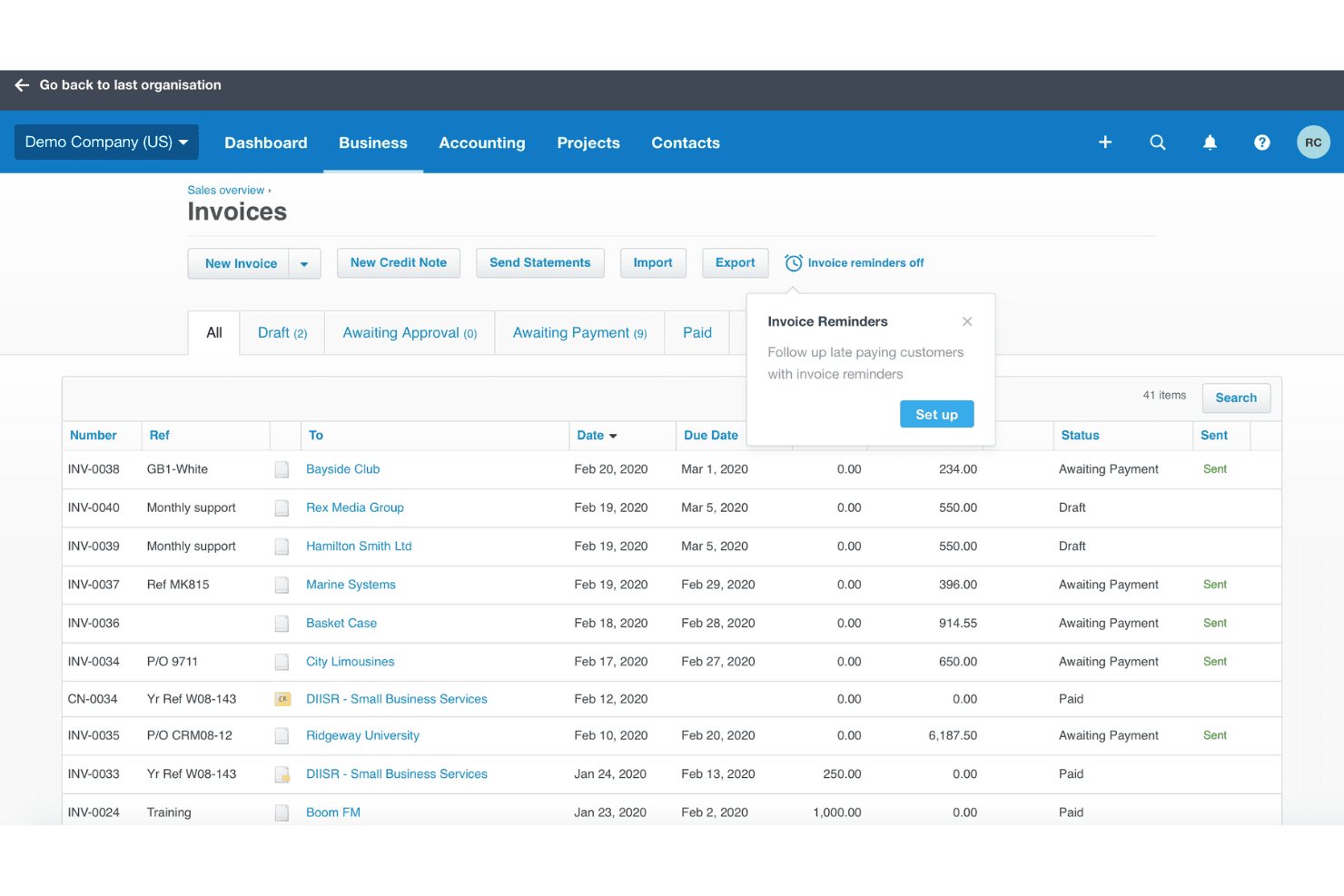
Invoicing: Xero lets your team create and send professional invoices, customize templates, and set up recurring invoices, saving time.
Expense Tracking: The software facilitates expense tracking and categorization for better financial insights so you can manage your cash flow and budget more effectively.
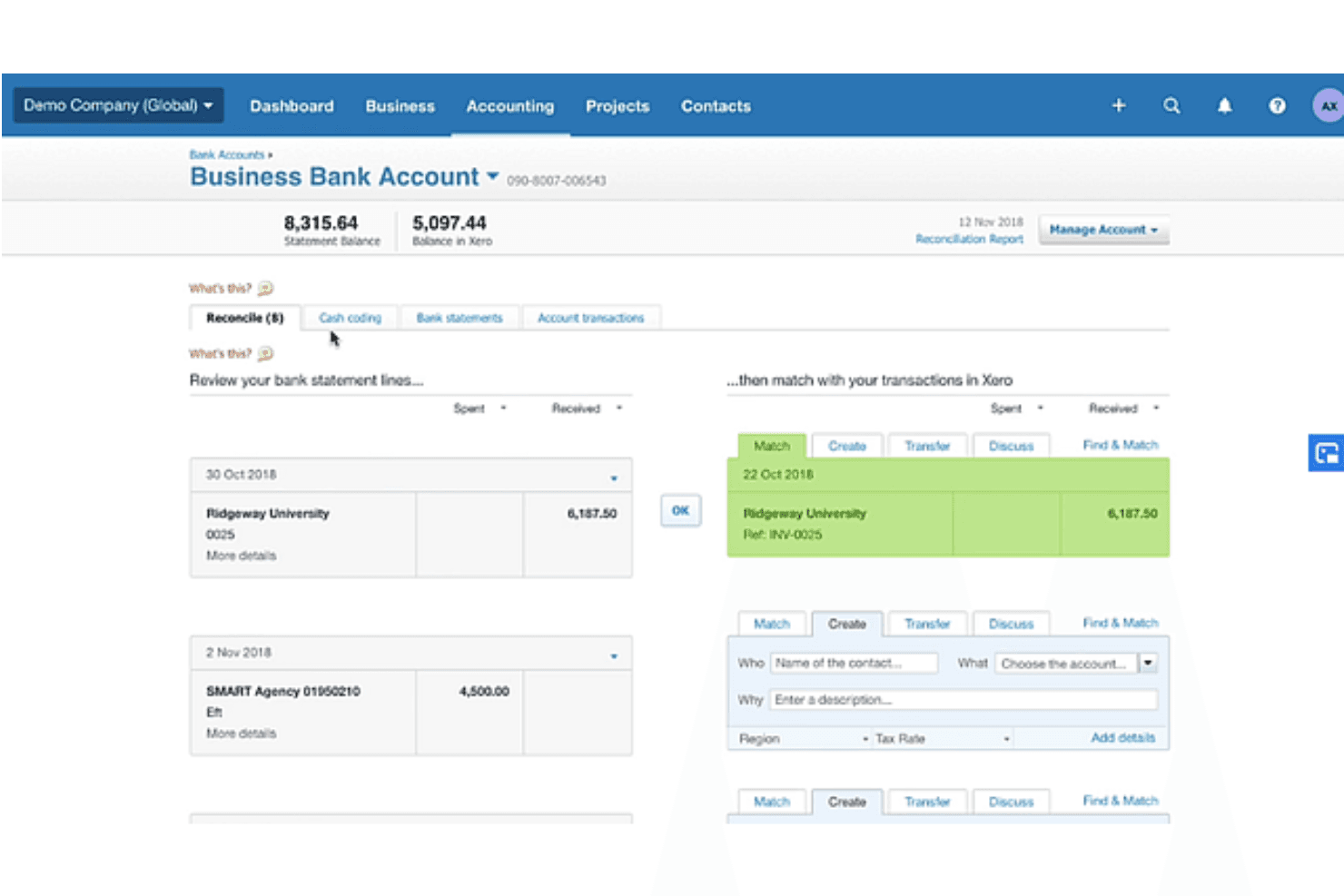
Bank Reconciliation: Xero automatically matches your bank transactions with your records, reducing. errors and keeping your accounts accurate and up to date.
Financial Reporting: Xero’s reporting tools allow you to generate detailed financial reports so you can make informed business decisions.
Inventory Management: Xero's inventory management tracks stock levels and values in real time, enabling your business to meet customer demand without overstocking.
Business Accounting: Xero accounting helps businesses carry out day-to-day business accounting, allowing them to send invoices, manage accounts payable and receivable and bank feeds, and generate balance sheets.
Ease of Use
Xero’s interface is accessible, enabling straightforward navigation so you can find what you need without the hassle. Automation features such as transaction matching simplify your work by reducing manual entry. Users often praise Xero’s clean layout, which helps them manage finances without feeling overwhelmed.
Integrations
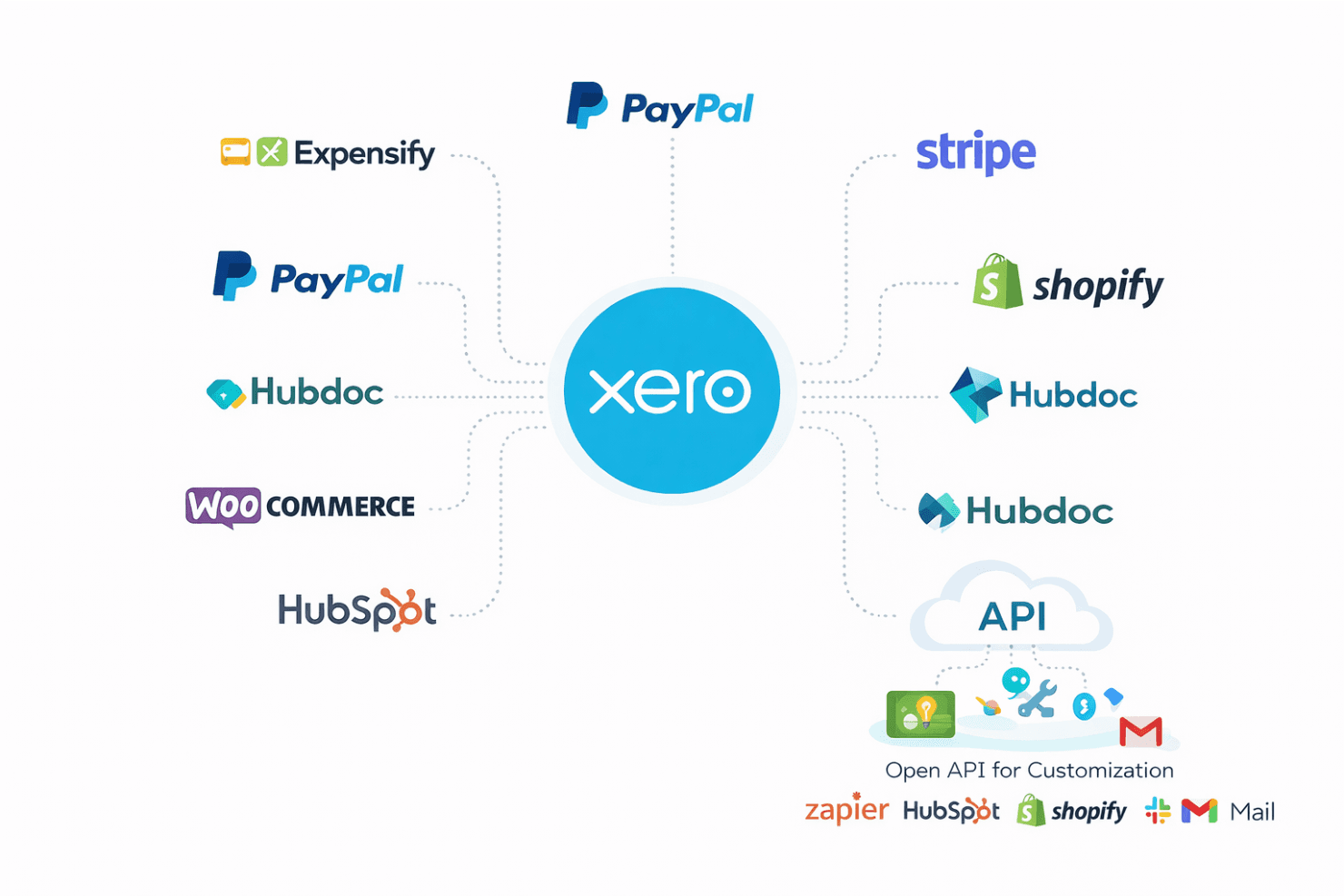
Xero supports a wide range of add-on integrations, including CRM systems, enabling businesses to customize their accounting workflows. It integrates with popular tools such as PayPal, Stripe, Shopify, Hubdoc, HubSpot, WooCommerce, and Expensify.
Xero also has an open API, allowing businesses to create custom apps and connect with third-party apps.
New Product Updates from Xero
Xero Adds Supplier Days to Pay Detail Report
Xero adds a Supplier Days to Pay Detail report that shows how long each supplier bill took to pay across a selected period. Users can review payment-time categories and export the underlying data for further analysis or Fair Payment Code applications. Highlights include:
- Supplier Payment Tracking: View payment times for every supplier bill within a selected period.
- Payment Categories: Group bills into 0–30, 31–60, 61–90, and over 90-day ranges.
- Exportable Data: Export supplier payment details for reporting and further analysis.
- Fair Payment Code Support: Use report data as evidence when preparing a Fair Payment Code application.
Visit Xero’s official site for more details.
Xero Expands Claude Workflows and Adds ChatGPT Integration
Xero connects live financial data with Claude for Small Business and ChatGPT, supporting financial questions, reporting, and workflow preparation. Users can work with current Xero data without relying on manual exports. Highlights include:
- ChatGPT Integration: Brings live Xero data into ChatGPT for financial questions and workflows.
- Claude Workflows: Supports tasks such as cash flow snapshots, month-end preparation, and recurring reports.
- Live Financial Data: Uses current Xero information instead of exported data.
- Financial Insights: Supports data across profit and loss, balance sheets, invoices, bills, and more.
- Advisor Access: Lets accountants and bookkeepers work with client data through supported AI workflows.
- Review Controls: Keeps final review and decisions with the business owner or advisor.
Visit Xero’s official site for more details.
 Opens new window
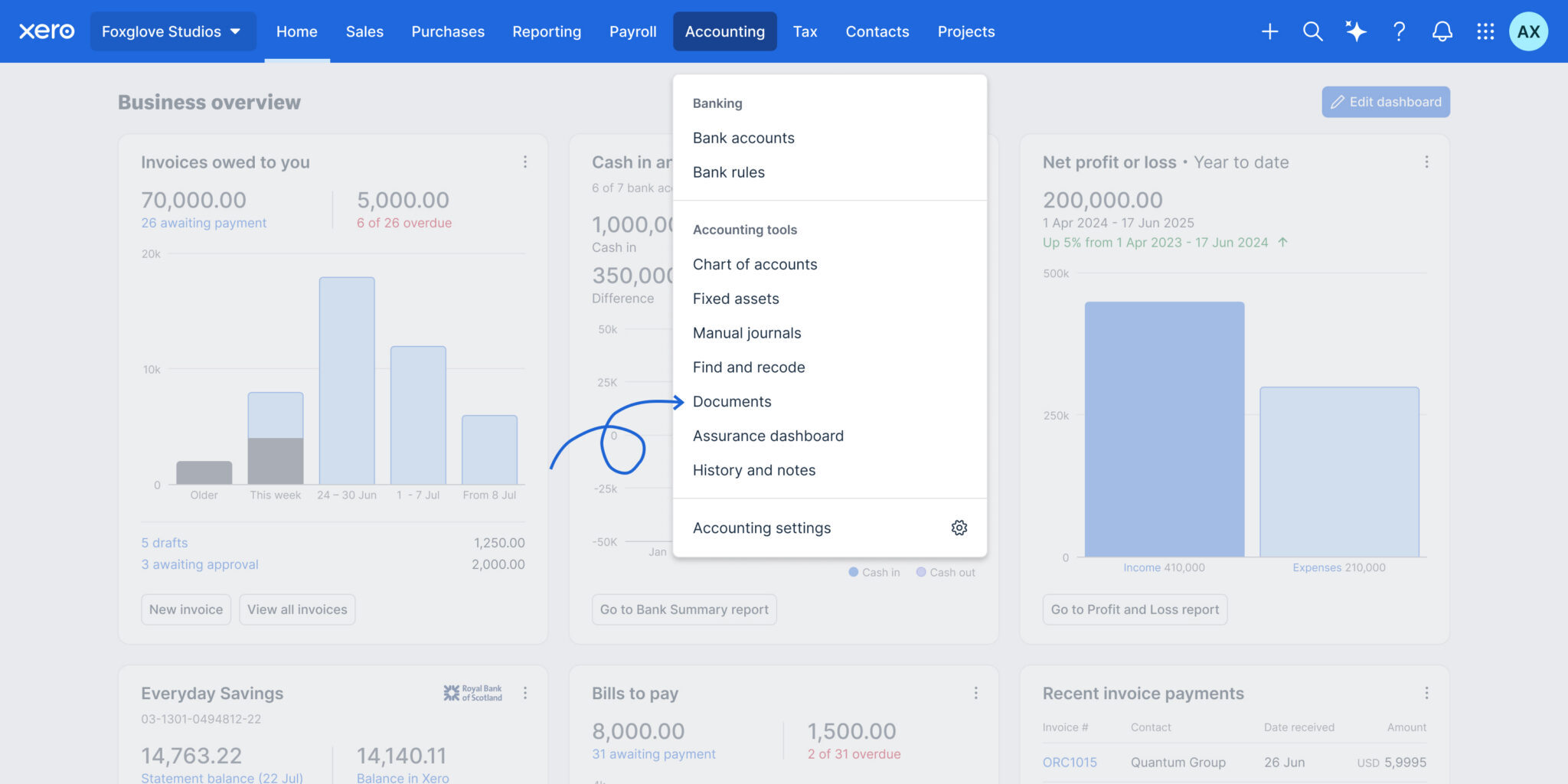
Files is now Documents in Xero
Xero has renamed Files to Documents and relocated it to the Accounting menu, making it easier to find where Smart Document Capture lives. The update also adds smarter automation and controls to improve accuracy, reduce manual work, and strengthen oversight. Highlights include:
- Automatic Tax Extraction: Pulls local tax rates from uploaded documents.
- Credit Note Support: Extracts credit note data and prepares draft transactions.
- Auto-Matching: Matches uploaded documents to existing transactions automatically.
- Document Permissions: Lets teams control upload and view-only access.
- Deletion Alerts: Warns users before removing documents linked to transactions.
- Accounting Menu Access: Moves Documents closer to other accounting workflows.
Visit Xero’s official site for more details.
 Opens new window
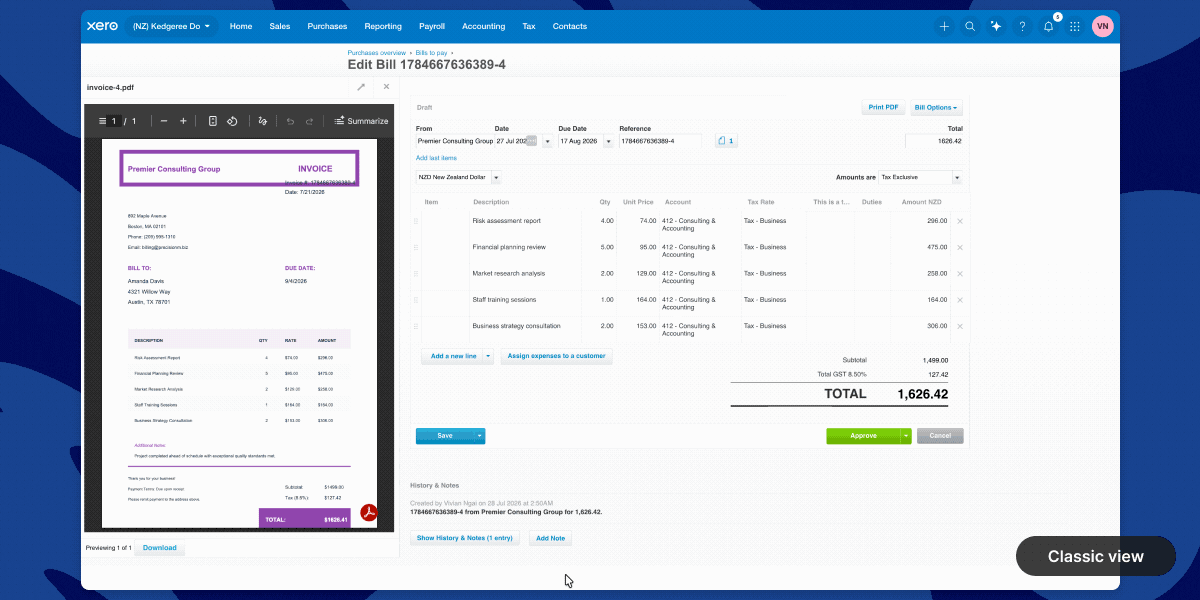
Xero Introduces a New Full-Page Bills Experience
Xero adds a modernized bills page with direct supplier editing, payment planning, billable expense assignment, customizable columns, and Approve & next navigation. These updates reduce back-and-forth between screens and help users review, update, and process bills faster. Highlights include:
- Direct Contact Editing: Updates supplier information without leaving the bill page.
- Planned Payment Dates: Adds payment scheduling directly within each bill to support cash flow planning.
- Custom Layouts: Lets users show or hide columns and resize the attached file preview.
- Billable Expense Assignment: Assigns customers or projects directly from the line item table.
- Approve & Next: Approves the current bill and moves directly to the next bill for faster processing.
- Instant Bill Payments: Lets eligible users in the UK and US pay bills from the bill detail page.
Visit Xero’s official site for more details.
Xero Launches Ultra in Australia With Multi-Entity Reporting
Xero launches Xero Ultra in Australia with multi-entity consolidated reporting, advanced forecasting, AI-powered insights, and enhanced support for growing businesses. The plan gives finance teams greater visibility and control while allowing them to keep working within the Xero platform. Highlights include:
- Multi-Entity Consolidated Reporting: View financial performance across multiple entities in one consolidated report.
- Advanced Forecasting: Use scenario modelling and four-way cash flow forecasting through Syft Advanced reporting.
- AI-Powered Insights: Access JAX for financial insights and support with routine finance workflows.
- Enhanced Support: Get priority access to Xero specialists, personalised onboarding, migration support, and targeted data restore.
- Governance Controls: Use flexible permissions to support stronger financial oversight and separation of duties when available.
Visit Xero’s official site for more details.
 Opens new window
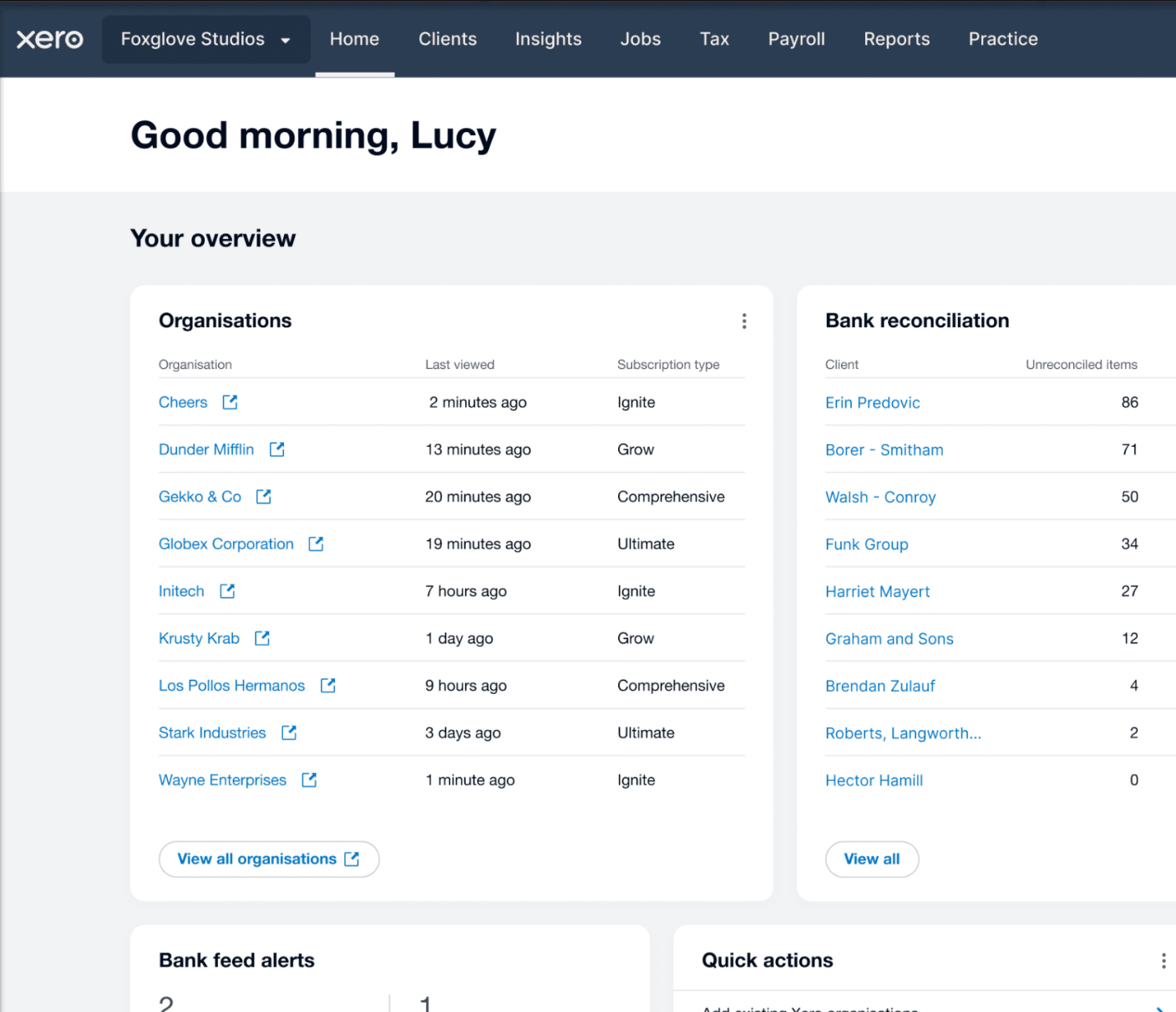
Xero Launches Partner Hub for UK Partners
Xero has launched Partner Hub for all UK partners, creating a single workspace to access key practice tools and information. The redesigned homepage and customizable widgets aim to make daily workflows faster and more personalized. Highlights include:
- Unified Workspace: Access practice tools, client information, and navigation from a single workspace.
- Customizable Homepage: Show, hide, and reorder widgets to personalize the homepage.
- Client and Practice Widgets: View organization watchlists, bank feed alerts, jobs, and productivity metrics at a glance.
- JAX Chat Integration: Use JAX to summarize client financials and generate insights directly from Partner Hub.
Visit Xero's official site for more details.
Xero Expands Wagepoint Integration for Canadian Payroll
Xero has enhanced its Wagepoint integration for Canadian small businesses, making it easier to run payroll while keeping accounting records accurate. With less manual re-entry and a more connected workflow, payroll and bookkeeping stay aligned. Highlights include:
- Single Sign-On: Access Wagepoint using existing Xero credentials without separate logins.
- Automatic Payroll Data Sync: Sync wages, taxes, deductions, and benefits from Wagepoint to Xero automatically.
- Connected Payroll and Accounting: Keep payroll and accounting records aligned through an integrated workflow.
Visit Xero's official site for more details.
Xero Specs
- 2-Factor Authentication: Yes
- Accounts Payable: Yes
- Accounts Receivable: Yes
- API: Yes
- Balance Sheet: Yes
- Billing/Invoicing: Yes
- BitCoin: Yes
- Budgeting: Yes
- Calendar Management: Yes
- Contact Management: Yes
- CRM Integration: Yes
- Customer Management: Yes
- Dashboard: Yes
- Data Export: Yes
- Data Import: Yes
- Data Visualization: Yes
- Expense Tracking: Yes
- External Integrations: Yes
- Forecasting: Yes
- General Account Ledger: Yes
- Inventory Tracking: Yes
- Multi-Currency: Yes
- Multi-User: Yes
- Notifications: Yes
- P&L: Yes
- PayPal: Yes
- Payroll: Yes
- SAP Integration: Yes
- Stripe: Yes
- Supplier Management: Yes
- Tax Management: Yes


