

Mixpanel-Bewertung: Vor- und Nachteile, Funktionen und Preise
Mixpanel überzeugt bei der E-Commerce-Analyse mit einer benutzerfreundlichen Oberfläche und leistungsstarken Einblicken, die Ihrem Team helfen, effektiv datengestützte Entscheidungen zu treffen.

Wir bewerten Tools unabhängig und Provisionen helfen, unsere Tests zu finanzieren. Siehe unsere transparente Richtlinie, unsere Methodik oder schlagen Sie ein Tool vor.
Mixpanel is an ecommerce analytics software built around event-based tracking—mapping what individual users do across your site or app, from first touch to purchase and beyond. I'd consider it if your team needs to dig into funnel drop-off, retention, and user cohort behavior with more granularity than something like Google Analytics offers. Where GA4 centers on session and traffic data, Mixpanel tracks actions at the user level, which makes it a stronger choice for teams trying to understand why conversion rates look the way they do.
Mixpanel Evaluation Summary
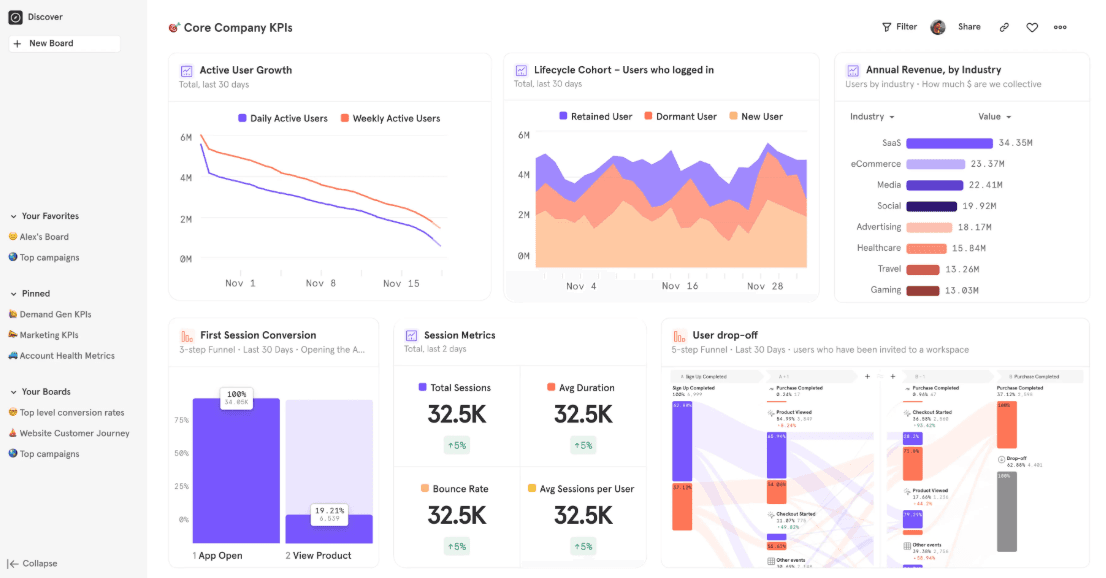
4.5/5
- From $120/month (billed annually)
- Free plan available
Warum Sie unseren Software-Empfehlungen vertrauen können
6,700+
Reviews
20
Industry experts
16+
Evaluation factors
14
Years
Unser Team testet und bewertet Software seit 2012. Als Führungskräfte im Einzelhandel selbst wissen wir, wie schwierig – und wichtig – es ist, die richtige Software auszuwählen.
Für diesen Leitfaden haben wir Tools mithilfe von praktischen Tests und unabhängiger Recherche bewertet und dabei die Tools anhand unserer Bewertungskriterien bewertet.
Unsere Bewertungen spiegeln unser unabhängiges Urteilsvermögen wider – keine Verkaufsstrategie.
Mixpanel Overview
In my opinion, Mixpanel is a solid choice as an ecommerce analytics platform, especially for tech-savvy teams needing detailed insights. It excels with its user-friendly interface and powerful analytics, but onboarding and customer support could use improvement. It’s great for product managers and marketers who need actionable data. Compared to other data analytics tools like Amplitude, Mixpanel offers excellent value for money with its comprehensive features. However, teams looking for extensive support might find it lacking. Choose Mixpanel if your team values in-depth analytics and a straightforward interface.
Pros
- You get detailed user behavior insights.
- It's easy for your team to navigate and use.
- Powerful analytics tools help your team make data-driven decisions.
Cons
- Onboarding can be a bit challenging for new users.
- Customer support might not meet your expectations.
- Some users find the learning curve steep for advanced features.
Is Mixpanel Right For Your Needs?
Who Would be a Good Fit for Mixpanel?
Mixpanel is ideal for tech companies and startups where product managers and marketing teams need deep insights into user behavior. If your business thrives on data-driven decisions, Mixpanel's powerful analytics can help you understand customer journeys and improve product offerings. Its user-friendly interface makes it easy for teams to navigate and extract meaningful data. For example, if your team is focused on optimizing user engagement or conversion rates, Mixpanel’s detailed tracking and reporting features will be invaluable.
- Tech StartupsMixpanel helps your team track user engagement and improve product features with real-time data insights.
- Marketing TeamsYou can analyze customer journeys and optimize campaigns using Mixpanel's detailed analytics tools.
- Product ManagersMixpanel provides you and your product team with actionable insights to enhance product development and user experience.
- Ecommerce BusinessesMixpanel helps you track and analyze purchase behaviors to boost sales and improve customer satisfaction.
- Mobile App DevelopersYou gain insights into app usage patterns and user retention with Mixpanel’s comprehensive analytics.
- Small to Medium EnterprisesMixpanel offers you affordable, powerful tools to understand customer behavior and drive business growth.
Who Would be a Bad Fit for Mixpanel?
Mixpanel might not suit large enterprises with complex data needs or businesses requiring extensive customer support. If your team relies on a straightforward onboarding process and hands-on support, you might find Mixpanel lacking. Additionally, industries needing highly customizable dashboards may find its features limiting. For example, if your team requires deep integration with legacy systems, Mixpanel's capabilities might not meet your expectations.
- Large EnterprisesMixpanel's features may not handle your complex and diverse data needs effectively.
- Customer Support TeamsIf your work relies on extensive direct support, Mixpanel's support services might not satisfy you.
- Custom Dashboard NeedsMixpanel may not offer the customization your team requires for specific reporting needs.
- Legacy System IntegrationIf your industry relies on integrating with older systems, Mixpanel might not fit well.
- Non-Tech IndustriesMixpanel's advanced features may overwhelm teams without a tech background.
- Traditional Retail BusinessesMixpanel's focus on digital analytics might not align with your in-store data tracking needs.
Unsere Bewertungsmethodik
Wie Wir Tools Testen & Bewerten
Wir haben über Jahre hinweg unser System zur Softwarebewertung und -testung entwickelt, verfeinert und verbessert. Die Bewertungsmatrix ist darauf ausgelegt, die Feinheiten der Softwareauswahl und die Effektivität eines Tools einzufangen, wobei der Fokus auf entscheidende Aspekte des Auswahlprozesses liegt. Nachfolgend sehen Sie genau, wie unser Test- und Bewertungssystem anhand von sieben Kriterien funktioniert. Dies ermöglicht uns, eine unvoreingenommene Bewertung der Software basierend auf Kernfunktionen, besonderen Merkmalen, Benutzerfreundlichkeit, Einarbeitung, Kundensupport, Integrationen, Kundenrezensionen und Preis-Leistungs-Verhältnis anzubieten.
Kernfunktionen (25% der Gesamtnote)
Der Ausgangspunkt unserer Bewertung ist immer die Kernfunktionalität des Tools. Verfügt es über die grundlegenden Funktionen, die ein Nutzer erwarten würde? Sind wichtige Kernfunktionen eventuell nur in höherpreisigen Tarifen enthalten? Ein Tool sollte im Kern mindestens mit den Basisfunktionen der Wettbewerber mithalten können.
Besondere Funktionen (25% der Gesamtnote)
Anschließend bewerten wir außergewöhnliche Funktionen, die über die normalen Kernfunktionen vergleichbarer Tools hinausgehen. Ein hoher Score spiegelt spezialisierte oder einzigartige Funktionen wider, die das Produkt schneller, effizienter oder wertvoller für die Nutzer machen. Wir bewerten außerdem, wie einfach sich das Tool mit anderen Programmen, die typischerweise zum Technologie-Stack gehören, integrieren lässt, um dessen Funktionalität und Nutzwert zu erweitern. Tools mit zahlreichen nativen Integrationen, Drittanbieteranbindungen und API-Zugang für eigene Entwicklungen schneiden hier am besten ab.
Benutzerfreundlichkeit (10% der Gesamtnote)
Wir betrachten, wie schnell und einfach es ist, die Kernaufgaben mit dem Tool zu erledigen. Software, die gut gestaltet und intuitiv zu bedienen ist, mobile Apps bietet, Vorlagen zur Verfügung stellt und komplexe Aufgaben einfach erscheinen lässt, erzielt die besten Werte.
Einarbeitung (10% der Gesamtnote)
Wir wissen, wie wichtig die schnelle Einführung eines neuen Tools im Team ist. Daher evaluieren wir, wie einfach es mit minimalem Training ist, das Tool kennenzulernen. Wir ermitteln, wie schnell ein Teammitglied ohne Vorerfahrung startklar ist. Lösungen, die kaum oder gar keine Unterstützung benötigen, erhalten die höchste Punktzahl.
Kundensupport (10% der Gesamtnote)
Wir überprüfen, wie schnell und einfach man Hilfe per Telefon, Live-Chat oder Wissensdatenbank erhält. Tools und Anbieter, die Echtzeit-Support bieten, schneiden am besten ab; Chatbots liegen am unteren Ende.
Kundenrezensionen (10% der Gesamtnote)
Zusätzlich zu unseren eigenen Tests ziehen wir den Net-Promoter-Score bestehender und früherer Kunden heran. Wir überprüfen, wie wahrscheinlich sie das Tool erneut für die Kernfunktionen wählen würden. Ein hoher Score spiegelt einen hohen Net-Promoter-Score wider.
Preis-Leistungs-Verhältnis (10% der Gesamtnote)
Schließlich bewerten wir im Kontext aller anderen Kriterien den Durchschnittspreis von Einstiegsplänen im Verhältnis zu den Kernfunktionen und betrachten den Wert der übrigen Kriterien. Software, die mehr zu geringeren Kosten bietet, schneidet hier besser ab.
Core Features
User Behavior Tracking
You can track how users interact with your site in real-time, helping your team understand customer journeys. This feature stands out for its detailed insights into user actions.
Funnels Analysis
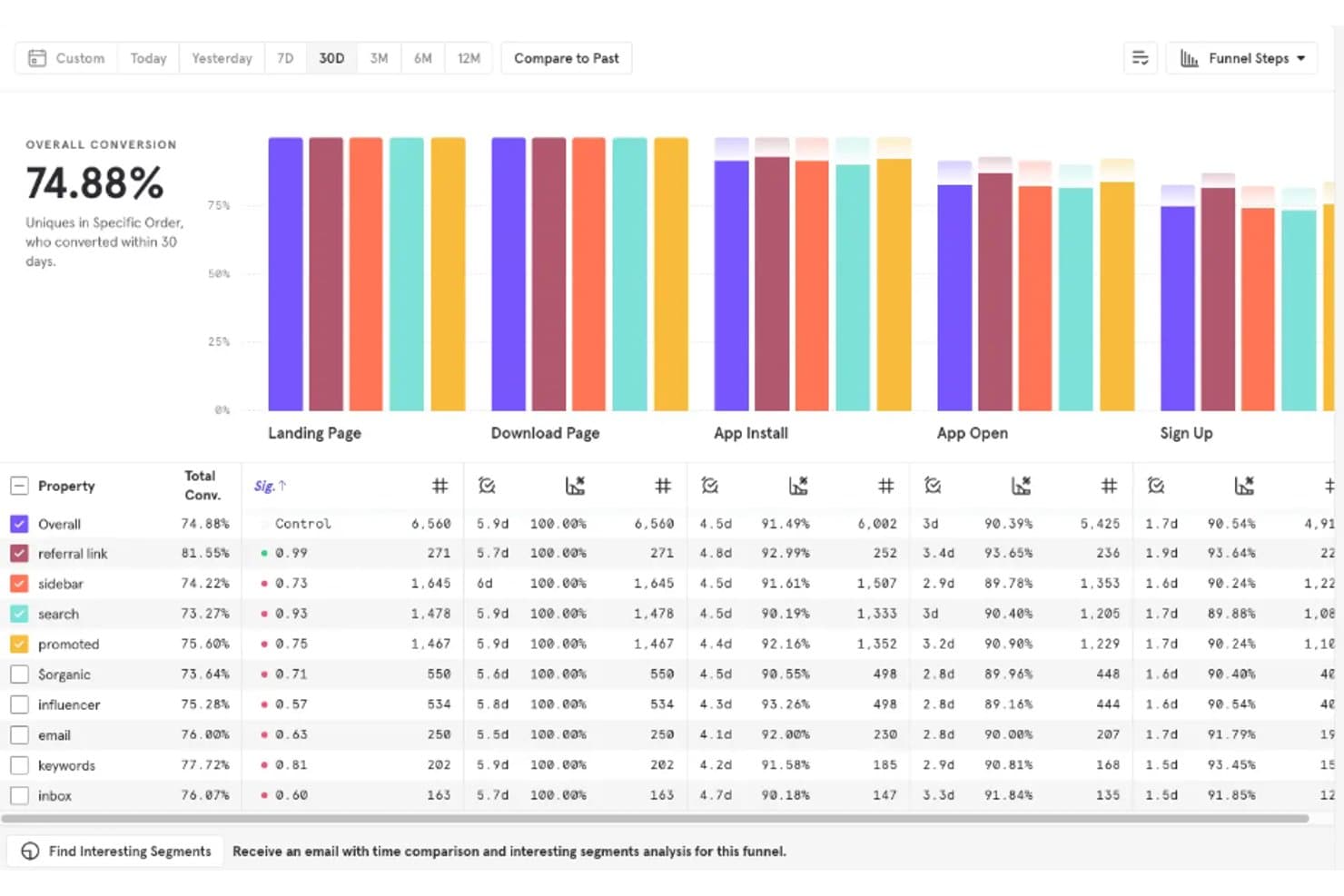
Mixpanel lets you visualize user paths and identify drop-off points in your sales funnel. Your team can use this to improve conversion rates.
Cohort Analysis
You can group users based on common behaviors or characteristics, allowing you to tailor marketing efforts effectively. This helps your team target specific user segments.
Event Tracking
Mixpanel allows you to track custom events that are crucial to your business. This feature lets your team measure specific actions users take.
Retention Reports
You can analyze how well you retain users over time, which is vital for growth. This feature gives your team insights into user loyalty.
A/B Testing
Mixpanel helps you test different versions of your site or app to see what works best. This empowers your team to make informed decisions.
Ease of Use
Mixpanel is fairly easy for your team to navigate, thanks to its intuitive interface and clear layout. While some advanced features might require a bit of a learning curve, the overall design ensures that you can quickly access key analytics. User reviews often praise the simplicity in setup and daily use, making it a reliable choice for teams focused on data-driven decisions. You'll appreciate how straightforward it is to track and analyze user behavior.
Integrations
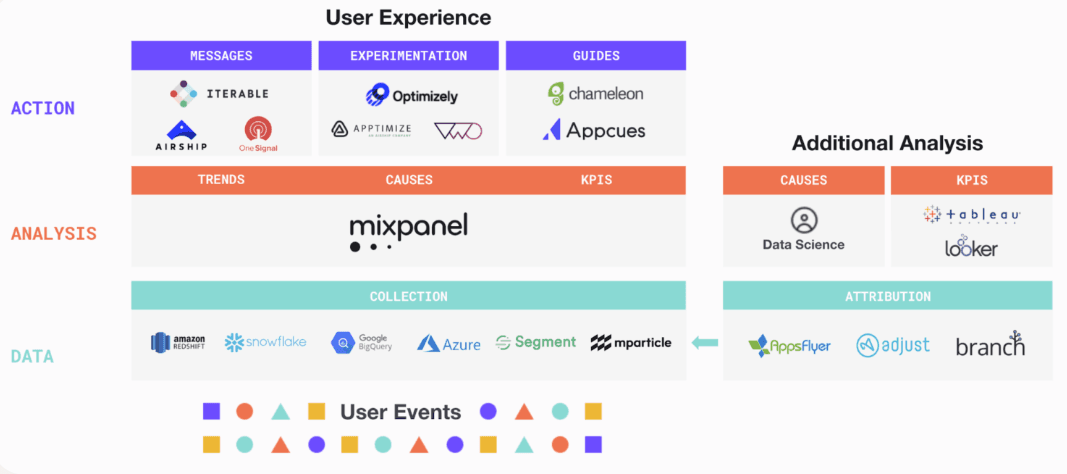
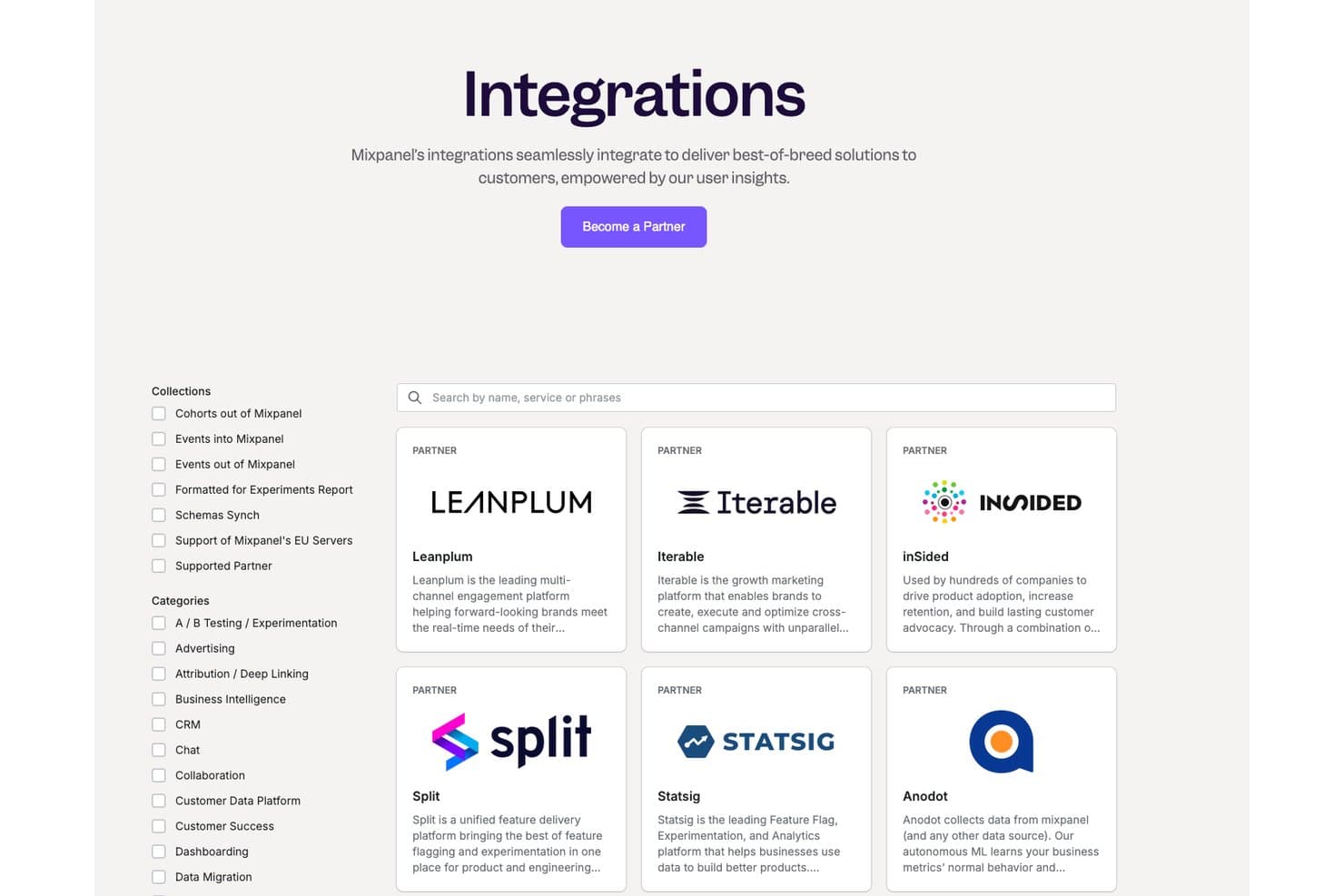
Mixpanel generally integrates with popular platforms like Salesforce, Slack, HubSpot, Segment, Google Analytics, Zendesk, Shopify, Marketo, WordPress, and Mailchimp.
Mixpanel also offers an API and connects with third-party integration tools to enhance its functionality.
Mixpanel Specs
- A/B Testing: Yes
- AI Integration: Yes
- Analytics: Yes
- API: Yes
- Comparative Reporting: Yes
- Conversion Tracking: Yes
- Custom Reports: Yes
- Dashboard: Yes
- Dashboards: Yes
- Data Export: Yes
- Data Import: Yes
- Data Mining: Yes
- Data Visualization: Yes
- External Integrations: Yes
- Feedback Management: Yes
- Forecasting: Yes
- Historical Data Analysis: Yes
- Keyword Tracking: Yes
- Link Tracking: Yes
- Multi-Site: Yes
- Multi-User: Yes
- Notifications: Yes
- Process Reporting: Yes
- Real-time Alerts: Yes
- Referral Tracking: Yes
- Reports: Yes
- Scenario Planning: Yes
- SEO: Yes
- Time Series Modeling: Yes
- Visualization: Yes
- Workflow Management: Yes


